
Our readers keep the lights on and my morning glass full of iced black tea. As an Amazon Associate, I earn from qualifying purchases.
Specs are compiled from manufacturer listings and verified buyer reviews and can change over time — please confirm the key details on the product page before buying.
Finding a laptop with 16GB of RAM used to mean choosing between a massive desktop replacement or paying a serious premium. That is no longer true. Today, 16GB is the real balance — enough memory to keep a dozen browser tabs, a video call, and your office apps running without that spinning wheel of doom, but without the extreme cost of 32GB. You just need to know which processor, screen size, and build quality match how you actually work and play.
I’m Min — the founder and writer behind Gadgets Feed. This guide is built by comparing the manufacturers’ published specifications and the patterns across verified customer reviews, so you get each pick’s real strengths and trade-offs instead of marketing spin.
if you need a lightweight machine for class, a business workhorse with a full number pad, or a premium ultrabook that lasts all day, these are the 16 gb ram laptops that actually deliver on their promises this year.
Our Picks at a Glance



How To Choose The Best 16 GB RAM Laptops
A laptop is a big purchase. You want to get it right the first time. The good news is that the choice depends on a few key decisions that are easy to understand once you know what they mean for your daily use.
Match the Processor to Your Workload
The processor is the brain of the laptop. An Intel Core i5 or an AMD Ryzen 5 is plenty for office work, browsing, streaming, and even some light photo editing. If you do heavy multitasking, run large spreadsheets, or edit video, stepping up to an Intel Core i7 or an AMD Ryzen 7 makes a real difference. The CPU model’s maximum clock speed, measured in GHz, tells you how fast it can handle a single task — a 4.6 GHz chip is snappier for quick bursts than a 4.0 GHz chip.
Pick the Right Screen Size and Resolution
Screen size is a trade-off between portability and comfort. A 13-inch or 14-inch laptop is light and easy to carry to class or a coffee shop. A 15.6-inch or 16-inch screen gives you more room to see documents side-by-side, which helps if you do not use an external monitor. Resolution matters too: Full HD (1920×1080) is the standard for sharp text and video. WUXGA (1920×1200) adds a few extra vertical pixels, which means you see a bit more of a webpage or document without scrolling.
Storage Type and Upgrade Path
Almost every modern laptop uses an SSD (Solid State Drive) instead of an old spinning hard drive. An SSD loads Windows and opens apps in seconds, not minutes. 512GB is the baseline for a comfortable amount of files and programs. Some laptops let you swap or add another SSD later, while others have the memory soldered to the motherboard — check this if you think you might want more storage in a couple of years.
Quick Comparison
| Model | Best For | Processor | Screen | Weight | Amazon |
|---|---|---|---|---|---|
| Apple MacBook Air M5★ Best Overall | Ultimate Portability & Battery | Apple M5 | 13.6″ Liquid Retina | 2.71 lbs | Amazon |
| Acer Aspire 14 AIAI Powerhouse | AI Features & Battery Life | Intel Core Ultra 5 226V | 14″ WUXGA | — | Amazon |
| Dell 16 Laptop DC16251Premium Metal Chassis | Premium Metal Chassis | Intel Core 7 150U | 16″ FHD+ (16:10) | — | Amazon |
| ASUS Vivobook 16″ | Large Screen & i7 Power | Intel Core i7-1355U | 16″ WUXGA | — | Amazon |
| Acer Aspire Go 15 | Ryzen 7 Performance Value | AMD Ryzen 7 7730U | 15.6″ FHD IPS | — | Amazon |
| Dell 15 Laptop DC15250 | 120Hz Display & Onsite Service | Intel Core i5-1334U | 15.6″ FHD (120Hz) | — | Amazon |
| HP 17.3″ Laptop | Big Screen & AI Noise Reduction | AMD Ryzen 5 7520U | 17.3″ HD+ | — | Amazon |
| Lenovo V15 | Business Features & Pro OS | AMD Ryzen 5 5500U | 15.6″ FHD | — | Amazon |
| Lenovo IdeaPad Slim 3 | Military-Grade Durability | Intel Core i5-13420H | 15.3″ WUXGA | — | Amazon |
| HP 255 G10 | 1TB Storage & Business Ready | AMD Ryzen 3 7330U | 15.6″ FHD | — | Amazon |
| ASUS Vivobook 14″ | Budget Entry-Level Workhorse | Intel Core i3-1315U | 14″ FHD | — | Amazon |
In‑Depth Reviews
1. Apple 2026 MacBook Air 13-inch with M5 chip
Our pick — over 4.5★ from 750+ verified ratings; the strongest balance of quality and price.
The ultraportable that redefines what a 16GB laptop can do, with an M5 brain and all-day stamina.
Let the battery life sink in — up to 18 hours on a single charge, so you can leave the power brick at home for a full workday. Apple’s M5 chip is the real story here. It combines a faster CPU with a next-generation GPU, plus a powerful Neural Engine that handles AI tasks like real-time photo editing and voice-to-text without breaking a sweat. The 13.6-inch Liquid Retina display supports 1 billion colors, making photos and videos look richer than on a standard panel.
The 12MP Center Stage camera automatically keeps you in frame during video calls, and it also offers a Desk View mode that shows a top-down angle of your workspace. At just 2.71 pounds and 0.44 inches thin, this is the lightest pick in the list by a wide margin. Buyers report that the fanless design means it runs completely silent, even during demanding tasks. The trade-off is that the 16GB of unified memory is soldered in — you cannot upgrade later. But for most users, 16GB on Apple Silicon flies past what an equivalent Windows laptop can do.
Unlike the Acer Aspire 14 AI below (which advertises up to 22 hours in video playback), the MacBook Air’s 18-hour battery is measured across real mixed usage, which is a more honest number for daily life. It comes with a MagSafe charging port, two Thunderbolt 4 ports, and supports up to two external displays. If you are deep in the Apple ecosystem, the way it mirrors your iPhone and pastes across devices is a productivity multiplier you cannot get elsewhere.
M5 chip speed
- M5 chip delivers fluid multitasking and fast app launches for creative and office work.
- Fanless operation means zero noise, even under load.
- Build quality feels premium, with a solid aluminum unibody.
limited ports
- 16GB of memory cannot be upgraded later — choose the configuration you will need for years.
- Limited to two external displays, which may frustrate power users with multi-monitor desks.
the confident buy: If you value zero-compromise portability, silent operation, and a long battery that actually matches its promise, this is the laptop to get.
keep in mind: If you need Windows-only software or a larger screen for split-view work, look at the Dell 16 or the HP 17.3 below.
2. Acer Aspire 14 AI Copilot+ PC
A Copilot+ PC that brings on-device AI to a 14-inch screen with a battery that outlasts a transatlantic flight.
The headline number here is 22 hours of battery life in video playback — that is enough to watch movies through an entire flight from New York to Tokyo without hunting for an outlet. The Intel Core Ultra 5 processor (Series 2) has a dedicated NPU (Neural Processing Unit) that delivers up to 40 TOPS for AI tasks. Practically, this means features like Recall let you search past content, and Windows Copilot can draft emails or summarize documents right on the laptop, keeping your data private.
The 14-inch WUXGA (1920×1200) display gives you a bit more vertical real estate than a standard 1080p panel, so you scroll less through long web pages. Owners mention that the lightweight aluminum chassis and the 180-degree lie-flat hinge make it easy to use on a cramped tray table or share the screen in a meeting. It comes with a full-function USB Type-C port, Wi-Fi 6E, and a backlit keyboard. The one catch is that the 16GB of LPDDR5X RAM is soldered, and the SSD is the only upgrade path.
AI Copilot integration: Against the ASUS Vivobook 16″ with a Core i7, the Acer’s AI features and battery life give it a clear edge for students and remote workers who are frequently away from a desk.
best for a mobile-first workfl: If you want the latest AI tools in Windows and a battery that lasts two full workdays, grab this one.
alternatively: If you prefer a traditional clamshell without AI features and need a larger 16-inch screen, the ASUS Vivobook 16″ below is a strong alternative.
3. Dell 16 Laptop DC16251
A metal-chassis Dell with a roomy 16:10 screen and a terabyte of SSD storage from the start.
The 16-inch FHD+ display with a 16:10 aspect ratio is the standout feature here — it gives you noticeably more vertical space than the 16:9 screens on most laptops, so you see more rows in a spreadsheet or less of a website is cut off. The Intel Core 7 150U processor handles daily multitasking with ease, and the 1TB SSD means you have plenty of room for files and applications without juggling external drives. Customers note that the metal chassis feels sturdy and premium compared to the plastic builds on some competitors.
Dell includes ComfortView Plus, which reduces blue light emissions without washing out colors, keeping your eyes comfortable during long work sessions. The up-to-FHD camera with temporal noise reduction delivers sharper video in low light. It also has a fingerprint reader for quick logins. The main trade-off is weight — with a 16-inch metal body, it is heavier than the 13-inch MacBook Air or the 14-inch Acer Aspire.
large display
- 16:10 aspect ratio shows more content vertically, reducing scrolling.
- 1TB SSD is double the storage of many rivals at this price.
- 1 Year Onsite Service means Dell comes to you for repairs.
heavy build
- Heavier and bulkier than smaller ultrabooks due to the large metal chassis.
- Integrated Intel Graphics will not handle demanding gaming or 3D rendering.
reach for this if: You spend all day on spreadsheets and documents and need the extra vertical screen space plus a 1TB drive.
pass if: Portability is your top priority — the MacBook Air is 2 pounds lighter.
4. ASUS Vivobook 16″ WUXGA Laptop
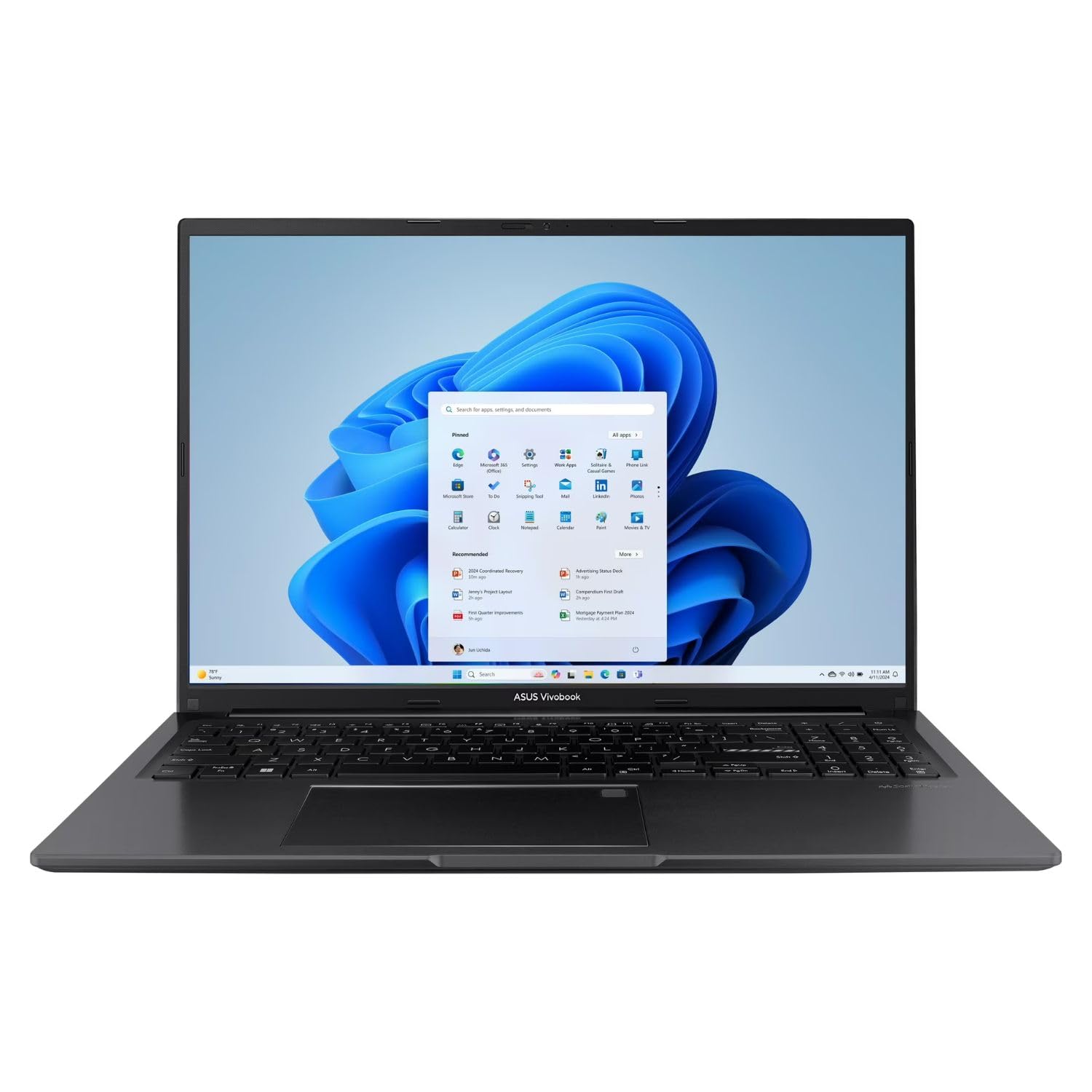
A 16-inch WUXGA screen paired with a Core i7 processor, giving you desktop-like real estate in a clamshell.
The Intel Core i7-1355U is a significant step up from the Core i5 found in many mid-range laptops. It handles heavy multitasking, large spreadsheets, and even some light video editing without hesitation. The 16-inch WUXGA (1920×1200) display gives you a larger canvas than a standard 15.6-inch screen, which makes a real difference when you have two windows open side by side. Intel Iris Xe integrated graphics handle streaming and everyday visuals smoothly.
The port selection is generous for a thin-and-light chassis: you get USB-C, USB-A, HDMI, a microSD card reader, and a 3.5mm audio jack. Reviewers point out that the Indie Black finish looks professional and resists fingerprints better than silver laptops. The 16GB of RAM is enough for most users, but check if your workflow benefits from the faster clock speeds of the Lenovo IdeaPad Slim 3’s DDR5 memory, which operates at a higher bandwidth.
the balance for: Buyers who want a large high-resolution screen without stepping up to a 17-inch chassis, and who need the extra CPU grunt of an i7.
keep in mind: If you need a full number pad for data entry, check the Lenovo IdeaPad Slim 3 or the HP 255 G10.
5. Acer Aspire Go 15 AI Ready Laptop

An AMD Ryzen 7 laptop that gives you workstation-class multi-core performance without the premium price tag.
The AMD Ryzen 7 7730U is a workhorse processor. With 8 cores and 16 threads, it outperforms many Intel Core i5 chips in multi-threaded tasks like video encoding, compiling code, or running virtual machines. The 15.6-inch Full HD IPS display delivers sharp, consistent colors from wide viewing angles, which matters if you often share your screen with a colleague. The 16GB of DDR4 RAM keeps everything snappy, and the 512GB PCIe Gen4 SSD loads programs almost instantly.
Buyers highlight the Copilot key on the keyboard as a nice convenience — one tap opens Microsoft’s AI assistant. The Acer BlueLightShield technology reduces eye strain during long sessions. The laptop also includes a full-function USB Type-C port and HDMI 2.1 for connecting to modern monitors. The biggest compromise is the display resolution: at 1920×1080, it is not as sharp as the WUXGA panel on the Lenovo IdeaPad Slim 3 or the ASUS Vivobook 16″.
ideal for: Power users who run demanding software or multitask heavily but want to keep the budget under control.
the trade-off: You get raw CPU performance, but the display is standard 1080p, not the higher-resolution WUXGA screens on some rivals.
6. Dell 15 Laptop DC15250

A 120Hz screen at this price is rare — it makes every scroll and cursor movement feel fluid and fast.
The 15.6-inch Full HD display with a 120Hz refresh rate is the defining upgrade here. Most laptop screens are locked at 60Hz, which shows a new image 60 times per second. This Dell refreshes 120 times per second, so scrolling through long documents feels silky smooth and cursor movement appears sharper. The Intel Core i5-1334U processor (with a max speed of 4.6 GHz) is fine for daily productivity, and the 16GB of DDR4 RAM handles multiple apps without breaking a sweat.
Dell includes ComfortView software to reduce blue light emissions, which helps if you work late into the evening. The laptop also has a separate numeric keypad and a calculator hotkey, a small but welcome time-saver for anyone doing data entry. Buyers appreciate the 1 Year Onsite Service — if something goes wrong, Dell sends a technician to your home or office. The catch is that the 512GB SSD is on the smaller side compared to the 1TB drives on the HP 255 G10 or the Dell 16.
best for: Anyone who spends hours reading or scrolling and wants a screen that feels instantly more responsive.
consider instead if: You need more storage — the Dell 16 DC16251 offers double the SSD capacity for a modest step up in price.
7. HP 17.3 inch Laptop

The biggest screen in the list, with an anti-glare panel that keeps reflections at bay when working outdoors.
A 17.3-inch laptop is a desktop replacement. The HD+ (1600×900) anti-glare display is a step down in resolution from Full HD, but the matte finish cuts glare significantly so you can work near a window or under harsh lights. The AMD Ryzen 5 7520U processor is paired with 16GB of LPDDR5 RAM, which is power-efficient and responsive. The 512GB PCIe NVMe SSD loads everything quickly, and the AMD Radeon graphics handle casual gaming like older titles or strategy games.
The distinguishing feature here is AI Noise Reduction, which uses artificial intelligence to filter out background noise during video calls. Shoppers say it works well in busy coffee shops or open-plan offices. The lift-hinge design tilts the keyboard for a more comfortable typing angle, and the HP True Vision HD camera has a physical privacy shutter. The main downsides are the lower HD+ resolution (it is not Full HD) and the battery life of about 7.15 hours, which is shorter than many 15-inch laptops.
reach for this if: You want the largest possible screen for less than premium-tier pricing and work in bright environments where glare is a problem.
trade-off: The HD+ resolution is noticeably less sharp than Full HD — if crisp text matters, look at the Acer Aspire Go 15 or the Dell 15.
8. Lenovo V15 Laptop

A business-class laptop with Windows 11 Pro and a wired Ethernet port, built for a corporate environment.
The AMD Ryzen 5 5500U processor (6 cores, 12 threads) keeps up with office suites, multiple browser tabs, and video conferencing. The 15.6-inch Full HD display gives you a clear, sharp picture for documents and spreadsheets. The key differentiator is Windows 11 Pro, which includes features like BitLocker encryption, Group Policy management, and Remote Desktop — tools that Windows 11 Home does not have. This makes the V15 a strong fit for IT-managed environments or anyone who wants extra security.
The port selection includes an RJ45 Ethernet jack, which is increasingly rare on modern laptops. If your office or home uses a wired network for stable connections, this is a big advantage over the Wi-Fi-only machines on this list. It also has a numeric keypad for data entry. Buyers report that the build feels durable for a work laptop, though the bezels around the screen are thicker than on more modern designs like the Dell 16. The 16GB of RAM and 512GB SSD are standard for the price range.
best for: IT managers, small business owners, or anyone whose company requires Windows 11 Pro features and wired Ethernet.
skip it if: You want a slim, bezel-less design — the HP 255 G10 or Acer Aspire 14 AI have a more modern look.
9. Lenovo IdeaPad Slim 3 Laptop
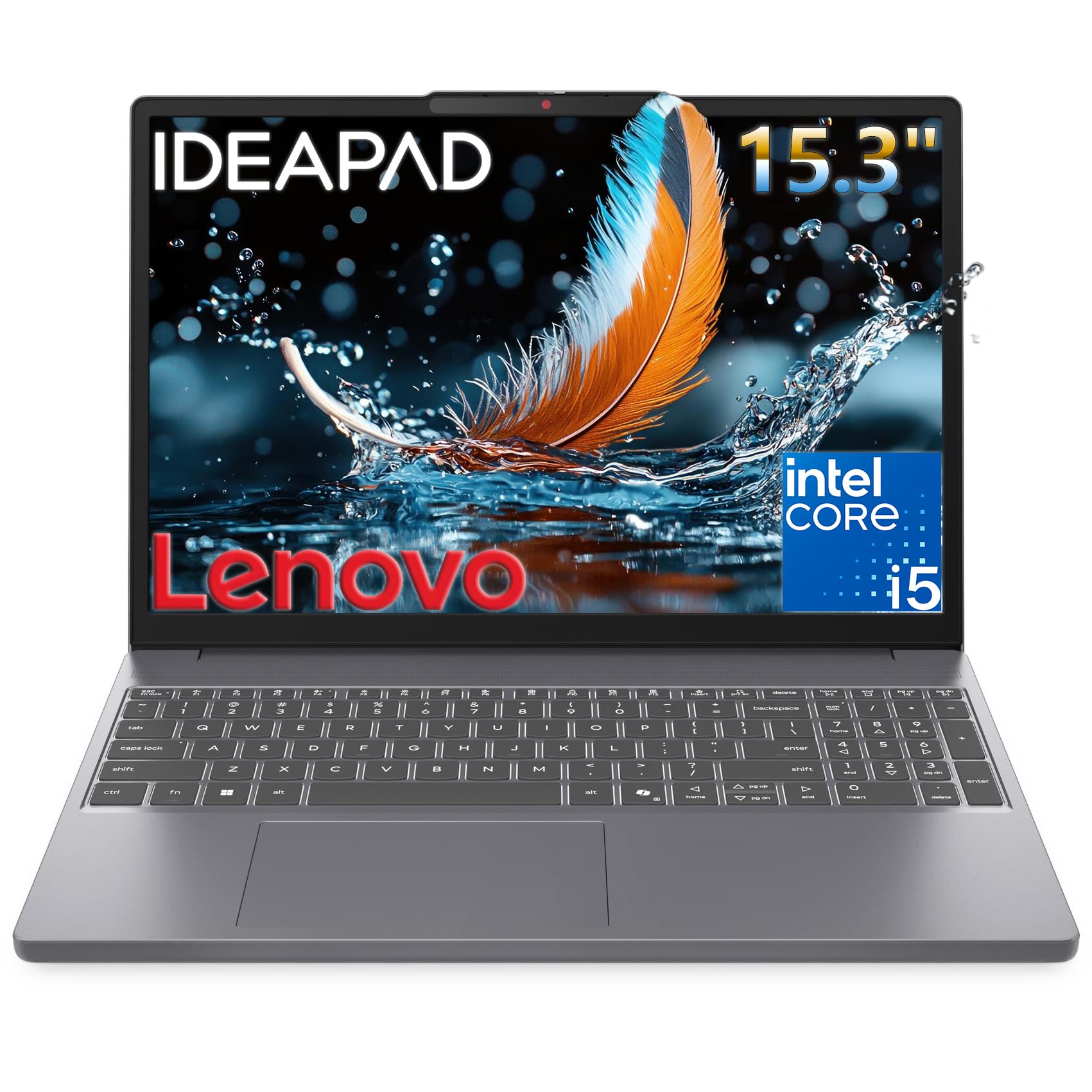
Built to survive bumps and drops, with faster DDR5 RAM and a sharp WUXGA screen.
The Lenovo IdeaPad Slim 3 is engineered to military-grade standards, meaning it has passed tests for drops, dust, and extreme temperatures. The Intel Core i5-13420H processor hits a max boost clock of 4.6 GHz — 7% higher than the HP 255 G10’s Ryzen 3 7330U at 4.3 GHz — so it feels snappier when opening apps and switching tasks. The 15.3-inch WUXGA (1920×1200) IPS display with 300 nits of brightness is 50 nits brighter than many budget panels, making it easier to see in sunny rooms.
The 16GB of DDR5 RAM is a meaningful upgrade over the DDR4 found in many competitors. DDR5 runs at higher speeds, which helps with multitasking and loading large files. The full keyboard with a number pad is great for spreadsheet work, and the privacy shutter on the 720p webcam gives you confidence. Buyers mention that the 10% slimmer profile compared to the previous generation makes it noticeably easier to slide into a backpack. The biggest miss is the HDMI 1.4 port, which caps external monitors at 4K 30Hz — not ideal for modern 4K displays.
the durable pick for: Students or field workers who need a tough laptop that can survive a busy backpack and still deliver fast performance.
the limitation: The HDMI 1.4 port limits external monitor refresh rates — if you run a 4K monitor, check the Acer Aspire Go 15 with HDMI 2.1.
10. HP 255 G10 Laptop

A 1TB SSD and Windows 11 Pro from the start, making this the storage king among budget-friendly picks.
The AMD Ryzen 3 7330U processor is an entry-level chip, but it handles web browsing, Office apps, and streaming without complaint. The real draw here is the 1TB PCIe NVMe SSD — double the storage of most laptops at this price tier. You can store hundreds of large video files, an entire Steam library of older games, or years of work documents without needing an external drive. The 15.6-inch Full HD display delivers crisp visuals, and the AMD Radeon graphics are fine for casual use.
Windows 11 Pro is pre-installed, giving you features like BitLocker encryption and Remote Desktop that the Home version lacks. Buyers comment that the silver plastic chassis looks professional enough for an office but does not feel as premium as the metal build on the Dell 16. The thin and light design keeps it portable for its class. The weakest link is the processor — the Ryzen 3 7330U is slower than the Ryzen 5 and Intel Core i5 chips found on most other picks here.
best for: Budget-conscious buyers who need a ton of storage for files and media, plus the business features of Windows 11 Pro.
consider upgrading: If you want a faster processor, the Lenovo IdeaPad Slim 3 with its Intel Core i5-13420H is a significant step up.
11. ASUS Vivobook 14″ FHD Business Laptop

An entry-level Windows 11 Pro laptop with a privacy shutter, built for budget-conscious professionals.
The Intel Core i3-1315U processor is the most basic chip in this list. It is fine for word processing, email, web browsing, and video calls, but you will feel the lag if you try to edit large photos or run multiple virtual machines. The 14-inch Full HD display is sharp enough for daily work, and the 16GB of RAM (upgradeable to 24GB) keeps multiple tabs and apps running smoothly. The 512GB PCIe SSD ensures fast boot times and file transfers.
The camera privacy shutter is a nice touch for security-conscious users — you slide it closed when the camera is not in use. The laptop comes with Windows 11 Pro, not Home, which is unusual at this price point. Buyers mention that the Quiet Blue color looks more premium than the standard black or silver options. The port selection is good for a 14-inch chassis, with USB-C, USB-A, and HDMI. The main sacrifice is the processor speed — the Lenovo IdeaPad Slim 3’s Core i5-13420H at 4.6 GHz is significantly faster for multitasking.
the budget option for: Simple office tasks, note-taking, and video calls where maximum speed is not the priority.
skip it and spend more if: You regularly run heavy applications or multitask aggressively — the Core i3 will become a bottleneck.
Understanding the Specs
Processor Speed (GHz)
The maximum clock speed of a CPU, measured in gigahertz (GHz), tells you how fast it can execute a single task. A chip with a 4.6 GHz max boost will feel snappier for bursts of activity like opening apps or loading web pages than one with a 4.0 GHz max. The Intel Core i5-13420H in the Lenovo IdeaPad Slim 3, for example, has a max of 4.6 GHz, giving it a 7% speed advantage over the 4.3 GHz Ryzen 3 in the HP 255 G10. For everyday productivity, look for a chip that hits at least 4.0 GHz.
Screen Resolution and Aspect Ratio
Resolution determines how sharp text and images look. Full HD (1920×1080) is the baseline for a clear picture. WUXGA (1920×1200) adds 120 vertical pixels, which means you see a bit more of a webpage or document without scrolling. The aspect ratio matters too: a 16:10 screen like the Dell 16 Laptop gives you noticeably more vertical space than the standard 16:9 screens on most laptops, which helps with reading and productivity. If you connect to an external monitor, check for HDMI 2.1 (supports 4K at 60Hz) vs HDMI 1.4 (capped at 4K 30Hz).
FAQ
Is 16GB of RAM enough for a laptop in 2025?
Can I upgrade the RAM on these laptops later?
What is the difference between an Intel Core i5 and i7?
Is AMD Ryzen or Intel better for a 16GB laptop?
What does Windows 11 Pro give me that Windows 11 Home does not?
How many hours of battery should I expect from a 16GB RAM laptop?
What is the difference between an SSD and a hard drive in a laptop?
Is a 120Hz display worth it for a laptop that is not used for gaming?
Do I need a dedicated graphics card for photo editing on a 16GB laptop?
Which laptop on this list has the best warranty support?
Final Thoughts: The Verdict
For most people, the 16 gb ram laptops winner is the Apple MacBook Air M5 because it combines the best battery life, a phenomenal display, and silent operation in a 2.71-pound chassis. If you want the latest AI features in Windows and a 22-hour battery, grab the Acer Aspire 14 AI. And for a spacious 16-inch metal chassis with a terabyte of storage, the standout is the Dell 16 DC16251.
How We Picked
We do not accept paid placement. Every pick is matched to a real buyer and a real use-case; we do not hands-on test units.
Sources & Methodology
Specifications: manufacturer listings and product documentation. Review insights: verified customer reviews, as of July 2026. Pricing: not shown on this page (it changes often); check the current price via the retailer link.
As an Amazon Associate, Gadgets Feed earns from qualifying purchases. This does not affect which products we feature.