
Our readers keep the lights on and my morning glass full of iced black tea. As an Amazon Associate, I earn from qualifying purchases.
Specs are compiled from manufacturer listings and verified buyer reviews and can change over time — please confirm the key details on the product page before buying.
Upgrading to 16 GB of RAM is the best way to revive an older computer, but buying the first stick without checking fit is a common mistake. Desktop and laptop memory are physically different shapes, and a 16 GB kit that works flawlessly in one system will not even slide into another. You need to know the difference between desktop and laptop RAM before you buy, because a mismatch means the stick simply won’t fit.
I’m Min — the founder and writer behind Gadgets Feed. This guide is built by comparing the manufacturers’ published specifications and the patterns across verified customer reviews, so you get each pick’s real strengths and trade-offs instead of marketing spin.
Whether you are refreshing an old workstation or building a new rig, knowing the right type and speed of 16 gb ram for your system makes the difference between a smooth upgrade and a wasted purchase.
Our Picks at a Glance


How To Choose The Best 16 GB RAM
Before you compare speeds and prices, you need to know which generation and physical shape your computer takes. A 16 GB upgrade only helps if it physically fits and your motherboard supports it.
DDR4 versus DDR5: Which generation do you have?
The generation of memory you need is locked by your motherboard and processor, and the two types are not interchangeable. DDR4 has been the standard for years and still powers millions of desktops and laptops, while DDR5 is the newer generation found in recent builds. Your motherboard only has slots for one generation, so check your system’s manual or use a scanner tool before buying.
The physical shape: DIMM versus SODIMM
Memory comes in two physical sizes that are not compatible with each other. Desktop computers use full-size DIMM modules, while laptops and mini PCs use the much shorter SODIMM modules. Trying to force the wrong one will not work, so confirm which shape your machine takes before you order.
Speed ratings and CAS latency
Speed is measured in MHz and tells you how fast the memory can transfer data, with 3200 MHz being a common and balanced choice for DDR4. The other number that matters is CAS latency, shown as CL followed by a number, which measures delay in clock cycles. Lower latency numbers like CL16 can feel snappier than higher numbers like CL22 at the same speed, which is why two kits at 3200 MHz can perform differently.
Quick Comparison
| Model | Best For | Capacity | Speed | Form Factor | Amazon |
|---|---|---|---|---|---|
| Corsair Vengeance LPX★ Best Overall | Desktops that want overclocking headroom | 16GB (2x8GB) | 3200MHz | DIMM | Amazon |
| Crucial 16GB DDR4 LaptopTop Performer | Laptop upgrades, easy install | 16GB | 3200MHz | SODIMM | Amazon |
| G.SKILL AEGISTight Timings Pick | Desktop builds, tight timings | 16GB (2x8GB) | 3200MHz | DIMM | Amazon |
| Timetec 16GB DDR4 | Laptops, Mini PCs, value | 16GB | 3200MHz | SODIMM | Amazon |
| Patriot Signature Line | Budget desktops, tight cooler clearance | 16GB (2x8GB) | 2666MHz | DIMM | Amazon |
| PNY Performance Laptop | Budget laptop upgrades | 16GB (2x8GB) | 3200MHz | SODIMM | Amazon |
| Silicon Power Value | Budget desktops, no XMP fuss | 16GB (2x8GB) | 3200MHz | DIMM | Amazon |
| Patriot Viper Steel | Desktops wanting 3600MHz speed | 16GB (2x8GB) | 3600MHz | DIMM | Amazon |
| Crucial 16GB DDR5 | New DDR5 desktop builds | 16GB | 4800MHz | DIMM | Amazon |
In‑Depth Reviews
1. Corsair Vengeance LPX DDR4 RAM 16GB (2x8GB) 3200MHz
Our pick — over 4.5★ from 62,000+ verified ratings; the strongest balance of quality and price.
The desktop crowd-pleaser that pairs tight CL16 timing with serious overclocking headroom.
Its CL16 latency makes everyday tasks feel snappy, which is why it keeps appearing in builds. Its CL16 timing cuts latency by 38% versus a CL22 kit at the same 3200 MHz, making games and apps feel noticeably more responsive. The aluminum heatspreader (a metal cover that pulls heat away from the chips) keeps things cool so the memory can hold high speeds under load.
At just 34mm tall, it clears large tower coolers and fits most small-form-factor builds. It is tune for wide compatibility with the latest Intel and AMD DDR4 motherboards and supports Intel XMP 2.0, a one-setting BIOS toggle that gets you to the rated speed. Its 4.8-star rating across 62,000+ owners signals long-term reliability.
Buyers report pushing it further than the sticker speed: “I stepped up the operating frequency to 3466MHz.” Several owners mention running it for years, with one noting the same kit bought four years ago is still serving well. The recurring caveat is that on some older AMD systems you may need to tweak BIOS settings to hit full speed, and the reliability picture is mostly strong but not perfect.
reliable classic choice
- Memory performance is the most-discussed strength, with over 950 owners singling it out
- Functionality earns nearly 800 positive mentions for stable daily use
- The low 34mm height clears nearly any CPU cooler
tall heat spreader
- Some AMD boards need manual BIOS timing to reach 3200 MHz
- A few owners mention stick failures within two months
value pick: you want a proven desktop kit that runs at 3200 MHz with headroom to overclock past it.
tight builds: your motherboard is an older AMD board that may not hit the full speed without tweaking.
2. Crucial 16GB DDR4 RAM 3200MHz Laptop Memory
A laptop upgrade so simple to use that a first-timer can do it in under ten minutes.
This is the SODIMM (the shorter memory stick made for laptops) that makes upgrading a notebook feel like a five-minute job rather than a project. It runs at 3200 MHz in a 260-pin form factor that fits most modern laptops, and it is backed by Crucial’s System Scanner tool that tells you exactly if it works with your machine before you buy. Micron’s 42 years of memory expertise shows in rigorous component- and module-level testing.
Owners consistently describe installation as taking about five minutes with zero need for computer skills, and the performance gains show up immediately. Customers note no crashes or glitches after upgrading, and one owner of an Acer Aspire noticed lag-free multitasking and better gaming with cooler temperatures. The functionality is what owners praise most, with over 280 positive mentions for how it performs in real daily use.
The standout quality here is reliability, which owners rate as a clear strength with no mixed feedback. It works with 13th Gen Intel Core and AMD Ryzen 7000 laptops, and its 1.2V low voltage keeps power draw minimal. The only real requirement is confirming your laptop actually uses SODIMM memory, which the Crucial Scanner handles for you.
laptop fit: anyone refreshing a laptop who wants a guaranteed-compatible stick that installs in minutes.
desktop use: you are upgrading a desktop, since this is a SODIMM laptop module that will not fit DIMM slots.
3. G.SKILL AEGIS Series DDR4 RAM 16GB (2x8GB) 3200MHz
Desktop memory that delivers CL16 tightness at 3200 MHz with a rock-solid XMP profile.
G.SKILL built its reputation on memory that just works, and the AEGIS series carries that tradition with a CL16-18-18-38 timing at 3200 MHz. The tight timings (lower numbers mean faster response) give it an edge over CL22 kits running at the same speed, which is why it feels so responsive in gaming and multitasking. It is a 288-pin U-DIMM for desktop PCs and gaming rigs, rated for up to DDR4-3200 at 1.35V.
The XMP profile (a one-click overclock setting in your BIOS) is what owners love most, with one noting “Xmp straight away. No dillying about.” The performance earns the most positive mentions by far, with over 20 owners calling it out for making their PCs run better and faster. One builder paired two kits to reach 32GB for a budget Xeon PC and reported they work perfectly at 3200 MHz.
The value-for-money praise is strong, with owners calling the price-to-performance “unbeatable.” An occasional reliability note appears, with one owner mentioning crashes when using more than 8GB, so it is worth confirming your motherboard’s compatibility with G.SKILL’s QVL list. For a first build since 2008, one owner reported games saw a big improvement over an older 8GB system.
budget gamer ram
- Performance is the most-discussed strength, with over 20 owners praising it
- XMP enables the full 3200 MHz speed with a single BIOS setting
- Value for money is a recurring theme across reviews
basic design
- Some reviewers point out reliability issues, including crashes above 8GB
- Always check the motherboard QVL to confirm compatibility
budget build: a desktop gaming build where tight CL16 timings and easy XMP matter.
rgb fans: you are on a laptop or mini PC that needs a SODIMM module instead.
4. Timetec 16GB DDR4 3200MHz SODIMM Laptop RAM
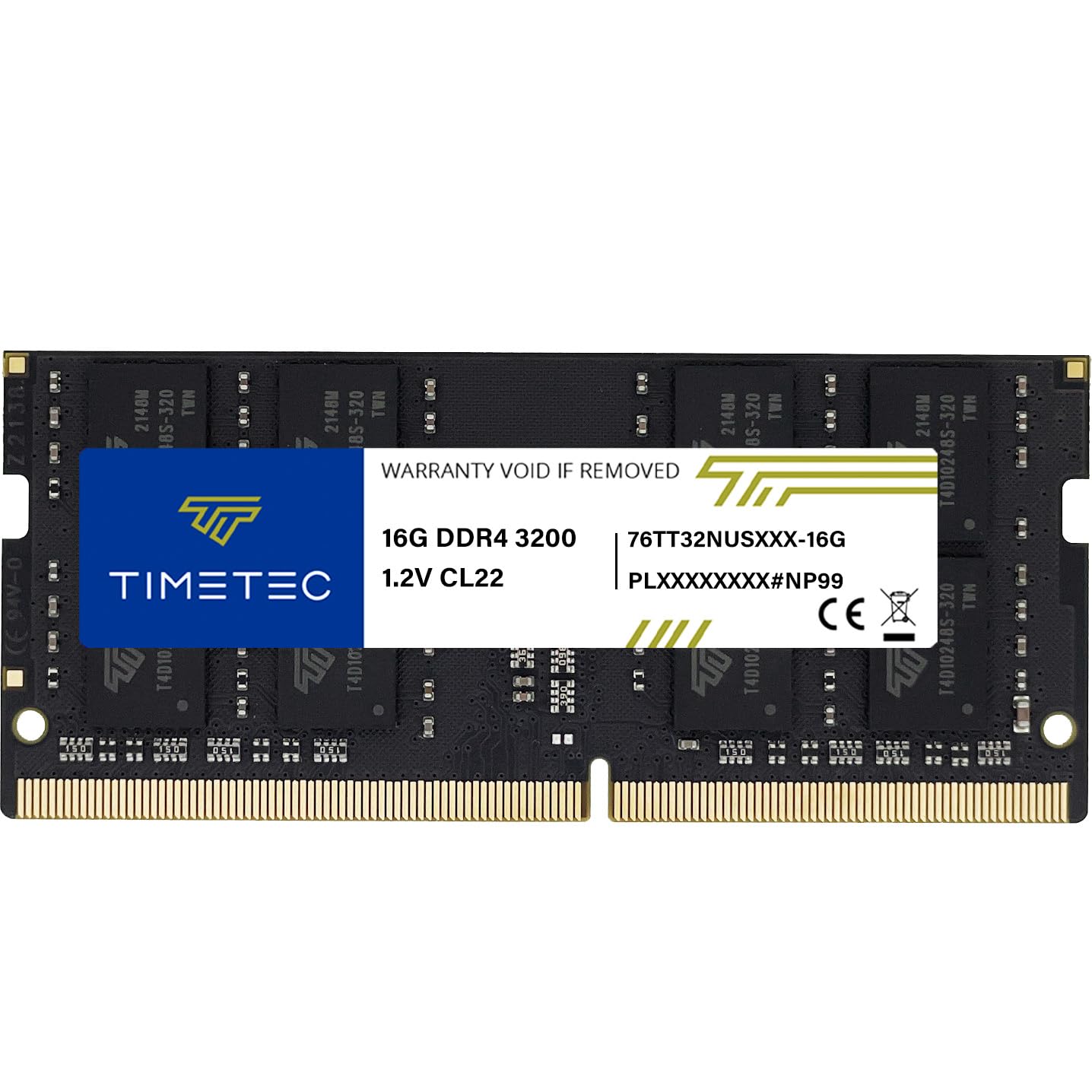
A single 16GB SODIMM that breathes new life into laptops, mini PCs, and even NAS boxes.
This is a single-module 16GB SODIMM (one stick, not a pair) made for laptops, notebooks, mini PCs, and All-in-One systems that take 260-pin memory. At 3200 MHz with CL22 timing, it delivers solid everyday speed and runs at a low 1.2V. The plug-and-play install needs no expertise, which owners confirm — one noted it “immediately worked great from the start, no issues whatsoever.”
Memory quality is what owners praise most, with over 20 calling it one of the best SODIMM 3200 options they have used. It works across a wide range of devices, including Samsung and Synology NAS systems, and shoppers say laptops running faster right after installation. One HP owner did a quick swap from old RAM and the system recognized it instantly.
The key limitation to know is that it is a single stick, so you lose the dual-channel speed boost you get from a matched pair. It automatically downclocks to 2933 MHz or 2666 MHz if your system only supports those speeds, which is a helpful safety net rather than a flaw. Owners note RAM prices have been climbing, with one mentioning the cost has nearly doubled, so the value window may be closing.
tight budget: you need a single 16GB stick for a laptop, mini PC, or NAS and want a lifetime warranty.
name brands: your laptop has two slots and you want the dual-channel performance boost of a matched pair.
5. Patriot Signature Line DDR4 RAM 16GB (2x8GB) 2666MHz

Bare-bones desktop memory with no heat-spreaders, perfect for tight cooler clearance.
This is utilitarian DDR4 in the best sense: a 16GB (2x8GB) kit running at 2666 MHz with CL16 effective timing and a modest 1.2V. It uses the 288-Pin Unbuffered form factor for standard desktops, and because the modules have no heat-spreaders (the metal fins most RAM has), they fit under large AMD Ryzen coolers where taller sticks would collide. One owner noted this exact advantage for tight cooler clearance.
Functionality is the most-praised aspect, with over 30 owners reporting it just works, including one who runs it in a video server and another with a 4-year-old PC that feels faster. One owner ran it in a Ryzen 1800x with an RX580 and found it stable at 2667 MHz, even manually tightening the timing from 19-19-19-43 down to 16-17-17-35. It is 100% tested and backed by a limited lifetime warranty.
The trade-off is the lower 2666 MHz ceiling, which is slower than the 3200 MHz kits above it. But for budget builds and non-overclockers, owners consistently say the capacity matters more than chasing FPS gains. The occasional mis-shipment was corrected within two days, and the dual-channel performance works as expected once installed.
legacy systems: you want a cheap, reliable desktop kit and your cooler needs the clearance that bare boards provide.
new builds: you are overclocking or want the 3200 MHz speed of the pricier kits.
6. PNY DDR4 16GB (2x8GB) 3200MHz Laptop Memory

A budget SODIMM kit that hits its advertised 3200 MHz without fuss on a Dell Latitude.
This is a 16GB (2x8GB) SODIMM kit built for laptops and notebooks, running at 3200 MHz with a CL22 timing and 1.2V. The 260-pin form factor fits most modern laptops, and it is backwards compatible with slower speeds like 2933 MHz, 2666 MHz, 2400 MHz, and 2133 MHz if your system caps out lower. Reliability is the most-praised aspect, with nearly 40 owners reporting it simply works.
The value story here is strong — owners call it a budget-friendly upgrade that delivers exactly what is expected. “This PNY 16GB DDR4 kit works flawlessly and hits the advertised 3200MHz speeds easily with XMP enabled,” buyers report. The XMP toggle (a BIOS setting) gets you to full speed, and one owner upgraded an HP Envy from 8GB to 16GB for Windows 11 and noticed smoother operation.
One owner was nervous from a bad RAM experience years ago but found this one “worked like a charm,” a sentiment echoed by several others. The memory capacity receives mixed feedback from some users, so it is worth confirming your laptop supports the full 16GB. For a desktop user, this is the wrong shape — it is strictly a SODIMM laptop module.
plug and play: laptop owners who want a cheap, reliable 16GB upgrade and have XMP available in BIOS.
tweakers: you are building a desktop, since this is a SODIMM module that will not fit DIMM slots.
7. Silicon Power DDR4 16GB Kit (2x8GB) 3200MHz

Budget desktop RAM that hits 3200 MHz by default, no BIOS tinkering required.
This 16GB (2x8GB) kit is the anti-fuss choice for budget desktop builds because it runs at 3200 MHz from the start without needing an XMP profile enabled. It uses the standard 288-pin UDIMM form factor for desktops, runs at a low 1.2V, and complies with JEDEC standards (the industry norms for memory). One owner compared it to a pricier G.Skill kit and found it matched the speed.
Memory quality is the most-praised aspect, with over 20 owners calling it good, and the speed is the second-most discussed strength. One owner revived an old i7-8700k gaming build with it and noted “runs at 3200MT/s default, no XMP needed.” Another uses it to generate Minecraft servers and worlds, saying it “removes all system latency” compared to 8GB.
The reliability picture is mixed, with one owner reporting a stick failed after about a month before an RMA replaced it, and another noting one stick died after two and a half years. The lifetime warranty promises complete services and technical support, which owners found helpful. One owner noted the PC would only boot with one stick, though they suspected user error.
all rounder: a budget desktop build where you want 3200 MHz speed without touching BIOS settings.
aesthetics: you are overclocking and want the headroom of a pricier kit.
8. Patriot Viper Steel DDR4 RAM 16GB (2x8GB) 3600MHz

A 3600 MHz desktop kit with an aluminum heat spreader for stable overclocking.
This kit runs at 3600 MHz, which is a meaningful jump over the more common 3200 MHz and a balance for many modern AMD and Intel platforms. It is a 16GB (2x8GB) kit in the 288-pin UDIMM desktop format, with an aluminum heat spreader that has a distinctive design and helps keep things cool. It supports XMP 2.0 (a one-click BIOS setting that automatically overclocks the memory to its rated speed), so you get the full 3600 MHz without manual tuning.
Owners mention easy installation, with one noting their performance has been “stable and solid” and recommending it for a mid-range budget build. Another had to install the sticks one at a time for an Asus ROG STRIX B550E board to detect them, but once recognized, the RAM “breezed through MEM86 with zero errors” and all games and apps ran without blue screens. Memory quality is the most-praised aspect.
The performance picture is mixed, with one owner spending hours trying to get it to work before succeeding. The most notable negative is a single stick that died 35 days in, which the owner attributed to bad luck and planned to switch brands. For the price, this delivers premium speed, but it is worth confirming your motherboard supports 3600 MHz.
speed demons: you want the faster 3600 MHz speed and your motherboard supports it.
plug and play: your motherboard caps out below 3600 MHz, since the extra speed would be wasted.
9. Crucial 16GB DDR5 RAM 4800MHz Desktop Memory
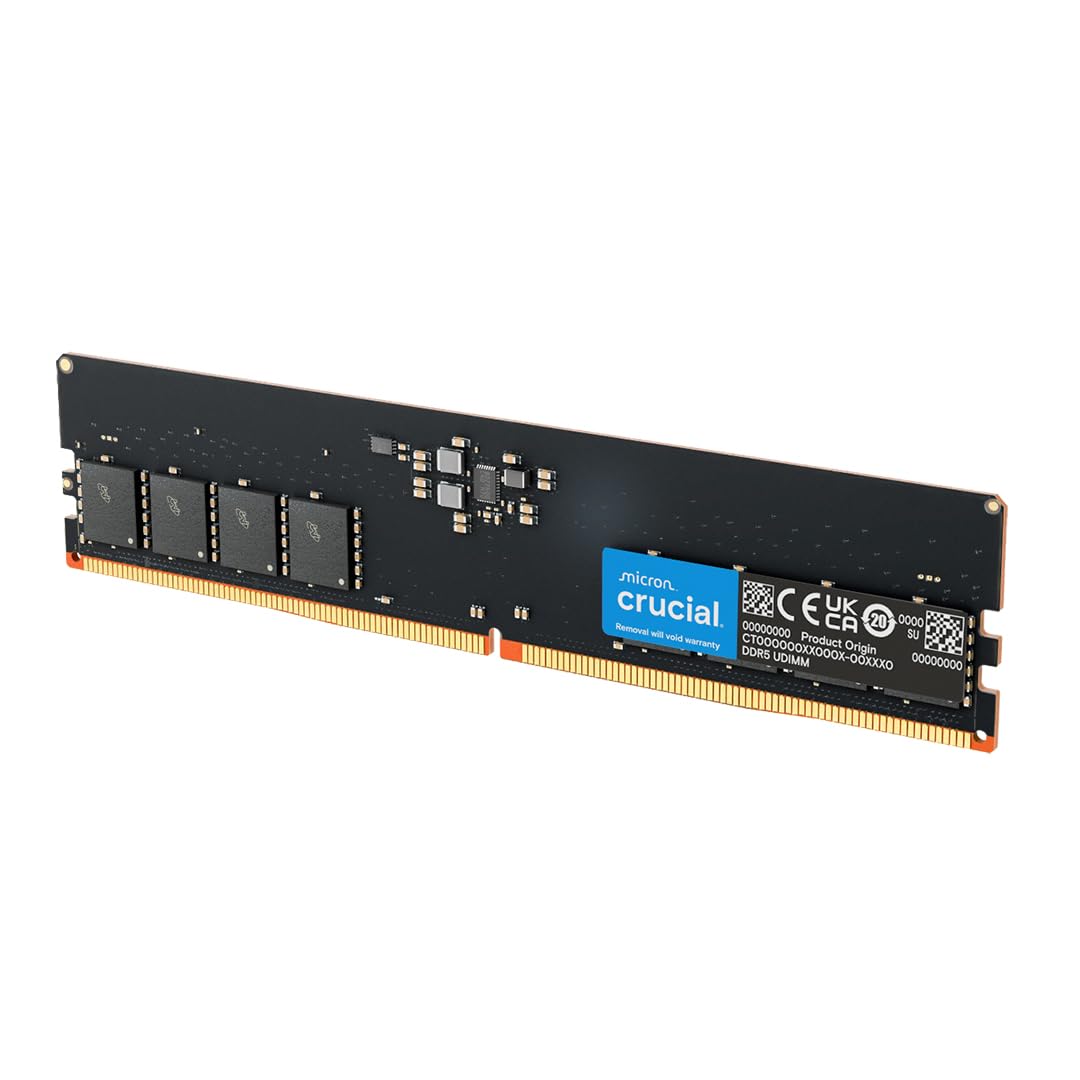
The DDR5 choice for new builds, pushing 4800 MHz for the latest Intel and AMD platforms.
If you are building or upgrading a system that takes DDR5, this is the entry-level module that gets you into the next generation of memory. It is a single 16GB stick running at 4800 MHz in the 288-pin UDIMM form factor for desktops, with a CL40 latency and a low 1.1V. It supports both Intel XMP 3.0 and AMD EXPO on the same module for 13th Gen Intel Core and AMD Ryzen 7000 Series processors.
Functionality is the most-praised aspect, with over 15 owners calling it out for just working. One owner paired it with an existing Micron 16GB stick in a Lenovo Legion and both worked together in dual channel at CL36 with 4400 MHz. Another bought it for a new i9-14900KF build and found it works great, noting that a 6400 MHz stick would have been “overkill.”
The compatibility picture is mixed, with one owner noting it does not work with a Dell Precision 3660, so checking your motherboard is essential. Because it is a single module, you give up the dual-channel boost of a matched pair, and the bare design has no heatsink, which one owner said limits overclocking in low-airflow cases. For the price, it is the cheapest way into DDR5.
new platforms: you have a new DDR5 motherboard and want a reliable, budget 16GB module to start with.
old boards: you are upgrading a prebuilt like a Dell Precision, since some systems reject third-party DDR5.
Understanding the Specs
CAS Latency (CL)
CAS latency is the delay, measured in clock cycles, between the moment the memory is asked for data and when it actually delivers it. A lower number like CL16 means less delay and snappier performance than a CL22 kit running at the same speed. It is the number that separates two otherwise identical-looking 3200 MHz kits.
MHz and Data Transfer Rate
The MHz rating tells you how many millions of transfers the memory can do per second, so 3200 MHz is faster than 2666 MHz. However, this speed is only reached when XMP is enabled in your BIOS; by default, memory often runs at a conservative speed like 2133 MHz. For DDR4, 3200 MHz is the balance for everyday builds.
FAQ
How do I know if my laptop takes SODIMM or my desktop takes DIMM memory?
What does XMP do and do I need to enable it?
Will a 3600 MHz kit work in a motherboard that only supports 3200 MHz?
Is one 16GB stick better than two 8GB sticks?
Can I mix RAM from different brands or speeds?
Why does my new RAM show a lower speed than advertised?
Is DDR5 worth upgrading to over DDR4?
How long does RAM typically last before it fails?
What does the voltage rating like 1.2V or 1.35V mean?
Final Thoughts: The Verdict
Across the board, the 16 gb ram winner is the Corsair Vengeance LPX because it pairs the crowd’s highest trust with CL16 timings and overclocking headroom. If you want the easiest laptop upgrade with guaranteed compatibility, grab the Crucial 16GB DDR4 Laptop Memory. And for a tight-timing desktop build at 3200 MHz, the G.SKILL AEGIS is the one to reach for.
How We Picked
We do not accept paid placement. Every pick is matched to a real buyer and a real use-case; we do not hands-on test units.
Sources & Methodology
Specifications: manufacturer listings and product documentation. Review insights: verified customer reviews, as of August 2026. Pricing: not shown on this page (it changes often); check the current price via the retailer link.
As an Amazon Associate, Gadgets Feed earns from qualifying purchases. This does not affect which products we feature.