
Building a high-speed wired network that can handle massive file transfers, 4K/8K video editing workflows, or a dense virtualization lab demands a switching backbone that won’t cap your data rates. A 16-port 10-gigabit switch sits at the center of this infrastructure, dictating whether your devices talk to each other at a frustrating 1 Gbps or at the full 10 Gbps they were designed for. The wrong choice means bottlenecked storage area networks (SANs) and sluggish server communication.
I’m Min — the co-founder and writer behind Gadgets Feed. I’ve spent hundreds of hours cross-referencing switching capacity figures, port-level characteristics, thermal design, and management feature sets to separate genuine high-performance hardware from overhyped options in this specific category.
After careful analysis of the market landscape, this guide delivers my precise recommendations for the best 16 port 10gb switch tailored to different network environments and budgets.
How To Choose The Best 16 Port 10Gb Switch
Selecting a 10-gigabit switch is not like picking a basic office switch. The core decision hinges on whether you need pure Layer 2 forwarding, Layer 3 routing capability, or Power over Ethernet (PoE). Each choice has costs and benefits that directly affect network latency and deployment flexibility.
Port Architecture: SFP+ vs. RJ45
The biggest fork in the road is whether you need copper 10GBASE-T connections or fiber SFP+ slots. RJ45 ports offer convenience — you can use standard Cat6a or Cat7 cabling — but they generate significantly more heat and power draw. SFP+ ports support fiber optic cables (LR, SR) and Direct Attach Copper (DAC) cables, which run cooler and are often cheaper for short runs, but require transceivers and careful cable planning. Many hybrid switches offer a mix of both.
Management Layer and Features
An unmanaged 10Gb switch simply pushes packets and is ideal for pure transport. A smart or L2+ managed switch adds VLAN isolation, IGMP snooping for multicast traffic, and link aggregation groups (LAG). Layer 3 managed switches add static or dynamic routing (RIP, OSPF), enabling inter-VLAN routing directly on the switch without a separate router. For any homelab or small business with multiple subnets, Layer 3 management is a must-have.
Switching Capacity and Non-Blocking Throughput
This pair of specs tells you whether the switch can handle full wire-speed traffic on all ports simultaneously. A 16-port 10Gb switch ideally needs a switching capacity of at least 320 Gbps to be fully non-blocking. A 160 Gbps capacity means the switch will drop packets under heavy load. Check these numbers before committing.
Quick Comparison
On smaller screens, swipe sideways to see the full table.
| Model | Category | Best For | Key Spec | Amazon |
|---|---|---|---|---|
| TP-Link Omada SX3016F | Premium | Enterprise aggregation with SDN | 16x 10G SFP+ ports, 320 Gbps switching capacity | Amazon |
| QNAP QSW-3216R-8S8T-US | Premium | Silent unmanaged 10GbE backbone | 8x RJ45 10GbE + 8x SFP+, 320 Gbps switching capacity | Amazon |
| Ubiquiti ES-16-XG | Premium | Managed 10Gb aggregation | 12x SFP+ + 4x RJ45 10GbE, 160 Gbps switching capacity | Amazon |
| Ubiquiti USW-Pro-Max-16-PoE | Mid-Range | PoE++ with multi-gig and UniFi integration | 4x 2.5GbE PoE++ + 2x 10G SFP+, 84 Gbps switching capacity | Amazon |
| TP-Link Omada SG3218XP-M2 | Mid-Range | 2.5Gb access with 10G uplink and PoE+ | 16x 2.5GbE + 2x 10G SFP+, 240W PoE budget | Amazon |
| MokerLink 12 Port 10G Managed | Mid-Range | Affordable Layer 3 with 10G copper | 8x 10GbE RJ45 + 4x 10G SFP+, 240 Gbps switching capacity | Amazon |
| Ubiquiti USW-16-POE | Budget | PoE+ managed access for UniFi | 16x GbE PoE+ (no 10Gb ports) | Amazon |
In‑Depth Reviews
1. TP-Link Omada SX3016F

The TP-Link Omada SX3016F is a dense, pure-fiber 10-gigabit switch built for aggregation or core-layer deployment. With 16 SFP+ ports, it lacks the heat and power overhead of copper 10GBASE-T, making it ideal for environments where fiber cabling is already in place or planned. The 320 Gbps switching capacity ensures it can run all 16 ports at line rate simultaneously without dropping a single frame — a critical requirement for a backbone switch.
Integration into the Omada SDN ecosystem is the central feature here, allowing centralized cloud management and zero-touch provisioning. The switch supports static routing, L2/L3/L4 QoS, IGMP snooping, and LAG. It draws a maximum of only 12.3 watts, which is remarkably efficient for a full 10G switch. The black metal chassis is rackmountable and occupies a standard 1U space.
However, the fan noise is the primary complaint. The stock fan runs loud at full speed, and some users have performed a Noctua fan swap to bring noise levels down. The web management interface and CLI are functional but not as polished as some enterprise alternatives. This switch is best for users already invested in the TP-Link Omada controller ecosystem who need a high-port-count SFP+ aggregation point.
Why it’s great
- Fully non-blocking 320 Gbps fabric handles 16 simultaneous 10G streams
- Deep SDN integration for cloud-managed VLAN and route configuration
- Ultra-low power draw of 12.3W for a full 10G switch
Good to know
- Stock fan is loud; most users replace it with a Noctua NF-A4x20
- Switch requires the Omada controller for full feature set
2. QNAP QSW-3216R-8S8T-US

For users who need a pure 10GbE transport layer without management overhead, the QNAP QSW-3216R-8S8T-US is a standout. It provides eight 10GBASE-T copper ports (auto-negotiating down to 100M) and eight SFP+ fiber ports, totaling 16 ports of 10G line-rate forwarding. The 320 Gbps switching capacity means it is fully non-blocking — every port can push 10 Gbps in both directions simultaneously. The half-width rackmount form factor is unique, requiring 1U of depth but only half the width, making it perfect for shallow racks or SMB environments.
This switch is plug-and-play unmanaged, meaning no IP configuration, VLAN setup, or management console needed. It automatically detects and blocks loops to prevent broadcast storms. It also supports Energy Efficient Ethernet (802.3az) to reduce power draw when ports are idle. Users report it runs quiet and cool, even with the copper ports running at full speed, though boot time is unusually long at around one minute.
The main limitation is the lack of management features. If you need VLAN segmentation, QoS, or IGMP snooping, this switch cannot provide it. Also, some units sold through Amazon Resale have been reported to experience occasional hiccups. This switch is best suited as a dedicated backbone segment for a NAS or a video editing network where pure throughput is the only priority.
Why it’s great
- Mixed RJ45 + SFP+ ports offer maximum cable flexibility
- True 320 Gbps non-blocking fabric with zero configuration needed
- Half-width rackmount design saves space in crowded racks
Good to know
- Completely unmanaged — no VLAN, QoS, or routing capability
- Boots slowly; takes about a minute to become operational
3. Ubiquiti Networks EdgeSwitch 16 XG
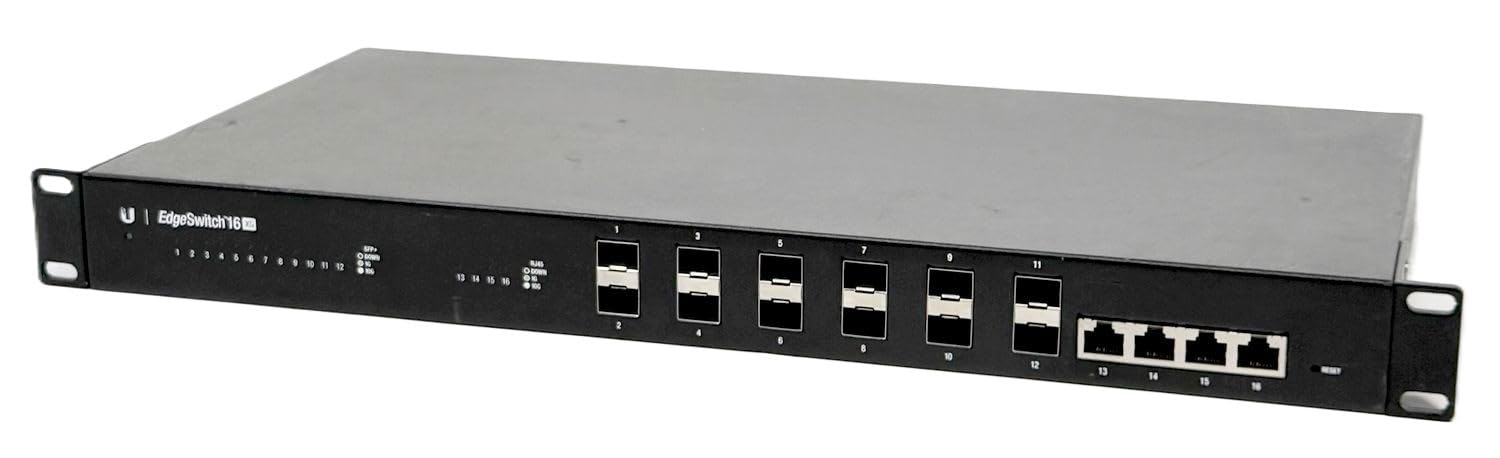
The Ubiquiti EdgeSwitch 16 XG (ES-16-XG) is a veteran in the high-port-count 10Gb space, offering 12 SFP+ ports and 4 copper 10GBASE-T ports in a single 1U chassis. It runs on the EdgeOS platform, providing a full Layer 2 managed feature set with VLANs, STP, LACP, and port mirroring. The web-based management interface gives granular control per port, and the switch supports a wide range of SFP+ transceivers and DAC cables, including third-party optics.
One of the most praised aspects is the metal construction and the fact that users can quiet the factory fans with a simple Noctua fan swap — a common modification that drops noise significantly. The four copper ports are useful for direct connections to 10GBASE-T servers or workstations without needing transceivers. The current 160 Gbps switching capacity feels low for a 16-port switch, meaning it can be slightly oversubscribed under full load. However, for typical aggregation use with a few heavy-hitting servers and many lower-bandwidth clients, this is rarely a real-world problem.
The ES-16-XG is not part of the UniFi ecosystem, so it uses the EdgeSwitch interface, which some users find less polished than UniFi. The firmware must be updated immediately upon arrival to avoid stability issues. This switch is ideal for users who want a proven, managed 10Gb aggregation switch with a mix of fiber and copper ports and who do not require Layer 3 routing.
Why it’s great
- 12 SFP+ plus 4 copper 10GbE ports offer the most versatile port mix
- Strong community support and simple Noctua fan swap for silence
- Infinitely configurable via EdgeOS web interface
Good to know
- 160 Gbps switching capacity means potential oversubscription under full load
- Firmware must be updated immediately out of the box
4. Ubiquiti USW-Pro-Max-16-PoE
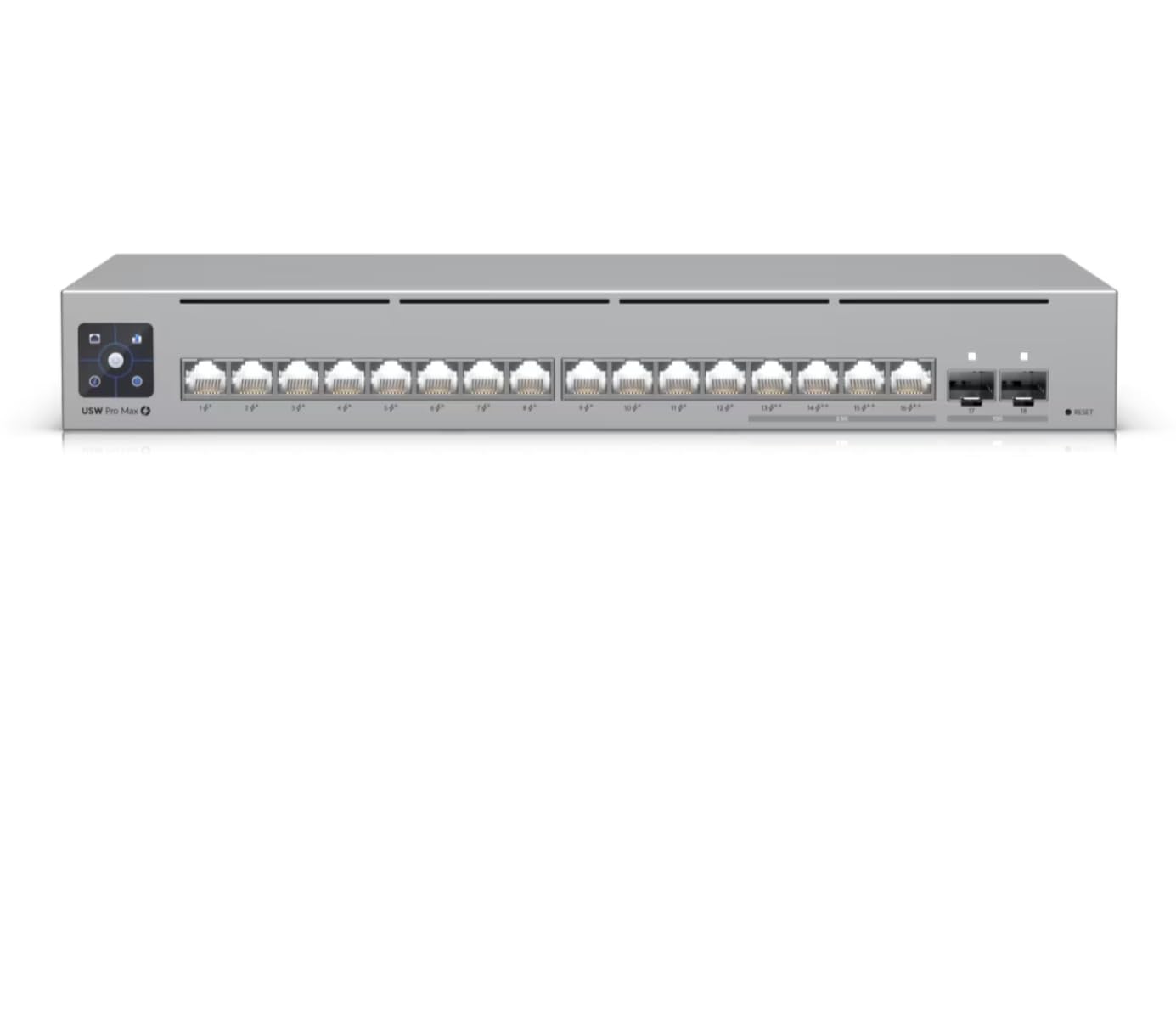
The Ubiquiti USW-Pro-Max-16-PoE is a specialized switch for UniFi users who need high-power PoE++ output to drive demanding devices like the latest Wi-Fi 7 access points, pan-tilt-zoom cameras, or PoE-powered edge compute nodes. It features four 2.5 GbE PoE++ ports delivering up to 64W per port, twelve GbE PoE+ ports, and two 10G SFP+ uplinks. The built-in 1.3-inch touchscreen provides real-time port status, VLAN mapping, and link health without needing to log into the UniFi controller.
Being a Layer 2/3 switch, it supports inter-VLAN routing and static routes, offloading that work from the UniFi gateway. The fanless design is silent, making it suitable for open office or home listening room environments. The 84 Gbps switching capacity is modest, but this is not designed to be a dense 10G aggregation switch — it is an access-layer PoE power house. The included slim Cat6A patch cable from QALYNX is a small but welcome addition.
The form factor is slightly non-standard. It is not a full 19-inch rack width, requiring a separate Rack Mount Kit (sold separately) for standard rack installation, and that kit has been out of stock for long periods. This switch is ideal for a UniFi-centric deployment with high-power PoE requirements at the edge, but it should not be mistaken for a core 10G aggregation switch.
Why it’s great
- PoE++ ports deliver 64W per port, enough for heavy-duty APs and PTZ cameras
- Front touchscreen gives instant visual feedback on network status
- Silent fanless operation for noise-sensitive areas
Good to know
- Requires separate rack kit for standard 19-inch mounting
- Limited to only 2x 10G SFP+ uplink ports
5. TP-Link Omada SG3218XP-M2

The TP-Link Omada SG3218XP-M2 is a hybrid access switch that bridges the gap between 1 Gbps and 10 Gbps. It offers 16 ports of 2.5 Gigabit Ethernet, with 8 of those ports delivering PoE+ at a total budget of 240 watts — enough to power a fleet of high-bandwidth Wi-Fi 6/6E access points. Two 10 Gbps SFP+ uplink slots connect this access switch back to a main core router or 10G aggregation switch, ensuring that the 2.5 Gbps client traffic is not throttled by a slow upstream link.
The switch is fully integrated into the Omada SDN ecosystem, allowing for central management via the Omada Cloud. It supports static routing, L2+/L3 features like IGMP snooping and link aggregation, and has a robust security suite including DHCP snooping and 802.1X. The metal chassis is fanless, running cool and silent even under load. The five-year warranty is an industry-leading perk that adds long-term peace of mind.
The trade-off is that these are 2.5 Gbps access ports, not 10 Gbps. Clients with 10 GbE NICs will be bottlenecked by these ports. This switch is perfect for environments where the majority of clients are Wi-Fi or have 2.5 GbE NICs, and where a single 10G uplink to a core switch is the architecture. It is less suited for a pure 10G SAN or server cluster.
Why it’s great
- 240W PoE+ budget across 8 ports powers demanding wireless infrastructure
- Fanless design and low heat output for quiet operation
- Robust Omada SDN management with a 5-year warranty
Good to know
- Access ports are 2.5 Gbps, not 10 Gbps
- Limited to only 2x 10G SFP+ uplink ports
6. MokerLink 12 Port 10G Managed
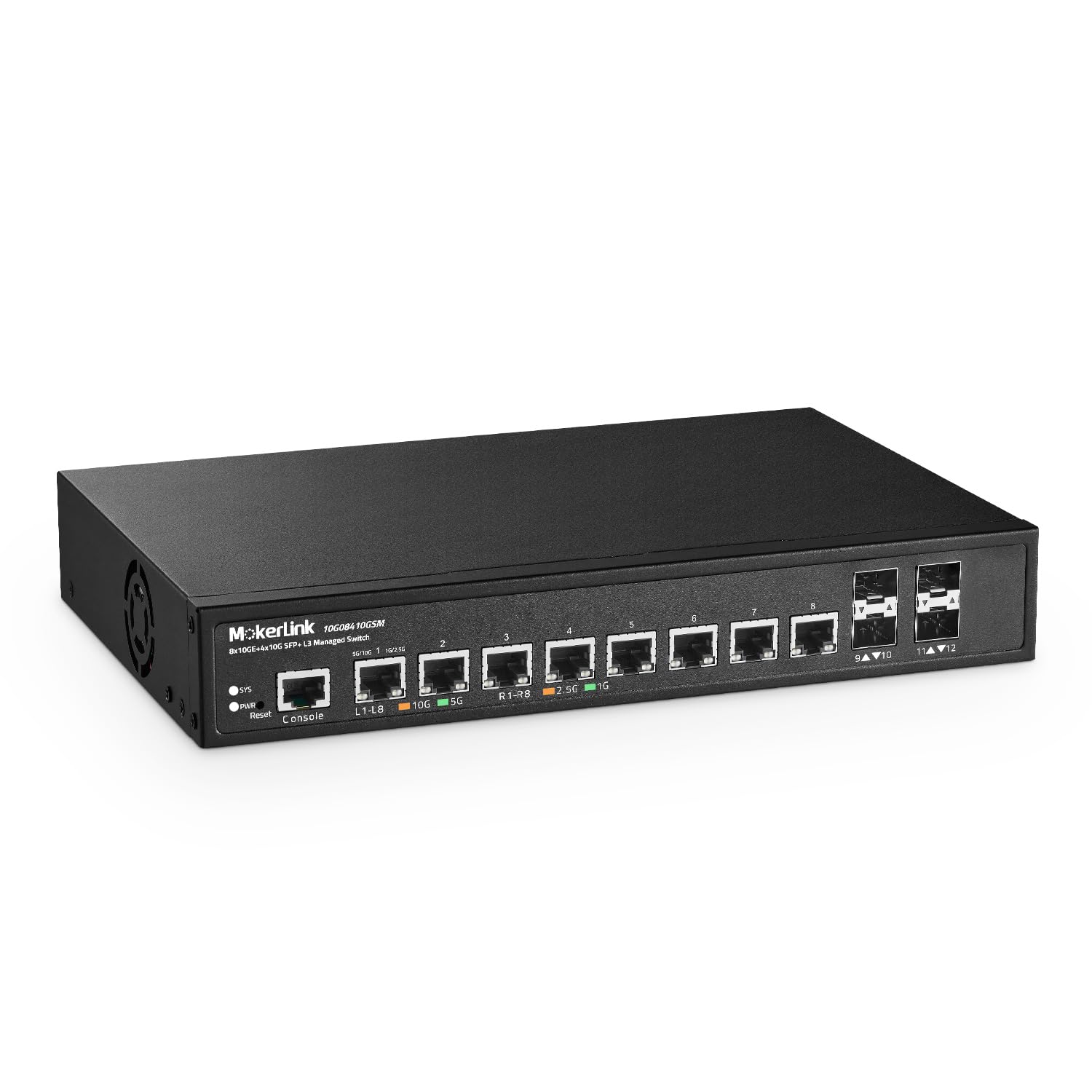
The MokerLink 12 Port 10G Managed switch breaks the price barrier for true Layer 3 management on 10-gigabit copper ports. With 8 x 10GBASE-T Ethernet ports and 4 x 10G SFP+ slots, it offers a 240 Gbps switching capacity, ensuring non-blocking forwarding across all ports. The L3 feature set includes IPV4/IPV6 static routing, VLAN, ACLs, QoS, and 802.1X authentication — foundational for segmenting traffic and securing a SOHO or homelab network.
The metal chassis is designed for both desktop and 19-inch rackmount use. It includes rackmount ears, and the fan, while audible, is quieter than many enterprise switches. Users note that the initial setup guide has an IP address error, but the web interface is robust once accessed. The 6kV surge protection on every port adds resilience in less-controlled electrical environments.
The primary risk is brand perception and long-term support. MokerLink is a smaller brand, and firmware updates are not as frequent as TP-Link or Ubiquiti. The fan noise can be intrusive in quiet spaces, and some users plan to replace the fan. However, for a budget-conscious buyer who needs true Layer 3 features on 10G copper, this switch offers an unmatched price-to-feature ratio.
Why it’s great
- True Layer 3 management at a fraction of the price of comparable switches
- 8 copper 10GbE ports eliminate need for transceivers for direct server connections
- 6kV protection on every port adds valuable surge resilience
Good to know
- Setup guide contains an IP address error; requires internet research
- Fan is louder than ideal for a quiet home office
7. Ubiquiti USW-16-POE

The Ubiquiti USW-16-POE is a 16-port managed PoE+ switch that is strictly a 1 Gigabit device — it has no 10G ports. However, for buyers on a strict budget who need to build a UniFi-powered network with PoE for access points and cameras, this switch provides excellent value. It adopts into the UniFi controller seamlessly, offering VLAN, STP, and overall network management through the same interface as Ubiquiti gateways and APs. The 6.17-pound weight and 1.7-inch depth make it easy to rack-mount or shelf-mount.
All 16 ports support PoE+, and the switch is designed to integrate within a larger UniFi ecosystem. Users report that the switch runs warm, which is a common characteristic of PoE switches from Ubiquiti. Some units had early firmware issues where PoE ports would reset after power loss, but firmware updates have resolved this. The build quality is solid, with an all-metal chassis that feels robust for its price class.
The severe limitation is the lack of 10-gigabit connectivity. This switch cannot serve as a backbone for a high-speed storage network or aggregate 10G servers. It is best thought of as an access-layer switch for a budget UniFi deployment where the ultimate bottleneck — internet speed or client Wi-Fi — is well below 1 Gbps. For any scenario requiring 10Gb interconnect, this switch is not the right tool.
Why it’s great
- Budgest-friendly entry into the UniFi managed ecosystem with full PoE+ support
- Rackmountable metal chassis with 16 PoE+ ports for cameras and access points
- Seamless UniFi controller integration for unified network management
Good to know
- All 16 ports are 1 Gbps — no 2.5G or 10G support whatsoever
- Runs warm under load and early firmware had PoE reboot issues
FAQ
Do I need a Layer 3 switch for my home lab 10G network?
Can I use Cat5e cable with a 10GBASE-T switch?
Why is my 10G switch running hot?
Final Thoughts: The Verdict
For most users, the best 16 port 10gb switch winner is the TP-Link Omada SX3016F because it delivers 16 wire-speed SFP+ ports, deep SDN integration, and incredibly low power draw in a single rack unit. If you need a silent unmanaged backbone with mixed copper and fiber, grab the QNAP QSW-3216R-8S8T-US. And for a PoE++ powerhouse that powers next-gen access points, nothing beats the Ubiquiti USW-Pro-Max-16-PoE.