
Our readers keep the lights on and my morning glass full of iced black tea. As an Amazon Associate, I earn from qualifying purchases.
Specs are compiled from manufacturer listings and verified buyer reviews and can change over time — please confirm the key details on the product page before buying.
Managing a rack full of servers or a lab bench piled with computers usually means a tangle of extra keyboards, mice, and monitors. A 16 port KVM switch cuts through that mess by letting you control every machine from a single desk setup. The hard part is picking one that doesn’t introduce its own headaches—like flickering video, dead ports, or a setup process that makes you wish you’d stuck with the cable salad.
I’m Min — the founder and writer behind Gadgets Feed. This guide is built by comparing the manufacturers’ published specifications and the patterns across verified customer reviews, so you get each pick’s real strengths and trade-offs instead of marketing spin.
Whether you are outfitting a data center, a homelab, or a security monitoring station, these are the models that genuinely deliver on the promise of a streamlined 16 port kvm switch.
Quick Picks
- JideTech 16 Port HDMI KVM Switch 4K@60Hz — Top Performer
- MLEEDA 16 Port HDMI KVM Switch 4K@60Hz — Best Value
- JideTech 16 Port HDMI USB KVM Switch 4K@30Hz — Homelab Hero
- MT-VIKI 4K 16 Port KVM Switch HDMI, 4K@30Hz — Budget 4K
- TRENDnet 16-Port Rack Mount USB KVM Switch, TK-1603R — VGA Workhorse
- 16 Port VGA KVM Switch 1U Rack Mount — VGA Value
- MT-VIKI 16 Port KVM Switch, 16X1 Rackmount KVM Switch VGA — Budget Entry
How To Choose The Best 16 Port KVM Switch
A 16-port KVM switch is a serious investment of time and money for any server room or homelab. Before you click buy, match the switch’s key specs to your actual hardware environment—a mismatch here can mean flickering screens, unresponsive keyboards, or ports that simply refuse to work.
Video Resolution and Connector Type (VGA vs. HDMI)
The first fork in the road is whether your computers output VGA or HDMI. VGA switches like the TRENDnet TK-1603R top out at 2048 x 1536, which is fine for text-heavy server consoles. HDMI switches can go up to 4K@60Hz, giving you crisp visuals for media servers, design workstations, or security camera feeds. Pair the connector type to your gear—an all-HDMI setup on a VGA switch is a non-starter.
EDID Emulation (The Window-Shuffle Fix)
Without EDID (Extended Display Identification Data) emulation, your monitor and computer renegotiate their handshake every time you switch ports. This often makes windows pile up on the primary screen or shifts application layouts. A switch with EDID emulation, like the MLEEDA or the JideTech 4K@60Hz model, holds that handshake steady, so each computer remembers exactly how you left its desktop.
USB Hub Speed and Peripheral Sharing
Look at the USB ports on the switch itself. USB 2.0 is adequate for a basic keyboard and mouse. For external drives, flash storage, or high-speed scanners, you want USB 3.0 with 5Gbps transfer speeds. Also check the number of shared USB ports—six ports on the console give you more flexibility than a single port.
Quick Comparison
| Model | Best For | Video Resolution | Console USB Ports | Switching Methods | Amazon |
|---|---|---|---|---|---|
| JideTech 4K@60Hz | High-res workstation & server rack | 4K@60Hz | USB 3.0 (audio/mic) | Buttons, hotkey, mouse, IR, RS232, wired remote | Amazon |
| MLEEDA 16-Port HDMI | USB 3.0 speed & 4K clarity | 4K@60Hz | USB 3.0 (6 ports, TF/SD) | Buttons, wired remote, RS232 | Amazon |
| JideTech 4K@30Hz | Mixed OS homelab & security | 4K@30Hz | USB 2.0 (built-in hub) | Buttons, hotkey | Amazon |
| MT-VIKI 4K HDMI | Budget HDMI with cables included | 4K@30Hz | USB 2.0 (4 ports) | Buttons, remote control | Amazon |
| TRENDnet TK-1603R | Reliable VGA server management | 2048 x 1536 | USB/PS2 combo | Buttons, hotkey | Amazon |
| 16-Port VGA KVM Switch | Budget VGA with USB sharing | 1920 x 1440 | USB 2.0 (3 ports) | Buttons, remote control | Amazon |
| MT-VIKI 16-Port VGA | Lowest-cost entry point | 1920 x 1440 | USB 1.1 (keyboard/mouse) | Buttons, remote control | Amazon |
In‑Depth Reviews
1. JideTech 16 Port HDMI KVM Switch 4K@60Hz
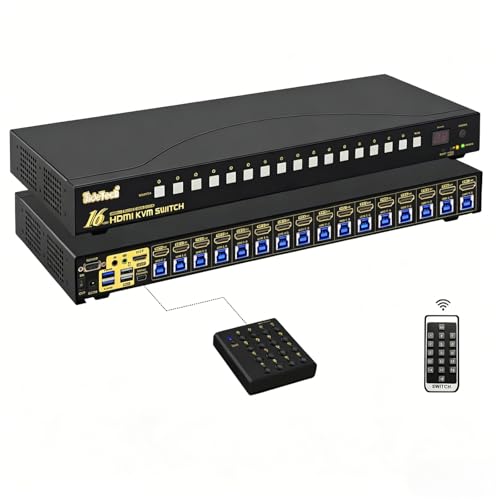
The command center for serious mixed-OS racks that demands full 4K@60Hz and six switching methods.
You get true 4K@60Hz over HDMI, which keeps image transmission smooth for engineering workstations, broadcasting, or high-resolution monitoring tasks. Six switching methods—front panel buttons, keyboard hotkeys, mouse switching, a wired remote, an IR remote, and RS232 command control—mean no matter how you’ve racked it, you have a way to jump between 16 computers.
The built-in USB 3.0 hub runs at 5Gbps for fast external drives, plus it has separate audio and microphone ports for multimedia work. Intelligent EDID emulation holds your display handshake steady, so switching between systems doesn’t scramble your window layout. A big plus for homelab enthusiasts: buyers report it works well with a mix of Windows, Mac, and Linux machines without driver headaches.
Why it stands out
- True 4K@60Hz video output with stable transmission
- Six switching methods (including RS232 and IR) for flexible control
- USB 3.0 hub with independent audio and microphone ports
- EDID emulation prevents window rearrangement
One trade-off
- Premium pricing compared to HDMI 4K@30Hz alternatives
Who this fits: IT pros running a multi-OS rack with high-resolution displays who need flexible control methods.
Who should think twice: A buyer with older VGA-only servers gets zero benefit from the HDMI 4K@60Hz output.
2. MLEEDA 16 Port HDMI KVM Switch 4K@60Hz
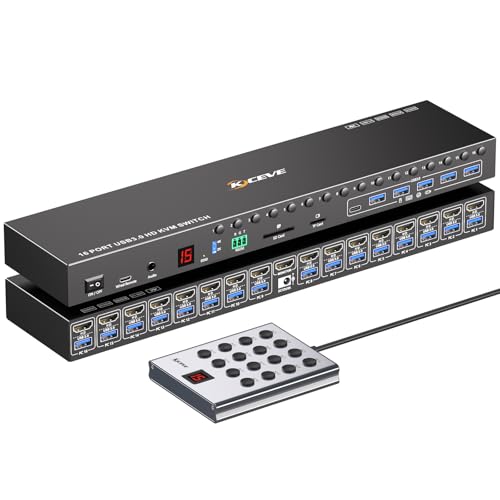
A feature-rich 4K@60Hz switch with USB 3.0 speed and EDID smarts at a mid-range price.
This switch brings 4K@60Hz resolution, EDID emulation that stores resolution and refresh rate, and six USB 3.0 ports for sharing drives and peripherals at 5Gbps. It also includes a TF/SD card slot—handy for security camera DVR setups. Three switching modes (panel buttons, a 1.5m wired remote with a digital display, and RS232) cover most rack configurations.
You get sixteen USB 3.0 cables in three different lengths (eight 1.5M, four 2.0M, four 2.5M), so you don’t need to buy cables separately. Owners mention it works smoothly across Windows, macOS, and Linux, and the wired remote has a satisfying click. A couple of buyers flagged that a few ports didn’t work on arrival, so testing all ports upfront is wise.
What you gain
- 4K@60Hz with EDID emulation prevents window scrambling
- Six USB 3.0 ports plus TF/SD card slot
- Includes 16 USB 3.0 cables in mixed lengths
- Wired remote with digital display
What to watch
- A minority of units have had port failures within the first month
Reach for it when: You want 4K@60Hz video and fast USB 3.0 sharing without jumping to the premium tier.
Consider another option if: Your budget absolutely can’t absorb any risk of DOA ports.
3. JideTech 16 Port HDMI USB KVM Switch 4K@30Hz
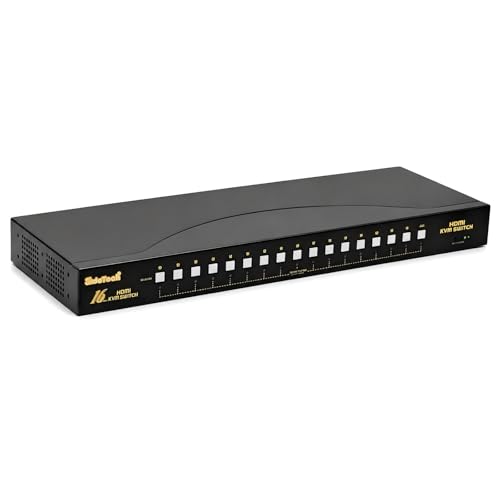
The reliable HDMI switcher for homelabbers running a mix of Macs, PCs, and Linux boxes at 4K@30Hz.
This JideTech model supports HDMI 1.4a with resolutions up to 4K@30Hz and backward compatibility to 1080P, so it handles most homelab and security-camera workloads. Switching is instant via front panel buttons or keyboard hotkeys, and it has an auto-scan function for cycling through connected computers.
The built-in USB 2.0 hub lets multiple systems share printers, flash drives, and mice without re-plugging. Reviewers point out that it works equally well with Apple USB keyboards, traditional PC mice, and a stack of Mac Minis (2017-2024). One downside: at a higher cost, it lacks the USB 3.0 speed of the MLEEDA switch above.
Key strengths
- 4K@30Hz over HDMI with backward compatibility to 1080P
- Hotkey and auto-scan switching for fast workflow
- Works with Windows, Linux, Mac OS, Unix, DVR, NVR
- Stable metal housing for rack environments
Limitations
- USB 2.0 hub, not USB 3.0
- No EDID emulation for window layout preservation
Who it suits: Homelab users with a mix of 4K@30Hz displays and OS types who value instant hotkey switching.
skip it if: You need USB 3.0 transfer speeds or EDID emulation to keep your desktop layout intact.
4. MT-VIKI 4K 16 Port KVM Switch HDMI, 4K@30Hz
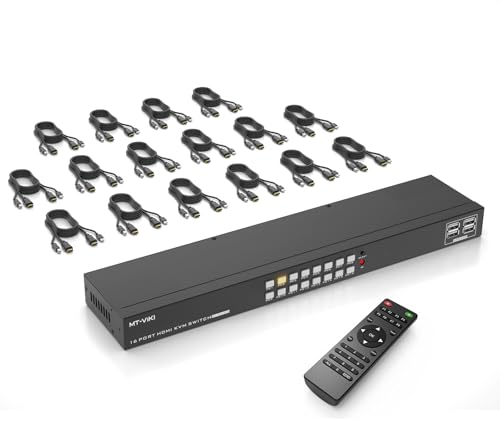
A cable-inclusive 4K@30Hz HDMI KVM that covers the basics and fits a 19-inch rack.
This MT-VIKI model serves 16 computers at 4K@30Hz over HDMI 1.4 with HDCP 1.4, and it includes 16 HDMI cables and 16 USB cables right in the box—saving you the extra shopping trip. It also provides a four-port USB 2.0 hub for shared keyboards, mice, and low-speed peripherals. EDID storage ensures the best transmission signal between the switch and each computer.
Switching happens through panel buttons or the included IR remote (you supply the AAA batteries). Customers note that it works with Microsoft smart mice and Logitech network mice, but a few units arrived DOA or failed within a month. One reviewer noted the power supply uses a US 2-pin connector despite being 230V rated.
What’s included
- 16x HDMI and 16x USB cables in the package
- EDID storage for stable video transmission
- 4-port USB 2.0 hub for peripherals
- Fits standard 1U 19-inch racks
What’s risky
- Some units have failed within the first month
- No RS232 serial or physical power switch
Grab it for: A cost-effective 4K@30Hz HDMI setup where included cables simplify deployment.
Look elsewhere if: You need long-term reliability or RS232 control for your rack.
5. TRENDnet 16-Port Rack Mount USB KVM Switch, TK-1603R

The NDAA/TAA-compliant VGA workhorse that IT professionals trust for server management.
The TRENDnet TK-1603R supports up to 2048 x 1536 VGA resolution, which is plenty for racked server consoles. It accepts both USB and PS/2 connections on the console side, so you can use vintage PS/2 keyboards or modern USB peripherals. Switching uses hotkey or push-button, and the red LEDs on each port show which computer is active.
A standout feature is its NDAA and TAA compliance, making it a safe choice for government and institutional purchases in the US and Canada. Reviewers rave about its reliability—one buyer mentioned hooking up five Linux workstations each with 64 cores and switching between them at a “turtle’s steady-and-slow pace” without a hitch. The catch: KVM cables are sold separately, which adds to the setup cost.
Why pros choose it
- Proven reliability with a 2-year manufacturer warranty
- NDAA and TAA compliant for government use
- Supports both USB and PS/2 consoles
- 2048 x 1536 resolution for crisp server console text
What you need to know
- KVM cables are sold separately (6ft, 10ft, or 15ft options)
- External power adapter (wall wart) instead of integrated PSU
Perfect for: IT pros managing VGA-based servers who need a rack-mountable, NDAA-compliant, and thoroughly proven switch.
Not ideal if: Your network runs on HDMI or you want cables included in the box.
6. 16 Port VGA KVM Switch 1U Rack Mount
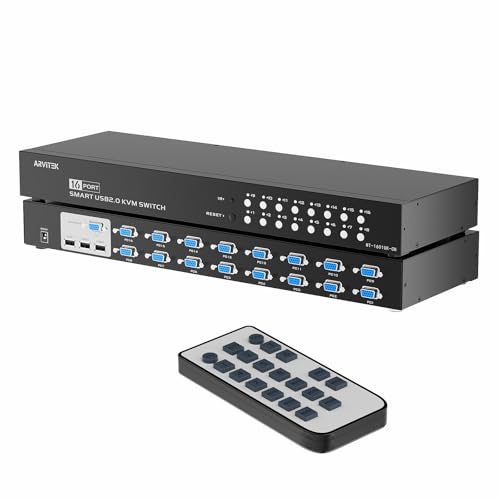
A straightforward VGA KVM with USB sharing and a remote, built for basic server room management.
This switch controls up to 16 computers from one VGA monitor, keyboard, and mouse at resolutions up to 1920 x 1440. It features three USB 2.0 ports for sharing printers, scanners, or flash drives between connected computers—no more fumbling behind the rack to unplug a device.
The complete kit includes 16 VGA KVM cables, a remote control, rack ears, and a power adapter, so it is truly plug-and-play. A buyer noted it was “a tiny bit short for reaching my 19-inch rack on both sides,” needing a minor shim. No driver installation is required, and it works with Windows, Linux, and Mac.
What you get
- 16 VGA KVM cables and remote included in the box
- Three USB 2.0 ports for peripheral sharing
- 1920 x 1440 resolution with stable VGA transmission
- Plug-and-play with no software or drivers
Minor complaints
- Rack ears may be slightly short for some 19-inch racks
- No 4K support or HDMI connectivity
Best suited for: A basic VGA server room where you need included cables and USB sharing without paying a premium.
Steer clear if: You require 4K resolution or a switch that fits a 19-inch rack without any shimming.
7. MT-VIKI 16 Port KVM Switch, 16X1 Rackmount KVM Switch VGA

The lowest-cost path to 16-port VGA control, complete with cables and a remote.
This MT-VIKI VGA model supports resolutions up to 1920 x 1440 and includes 16 KVM cables with integrated USB and VGA pigtails—a cleaner setup than dealing with 32 separate wires. It offers two switching methods: front panel buttons and an IR remote (AAA batteries not included).
Compatibility covers Windows 10/8/7/XP/Vista, Mac, Linux, DOS, and DVR systems. A significant caveat: some reviewers point out that the switch failed after one use with all lights red and no display, and customer support was unresponsive. Other users with Linux Mint found the USB mouse and keyboard did not work. Its low cost makes it the most accessible entry point, but reliability is a real gamble.
Entry-level perks
- 16 KVM cables with integrated pigtail included
- Supports resolutions up to 1920 x 1440
- Plug-and-play with no software required
- Most affordable 16-port option available
Known risks
- Reported failures after one use (all lights red)
- Does not work with some Linux distributions (e.g., Linux Mint)
- Support website described as unresponsive
Consider it if: Your budget for a 16-port KVM switch is extremely tight and you are prepared to test immediately and possibly return.
Better options exist if: You need reliable daily operation or Linux compatibility without guesswork.
Understanding the Specs
EDID Emulation
Every monitor tells a connected computer its capabilities (resolution, refresh rate, color depth) through a data block called EDID. Without EDID emulation, a KVM switch drops this data when it switches ports, forcing each computer to re-detect the monitor as if a new display was just plugged in. That redetection often scatters your open windows onto a single screen or changes the resolution. A switch with EDID emulation stores the monitor details internally, so each computer thinks it is still talking to the same display—your desktop layout stays exactly where you left it.
USB 3.0 vs. USB 2.0 KVM Hubs
The USB ports on the front of a KVM switch are shared among all connected computers. USB 2.0 caps out at 480 Mbps—fine for a keyboard, mouse, or a basic flash drive. USB 3.0 runs at 5 Gbps, roughly ten times faster, which matters when you are transferring large files to a shared external drive or using a high-speed scanner. For most server administration, USB 2.0 is perfectly adequate. For media production or data recovery, USB 3.0 is worth the premium.
Hotkey Switching vs. Panel Buttons
Panel buttons are tactile—you press the physical button for port 5, the switch jumps to computer 5. Hotkey switching lets you type a keyboard shortcut (often Scroll Lock + Scroll Lock + the port number) to change computers without reaching behind the rack. The fastest setups also include RS232 command control, which lets automation scripts or remote management software switch ports programmatically.
Screened CABLES (Included vs. Sold Separately)
Some KVM switches ship with all 16 sets of cables; some require you to buy them separately. If the switch uses a non-standard cable (like the TRENDnet’s piggyback USB/VGA), you cannot just grab any old VGA cable—you need the specific compatible model. Check the package contents and factor in – per cable if the switch does not include them.
FAQ
Will a 16-port KVM switch work with my wireless keyboard and mouse?
Can I use a 16-port KVM switch with both HDMI and VGA computers at the same time?
Does a 16-port KVM switch require separate power?
How long do 16-port KVM switches typically last?
What does EDID emulation actually fix for my workflow?
Can I daisy-chain two 16-port KVM switches for 32 computers?
Does the switch affect video quality or introduce lag?
What does TAA compliant mean for a KVM switch?
Can I use a 16-port KVM switch with a DisplayPort monitor?
Do I need special cables for a KVM switch, or do standard ones work?
Final Thoughts: The Verdict
For most people, the 16 port kvm switch winner is the JideTech 16 Port HDMI KVM Switch 4K@60Hz because it combines true 4K@60Hz output, six switching methods, USB 3.0 speed, and intelligent EDID emulation—everything a serious IT environment demands. If you want the best balance of 4K@60Hz and cost, grab the MLEEDA 16 Port HDMI KVM Switch. And for a proven VGA workhorse that governments and enterprises rely on, the TRENDnet TK-1603R is a reliable choice.
How We Picked
We do not accept paid placement. Every pick is matched to a real buyer and a real use-case; we do not hands-on test units.
Sources & Methodology
Specifications: manufacturer listings and product documentation. Review insights: verified customer reviews, as of July 2026. Pricing: not shown on this page (it changes often); check the current price via the retailer link.
As an Amazon Associate, Gadgets Feed earns from qualifying purchases. This does not affect which products we feature.
Product prices and availability are accurate as of the date/time indicated and are subject to change. Any price and availability information displayed on Amazon at the time of purchase will apply to the purchase of this product. As an Amazon Associate I earn from qualifying purchases.
CERTAIN CONTENT THAT APPEARS ON THIS SITE COMES FROM AMAZON. THIS CONTENT IS PROVIDED "AS IS" AND IS SUBJECT TO CHANGE OR REMOVAL AT ANY TIME.
Amazon and the Amazon logo are trademarks of Amazon.com, Inc. or its affiliates.