
Every laptop buyer eventually hits a wall: that moment when too many browser tabs, a video call, and a spreadsheet grind the system to a halt. It’s not a processor issue — it’s a memory ceiling. 8GB of RAM has become the bottleneck of modern multitasking, and the fix is a single spec bump: 16GB. That jump keeps your system fluid through dozens of Chrome tabs, 4K streaming, light video editing, and Office apps running simultaneously without the stutter.
I’m Min — the co-founder and writer behind Gadgets Feed. I’ve spent hundreds of hours cross-referencing benchmark data, battery test results, chassis specifications, and real-world customer feedback across the entire 16GB laptop market to pinpoint which models deliver peak value for your specific workflow.
Whether you need a featherlight ultrabook for campus commutes or a gaming machine with a high-refresh display, the right 16gb laptop balances memory, processor, and build quality to match your daily load without compromise.
How to Choose the Best 16GB Laptop
Selecting a 16GB laptop means filtering beyond the RAM spec alone. The processor generation, storage type, display quality, and chassis materials all determine how effectively that memory translates into real-world speed and longevity. Focus on components that match how you actually use the machine.
Processor Generation and Thermal Limits
The CPU dictates how fast data flows through that 16GB RAM. Recent-generation processors like AMD Ryzen 7 7000-series or Intel Core i7 13th/14th-gen offer significantly better efficiency and multi-core throughput than older chips. Thin-and-light laptops often pair low-wattage CPUs (U-series) with passive cooling, which limits sustained performance. Gaming and workstation models feature HX or H-series processors with active cooling solutions that maintain higher clock speeds under load. Choose a chip that matches your workload: U-series for basic productivity, H-series for content creation or gaming.
Display Resolution and Panel Technology
A 16GB laptop can drive demanding visual tasks, so the display becomes a critical upgrade path. 1080p IPS panels are the standard for budget and mid-range models, offering good color accuracy and wide viewing angles. 2.5K (2560×1600) or 3K AMOLED screens deliver sharper text, richer contrast, and better color gamut coverage — essential for photo editing and media consumption. Refresh rate matters for gaming: 120Hz or 165Hz panels provide smoother motion clarity compared to the typical 60Hz. Match the resolution to your GPU capability; integrated graphics can struggle with high pixel counts in games.
SSD Interface and Storage Flexibility
All modern 16GB laptops use NVMe SSDs, but the interface generation affects transfer speeds. PCIe Gen 4 SSDs are standard in mid-range and premium models, offering sequential read speeds above 5000 MB/s versus Gen 3’s ~3500 MB/s. An expandable M.2 slot allows future storage upgrades — a valuable feature as OS and application sizes grow. Models with soldered RAM (common in ultrabooks like the MacBook Air) lock you into 16GB permanently, while laptops with replaceable SO-DIMM modules let you upgrade to 32GB later if your needs change.
Quick Comparison
On smaller screens, swipe sideways to see the full table.
| Model | Category | Best For | Key Spec | Amazon |
|---|---|---|---|---|
| Apple MacBook Air 13″ M5 (512GB) | Premium Ultrabook | All-day productivity and creative work | Apple M5 / 16GB Unified Memory | Amazon |
| Samsung Galaxy Book5 Pro 360 | 2-in-1 Premium | Touchscreen creative workflows and note-taking | 3K AMOLED 120Hz / S Pen | Amazon |
| ASUS ROG Strix G16 (2025) | Gaming Laptop | High-fps gaming and VRAM-heavy titles | RTX 5060 / 165Hz FHD+ | Amazon |
| Dell Inspiron 16 Plus 7640 | Content Creation | Multitasking and media consumption | 2.5K 120Hz / i7-13620H | Amazon |
| Dell 16 Plus DB16250 | High-End Workstation | Demanding AI tasks and multitasking | Ultra 9 288V / 32GB LPDDR5X | Amazon |
| Apple MacBook Air 13″ M5 (1TB) | Premium Ultrabook | Extended local storage and portable power | Apple M5 / 16GB / 1TB SSD | Amazon |
| HP 17.3″ Laptop | Large Screen | Spreadsheet work and home media | Ryzen 5 7520U / 17.3″ HD+ | Amazon |
| Lenovo IdeaPad Slim 3X | AI Copilot+ | AI-assisted workflows and remote work | Snapdragon X / 60Wh battery | Amazon |
| Acer Aspire Go 15 | Mid-Range Value | Budget multitasking and light gaming | Ryzen 7 7730U / Radeon Graphics | Amazon |
| HP 15.6″ FHD (2026) | Student Notebook | Schoolwork and online classes | Intel N100 / 1TB SSD | Amazon |
| Lenovo V15 | Business Basic | Office productivity and data entry | Ryzen 5 5500U / Windows 11 Pro | Amazon |
In‑Depth Reviews
1. Apple MacBook Air 13″ Laptop with M5 chip (512GB)
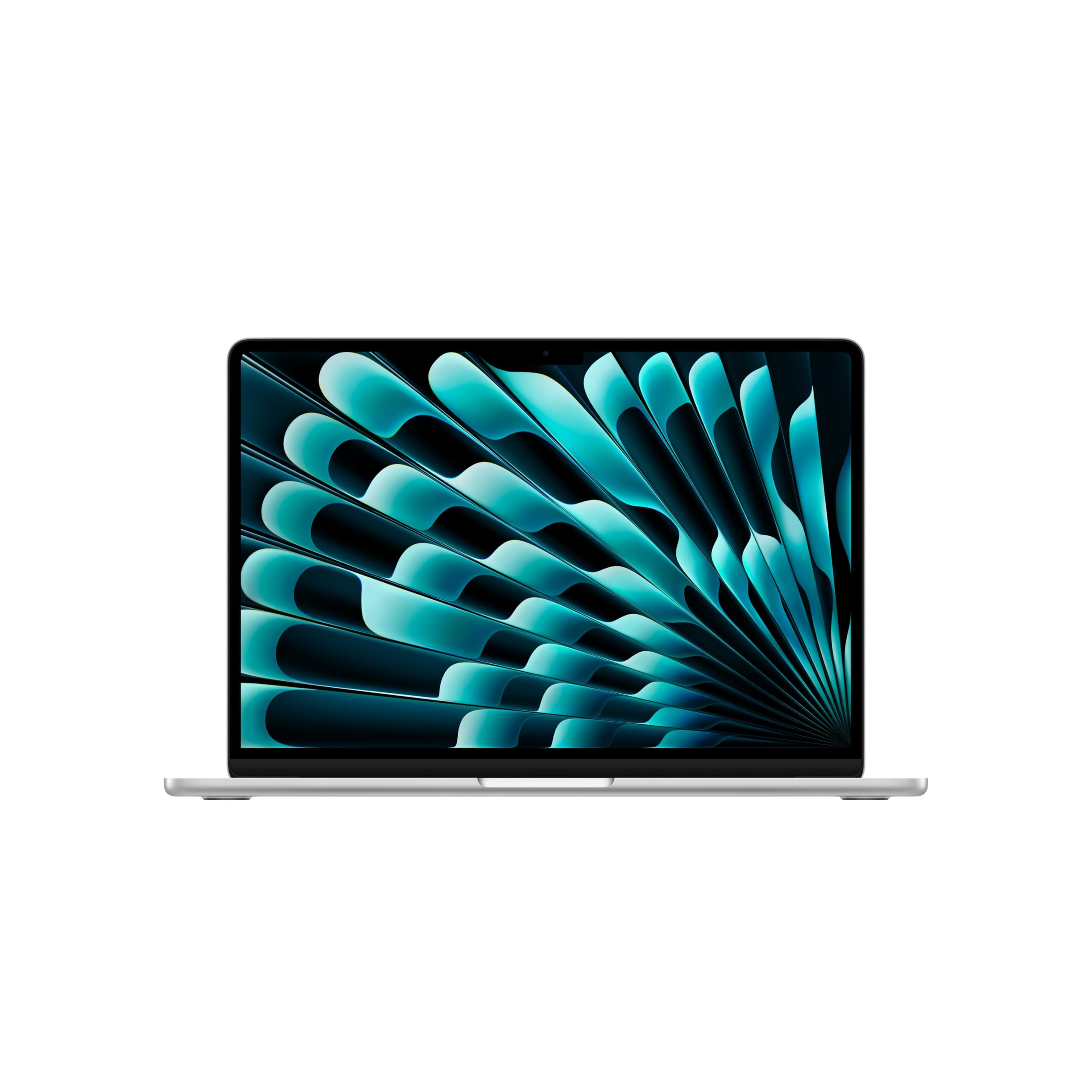
The Apple MacBook Air with the M5 chip redefines what a 16GB ultrabook can deliver. Its unified memory architecture lets the CPU and GPU access the same pool simultaneously, eliminating the latency of traditional RAM and enabling fluid multitasking across a dozen apps. With up to 18 hours of battery life and a completely silent fanless design, this machine handles heavy browser workloads, light video editing, and even some AI-powered tasks without ever feeling warm or sluggish.
The 13.6-inch Liquid Retina display supports 1 billion colors at a crisp pixel density, making text razor-sharp and gradients smooth. The 12MP Center Stage camera automatically keeps you centered during video calls, while Wi-Fi 7 and Bluetooth 6 future-proof connectivity. At just 2.7 pounds, it disappears into a bag and lasts an entire workday on a single charge — a combination no Windows competitor at this weight matches.
Where the MacBook Air shows its limits is sustained high-load tasks like 4K video rendering or hardcore gaming, where the lack of active cooling causes thermal throttling after extended periods. The 512GB SSD is fast but fills quickly if you store local media; the 1TB variant addresses that. For 90% of users, this is the most balanced 16GB laptop on the market today.
Why it’s great
- Silent fanless operation with all-day battery life
- Stunning 1-billion-color Liquid Retina display
- 12MP Center Stage camera and Wi-Fi 7 support
Good to know
- No fan cooling limits sustained CPU/GPU loads
- Only two Thunderbolt 4 ports; requires hub for USB-A
- 512GB base storage fills fast for media work
2. Samsung Galaxy Book5 Pro 360

The Galaxy Book5 Pro 360 sets a new benchmark for 2-in-1 Windows laptops with its stunning 16-inch Dynamic AMOLED 2X touchscreen. At 2880×1800 resolution with a 120Hz refresh rate, the display delivers deep blacks, vivid colors, and buttery-smooth scrolling — ideal for artists using the included S Pen or for watching HDR content. The Intel Core Ultra 7 processor with its integrated Intel Arc graphics handles creative workloads like Photoshop and light 1080p video editing without stutter.
Battery life reaches up to 25 hours on a single charge in mixed use, which is exceptional for a high-resolution AMOLED panel. The 360-degree hinge lets you switch between laptop, tent, and tablet modes seamlessly. Samsung’s ecosystem integration with Phone Link and Quick Share makes file transfers and notifications between your phone and laptop effortless. The quad-speaker setup with Dolby Atmos produces clear, room-filling audio for media consumption.
The keyboard deck can feel slightly warm under sustained load, and the glossy AMOLED panel reflects overhead lights aggressively, making outdoor visibility a challenge without max brightness. The Core Ultra 7’s integrated graphics, while capable, won’t run modern AAA titles at playable frame rates — this is a creator’s machine, not a gamer’s. Users seeking a convertible for both productivity and art will find few competitors that match this package.
Why it’s great
- Best-in-class 3K AMOLED 120Hz touchscreen with S Pen
- Exceptional 25-hour battery life
- Versatile 360-degree hinge and seamless Samsung ecosystem
Good to know
- Glossy display suffers from reflections outdoors
- Integrated Arc graphics not suitable for AAA gaming
- Keyboard deck warms under sustained load
3. ASUS ROG Strix G16 (2025)

The ASUS ROG Strix G16 targets gamers who need a 16GB laptop with a dedicated GPU to drive modern titles at high frame rates. The RTX 5060 with 8GB of GDDR6 VRAM delivers smooth 1080p gameplay at ultra settings, achieving 77-148 fps in demanding MMOs and over 110 fps in modern shooters after driver tuning. The Intel Core i7-14650HX processor with 16 cores ensures no CPU bottleneck during gaming or live streaming. The 16-inch FHD+ display runs at 165Hz with a 3ms response time, featuring an ACR film that reduces glare and enhances contrast without sacrificing motion clarity.
Thermal management is a standout: ROG’s tri-fan cooling system with a vapor chamber and Conductonaut Extreme liquid metal on the CPU keeps temperatures under control even during extended sessions. The bottom panel runs warm but the keyboard deck stays comfortable. The full-surround RGB lightbar and per-key RGB keyboard allow customizable lighting profiles, while Stealth Mode turns everything off for a professional look in public.
The main drawback is battery life — roughly 2 hours under gaming load and 5-6 hours for light browsing, which forces you to stay plugged in for serious play. The 16GB of DDR5-5600MHz RAM is adequate but not upgradable past 32GB on this board. Build quality is solid but the plastic chassis feels less premium than aluminum rivals at this price. For dedicated gamers who want a portable desktop replacement, this remains a top contender.
Why it’s great
- RTX 5060 delivers high-fps 1080p gaming
- 165Hz FHD+ display with fast 3ms response
- Advanced tri-fan vapor chamber cooling system
Good to know
- Battery life drops to ~2 hours during gaming
- Plastic chassis feels less premium than metal builds
- RAM is not easily upgradable past 32GB
4. Dell Inspiron 16 Plus 7640

The Dell Inspiron 16 Plus 7640 brings a sharp 16-inch 16:10 2.5K (2560×1600) display with a 120Hz refresh rate to the mid-range segment, a rarity at this price. The taller 16:10 aspect ratio lets you see more rows in spreadsheets and more code lines without scrolling. The Intel Core i7-13620H with 10 cores (6P+4E) provides ample power for multitasking, content creation, and even some light gaming at the native resolution, though the Intel UHD integrated graphics won’t run demanding 3D apps smoothly.
The Ice Blue aluminum chassis feels premium and passes MIL-STD-810H durability tests. Dell ComfortView Plus hardware reduces blue light emissions while preserving color accuracy, making long work sessions easier on the eyes. The 64Wh battery delivers around 8-10 hours of mixed use, and the included 100W USB-C adapter charges quickly. The keyboard and trackpad receive frequent praise for their near-Apple precision.
The main tradeoff is the integrated GPU: while fine for productivity and streaming, it struggles with even moderate gaming at 2.5K resolution, forcing you to drop to 1080p. The laptop has a limited port selection — two USB-C (one for power), one USB-A, and no Thunderbolt 4. The 120Hz refresh rate also places extra load on the integrated GPU during normal scrolling, causing occasional micro-stutter unless you manually lower it to 60Hz. For office productivity and media consumption at a sharp resolution, this is a strong mid-range pick.
Why it’s great
- 2.5K 120Hz 16:10 display at a mid-range price
- MIL-STD-810H certified durable aluminum chassis
- Dell ComfortView Plus for reduced eye strain
Good to know
- Integrated UHD graphics unsuitable for gaming
- Limited port selection with no Thunderbolt 4
- 120Hz can cause micro-stutter on integrated GPU
5. Dell 16 Plus DB16250

The Dell 16 Plus DB16250 pushes beyond the typical 16GB laptop by packing 32GB of LPDDR5X-8533 memory, ensuring your RAM never becomes the bottleneck even with dozens of browser tabs, virtual machines, or large datasets. The Intel Core Ultra 9 288V processor features a dedicated AI engine that accelerates tasks like real-time photo masking and background blur in video calls. The 16-inch 16:10 2.5K (2560×1600) display provides ample real estate for complex spreadsheets and coding windows.
At just 2.5 pounds, this laptop is remarkably light for its performance tier, making it easy to carry between office and home. The Intel Arc integrated graphics, while not a gaming GPU, handle 4K video playback and light photo editing without lag. Dell includes a 1-year Onsite Service warranty, which means a technician visits your location for hardware issues — a useful safety net for a work-critical device. The backlit Copilot key provides one-touch access to Microsoft’s AI assistant.
The biggest compromises come from its slim design: there is only a single USB-A port, and the soldered RAM cannot be upgraded later. The keyboard, while backlit, uses a shallow key travel that typists may find unresponsive. The speakers are adequate for podcasts but lack bass for music. For professionals who prioritize portability and memory bandwidth over GPU power and upgradeability, this is an excellent high-end choice.
Why it’s great
- 32GB LPDDR5X-8533 memory at an ultra-light 2.5 lbs
- Intel Core Ultra 9 with dedicated AI acceleration
- 1-year Onsite Service warranty included
Good to know
- Soldered RAM, no future upgrade path
- Only one USB-A port requires adapters
- Shallow keyboard travel and weak speakers
6. Apple MacBook Air 13″ Laptop with M5 chip (1TB)
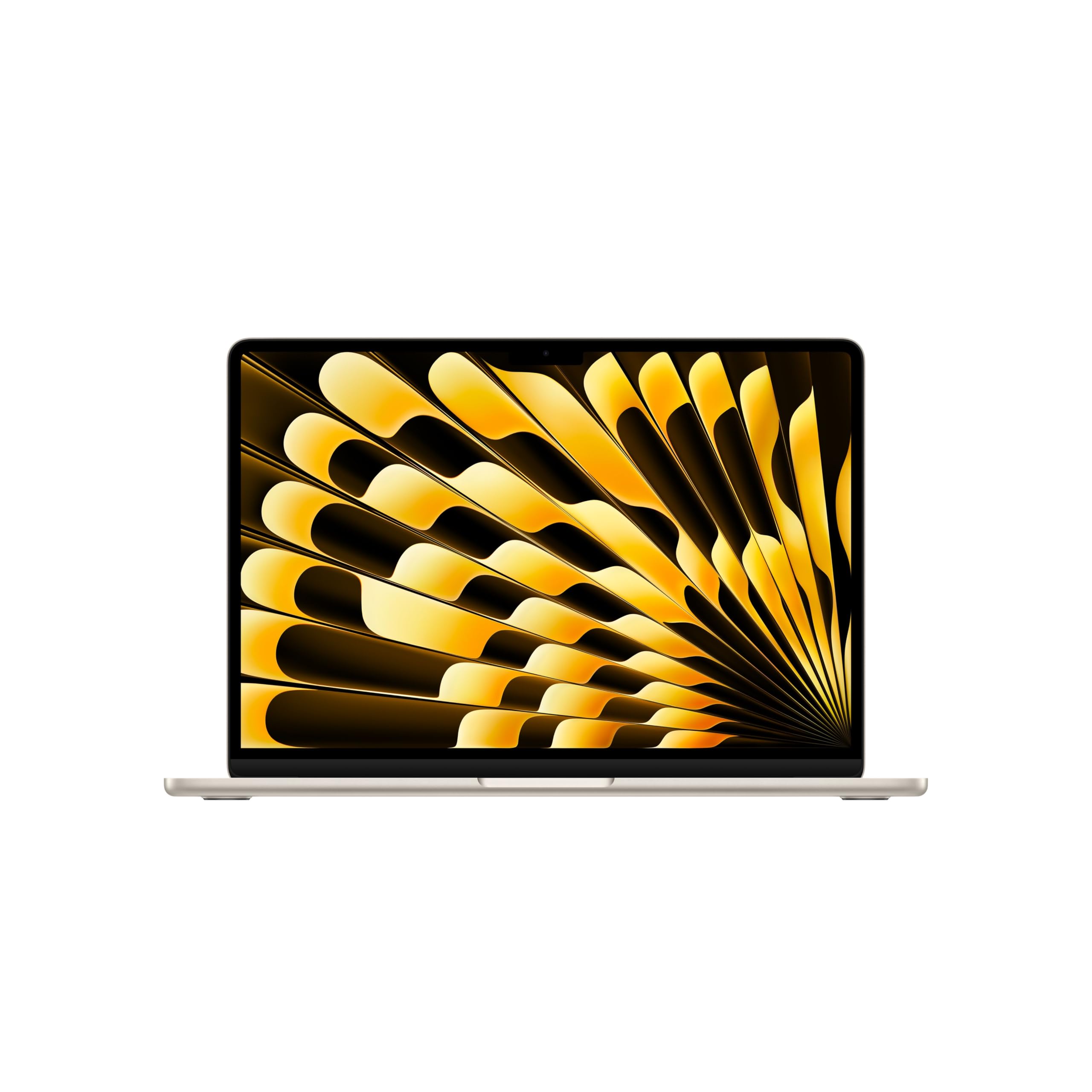
The 1TB variant of the MacBook Air M5 eliminates the storage anxiety of the base 512GB model, providing ample room for a local photo library, Xcode projects, and a growing collection of apps without needing external drives. All the core strengths of the M5 chip carry over: silent fanless operation, 18-hour battery life, and a 13.6-inch Liquid Retina display that supports 1 billion colors. The 16GB unified memory keeps app switching instant, even with 20+ tabs open alongside video editing software like DaVinci Resolve.
Starlight is the standout color option, offering a warm champagne-like finish that resists fingerprints better than Midnight. The 12MP Center Stage camera with Desk View allows you to show your physical workspace during calls — a useful feature for remote collaboration. Wi-Fi 7 and the Apple N1 chip ensure future-proof wireless speeds, with real-world tests showing ~950 Mbps both up and down on compatible routers.
The extra storage cost pushes the total into premium territory, and you still face the same port limitation of only two Thunderbolt 4 connectors (plus MagSafe). Users moving from older MacBook Pros will need a USB-C hub for legacy accessories. The 60Hz display refresh rate feels less smooth compared to the 120Hz panels on competing Windows ultrabooks, though macOS animations compensate somewhat. For Apple ecosystem users who need local storage without dongles, this is the refined choice.
Why it’s great
- 1TB SSD eliminates the need for external drives
- Silent fanless operation with 18-hour battery life
- Wi-Fi 7 and 12MP Center Stage camera
Good to know
- Significant price premium over the 512GB base model
- Only two Thunderbolt 4 ports; requires adapter for USB-A
- 60Hz display lags behind 120Hz ultrabook competitors
7. HP 17.3 inch Laptop

The HP 17.3-inch laptop delivers the expansive screen real estate that spreadsheet users and home media consumers crave, without requiring a premium investment. The 1600×900 HD+ anti-glare display reduces reflections, making it usable near windows or under office lighting. The AMD Ryzen 5 7520U processor with 4 cores and 8 threads provides enough grunt for web browsing, Office 365, and streaming 4K video, while the 16GB of LPDDR5 RAM ensures smooth multitasking across a dozen tabs and background apps.
The lift-hinge design elevates the keyboard for a more comfortable typing angle, and the full-size keyboard with numeric keypad makes data entry efficient. HP True Vision HD camera with a physical privacy shutter gives you control over your webcam, while AI noise reduction filters out background chatter during calls. The 17.3-inch chassis contains a 41Wh battery that delivers around 5.5 hours of mixed use — shorter than smaller ultrabooks but reasonable for a large-screen device.
The primary drawback is the display resolution: 1600×900 looks noticeably softer than the Full HD panels found on similarly priced 15-inch rivals. Text and icons appear less sharp, which affects readability during long work sessions. The plastic construction feels sturdy but lacks the premium rigidity of aluminum builds. For users who prioritize a massive display and numeric keypad over pixel density and build polish, this is the most affordable 17-inch 16GB option.
Why it’s great
- 17.3-inch anti-glare screen for less eye fatigue
- Full keyboard with numeric keypad for data entry
- Physical webcam shutter and AI noise reduction
Good to know
- 1600×900 resolution is less sharp than FHD panels
- Plastic chassis lacks the feel of metal builds
- Battery life averages only 5.5 hours
8. Lenovo IdeaPad Slim 3X

The Lenovo IdeaPad Slim 3X introduces the Snapdragon X processor — an ARM-based chip built on a 4nm process that delivers remarkable power efficiency. With a 60Wh battery, this laptop achieves up to 15 hours of real-world mixed use, making it one of the longest-lasting 16GB Windows laptops available. The 45 TOPS NPU handles AI-assisted Copilot+ features like real-time meeting summaries, file search, and background blur without taxing the main CPU.
The 15.3-inch WUXGA (1920×1200) 16:10 display provides more vertical space than standard 1080p panels, reducing scrolling in documents and web pages. The chassis uses a premium-grade metal that passes MIL-STD-810H durability tests, and the physical webcam shutter combined with a fingerprint reader provides solid security. The Snapdragon X’s ARM x86 emulation handles most productivity apps smoothly, though some legacy x86 software may see slightly reduced performance versus native ARM apps.
The main limitation is software compatibility: some niche Windows applications, drivers for older printers, or specific games built for x86 may not run correctly under emulation. The 512GB SSD is adequate but not expandable, so users with large local libraries should plan carefully. The Snapdragon X’s integrated Adreno GPU is fine for 4K video and light photo editing but can’t match Intel Arc or AMD Radeon graphics for gaming. For battery-first users who work primarily in modern web apps and Office, this is a breakthrough.
Why it’s great
- Exceptional 15-hour battery life from 60Wh cell
- MIL-STD-810H certified metal chassis
- 45 TOPS NPU for Copilot+ AI features
Good to know
- ARM chip may struggle with legacy x86 apps and games
- Integrated Adreno GPU is not for serious gaming
- 512GB SSD is not user-expandable
9. Acer Aspire Go 15 AI Ready Laptop

The Acer Aspire Go 15 delivers outstanding price-to-performance by pairing a powerful AMD Ryzen 7 7730U processor with 16GB of DDR4 memory and a 512GB PCIe Gen 4 SSD. The Ryzen 7 features 8 cores and 16 threads, making it a multitasking monster that can handle 20+ browser tabs, Office apps, and even light gaming (like Sims 4 or Cities Skylines) without hesitation. The 15.6-inch Full HD IPS display provides sharp text and good viewing angles, enhanced by Acer BluelightShield to reduce eye strain.
The USB-C port supports full functionality for charging and display output, while Wi-Fi 6 and Bluetooth 5.1 ensure modern wireless connectivity. Acer’s PurifiedVoice AI noise reduction improves video call clarity, and the Copilot key provides one-touch access to Microsoft’s AI assistant. The laptop runs cool and quiet under everyday loads, with the fan rarely spinning up audibly during office tasks.
Where the Aspire Go 15 makes compromises is build quality: the all-plastic chassis feels hollow and flexes under pressure, and the 720p webcam is disappointingly low-resolution for video calls. The 16GB DDR4 memory is slower than the LPDDR5 found in newer premium models, though the real-world difference is minimal for most productivity tasks. For buyers on a strict budget who need raw CPU performance and a sharp FHD display, this laptop punches far above its price class.
Why it’s great
- Ryzen 7 7730U with 8 cores for heavy multitasking
- Sharp 15.6-inch FHD IPS display
- USB-C with full function and Wi-Fi 6
Good to know
- Plastic chassis feels hollow and flexible
- 720p webcam is low-res for modern video calls
- DDR4 RAM is slower than LPDDR5 alternatives
10. HP 15.6″ FHD Laptop 2026 Edition

The HP 15.6-inch 2026 Edition focuses on storage capacity and portability for students who need to carry a full semester’s worth of files. The 1TB PCIe NVMe SSD provides lightning-fast boot times and ample room for lecture recordings, textbooks, and project files without worrying about space. The Intel N100 processor delivers adequate performance for web browsing, Office 365, and streaming, while the 16GB of RAM ensures you can keep 10-15 tabs open alongside video calls without slowdown.
At just 3.64 pounds, this is one of the lightest 15-inch laptops in this price range, making it comfortable to carry across campus. Wi-Fi 6 ensures stable connections in crowded lecture halls, and the full-size keyboard with numeric keypad aids data entry. The anti-glare 1080p display reduces reflections, and the included lifetime Office for web access covers basic word processing and spreadsheet needs out of the box.
The Intel N100 is a low-power Alder Lake-N chip with only 4 efficiency cores, which means it lacks the performance headroom for anything beyond basic multitasking. Video editing, large dataset manipulation, or running multiple virtual desktops will cause stutter. The plastic build feels less durable than HP’s premium Envy or Spectre lines. For students whose workload is limited to Office, Google Docs, video streaming, and online classes, this laptop offers the most storage per dollar of any 16GB model.
Why it’s great
- Massive 1TB SSD for storing all coursework locally
- Ultra-light 3.64 lbs for easy campus carry
- Wi-Fi 6 and anti-glare display for class environments
Good to know
- Intel N100 low-power chip limits performance ceilings
- Plastic construction lacks premium durability
- Not suitable for video editing or heavy multitasking
11. Lenovo V15 Laptop

The Lenovo V15 targets business users and IT departments who need a reliable, no-frills 16GB laptop with professional-grade features. The AMD Ryzen 5 5500U with 6 cores and 12 threads provides ample performance for Office 365, web conferencing, and accounting software, while the 16GB of DDR4 RAM handles multiple browser tabs and background syncs without complaint. The inclusion of Windows 11 Pro unlocks features like Remote Desktop, BitLocker encryption, and Group Policy management — essential for corporate environments.
The 15.6-inch FHD (1920×1080) display offers adequate sharpness for document work, though color accuracy and brightness are basic. The full keyboard with numeric keypad and a dedicated RJ45 Ethernet port makes it easy to connect to wired office networks without dongles. The physical build is utilitarian but durable, with good keyboard feel and a touchpad that works reliably. The 512GB PCIe Gen 3 SSD boots Windows in under 15 seconds.
The biggest compromise is battery life: the 45Wh battery delivers only about 3-4 hours of real-world mixed use, which falls short of even budget ultrabooks. The display quality is mediocre, with poor viewing angles and low peak brightness that makes outdoor use difficult. The plastic chassis feels basic, with noticeable flex around the keyboard deck. For budget-conscious businesses or home office users who need Windows 11 Pro and stay plugged in most of the day, this is a functional, affordable choice.
Why it’s great
- Windows 11 Pro with remote desktop and BitLocker
- RJ45 Ethernet port for wired office networks
- Reliable keyboard and touchpad for daily use
Good to know
- Poor battery life — only 3-4 hours of mixed use
- Mediocre display with low brightness and narrow viewing angles
- Plastic chassis flexes under keyboard pressure
FAQ
Will 16GB of RAM be enough for the next five years?
Is there a difference between 16GB of DDR4 vs DDR5 in a laptop?
Why do some 16GB laptops feel slower than others with the same RAM?
Can I upgrade the RAM in my 16GB laptop later?
Does a 16GB laptop with integrated graphics work for light gaming?
Final Thoughts: The Verdict
For most users, the 16gb laptop winner is the Apple MacBook Air 13″ M5 (512GB) because it combines silent fanless operation, industry-leading battery life, and a gorgeous 1-billion-color display in a package lighter than most Windows competitors. If you need a versatile touchscreen with a stylus for creative work, grab the Samsung Galaxy Book5 Pro 360. And for high-fps gaming on the go, nothing beats the ASUS ROG Strix G16 with its RTX 5060 and 165Hz display.