
Our readers keep the lights on and my morning glass full of iced black tea. As an Amazon Associate, I earn from qualifying purchases.
Specs are compiled from manufacturer listings and verified buyer reviews and can change over time — please confirm the key details on the product page before buying.
Editing 4K footage on a machine with too little memory is a specific kind of misery: your timeline stutters, previews drop frames, and your editor freezes right as you hit a deadline. Adding 16GB of RAM is the single most effective upgrade you can make to a desktop that chokes on multi-track timelines and heavy effects stacks. This guide focuses entirely on 16GB DDR4 kits—the capacity balance for getting a smooth, crash-free editing experience without emptying your wallet.
I’m Min — the founder and writer behind Gadgets Feed. This guide is built by comparing the manufacturers’ published specifications and the patterns across verified customer reviews, so you get each pick’s real strengths and trade-offs instead of marketing spin.
Here are the best 16gb ram for video editing kits, ranked for speed, stability, and real-world performance on the timeline.
Our Picks at a Glance


How To Choose The Best 16GB RAM For Video Editing
Picking RAM for editing is different from picking it for gaming. Your editor needs memory bandwidth to feed the CPU and GPU preview frames, plus capacity to hold your timeline and assets. Before you buy, check two things: what generation your motherboard takes (DDR4 or DDR5) and how many slots it has free.
Dual-channel vs. single-stick
A 2x8GB kit runs in dual-channel mode, which means the CPU can read and write to two sticks at once. That gives you a real bandwidth boost during scrubbing and playback—the exact moments when editing feels slow. A single 16GB stick is easier to upgrade later, but it costs you immediate performance now.
Speed vs. timings
Higher MHz means faster data transfer, but lower CL (Column Address Strobe latency) means the RAM responds faster to requests. For editing, a 3200MHz CL16 kit is the balance for most Intel and AMD systems. You can enable XMP (Extreme Memory Profile) in the BIOS to run the RAM at its rated speed; without it, the kit runs at a slower default speed.
Clearance and cooling
If you have a large tower-style CPU cooler, tall heat spreaders on RAM can block it. Look for low-profile kits (around 34mm or less) if you’re working in a small form factor case or with a big air cooler. Standard kits without flashy spreaders also run fine since RAM rarely needs active cooling unless you overclock heavily.
Quick Comparison
| Model | Best For | Speed | Latency (CL) | Config | Amazon |
|---|---|---|---|---|---|
| CORSAIR Vengeance LPX★ Best Overall | Overall editing stability | 3200 MHz | 16 | 2x8GB | Amazon |
| G.SKILL RipjawsV 3200Top Performer | Reliability & value | 3200 MT/s | 16 | 2x8GB | Amazon |
| G.SKILL RipjawsV 3600AMD balance | AMD Ryzen builds | 3600 MT/s | 18 | 2x8GB | Amazon |
| Patriot Signature Line | Budget builds | 2666 MHz | 19 | 2x8GB | Amazon |
| Silicon Power Value | Basic editing | 3200 MHz | 22 | 2x8GB | Amazon |
| OLOy | Value dual-channel | 2666 MHz | 19 | 2x8GB | Amazon |
| PNY Performance | Single-slot upgrades | 3200 MHz | 22 | 1x16GB | Amazon |
| A-Tech | Simple swap-in | 2666 MHz | 19 | 1x16GB | Amazon |
| Crucial | Mixed-slot expansion | 3200 MHz | 22 | 1x16GB | Amazon |
In-Depth Reviews
1. CORSAIR Vengeance LPX DDR4 RAM 16GB (2x8GB) 3200MHz
Our pick — over 4.5★ from 5,500+ verified ratings; the strongest balance of quality and price.
The most reliable RAM for a video editing rig, with dozens of stability mentions backing it up.
The Vengeance LPX is the kit you install and never think about again—which is exactly what you want when rendering a long timeline. It runs at 3200 MHz with a tight CL16 latency, and buyers report that enabling XMP hits the full 3200MHz speed with zero instability. The crowd favorite here is the kind of kit that gives an older desktop “new life,” as a long-term user describes it.
What wins people over is its rock-solid reliability—the thing editors need most when a project is due. At just 20 g per module, it’s also one of the lightest kits in this roundup, and its short 34mm height means it slides under bulky CPU coolers without a clearance fight. The aluminum heat spreader keeps temperatures low even during long render sessions.
For editing specifically, the 3200MHz CL16 combination delivers snappy preview playback and quick scrubbing. It’s the kind of performance jump that one owner described as getting an extra 100 FPS in some games—a side benefit for a workstation you might also game on. The trade-off is that this is a mid-to-premium-priced kit, so you’re paying for that proven dependability.
Editor-Backed Strengths
- Runs at full 3200MHz CL16 with a simple XMP toggle
- Short 34mm height clears large CPU coolers
- Solid aluminum heat spreader keeps render temps down
Worth Knowing
- Sits at a premium price point for DDR4
- Maximum rated speed requires BIOS overclocking
Reach for it if: you want a set-and-forget kit that holds its speed and stability through the longest render queues.
Know upfront: you’ll need to enter the BIOS to enable XMP and open up the full 3200MHz speed.
2. G.SKILL RipjawsV Series 16GB (2x8GB) 3200MT/s CL16
A matched 2x8GB kit that editors and builders trust for consistent performance.
The RipjawsV 3200 kit is the other heavyweight in this category, carrying CL16-18-18-38 timings at 1.35V. Owners mention that the BIOS immediately detects it as a four-channel setup on some boards, and the kit is frequently praised as a fix for other brands’ faulty memory—even passing memtest86 three times with zero errors. That’s the kind of verification you want before a long editing session.
It comes with both a JEDEC default profile and an Intel XMP overclock profile, so it boots safely from the start and only hits its rated speed once you enable XMP. At 100 g, it’s a heavier, more substantial kit than the Corsair, but that weight comes from a sturdier build. It’s designed to run together as a matched set, and G.SKILL explicitly warns against mixing it with other kits—so buy it as your full 16GB solution.
Where this kit shines for editors is its balance of value and performance. It’s slightly lighter on the wallet than the Corsair while offering the same speed and tighter build quality. The only caveat is a smaller but honest one: some users found they needed to manually adjust the memory speed in the BIOS to reach the rated 3200MT/s rather than having it auto-detect.
Standout spec: the CL16-18-18-38 latency profile gives you the same tight response as our top pick at a friendlier price.
Fit note: if your rig has failed RAM before, this kit’s track record at passing memory tests makes it a safe replacement choice.
Best matched for: builders who want a proven, matched dual-channel kit that won’t fight them on stability.
The single check: confirm your motherboard’s QVL list supports this exact model before you commit.
3. G.SKILL RipjawsV Series 16GB (2x8GB) 3600MT/s CL18
The faster sibling for Ryzen builds, delivering 3600 MT/s with an easy DOCP toggle.
If you’re on a modern AMD platform, this 3600MT/s version of the RipjawsV is the one to grab. It’s the same proven family as our second pick but rated for a 20% higher transfer rate—3600 MT/s versus 3200 MT/s—which pairs beautifully with Ryzen’s architecture. One buyer running DOCP at 3600 reported it “seems stable,” and the kit is praised for having good performance straight from the start without heavy configuration.
The spec sheet spells out why this matters for editors: CL18-22-22-42 timings at 1.35V, with both JEDEC and XMP profiles included. The latency is a bit looser than the 3200 CL16 kit, but the higher frequency more than compensates for memory-heavy workloads like scrubbing through 4K timelines. Enabling XMP is described as an overclocking act that requires BIOS adjustment, but owners say it’s a quick toggle.
The honest caveat here is reliability—a small but real thread in the feedback mentions failures within roughly 10 months of use. That’s not a pattern you see across all owners, but it’s why you should keep your receipt and rely on the lifetime warranty. For the price, the performance-per-dollar is hard to argue with for those chasing maximum speed from a Ryzen build.
High-Frequency Perks
- 20% faster transfer rate than 3200MT/s kits
- DOCP enables full speed on AMD boards
- Same proven RipjawsV build family
Honest Caveat
- Looser CL18 latency than the 3200 CL16 kit
- A minority of customers note early failures
Ideal for: AMD builders who want the full 3600MT/s speed their platform is capable of.
Guardrail: verify your board’s DOCP/XMP support before buying, or you’ll run at a slower default speed.
4. Patriot Signature Line DDR4 RAM 16GB (2x8GB) 2666MHz

Budget-friendly dual-channel RAM that keeps a four-year-old editing PC feeling quick.
For editors on a strict budget, the Patriot Signature Line delivers honest 2666MHz performance with no gimmicks. It’s a bare-bones kit—no heat spreaders, just sturdy dual-sided boards—which is actually a plus if you’re working around a massive air cooler. One owner reports it’s been stable for 2 months in a Ryzen 1800X system, detected at 2667MHz with the full 16GB recognized.
The value story here is strong: at 44 g for the pair, it’s more than twice the weight of the Corsair kit above, but that heft doesn’t hurt performance. The timing is a 19-19-19-43 at a low 1.2V, which means less power draw and less heat. A tinkerer even tightened the CAS from 19 down to 16-17-17-35 using Ryzen Master, showing the kit has a little untapped headroom.
What this kit trades is speed—2666MHz is the slowest rating in this roundup, running about 20% slower than the 3200MHz kits. For straight timeline editing and basic effects, you won’t feel the gap. But if your projects involve heavy multi-cam sync or complex color grades, the faster kits above will reward you.
Why it’s a steal: it delivers the 16GB capacity and dual-channel bandwidth that editing demands, at the friendliest price in this list.
Compromise: the slower 2666MHz speed means it’s best for lighter projects, not marathon 4K sessions.
Reach for it if: your editing is light-to-medium and your priority is upgrading an older office PC without spending much.
Think twice if: you cut 4K multi-cam footage daily—the faster kits will save you real time.
5. Silicon Power DDR4 16GB Kit (2x8GB) 3200MHz CL22

Full 3200MHz speed at a budget price, ideal for anyone upgrading a system for basic editing.
Silicon Power’s kit is living proof that you don’t need to overspend to get 3200MHz out of your editing rig. It defaults to the full 3200MT/s transfer rate without needing an XMP toggle—a genuine convenience if you’re not comfortable poking around in the BIOS. Reviewers point out it runs smoothly alongside pre-installed chips of a different brand, which makes it forgiving for mixed setups.
The timing is a looser CL22-22-22-52, which is a measurable step behind the CL16 kits—the data shows a 38% gap in latency versus the Corsair Vengeance. In practice, that means it’s a touch slower to respond to requests, but for everyday editing and “light gaming builds” (as feedback describes it), the difference is subtle. It runs at a low 1.2V, complies with JEDEC standards, and each unit goes through strict testing before it ships.
There’s one specific compatibility quirk to know: a few owners found that a system wouldn’t boot with both sticks installed, though the same RAM worked fine with a single stick across two different motherboards and CPUs. It could be a bad module in rare cases, so buy from a seller with easy returns. The value is otherwise exceptional—several owners bought multiple sets for different builds and had all of them work without issues.
Budget Speed
- Runs at full 3200MHz without BIOS tweaking
- Plays nice when mixed with other RAM brands
- Low 1.2V power draw keeps heat down
Compatibility Note
- Looser CL22 latency than premium kits
- Rare cases of dual-stick boot issues reported
Pick this if: you want 3200MHz speed on a tight budget and don’t want to touch the BIOS.
Keep in mind: the slower latency means it’s a step behind pricier kits for heavy multi-tasking.
6. OLOy DDR4 RAM 16GB (2x8GB) 2666 MHz CL19

A dual-channel kit that runs at 2666MHz straight from the start, no overclocking needed.
OLOy’s Black Saturn kit earns its place as a solid entry-level option for editors who just need more memory, fast. The standout feature is that it runs natively at 2666MHz without requiring you to enable a memory overclock in the BIOS—one owner specifically bought it to replace a dead name-brand chip and it worked instantly. It’s compatible with both Intel and AMD systems, and the 29.4 g modules come with built-in heat sinks.
The dual-channel 2x8GB configuration is the right shape for editing, giving you the bandwidth boost that a single stick can’t match. One owner put it in a six-year-old computer and it “worked like a charm,” showing its forgiving compatibility. The timings are a standard 19-19-19-43 at 1.2V, which is efficient and cool-running.
The honest catch is reliability—the feedback is genuinely mixed, with some owners reporting sticks failing after a few months of use. It’s not a universal problem, but it’s more visible here than on pricier kits. The warranty is lifetime, so the risk is an inconvenience rather than a total loss, but if your editing workload is mission-critical, spending a bit more on the Corsair or G.SKILL is the safer call.
Easy win: native 2666MHz support means zero BIOS fiddling—just plug in and edit.
Reality check: the mixed reliability feedback makes this better for budget builds than for professional work.
Ideal for: hobbyist editors or secondary machines where price matters more than peak reliability.
Look elsewhere if: you’re editing client work where a failed stick means a missed deadline.
7. PNY DDR4 16GB (1x16GB) 3200MHz CL22
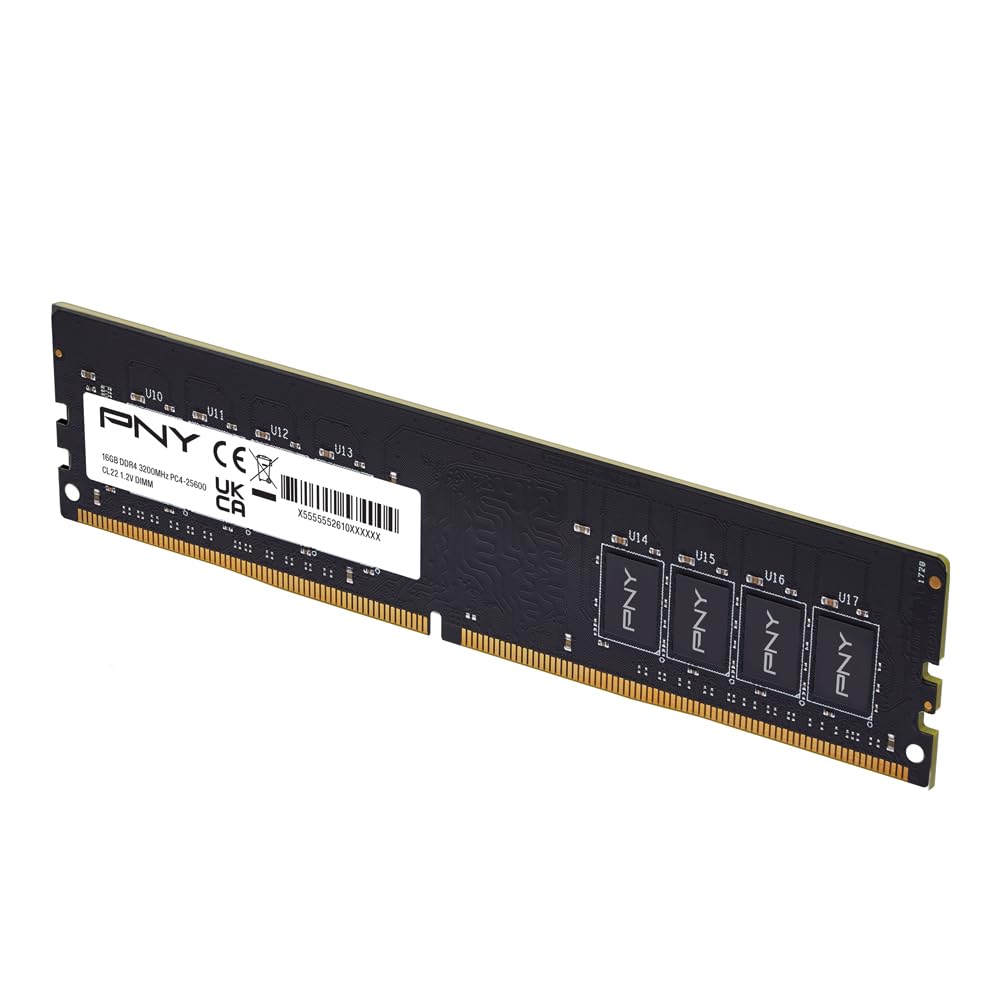
A single 16GB stick for adding capacity to an existing build without replacing your current RAM.
If you already have RAM in your system and just need more capacity for editing, this single 16GB PNY stick is the cleanest upgrade path. It’s rated at 3200MHz with a CL22 latency, and it’s backwards compatible with lower frequencies including 3000MHz, 2933MHz, 2666MHz, 2400MHz, and 2133MHz—so it will happily run at whatever speed your motherboard supports. One owner dropped it into a 2017 Dell and it locked securely with zero fuss.
The single-stick format is a deliberate trade-off: you lose dual-channel bandwidth, but you gain the ability to top up an existing machine to 24GB or 32GB. One editor added this to reach 32GB total and reports handling 20+GB of usage with over 100 browser tabs open, Outlook running, and no reboots—exactly the multitasking an editing workflow demands. It runs at a low 1.2V and is built for PC enthusiasts.
The catch is that as a lone stick, you won’t get the dual-channel performance boost that the 2x8GB kits deliver. For pure editing performance from scratch, a matched kit is better. But for filling an empty slot on a machine you already own, this is the right tool—and at 0.01 kg it’s practically weightless inside your case.
Upgrade-Friendly
- Fills one slot for easy capacity expansion
- Works across many lower frequency settings
- Trusted brand with easy installation
Performance Limit
- Single stick means no dual-channel bandwidth boost
- Looser CL22 latency than tighter CL16 kits
Best for: adding capacity to a working machine with a free slot, rather than building from scratch.
Skip it: if you’re building a fresh editing PC—a matched 2x8GB kit will serve you better.
8. A-Tech 16GB DDR4 2666 MHz UDIMM

A no-fuss single 16GB stick that boosts an older desktop’s multitasking in minutes.
The A-Tech 16GB module is about as simple as RAM upgrades get—designed for “easy installation at home, no expertise required,” and backed by a lifetime warranty with a friendly support team. It’s a single 16GB stick running at up to 2666MHz (2667MHz) with CL19 timings and a standard 1.2V. One owner describes popping it in and having Windows run better within five minutes, thanks to moving from single to dual-channel RAM.
That dual-channel point is key: if you already have one stick installed, adding this as a second module gives you the dual-channel bandwidth boost that editing software loves. One buyer went from 16GB to 32GB with this chip and reported everything works perfectly. It uses the JEDEC DDR4 standard, so it’s designed to be compatible across a wide range of desktop systems.
The limitation mirrors the PNY pick: on its own, a single stick won’t give you the same memory bandwidth as a matched pair. But A-Tech’s feedback shows it performing as expected with no reported issues, making it a reliable choice for a straightforward capacity boost. The 2666MHz speed is middle-of-the-road, fine for standard editing but not the fastest option here.
Easiest install: no expertise needed, no BIOS overclocking—just plug it into a free slot.
Best use case: pairing with an existing stick to open up dual-channel performance.
Choose this if: you want a low-maintenance, supported way to add 16GB to an existing setup.
Note: for a brand-new build, a matched 2x8GB kit is the better performance play.
9. Crucial RAM 16GB DDR4 3200MHz CL22

A flexible 3200MHz stick that safely downclocks for older systems while keeping things fast.
Crucial brings a well-known name to the single-stick category, with a 16GB module rated up to 3200MHz that automatically downclocks to 2933MHz or 2666MHz if that’s all your system supports. That flexibility makes it a safe bet for mixed-age hardware. One long-term owner has had it running for years alongside an RTX 4070 and R7 5800X, calling it fast enough to keep up for a while longer.
Installation is a known strong point—shoppers say adding it to a Dell XPS 8900 and having Windows 10 recognize the full new total instantly. One reviewer noted web pages loading about 25% faster after adding it to an i7 machine. The specs back up the marketing: the maker claims up to 32% higher bandwidth and up to 40% lower power consumption versus older memory, though those figures depend on your system.
The trade-off is the always-present single-stick limit: no dual-channel boost unless you pair it with a matching stick, and the CL22 latency is on the looser side. One owner noted their system ran it at 2133MHz, likely due to a motherboard cap, so check what your board supports. As a capacity expansion for a pre-built workstation, it’s a dependable pick from a trusted brand.
Why It Works
- Auto-downclocks for broad motherboard compatibility
- Trusted Crucial brand with proven longevity
- Simple drop-in installation
Limits
- Single stick misses dual-channel bandwidth
- Looser CL22 latency
Pick it for: a reliable single-stick expansion from a brand with a long track record.
Be aware: your motherboard might run it at a slower speed than its 3200MHz rating.
Understanding the Specs
Speed (MHz/MT/s)
This number tells you how fast the RAM can move data. A 3200MHz kit transfers roughly 20% more data per second than a 2666MHz kit (both numbers appear in our comparison). For video editing, higher speed means smoother timeline scrubbing and faster preview rendering—you feel it most when playback stutters less.
Latency (CL)
This is how quickly the RAM responds to a request, measured in clock cycles. A CL16 kit is faster to respond than a CL22 kit; the data shows a 38% latency gap between the Corsair (CL16) and Silicon Power (CL22) kits. Tight timings at high speed give you the best of both worlds, which is why 3200MHz CL16 is the editing balance.
Dual-Channel Config (2x8GB)
Two sticks running together let your CPU read and write to both at once, effectively doubling the data path. That’s why matched 2x8GB kits beat a single 16GB stick for editing performance. The trade-off is fewer free slots for future expansion.
XMP / DOCP Overclocking
XMP (Intel) and DOCP (AMD) are profiles stored on the RAM that tell your motherboard to run it at its rated speed. They’re enabled in the BIOS and count as a form of overclocking. Without enabling them, most kits run at a slower JEDEC default speed—so check your BIOS after install to get the speed you paid for.
FAQ
Is 16GB of RAM enough for video editing in 4K?
Should I get 2x8GB or 1x16GB for video editing?
Does RAM speed matter for video editing?
What does CL16 mean versus CL22?
Will 3200MHz RAM work in my older motherboard?
What is XMP and do I need to enable it?
Can I mix RAM from different brands?
Does RAM need a heat spreader for video editing?
How long does DDR4 RAM last?
Is 2666MHz RAM good enough for editing?
Final Thoughts: The Verdict
Across the board, the 16gb ram for video editing winner is the CORSAIR Vengeance LPX because it pairs the ideal 3200MHz CL16 speed with the highest reliability feedback in this category. If you want the same speed with a friendlier price tag, grab the G.SKILL RipjawsV 3200. And for a budget dual-channel build that still gets the job done, the Patriot Signature Line is the one to reach for.
How We Picked
We do not accept paid placement. Every pick is matched to a real buyer and a real use-case; we do not hands-on test units.
Sources & Methodology
Specifications: manufacturer listings and product documentation. Review insights: verified customer reviews, as of August 2026. Pricing: not shown on this page (it changes often); check the current price via the retailer link.
As an Amazon Associate, Gadgets Feed earns from qualifying purchases. This does not affect which products we feature.