
Our readers keep the lights on and my morning glass full of iced black tea. As an Amazon Associate, I earn from qualifying purchases.
Specs are compiled from manufacturer listings and verified buyer reviews and can change over time — please confirm the key details on the product page before buying.
If you are shopping for a 16K resin printer, you already know the resolution race is the whole game. The real question is whether that higher pixel count delivers visibly smoother surfaces and crisper edges on your finished models, or just a heavier price tag. This guide cuts through the spec-sheet noise to show which 16K machines deliver that detail reliably, and which ones leave you troubleshooting failed prints instead of painting miniatures.
I’m Min — the founder and writer behind Gadgets Feed. This guide is built by comparing the manufacturers’ published specifications and the patterns across verified customer reviews, so you get each pick’s real strengths and trade-offs instead of marketing spin.
You will learn exactly what separates a dependable 16K resin printer from a frustrating one, and how to choose the right build volume and features for your workshop. 16k resin printer choices are plentiful, but knowing which specs matter most is your ticket to a smoother printing experience.
Our Picks at a Glance

How To Choose The Best 16K Resin Printer
The jump to 16K is about more than a bigger number on the box. A 16K printer packs more pixels onto its LCD screen, which means finer detail on tiny features like faces, armor trim, and jewelry. But resolution is only one part of the reliability puzzle — you also need to weigh print speed, build size, and how much fuss the machine demands before every print.
Understand what 16K really means
On a 16K machine, the LCD screen holds roughly 15,120 × 6,230 pixels. That resolution translates into a pixel size (measured in microns) that determines the smallest detail your printer can render. Smaller micron values mean smoother surfaces and less visible layer lines, which is exactly what you want for display-quality models. Just remember that a larger build volume with the same pixel count means a coarser pixel size, so bigger print areas can trade away some fine detail.
Look at build volume and physical footprint
Your printer’s build volume dictates the maximum size of a single model — or how many smaller models you can fit in one run. A large machine like the Jupiter 2 lets you print bigger objects, but it also weighs 63.8 pounds and takes up serious bench space. A midsize machine like the Saturn 4 Ultra is more forgiving at 35.5 pounds and fits much easier into a home setup, making it the smarter pick if you mostly print tabletop miniatures.
Weigh automation features against reliability
Auto-leveling, heated resin tanks, and residue sensors sound great on paper, and they genuinely reduce the guesswork in daily printing. Smart tank heating keeps resin at a steady 30 °C for better flow and adhesion, which prevents bubbles and layer separation. But these automated systems are only as good as their electronics — and a few owners of these machines have reported failures in leveling sensors and screens, so check how well the brand handles support before you commit.
Quick Comparison
| Model | Best For | Resolution | Build Volume | Print Speed | Amazon |
|---|---|---|---|---|---|
| ELEGOO Saturn 4 Ultra★ Best Overall | Best Overall / Home users | 16K | Large | 150 mm/h | Amazon |
| Creality Halot-X1 Combo | Speed-focused printing | 15120×6230 | 211.68 × 118.37 × 200 mm | 170 mm/h | Amazon |
| ELEGOO Jupiter 2 | Large-format projects | 15120 × 6230 | 302.4 × 161.98 × 300 mm | — | Amazon |
In-Depth Reviews
1. ELEGOO Saturn 4 Ultra 16K Resin 3D Printer
Our pick — over 4★ from 300+ verified ratings; the strongest balance of quality and price.
The crowd favorite that prints quietly, levels itself, and keeps resin flowing at a perfect 30 °C.
For most home users, the ELEGOO Saturn 4 Ultra is the safest bet in this list — and with over three hundred ratings behind it, it is also the most proven. Its defining trick is smart tank heating that holds resin at a steady 30 °C, which keeps the liquid thin and improves layer adhesion so you see fewer bubbles and less layer separation. A built-in AI camera with a chamber light lets you check print progress day or night, and a time-lapse feature records your builds.
You do not need to be a tinkerer to get good results here. The machine handles auto-leveling with a single click, and its tilt release technology peels models off the film quickly — the maker rates it at up to 150 mm/h. Owners consistently describe it as quiet and reliable, and several note that failed prints are usually user error rather than a machine fault. The large build plate also supports bigger models, and the moving resin vat lets you use lighter supports.
The honest caveat is that a handful of units have arrived with electronic problems — screen failures, tank recognition errors, and a finicky WiFi module. The recurring gripe is the LCD screen, so treat the glass with care and update firmware cautiously. That said, the manufacturer’s support gets genuine praise for debugging issues and sending free replacement parts, which softens the reliability risk considerably.
What wins people over
- Smart tank heating keeps resin at 30 °C for consistent, bubble-free prints
- Quiet operation and smooth, highly detailed output straight from the box
- Auto-leveling with no manual adjustment needed, perfect for beginners
Who should think twice
- A small share of owners hit early electronics or LCD failures
- Firmware upgrades have been known to corrupt settings
- Resin emits VOCs — a vented enclosure is strongly recommended
Reach for this if: you want the best all-round balance of detail, ease, and support for a typical home resin setup.
Look elsewhere if: you expect flawless reliability from day one — a few units do arrive with defective screens.
2. Creality Halot-X1 Combo Resin 3D Printer, 10.1″ 16K Mono LCD, 14×19 μm
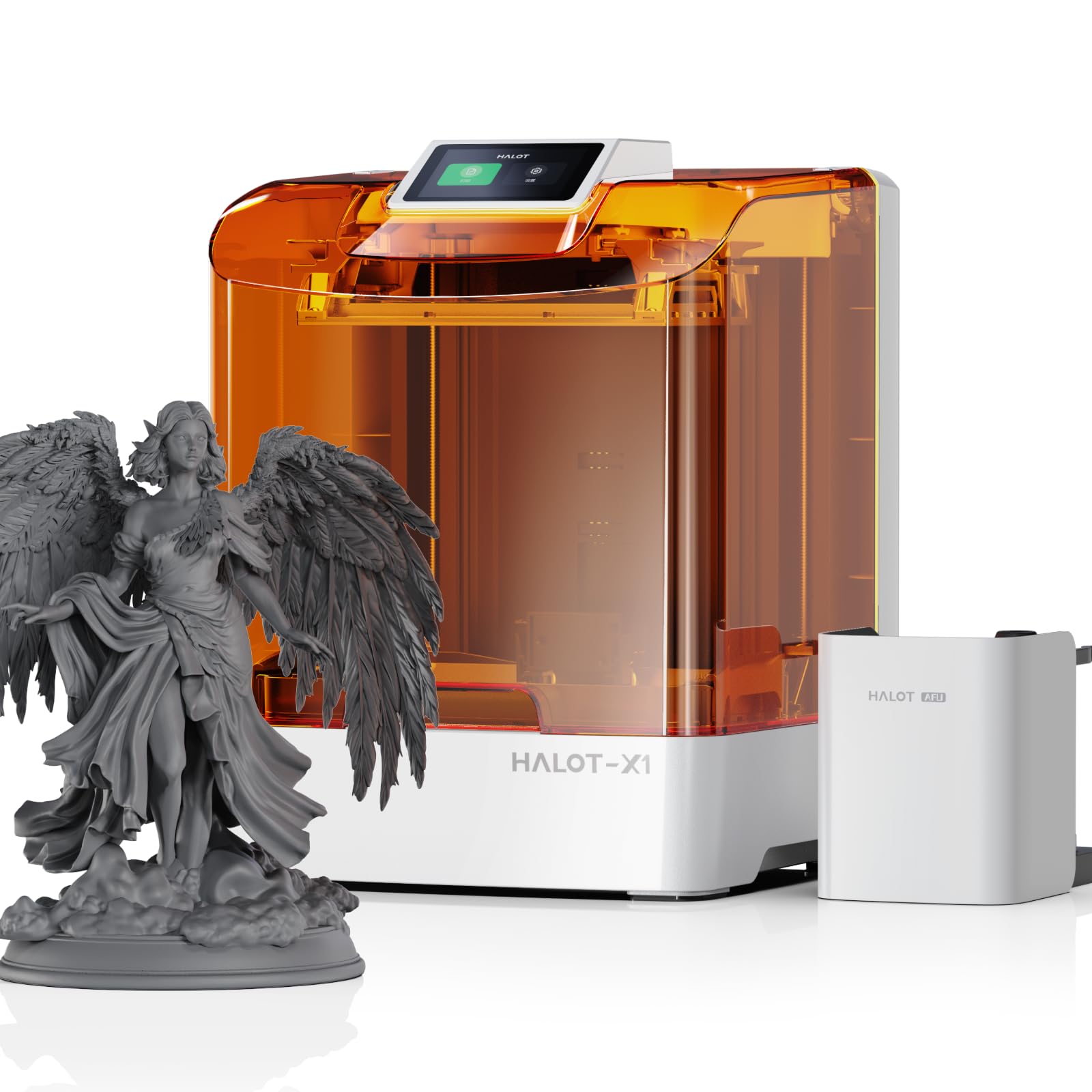
The fastest 16K on paper, with clever resin management — if you can live with its software growing pains.
The Creality Halot-X1 Combo is the speed king of this lineup, printing at up to 170 mm/h — a 13% faster pace than the Saturn 4 Ultra’s 150 mm/h. It packs a 10.1-inch 16K mono LCD at a 15120×6230 resolution with a tight 14×19 μm pixel size, which makes it a genuine contender for fine detail on display models. Build volume lands at 211.68 × 118.37 × 200 mm, smaller than the Jupiter 2 but plenty for most miniatures and busts.
You get a smarter workflow here because the Intelligent AFU Resin Management System (an automated resin handling setup) heats resin to 30–45 °C in about 3 minutes, reads resin parameters automatically via RFID tags (radio-frequency identification chips on the cartridge), and uses laser detection to feed and recycle leftover resin. A real-time weight monitor alerts you when material runs low. The Z-axis rides on dual linear rails and dual lead screws for 0.01 mm positioning precision, so layers stay consistent. The fixed build plate means no leveling is needed from the start — the structural design eliminates that step entirely, saving you setup time.
The catch is that the experience is not there yet. The few owners who got it working report “wonderful detailed characters” and find it very easy to use, but many more hit a wall: test prints succeed while user prints fail with “model data” and “abnormality” errors, and the Halot Box slicer (the software that prepares your 3D model for printing) crashes mid-slice. The recurring gripe is the software, so this is a printer for someone willing to wait for Creality to patch the slicing pipeline. If you need reliable prints today, you might skip this one until the software updates land.
Speed and smarts: the fastest print rate here plus RFID resin tagging, laser resin recycling, and self-heating — a genuinely advanced feature set.
Reality check: slicing software crashes and rejected files are the dominant owner story, so reliability is a wait-and-see situation until firmware matures.
Best if: you are an early adopter who values 170 mm/h speed and automated resin handling over turnkey reliability.
skip it if: you need dependable slicing today — the software failures are a real blocker for many owners.
3. ELEGOO Jupiter 2 Resin 3D Printer, 16K Large MSLA 3D Printing Machine

A 63.8-pound workhorse that prints the biggest models here without fear of light leaks.
The ELEGOO Jupiter 2 is the heavyweight of this group, built for large-format printing with a build volume of 302.4 × 161.98 × 300 mm — a 43% bigger envelope than the Creality Halot-X1’s 211.68 × 118.37 × 200 mm. That size lets you tackle bigger objects or batch multiple smaller models in one run, and at 27.95 x 20.08 x 19.29 inches it is still described as the smallest machine in its large-format class. It resolves to 15120 × 6230 pixels with a 20 × 26 μm XY resolution, so fine details stay sharp. The fully enclosed light source stops light leaks for even exposure, which means fewer failed prints from uneven curing.
Reliability is where this one shines for its fans. Owners who run it for production call it “the BEST large format resin printer on the market right now,” praising its simplicity, dependable operation, and the low cost of consumables — a 5-pack of PFA film runs about and a replacement LCD around, which is far cheaper than competing Phrozen parts. It also includes smart features like multi-point auto-leveling, tank heating that holds 30 °C, a resin shortage alarm, and an HDR camera (high dynamic range, for clear monitoring in any light). The 8 GB ROM and dual-band Wi-Fi support cluster management if you run multiple machines, so you can control them from one place.
But this is not a beginner’s machine. It weighs a substantial 63.8 pounds, and the lid comes off entirely rather than hinging open — a quirk for a printer this tall. The build plate is so large that only one competitor’s wash and cure station fits it with a print attached, and several buyers report print speed is slow, taking too long for each job. A few also warn of component failures and QC issues with replacement screens, so factor in tinkering and patience for adhesion on such a big FEP surface.
Bigger, not faster: the largest build volume and a fully enclosed light source deliver uniform exposure, but the trade-off is a slow pace that tests your patience.
Owner reality: those who love it call it the best large-format option around and praise cheap consumables; those who do not point to underdeveloped slicer software and slow print times.
Choose this if: you print large functional parts or production runs and want the cheapest consumables in the large-format space.
Think twice if: you are new to resin or want quick turnaround — this machine demands tweaking and patience.
Understanding the Specs
Resolution and micron pixel size
The “16K” label describes the pixel count on the LCD screen, but the number that really controls detail is the XY pixel size in microns. A smaller micron value means finer detail — the Creality Halot-X1’s 14×19 μm beats the Jupiter 2’s 20 × 26 μm for surface smoothness. The pixel size also shifts as build volume changes, since the same 15,000+ pixels get spread over a larger or smaller screen area.
Build volume and weight
Bigger build volume lets you print larger objects or batch more models per run, but it comes with real physical costs. The Jupiter 2’s 302.4 × 161.98 × 300 mm envelope demands 63.8 pounds of machine on your bench; the Saturn 4 Ultra drops that to 35.5 pounds with a still-generous plate. Match the print area to what you actually make — a 40% larger volume only helps if you need it.
Print speed in mm/h
Speed measures how fast the build plate moves through the resin, and it directly sets how long each job takes. The Halot-X1’s 170 mm/h is the quickest here, while the Saturn 4 Ultra runs at 150 mm/h, and the Jupiter 2 is slow enough that owners mention it. Faster speed matters most if you print in volume; for occasional miniatures, slow and reliable beats quick and fragile.
Auto-leveling and smart tank heating
Auto-leveling removes the most frustrating manual step in resin printing — the Saturn 4 Ultra levels itself with one click, and the Halot-X1 eliminates leveling entirely with a fixed plate. Smart tank heating keeps resin at a 30 °C balance so it flows better and adheres cleanly, cutting down on bubbles and layer separation. Both features reduce the failure rate for beginners, so you spend less time troubleshooting and more time printing.
FAQ
What does 16K resolution actually mean on a resin printer?
Is a 16K resin printer worth it over an 8K model?
How long does a 16K resin print take?
Do I need a heated resin tank for reliable prints?
How much bench space and weight should I plan for?
Is auto-leveling reliable on these printers?
Can I print multiple small models in one run?
What safety precautions do I need with a resin printer?
Final Thoughts: The Verdict
For most buyers, the 16k resin printer winner is the ELEGOO Saturn 4 Ultra because it pairs genuine 16K detail with smart tank heating, quiet operation, and a level of owner support that offsets its early electronics quirks. If you want the fastest prints and do not mind beta-testing software, grab the Creality Halot-X1 Combo. And for large-format production on a budget, the ELEGOO Jupiter 2 is the one to reach for — if you have the bench space and the patience.
How We Picked
We do not accept paid placement. Every pick is matched to a real buyer and a real use-case; we do not hands-on test units.
Sources & Methodology
Specifications: manufacturer listings and product documentation. Review insights: verified customer reviews, as of September 2026. Pricing: not shown on this page (it changes often); check the current price via the retailer link.
As an Amazon Associate, Gadgets Feed earns from qualifying purchases. This does not affect which products we feature.