
Our readers keep the lights on and my morning glass full of iced black tea. As an Amazon Associate, I earn from qualifying purchases.
Specs are compiled from manufacturer listings and verified buyer reviews and can change over time — please confirm the key details on the product page before buying.
If your 17-inch gaming laptop sounds like a jet engine the moment you launch a game, the right cooling pad can be the difference between a smooth session and a stuttering, throttled mess. The real challenge isn’t finding a pad — it’s cutting through the noise to find one that actually moves enough air under a big 17-inch chassis without sounding like a wind tunnel. This list sorts through the practical options, from budget-friendly multi-fan bargains to premium software-driven powerhouses, so you can match the pad to your laptop’s heat output and your own tolerance for fan hum.
I’m Min — the founder and writer behind Gadgets Feed. This guide is built by comparing the manufacturers’ published specifications and the patterns across verified customer reviews, so you get each pick’s real strengths and trade-offs instead of marketing spin.
Whether you’re a competitive gamer or a video editor with a hot-running workstation, a quality 17 inch laptop cooling pad is the best way to keep your hardware performing at its peak.
Our Picks at a Glance

How To Choose The Best 17 Inch Laptop Cooling Pad
Choosing a cooling pad for your 17-inch laptop starts with one question: how much heat does your machine produce, and how much fan noise can you tolerate? High-performance gaming laptops with top-tier GPUs (the graphics chips that render games) run hot, so you need a pad with serious airflow, not just flashy RGB lights.
Match Fan Count to Your Laptop’s Heat Output
Your laptop’s specs decide the fan setup you need. A thin ultrabook (a light, portable laptop) with a mid-range chip can get by with three quiet 120mm fans (about 4.7 inches across), but a beefy 17-inch rig running a 150W+ GPU (a graphics chip drawing over 150 watts) needs a large turbo fan or multiple high-speed fans to keep temperatures safe. More fans don’t always mean better cooling, but they do mean more airflow potential if they’re well-designed and positioned under your laptop’s intake vents (the slots that pull in cool air).
Understand the Noise and Speed Trade-off
Every pad has a speed range, often measured in RPM (revolutions per minute — how fast the fan blades spin). High RPM translates to more airflow and better cooling, but also more noise. Look for a pad with adjustable fan speed so you can dial in a balance between cooling performance and a tolerable noise level for your environment. A pad that runs at a lower RPM but uses a larger, more efficient fan can often provide ample cooling at a fraction of the noise.
Quick Comparison
| Model | Best For | Fan Setup | Max Fan Speed | Extra Ports | Amazon |
|---|---|---|---|---|---|
| llano V12 Ultra★ Best Overall | Software control & raw power | 1x 5.5″ Turbo Fan | 2800 RPM | 3x USB 3.0 | Amazon |
| AICHESON AA3Fan Coverage King | Budget multi-fan coverage | 8 Fans | 2600-3000 RPM | 2x USB | Amazon |
| Kootek LCP06Crowd Favorite | Quiet reliability with 5 fans | 5 Fans | — | 2x USB Hub | Amazon |
| KYOLLY 13-Fan | Maximizing coverage & angles | 13 Fans | — | 2x USB | Amazon |
| havit HV-F2056 | Ultra-portable & silent laptops | 3 Fans | — | 1x USB | Amazon |
| SOUNDANCE LS2 | Business-grade aluminum stand | 1x 140mm Fan | — | 4x USB 3.0 | Amazon |
| KLIM Turbofrost | High-RPM cooling with durability | 4 Turbo Fans | 4000 RPM each | 3x USB-A | Amazon |
| llano V10 | Mid-range laptops & custom controls | 1x 4.72″ Turbo Fan | 3500 RPM | 2x USB (A & C) | Amazon |
| Razer Cooling Pad | Smart auto-temp management | 1x 140mm Brushless | 3000 RPM | 3x USB-A | Amazon |
In-Depth Reviews
1. llano V12 Ultra
Our pick — over 4.5★ from 550+ verified ratings; the strongest balance of quality and price.
The software-savvy heavy hitter that bends cooling to your laptop’s every workload.
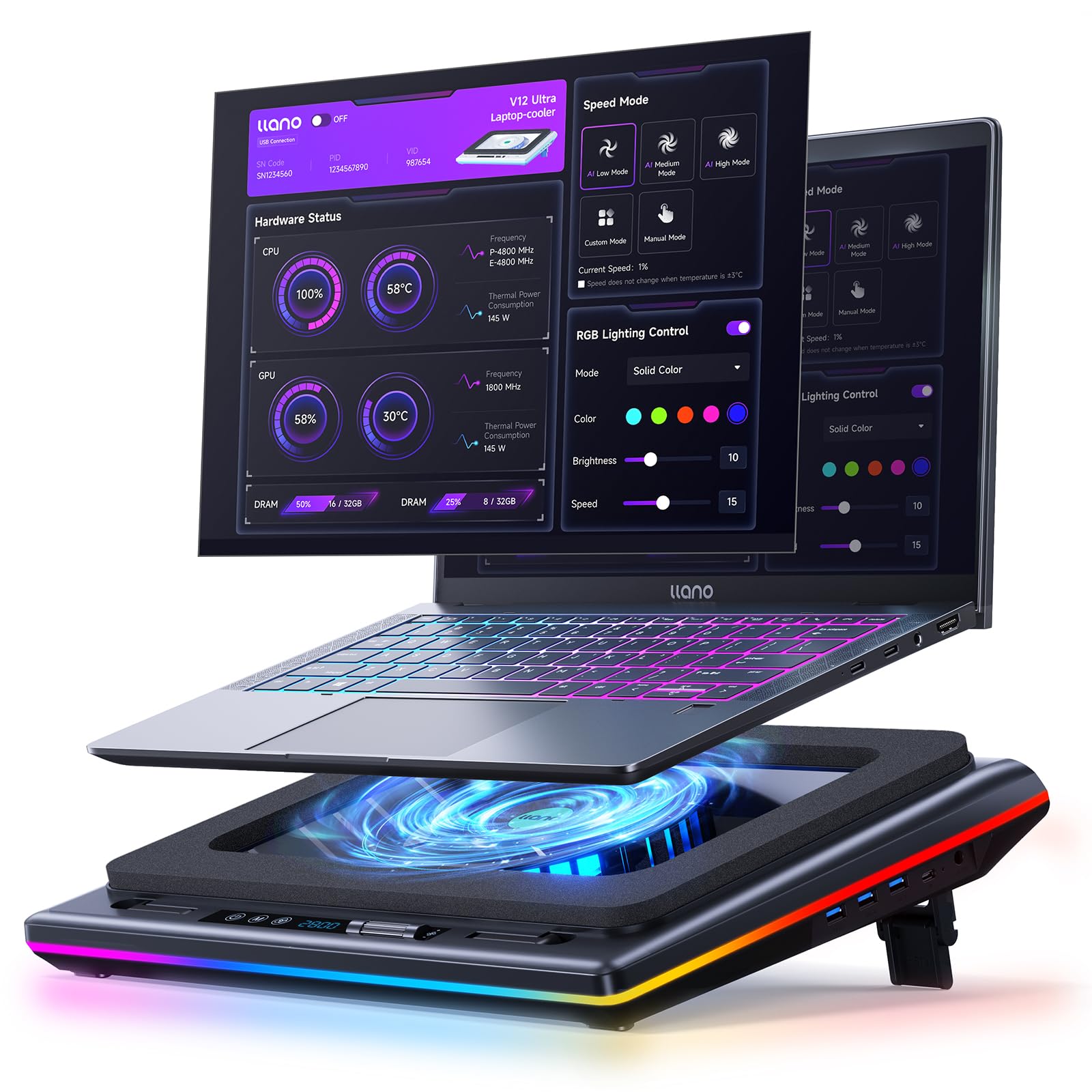
The defining single fact here is the 5.5-inch turbo fan, a massive single-fan design that spins up to 2800 RPM. This is the most effective approach for a hot 17-inch machine because one large, powerful fan creates a focused column of high-pressure air that penetrates deep into the chassis, unlike several smaller fans that just skim the surface. You get this without the jet-engine scream of many high-RPM alternatives.
What sets the V12 Ultra apart is its smart control. Its Myth.cool software offers three cooling modes (Low/Medium/High) that automatically adjust fan speed based on your laptop’s workload. In heavy use, owners of Alienware and Lenovo Legion machines report dramatic temperature drops — some seeing CPU temps drop 10°F and GPU temps plummet 25-35°F under load, with similar results on MSI Titan laptops. The trade-off: this smart control runs through downloadable software, which some users find genuinely useful and others find a hurdle, and the fan is conversation-level loud at its highest setting.
Beyond the headline cooling, the V12 Ultra is built as a complete workstation upgrade. It features a 1-in-3 USB 3.0 Hub for up to 5Gbps data transfer, allowing you to plug in a mouse, keyboard, and headset without sacrificing your laptop’s ports. The ergonomic design offers three adjustable tilt options (15°, 12°, and 3°) to improve posture, and a removable dust filter keeps the internal from clogging without needing any tools. The dynamic RGB lighting with 4 effects and 5 vibrant colors is the visual cherry on top.
Why it leads
- Huge 5.5″ turbo fan moves massive air for serious 17-inch cooling.
- Software control with auto-adjusting modes for hands-off management.
- Adds 3 USB 3.0 ports, turning it into a desktop hub.
The honest trade-offs
- Software is a divisive point — some find it essential, others call it clunky.
- Expect audible noise — near normal conversation level — at high RPM.
Reach for this if: you want the most comprehensive cooling solution with granular software control for a high-end gaming laptop.
Look elsewhere if: you can’t stand the idea of installing proprietary software to manage a fan.
2. AICHESON AA3
An eight-fan fortress that blankets the entire underside of your biggest laptops with airflow.
Where the llano V12 Ultra relies on one giant fan, the AICHESON AA3 goes the opposite direction with 8 high-speed fans spread across the entire surface. Each spins at 2600-3000 RPM via a roll switch, ensuring that whether your 17.3-inch laptop has one central intake vent or several scattered across the bottom, cool air is being pushed directly into every one. For laptops that run hot across a wide surface, this coverage is a real advantage.
Owners are clear that this is a desk-bound tool, not a lap pad. The stand offers 7 height positions ranging from 10° to 30° to ease neck and shoulder strain, but the sturdy kickstand legs and 18-inch diagonal length make it more stable on a table. Cooling is effective, with users seeing their machines drop 6-7°C. The 10 RGB lighting modes with fingerprint touch control add serious style, and you can turn off the side lights with a long press for a cleaner look at night or in a dim room.
The main caveat is an occasional durability concern — a few units have reported fans failing or shutting off after a few months of heavy use, though the included 1-year warranty is the remedy for that unlucky minority. It’s a budget-friendly pick at its price point, offering a level of air coverage that rivals pads costing much more.
Worth its weight: For a modest price, you get eight spinning fans, 7 height levels, and a 2-port USB hub — an unbeatable raw-airflow-to-dollar ratio for a 17-inch rig.
3. Kootek LCP06
The quiet champion that proves five well-placed fans can out-cool the noisy giants.
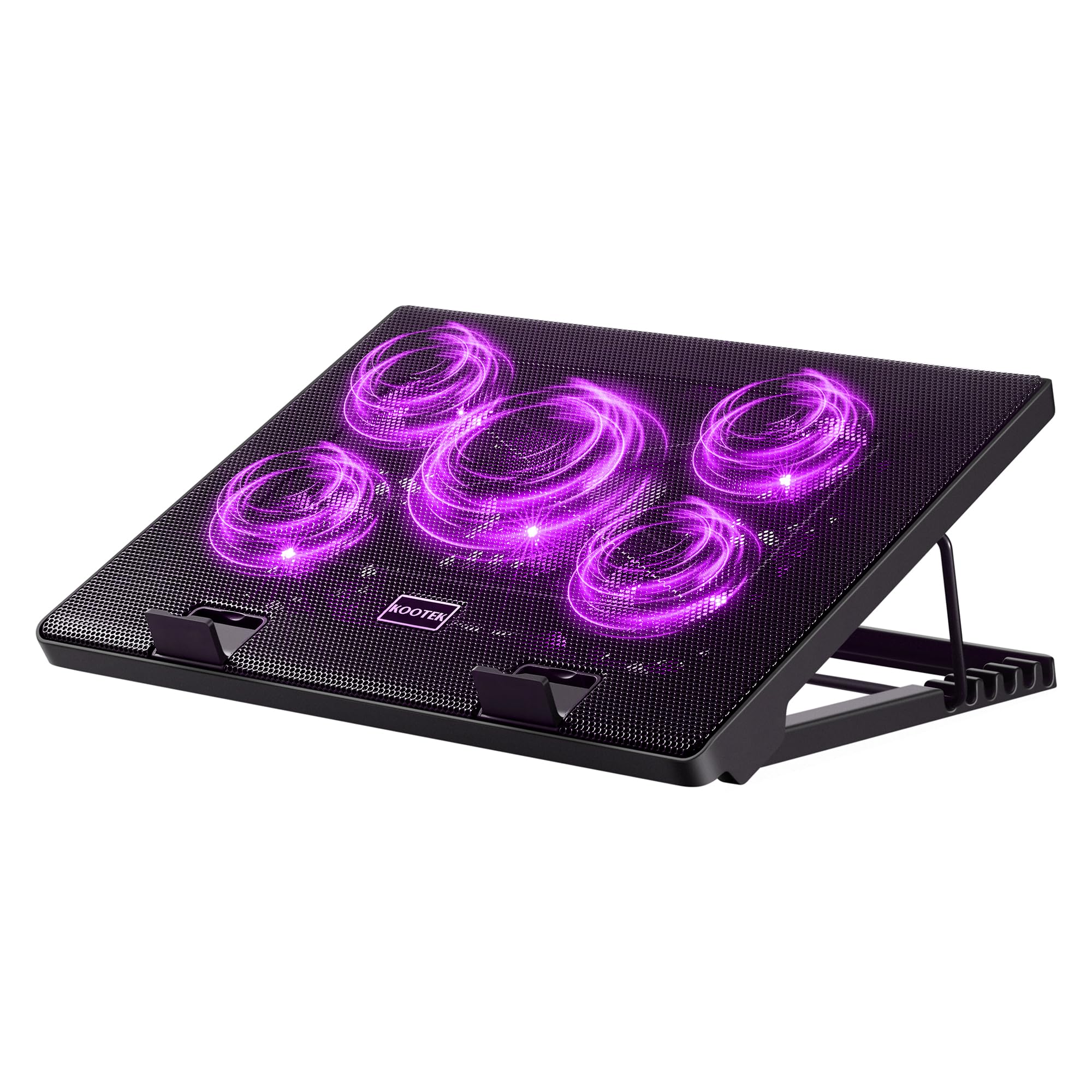
This Kootek is the sensible choice for anyone with a hot 17-inch laptop who values a peaceful room. It houses 5 fans — one large 4.72-inch in the center and four smaller 2.76-inch units flanking it — all working to dissipate heat quietly. Its whisper-quiet operation is the standout feature, with users reporting barely audible fans while 17-inch laptops drop 30-40°F to room temperature in minutes. The review crowd is enormous and overwhelmingly positive, making it the volume pick for a reason.
It’s designed for pure ergonomic comfort, with 6 adjustable height settings and two front stoppers to keep even the largest machines from sliding. The LCP06 also functions as a dual USB hub, adding two extra USB ports for connecting peripherals, though it’s note the packaged cable is USB-to-USB, so Type-C-only devices will need an adapter. The back and feet feel solid, and the purple LED lighting is subtle enough for a professional desk.
Know its physical limits: the peripheral feet are a bit short, so it feels less stable on an uneven surface or a soft bed, and the attached cord can get in the way when folding it for travel. Some owners note the locking bar for the height adjustment slips out easily if you’re rough with it. It’s a near-silent workhorse for a desk, not a rugged lap pad.
The strong suits
- Near-silent operation is the #1 reason for the huge fan base.
- 5 fans and a 6-height stand deliver on both cooling and posture.
- Holds 17-inch laptops securely with front stoppers.
What to watch
- Short flip feet and a flimsy bottom leg mean it prefers a flat, hard surface.
- Locking bar can slip out, and the non-removable cord limits portability.
Best suited for: the gamer or worker who wants effective, quiet cooling and a stable desk stand without paying a premium.
Think twice if: you plan to use it primarily on a couch or bed; this one is happiest on a firm desk.
4. KYOLLY 13-Fan Cooler
The over-engineered option that floods a large chassis with air and adds a doctor’s monitor.
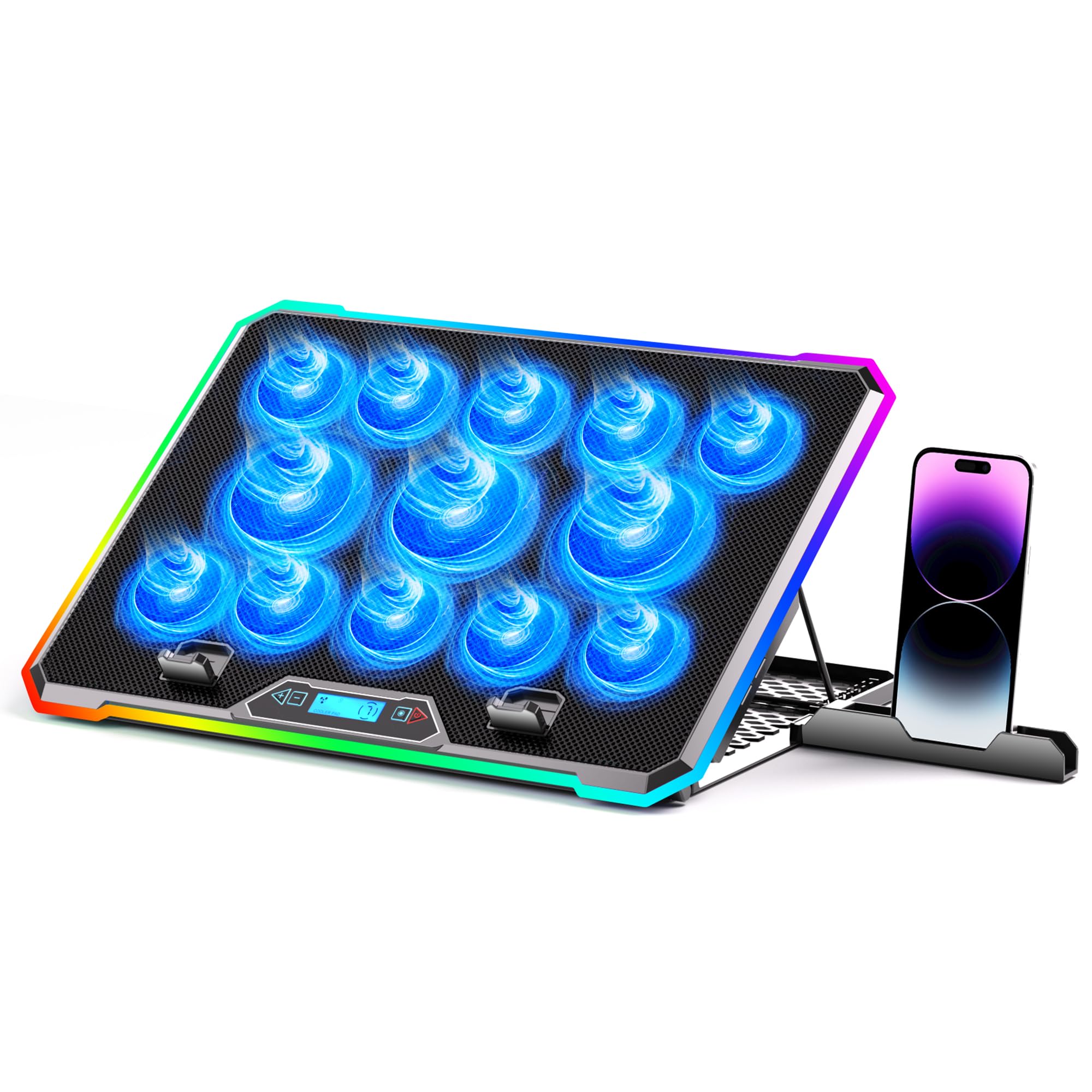
The KYOLLY takes the multi-fan concept to the extreme with 13 high-speed fans — three large and ten small — blanketing the entire underside of laptops up to 21 inches. This sheer number of fans is the key to its cooling performance, distributing airflow evenly so no single hot spot on your 17-inch machine goes unchilled. It also features a smart LCD screen that lets you monitor cooling and adjust fan speed without guessing, a premium feature usually found on far pricier pads.
Ergonomically, it’s the most flexible option on this list, with 9 adjustable tilt angles ranging from 10° to 45° to help you find the perfect height for long gaming sessions. A built-in silicone phone holder sits at the base, keeping your phone secure without taking up desk space. It’s fully lap-capable: the non-slip base is designed to hold a heavy 17-inch gaming laptop steady on uneven surfaces like beds and sofas.
The honest review is that it’s a mixed bag on the noise front — buyers report it’s very quiet at low settings, but the 13-fan version can turn into a loud whirl at maximum speed. The LCD control button layout also takes some getting used to, and the phone holder is a bit shallow and flimsy for larger phones. If you want complete cooling coverage with excellent adjustability and a visual performance readout, this is a unique option.
From the review pages: “It’s a standout — it keeps my gaming laptop completely cool and runs super quiet.” — the sentiment is echoing for cooling performance, though durability gets some occasional grumbles.
5. havit HV-F2056

The featherweight original that proves a slim profile can still keep a 17-inch workhorse chill.
As one of the longest-running and most-reviewed pads on the market, the havit HV-F2056 is the definition of a reliable classic. Its defining feature is the slim, lightweight build, weighing in at just 697.3 grams — easy to slip into a backpack alongside your 17-inch laptop. The three ultra-quiet fans are the primary praise point, creating a noise-free environment that’s ideal for a library or a quiet office while still circulating enough air to make a noticeable difference.
It also works as an ergonomic stand with two adjustable height settings to improve your viewing angle. The metal mesh top gives your laptop a stable surface and helps dissipate heat. There’s a useful extra USB port and a dedicated power switch so you can turn the fans off when you just need a stand, and the blue LED light indicator clearly shows when it’s running — though that same blue light can’t be turned off if it bothers you at night.
The catch is that its cooling power is modest compared to the turbo-fan beasts. While it effectively keeps an old hot laptop in check, it relies on gentle airflow rather than raw pressure. The surface can also be a bit slick for a laptop without rubber feet, so it’s best paired with a machine that has strong native rubber grips.
Where it shines
- Ultra-portable at 697.3 g with a slim profile for travel.
- Ultra-quiet fans — the most-praised aspect across thousands of owners.
- Reliable and budget-friendly with a simple on/off power switch.
The limitations
- No speed control and limited airflow pressure for extreme heat.
- Slick metal surface and a permanently-on blue LED are minor niggles.
Perfect when: you need dependable, quiet, and portable cooling for a 17-inch laptop on the move.
Not enough if: your machine runs extreme heat under sustained load; you’ll want a turbo-fan pad instead.
6. SOUNDANCE LS2

A sleek aluminum stand that prioritizes build quality and hub expansion over aggressive cooling.
The SOUNDANCE LS2 stands out for its premium aluminum construction and its focus on being a complete desk accessory. Its single large 140mm fan is designed for low noise while efficiently moving air to prevent overheating, and the blue LED ring makes it easy to see when it’s running. It holds laptops up to 17.3 inches securely, with rubber mats and feet preventing scratches and sliding on your desk.
The real star here is the expansion: it’s equipped with four true USB 3.0 ports along the back, transforming the cooling pad into a functional hub for a mouse, keyboard, and external drives. A separate USB power port keeps the fan powered independently, and a USB-A to USB-C adapter is included in the box, a thoughtful touch that saves you a trip to the store. The articulating stand is extremely sturdy, holding heavy 17-inch gaming laptops firmly at any angle without sagging.
The main adjustment is that it’s not a dedicated gaming cooler — the fan is quiet and effective but doesn’t have the raw pressure of a turbo fan. There’s no fan speed control, just an on/off switch, and the fan itself is a constant, if quiet, hum. It’s best seen as a high-quality ergonomic stand with cooling and hub benefits for professionals who value stability and a clean look.
Solid performer: Reviewers consistently praise the sturdy build and the convenience of the 4-port USB 3.0 hub, making it a favorite for both business and gaming setups.
7. KLIM Turbofrost
A German-engineered bruiser that combines extreme RPM (fan speed) with a 5-year assurance for total confidence.
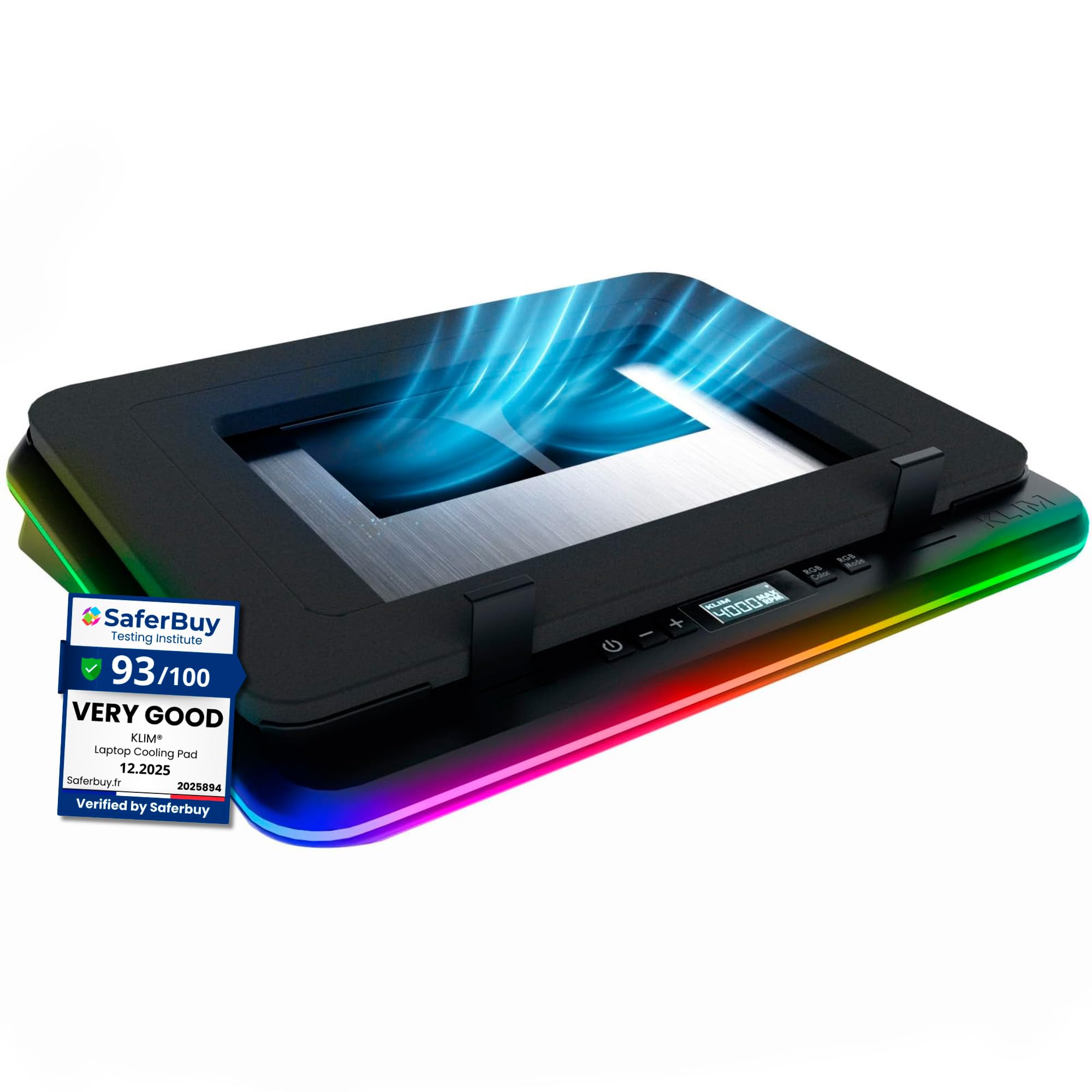
The KLIM Turbofrost is a serious tool for serious hardware, built with four turbo fans that each spin at 4000 RPM for a combined 16,000 RPM of cooling force. This is the highest raw fan-speed figure on this list, and it translates directly into massive airflow to keep the CPU and GPU of a hot 17.3-inch gaming laptop well within safe limits. The key differentiator is the dual power source: use the included DC adapter for full, steady power at a desk, or run it straight from your laptop’s USB-C port when you’re away from an outlet.
It’s built for durability with aircraft-grade aluminum that speeds up heat dissipation and a sealed anti-dust system to keep the internals clean, backed by a 5-year product assurance — the longest warranty on this list, a rarity in the cooling pad world. The adaptive noise-canceling foam helps keep fan volume down for its power level, and the 360-degree RGB with 64 lighting modes lets you customize your setup, with settings saving automatically between sessions. It also adds 3 extra USB-A ports so you don’t lose your laptop’s only port to a mouse and headset.
While it’s an exceptional cooler — owners of MSI and ASUS ROG Strix laptops report 30°C+ drops after a dust filter cleaning — it’s not shy about noise at maximum RPM. It’s affordable for this performance tier and backed by stellar customer support that reportedly replaced a faulty unit free of charge in 2 days.
Rated by owners: A 17-inch MSI dropped from a throttling 201°F to 168°F at 4000 RPM, and even at a whisper-quiet 2500-3000 RPM, the cooling remains excellent.
8. llano V10

The precision-focused turbo cooler that favors physical buttons over software guesswork.
The llano V10 takes the company’s turbo philosophy and simplifies the control interface. It features a powerful 4.72-inch turbo fan with a high-efficiency pure copper motor that delivers up to 3500 RPM — a massive single-fan setup that can cut laptop temps by up to 38°C (100°F) within minutes. Unlike the V12 Ultra’s software, this V10 model uses reliable physical buttons for both RGB and fan control, offering real-time responsiveness and precision without accidental changes mid-game.
It’s built for a wide range of devices, fitting 13-inch to 17.3-inch laptops from Dell, HP, ASUS, Lenovo, and Alienware, with extra foam inserts included to snugly hold smaller 13-14 inch laptop. The stand includes a 3-level ergonomic tilt, front anti-slip baffles, and a removable dust filter to keep your system’s airflow clean. Dual USB ports — one USB-A and one USB-C — let you power accessories without sacrificing your laptop’s ports.
Owners mention a 20°C drop at 2600+ RPM and praise the adjustability, with RPM adjustable in increments of 100. It can get noisy at higher settings, but it’s noticeably quieter than the larger V12 model at similar fan speeds. For a 17-inch machine, it’s a solid performer, though some owners with ultra-large laptops prefer the V12’s bigger footprint and wider airflow coverage.
The highs
- Excellent cooling with a powerful 3500 RPM copper-motor turbo fan.
- Precise physical buttons for fans and RGB, no app required.
- Strong value for the price, with a solid aluminum build.
The lows
- Noisy above 2000 RPM, requiring headphones for comfort.
- Rectangular air holes are tune for smaller laptops; wider 17″ models get less coverage.
Pick this up if: you want powerful, focused cooling with tactile buttons and a cleaner look than most RGB-laden pads.
Consider the V12 instead if: your 17-inch laptop is particularly wide and you want maximum airflow coverage.
9. Razer Laptop Cooling Pad

The smartest pad here, auto-tuning its 140mm fan to your CPU and GPU’s every thermal whim.
The Razer Cooling Pad is the brand’s first laptop cooling pad that changes fan speeds automatically to manage system temperatures based on your settings, from idle to full load. Its 140mm brushless fan spins up to 3000 RPM (revolutions per minute), and it’s paired with an airtight pressure chamber design—included foam seals ensure no cool air leaks, working with the fan to significantly reduce CPU, GPU, and surface temperatures. Owners of a Legion 5i and Asus TUF F15 report gaming temps cut nearly in half.
The smart design extends to the hardware. It features three magnetic frames that fit laptops from 14 inches up to 18 inches, ensuring a snug fit for your 17-inch machine without air gaps. Preset and custom fan curves (speed profiles) can be calibrated via Razer Synapse software to balance noise and performance, and two remappable multi-function buttons let you make on-the-fly changes to fan speed or RGB lighting without opening the app. It also acts as a 3-port USB-A hub to connect your peripherals.
This is a premium, pricier option with two clear trade-offs. First, it gets very loud at maximum RPM — it will easily cut through your headphones at max settings. Second, the value quotient is debatable; some owners find its smart features and adjustable seals justify the cost, while others call it overpriced compared to simpler high-RPM pads. It’s a sophisticated, high-tech solution for those already invested in the Razer ecosystem and who want hands-off thermal management.
The verdict: Owners praise the “powerful airflow and adjustable settings,” but the loudest complaint is the extreme fan noise — make sure your environment tolerates it before committing.
Understanding the Specs
Fan Design and RPM
The two main cooling philosophies are one large turbo fan versus many smaller fans. A large fan (like a 5.5-inch or 140mm) creates a strong, focused column of high-pressure air that pushes deep into a laptop’s chassis. Multiple smaller fans provide broader, shallower coverage across the entire bottom surface. The speed is measured in RPM (revolutions per minute — how fast the blades spin). Higher RPM means more airflow but also more noise. The best pads offer speed control so you can find the balance of cooling and noise that suits you.
Noise Levels in Real Life
Decibel ratings are rarely given for cooling pads, so listen to owner language: “conversation-level loud” means you’ll hear it clearly during quiet moments, while “whisper-quiet” means it could run during a Netflix call. A huge determinant is whether the fan has an adjustable speed. Without speed control, you’re locked into whatever noise the manufacturer chose. A quick rule of thumb: if you see “turbo fan,” expect it to be louder and more powerful than a standard multi-fan setup.
FAQ
Does a cooling pad really help a 17-inch laptop?
How many fans do I need for a 17.3-inch laptop?
Are gaming cooling pads too loud for an office?
Can I use a cooling pad on my lap?
Will a cooling pad with a USB hub slow down my laptop?
How do I clean a laptop cooling pad’s dust filter?
Is it worth paying more for a premium cooling pad?
Will a cooling pad fit my specific 17-inch laptop model?
What does “turbo fan” mean on a laptop cooler?
Final Thoughts: The Verdict
For most people, the best 17 inch laptop cooling pad is the llano V12 Ultra because it marries the most effective turbo-fan cooling with intelligent software control, making it a complete desktop upgrade. If you want the raw, brute-force airflow of eight fans at an unbeatable budget price, grab the AICHESON AA3. And for a whisper-quiet setup that disappears into the background, the Kootek LCP06 is the one to reach for.
How We Picked
We do not accept paid placement. Every pick is matched to a real buyer and a real use-case; we do not hands-on test units.
Sources & Methodology
Specifications: manufacturer listings and product documentation. Review insights: verified customer reviews, as of August 2026. Pricing: not shown on this page (it changes often); check the current price via the retailer link.
As an Amazon Associate, Gadgets Feed earns from qualifying purchases. This does not affect which products we feature.