
Our readers keep the lights on and my morning glass full of iced black tea. As an Amazon Associate, I earn from qualifying purchases.
You need a number pad for spreadsheets or data entry, but a full-size keyboard shoves your mouse so far right your shoulder aches. The fix is an 1800 compact keyboard: it keeps every key—including the numpad—in a layout about 20% shorter than standard, giving you back desk space without losing function. The best 1800 compact keyboard depends on whether you prioritize wireless freedom, premium build materials, raw gaming speed, or the deepest customization.
I’m Min — the founder and writer behind Gadgets Feed. This guide is built by comparing the manufacturers’ published specifications and the patterns across verified customer reviews, so you get each pick’s real strengths and trade-offs instead of marketing spin.
Whether you’re a programmer, an accountant, or a gamer who refuses to give up a numpad, this breakdown of the 1800 compact keyboard market will help you match the exact board to your real daily use.
Quick Picks
- YUNZII AL98 QMK/VIA Wireless Mechanical Keyboard — Top Performer
- Keychron K4 96% Layout 100 Keys Wireless Mechanical Keyboard — Best Battery Life
- HyperX Origins 2 1800 Gaming Keyboard — Best for Gaming
- RK ROYAL KLUDGE R98 Pro Wired Mechanical Keyboard — Budget Champion
- YUNZII YZ98 Gasket Mechanical Keyboard — Best Value
How To Choose The Best 1800 Compact Keyboard
Picking the right compact mechanical board with a numpad comes down to three things: how you connect, what the keys feel like, and how much you want to customize it later. Here is what to look for.
Connectivity: Wired vs Wireless vs Tri-Mode
If you swap between a desktop and a laptop during the day, pick a board with Bluetooth so you can switch devices without unplugging a cable. For competitive gaming, stick with wired or a low-latency 2.4GHz dongle (a small USB receiver) because Bluetooth adds a tiny delay. Tri-mode keyboards—offering wired, 2.4GHz, and Bluetooth—give you the most flexibility, but they cost more and often need a built-in battery (measured in mAh or milliampere-hours, which tells you how long it lasts between charges).
Typing Feel: Switch Type and Mounting Style
The switch (the mechanism under each keycap that registers your press) determines whether a keyboard feels smooth, clicky, or somewhere in between. Linear switches move straight up and down with no bump; tactile switches give a small bump at the halfway point so you feel the press. Gasket mounting (a soft silicone or foam layer between the plate and case) makes every keystroke feel slightly cushioned and makes the board sound deeper, like a marbles-on-glass “thock” instead of a hollow clack. Tray-mounted boards are simpler and cheaper but feel stiffer.
Build Materials and Customization
A case made of aluminum feels heavier and more solid than plastic, but it also makes the keyboard much heavier—great for desk stability, bad for carrying around. Keycaps made of PBT (a harder plastic that resists shiny wear) last years longer than ABS (a softer plastic that gets glossy with use). If you ever want to change the switches without soldering, look for a “hot-swappable” PCB (the circuit board inside) that accepts 5-pin switches—you can pop old switches out and push new ones in by hand.
Quick Comparison
On smaller screens, swipe sideways to see the full table.
| Model | Best For | Connectivity | Battery (mAh) | Weight (lbs) | Amazon |
|---|---|---|---|---|---|
| YUNZII AL98 | Premium Build + Full Customization | Tri-Mode (BT 5.0/2.4G/USB-C) | 8000 | 5.6 | $87.99$109.99Amazon |
| Keychron K4 V2 | Long-Lasting Battery Workhorse | Bluetooth 5.1 + Wired | 4000 | 2.2 | $79.99Amazon |
| HyperX Origins 2 1800 | Competitive Gaming Performance | Wired USB-C | N/A (Wired) | 2.1 | $99.99$139.99Amazon |
| RK ROYAL KLUDGE R98 Pro | Budget Creamy Typing Experience | Wired USB-C | N/A (Wired) | 1.76 | $69.99Amazon |
| YUNZII YZ98 | Entry-Level Wireless Value | Tri-Mode (BT 5.0/2.4G/USB-C) | 5000 | 1.98 | $95.00$119.58Amazon |
In‑Depth Reviews
1. YUNZII AL98 QMK/VIA Wireless Mechanical Keyboard
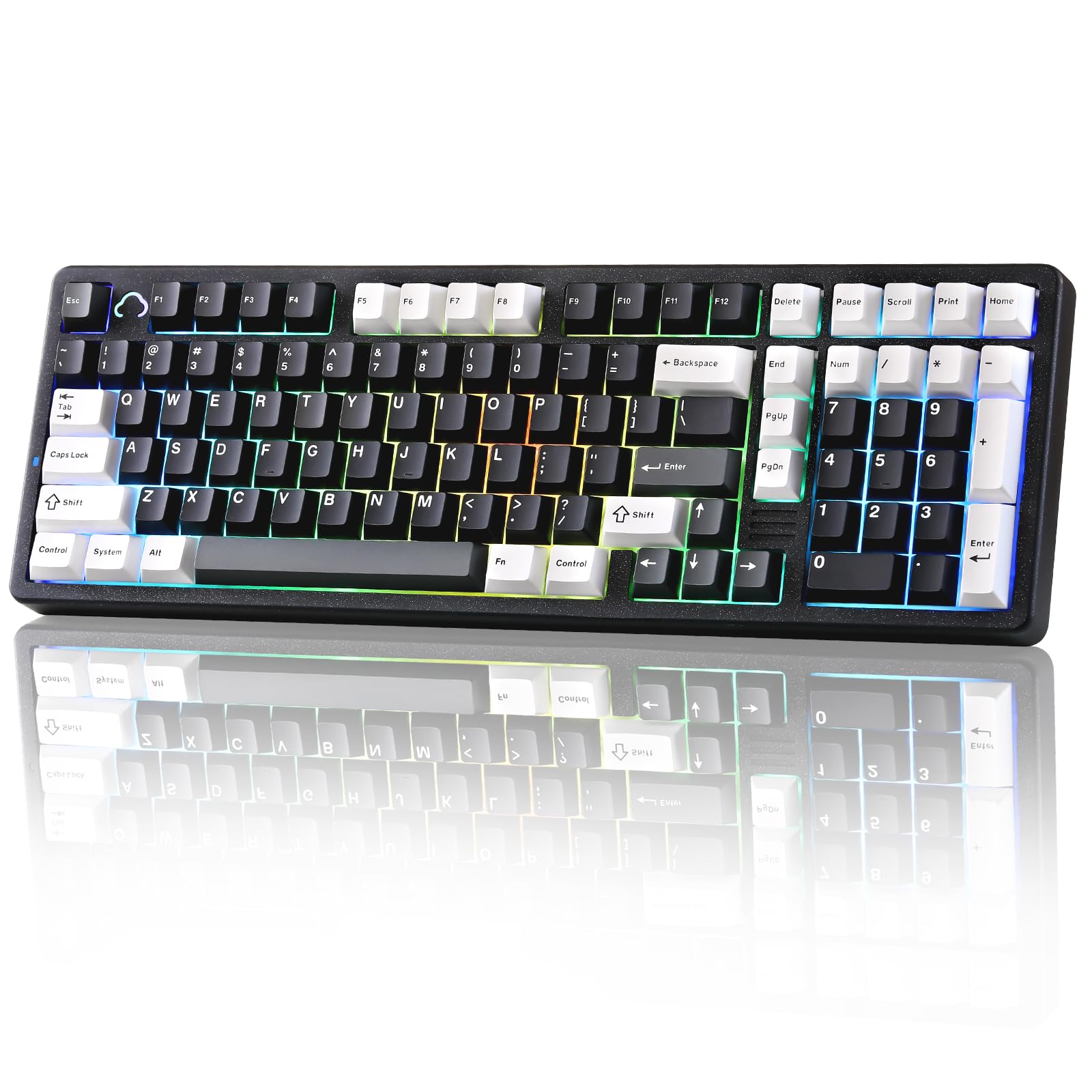
The heavy aluminum board that types like a cloud and lasts like a tank.
If you want a keyboard that feels solid enough to never flex under your fingers, this is the pick. The entire case is machined aluminum—it weighs 2.54 kilograms (5.6 pounds), making it more than twice as heavy as the Keychron K4 and far sturdier than the plastic-bodied RK R98 Pro. That weight keeps the board planted during intense typing sessions and gives it a premium, dampened sound. Its 1800 layout packs 101 keys into a frame that is just 16 inches wide.
What sets the AL98 apart from every other board here is full QMK/VIA firmware support, which lets you remap every single key, record macros, and customize RGB lighting down to the individual key layer—no proprietary software required. The tri-mode connectivity (Bluetooth 5.0, 2.4GHz dongle, and USB-C) works seamlessly across devices, and the 8000mAh battery is the largest in this roundup. Buyers report that the Milk switches feel “creamy” and “buttery smooth” out of the box, though some note the VIA software has a “steep learning curve” for first-time users.
The catch is that the all-aluminum shell makes this board genuinely heavy—not great for carrying to an office daily. It is also somewhat loud, as one reviewer pointed out, which might annoy close coworkers in an open-plan space. But for a permanent desk setup where you want deep customization and long battery life, nothing here matches it.
Why it’s great
- Full aluminum case provides zero flex and a premium feel.
- 8000mAh battery is the biggest on this list, charging rarely.
- QMK/VIA firmware allows total key remapping without proprietary drivers.
Good to know
- Extremely heavy at 2.54 kg (5.6 lbs)—not portable.
- Typing sound may be too loud for shared office spaces.
Best for: Enthusiasts and programmers who want a premium aluminum board with full key remapping and massive battery life.
Skip if: You need a lightweight board to carry between home and office.
2. Keychron K4 96% Layout 100 Keys Wireless Mechanical Keyboard

The proven workhorse that still sets the standard for battery life in 1800 boards.
This is the board that many people reach for after three years of daily use and still call “exceptional” in their reviews. The Keychron K4 packs 100 keys into a frame that is 14.61 inches wide—noticeably narrower than the YUNZII AL98 (16 inches) and the RK R98 Pro (15.3 inches), giving you more mouse space on a small desk. Its 4000mAh battery lasts up to 240 hours with the backlight turned off, which translates to weeks of real-world use before you need to plug it in.
The Keychron Super Brown switches (a tactile type that gives a small bump when you press) are built for a lifespan of 50 million clicks, and the board connects to up to three devices via Bluetooth 5.1 so you can jump between a PC, a MacBook, and an iPad without swapping cables. Buyers consistently praise the build quality and typing feel—one reviewer called it “a high-performing essential tool” after three years of daily use. The K4 is slightly taller than most boards, so you may want a palm rest to keep your wrists comfortable over long sessions.
The downside is that the K4 offers only white LED backlighting, not per-key RGB, and it lacks a 2.4GHz dongle option—you either use Bluetooth or the wired USB-C connection. The arrow keys are also slightly shifted left due to the condensed layout, which takes a day or two to get used to. For a reliable, long-lasting wireless board that you charge only once every few weeks, this is the proven choice.
Why it’s great
- Exceptional battery life at 4000mAh offering weeks of use.
- Proven durability—many owners mention years of daily use without issues.
- Compact footprint at 14.61 inches wide saves significant desk space.
Good to know
- White backlight only, not per-key RGB.
- No 2.4GHz wireless dongle; relies on Bluetooth or wired connection.
Best for: Office workers and hybrid users who need multi-device Bluetooth and rarely want to charge.
Skip if: You must have customizable per-key RGB lighting or a low-latency 2.4GHz gaming connection.
3. HyperX Origins 2 1800 Gaming Keyboard
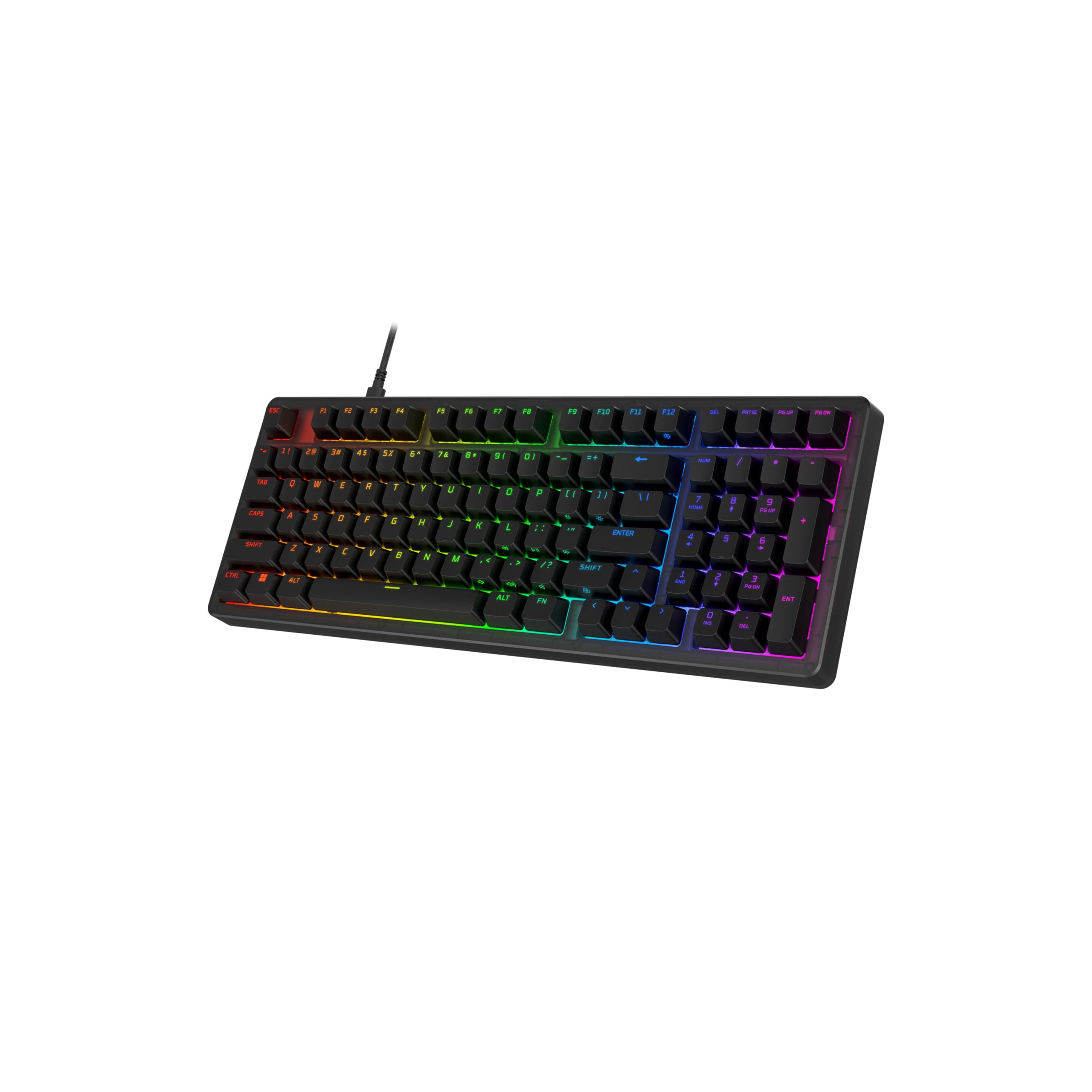
The wired speedster with 8k polling that never misses a keystroke in a firefight.
If you are a competitive gamer who will not compromise on input speed, this HyperX board is the one. Its biggest claim is an 8kHz (8000 Hz) polling rate, meaning it reports your key presses to the PC 8000 times every second—eight times faster than the standard 1000Hz polling rate on the YUNZII YZ98. In practice, that translates to a few milliseconds less delay, which matters in twitch-reaction games like Counter-Strike or Valorant where every frame counts.
The board uses an O-ring mounting system (soft rubber rings between the plate and case) that gives each keystroke a light bounce and a deeper sound, plus a removable silicon weight inside to dampen reverb. The 1800 layout packs a numpad into a compact frame with a high-profile design that elevates the key surface, making it easier to reach the keys without stretching. Customers note that the board feels “solid, stable, and premium” right out of the box, with responsive keys and a “controlled click” sound.
The trade-off is that this is a strictly wired board—no Bluetooth or 2.4GHz option—so you cannot use it with a tablet or switch between devices without unplugging. The tight key spacing in the 1800 layout also took some buyers a few days to adjust to. If you want the fastest possible wired response from a compact numpad keyboard, this is the pick; if you need wireless, look at the YUNZII AL98 or the Keychron K4 instead.
Why it’s great
- Ultra-fast 8kHz polling rate reduces input lag for competitive gaming.
- Factory-lubed HyperX Red switches rated for 80 million presses.
- O-ring mount delivers a lively, bouncy typing feel.
Good to know
- Wired only—no wireless connectivity at all.
- Tight 1800 key spacing may feel cramped at first.
Best for: Competitive PC gamers who want the lowest possible input latency in a compact numpad layout.
Skip if: You need Bluetooth or a wireless dongle for multi-device use.
4. RK ROYAL KLUDGE R98 Pro Wired Mechanical Keyboard

The creamy-sounding budget board that makes you wonder why premium boards cost more.
This board delivers a typing feel and sound that typically costs twice as much. The RK R98 Pro uses a gasket mount with five layers of sound-absorbing foam and pre-lubed cream linear switches—the same cushioning strategy found in the more expensive YUNZII AL98. The result is a “thocky” and “creamy” keystroke that buyers describe as “buttery smooth” and “ultra quiet.” It packs 98 keys into a 15.3-inch frame, which is slightly wider than the Keychron K4 (14.61 inches) but still smaller than any full-size keyboard. Its MDA-profile PBT keycaps (a sculpted shape that curves inwards to fit your fingertips) feel more natural for long typing sessions than the flat cherry-profile caps found on many boards.
The hot-swappable PCB supports both 3-pin and 5-pin switches, so you can try new switch types without soldering. A detachable aluminum volume knob sits in the top-right corner, and the wired USB-C connection delivers zero latency for gaming. One consistent caveat that buyers mention: the board lacks per-key backlighting, meaning the letters on the keycaps stay dark in low light—you basically have to learn to type by feel or work under a lamp. At this price point, the creamy sound and solid build are hard to beat for pure typing enjoyment on a budget.
Why it’s great
- Exceptional gasket-mounted feel with five-layer sound dampening at a low price.
- Pre-lubed cream switches deliver a smooth, quiet keystroke out of the box.
- Hot-swappable with 3/5-pin support and a detachable volume knob.
Good to know
- No per-key backlighting—letters on keycaps are dark in low light.
- Wired only; no wireless connectivity option.
Best for: Budget-conscious typists who want a smooth, creamy sound without spending over.
Skip if: You need backlit keycap legends to type in a dark room.
5. YUNZII YZ98 Gasket Mechanical Keyboard

The entry-level wireless board that packs a 5000mAh battery and a gasket mount.
This is the most affordable tri-mode (Bluetooth, 2.4GHz, and USB-C) board in the lineup, and it still manages to include features often reserved for pricier models. The YZ98 uses a gasket mount with five layers of sound dampening (PC plate, PORON pads, IXPE switch pad, PET absorbing pad) to reduce hollow echo and fatigue—a level of internal engineering you do not expect at this tier. Its 5000mAh battery is larger than the Keychron K4’s 4000mAh cell, though reviewers point out that running the RGB backlight at full brightness over the 2.4GHz dongle drains it in about three days of 8-12 hour use. That is still a solid run for an entry-level wireless board.
The 99-key layout gives you a full numpad with double-shot PBT keycaps (two layers of plastic molded together so the legends never wear off) and south-facing RGB lighting that shines through the keycaps rather than under them. The Cocoa Cream V2 switches that ship with the board are factory-lubed and produce a “thocky” sound that one reviewer described as “perfect out of the box.” The board works with Linux, Windows, and Mac, and the 2.4GHz mode offers a 1000 Hz polling rate (the same as most gaming keyboards, sending a signal to your computer every millisecond). One limitation is that the plastic case feels less premium than the aluminum YUNZII AL98 or the solid HyperX Origins 2, but for a budget-friendly wireless board with a numpad, this is the best value.
Why it’s great
- Tri-mode wireless (BT/2.4G/USB-C) at an entry-level price point.
- Gasket mount with five-layer dampening for a deep, pleasant typing sound.
- 5000mAh battery offers strong wireless uptime between charges.
Good to know
- Plastic case lacks the premium feel of aluminum boards.
- Battery drains faster with full RGB brightness on 2.4GHz mode.
Best for: Shoppers on a budget who want wireless freedom, a numpad, and a gasket-mounted typing feel.
Skip if: You want a metal case or need more than three days of battery life with RGB on.
Understanding the Specs
Polling Rate: Why 8kHz Matters for Gamers
The polling rate, measured in Hz, is how often your keyboard tells your computer what keys are pressed. Standard boards use 1000 Hz (once every millisecond), which is already fast. The HyperX Origins 2 uses 8000 Hz (8kHz), meaning it reports eight times per millisecond. In real life, that shaves off a few milliseconds of delay—imperceptible in typing but noticeable in competitive shooters where a single frame can decide a round. For office work, 1000 Hz is plenty; 8kHz is only useful for serious competitive gaming.
Battery Capacity: mAh Explained
mAh stands for milliampere-hour and measures how much electrical charge a battery holds. A 4000mAh battery (like the Keychron K4’s) can last up to 240 hours with backlighting off—that is weeks of daily typing. A 5000mAh battery (YUNZII YZ98) offers about 25% more run time, but actual battery life depends heavily on whether you use Bluetooth versus the faster 2.4GHz dongle and how bright you set the RGB lights. The YUNZII AL98’s 8000mAh battery is the largest here, doubling the capacity of the K4 and making it ideal for users who hate charging cables.
Gasket Mount vs Tray Mount
A gasket-mounted keyboard uses strips of soft silicone or foam between the plate (the metal layer that holds the switches) and the case. This cushions each keystroke, making the typing feel bouncier and the sound deeper and less hollow—a “thock” rather than a “clack.” Most enthusiast boards at and up use gasket mounts. Tray-mounted keyboards screw the plate directly into plastic standoffs on the case bottom, which is cheaper but produces a firmer, often louder typing feel and more case resonance. The YUNZII YZ98, RK R98 Pro, and YUNZII AL98 all use gasket mounts; the Keychron K4 and HyperX Origins 2 use different mounting methods (tray and O-ring, respectively) that still aim for a softer feel.
Hot-Swappable Switches and PBT Keycaps
A hot-swappable PCB (printed circuit board) lets you pull out the existing switches with a small tool and push in new ones without any soldering. This matters if you want to experiment with different feels—say, swapping from linear to tactile switches—without buying a whole new keyboard. All five boards here are hot-swappable, supporting 3-pin or 5-pin switches. PBT keycaps are made from a harder plastic than ABS and resist the shiny, greasy wear that develops on cheaper keycaps after months of use. Both the YUNZII YZ98 and RK R98 Pro ship with PBT keycaps, which is a mark of better long-term durability.
FAQ
What exactly is an 1800 compact keyboard layout?
Is an 1800 keyboard good for gaming?
Can I use an 1800 compact keyboard with a Mac?
How long does the battery last on a wireless 1800 keyboard?
What does “hot-swappable” mean on these keyboards?
Why do some 1800 keyboards not have a gap between the alpha keys and the numpad?
Are PBT keycaps worth paying extra for?
How do I clean a mechanical keyboard with an 1800 layout?
Can I use an 1800 keyboard on my lap?
What is the difference between QMK/VIA and proprietary software?
Final Thoughts: The Verdict
Across the board, the best 1800 compact keyboard is the YUNZII AL98 because it combines a premium aluminum build, the largest 8000mAh battery, and full QMK/VIA customization in a layout that fits any desk. If you want weeks of battery life and proven long-term reliability, grab the Keychron K4 V2. And for competitive gamers who need the fastest possible wired response, the standout is the HyperX Origins 2 1800.
How We Picked
We do not accept paid placement, and we did not hands-on test every unit. Instead, we match each pick to a real buyer and use-case by comparing the manufacturers’ published specifications against the patterns in verified customer reviews — so you get each pick’s real strengths and trade-offs instead of marketing copy.
Sources & Methodology
Specifications: manufacturer listings and product documentation. Review insights: verified customer reviews, as of June 2026. Pricing: not shown on this page (it changes often); check the current price via the retailer link.
As an Amazon Associate, Gadgets Feed earns from qualifying purchases. This does not affect which products we feature.
Product prices and availability are accurate as of the date/time indicated and are subject to change. Any price and availability information displayed on Amazon at the time of purchase will apply to the purchase of this product. As an Amazon Associate I earn from qualifying purchases.
CERTAIN CONTENT THAT APPEARS ON THIS SITE COMES FROM AMAZON. THIS CONTENT IS PROVIDED "AS IS" AND IS SUBJECT TO CHANGE OR REMOVAL AT ANY TIME.
Amazon and the Amazon logo are trademarks of Amazon.com, Inc. or its affiliates.