
Our readers keep the lights on and my morning glass full of iced black tea. As an Amazon Associate, I earn from qualifying purchases.
A curved monitor with an 1800R radius wraps the edges of the screen toward you, creating a field of view that flat panels simply cannot match. The tighter curve means each corner of the display sits roughly the same distance from your eyes, reducing the micro-shifts in focus that cause fatigue over long sessions. That single design choice changes how you watch, work, and play.
I’m Min — the co-founder and writer behind Gadgets Feed. This guide rests on many hours comparing curvature specs, panel technologies, and real-world setup challenges across the current 1800R market so you know exactly which model earns its place on your desk.
After analyzing nearly a dozen models across different budgets and use cases, I’ve built a focused list of the best 1800R curved monitor options that deliver genuine immersion without the usual spec-sheet noise.
How To Choose The Best 1800R Curved Monitor
An 1800R bend is the middle ground between a subtle curve and an aggressive wrap. Picking the right one means matching the panel type, resolution, and refresh rate to how you actually use the screen. Start with the panel technology because it dictates everything else about the image.
Panel Technology: VA, OLED, or QD-OLED
VA panels dominate the 1800R space because they maintain contrast from wide viewing angles better than IPS, and they do not suffer the burn-in risks of OLED. A good VA at 3000:1 contrast ratio delivers deep blacks for dark games and movies. OLED and QD-OLED panels push contrast to near-infinite levels with per-pixel lighting, but they require careful usage habits to avoid image retention. If you run static toolbars for eight hours a day, stick with VA. If you game or watch HDR content in a controlled-light room, OLED is transformative.
Resolution and Pixel Density
Ultra-wide 1800R monitors come in two dominant resolutions: Dual FHD (3840×1080) and WQHD (3440×1440). Dual FHD is easier on mid-range GPUs and keeps frame rates high, but pixel density is lower — you may notice individual pixels at close viewing distances on a 49-inch panel. WQHD packs 1.7x the pixels into the same curve, delivering sharper text and finer detail, but it demands significantly more GPU horsepower to maintain 100 Hz or higher.
Refresh Rate and Adaptive Sync
Most 1800R ultra-wides target 144 Hz or 175 Hz. Hitting those frame rates at WQHD resolution requires a modern graphics card with DisplayPort 1.4 bandwidth. Dual FHD panels can push 144 Hz with a much wider range of GPUs, including mid-range cards from two generations ago. Check whether the monitor supports FreeSync, G-Sync, or both — and read recent firmware reports because some models have flickering issues with certain GPU combinations.
Quick Comparison
On smaller screens, swipe sideways to see the full table.
| Model | Category | Best For | Key Spec | Amazon |
|---|---|---|---|---|
| LG 34SR63QA-W | Mid-Range | Smart features & work-from-home | 3440×1440, 100 Hz, USB-C 65W PD | $387.00Amazon |
| Deco Gear 49″ | Mid-Range | Budget super ultra-wide | 3840×1080, 144 Hz, 32:9 | $449.99Amazon |
| INNOCN 49C1G | Mid-Range | Multitasking workstation | 3840×1080, 144 Hz, USB-C 65W | $599.99$699.99PrimeAmazon |
| Philips Evnia 34M2C6500 | Premium | QD-OLED HDR gaming | 3440×1440, 175 Hz, QD-OLED | $657.30Amazon |
| ASUS ROG Strix XG49VQ | Premium | FreeSync 2 HDR gaming | 3840×1080, 144 Hz, HDR400 | $804.26$849.00Amazon |
| Alienware AW3423DW | Premium | Competitive QD-OLED esports | 3440×1440, 175 Hz, G-Sync Ultimate | $839.95Amazon |
In‑Depth Reviews
1. LG 34SR63QA-W 34 inch Smart Curved Monitor
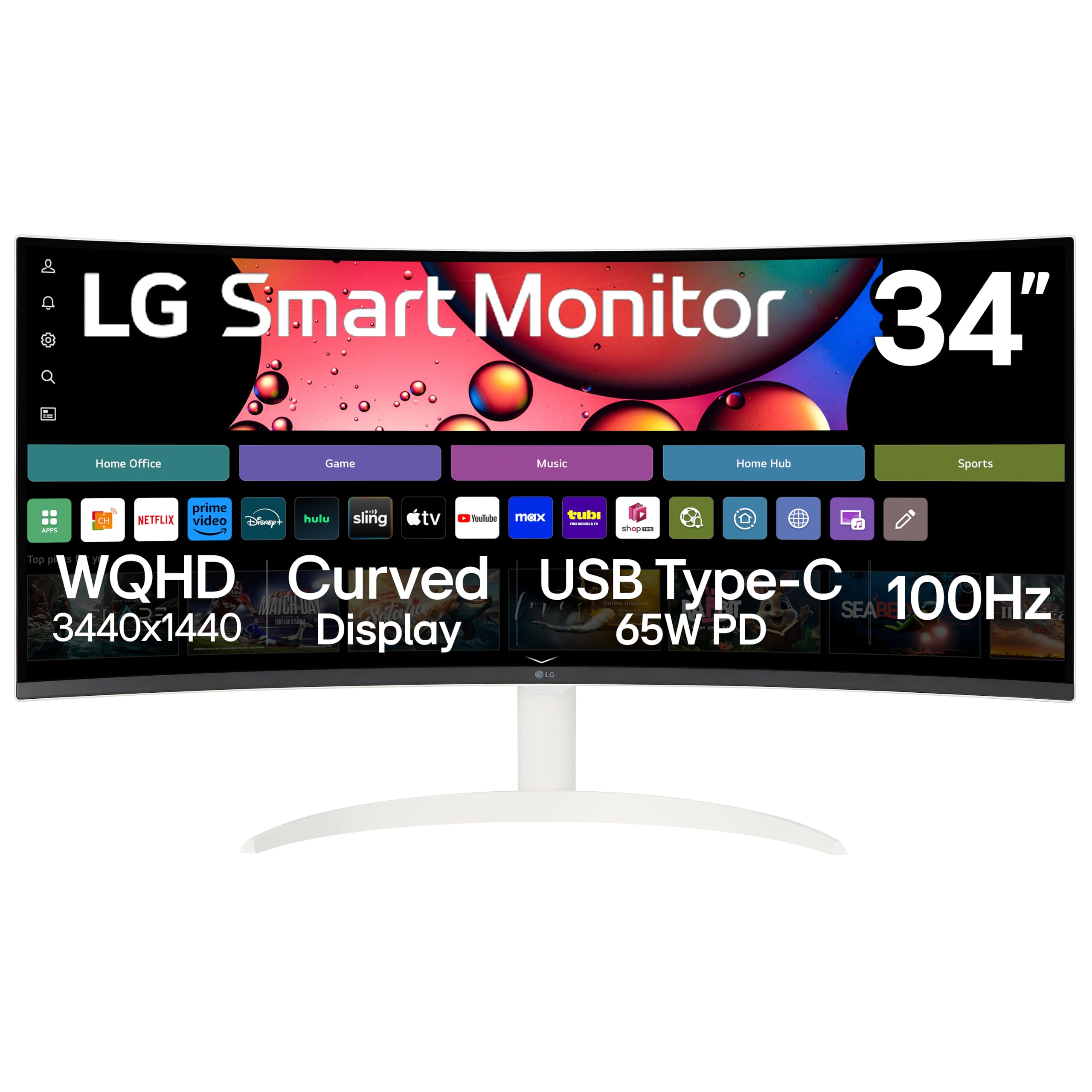
LG built a 34-inch 1800R panel that doubles as a smart TV. The VA display delivers a 3000:1 contrast ratio with 99 percent sRGB coverage, and the 3440×1440 WQHD resolution provides sharp text for multi-window work. The built-in webOS 23 platform streams Netflix, Prime Video, and Disney+ directly without a separate source device.
USB-C with 65 watts of power delivery simplifies a laptop setup — one cable carries video, data, and charging. The 100 Hz refresh rate is modest by gaming standards but smooth for desktop navigation and casual play, and Adaptive Sync support via FreeSync and G-Sync eliminates tearing in compatible titles. The 3-side virtually frameless design in white fits bright, modern workspaces.
The tilt-only stand lacks height adjustment, which forces you to dial in your desk ergonomics with books or a riser. Customers report that driving the full 3440×1440 resolution requires a USB-C 3.2 dock running at 10 Gbps; older 5 Gbps docks may cause flickering. Those minor cable constraints aside, the combination of smart features, high pixel density, and the immersive 1800R wrap makes this the most versatile pick for mixed-use buyers.
Why it’s great
- Built-in webOS 23 eliminates need for streaming stick
- USB-C 65W PD powers and connects a laptop in one cable
- 3440×1440 resolution keeps text crisp on a 34-inch curve
Good to know
- Stand offers tilt only — no height or swivel adjustment
- Requires 10 Gbps USB-C dock for flicker-free 3440×1440 at 100 Hz
- 100 Hz refresh rate is below dedicated gaming standards
2. Deco Gear 49″ Curved Ultrawide Gaming Monitor
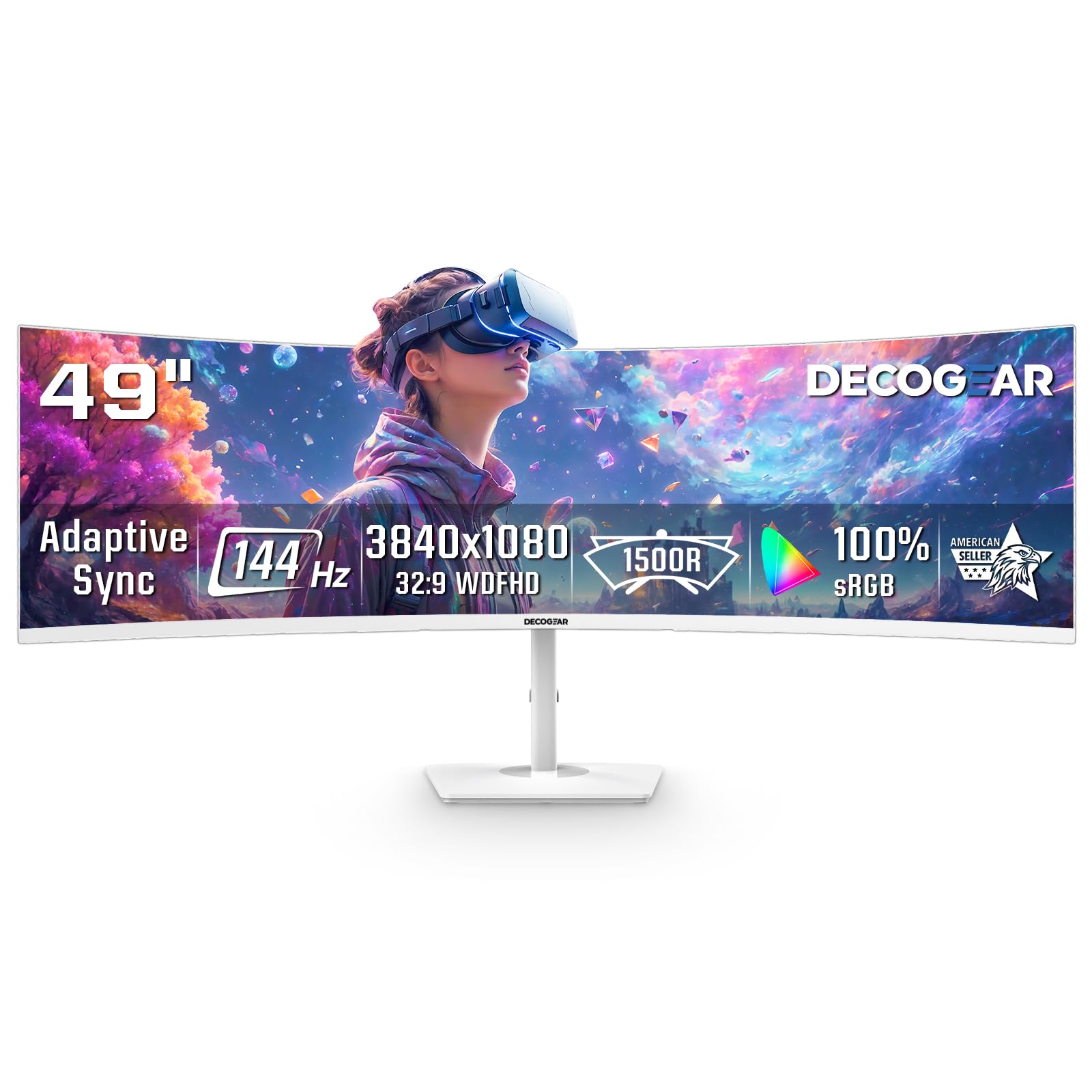
Deco Gear delivers a 49-inch 32:9 panel with a 144 Hz refresh rate, 1 ms MPRT response, and an 1800R curve that turns the entire desk into a panorama. The Dual FHD resolution (3840×1080) keeps GPU demands low enough that mid-range cards can push high frame rates in competitive titles. The VA panel’s 3000:1 contrast ratio gives dark scenes depth that IPS panels cannot match at this price tier.
PIP and PBP modes let you connect two sources side by side — a work laptop and a gaming PC, for instance — without swapping cables. The white finish is a deliberate design choice for bright gaming setups, and the 2x HDMI plus 2x DisplayPort inputs offer flexibility. Adaptive Sync with both FreeSync and G-Sysnc compatibility reduces screen tearing across a wide range of graphics cards.
The build feels less premium than more expensive 49-inch options; several customers noted loose screws out of the box. The monitor lacks a USB-C port and an audio output, so you must route sound through your PC or console. Mac users need third-party software to hit higher than 30 Hz over HDMI. For the price, the sheer screen real estate and smooth 144 Hz motion make it a compelling entry into super ultra-wide territory.
Why it’s great
- 49-inch 32:9 panel replaces two separate monitors without a bezel gap
- 144 Hz refresh rate at 3840×1080 is easy on mid-range GPUs
- PIP/PBP mode lets two devices share the screen simultaneously
Good to know
- No USB-C port and no audio output included
- Mac HDMI output limited to 30 Hz without additional software
- Build quality concerns reported with loose screws and fit issues
3. INNOCN 49C1G Curved Gaming Monitor

The INNOCN 49C1G packs a 49-inch VA panel with 3840×1080 resolution, 144 Hz refresh rate, and HDR400 certification into a package that targets both gaming and productivity. The 1800R curve wraps the 32:9 aspect ratio around your peripheral vision, reducing the neck turning that flat super ultra-wides require. The 3000:1 native contrast ratio makes blacks look deep in games and movies.
Connectivity is this monitor’s strongest card: one USB-C port with 65 watts of power delivery, one HDMI 2.1 input, one DisplayPort 1.4, plus a USB hub with two USB-A ports, USB-B upstream, and an RJ45 Ethernet jack. That wired LAN port is a rare addition that gives a stable network connection to devices connected via USB-C. The stand offers height, tilt, and swivel adjustments — a genuine ergonomic advantage over many 1800R competitors.
The VESA mount pattern is 75×75, which is smaller than the standard 100×100, so aftermarket monitor arms require an adapter. The 3840×1080 resolution means pixel density is low compared to 3440×1440 panels; text appears larger and slightly less refined on the 49-inch surface. Non-gamers praise its ability to display four apps simultaneously, effectively replacing a three-monitor array with a single curved surface.
Why it’s great
- USB-C with 65W PD plus RJ45 Ethernet creates a true workstation hub
- Full height, tilt, and swivel adjustments for custom ergonomics
- HDR400 and 144 Hz serve both productivity and fast-paced gaming
Good to know
- VESA mount uses non-standard 75×75 pattern
- 3840×1080 resolution yields lower pixel density than WQHD panels
- PlayStation 5 displays stretched image — best suited for PC
4. Philips Evnia 34M2C6500 QD OLED Curved Gaming Monitor

The Philips Evnia 34M2C6500 uses a QD-OLED panel to deliver per-pixel lighting with a 1,000,000:1 contrast ratio. Blacks are truly black because each pixel turns off independently, and the 1800R curvature on a 34-inch 21:9 screen creates a natural viewing arc without requiring significant head movement. The 175 Hz refresh rate and Adaptive Sync ensure that fast-paced scenes remain fluid with no tearing.
VESA DisplayHDR TrueBlack 400 certification means HDR content achieves deep blacks alongside bright highlights — a combination VA panels cannot reproduce because they rely on a backlight that never fully turns off in dark zones. The 3440×1440 WQHD resolution balances sharpness and GPU demand better than 4K ultra-wides, making it viable for high-refresh-rate gaming on a high-end graphics card.
The monitor lacks built-in speakers, which is typical for premium gaming displays but may surprise buyers accustomed to all-in-one 1800R monitors. The Ambiglow backlighting system is functional but customers note it feels less polished than competing implementations. Pixel refresh cycles occur after extended use and cannot be skipped easily, which can interrupt a session. The 4-year advance replacement warranty partially offsets concerns about OLED longevity.
Why it’s great
- QD-OLED delivers infinite contrast and true black levels
- 175 Hz refresh rate with Adaptive Sync for tear-free gaming
- DisplayHDR TrueBlack 400 certification for accurate HDR
Good to know
- No built-in speakers — external audio required
- Pixel refresh cycle is mandatory and interrupts usage
- Some units arrive with dead pixels or vertical line defects
5. ASUS ROG Strix XG49VQ Curved Gaming FreeSync Monitor

ASUS built the ROG Strix XG49VQ around a 49-inch VA panel with a 1800R curve, targeting gamers who want a panoramic field of view without requiring a flagship GPU. The 3840×1080 Dual FHD resolution paired with a 144 Hz refresh rate means even mid-range cards can maintain high frame rates in shooters and racing sims. FreeSync 2 HDR support with DisplayHDR 400 certification provides a wider color gamut covering 90 percent DCI-P3.
The stand offers height, tilt, and swivel adjustments plus VESA compatibility at 100×100, so mounting on an arm is straightforward. ASUS includes GamePlus crosshair overlays and GameVisual color presets that adjust gamma and saturation per genre. The VA panel’s 3000:1 contrast ratio gives dark scenes more depth than the typical 1000:1 IPS flat panel.
Several customers report that G-Sync compatibility causes ghosting or flickering on this monitor; it performs best when paired with an AMD GPU using native FreeSync. The HDR implementation is mediocre — peak brightness is limited, and the zone-less edge-lit backlight cannot achieve the punch of proper full-array HDR displays. The build uses more plastic than the price suggests, and the resolution at 49 inches makes individual pixels visible at typical viewing distances.
Why it’s great
- 144 Hz at 3840×1080 runs smoothly on mid-range PC builds
- Full ergonomic stand with height, tilt, swivel, and VESA 100×100
- FreeSync 2 HDR with 90 percent DCI-P3 color coverage
Good to know
- G-Sync compatibility causes ghosting on some units
- HDR400 performance is underwhelming with limited brightness
- Dual FHD resolution shows visible pixels on 49-inch screen
6. Alienware AW3423DW Curved Gaming Monitor

The Alienware AW3423DW pairs a 34-inch QD-OLED panel with an 1800R curve and G-Sync Ultimate certification. The 3440×1440 resolution delivers a 0.23 mm pixel pitch — noticeably sharper than 49-inch Dual FHD panels — while the 175 Hz refresh rate and 0.1 ms GtG response time produce virtually no motion blur. Quantum Dot technology pushes color gamut to 149 percent sRGB, making this one of the most color-accurate 1800R monitors available.
Creator Mode allows switching between DCI-P3 and sRGB color spaces with adjustable gamma, which matters for photo editing and color grading tasks. The Legend 2.0 design includes customizable stadium-loop OLED AlienFX lighting and improved cable management through the stand’s central channel. The 3-year burn-in warranty from Dell provides some reassurance for buyers concerned about OLED longevity in mixed-use scenarios.
The glossy panel surface reflects ambient light — users with bright windows behind them may find blacks appear gray until the room is controlled. HDMI is version 2.0, not 2.1, which limits console use to 100 Hz; the full 175 Hz requires DisplayPort. Automatic pixel refresh every four hours cannot be permanently disabled, and occasional panel refresh cycles take an hour. Some units exhibit brightness flickering with G-Sync enabled, though replacement units typically resolve the issue.
Why it’s great
- QD-OLED with 149 percent sRGB and true 0.1 ms GtG response
- G-Sync Ultimate eliminates tearing with zero input lag
- 3-year burn-in warranty covers long-term OLED concerns
Good to know
- Glossy panel shows reflections in bright rooms
- HDMI 2.0 limits console refresh to 100 Hz
- Mandatory pixel refresh cycles interrupt workflow every four hours
FAQ
Is 1800R too aggressive for office productivity tasks?
Can I use an 1800R monitor with a console like PS5 or Xbox Series X?
How much desk depth do I need for a 49-inch 1800R monitor?
Final Thoughts: The Verdict
For most users, the 1800r curved monitor winner is the LG 34SR63QA-W because its 3440×1440 resolution, built-in smart TV platform, and single-cable USB-C power delivery cover the broadest range of uses without demanding a premium GPU. If you need a 49-inch super ultra-wide for multitasking, grab the INNOCN 49C1G — the USB-C hub with Ethernet and adjustable stand make it a true workstation centerpiece. And for competitive gaming where per-pixel contrast and 175 Hz motion clarity matter most, nothing beats the Alienware AW3423DW.
Product prices and availability are accurate as of the date/time indicated and are subject to change. Any price and availability information displayed on Amazon at the time of purchase will apply to the purchase of this product. As an Amazon Associate I earn from qualifying purchases.
CERTAIN CONTENT THAT APPEARS ON THIS SITE COMES FROM AMAZON. THIS CONTENT IS PROVIDED "AS IS" AND IS SUBJECT TO CHANGE OR REMOVAL AT ANY TIME.
Amazon and the Amazon logo are trademarks of Amazon.com, Inc. or its affiliates.