
Our readers keep the lights on and my morning glass full of iced black tea. As an Amazon Associate, I earn from qualifying purchases.
Specs are compiled from manufacturer listings and verified buyer reviews and can change over time — please confirm the key details on the product page before buying.
A dead laptop charger can halt your entire workflow in seconds. You check the barrel, you check the wall outlet, and every time it is the charger that gave up. Replacing a 19.5V charger requires matching voltage, barrel size, and wattage. Not all 19.5V chargers are universal; some fit only one laptop model while others work across multiple generations.
I’m Min — the founder and writer behind Gadgets Feed. This guide is built by comparing the manufacturers’ published specifications and the patterns across verified customer reviews, so you get each pick’s real strengths and trade-offs instead of marketing spin.
The common thread across Dell and HP laptops is the 19.5V output voltage. Matching wattage, barrel size, and brand compatibility is essential to avoid buying a useless adapter. This is the complete breakdown of the best 19.5v laptop charger for every common use case.
Our Picks at a Glance


How To Choose The Best 19.5V Laptop Charger
To pick the right 19.5V laptop charger, you need to match three things: voltage (19.5V), wattage, and the barrel size (the plug that goes into your laptop). Your laptop’s wattage tells you how much power it needs — a typical business ultrabook runs on 45W or 65W, while a gaming rig needs 90W or even 180W to keep the processor fed under load. Plug a weak adapter into a hungry machine and you get a slow drain even while plugged in.
Barrel Compatibility is King
The round tip that goes into your laptop varies in outer diameter and inner diameter. Dell laptops from the Latitude E-series era use 7.4mm x 5.0mm tips with a center pin. HP business and consumer laptops (EliteBook, Pavilion, Envy) use a smaller 4.5mm x 3.0mm “blue tip” design — and that blue tip often includes a smart communication pin that negotiates power. ASUS ROG gaming laptops use a 5.5mm x 2.5mm barrel. There is no universal tip, so measure your old adapter with a ruler or calipers before you click buy.
Build Quality and Safety Protections
A cheap adapter may fail quickly, so look for built-in safety protections. Look for chargers that explicitly list built-in safeguards against over-voltage, over-current, short-circuit, and over-temperature. These protections keep a power surge from frying your laptop’s motherboard. A plastic case runs cooler than a metal one in most scenarios, but a well-vented design matters more than the material itself.
Quick Comparison
| Model | Best For | Wattage | Connector Size | Safety Features | Amazon |
|---|---|---|---|---|---|
| Ymawetia 90W Sony Vaio★ Best Overall | Old Sony machines | 90W | 6.5 x 4.4mm | Not listed | Amazon |
| AYKLCZUU Dell 90WBest Value | Budget Latitude fix | 90W (also 65W) | 7.4 x 5.0mm | Not listed | Amazon |
| ROLADA 65W HP Blue TipTop Performer | HP Stream/EliteBook | 65W (also 45W) | 4.5 x 3.0mm | Short Circuit Protection | Amazon |
| KAQIAR 90W Dell | Dell Latitude E-series | 90W (also 65W) | 7.4 x 5.0mm | Short Circuit Protection | Amazon |
| ZOZO 45W Universal | Multi-brand travelers | 45W | Interchangeable tips | Short Circuit, Over-heat | Amazon |
| TREE.NB 90W Dell | Reliable daily driver | 90W | 7.4 x 5.0mm | Not listed | Amazon |
| Delight Tordor 45W Dell | Low-power Dell ultrabooks | 45W | 4.5 x 3.0mm | Overcharging, Short Circuit | Amazon |
| QXA 65W HP Blue Tip | Premium HP replacement | 65W (also 45W) | 4.5 x 3.0mm | Overcurrent, Overheat | Amazon |
| DTDR 180W ASUS ROG | ASUS gaming laptops | 180W | 5.5 x 2.5mm | Overcharging, Short Circuit | Amazon |
In‑Depth Reviews
1. Ymawetia 90W AC Adapter for Sony Vaio
Our pick — over 4.5★ from 550+ verified ratings; the strongest balance of quality and price.
Sony Vaio owners rarely find an adapter that actually fits their aging machines — this one does.
This adapter earns the top spot by solving a specific compatibility issue for Sony Vaio owners. Sony Vaio laptops from the PCG-71913l era used a proprietary 6.5mm x 4.4mm barrel, and most universal chargers skip that connector entirely. This 90W block delivers 19.5V at 4.7A, which is the exact spec those early 2010s Vaios demand. Reviewers report it is an OEM-grade power supply that keeps two-decade-old laptops running Windows 10 without hiccups. The package includes the adapter and a standard power cord, so there are no extra dongles to lose.
What wins people over is sheer functionality — over two dozen owners single out the fact that it just works as a drop-in replacement. The main caveat is fit: a few units don’t seat perfectly into every Vaio model, so double-check your laptop’s exact PCG code against the compatibility list. For everyone who matches right, this is the exact remedy for a lost or chewed charger.
Drop-in replacement: This is the simplest 19.5V fix for a Sony Vaio that still has life left. The 90W output handles the power draw of those machines without straining. Buyers report it as “an exact match to the old one” and praise the value.
Grab this if: you own a Sony Vaio from the PCG-719 or PCG-3c series and need a faithful 90W replacement that matches the original brick. The functionality is proven and the price is low.
Look elsewhere if: your Vaio model is not listed in the compatibility list, or if you need a charger for any laptop brand other than Sony — this proprietary tip won’t work on Dell or HP machines.
2. AYKLCZUU 19.5V 65W/90W Laptop Charger for Dell Latitude
The Dell Latitude fix that costs less than a takeout dinner and covers a dozen model families.
This 90W adapter (also backward-compatible with 65W) is the most budget-conscious route for getting a dead Latitude back on its feet. The connector is the standard 7.4mm x 5.0mm Dell barrel with a center pin, and it fits everything from the ancient E6400 up to the E7450 and Precision M-series machines. Output is 19.5V at up to 4.62A, with the ability to run on 65W laptops at 3.34A, making it a flexible spare for households with multiple old Dells. Reviewers mention it offers a snug fit for an E6400 and charges without any power fluctuation issues.
The most-discussed point is functionality — over 40 owners confirm it performs as a direct swap. Durability is the honest trade-off here: a fair share of units have a mixed track record, with some owners reporting the adapter lasted only a couple of months. For the price, it is a roll of the dice worth taking if you need a quick replacement today.
What Works
- Massive Latitude and Inspiron compatibility list covering models from E-series to Precision.
- 90W output powers laptops that need the full wattage, while staying safe for 65W machines.
- Excellent charging ability reported — laptops go from dead to full without stuttering.
What to Watch
- Durability is inconsistent; a number of owners mention failure after a short period.
- No built-in short-circuit or over-voltage protection listed in the specs.
A good temporary fix: Grab this if you need a working Dell charger right now on a tight budget. It fits and charges, and many owners are perfectly happy. skip it if reliability over the long term is your priority — you may want to spend a little more for a tougher brick.
3. ROLADA 65W HP Laptop Charger — 19.5V 3.33A
The HP charger that outdoes the OEM cord in value while covering a wide spread of Stream and EliteBook models.
This 65W adapter from ROLADA uses the HP-standard 4.5mm x 3.0mm “blue tip” connector and is compatible with both 45W and 65W laptops. It runs at 19.5V and 3.33A, which covers the power needs of HP Stream 11/13/14, EliteBook 840 G3 through G9, Pavilion x360, and Envy x360 machines. The braided-style cable runs longer than many original cords — owners specifically call out the cord length as a win for reaching distant outlets. Built-in short circuit protection adds a layer of safety that budget adapters often skip.
Value for money is the second most-praised aspect after pure functionality. Several buyers describe it as “better than the original” because it costs less and the same reviews confirm it doesn’t run hot. The honest caveat is that a small number of units have experienced burning or failure. One owner humorously noted their cat left “tiny little teeth marks” on the cord and it still kept working — proof of build quality that survived a curious feline.
Strengths
- Longer cord than most OEM HP adapters gives you more flexibility at your desk.
- Covers both 65W and 45W laptops with the same physical brick — just plug and go.
- Short circuit protection helps prevent board damage from a surge.
Weaknesses
- A minority of units have been reported to stop working or burn out unexpectedly.
- Only 65W output — not suitable for high-drain HP ZBook or Omen models that require 90W+.
The HP daily driver: Reach for this if you own an HP Stream, EliteBook, or Pavilion x360 and want a reliable 65W brick with a longer cord. It is the right fit for office and school laptops. A 90W adapter would be better for power users running processor-heavy tasks.
4. KAQIAR 90W Laptop Charger for Dell Latitude
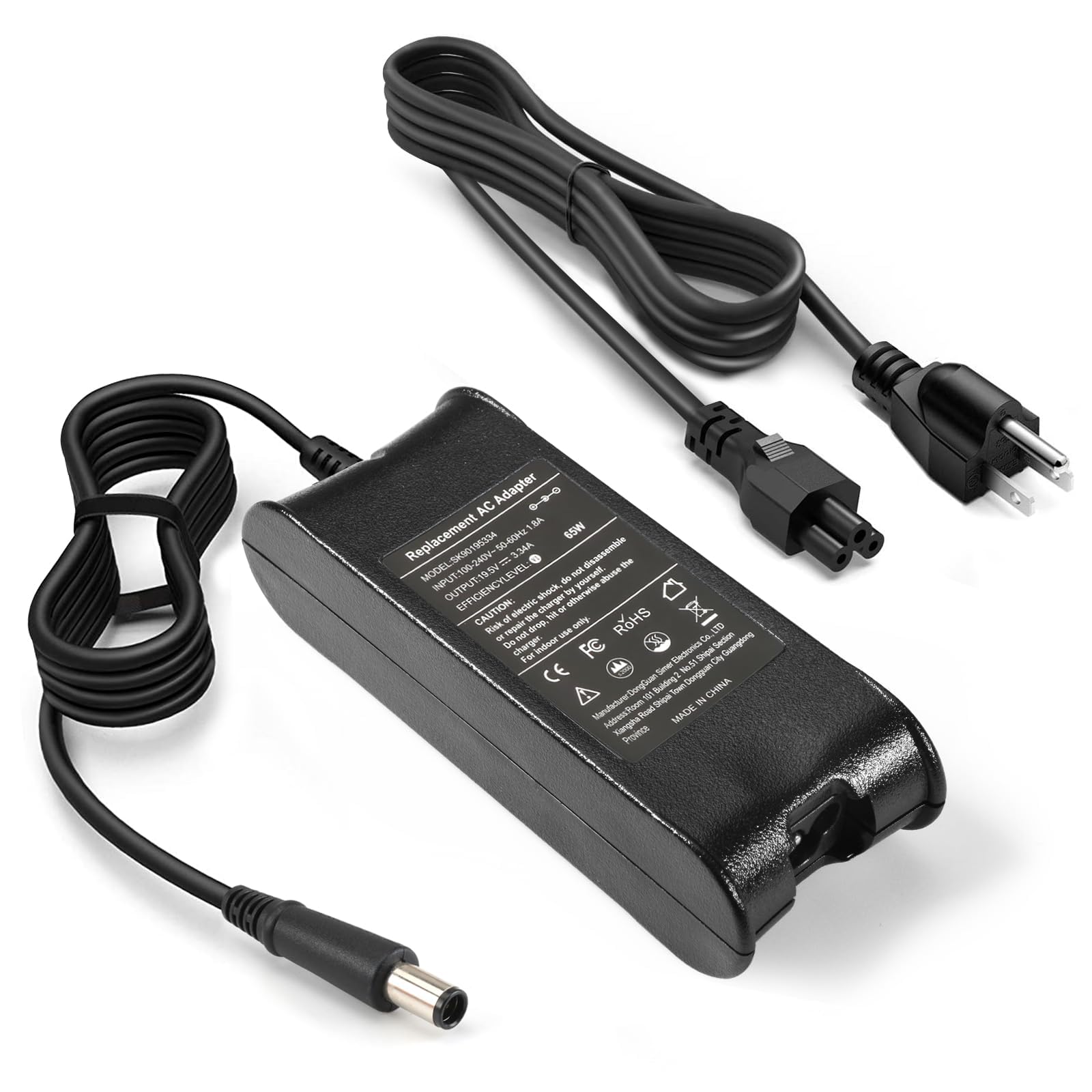
A dependable 90W Dell alternative that feels solid in the hand and charges fast without overheating.
The KAQIAR adapter matches the same 7.4mm x 5.0mm barrel as the AYKLCZUU unit above, but adds explicit short-circuit protection and a slightly more refined build. It outputs 19.5V at up to 4.62A for 90W, and it is also compatible with 65W laptops at 3.34A. The compatibility list spans Latitude E-series, Precision M-series, and even some Vostro models, making it a strong second choice for Dell owners. Customers note that it maintains consistent performance during heavy use — it doesn’t get hot, and the charging speed is fast enough to satisfy users coming from OEM bricks.
The most-discussed upside is functionality, with over 40 owners confirming it works as a perfect replacement. One reviewer used it for several months on a Latitude E6440 and reported no issues with the charge holding stable. The honest trade-off is that the cord is noticeably shorter than the original Dell cable. A few users had to rearrange their desk setup to accommodate the reach. For a desk where the outlet is nearby, this is a non-issue.
Solid Dell replacement: If you want a 90W brick that charges fast and includes over-voltage and over-current protections, this is a solid choice. The short cord is the only real limitation — check your outlet distance before buying.
Best for desk use: Grab this if your Dell Latitude sits near a wall outlet and you want a charger that won’t get hot. pass on it if you need a long cable to reach across a room or a dorm setup.
5. ZOZO Universal 45W Laptop Charger

A single 45W brick with multiple tips that covers Dell, HP, Acer, Asus, and Chromebooks in one kit.
This is the “grab bag” solution for households with mixed-brand laptops. The ZOZO adapter outputs 19.5V (and also 18.5V, 19V, and 20V) at up to 45W, with a set of interchangeable plugs that fit most thin-and-light models. It is strictly a 45W adapter — not suitable for gaming or high-performance laptops — but that is exactly the right wattage for Chromebooks, ultrabooks, and entry-level notebooks from Dell Inspiron, HP Stream, Acer Aspire, and Asus Zenbook. The built-in safeguards protect against short-circuit, over-current, over-voltage, and over-heating.
Quality is what owners praise most — a number of buyers mention it feels sturdy and beats generic store-brand cords. The mixed feedback centers on charging performance: it works great for some Chromebook models and falls short for others that need a higher current. One 30-year IT professional used it as a replacement for a Funyet N95 gaming notebook and said it matched options that cost far more. Incompatible with 65W, 90W, or 12V laptops, so check your wattage first.
Universal Appeal
- Comes with multiple tips covering Dell, HP, Acer, Asus, Samsung, Toshiba, and more.
- Weighs only 0.33 kg, making it a travel-friendly backup.
- Over-heating and short-circuit protection included.
Limits
- 45W max output restricts it to low-power laptops and Chromebooks.
- Not all tips fit every model perfectly — compatibility is mixed across brands.
Best for mixed households: If you have a Chromebook, an older Dell ultrabook, and an HP Stream in the house, one adapter can charge all three. Stick to a dedicated brick if you need more than 45W.
6. TREE.NB 90W AC Adapter for Dell Laptops

A 90W Dell charger with a metal-and-plastic casing that has kept vintage Inspiron laptops alive for years.
The TREE.NB adapter uses a 7.4mm x 5.0mm barrel (the plug size) and delivers a clean 19.5V at 4.62A for 90W — enough to power most Dell business laptops without draining the battery. what separates it from other Dell options is build quality: the enclosure uses both metal and plastic materials, giving it a denser, more premium feel that dissipates heat better than an all-plastic brick. Compatibility spans not just Latitude E-series and Inspiron 3xxx/5xxx, but also the Precision M-series and Vostro lines. One owner reported a first unit lasted over three years of daily use without failure, which is strong longevity for a third-party adapter. It is a better-built choice than the ROLADA if you want a denser feel and better heat dissipation, but it’s not for you if you need a charger for a non-Dell laptop — the barrel size is Dell-specific.
Quality and value for money are the two most-praised aspects. The cord length gets specific praise — long enough to reach comfortably without being a trip hazard. The honest downside is reliability: a notable share of owners experienced failure within a short period, with one unit dying after a couple of months of minimal use. A few units produce an audible hum or whistle when plugged in, quieter when connected to a laptop. Treat it as a well-made adapter that may have batch inconsistency.
Premium feel, mid-range price: The metal-reinforced casing and strong compatibility list make this a top contender for a daily driver. The main risk is variability — some units last years, others fail early. Buy from a seller with a good return policy.
Worth a try for Dell owners: Reach for this if you want a sturdy 90W brick for an older Dell and are willing to accept a small gamble on unit consistency. If a quiet charging brick matters to you, the possible hum is worth knowing.
7. Delight Tordor 45W AC Charger for Dell Inspiron

The exact 45W fix for a late-model Dell Inspiron that does not need the extra weight of a 90W brick.
This is a 45W adapter with a 4.5mm x 3.0mm tip — the smaller barrel that fits newer Dell Inspiron 3000, 5000, and 7000 series laptops, plus the XPS 13. Output is 19.5V at 2.31A, and it is specifically designed for the 45W tier (not compatible with 65W or 90W models). It includes built-in protections against overcharging, short circuiting, and overheating, plus an intelligent cooling system to monitor temperature. The compact design makes it easy to toss into a bag for a light travel charger.
Compatibility is what owners praise most — over a dozen confirm it is a perfect fit for their Inspiron 15 and 17 models. One reviewer even used it on an Acer laptop and reported fast charging with no problems. The reliability feedback is mixed: about as many reviewers point out that it stopped working after a short time as those who say it works flawlessly. It is a pure 45W adapter, so it will not serve a high-drain gaming laptop.
Why It Fits
- Exact 4.5mm x 3.0mm tip for newer Dell Inspiron and XPS models.
- Auto-stop charging when the battery is full protects long-term battery health.
- Slim form factor makes it pocketable for a commuter bag.
Potential Pitfalls
- Reliability is inconsistent — some units stop working without warning.
- Only 45W output, so it cannot power a high-performance mobile workstation.
For the right Dell Inspiron: Grab this if your Dell Inspiron or XPS uses the smaller 4.5mm tip and you want a light travel charger. look elsewhere if you need a brick that handles sustained heavy loads or if you own a 65W/90W Dell.
8. QXA 65W HP Laptop Charger — Blue Smart Tip
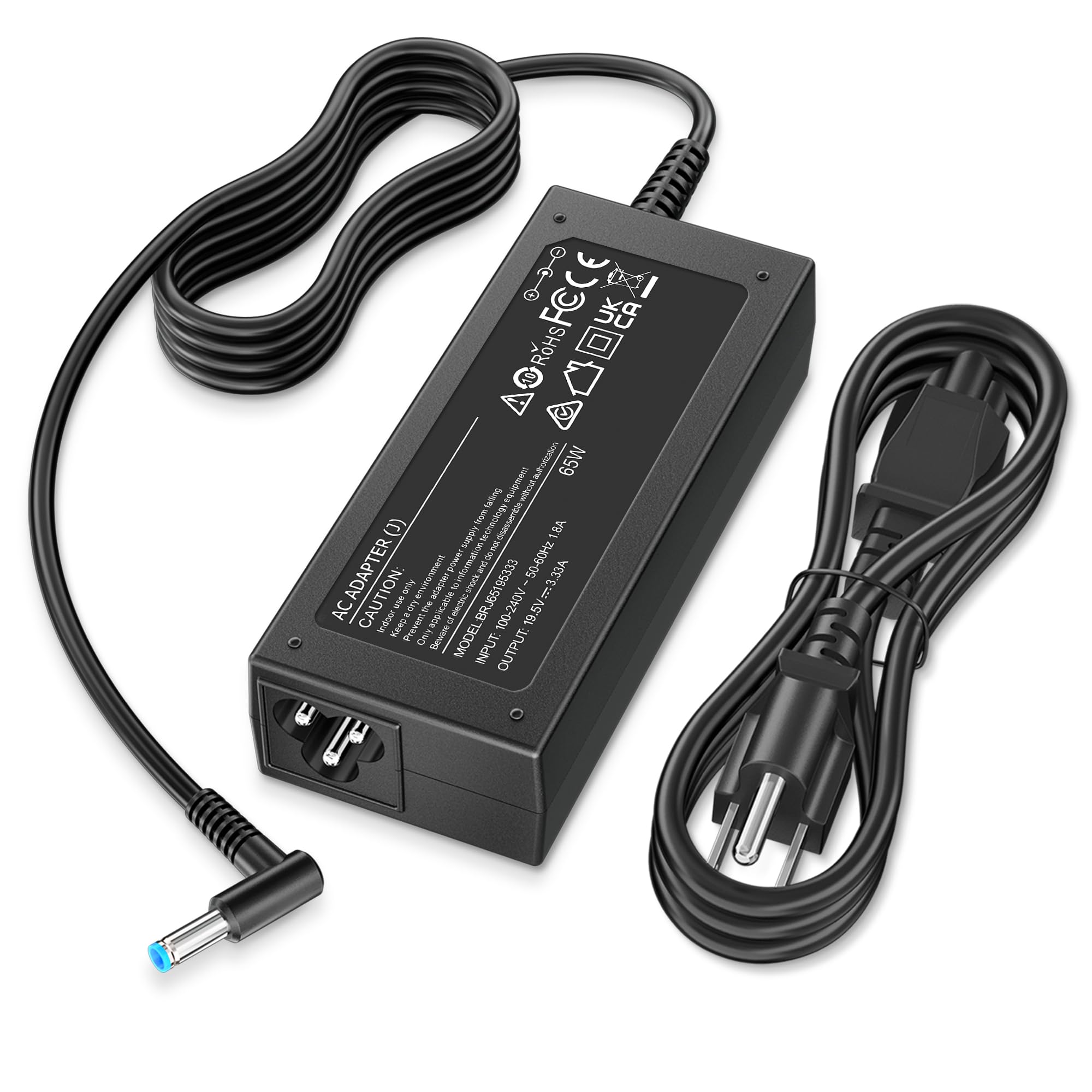
A certified HP adapter that emphasizes electrical safety with a sturdy set of built-in protections — including over-voltage, over-current, and short-circuit safeguards.
The QXA 65W charger is the only adapter in this lineup that explicitly mentions certification by a leading U.S. consumer product testing laboratory. It uses the HP 4.5mm x 3.0mm blue smart tip and runs at 19.5V with up to 3.33A, also backward-compatible with 45W machines. The safety suite is comprehensive: short-circuit, overvoltage, overcurrent, and overheat protection are all listed, and the seller offers a 12-month return policy alongside lifetime support. This is the pick for buyers who prioritize electrical safety above rock-bottom pricing.
Functionality and quality are the two most-praised aspects — over three dozen owners confirm it works as a smooth replacement for an HP 19.5V charger. One reviewer with an HP ProBook G10 450 reported a perfect fit and fast charging. The charging speed feedback is mixed: some users find it charges at full speed while others feel it is on the slower side for a 65W brick. Fit is widely praised, with one owner noting it actually fixed a loose connection issue they suspected was a laptop problem. It has only been on the market for a month based on the data, so long-term reliability data is limited. This is the safest bet if you are nervous about third-party chargers, but steer clear if you need a proven track record — the ROLADA has been around longer.
confidence included: The safety certification and multiple protection layers (over-voltage, over-current, short-circuit) make this the safest bet for anyone nervous about third-party laptop chargers. The short track record — only one month on the market — is the only reason it sits behind the ROLADA on the list.
Best for cautious buyers: Reach for this if you want a 65W HP charger that has been tested against electrical safety standards. The 12-month exchange policy adds extra confidence. The mixed charging speed feedback is the main trade-off.
9. DTDR 180W 19.5V Laptop Charger for ASUS ROG

A massive 180W brick built to feed hungry ASUS ROG gaming laptops that need real power under load.
This is the heavy lifter of the lineup — a 180W adapter pushing 19.5V at a full 9.23A. It uses a 5.5mm x 2.5mm barrel and is designed for ASUS ROG machines like the G75VW, G751JM, G752VL, and GL502VT. It also works with some MSI 150W/120W models via compatibility listed in the manual. The DTDR includes a cooling system and built-in safeguards against overcharging, short circuiting, overheating, and spark. It comes with two extra adapter tips for other laptop brands, making it slightly more versatile than a pure ASUS brick.
Functionality and quality are the top praised aspects — over 40 owners confirm it powers laptops properly. One owner replaced the brick on a 2019 ASUS ROG Strix SCAR and said it worked as well as the original. Another used it on a ten-year-old G75VX and noted it ran cool even during extended gaming sessions. Durability is the main concern, with a number of owners reporting failure after about three months of daily use. Compatibility is also mixed — it fits ASUS ROG models well, but some users found it did not work with their specific sub-model or build revision.
Raw Power
- 180W output handles the most power-hungry ASUS gaming laptops and some MSI models.
- Extra adapter tips included for limited cross-brand compatibility.
- Cooling system keeps the brick from getting scalding hot during marathon sessions.
Power Trade-Offs
- Durability is the main complaint — a significant share of units fail within three months.
- Does not fit all ROG models; check the connector size carefully against your specific laptop.
For ROG loyalists on a budget: Grab this if your ASUS ROG needs a 180W replacement and you want to avoid the OEM price tag. The quick failure rate for some units means you should test it thoroughly during the return window. skip it if you cannot afford to have the adapter die mid-project.
Understanding the Specs
Wattage & Current
A 19.5V laptop charger’s wattage tells you how much power it can push. A 45W adapter provides 2.31 amps, which is fine for a slim ultrabook. A 90W adapter provides 4.62 amps for a standard business laptop. A 180W unit provides 9.23 amps for a gaming machine that needs power under full processor and GPU load. If you plug a 45W charger into a laptop that needs 90W, the battery will still drain slowly while the laptop is running. The adapter will run hot and may shut down or fail early.
Connector Barrel Size
The round metal tip that goes into your laptop comes in standard diameters. The most common 19.5V sizes are 7.4mm x 5.0mm (older Dell Latitude and Precision), 4.5mm x 3.0mm (HP and newer Dell Inspiron/XPS), and 5.5mm x 2.5mm (ASUS ROG). There is no universal standard across brands. Measure your old adapter’s outer barrel diameter and inner pin diameter with a ruler in millimeters. Even within the same brand, different laptop generations use different barrel sizes, so never assume “Dell charger” means one tip.
Smart Pin vs Standard Barrel
HP laptops use a “blue tip” connector that contains a small data pin in the center. This pin communicates with the laptop to confirm the adapter is genuine and delivers the correct power profile. A standard barrel without the smart pin still works for charging on many HP models, but some machines may refuse to charge or may charge at a reduced rate. Dell’s 7.4mm barrel also has a center pin, but it acts as a mechanical guide rather than a data line, so there is less compatibility risk.
Protection Circuits
A quality 19.5V charger should list over-voltage protection (OVP), which shuts down the adapter if voltage spikes above safe levels. Over-current protection (OCP) prevents excessive current from overheating the cable. Short-circuit protection (SCP) instantly cuts power if the barrel contacts touch metal. Over-temperature protection (OTP) reduces power or turns off the brick if internal components get too hot. These four features protect your laptop’s motherboard from electrical damage.
FAQ
Can I use a 90W charger on a 65W laptop?
What happens if I use a 45W charger on a 90W laptop?
How do I measure my laptop charger’s barrel size?
Will a 19.5V charger work on a 18.5V or 20V laptop?
How long should a third-party laptop charger last?
Can a 19.5V charger overcharge my laptop battery?
What does a “smart blue tip” charger do differently?
My charger is humming or buzzing — is that normal?
Does brand matter for laptop charger reliability?
Can I use a 19.5V charger with a proprietary Dell tip?
Is it safe to leave a third-party charger plugged in all the time?
Final Thoughts: The Verdict
For most people, the best 19.5v laptop charger overall is the Ymawetia 90W for Sony Vaio because it is the only exact drop-in replacement for those specific laptops, backed by strong owner feedback. If you use HP laptops at home and want a safety-certified brick, the QXA 65W HP Charger offers the best protection features in the lineup. And for anyone running a Dell Latitude or Inspiron who needs reliability on a budget, the KAQIAR 90W is the most balanced option with consistent performance reports. No matter which charger fits your 19.5V machine, matching the barrel size and wattage rating is always the first and most important step.
How We Picked
We do not accept paid placement. Every pick is matched to a real buyer and a real use-case; we do not hands-on test units.
Sources & Methodology
Specifications: manufacturer listings and product documentation. Review insights: verified customer reviews, as of July 2026. Pricing: not shown on this page (it changes often); check the current price via the retailer link.
As an Amazon Associate, Gadgets Feed earns from qualifying purchases. This does not affect which products we feature.