
Our readers keep the lights on and my morning glass full of iced black tea. As an Amazon Associate, I earn from qualifying purchases.
Specs are compiled from manufacturer listings and verified buyer reviews and can change over time — please confirm the key details on the product page before buying.
Your rack gear gets hot, and when it gets too hot, it starts throttling or shutting down. A 1U rack fan pulls that heat away before your amp, server, or network switch suffers. This guide compares the panels that actually move air—without drowning out your work or your music.
I’m Min, founder and writer of Gadgets Feed. This guide is built from the manufacturers’ published specs and verified customer reviews, so you see each pick’s real strengths and trade-offs.
You will see six serious contenders for the best 1u rack fan, ranging from programmable AC Infinity panels to high-CFM dual and triple-fan systems. Each has a specific job inside your cabinet.
Our Picks at a Glance


How To Choose The Best 1U Rack Fan
A 1U rack fan is a simple purchase until you mount the wrong one and discover it is too loud, too weak, or blows in the wrong direction. A few specs separate a smart buy from a regret.
Airflow Direction: Intake vs Exhaust vs Top Exhaust
The direction the fan pushes air matters more than most buyers think. An intake fan (like the AC Infinity CLOUDPLATE T1-N) draws cool air from the front of the rack and blows it across your gear toward the back, so components stay cool. An exhaust fan (the AC Infinity CLOUDPLATE T1) does the opposite — it pulls hot air from inside the rack and pushes it out the front, so heat leaves the cabinet. A top-exhaust fan (the AC Infinity CLOUDPLATE T2) vents heat upward, which works best in a sealed rack where hot air naturally rises. Pick the direction that matches your rack’s existing airflow path rather than fighting it.
CFM (Cubic Feet Per Minute) — How Much Air It Actually Moves
CFM is the raw measure of airflow. A low-CFM panel (20 to 60 CFM) is fine for a lightly loaded AV rack or a home-theater cabinet where quiet operation matters. A high-CFM panel (150 to 300 CFM) is built for server rooms and dense network closets where heat builds fast. The trade-off is almost always noise — higher CFM generally means higher dBA (decibels A-weighted, which measures how loud something sounds to the human ear). Your job is to match the airflow to the actual heat load, not to max out the number for no reason.
Noise Level and Where You Mount It
Noise is measured in dBA (decibels, A-weighted). A fan at 28 dBA is whisper-quiet and livable in a home theater or living room. A fan at 44-50 dBA is noticeable (like a running refrigerator or a normal conversation) and belongs in a basement, garage, or mechanical closet. Read the decibel rating in context of your mounting location — never pick purely on CFM without checking the dBA, or you will end up with a wind tunnel in your living space.
Thermostat Control — Manual vs Automatic
A programmable thermostat sensor (a small temperature probe you place near your hottest gear) lets the fan idle when your gear is cool and ramp up only when heat builds. That saves noise, extends fan bearing life, and avoids running a jet engine 24/7 for no reason. Manual on/off fans are cheaper, but they run at full speed constantly, which wears them out faster and annoys everyone in earshot.
Quick Comparison
| Model | Best For | Airflow (CFM) | Noise (dBA) | Weight | Amazon |
|---|---|---|---|---|---|
| AC Infinity CLOUDPLATE T1-N★ Best Overall | Quiet intake in living spaces | 20 to 60 CFM | 8 to 28 dBA | 2.5 Pounds | Amazon |
| AC Infinity CLOUDPLATE T2Top Exhaust | Top exhaust for sealed racks | 60 to 300 CFM | 12 to 38 dBA | 3 Pounds | Amazon |
| AC Infinity CLOUDPLATE T1 | Quiet exhaust in living spaces | 20 to 60 CFM | 8 to 28 dBA | 2.5 Pounds | Amazon |
| Tupavco TP1731 (3-Fan) | High CFM with programmable thermostat | 225 CFM | Not specified | 101 Ounces | Amazon |
| Tupavco TP1721 (2-Fan) | Balanced mid-range with adjustable temp control | 150 CFM | Not specified | 83 Ounces | Amazon |
| ARES VISION Dual Fan | High CFM in a non-living-space closet | 250 CFM | 44-50 dBA | Not specified | Amazon |
In‑Depth Reviews
1. AC Infinity CLOUDPLATE T1-N, Rack Mount Fan Panel 1U, Intake Airflow
Our pick — over 4.5★ from 250+ verified ratings; the strongest balance of quality and price.
The quietest way to pull cool air into a rack without waking up the whole room.
You get intelligent control with a programmable thermostat controller that automatically ramps speed up or down based on your gear’s temperature. The intake design pulls fresh air into the front of your rack—important when your equipment sits in a cabinet with a closed back. Airflow ranges from 20 to 60 CFM (cubic feet per minute), which is modest compared to the 250 CFM of the ARES VISION dual fan below. The trade-off is a noise floor of just 8 to 28 dBA (decibels A-weighted, roughly the sound of a whisper or quiet library), so it works in a home theater or living room.
The build uses premium anodized aluminum with CNC-machined detailing, so it looks professional in a rack. Dual ball bearings (small metal balls that reduce friction inside the fan motor) extend lifespan compared to cheaper sleeve bearings. Buyers report it is an “efficient exhaust fan, intuitive controls, strong airflow but loud at max speed.” One reviewer noted that if you run it at speed six (1800 RPM max) in a small rack, you may have a mounting or air-gap problem rather than a fan problem.
The Quiet Trade-Off
- Programmable thermostat with speed 1-6 plus auto mode saves energy and noise
- Display shows current temperature, speed, and mode at a glance
- Runs at 1800 RPM max, keeping the noise livable in occupied rooms
The Mounting Catch
- Only 60 CFM at max — insufficient for a densely packed server rack with high heat output
- Bulky power plug and loose temperature-sensor cable make a tight 1U fit even tighter
- Some buyers wish the temperature-sensor cable clip was more secure
Reach for this if: you need intake cooling in a quiet space (home theater, office, living-room AV cabinet) where low dBA matters more than raw CFM.
Look elsewhere if: you have a dense network or server closet that needs to push 200+ CFM to survive — this panel will not keep up.
2. AC Infinity CLOUDPLATE T2, Rack Mount Fan 1U, Top Exhaust Airflow
The heavy lifter that pushes hot air up and out of a sealed rack without screaming.
This is the only AC Infinity panel here that moves serious air — 60 to 300 CFM (cubic feet per minute), which is five times the max of the CLOUDPLATE T1-N above. The top-exhaust design works with the natural convection of a sealed rack, pulling hot air from inside and venting it upward, so heat does not recirculate. Noise sits between 12 and 38 dBA (decibels A-weighted), meaning it stays quiet at low speeds and only gets noticeable at full blast. But one buyer mentioned the LED is bright, and at 13.5 inches deep it may be too tight for shallow 13.8-inch racks; the power cable and probe stick out and risk damage.
A programmable thermostat with automated speed control, alarm warnings, and backup memory separates it from simpler on/off fans. You can also connect it to the AC Infinity app for monitoring. Owners mention it keeps a switch’s temperature 34°F cooler on auto mode and is “quiet even at full blast.” One reviewer wrote that the CLOUDPLATE T2 is strong enough to cool a 42U rack effectively.
The Heat Exhaust Specialist
- 300 CFM is the highest airflow in this list, matching the ARES VISION’s 250 CFM range but with a quieter profile
- Programmable thermostat with backup memory keeps settings after a power loss
- App control adds convenience for remote monitoring
The Fitment Issue
- Depth of 13.5 inches is too tight for some racks; the protruding power cable and probe can snag or bend
- Noise rises to 38 dBA at max speed, which is noticeable in a quiet room
- Premium price is worth it for the performance, but budget options exist for lighter loads
Who it fits: owners of sealed server or network racks with a real heat-load (dense switches, powerful amps) who need top exhaust and are willing to check depth clearance.
Who might struggle: anyone with a shallow rack under 14 inches deep — measure before you buy, or the protruding cables will be a headache.
3. Tupavco TP1731, 3 Fan Server Cooling System, 1U 19″ Rackmount
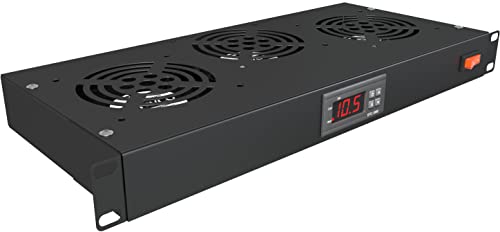
Three 120mm fans and a digital thermostat in one 1U panel for less than premium-tier rivals.
Where the AC Infinity CLOUDPLATE T1-N maxes out at 60 CFM (cubic feet per minute), this Tupavco triple-fan panel delivers 225 CFM — nearly four times the airflow. The three 4-inch (120mm) noise-control ball-bearing fans push hot air through the top exhaust system, and the programmable thermostat sensor triggers them based on your set temperature range. At 101 ounces (about 6.3 pounds), it is noticeably heavier than the 83-ounce (about 5.2-pound) dual-fan version below, which customers note reflects a “high quality, heavy duty 19″ rackmount” build.
One buyer praised the unit as “heavy duty, high quality” with an LCD screen and 225 CFM airflow. But another rewired the unit to bypass a component because it did not work from the start. The aluminum construction and adjustable temperature sensor are strong selling points, but the quality control appears less consistent than AC Infinity.
The Mid-Range Workhorse
- 225 CFM at 1800 RPM delivers strong airflow for medium-load cabinets without hitting server-room noise
- Programmable thermostat with digital display gives you simple set-and-forget temperature control
- Three fans distribute airflow across the full width of the rack better than a single fan design
The Consistency Concern
- Some units arrived with bent brackets or missing hardware from damaged returns
- At least one owner reported the unit did not function and required internal rewiring
- No official noise rating in dBA — you are guessing until you mount it
Best for: anyone with a mid-density rack (a mix of AV, networking, or pro audio gear) who wants thermostat control and high CFM without spending premium-tier money.
Skip if: quality consistency is your top priority — the AC Infinity panels have far fewer defect reports in the data.
4. Tupavco TP1721, 2 Fan Server Cooling System, 1U 19″ Rackmount

A dual-fan thermostat panel that solved one buyer’s capacitor failure — literally.
This is the dual-fan sibling of the Tupavco TP1731 above, delivering 150 CFM (cubic feet per minute) compared to the triple-fan’s 225 CFM. At 83 ounces (about 5.2 pounds), it is 22% lighter than the 101-ounce triple-fan unit, but the build still uses aluminum and noise-control ball-bearing fans. The programmable thermostat sensor lets you set a trigger temperature; one reviewer set theirs to start at 100°F and shut off at 70°F, which “solved previous capacitor failure” in their AV system — a real-world case study in why thermostat control matters.
Reviewers point out the adjustable thermostat “prevents overheating; cools receiver and four 700W amps” and that the “fans not loud.” But another reviewer found the “noise-controlled” label misleading and called the fans loud with weak airflow for the price. The interface requires holding S + arrows to adjust the setpoint, which is a minor annoyance but not a dealbreaker once set.
The Thermostat Performer
- 150 CFM is a solid middle ground between the AC Infinity 60 CFM panels and high-volume 250+ CFM options
- Programmable thermostat with digital display and overheat alarm gives active protection
- Dual 120mm ball-bearing fans move air quietly at lower speeds
The Mixed Reviews
- Some shoppers say weak airflow for the noise level — results vary per unit
- Interface to adjust temperature setpoint is not intuitive (hold S + arrow keys)
- At 83 ounces, it is heavier than a two-fan AC Infinity unit but lacks the AC build consistency
Reach for this if: you have a medium-heat AV or network rack and want thermostat control to keep fans from running 24/7.
Consider the AC Infinity T1 instead for dead-silent operation at low speeds — the Tupavco units have less consistent noise reports than AC Infinity’s line.
5. AC Infinity CLOUDPLATE T1, Rack Mount Fan Panel 1U, Exhaust Airflow

The exhaust mirror of the T1-N, with one consistent buyer praise: it runs slightly quieter at higher speeds.
This is the exhaust version of the CLOUDPLATE T1-N, meaning it pulls hot air from inside the rack and blows it out the front instead of drawing cool air in. The specs are identical on paper — 20 to 60 CFM (cubic feet per minute), 8 to 28 dBA (decibels A-weighted), 1800 RPM (revolutions per minute) max, dual ball bearings, premium anodized aluminum. But one buyer who owns both versions reported that the exhaust unit has a “slightly lower overall noise as compared to the intake at speeds 4, 5, and 6.” That difference matters if your rack sits in a noise-sensitive room.
The programmable thermostat controller with automated speed control and alarm warnings is the same smart platform that makes the T1-N so adaptable. A reviewer wrote it is “ultra quiet” and works smoothly with the temperature probe to exhaust heat. Another said the “high pitch but livable sound” is noticeable at higher speeds — the 28 dBA rating is an upper bound, not a constant noise floor. If your rack layout already has intake fans on the other side, this exhaust panel completes the airflow loop.
The Completionist Pick
- Slightly quieter than the intake version at mid-to-high speeds per a verified dual-owner
- Programmable thermostat with alarm warnings adds active heat protection
- CNC-machined aluminum build looks professional and matches other AC Infinity gear
The Limitation
- Only 60 CFM max — insufficient for a hot server rack on its own
- Buyer reports a high-pitched fan whine at speeds above 4 that is “livable” but present
- Best used as part of a matched intake+exhaust pair, which raises total cost
Ideal for: pairing with the CLOUDPLATE T1-N to create a front-to-back airflow path in a low-to-moderate-heat rack — one intake, one exhaust, both whisper-quiet.
Not for: solo cooling of a hot server closet — 60 CFM is not enough for dense gear; step up to the CLOUDPLATE T2 instead.
6. ARES VISION Dual 1U Cooling Air Circulating Fans for 19” Wide Standard Server Cabinet

The budget cyclone that moves air like a 5000 RPM jet but sounds like one too.
This is the raw-CFM champion of the list — 250 CFM (cubic feet per minute) at a screaming 5000 RPM (revolutions per minute). To put that in perspective, it moves 4.2 times the air of the AC Infinity CLOUDPLATE T1-N (60 CFM) and spins at 2.8 times its max RPM. The steel construction with welded seams feels solid, and the pre-cut vented shelf design lets air flow through your gear rather than just across it. But the noise is the headline: 44-50 dBA (decibels A-weighted) is not subtle (think loud refrigerator or normal conversation). Buyers report “effective but LOUD” and one client asked to relocate their cabinet away from the sound after installation.
Multiple reviews report a common failure mode: “Two units both had fan failure within a year (loud whine).” The manufacturer was unresponsive after a warranty claim according to that buyer. Another reviewer said the “fan quality poor” and the noise forced a cabinet relocation. The performance is real — the unit pushes a massive volume of air — but reliability and noise make it a niche choice for basements, garages, or mechanical closets where nobody sits near the equipment.
The Air-Moving Powerhouse
- 250 CFM at 5000 RPM buries every other panel here on raw airflow — the CLOUDPLATE T2’s 300 CFM is the only comparable figure
- Steel construction with welded seams feels sturdy for the price
- Simple on/off operation means no programming or thermostat setup
The Reliability Risk
- Multiple reports of bearing failure within a year (loud whine) and unresponsive manufacturer support
- 44-50 dBA is very loud — not suitable for any occupied room, including a home theater or office
- Single-speed on/off only — no thermostat, no speed control, no auto mode
Only for: a basement, garage, or dedicated mechanical room where nobody works nearby and pure CFM matters more than any other feature.
Avoid if: you need quiet operation, long-term reliability, or any temperature-based control — this is a bare-bones air mover with a poor track record.
Understanding the Specs
CFM — Cubic Feet Per Minute
This is the raw measure of how much air the fan moves in one minute. Higher CFM means more heat extraction, but it almost always comes with higher noise. A 60 CFM panel is fine for a lightly loaded AV rack; a 300 CFM panel is built for dense server stacks. Match CFM to your gear’s heat output rather than chasing the highest number.
dBA — Decibels A-Weighted
This is the noise level measured with a filter that mimics human hearing. 28 dBA is about as loud as a whisper or a quiet library. 44-50 dBA is closer to normal conversation level or a running refrigerator. A 3 dBA increase doubles the sound intensity, so the gap between 28 dBA and 50 dBA is enormous — not just twice as loud, but many times louder to your ear.
RPM — Revolutions Per Minute
This tells you how fast the fan blades spin. Higher RPM generally pushes more air but also creates more noise and wears bearings faster. A 1800 RPM fan is moderate and quiet. A 5000 RPM fan is a jet engine — it moves a lot of air but will be loud and may fail sooner if the bearings are not premium quality.
Ball Bearings vs Sleeve Bearings
Ball bearings use small metal balls to reduce friction inside the fan motor. They last longer (often 2-3x the lifespan of sleeve bearings) and handle heat and continuous operation better. Sleeve bearings are cheaper and quieter when new but wear out faster, especially in warm environments like a rack. Dual ball bearings are the mark of a fan built to run 24/7.
FAQ
Can I mix an intake fan and an exhaust fan in the same rack?
How much CFM do I need for a typical 12U to 24U AV rack?
Will a 1U rack fan fit in any standard 19-inch rack?
What does the thermostat sensor on a rack fan actually do?
Is a 44-50 dBA fan too loud for a home theater?
How long do ball-bearing fans last in a 1U rack fan?
Can I use a 1U rack fan to cool a power amplifier that runs hot?
What is the difference between the AC Infinity CLOUDPLATE T1-N and the T1?
Does a 1U rack fan need to be mounted at the top or bottom of the rack?
What does the “top exhaust” design on the CLOUDPLATE T2 do differently?
Final Thoughts: The Verdict
For most buyers, the best 1u rack fan winner is the AC Infinity CLOUDPLATE T1-N because it combines a programmable thermostat, near-silent 28 dBA operation, and premium anodized aluminum build in a single 1U slot — ideal for any living-space rack. If you need serious heat extraction for a sealed server rack, grab the AC Infinity CLOUDPLATE T2 for its 300 CFM top-exhaust design. And for a budget-friendly thermostat panel with high CFM, the standout is the Tupavco TP1731 — just be ready for less consistent quality control.
How We Picked
We do not accept paid placement. Every pick is matched to a real buyer and a real use-case; we do not hands-on test units.
Sources & Methodology
Specifications: manufacturer listings and product documentation. Review insights: verified customer reviews, as of July 2026. Pricing: not shown on this page (it changes often); check the current price via the retailer link.
As an Amazon Associate, Gadgets Feed earns from qualifying purchases. This does not affect which products we feature.