
A 1×2 label printer isn’t just a shipping accessory—it’s the difference between manually writing out address labels for every single package and hitting “print” once. For small business owners, Etsy sellers, and home-office organizers, the ability to drop a 1×2 inch label into a printer and get a perfectly crisp, smudge-proof adhesive label in under two seconds changes the entire packing workflow. The right unit eliminates the hunt for a pen, the frustration of peeling sheet labels, and the waste of using a full 4×6 sheet for a tiny return address.
I’m Min — the co-founder and writer behind Gadgets Feed. I’ve spent hundreds of hours researching direct-thermal and thermal-transfer label printers, breaking down connectivity options, DPI resolution claims, and media compatibility across the major brands so you don’t have to guess which machine actually handles 1×2 label stock without constant paper jams or driver headaches.
After comparing print speeds, software ecosystems, and label width tolerances across nine models, this guide delivers the definitive breakdown of the best 1×2 label printer for every workflow and budget.
How To Choose The Best 1×2 Label Printer
Most buyers over-index on maximum label width (4×6 capability) when their daily use case is actually 1×2 inch address or return labels. The real decision points are connectivity, print technology, and software reliability—not just “does it print a label.”
Print Technology: Direct Thermal vs. Thermal Transfer
Direct thermal printers burn the image directly into the label surface—no ink, no ribbon, but the print fades under heat or sunlight over a couple years. Thermal transfer uses a ribbon that physically bonds a layer onto the label, making it waterproof, oil-proof, and fade-resistant for 5+ years. For 1×2 shipping labels that travel through rain and handling, thermal transfer is the superior long-term choice. For general office organization or indoor use, direct thermal is cheaper and simpler.
Connectivity and Software Ecosystem
A printer that requires a USB tether to a single desktop is fine for a stationary workstation, but Bluetooth and Ethernet models let you print directly from a phone or tablet—critical for warehouse floors, retail counters, or anyone who prints labels from Poshmark, Etsy, or Shopify on the go. The app quality matters enormously: apps that offer batch printing, barcode generation, and Excel import save time, while poorly designed apps force you into frustrating workarounds.
Label Width Tolerance and Die-Cut Support
Not every printer handles narrow 1×2 labels cleanly. Some machines have a minimum printable width of 1 inch, others start at 2.4 inches. For 1×2 inch labels, you want a printer that supports die-cut (pre-sized) label rolls in that exact dimension—otherwise you’re cutting continuous tape by hand, which defeats the purpose. Check the media compatibility table before buying.
Quick Comparison
On smaller screens, swipe sideways to see the full table.
| Model | Category | Best For | Key Spec | Amazon |
|---|---|---|---|---|
| Brother QL-820NWB | Premium | Multi-device network label printing | 300 DPI, 110 labels/min | Amazon |
| NIIMBOT M2 | Mid-Range | Thermal transfer color ribbon labels | 300 DPI, 60 ppm | Amazon |
| Seiko SLP 620 | Entry-Level | Simple desktop address labels | 2.76 labels/sec, 1.08 lbs | Amazon |
| Phomemo D530Pro | Mid-Range | Multi-platform shipping label printing | 300 DPI, 150mm/s | Amazon |
| Brother PTD600 | Mid-Range | High-resolution PC connectable labeling | 24 bpp color display, 180 DPI | Amazon |
| Rollo USB | Premium | Commercial-grade high-speed shipping | 203 DPI, 1 label/sec | Amazon |
| Makeid D50 | Premium | Industrial job-site heavy-duty labeling | 300 DPI, 2600mAh battery | Amazon |
| DYMO 450 Twin Turbo | Premium | Dual-roll multi-size label switching | Direct thermal, 2 rolls | Amazon |
| Brother QL-1110NWB | Premium | Wide-format (4″) wireless label printing | 300 DPI, 69 labels/min | Amazon |
In‑Depth Reviews
1. Brother QL-820NWB

The Brother QL-820NWB is the closest thing to a universal label printer for a professional environment. Its 300 DPI print head delivers text and barcodes at 110 standard address labels per minute, and the three connectivity options—Bluetooth, dual-band WiFi, and Ethernet—mean you can plug it into a network and let any computer on the floor send a 1×2 label job without USB cables. The monochrome LCD screen allows standalone label creation when you don’t want to touch a computer.
What sets this apart for 1×2 label users is the DK-series label compatibility, which includes die-cut rolls in 1×2 inch sizes. You get the DK-1201 starter roll in the box, so you’re printing immediately. The direct thermal engine requires no ink or toner, though labels stored in hot windows will fade over time. The Bluetooth connectivity is limited to one paired device at a time, but the WiFi connection handles multiple devices seamlessly.
The build quality is typical Brother—solid, reliable, quiet in operation. The P-Touch Editor software has a learning curve, but once you set label templates, batch printing from Excel or a CRM is straightforward. For a small business that prints 50-200 1×2 labels per day and needs network accessibility, this is the most future-proof option on the list.
Why it’s great
- Triple connectivity (Bluetooth, WiFi, Ethernet) fits any workflow
- 300 DPI at 110 labels per minute is genuinely fast
- Die-cut 1×2 label support out of the box with DK-series rolls
Good to know
- Bluetooth limits to one device at a time
- Direct thermal labels fade under prolonged UV exposure
- Software interface feels dated compared to mobile-first competitors
2. NIIMBOT M2

The NIIMBOT M2 is a thermal transfer printer in a world dominated by direct thermal competitors, and that alone makes it a compelling choice for 1×2 labels that need to survive outdoors, refrigeration, or chemical exposure. With 300 DPI resolution and a print width of 20-50mm, it handles 1×2 rolls perfectly. The thermal transfer process uses a ribbon to bond ink into the label, producing waterproof, oil-proof, and scratch-resistant prints that last years without fading.
Bluetooth connectivity works with the NIIMBOT app for both iOS and Android, and the M2 can support up to 10 phones simultaneously (3 iOS, 7 Android). The app is template-rich, offering barcodes, QR codes, batch printing, and Excel import—features normally reserved for premium corporate models. The USB-C port also lets you connect to a PC via cable for more precise layout control. The included 50x30mm label roll lets you start printing immediately.
The main caveat: the M2 uses proprietary M2-series consumables. Standard thermal labels from older NIIMBOT models (B1, B2, B21) will not work. One ribbon roll prints approximately three label rolls, so factor recurring consumable costs into your decision. The print speed of 60 pages per minute is adequate for medium-volume use but won’t match the brother’s 110 lpm. For anyone who needs durable labels that resist water and abrasion, the M2 punches well above its price tier.
Why it’s great
- Thermal transfer produces waterproof, oil-proof, scratch-resistant labels
- 300 DPI resolution ensures sharp text on small 1×2 labels
- Bluetooth supports up to 10 phones simultaneously
Good to know
- Only compatible with M2-series label rolls, not standard thermal rolls
- One ribbon roll yields only three label rolls before replacement
- App requires some learning for custom layouts
3. Seiko Smart Label Printer 620

The Seiko SLP 620 is a direct thermal desktop printer built for one job—producing crisp address and file-folder labels at 2.76 inches per second. Its front-load design makes swapping between 1×2 label rolls trivial: you drop in a new roll and close the latch. The included software lets you pull contacts from Outlook or Google Apps and produce formatted labels in seconds, which is ideal for low-volume office environments where network printing isn’t required.
The printer weighs only 1.08 pounds and occupies a footprint smaller than a standard notebook, making it a permanent desktop fixture that doesn’t crowd your workspace. The direct thermal engine means zero ink or toner purchases forever. Seiko offers a wide range of label sizes including 1×2 inch die-cut rolls, and the label stock is reasonably priced compared to proprietary alternatives from other brands that lock users into expensive consumables.
The critical limitation is connectivity: USB only, no Bluetooth, no WiFi. That means the SLP 620 works exclusively with a single tethered computer. If your workflow involves printing labels from a phone, tablet, or multiple workstations, this is a non-starter. Additionally, some users report that Seiko’s software support lifecycle is limited—older models were dropped when Windows or macOS introduced major updates. If you need a dead-simple, single-workstation label printer, this form factor is still tough to beat.
Why it’s great
- Ultra-compact footprint saves desk space
- Front-load label roll swap takes under ten seconds
- Direct thermal printing eliminates ink and toner forever
Good to know
- USB-only connectivity limits to one tethered computer
- Software support lifecycle may end with OS updates
- Not designed for high-volume batch printing
4. Phomemo D530Pro

The Phomemo D530Pro is a 300 DPI thermal label printer that supports Ethernet, Bluetooth, and USB connectivity, giving it the widest connection flexibility in its price bracket. While it ships as a 4×6 shipping label printer, its 1 to 4.6-inch printable width range means 1×2 inch label rolls work perfectly inside the built-in paper slot. The printer can hold up to 500 4×6 labels internally, which also translates to plenty of internal capacity for smaller rolls.
The print speed of 150mm/s is fast enough to handle small batch runs without waiting, and the Labelife app provides templates for barcodes, QR codes, and common label layouts. Compatibility with USPS, UPS, FedEx, Shopify, Etsy, and Amazon platforms means you can print 1×2 return address labels directly from those platforms without reformatting. The included USB-C adapter makes PC connection simple, and the Ethernet port allows network sharing.
A few limitations temper the versatility. Some users report that the printer struggles with UPS labels from Shopify specifically—the print cuts off or misaligns—which suggests firmware optimization issues for specific platform-label combinations. The build feels slightly less premium than Brother or Rollo units, with a lightweight plastic chassis. For mixed-label use (1×2 address labels plus occasional 4×6 shipping labels) with multi-platform support, the D530Pro delivers strong value, but verify UPS label compatibility before committing.
Why it’s great
- 300 DPI produces sharp text even on 1×2 labels
- Triple connectivity (Ethernet, Bluetooth, USB) fits any setup
- Internal paper slot keeps workspace tidy
Good to know
- UPS label printing from Shopify may experience alignment issues
- Build quality is lightweight plastic, not commercial-grade
- Requires Labelife app for label imports
5. Brother PTD600

The Brother PTD600 is a PC-connectable labeler that combines a full color LCD display with a large keyboard for standalone editing, plus USB connectivity to a Windows or Mac computer for advanced P-Touch Editor control. The 24-bit color display lets you preview labels before printing, reducing label waste. The top-loading tape cassette system accepts a wide range of TZe tape widths, including 1×2 inch sizes when you use the correct die-cut cassette.
Where the PTD600 shines for 1×2 label users is the ability to create and edit labels directly on the device without needing a computer. The keyboard is comfortable for extended typing sessions, and the display resolution is high enough to render small fonts clearly. The included AC adapter means you’re not burning through batteries, though six AA batteries can power it for portable use. Third-party tape cartridges like JARBO work reliably, bringing down the cost per label significantly compared to genuine Brother supplies.
The main trade-off is the minimum label length for the internal automatic cutter. The PTD600 requires labels to be at least one inch long to trigger the auto-cut, which works for 1×2 labels but creates about an inch of wasted tape before short labels. Selecting the “small margins” option reduces right-side waste but not left-side waste, resulting in roughly 25-33% tape loss on small 1×2 jobs. For high-volume 1×2 work, this inefficiency adds up—plan for third-party tape or collect scraps for less demanding uses.
Why it’s great
- Full color LCD display for label preview
- Standalone keyboard operation without a computer
- Top-loading tape cassette for quick media swaps
Good to know
- Auto-cutter wastes 25-33% of tape on 1×2 labels
- MacOS driver obsolescence may require third-party alternatives
- Two protective films on LCD are easy to miss during unboxing
6. Makeid D50 Industrial
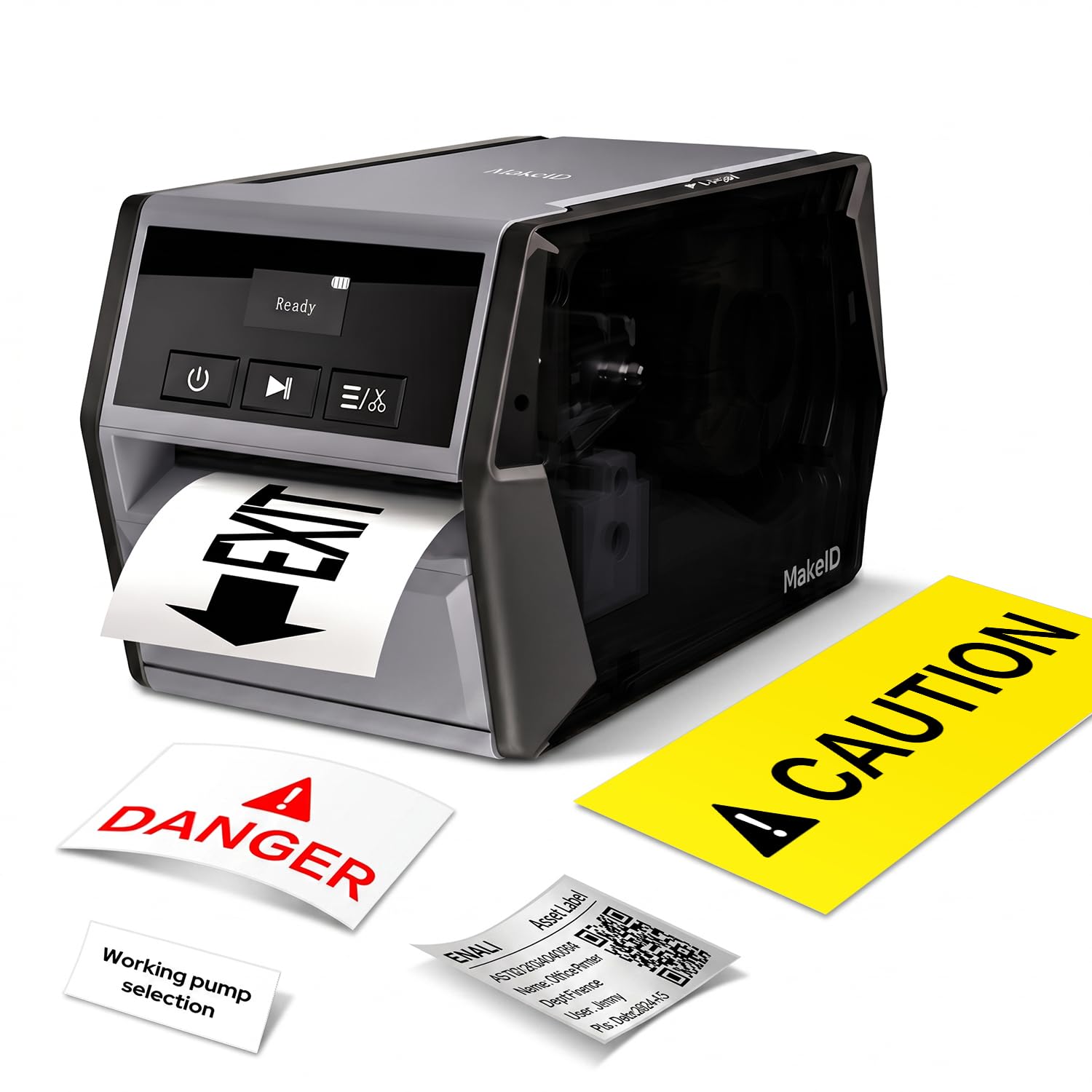
The Makeid D50 is a thermal transfer label printer built for industrial and job-site environments where power outlets aren’t always available. The 2600mAh lithium-ion battery delivers up to 90 days of standby or several hours of continuous printing. The 2-inch print head and 300 DPI resolution produce sharp, smudge-proof labels on narrow media down to 10mm width—ideal for 1×2 labels on cable wraps, circuit board identification, or asset tracking.
The integrated label and ribbon cartridge design is a genuine innovation: consumable swaps take about five seconds. The thermal transfer process prints labels that resist water, oil, low temperatures, and UV exposure, maintaining readability for up to five years. The built-in automatic cutter enables precise batch cutting, which is essential when you’re printing 50 1×2 labels for a warehouse or laboratory project. The OLED display provides clear status feedback even in bright outdoor conditions.
Connectivity is limited to USB-C for PC and mobile app via Bluetooth—there is no Ethernet or WiFi option. The app is functional but the PC software feels less polished than Brother’s P-Touch Editor. The loud startup and shutdown sound is a minor nuisance in quiet indoor settings. For indoor operations that benefit from portability, the Phomemo D530Pro offers better network connectivity at a similar price, but for outdoor, job-site, or industrial label printing, the D50’s battery and durability are unmatched.
Why it’s great
- 2600mAh battery supports extended untethered operation
- Thermal transfer prints water/oil/UV-resistant labels that last 5 years
- 5-second consumable cartridge swaps with integrated ribbon
Good to know
- No Ethernet or WiFi connectivity
- PC software lacks polish compared to competitors
- Loud power-on and shutdown sound
7. Rollo USB Shipping Label Printer

The Rollo USB is the fastest direct thermal label printer in this lineup at one 4×6 label per second, and it scales down cleanly to 1×2 inch labels. The 203 DPI resolution is lower than the 300 DPI offered by competitors, but for barcode and address labels with standard-sized fonts, the output remains crisp and scannable. The print width range of 1.57 to 4.1 inches covers 1×2 labels comfortably, and the automatic label size detection means no manual configuration when swapping between roll sizes.
Setup is genuinely simple: plug in the USB cable, download the Rollo drivers, and the printer appears as a standard printer option across all shipping platforms and marketplaces. Rollo’s compatibility with FedEx, UPS, USPS, ShipStation, ShippingEasy, Shopify, Etsy, and Amazon is comprehensive, and the absence of proprietary label stock requirements means you can buy generic direct thermal labels from any supplier. The build quality is commercial-grade—the metal chassis and reliable feed mechanism are designed for daily high-volume use.
The only compromises are the lack of wireless connectivity (USB-only tethered operation) and the lower 203 DPI resolution compared to 300 DPI competition. If you need fine text on ultra-small 1×2 labels, the 203 DPI may show jagged edges on 6-point fonts. The Rollo is also one of the heavier units at nearly 3 pounds, making it a fixed desktop device. For any small business shipping 20-100 packages a day with 1×2 return labels, the Rollo’s speed and reliability justify its position.
Why it’s great
- High-speed print engine: one 4×6 label per second
- Works with any generic direct thermal labels—no proprietary stock needed
- Commercial-grade metal build designed for daily high-volume use
Good to know
- 203 DPI may show jagged text on very small fonts
- USB-only connectivity requires a single tethered computer
- Heavier than average at nearly 3 pounds
8. DYMO LabelWriter 450 Twin Turbo

The DYMO LabelWriter 450 Twin Turbo differentiates itself with two independent label roll slots, allowing you to load a 1×2 return address roll on one spool and a different size on the other without swapping media. The direct thermal print engine is fast and reliable, printing directly from Microsoft Word, Excel, Outlook, and Google Contacts without needing a separate app. The printer is compact, quiet, and has been a staple in small offices for years because it “just works.”
The ability to switch between two label types without touching the printer is a genuine productivity boost for anyone who prints both 1×2 address labels and, say, 2×3 shipping labels throughout the day. DYMO’s software lets you assign each spool to a specific label type, so one click prints the correct size. The twin-turbo design also prints faster than the single-roll 450 model, handling moderate daily volumes without bottleneck.
The biggest issue with the DYMO 450 Twin Turbo is the software. Numerous user reports describe Dymo’s software (versions V8 through V10) deleting saved label templates across updates, with no backup or restore functionality. Your saved layouts may vanish. Additionally, DYMO labels are proprietary and comparatively expensive, though third-party compatible rolls exist and generally work. The printer also has no wireless connectivity—USB only. If you’re willing to manage the software risk and use third-party labels to offset cost, the dual-spool convenience is unique and genuinely useful.
Why it’s great
- Two independent label spools for instant size switching
- Direct integration with Word, Excel, Outlook, and Google Contacts
- Compact and quiet for desktop use
Good to know
- DYMO software has a history of deleting saved label templates
- Proprietary DYMO labels are expensive; third-party stock varies in reliability
- USB-only connectivity with no wireless option
9. Brother QL-1110NWB

The Brother QL-1110NWB is the wide-format flagship of Brother’s direct thermal label printer line. While it prints on labels up to 4 inches wide, it also handles 1×2 inch die-cut rolls from the DK-series without any configuration changes. The 300 DPI resolution ensures small text and barcodes on 1×2 labels are razor-sharp, and the print speed of 69 labels per minute keeps workflows moving. The connectivity trifecta—Bluetooth, dual-band WiFi, and Ethernet—makes this the most network-friendly label printer on the list.
The wireless printing from iPhone or Android is the standout feature for Poshmark, eBay, and Etsy sellers who process labels directly from their phone. The “Plug & Label” feature on Windows PCs lets you create and print labels without installing the full P-Touch Editor software, reducing setup friction. The barcode crop function (Windows only) lets you pull individual barcodes from a sheet and print them on 1×2 labels without formatting struggles. The internal label roll slot keeps the desktop footprint small despite the 4-inch print width.
The trade-off is the price—the QL-1110NWB is the most expensive unit here. Brother labels are also premium-priced, though third-party alternatives reduce long-term costs. The software setup for network printing can be finicky: assigning a static IP and installing drivers on each computer takes more effort than a USB-connected printer. Linux users will find the drivers outdated and unsupported, making it a non-starter for that OS. For a professional setting where wireless printing from phones and multiple computers is essential, the QL-1110NWB justifies its cost with reliability and print quality that consistently earns five-star feedback.
Why it’s great
- Wireless printing from iPhone and Android works seamlessly
- 300 DPI output is crisp for small barcodes and tiny text
- Triple connectivity (Bluetooth, WiFi, Ethernet) for any network setup
Good to know
- Highest upfront cost in this comparison
- Network setup requires static IP and per-computer driver installation
- No Linux support; CUPS drivers are outdated
FAQ
Can a 4×6 shipping label printer handle 1×2 label rolls?
What’s the difference between direct thermal and thermal transfer for 1×2 labels?
Why does my label printer waste tape on 1×2 labels?
Final Thoughts: The Verdict
For most users, the best 1×2 label printer winner is the Brother QL-820NWB because it combines 300 DPI print quality, triple connectivity (Bluetooth, WiFi, Ethernet), and reliable DK-series 1×2 label support in a well-built package that lasts for years. If you want durable waterproof labels and don’t need network printing, the NIIMBOT M2 delivers thermal transfer quality at a compelling price. And for job-site or outdoor labeling where battery-powered portability matters most, nothing beats the Makeid D50 with its 2600mAh battery and thermal transfer durability.