
Our readers keep the lights on and my morning glass full of iced black tea. As an Amazon Associate, I earn from qualifying purchases.
Specs are compiled from manufacturer listings and verified buyer reviews and can change over time — please confirm the key details on the product page before buying.
Adding a single 8GB DDR4 stick is the cheapest way to make a sluggish computer feel responsive again—no new motherboard, no fresh CPU, just one slot and a few seconds of your time. But not all sticks are equal: the wrong latency or speed can leave you with a system that still stutters under a handful of browser tabs. This guide cuts through the spec soup so you pick the exact module your desktop or laptop actually needs.
I’m Min — the founder and writer behind Gadgets Feed. This guide is built by comparing the manufacturers’ published specifications and the patterns across verified customer reviews, so you get each pick’s real strengths and trade-offs instead of marketing spin.
Whether you are upgrading an old office PC or adding a matching stick to an existing build, the 1x8gb ddr4 ram options here are proven to work.
Our Picks at a Glance

How To Choose The Best 1x8GB DDR4 RAM
Picking the right single 8GB DDR4 stick is straightforward once you know two things: where it is going (laptop or desktop) and what speed your motherboard supports. Here are the factors to weigh before you click buy.
Form Factor — DIMM vs SODIMM
Desktop motherboards use the larger 288-pin DIMM slot. Laptops, mini PCs, and all-in-ones use the shorter 260-pin SODIMM slot. A desktop stick physically cannot fit in a laptop, and vice versa. Check your device’s manual or look at the slot shape before ordering.
Speed and Latency
DDR4 memory speed is measured in MHz (how fast the data moves), and latency is measured by CAS (column address strobe)—how many clock cycles the RAM waits before delivering data. Lower CAS at the same speed is faster. A 2666 MHz stick with CL19 is better balanced than a 2133 MHz stick with CL17, but your motherboard’s supported speed is the ceiling.
Single vs Dual Rank
Rank refers to how the memory chips are grouped on the stick. Dual-rank (2Rx8) modules can offer slightly better performance in some workloads because the memory controller can alternate between the two groups. Single-rank (1Rx8) sticks are more common in budget modules. Either works fine for most users, but dual-rank can help with compatibility on older platforms like X99.
Quick Comparison
| Model | Best For | Speed | CAS Latency | Form Factor | Amazon |
|---|---|---|---|---|---|
| Crucial CT8G4SFRA266★ Best Overall | Best Overall Laptop Pick | 2666 MHz | 19 | SO-DIMM | from $97.99Amazon |
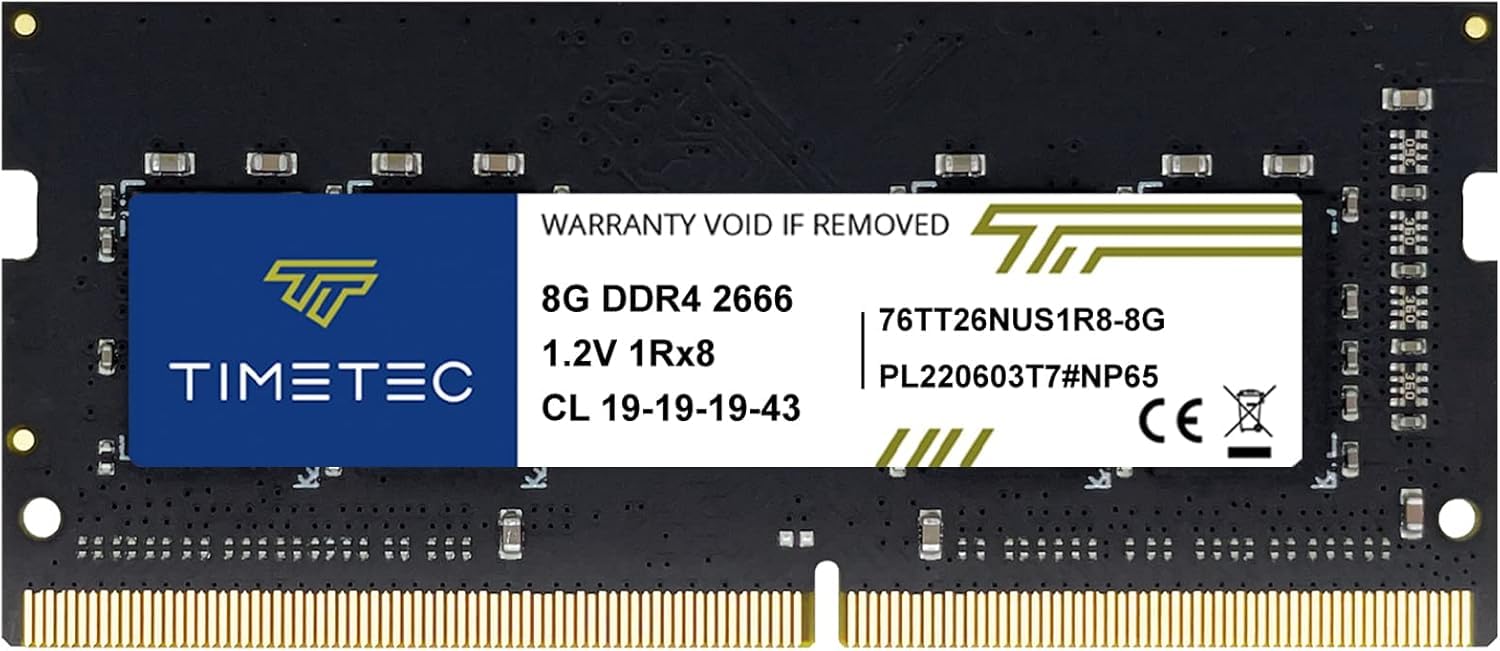
| Timetec 8GB DDR4 2666MHz SODIMMGreat Value | Budget-Friendly Laptop Upgrade | 2666 MHz | 19 | SO-DIMM | $50.99$55.99Amazon |
| A-Tech 8GB DDR4 2400 UDIMM | Value Desktop RAM | 2400 MHz | 17 | DIMM | $56.20$59.16Amazon |
| A-Tech 8GB DDR4 2133 UDIMM | Legacy Desktop Compatibility | 2133 MHz | 15 | DIMM | $56.20$59.16Amazon |
| Crucial CT8G4DFD824A | Premium Desktop Performance | 2400 MHz | 17 | DIMM | $56.98Amazon |
| Samsung M471A1K43CB1-CRC | Reliable Laptop OEM Part | 2400 MHz | 17 | SO-DIMM | $59.75Amazon |
| Samsung M378A1K43CB2-CTD | Top-Speed Desktop Stick | 2666 MHz | 19 | DIMM | $69.99Amazon |
In‑Depth Reviews
1. Crucial RAM 8GB DDR4 2666 MHz CL19 Laptop Memory CT8G4SFRA266
Our pick — over 4.5★ from 15,000+ verified ratings; the strongest balance of quality and price.
The laptop stick that 15,000 buyers trust to wake up a sleeping machine.
This single 8GB stick runs at 2666 MHz with a CAS latency of 19—a balanced pairing that brings noticeable multitasking gains without demanding a specific motherboard chipset. Because it is a SO-DIMM (the shorter laptop form factor), it slides into any DDR4-compatible notebook, mini PC, or all-in-one. Buyers report the stick is “installed in a Synology DS425+ NAS” and works flawlessly, which speaks to its compatibility beyond just laptops.
Micron builds these modules, so you get the same factory-level testing that makes Crucial a go-to for system builders. The stick weighs just 0.3 ounces, so it adds no bulk. Unlike the Timetec below, this one comes with a Crucial system scanner that checks your exact motherboard compatibility before you buy—removing the guesswork entirely.
Why it earns the top spot: 4.8 stars from over 15,000 ratings and a verified track record inside NAS devices and older laptops makes this the safest, fastest laptop pick on the list.
Reach for this if: you need a proven 2666 MHz SO-DIMM for a laptop, mini PC, or NAS and want the reassurance of Micron’s 42 years of memory manufacturing.
Look elsewhere if: your desktop motherboard requires a full-size 288-pin DIMM—this stick is SODIMM only.
2. Timetec 8GB DDR4 2666MHz (PC4-2666V) PC4-21300 SODIMM Laptop RAM
The budget laptop upgrade that punches at the same speed as pricier sticks.
At 2666 MHz with CL19, the Timetec matches the speed of our top pick while coming in at a slightly lower price. This is a 260-pin SO-DIMM, so it fits the same slot as the Crucial. Owners mention “single 8GB stick, used in HP Elitedesk 800 G4 Mini to upgrade to 16GB total” and that it mixed with a different brand with identical specs—no drama, no blue screens.
The catch is batch variability: the PCB color (green or black) and rank (1Rx8, 2Rx8, or 1Rx16) may change between production runs. The performance stays consistent, but if you are trying to match an existing stick exactly, that mismatch can bother some builders. Timetec backs it with a lifetime warranty and US-based technical support, which takes the sting out of the variability.
What stands out
- 2666 MHz speed for a very competitive price
- Backed by a lifetime warranty
- Buyers confirm it plays nice with other brands
What to know
- PCB color and rank can vary per batch
- Not compatible with desktop DIMM slots (SODIMM only)
Best for: budget-conscious laptop owners who want 2666 MHz speed without paying the Crucial or Samsung premium.
skip it if: visual consistency between sticks matters to you, or you need a desktop DIMM.
3. A-Tech 8GB DDR4 2400 MHz UDIMM PC4-19200 CL17 DIMM Desktop RAM

A 2400 MHz desktop stick that pairs low latency with a fair price.
This A-Tech module is a standard 288-pin desktop DIMM (UDIMM) running at 2400 MHz with a CAS latency of 17. That is a tighter latency than the 2666 MHz sticks above—2400 MHz CL17 means it responds a little faster per cycle, which can help on older platforms that top out at 2400 MHz anyway. Customers note it was “easy to install into my son’s gaming pc with no problems.”
You get A-Tech’s lifetime warranty and a US-based tech support team for troubleshooting. The stick is rated for 1.2V JEDEC standard voltage, so it won’t stress your power supply. Compared to the Crucial CT8G4DFD824A which is also 2400 MHz but dual-ranked, this A-Tech can ship as either single-rank or dual-rank depending on the batch—worth checking before you buy if you care about rank matching.
Straightforward pick: 2400 MHz desktop RAM with a strong warranty and a buyer-proven track record with gaming rigs.
Go for this if: you have a desktop that supports 2400 MHz and you want a simple, reliable stick backed by lifetime support.
Consider another if: your motherboard can run 2666 MHz—the speed gap of 25% to the Timetec or Crucial sticks means a tangible multitasking lift.
4. A-Tech 8GB DDR4 2133 MHz UDIMM PC4-17000 CL15 DIMM Desktop RAM

The 2133 MHz stick that solves compatibility headaches on older X99 motherboards.
Running at 2133 MHz with a very tight CAS latency of 15, this A-Tech module is the slowest in terms of raw speed but the fastest in terms of response per cycle. The 2133 MHz speed makes it ideal for older desktop platforms that never supported higher DDR4 frequencies. One reviewer noted that “double-ranked (2Rx8) modules fixed compatibility issues with single-ranked Corsair modules on Asus X99 Deluxe”—a specific edge for anyone still running that platform.
The form factor is a 288-pin desktop DIMM, same as the other desktop sticks here. With a lifetime warranty from A-Tech, this is a low-risk buy for reviving an older workstation. Just know that at 2133 MHz, the data rate is slower than the 2666 MHz options—you make that trade-off for guaranteed platform compatibility.
What works
- Very low CL15 latency helps offset the slower speed
- Buyers confirm dual-rank modules solve X99 issues
- Lifetime warranty included
Trade-off
- 2133 MHz is noticeably slower than 2666 MHz options
- Rank type may vary; check the product image for “2Rx8” if you need dual-rank
Perfect for: anyone upgrading an older desktop stuck at 2133 MHz, especially Asus X99 Deluxe owners who need dual-rank modules.
Not ideal if: your motherboard supports 2400 or 2666 MHz—you are leaving performance on the table.
5. Crucial 8GB Single DDR4 2400 MT/s PC4-19200 DR x8 DIMM 288-Pin

A dual-ranked desktop module from Micron that is built for bandwidth-hungry builds.
You get better throughput in memory-heavy tasks like video editing or large database work because this Crucial desktop stick is dual-ranked (it has two banks of memory chips the controller can jump between). It runs at 2400 MHz with a CAS latency of 17. One buyer mentioned it “used on my Acer Aspire GX 785-UR18 pc and it fit as the Crucial website said it would,” popping in without any configuration. The manufacturer is Micron, the same parent company as Crucial, so the component-level validation is built in.
It is a 288-pin unbuffered DIMM (UDIMM), so it fits any standard desktop DDR4 slot. Crucial reports up to 32% more bandwidth and 40% lower power versus older memory types, based on internal testing. Still, for a dual-ranked 2400 MHz stick, this is a refined option for anyone who wants Micron-level validation without stepping up to 2666 MHz.
Why it earns the premium tag: dual-ranked architecture and Micron’s validation process give this stick an edge in data-heavy workflows over standard single-rank modules.
Choose this if: you run applications that benefit from dual-rank memory (video editing, rendering, heavy multitasking) on a 2400 MHz desktop platform.
Consider the Samsung 2666 MHz stick instead if: your motherboard supports faster speeds and raw bandwidth matters more than rank configuration.
6. SAMSUNG M471A1K43CB1-CRC 8GB DDR4 2400MHz SO-DIMM

An OEM-grade Samsung stick that matches the exact part number in many laptops.
This Samsung module is clocked at 2400 MHz with a CAS latency of 17, using a 260-pin SO-DIMM slot. It is an OEM part (M471A1K43CB1-CRC), meaning it is the same stick you would find inside many Dell, HP, and Lenovo laptops from the factory. Buyers appreciate that they “could order EXACTLY the same memory part number that was in my laptop to be sure it would be compatible.” One reviewer ran memtest from BIOS and confirmed “no errors.”
The trade-off is that the first stick one buyer received was faulty from the start—shutting down the whole motherboard. They returned it and the replacement worked fine. That is a reminder that any electronic component can have a DOA unit, but Samsung’s brand reliability means the odds are low. Compared to the Crucial CT8G4SFRA266, this is 2400 MHz instead of 2666 MHz, so you get slightly less bandwidth for a slightly higher price.
What works
- OEM part number matches what is inside many name-brand laptops
- Buyers confirm no memtest errors
- Solid 4.7-star average across 969 ratings
Downsides
- 2400 MHz is slower than 2666 MHz options at the same price point
- Rare but real DOA reports
Pick this if: you want an exact OEM match for your existing Samsung laptop memory and confidence from memtest validation.
pass on it if: you want the fastest speed for your money—the Crucial or Timetec 2666 MHz sticks offer more bandwidth.
7. Samsung 8GB DDR4 PC4-21300, 2666MHz, 288 PIN DIMM Desktop RAM

The fastest desktop stick on this list—2666 MHz from Samsung for demanding builds.
This single 8GB module is a 288-pin desktop DIMM running at 2666 MHz with a CAS latency of 19, making it the highest-speed desktop option here. It is designed for DDR4 desktop motherboards that support the 2666 MHz memory speed. One buyer “upgraded from 16GB to 32GB DDR4 for Photoshop, video encoding, and rendering” and reported faster performance than their old 32GB DDR3 setup. Samsung is the world’s largest memory manufacturer, so the module-level reliability is as good as it gets.
One thing to flag: a few buyers mentioned that the stick showed up as “Micron” in their system settings instead of Samsung. The memory still worked fine, including with a Ryzen 5 HP gaming desktop. This is likely a supply-chain quirk where Samsung rebrands certain wafers, but it can cause a moment of confusion at boot. At 2666 MHz, this stick has a 25% speed advantage over the A-Tech 2133 MHz desktop module, making a real difference in load times and multitasking.
Why it leads the desktop category: 2666 MHz is the top speed on this list, and Samsung’s global market dominance means this stick is tested across a massive range of platforms.
Grab this if: you want the highest available speed for a desktop DDR4 build and trust Samsung’s DRAM engineering.
Be aware: the module may sometimes show as Micron in your system info—performance remains unaffected, but it can be jarring.
Understanding the Specs
DDR4 Speed (MHz)
Measured in megahertz, this number tells you how fast the memory can transfer data. Common DDR4 speeds are 2133 MHz, 2400 MHz, and 2666 MHz. A higher number means roughly 11% more bandwidth between each step. Your motherboard has a maximum supported speed—beyond that, the stick will simply clock down to match.
CAS Latency (CL)
Short for Column Address Strobe latency, this is the number of clock cycles the RAM waits before delivering requested data. A stick with CL15 is faster per cycle than one with CL19 at the same MHz. When comparing two sticks of different speeds, lower CAS can partly compensate for lower MHz—but more MHz is generally the bigger win for overall throughput.
FAQ
Will a 1x8GB DDR4 stick work in any desktop or laptop?
Can I mix an 8GB DDR4 stick with an existing stick of a different brand?
What does PC4-19200 or PC4-21300 mean on the label?
How do I check what DDR4 speed my motherboard supports?
Is a single 8GB stick better than two 4GB sticks?
Does 1x8GB DDR4 RAM come with a warranty?
What is the difference between ECC and Non-ECC DDR4 RAM?
Can I install a 1x8GB DDR4 stick in a DDR3 slot?
Does single-rank or dual-rank matter for 1x8GB sticks?
Final Thoughts: The Verdict
For most buyers, the 1x8gb ddr4 ram winner is the Crucial CT8G4SFRA266 because it offers a proven 2666 MHz CL19 kit in the laptop SO-DIMM form factor with an excellent 4.8-star rating from thousands of buyers. If you want the fastest desktop stick, grab the Samsung 2666 MHz DIMM. And for budget-friendly compatibility on legacy desktops, the A-Tech 2133 MHz CL15 is a solid value option.
How We Picked
We do not accept paid placement. Every pick is matched to a real buyer and a real use-case; we do not hands-on test units.
Sources & Methodology
Specifications: manufacturer listings and product documentation. Review insights: verified customer reviews, as of July 2026. Pricing: not shown on this page (it changes often); check the current price via the retailer link.
As an Amazon Associate, Gadgets Feed earns from qualifying purchases. This does not affect which products we feature.
Related Guides
Product prices and availability are accurate as of the date/time indicated and are subject to change. Any price and availability information displayed on Amazon at the time of purchase will apply to the purchase of this product. As an Amazon Associate I earn from qualifying purchases.
CERTAIN CONTENT THAT APPEARS ON THIS SITE COMES FROM AMAZON. THIS CONTENT IS PROVIDED "AS IS" AND IS SUBJECT TO CHANGE OR REMOVAL AT ANY TIME.
Amazon and the Amazon logo are trademarks of Amazon.com, Inc. or its affiliates.