
A single dead spot in your home, garage, or workshop can turn a reliable 2.4GHz network into a constant source of frustration. The stock antenna on most routers, PCIe cards, and security cameras is often a compromise — adequate for open spaces but useless when signals need to punch through concrete, metal siding, or multiple floors.
I’m Min — the co-founder and writer behind Gadgets Feed. I’ve spent over a hundred hours analyzing antenna specifications, reading through network engineer discussions, and cross-referencing real customer signal tests to understand which 2.4GHz antennas actually deliver measurable range gains versus which ones are just marketing numbers on a box.
Whether you’re fighting a weak signal in a detached garage or trying to stabilize a distant security camera feed, the right upgrade can transform your wireless experience. This guide covers the seven best options for the 2.4ghz wifi antenna based on real-world gain, connector compatibility, and build quality.
How To Choose The Best 2.4GHz WiFi Antenna
Selecting the right antenna for your 2.4GHz network isn’t just about picking the highest dBi number. You need to match the antenna type to your physical environment, verify the connector standard, and understand that gain comes with trade-offs in beamwidth and signal pattern.
Omni-Directional vs. Directional: Pick Your Pattern
An omni-directional antenna radiates signal equally in all horizontal directions — ideal for a central router that needs to cover a 360-degree area. A directional panel or Yagi antenna focuses energy in one narrow beam, which doubles or triples effective range but requires precise aiming. For a detached garage or barn, a directional antenna is often the only way to bridge the gap.
Connector Types: RP-SMA, SMA, and N-Female
Most consumer routers, PCIe cards, and security cameras use an RP-SMA Female port — internal threads with a center pin. The antenna must have an RP-SMA Male connector (external threads, no center pin). Professional outdoor equipment often uses N-Female connectors, which require an adapter or different antenna. Always inspect your device’s port before ordering.
dBi Gain and the Ceiling Effect
Gain is measured in dBi — decibels relative to an isotropic radiator. A 7dBi antenna roughly doubles effective range over a 2dBi stock dipole. But gains above 15dBi for omni-directional antennas compress the vertical beamwidth so severely that slight tilting can drop the signal entirely. For most homes, 7dBi to 13dBi hits the sweet spot between range and forgiveness.
Quick Comparison
On smaller screens, swipe sideways to see the full table.
| Model | Category | Best For | Key Spec | Amazon |
|---|---|---|---|---|
| Eightwood WiFi 6E Tri-Band | Tri-Band | WiFi 6E desktop PC gaming | 6.5ft cable + magnetic base | Amazon |
| Tupavco TP542 Panel | Directional | Long-range outdoor point-to-point | 13dBi / 2 mile range | Amazon |
| Superbat Dual Band 4-Pack | Multi-Pack | Replacing multiple router antennas | 8dBi / 4 antennas per pack | Amazon |
| Kaunosta 22dBi Omni | High-Gain | Detached garage & garden cameras | 22dBi / 10ft extension cable | Amazon |
| Slinkdsco WiFi 6E Magnetic | Tri-Band | Desktop PC with gaming motherboard | 9dBi / dual 6.5ft cables | Amazon |
| TREADALT-TEC 10dBi 3-Pack | Value Pack | Budget range boost for router | 10dBi / 3 antennas per pack | Amazon |
| ALFA 7dBi Panel | Directional | Focused signal for extender/WiFi adapter | 7dBi / screw-on swivel | Amazon |
In‑Depth Reviews
1. Eightwood WiFi 6E Tri-Band Antenna

The Eightwood antenna is the most versatile option here because it covers 2.4GHz, 5GHz, and the new 6GHz WiFi 6E band in a single package. The 6.5-foot RG174 extension cable and magnetic base let you relocate the antenna away from the metal case of a desktop PC, which dramatically reduces interference that kills 2.4GHz reception when the antenna is screwed directly into the back of a PCIe card.
Users reported dramatic improvements on the 2.4GHz band specifically — one reviewer noted stable connections half a block away in a crowded city environment after replacing a stock router dipole. The 50-ohm impedance matches standard networking gear, and the RP-SMA Male connectors (internal threads, no center pin) fit the vast majority of consumer routers and WiFi cards. The tri-band support also future-proofs your setup if you eventually upgrade to a WiFi 6E access point.
Some users on 1Gbps fiber plans saw throughput capped around 200Mbps on their existing card — the antenna itself isn’t the bottleneck, but pairing it with a newer WiFi 6E card unlocks the full potential. The magnetic base is strong enough to hold the antenna vertically on a steel shelf or side of a metal desk without slipping.
Why it’s great
- Tri-band coverage includes 6GHz for WiFi 6E compatibility
- Long 6.5ft cable allows optimal placement away from PC interference
- Strong magnetic base attaches securely to any steel surface
Good to know
- Signal gain is modest; don’t expect massive range increase over stock antennas
- Requires RP-SMA Female port on device — verify before purchasing
2. Tupavco TP542 Outdoor Directional Panel

The TP542 is a serious directional panel antenna built for bridging WiFi across distances up to two miles. Its 13dBi gain on both 2.4GHz and 5GHz bands makes it the highest-gain antenna in this lineup, and the weatherproof housing with corrosion-resistant materials means it can live on a pole outdoors year-round without signal degradation from moisture ingress.
Real-world user tests confirm the directional boost is substantial — one reviewer saw 2.4GHz signal improve from -70dBm to -50dBm, with download speeds jumping from 100Mbps to 700Mbps at 50 feet through a wall. The N-Female connector is standard for outdoor networking gear, but it means you’ll need a short, low-loss coax cable (not included) to connect to your router or bridge. Pole mount hardware is included, though the U-bolt may be too large for a 1-inch mast.
This is not a casual desktop replacement. It requires aiming, mounting, and cable management. But if you need to push a 2.4GHz link through a metal building, across a long driveway, or between two structures, the TP542 delivers measurable range that consumer-grade antennas simply cannot match. The trade-off is a narrow beamwidth — misalignment of even a few degrees can drop the signal significantly.
Why it’s great
- 13dBi dual-band gain for long-range point-to-point links
- Rugged weatherproof housing with stainless steel mounting hardware
- Capable of bridging distances up to two miles in open line-of-sight
Good to know
- N-Female connector requires a separate coax cable purchase
- Directional beam requires precise aiming; narrow alignment tolerance
3. Superbat Dual Band WiFi Antenna 4-Pack
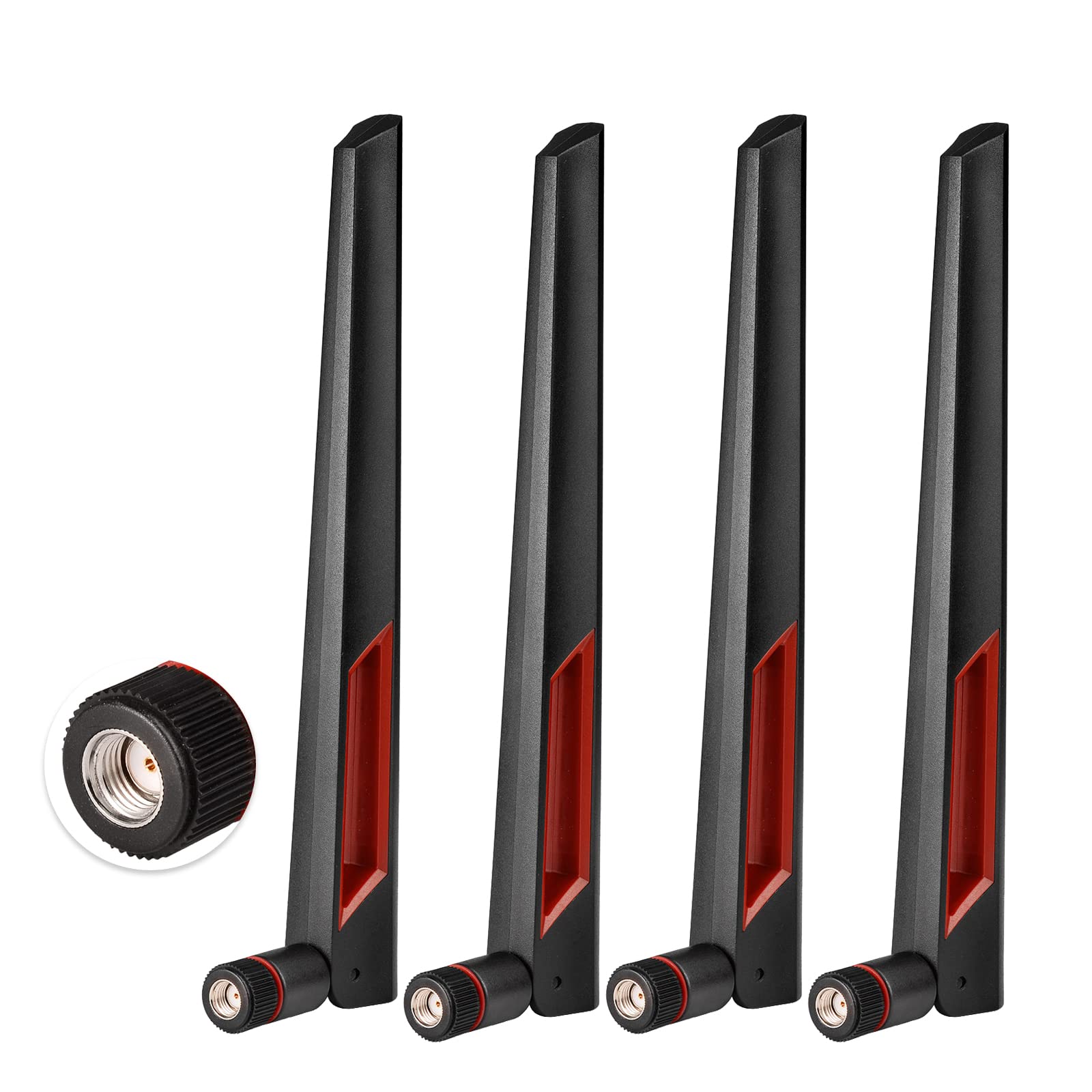
When you need to replace antennas on multiple devices — a router, a security camera, and a PCIe card — the Superbat 4-pack offers the best per-unit cost for a genuine 8dBi omni-directional antenna. Each antenna covers both 2.4GHz and 5.8GHz bands with a 50-ohm impedance and RP-SMA Male connector, making them drop-in replacements for most consumer networking gear.
Users replacing broken antennas on ASUS routers reported restored range and better build quality than the original plastic dipoles. The black finish and angular design are more visually appealing than the generic rubber-duck style, and the screw-on base stays tighter than many OEM antennas that loosen over time. On security camera systems, a single antenna improved image stability and range enough that one reviewer saw “superb image with outstanding range” from just one antenna swap.
The 8dBi gain is modest enough that beamwidth remains usable — you won’t lose signal by tilting the antenna slightly. However, this is not a high-gain solution for extreme distances. It’s best thought of as a quality replacement that gives you a measurable but not dramatic boost over the typical 2-3dBi stock antenna that ships with most routers. The 4-pack covers a household with multiple devices without needing separate purchases.
Why it’s great
- Four antennas in one pack cover multiple devices at low cost per unit
- Better build quality and design than most OEM router antennas
- Dual-band 2.4GHz and 5.8GHz compatibility
Good to know
- Some units have tight threading that makes initial installation difficult
- 8dBi gain is modest — expect incremental rather than massive range improvement
4. Kaunosta 22dBi High Gain Omni-Directional Antenna

The Kaunosta antenna targets a very specific pain point: extending 2.4GHz WiFi to detached garages, barns, and garden security cameras where standard antennas simply don’t have the punch to penetrate walls and distance. Its 22dBi gain is the highest omni-directional rating in this roundup, and the included 10-foot RG174 extension cable lets you mount the antenna high on a wall or outside to bypass obstacles.
Real-world results are mixed but telling. One user with a security camera mounted on aluminum siding went from a weak 1-2 bar connection to a rock-solid 3 bars after swapping to the Kaunosta. Another user used it to boost Bluetooth range on a Denon receiver from 50 feet to over 150 feet with no dropouts. However, the extension cable itself introduces about 20% signal loss according to some measurements — a compromise of using cheaper RG174 coax rather than thick LMR-400.
This antenna is 2.4GHz only — it will not work on 5GHz or dual-band networks. The omni-directional pattern at 22dBi is extremely flat vertically, so mounting height and angle are critical. If your goal is a point-to-point link rather than broadcast coverage, a directional panel like the Tupavco TP542 or the ALFA panel below will outperform this omni design at similar or lower gain numbers.
Why it’s great
- Very high 22dBi gain for extending range to detached structures
- 10ft extension cable enables flexible mounting away from interference
- Weather-resistant construction suitable for outdoor use
Good to know
- 2.4GHz only — no 5GHz or dual-band support
- Extension cable causes measurable signal loss; upgrade to LMR-400 for best results
- Very narrow vertical beamwidth requires careful positioning
5. Slinkdsco WiFi 6E Tri-Band Magnetic Antenna

The Slinkdsco antenna brings 9dBi gain across 2.4GHz, 5.8GHz, and 6GHz bands, making it a strong competitor to the Eightwood for desktop PC users. It ships with two separate 6.5-foot RP-SMA cables, which is ideal for motherboards or PCIe cards that have two antenna ports for 2×2 MIMO operation — both cables are included in the box rather than requiring a second purchase.
One reviewer saw their son’s PC jump from 90Mbps to over 400Mbps after installing this antenna, though that user’s previous setup had no antenna attached at all. More controlled tests showed noticeable speed and stability improvements, especially on the 6GHz band where stock antennas are often the weakest link. The 180-degree rotatable design allows the two stubs to be angled independently for optimal polarization alignment.
There is some skepticism about the 9dBi claim — one user found that orientation drastically affected signal strength, suggesting the actual gain may be lower than advertised. The magnetic base is strong and the build quality feels premium, but the thin coaxial cables are a potential durability concern if you frequently reposition the antenna. For a desktop PC that stays in one place, this is a solid mid-range upgrade that covers current and next-gen WiFi bands.
Why it’s great
- Two separate cables support 2×2 MIMO without extra purchase
- Tri-band coverage includes 6GHz for WiFi 6E compatibility
- Rotatable stubs allow flexible positioning for best signal
Good to know
- Actual gain may be lower than the advertised 9dBi based on user tests
- Thin coaxial cables may be less durable over time with frequent repositioning
6. TREADALT-TEC 10dBi 3-Pack Antenna

If you have a router with three antenna ports or multiple devices that all need an upgrade, the TREADALT-TEC 3-pack offers the lowest per-antenna cost of any option here while still delivering a genuine 10dBi gain boost. One user replaced six broken stock antennas on a router and saw 80% of prior dead spots — including areas behind thick walls and metal fixtures — come back to life, with range roughly doubling to 25 yards.
The 15.35-inch length makes these antennas noticeably larger than standard dipoles, which helps achieve the 10dBi gain but also means they protrude significantly from your router. Some users reported no measurable change on high-end routers like the Nighthawk, which suggests that routers with already-decent stock antennas may see diminishing returns. The antennas work across 2.4GHz and 5GHz bands, plus 5.8GHz for FPV drone applications.
Build quality is decent for the price point — the antennas feel durable and the RP-SMA Male connectors are properly threaded. However, if you plan to mount them outdoors, they lack the weatherproofing of dedicated outdoor antennas and will need some form of protection from rain and UV exposure. For indoor use on a budget router or security camera system, this 3-pack stretches your dollar further than any single antenna purchase.
Why it’s great
- Three antennas per pack at the lowest cost-per-unit in this roundup
- 10dBi gain provides noticeable improvement in most dead-zone scenarios
- Compatible with routers, cameras, PCIe cards, and even drone controllers
Good to know
- Large 15-inch length may be visually obtrusive on a router
- Results are inconsistent on premium routers with already-strong stock antennas
7. ALFA 7dBi RP-SMA Panel Antenna

The ALFA 7dBi panel antenna takes a different approach — instead of broadcasting in all directions, it focuses its energy into a 60-90 degree beam. For users with a WiFi extender, USB adapter, or router in a fixed location, this directional focus can deliver up to 150% signal strength improvement over the stock omni antenna by rejecting interference from behind and to the sides.
One real-world test showed dramatic results: a user replaced the antenna on a Netgear N300 extender and successfully picked up a hotspot one mile away through wooded terrain, streaming Netflix without the previous frequent disconnects. The 2.4GHz signal went from -60dBm with stock antennas to -40dBm with the ALFA panel, with throughput jumping from 70Mbps to 78Mbps. The directional nature also naturally filters out interference from the rear, cleaning up the signal.
The ALFA brand has a strong reputation among network enthusiasts, and the build quality reflects that — the SMA connector and panel housing feel substantial. However, the panel requires aiming toward the target access point, and performance drops significantly if the rear of the panel faces the signal source. It also lacks the extreme gain of larger outdoor panels, so it’s best suited for medium-distance focused links rather than mile-plus bridging. The included RP-SMA connector fits most consumer gear directly.
Why it’s great
- Directional design concentrates signal and rejects rear interference
- Proven 150% signal strength improvement in controlled tests
- Compact size with RP-SMA connector fits most consumer devices
Good to know
- Requires careful aiming toward the target access point
- 7dBi gain is lower than omni-directional alternatives at the same price
FAQ
Will a higher dBi antenna always give me better range on my router?
Can I use a 2.4GHz antenna on a dual-band or tri-band router?
Why didn’t my new antenna improve signal strength at all?
Final Thoughts: The Verdict
For most users, the 2.4ghz wifi antenna winner is the Eightwood WiFi 6E Tri-Band because it combines tri-band future-proofing, a long cable for optimal placement, and a magnetic base that solves the desktop interference problem better than any other option. If you need to bridge a long outdoor distance, grab the Tupavco TP542 Panel for its 13dBi directional power and weatherproof build. And for a focused medium-range link with interference rejection, nothing beats the ALFA 7dBi Panel.