
Our readers keep the lights on and my morning glass full of iced black tea. As an Amazon Associate, I earn from qualifying purchases.
Specs are compiled from manufacturer listings and verified buyer reviews and can change over time — please confirm the key details on the product page before buying.
Your internet plan might be faster than your network can actually move data. A 2.5 GB switch is the missing link that lets every wired device — your NAS, gaming PC, and Wi-Fi 6 access points — talk to each other at 2.5 Gbps instead of being capped at the old 1 Gbps standard. This guide cuts through the specs to find the switch that fits your setup, if you need eight ports for a home office or a managed model for VLAN control.
I’m Min — the founder and writer behind Gadgets Feed. This guide is built by comparing the manufacturers’ published specifications and the patterns across verified customer reviews, so you get each pick’s real strengths and trade-offs instead of marketing spin.
The right 2.5 gb switch turns a sluggish home network into one where large file transfers finish in seconds, not minutes.
Our Picks at a Glance

How To Choose The Best 2.5 GB Switch
Before you buy, you need to know what you’re plugging in. A 2.5G switch only helps devices that also have a 2.5G port — like a newer NAS, a high-end motherboard, or a Wi-Fi 6 access point. If your gear is all old 1G hardware, the switch will still work, but it will just run at the slower speed.
Port Count: Match It To Your Wired Devices
Count every device you plan to connect with an Ethernet cable. An 8-port switch is the balance for most homes, giving you room for a few computers, a NAS, a game console, and still leaving spares. If you only have two or three devices that need the speed, a 5-port model saves money and desk space. Remember, the switch itself uses one port to connect to your router, so an 8-port switch actually gives you seven usable connections.
Unmanaged vs. Managed: The Control Question
The key decision is if you need manual network configuration or prefer a set-and-forget device. An unmanaged switch is pure plug-and-play — you connect cables and it works, no software or settings needed. That’s perfect for 90% of home users. A managed switch adds a web interface where you can set up VLANs to separate traffic, or use Link Aggregation to combine two ports into one faster 5G connection. These features suit advanced users who need traffic prioritization and multicast optimization.
SFP+ Ports: The Future-Proofing Option
Some switches include SFP+ ports — these are cage-like slots that accept fiber optic modules for 10G connections. That’s overkill for most homes today, but it’s a smart buy if you plan to upgrade your NAS or main server to 10G later. It also lets you connect two switches together with a cheap fiber cable for a high-speed backbone, as buyers report doing to link separate rooms at full speed.
Quick Comparison
| Model | Best For | Ports | Switching Capacity | Management | Amazon |
|---|---|---|---|---|---|
| TP-Link TL-SG108S-M2★ Best Overall | Plug-and-play home upgrades | 8 | 40 Gbps | Unmanaged | Amazon |
| Davuaz 8-Port10G Uplinks | Adding 10G fiber uplinks | 10 | 80 Gbps | Unmanaged | Amazon |
| VIMIN 8-PortDesktop & Wall Mount | 4K/8K streaming setups | 8 | 40 Gbps | Unmanaged | Amazon |
| D-Link DMS-105 | Compact media & gaming | 5 | 25 Gbps | Unmanaged | Amazon |
| TRENDnet TEG-S350 | Small office NAS work | 5 | 25 Gbps | Unmanaged | Amazon |
| TP-Link TL-SG108-M2 | Silent home backbone | 8 | 40 Gbps | Unmanaged | Amazon |
| GigaPlus 10-Port | Fast file transfer workstations | 10 | 80 Gbps | Unmanaged | Amazon |
| YuLinca 8-Port Managed | VLAN and link aggregation control | 9 | 60 Gbps | Managed Web | Amazon |
| BrosTrend 8-Port | Simple VLAN without software | 8 | 40 Gbps | Mode Button | Amazon |
In-Depth Reviews
1. TP-Link TL-SG108S-M2
Our pick — over 4.5★ from 450+ verified ratings; the strongest balance of quality and price.
The crowd-favorite 8-port that turns a 1G bottleneck into a 2.5G freeway with zero setup.
This is the switch that owners describe as finally smashing the 1Gbps ceiling. One buyer measured their internet speed jump from roughly 940 Mbps to over 2300 Mbps right after plugging it in, and another found their 50GB NAS transfers ran more than twice as fast. The 8× 2.5-Gigabit ports give you a combined 40 Gbps of switching capacity, which means every port can run at full speed at once without choking.
Setup is truly plug-and-play: connect cables and it auto-negotiates speeds for each device. Auto-negotiation senses each device’s speed — 100Mb, 1G, or 2.5G — and adjusts automatically, so old laptops and new Wi-Fi 6 access points coexist happily. The metal, fanless body runs silent and stays cool, and it’s compact enough to tuck beside a router. Buyers also praise the solid aluminum feel, noting it’s a heavy, stable build that doesn’t slide around.
The recurring advice from owners is simple: use quality cables, especially for longer runs. As owners mention, it delivers full 2.5Gbps between compatible PCs but drops to 1Gbps otherwise, which is exactly the backward compatibility you want. It’s the safest, most proven pick for anyone moving from a basic gigabit switch.
What Wins People Over
- Performance is the #1 talking point — real, measurable speed gains
- True plug-and-play, with one owner citing a 2-minute install
- Silent fanless metal case that stays stable on a desk
What To Watch
- No SFP+ ports for future 10G fiber upgrades
- Speed depends on your cabling quality, so check long runs
Your best move: Grab this if you want the simplest, most reliable 8-port upgrade with no configuration at all.
Think twice if: You need a 10G fiber uplink for a future NAS backbone — that requires one of the SFP+ models below.
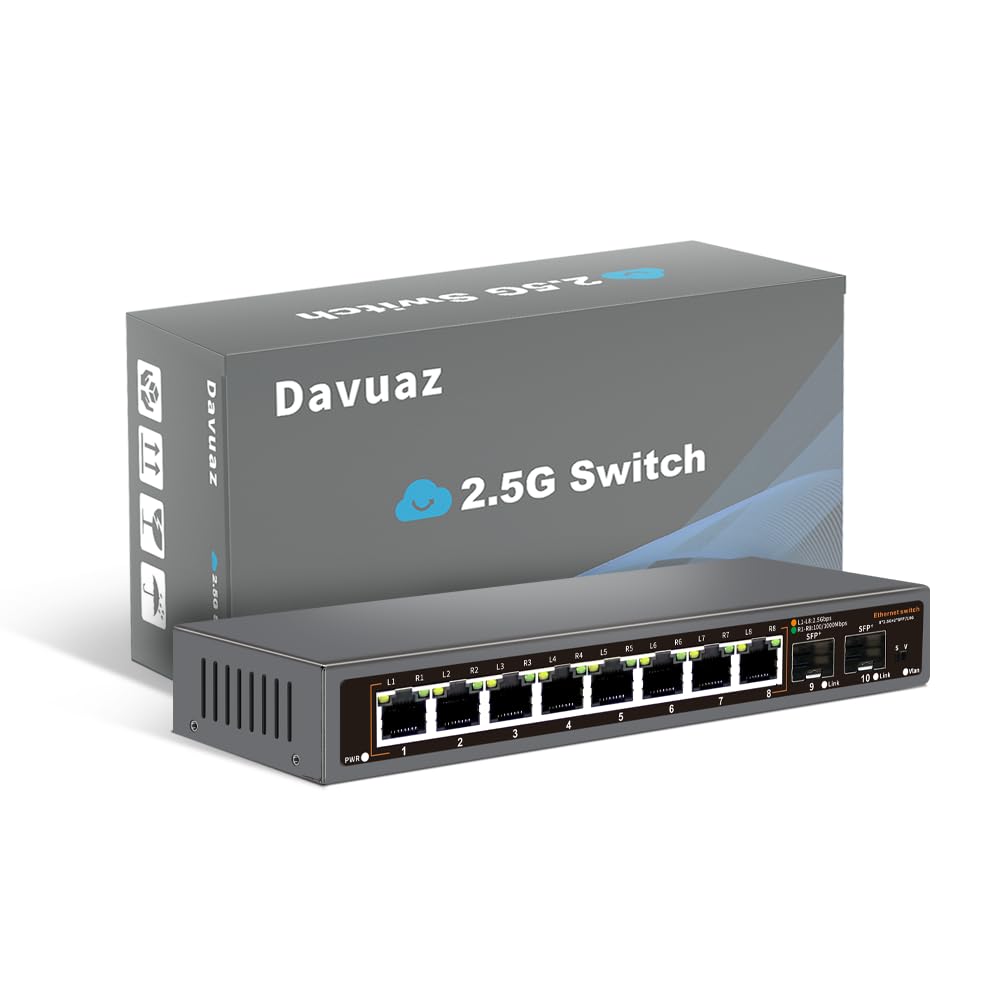
2. Davuaz 8-Port 2.5G Switch
An 8-port workhorse with two 10G fiber uplinks for networks that are about to grow.
What sets this switch apart is its 2× 10G SFP+ uplink ports — fiber slots normally found on far pricier gear. That gives you an 80Gbps switching capacity and a clear path to connect a 10G NAS or server later. Customers note testing 2.5Gb over existing in-wall Ethernet in a 20-year-old house, proving you don’t need fresh cabling to see the benefit. One owner even linked two of these switches via SFP+ to a 10Gb rack and called the speed improvement major.
The metal, fanless body is light — one owner joked it feels a bit “tin can” — but it runs silently and keeps cool. The front LEDs tell you your link rate at a glance: the “L” light means 2.5G, the “R” means 100/1000Mbps. It’s a clever touch for troubleshooting without logging into anything.
The honest catch is that this is a lesser-known brand, which makes some buyers cautious about security and long-term support. One owner did hit a terrible slowdown right after install, though that’s an outlier against many positive reports of great speed and build quality. The no-config plug-and-play nature means it’s still a low-risk buy if you like the SFP+ future-proofing.
Why It Stands Out
- Two 10G SFP+ ports at a budget-friendly price
- LED indicators that clearly show 2.5G vs 1G status
- Works over old in-wall cabling, per owner tests
Fair Warning
- Unfamiliar brand name may raise reliability questions
- Light metal body feels less premium than heavier rivals
Reach for this if: You want 10G fiber uplinks now without paying premium-brand prices.
Look elsewhere if: Brand trust matters more to you than having the SFP+ option — the TP-Link above has a longer track record.
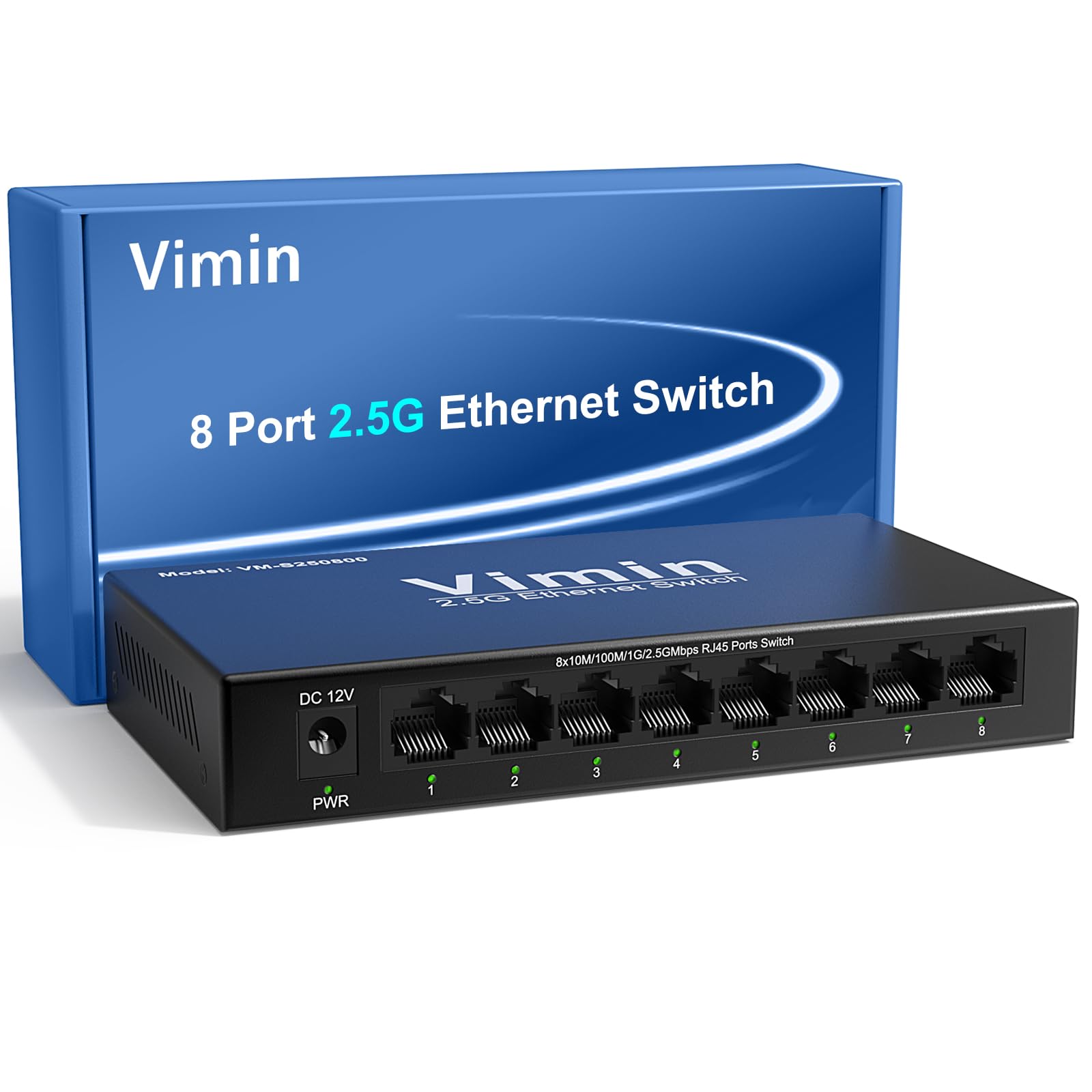
3. VIMIN 8-Port 2.5G Switch
A quiet, simple 8-port that handles 4K/8K streaming and NAS backups without breaking a sweat.
It’s ideal for users who want a no-configuration, reliable 2.5G upgrade. The 8 auto-negotiation RJ45 ports support 10/100/1000/2500Mbps and deliver a 40Gbps switching capacity with a 29.76Mpps forwarding rate, which means all ports run at line speed simultaneously without packet loss. It also supports jumbo frames up to 10KB, a spec that speeds up large file transfers for video editors and heavy NAS users.
The rugged metal housing doubles as a heat sink, and it complies with IEEE 802.3az Energy-Efficient Ethernet to cut power draw during light traffic. You can sit it on a desk or screw it to a wall, which owners find handy for tidying up a media center. Per-port LEDs for power, link activity, and 2.5G speed make it easy to spot problems.
The buying advice from owners is two-fold: first, this switch does not include Power over Ethernet (PoE), so you can’t power cameras or access points through it — one buyer returned it for that reason. Second, the included plug isn’t the EU/UK type, so international buyers need their own power lead. In its standard home role, though, it’s “easy to setup and quiet” as the review pages sum it up.
A no-fuss performer: Ideal for home offices and small businesses that need full-speed 2.5G on all eight ports with zero configuration.
One honest gap: No PoE support and a non-standard plug shape — check your power situation before ordering.
4. D-Link DMS-105 5-Port
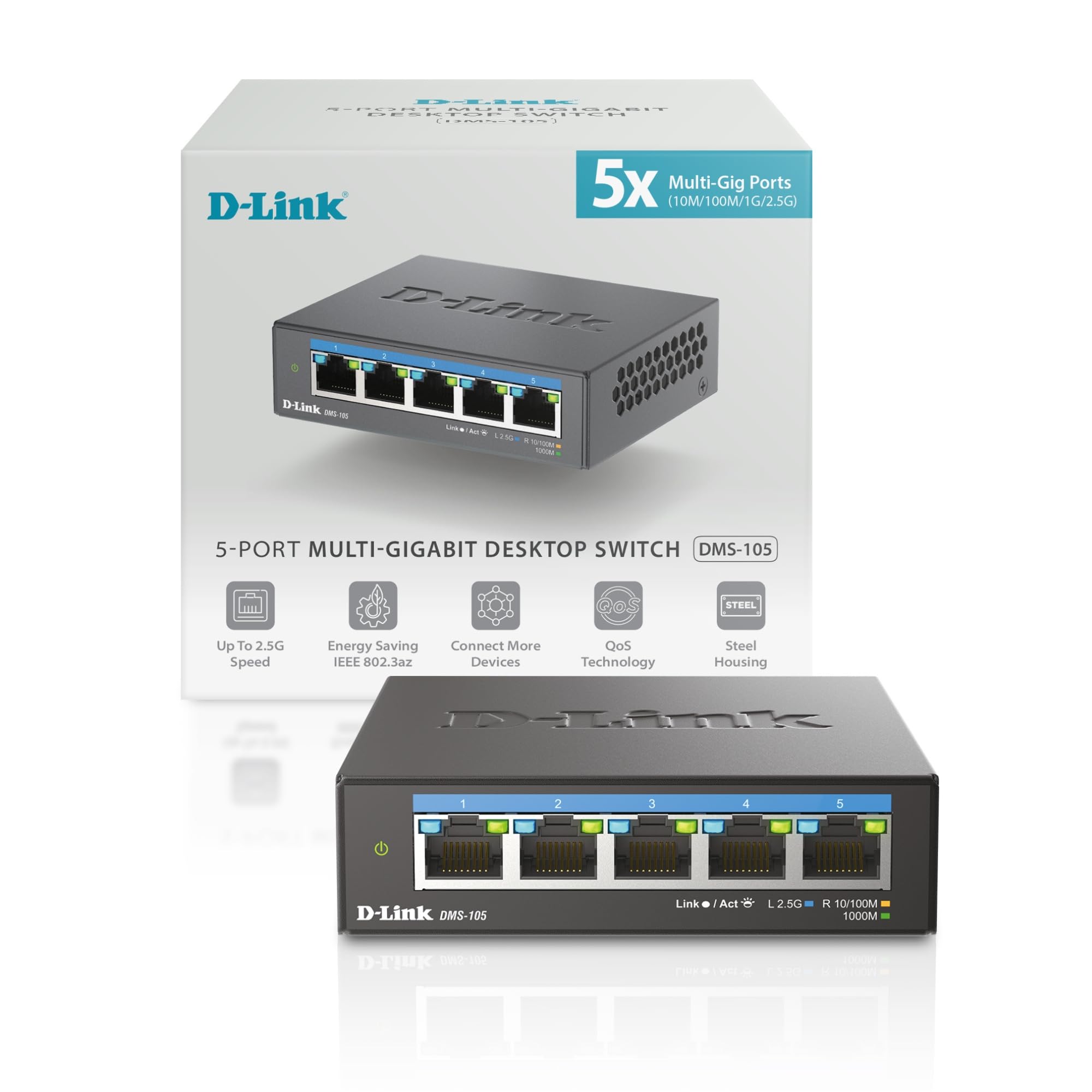
The tiny 5-port that packs QoS and IGMP Snooping into a silent metal frame.
If you only need to speed up a few devices — a main PC, a NAS, and a Wi-Fi 6 access point — this D-Link is a clever fit. It gives you five 2.5 Gigabit Ethernet ports with up to 25Gbps of switching capacity, and it’s small enough to hide behind a monitor. One owner reported sustained 250-300MB/s transfer speeds to their NAS, which is the kind of real-world throughput that makes a 2.5G upgrade feel worth it.
It also includes Flow Control to minimize dropped packets and IGMP Snooping to tune multicast streams — specs that matter for IPTV and 4K video. The metal, fanless body stays cool and quiet, with owners noting it runs warm (95-100°F) but never hot.
The main trade-off is value: some owners call it a bit pricey for the port count, and the power adapter feels basic compared to the sturdy switch itself. But in a small office, that port is “rock solid” — as the review pages note, one buyer ran two units for a year and a half on a MoCA 2.5 network with zero issues.
Smart traffic sorting: QoS with 8 priority levels keeps lag-sensitive apps smooth, which is rare at this size.
Size it right: Five ports fill up fast in a busy office, so count your devices before committing.
5. TRENDnet TEG-S350

A 5-port with a lifetime warranty that’s been running small offices for years.
It’s built for long-term reliability with a lifetime warranty and proven durability. TRENDnet backs the TEG-S350 with a Lifetime Manufacturer Protection in the U.S. and Canada, and it’s also NDAA and TAA compliant, meaning it meets government procurement standards. That explains why one owner says it’s been running their small office network for a few years straight, using the 2.5G ports to get the most out of their NAS and workstation.
The 5× 2.5GBASE-T ports push up to 2.5Gbps over existing Cat5e or better cabling — no rewiring needed — with a 25Gbps switching capacity. It’s backward compatible with 1000Mbps devices, so mixed networks just work. The aluminum chassis, which buyers confirm stays cool even after months of use, is wall-mountable and completely fanless.
There’s one recurring theme in the talk around this model: heat under sustained load. Some reviewers point out it gets noticeably warm when pushed hard, though others note it stays cool after three months of normal duty. It also skips VLAN and QoS features, so it’s strictly for plug-and-play speed, not network control. But for that role, it’s hard to argue with a near-zero failure rate and a lifetime promise.
Built To Last
- Lifetime warranty and TAA compliance for government-grade trust
- Wall-mountable metal body that runs silent
- Proven years of continuous office use per owner reports
The Real Talk
- No VLAN or QoS for traffic management
- Runs warm under heavy, sustained loads for some
Pick this for: A set-and-forget small office or media setup that can’t afford downtime.
skip it if: You need to segment traffic with VLANs — that’s the managed models’ job.
6. TP-Link TL-SG108-M2

TP-Link’s proven 8-port that hits 2.3 Gbps on LAN and runs cool in a garage.
This is the sibling model to our top pick, and it’s built for the same job with a few extra credentials. The 8× 2.5-Gigabit ports deliver up to 40 Gbps of switching capacity, and owners have measured real-world LAN throughput of 2.3 Gbps using iperf3 — that’s the kind of number you actually feel when dragging files across a network. One owner runs it in a non-climate-controlled garage, and it stays cool, which speaks to the metal case and fanless design.
The 3-year warranty is a genuine differentiator here, backed by free technical support during business hours. It’s also plug-and-play with auto-negotiation across 100Mb/1G/2.5G, so your older gear drops down gracefully. Buyers describe the setup as literally “no configuration needed,” and it carries the same trust that makes TP-Link a default choice after 15 years of reliable use.
The honest notes from owners are about cabling and adapters. Initial instability in one setup vanished after switching to a CAT6A cable, and some Realtek USB adapters had auto-negotiation hiccups on boot that needed a driver re-sync. That’s not a flaw in the switch — it’s a reminder that the whole chain from PC to port needs to speak 2.5G cleanly. The power indicator is a minor gripe for some, but this remains a rock-solid backbone for multi-gig homes.
The Highlights
- Measured 2.3 Gbps LAN speed in owner testing
- 3-year warranty with free tech support
- Runs cool even in a hot garage environment
Keep In Mind
- Results depend on quality cables and 2.5G-capable adapters
- Some units have a dim or unreliable power LED
Best for: A dependable wired backbone where the 3-year warranty gives you confidence.
Not ideal if: You want the newest SFP+ uplinks — this one is pure RJ45.
7. GigaPlus 10-Port Switch

Ten ports of mixed 2.5G and 10G speed that owners call 2.5 times faster than standard 1GBe.
For workstations with serious file-transfer needs, this GigaPlus is a heavy hitter. It combines 8× 2.5G RJ45 ports with 2× 10G SFP+ uplink ports, giving you an 80Gbps switching capacity and a way to connect a high-speed backbone. One owner with 2.5GBe on three computers and a NAS said the file transfer speed upgrade is “great,” and the two 10GBe ports are ready for future network upgrades.
The rugged metal casing includes 4KV lightning protection, a spec that matters if your switch sits near external cabling or in a building prone to surges. It’s fanless and silent, supports desktop or wall mounting, and runs cool under load. The plug-and-play nature means you can have it running in under a minute with devices negotiating speeds automatically between 10/100/1000M/2.5G.
The clear caution here is the SFP+ ports. While the 2.5G ports earn consistent praise, some shoppers say the 10G SFP+ ports cutting out randomly or failing after one to six months of use. One buyer’s SFP+ port gave out at six months, though GigaPlus’s customer service stepped in with a refund — so the support is solid even when the hardware isn’t perfect. If you only need the 2.5G ports, this is a fine, fast buy.
Raw speed first: The 2.5G ports deliver file transfers that are genuinely 2.5 times faster than 1G, per owner testing.
A real caveat: The 10G SFP+ slots are the weak link for some — treat them as a bonus, not the main reason to buy.
8. YuLinca 8-Port Managed Switch

The budget managed switch that adds VLAN, QoS, and link aggregation without the enterprise price.
If you’ve outgrown plug-and-play, this is the gateway into real network control. The YuLinca packs 8× 2.5G RJ45 ports plus a 10G SFP+ slot with 60Gbps backplane bandwidth, and it’s managed through a web interface. That means you can set up VLANs to keep your smart-home traffic separate from your work devices, apply QoS to prioritize gaming, and use LACP to bond two 2.5G ports into a single 5G connection. Buyers report consistent 2.35Gbps TCP throughput with no packet loss or added latency.
The reliability story is strong — one reviewer noted zero issues after 15 months of continuous use, and another has run one for two years as a firewall bridge with a 9.8Gb/s SFP+ throughput. It’s fanless and cool, which is rare for a managed switch. The web interface supports static and dynamic link aggregation, MAC address tables, and diagnostics, putting it in a different league than the unmanaged models above.
The learning curve is real but manageable. Owners note you need to set a static IP like 192.168.2.x to reach the management page, and you must use the System Manage → Save Configuration option or your settings vanish on reboot. One buyer flagged that the power adapter isn’t UL or ETL listed, which is note for safety-conscious buyers. For the feature set at this level, though, it’s an exceptional value.
Power Tools
- Full L2 management: VLAN, QoS, IGMP, and LACP
- Consistent 2.35Gbps throughput in owner tests
- 10G SFP+ slot for a future fiber backbone
The Cost Of Control
- Must save config via web UI or settings are lost on reboot
- Power adapter lacks UL/ETL certification per one owner
Choose this when: You need to segment traffic or bond ports and want to learn managed networking on a budget.
pass on it if: You’d rather never open a web admin page — the unmanaged picks are simpler.
9. BrosTrend 8-Port Switch

An 8-port that gives you VLAN and link aggregation with a hardware button, not a web page.
This BrosTrend is the clever middle ground for people who want managed features without learning a web interface. It has a physical button that toggles between Standard Mode, Static Link Aggregation, and VLAN Mode — no software, no static IPs, just a switch. In LAG mode, you can combine two ports for up to 5Gbps to a dual-Ethernet NAS or server, with auto failover and failback for stability. Owners call it “fantastic” and note it’s ideal for incremental multi-gig home upgrades.
The 8× 2.5Gbps ports deliver a 40Gbps switching capacity, and the metal, fanless body is sturdy and wall-mountable. Owners mention it runs silently and stays reliable for weeks of continuous use, with one calling it a great deal for getting eight ports at the price of five elsewhere. It works with any wired device, from game consoles to VoIP phones, and there’s a 24-watt maximum power draw that stays low in standard use.
The known weakness is the VLAN mode itself. One owner who needed VLAN for entertainment devices found it buggy — devices lose IP addresses randomly — and had to fall back to standard mode. This switch also doesn’t support Dynamic Link Aggregation (LACP or PAgP), so it only bonds with devices that do static LAG. For pure plug-and-play speed in standard mode, it’s excellent; just don’t lean on the VLAN feature.
The Appeal
- Hardware mode button for simple LAG and VLAN setup
- Static link aggregation hits up to 5Gbps for dual-port NAS
- Reliable weeks-long uptime and silent operation
Honest Limits
- VLAN mode can drop IP addresses randomly for some
- No LACP support, so it only bonds via static aggregation
Grab this if: You want 5G link aggregation for a NAS but refuse to learn a managed web UI.
Pass it by if: VLAN reliability is a must — that’s where the YuLinca managed switch is the safer bet.
Understanding the Specs
Switching Capacity
This number tells you the total data the switch can move across all ports at once, measured in Gbps. A 40 Gbps switch with eight 2.5G ports means every port can run at full speed simultaneously without slowing down. If a switch had a lower capacity than the port count multiplied by the speed, you’d see slowdowns under heavy load. A higher switching capacity ensures all ports can run at full speed simultaneously without bottlenecks.
Auto-Negotiation
This is the feature that makes a switch “just work.” It senses what speed each connected device supports — 100Mb, 1G, or 2.5G — and sets the link accordingly. Plug in an old 1G laptop next to a new 2.5G NAS and each gets its maximum speed without any configuration. If you see a switch without this, keep shopping.
Unmanaged vs. Managed
An unmanaged switch is a pure hardware hub — cables in, speeds out, no settings. A managed switch adds a web interface with tools like VLANs to isolate traffic and QoS to prioritize certain data. The middle ground, like a mode button, gives you presets without a full web page. Your choice depends on if you want control or simplicity.
Link Aggregation (LAG)
This combines two physical ports into one logical connection to double your bandwidth between a switch and a device. For example, a NAS with two Ethernet ports can use LAG to reach up to 5Gbps. Static LAG requires manual setup on both ends, while LACP (Link Aggregation Control Protocol) handles it automatically — make sure your devices support the same type.
FAQ
Will a 2.5G switch work with my existing Cat5e or Cat6 cables?
Do I need a 2.5G switch if my internet plan is only 1 Gbps?
What is the difference between a 2.5G switch and a Gigabit switch?
How many ports do I need on a 2.5G switch?
What is an SFP+ port and do I need one?
Are 2.5G switches noisy?
What does unmanaged mean on a network switch?
Is a managed 2.5G switch worth it for a home office?
Can I connect two 2.5G switches together to add more ports?
Do all my devices need to support 2.5G to use this switch?
Final Thoughts: The Verdict
For the majority of shoppers, the 2.5 gb switch winner is the TP-Link TL-SG108S-M2 because it delivers proven speed gains — buyers measured jumps from ~940 Mbps to 2300+ Mbps — in a silent, plug-and-play metal case at a price that beats the competition. If you have a dual-port NAS and want a faster 5G connection without learning managed networking, grab the BrosTrend 8-Port with its hardware LAG button. And for anyone planning a future 10G fiber backbone, the Davuaz 8-Port with 10G SFP+ uplinks is the one to reach for, giving you room to grow without replacing your switch.
How We Picked
We do not accept paid placement. Every pick is matched to a real buyer and a real use-case; we do not hands-on test units.
Sources & Methodology
Specifications: manufacturer listings and product documentation. Review insights: verified customer reviews, as of August 2026. Pricing: not shown on this page (it changes often); check the current price via the retailer link.
As an Amazon Associate, Gadgets Feed earns from qualifying purchases. This does not affect which products we feature.