
A cluttered desk with mismatched monitor stands is the fastest way to kill your ergonomic setup and your productivity. A single 2-arm monitor mount replaces both factory stands, reclaims significant desk space, and lets you position each screen exactly where your neck and eyes need it — no more leaning forward or craning sideways to see.
I’m Min — the co-founder and writer behind Gadgets Feed. I’ve spent countless hours digging into gas-spring tension ratings, VESA plate compatibility, and real-world wobble tests to separate the mounts that stay locked from the ones that slowly sag.
Whether you run dual 27-inch displays for code or a pair of ultrawides for trading, choosing the right 2-arm monitor mount means understanding weight capacity per arm, extension reach, and build material — not just trusting the marketing photos.
How To Choose The Best 2-Arm Monitor Mount
Not every dual mount delivers the same stability. You need to match the mount’s mechanics to your monitor size, desk thickness, and how often you reposition your screens. Overlooking any of these three factors leads to sag, wobble, or an unusable clamp fit.
Gas Spring vs. Fixed-Pole Design
A gas-spring arm uses a pneumatic cylinder inside the upper section to counterbalance the monitor’s weight. This lets you lift or lower the screen with a light touch and holds it at any height without tightening knobs. Fixed-pole mounts (like the Fellowes option) rely on set screws to lock height — they’re more durable over years but require a tool to adjust. For daily repositioning, spring arms are vastly more convenient.
Weight Capacity Per Arm — The Real Number
Manufacturers often list a total capacity for both arms combined, but each arm has an independent limit. A mount rated for 22 lbs per arm handles a standard 27-inch office display, but a 34-inch ultrawide can weigh 15–20 lbs, leaving almost no headroom. For heavy curved or ultrawide panels, look for arms with at least 26–33 lbs per side, like the ErgoFocus or ARES WING models.
Desk Clamp Fit and Surface Protection
Most mounts use a C-clamp that fits desks 0.4″ to 3.3″ thick. A clamp too shallow for your desk edge will loosen over time. If you have a glass desk or a sit-stand model with a thin edge, check whether the mount includes padded clamping pads. Grommet-mount options are more secure but require drilling a hole — ideal for solid wood tops where the clamp can’t grip.
Quick Comparison
On smaller screens, swipe sideways to see the full table.
| Model | Category | Best For | Key Spec | Amazon |
|---|---|---|---|---|
| MOUNT PRO Dual Arm | Gas Spring | High weight capacity per arm | 30.9 lbs per arm | Amazon |
| ErgoFocus Heavy Duty | Gas Spring | Ultrawide & heavy monitors | 33.1 lbs per arm | Amazon |
| VIVO STAND-V102BDU | Premium Aluminum | Sleek design + USB ports | 26.4 lbs per arm | Amazon |
| ARES WING Dual Arm | Gas Spring | 49-inch ultrawide support | 44 lbs per arm | Amazon |
| VIVO STAND-V120K | Pneumatic | Extra-tall & stacked setups | 44 lbs per arm | Amazon |
| HUANUO Dual Mount | Fixed Articulating | Best value for 32-inch displays | 22 lbs per arm | Amazon |
| Fellowes Everyday Plus | Fixed-Pole | Rock-solid height lock | 19.84 lbs per arm | Amazon |
In‑Depth Reviews
1. MOUNT PRO Dual Monitor Desk Mount

The MOUNT PRO delivers the sweet spot between weight capacity and smooth gas-spring action. Each arm supports up to 30.9 lbs, which is enough for most 27- to 35-inch monitors, and the arm extends to 22.6 inches for large desks. The integrated cable management hides wires completely, and the hidden tool storage in the base is a thoughtful touch for future adjustments.
User reviews consistently praise its rock-solid build — one setup held two 28-inch displays without any sag for months. The clamp is heavy-duty, but it requires roughly 18 inches of clearance behind the desk to let the arms reach full extension. If your workspace is shallow, you’ll need to mount the monitors farther forward on the base.
The only real downside is the bulky desk clamp, which can crowd a small desk edge. For the price, however, the build quality and smooth motion rival premium options costing much more.
Why it’s great
- High 30.9 lbs per arm capacity
- Smooth gas-spring lift across full height range
- Integrated cable management hides wires
Good to know
- Clamp base is large and takes up desk edge space
- Factory springs may need retightening out of the box
2. ErgoFocus Heavy Duty Dual Monitor Mount

The ErgoFocus is built for the heaviest loads in its class. Each arm handles 33.1 lbs, and the innovative tilting-head design uses two limit screws to prevent the dreaded monitor sag that plagues other arms over time. The gas spring itself has passed 20,000 fatigue tests, so you can adjust height daily for years without losing lift force.
Owners running dual 34-inch curved monitors report zero droop even after months of use. The arm extends to 20.87 inches and raises to 22.4 inches, giving tall users plenty of vertical range. The lower arm even stores Allen keys for future adjustments.
A few users noted that the top-to-bottom angle can drift slightly on ultrawide screens if the tension isn’t dialed in perfectly. The 3-year warranty covers mechanical defects, which adds peace of mind for heavy setups.
Why it’s great
- 33.1 lbs per arm handles the heaviest ultrawides
- Anti-sag tilting head with two limit screws
- 3-year warranty and fatigue-tested gas spring
Good to know
- Angle drift may require fine-tuning on ultrawide panels
- Maximum screen size listed at 34 inches despite 43-inch claim
3. VIVO Premium Aluminum STAND-V102BDU
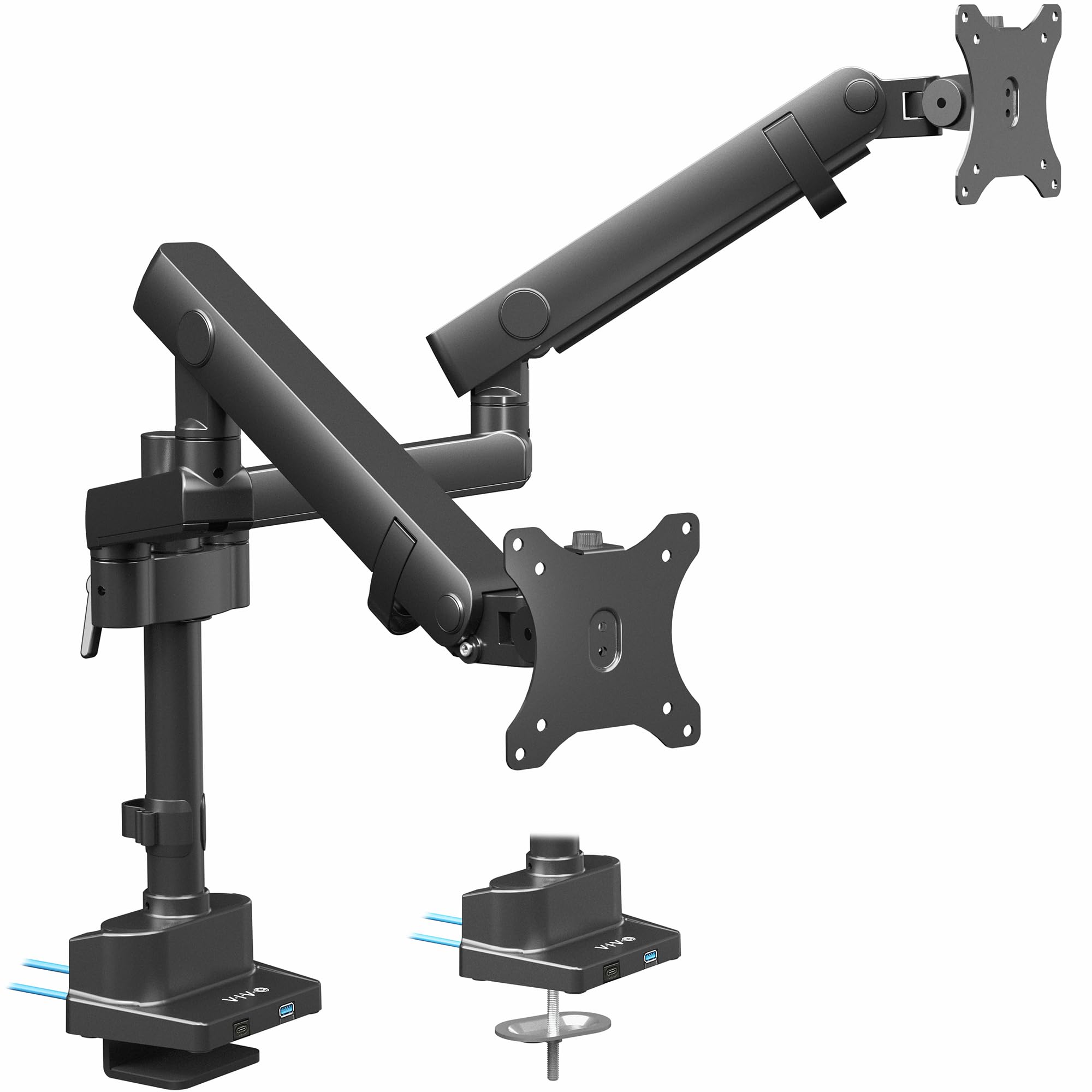
The VIVO STAND-V102BDU stands out for its polished aluminum construction and integrated dual USB 3.0 ports at the base — a convenience for charging phones or syncing peripherals without reaching under the desk. The mechanical spring (not gas) counterbalances screens up to 26.4 lbs flat or 24.2 lbs curved, and the arm extends 24 inches high for tall users.
Reviewers love its smooth tilt from -90° to +90° and the fact that it doesn’t drift over time. The quick-release VESA brackets make installation easier than threading bolts behind the monitor. This mount is a favorite for light to medium-duty setups — up to about 10 adjustments per week — rather than constant daily repositioning.
Some users found a slight play in the VESA plate connection, which can cause minor screen wobble on bouncy desks. The USB ports also sit on the base rather than the arm, so they’re more useful for a phone than a flash drive you leave plugged in.
Why it’s great
- Aluminum build with clean, premium look
- Dual USB 3.0 ports on the base
- Wide 24-inch height range
Good to know
- VESA plate can have slight play causing wobble
- Mechanical spring, not gas — less smooth for frequent adjusts
4. ARES WING Dual Monitor Arm
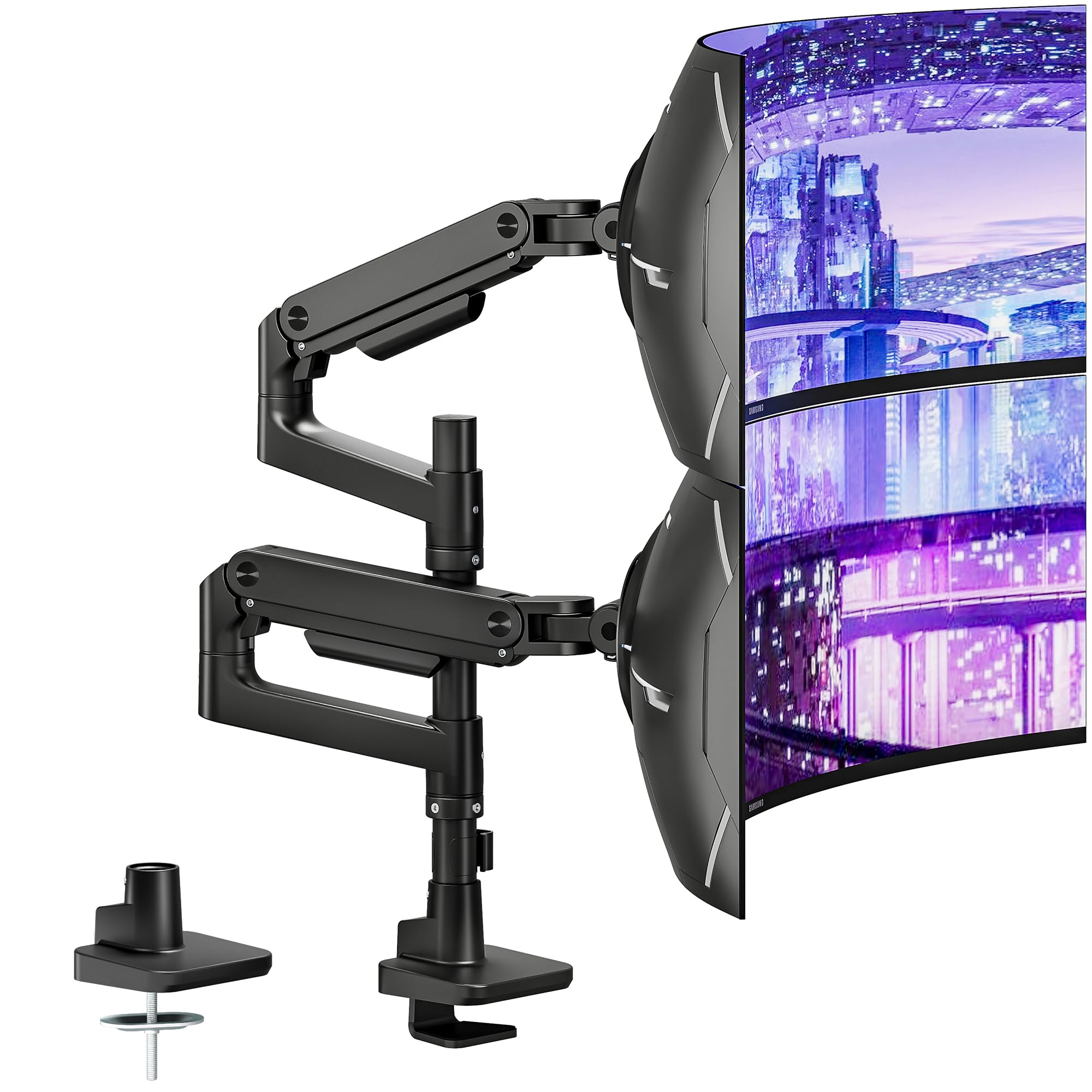
The ARES WING is the heaviest-duty option in this lineup, with each arm rated for an astonishing 44 lbs. That means it can handle a pair of 49-inch ultrawide monitors — including 1000R curved screens — without breaking a sweat. The gas spring offers 27.9 inches of height adjustment and 22.4 inches of extension, giving enormous flexibility for stacking or side-by-side layouts.
Users consistently mention its tight tolerances and superior finish compared to other premium arms like Ergotron. The quick-release VESA plates and tool-less cable management make installation painless. For those running a single ultrawide plus a secondary monitor, the arms can be independently positioned to almost any configuration.
The main complaint targets the plastic clips on the cable management channels — they break easily if overtightened. For the sheer weight capacity and stability, though, this is the mount to beat for maximalist monitor setups.
Why it’s great
- 44 lbs per arm handles the largest ultrawides
- 27.9-inch height range for tall desks
- Rated for 1000R curved monitors
Good to know
- Plastic cable management clips are fragile
- Overkill for standard 24-inch monitors
5. VIVO Pneumatic Arm STAND-V120K

The STAND-V120K from VIVO is purpose-built for stacked monitor layouts — it fits two ultrawide screens up to 49 inches (stacked) or 38 inches side-by-side. The pneumatic lift system counterbalances monitors from 5.5 lbs to 44 lbs, and the cast aluminum base and arms scratch the durable build checkbox. It’s the tallest mount here, with a center-screen height that clears most standing-desk setups.
Owners running dual 34-inch ultrawides report zero wobble even on sit-stand desks. The detachable VESA plates simplify mounting heavy panels, and the high-capacity tilt joints prevent sag at extreme angles. The 3-year warranty covers the pneumatic mechanism.
The clamp base is deep — it requires a desk edge that fully accepts the heavy bracket. Some users found the downward tilt range limited for the top monitor in a stacked configuration, so careful planning of vertical spacing is needed.
Why it’s great
- 44 lbs per arm for massive monitors
- Extra-tall pole fits stacked ultrawide setups
- 3-year warranty on pneumatic system
Good to know
- Deep clamp requires substantial desk edge
- Limited downward tilt for top monitor in stack
6. HUANUO Dual Monitor Mount

The HUANUO is the entry-level workhorse that still punches above its weight. Each arm supports 22 lbs — enough for most 27-inch and many 32-inch flat panels — and the aerospace-grade aluminum build feels far more expensive than the price suggests. It offers ±90° swivel, +90°/-35° tilt, and 360° rotation, so you can flip between landscape and portrait without tools.
User reviews highlight an easy 10-minute install with clear instructions, and the tension holds firmly after initial setup. For those with LG monitors that have recessed VESA mounts, you may need to buy longer M4 25mm screws separately — a known but minor compatibility quirk.
The cable management channel uses a single screw cover that can strip if overtightened, and the arm extension is limited to 17.5 inches. For standard dual-27 setups on a typical 60-inch desk, this is the best value in the market.
Why it’s great
- Excellent value with aluminum build
- Simple 10-minute tool-less assembly
- Full 360° rotation for portrait mode
Good to know
- Arm extension limited to 17.5 inches
- Cable cover screw can strip; monitor screws may be needed for recessed mounts
7. Fellowes Everyday Plus Dual Monitor Arm
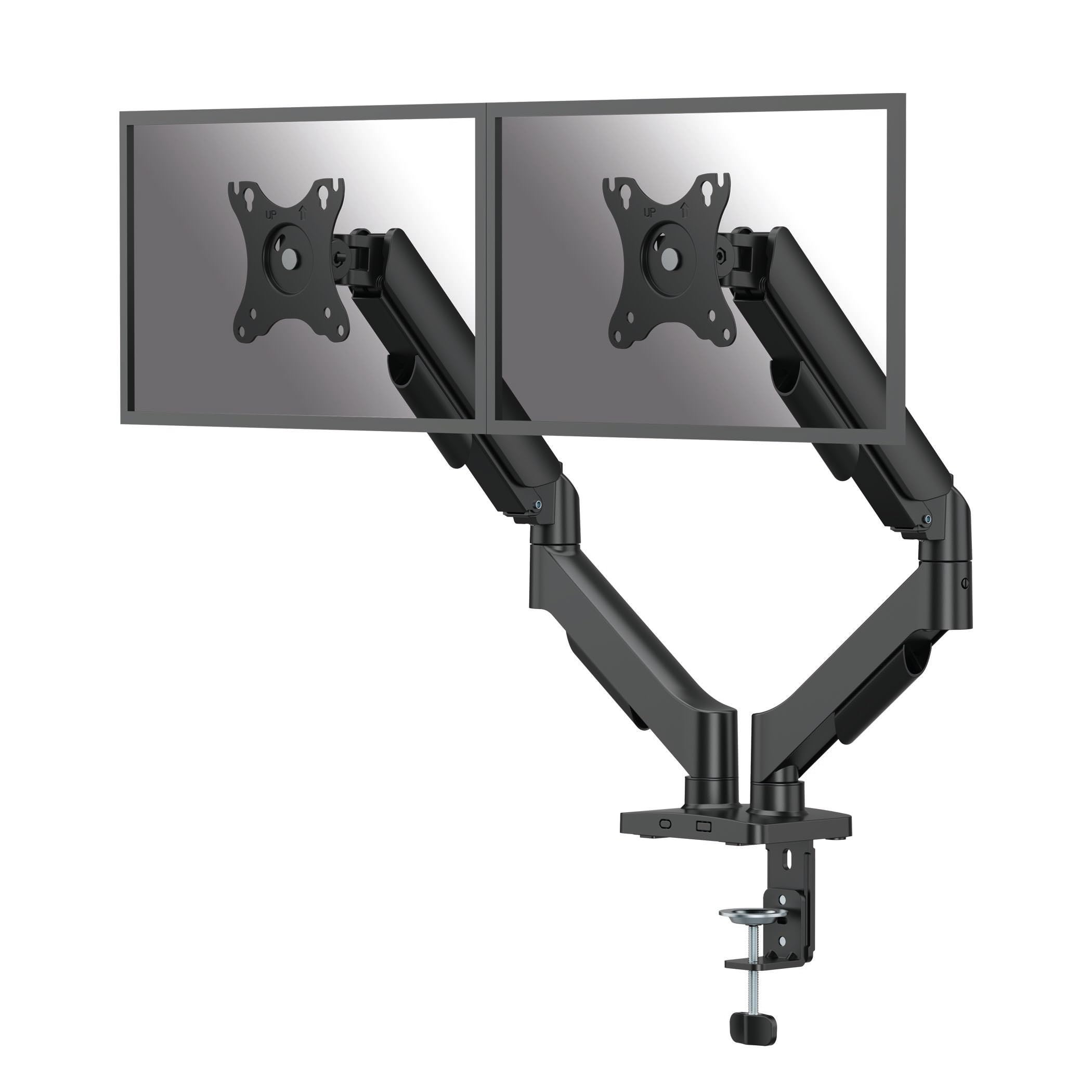
The Fellowes Everyday Plus uses a fixed-pole design with gas-spring height adjustment for smooth tool-free lifting. It supports screens from 17 to 32 inches weighing 4.4 to 19.84 lbs each — the lightest capacity in this roundup, but more than adequate for standard office monitors. The height adjusts 9.84 inches, and the arm extends to 19.92 inches for flexible positioning.
Owners appreciate the rock-solid lock once the height is set — no drifting over months of use. The clamp and grommet options cover desks from 0.39 to 3.15 inches thick, and the included cable management clips keep wires tidy. The VESA plate disconnects with a single screw for easy monitor swap.
The fixed-pole design means you can’t slide the arm horizontally along a rail — the movement is limited to the arm’s pivot points. For those who rarely adjust height, the lack of gas-spring seals that can leak over years is actually a long-term advantage. This is a reliable, no-nonsense mount for the budget-conscious office user.
Why it’s great
- Fixed-pole design avoids gas spring leakage risk
- Sturdy, no sag after months of daily use
- Easy disconnect VESA plate for monitor swaps
Good to know
- Limited to 19.84 lbs per arm — not for heavy ultrawides
- No lateral sliding — only pivot movement
FAQ
Can a 2-arm mount hold two different-sized monitors?
What if my desk is glass or sits on a sit-stand frame?
Why does my monitor sag after a few months?
Final Thoughts: The Verdict
For most users, the 2-arm monitor mount winner is the MOUNT PRO Dual Arm because it combines a 30.9 lbs per-arm capacity, smooth gas-spring motion, and a price that undercuts premium rivals by nearly half. If you need to support massive 49-inch ultrawides, grab the ARES WING for its 44 lbs per-arm rating and extra-tall reach. And for the budget-conscious buyer with standard 27-inch monitors, nothing beats the HUANUO Dual Mount for pure value and stability.