
Migrating scattered files off external USB drives, cloud subscriptions, and old laptops onto a dedicated network appliance changes how you access and protect your data. A quality 2-bay enclosure with RAID mirroring gives you automatic redundancy against a single drive failure, turning two physical disks into one trusted pool.
I’m Min — the co-founder and writer behind Gadgets Feed. I spend hundreds of hours each quarter cross-referencing processor benchmarks, RAID controller capabilities, network throughput tests, and real-world user feedback to separate genuinely capable hardware from overpriced shells.
This guide cuts through the spec clutter to help you match the right hardware to your actual workflow, whether you need silent media serving or heavy multi-user file access. Here is everything you need to select, set up, and trust your next 2-bay nas.
How To Choose The Best 2-Bay NAS
Selecting the right enclosure comes down to understanding your daily file-access patterns and future growth plans. A unit that excels at direct-attached backup might choke under the demands of a multi-user Plex server, while a high-performance model with 10GbE is overkill for a single laptop running Time Machine.
CPU and Memory Matter More Than You Think
The processor determines whether your unit can handle hardware transcoding for 4K video streams, run Docker containers, or manage file encryption without bottlenecking. An Intel Celeron or Pentium Gold with Quick Sync Video beats any ARM chip for Plex or Jellyfin. RAM capacity — 4 GB minimum, 8 GB or more for Docker or VMs — directly impacts multitasking headroom.
Network Throughput Matches Your Workflow
A single 1GbE port caps transfers at roughly 113 MB/s, which is fine for routine backups and file sharing. Dual 2.5GbE ports or a single 10GbE port become necessary if you edit video directly off the NAS, run large database applications, or move multi-gigabyte files frequently. The drives themselves — mechanical HDDs top out around 250 MB/s sequentially — must also keep pace with the network link.
Quick Comparison
On smaller screens, swipe sideways to see the full table.
| Model | Category | Best For | Key Spec | Amazon |
|---|---|---|---|---|
| Synology DS225+ | 2-Bay Premium | Plex transcoding & home media | Intel CPU, 282 MB/s transfer | Amazon |
| Asustor AS5402T | 2-Bay Premium | High-speed NVMe caching & gaming | 4x M.2 NVMe, dual 2.5GbE | Amazon |
| Synology DS223 | 2-Bay Mid-Range | Centralized backup & file sharing | Synology SHR, metal enclosure | Amazon |
| BUFFALO LinkStation 720 | 2-Bay Mid-Range | Simple plug-and-play personal cloud | 4TB included, closed OS | Amazon |
| QNAP TR-002 | DAS / Entry | Direct-attached RAID for a single PC | USB 3.2 Gen 2, hardware RAID | Amazon |
In‑Depth Reviews
1. Synology DS225+ Private Cloud Media Server

The DS225+ packs an Intel quad-core processor capable of hardware-accelerated 4K transcoding for Plex and Jellyfin, a feature that ARM-based units simply cannot match. With sequential reads hitting 282 MB/s over its dual 1GbE ports (Link Aggregation), this enclosure handles multiple simultaneous 4K streams and heavy Docker workloads without stuttering.
Synology’s DiskStation Manager remains the gold standard for software polish. Snapshot Replication, Active Backup Suite, and the Synology Photos app make centralized photo management and automated PC/Mac backups feel effortless. The 3-year warranty adds peace of mind for a device meant to run 24/7.
The main trade-off is cost — this is a premium appliance without drives, so you need to budget for two quality NAS-rated HDDs. Some users also note that third-party RAM upgrades void the warranty, though the 4 GB default is adequate for most home applications.
Why it’s great
- Intel Quick Sync Video for smooth 4K Plex transcoding
- Best-in-class DSM software with snapshot and backup tools
- Multi-gig ready via dual 1GbE with Link Aggregation
Good to know
- Diskless — drives add significant cost
- No 2.5GbE or 10GbE out of the box
- Third-party RAM upgrades may void warranty
2. Asustor AS5402T 2-Bay NAS

The Asustor AS5402T is the price-to-performance champion for users who need fast NVMe caching or full-flash storage. Four M.2 NVMe slots are an anomaly on a 2-bay chassis, allowing you to run a blazing-fast storage pool or tiered cache that dramatically accelerates small-file operations and database queries.
Dual 2.5GbE ports provide 2.5 Gbps native connectivity without needing an aggregating switch, and the HDMI 2.0b output makes it a capable direct-attach media player. The Intel N5105 CPU with Quick Sync Video handles hardware transcoding just as well as the competition, while the upgradeable DDR4 RAM (up to 16 GB) offers headroom for multiple Docker containers.
The Asustor ADM interface is functional but not as polished as Synology’s DSM — expect a slightly steeper learning curve for advanced features like virtualization or snapshot scheduling. The plastic drive trays also feel less reassuring than the all-metal construction of some rivals.
Why it’s great
- Four M.2 NVMe slots for extreme caching or all-flash pools
- Dual 2.5GbE ports at a price that undercuts Synology
- HDMI 2.0b output for direct 4K media playback
Good to know
- ADM software is less intuitive than DSM
- Plastic drive trays feel budget relative to metal alternatives
- No 10GbE option on this model
3. Synology DS223 Home & Office Backup Hub

The Synology DS223 is the sweet spot for users who want Synology’s rock-solid DSM ecosystem without paying for the 4K transcoding hardware they do not need. Its ARM-based Realtek processor is perfectly capable of managing centralized file backups, running Synology Photos, and acting as a home surveillance station for up to 20 IP cameras.
Synology Hybrid RAID (SHR) is a standout feature that lets you mix drives of different capacities without wasting space, a flexibility traditional RAID 1 does not offer. The all-metal enclosure and 2-year warranty give it a sturdy, business-grade feel that justifies the price premium over consumer-branded alternatives.
The main limitation is the lack of hardware transcoding — if you plan to stream 4K video to mobile devices or remote clients, the CPU will struggle without native support. Additionally, the single 1GbE port caps network transfers to about 113 MB/s, which is fine for backup but slow for large media libraries.
Why it’s great
- Synology SHR supports mixed-capacity drives seamlessly
- Metal chassis and 2-year warranty for 24/7 operation
- Excellent DSM software with comprehensive backup tools
Good to know
- ARM CPU lacks hardware transcoding for 4K
- Single 1GbE port limits transfer speed
- No Docker support on this chipset
4. BUFFALO LinkStation 720 4TB

For users who just want network-accessible storage and do not care about Plex, Docker, or app ecosystems, the BUFFALO LinkStation 720 delivers a true zero-config experience. Drives come pre-installed with RAID 1 already active, so you get 2 TB of mirrored storage out of the box — perfect for family photo backups and basic file sharing.
The closed operating system is actually an advantage here: there are no third-party apps to manage, no firmware update anxiety, and a reduced attack surface for ransomware. BUFFALO’s 24/7 US-based support and 2-year warranty (including the drives) make this the lowest-maintenance option on the list.
The trade-off is severe — you cannot install additional apps, no Docker, no hardware transcoding, and the web interface is basic. Performance over its single 1GbE port is adequate for a few users but will bottleneck with concurrent video streaming or large file transfers. DLNA streaming support has also been reported to break after firmware updates.
Why it’s great
- Drives included and RAID 1 configured out of the box
- Closed OS reduces attack surface and maintenance burden
- 24/7 US-based support and 2-year warranty cover drives
Good to know
- No app ecosystem, Docker, or transcoding
- Single 1GbE port limits transfer speed
- DLNA functionality may break after firmware updates
5. QNAP TR-002-A-US Direct Attached Storage

The QNAP TR-002 is technically a direct-attached storage (DAS) enclosure, not a NAS — but it earns a spot here for users who want hardware RAID protection without the complexity of a network stack. Connect it via USB 3.2 Gen 2 to a PC, flip the DIP switches for RAID 1, and you get automatic disk mirroring that offloads the RAID processing from your computer’s CPU.
Lockable drive bays add a layer of physical security absent from most budget enclosures, and the 70mm fan keeps 7200 RPM drives cool at 38°C under load. Sequential reads of 400 MB/s in RAID 0 beat any 1GbE NAS, making this an excellent choice for video editors who need fast local backup without network overhead.
The enclosure is sensitive to USB cable quality — poor cables can drop write speeds from 300 MB/s to 20 MB/s. The loud beeping alarm when a drive degrades (no mute option) is also a frustration for quiet home environments. This is a backup solution for a single computer, not a multi-device network hub.
Why it’s great
- Hardware RAID offloads CPU and works with any modern OS
- Lockable drive bays for physical security
- 400 MB/s sequential reads via USB 3.2 Gen 2
Good to know
- USB cable quality directly impacts performance
- Loud beeping alarm when degraded, no mute button
- Attached to a single computer — not a network device
6. LincStation N2 6-Bay NAS

The LincStation N2 reimagines the NAS for an all-flash world: 4x M.2 NVMe slots and 2x 2.5-inch SATA bays in a compact metal chassis smaller than a paperback. The Intel N100 processor with 16 GB of LPDDR5 RAM handles Plex transcoding, Docker stacks, and the included Unraid OS license out of the box, making it a turnkey solution for tech enthusiasts.
The built-in 10GbE port is the headline feature — it quadruples the throughput of typical 2.5GbE units, enabling direct 4K video editing workflows and near-instantaneous file transfers. USB-C 10 Gbps and HDMI 2.0 output round out the connectivity, while the fanless metal enclosure keeps NVMe drives under 35°C in normal operation.
The downsides start with PCIe lane constraints: each NVMe slot runs on a single PCIe 3.0 lane, capping individual drives around 900 MB/s, and RAID 1 sync speeds hover around 684 MB/s. There is no support for 3.5-inch HDDs, limiting bulk storage to slower USB-attached drives. The 2-year warranty is decent, but reports of units not powering up after a few weeks raise reliability questions.
Why it’s great
- 10GbE port provides massive throughput for NVMe storage
- Includes Unraid OS license with 30-day trial
- Compact, silent, all-metal chassis with excellent thermals
Good to know
- PCIe x1 lanes cap NVMe performance below theoretical max
- No 3.5-inch HDD support — limited to 2.5-inch and NVMe
- Some reliability concerns reported after a few weeks of use
7. Synology DS425+ 4-Bay NAS
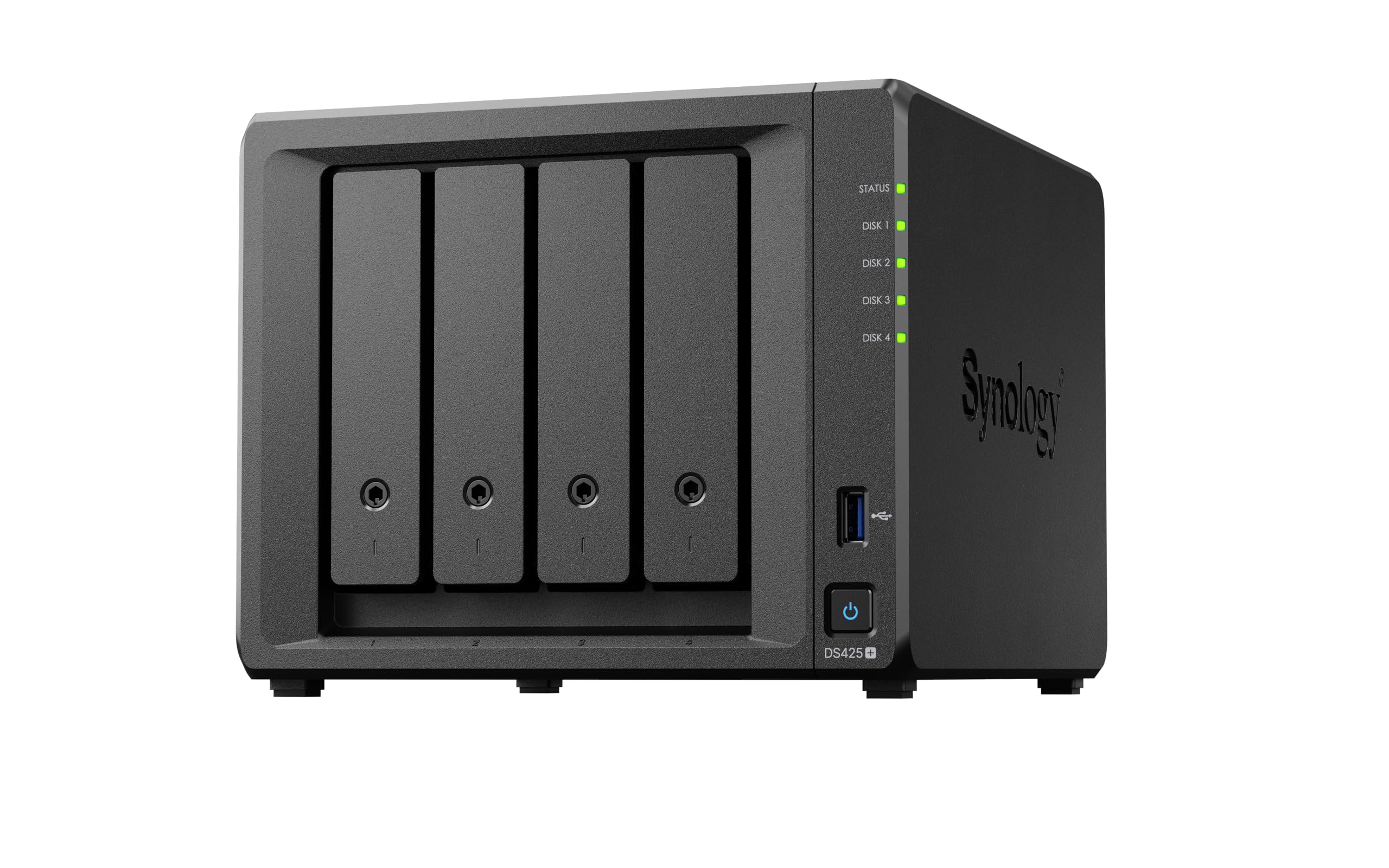
The Synology DS425+ is technically a 4-bay unit, but it belongs in this comparison because it represents the peak of what Synology’s consumer lineup can do — and many buyers weighing premium 2-bay models should consider whether the extra bays justify the higher cost. With 80 TB of raw capacity and support for up to 30 IP cameras, this is a small-office powerhouse.
Synology’s Active Backup Suite for Microsoft 365 and Google Workspace makes it trivially easy to back up cloud data locally, a feature that saves small businesses from vendor lock-in. The DS425+ also supports SSD caching via M.2 NVMe slots, dramatically accelerating random I/O for database or email server workloads without dedicating a full bay to a cache drive.
The elephant in the room is Synology’s drive-compatibility lock — only Synology-branded HDDs are officially supported, and third-party drives may trigger warnings or refuse to initialize. This practice pushes the total cost of ownership significantly higher. The 3-year warranty is excellent, but the drive restriction makes this a less flexible long-term investment than open-platform alternatives.
Why it’s great
- Active Backup Suite for cloud and Microsoft 365 protection
- SSD caching via M.2 NVMe accelerates random I/O
- 3-year warranty and enterprise-grade support options
Good to know
- Synology-branded drives are required for official compatibility
- Setup and migration can take multiple days
- Overkill for single-user home use — better suited for small offices
8. UGREEN NAS DXP4800 Plus
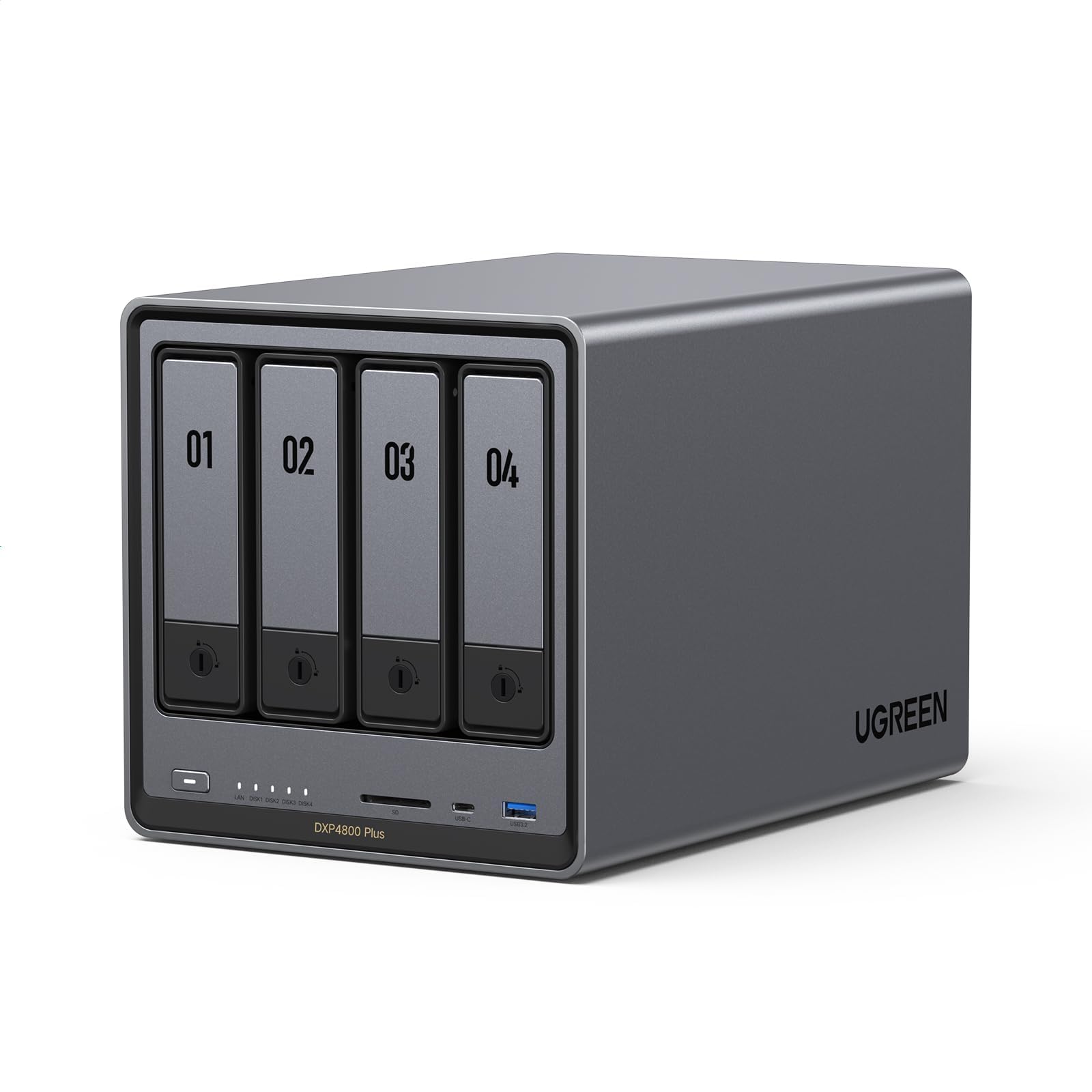
The UGREEN DXP4800 Plus is a content creator’s dream: a native 10GbE port, an Intel Pentium Gold 8505 5-core CPU, and 8 GB of DDR5 RAM in a premium aluminum chassis. Sequential transfers hit 1250 MB/s over 10GbE, making it possible to edit 4K/60 footage directly off the NAS without copying files to a local SSD first.
UGREEN’s UGOS software is surprisingly polished for a newcomer, with built-in Docker support, AI-powered photo organization, and seamless Plex/Jellyfin integration. The dual M.2 NVMe slots (Gen 4) allow for blazing-fast caching or a dedicated fast pool, and the SD 3.0 card slot is a thoughtful addition for photographers who want to offload memory cards directly to the NAS.
The software still has rough edges — some advanced features require command-line tweaks, and the app ecosystem is nowhere near Synology’s breadth. The Pentium Gold chip, while capable, lacks the Quick Sync Video hardware transcoding that Intel Celeron and Core chips offer, meaning 4K Plex transcoding will fall back to software encoding and consume more CPU resources.
Why it’s great
- Native 10GbE port for true high-speed video editing
- Premium aluminum build and SD 3.0 card reader
- Dual Gen 4 M.2 slots for caching or all-flash pools
Good to know
- No Quick Sync Video — 4K transcoding uses software CPU
- UGOS software still has minor UI quirks and missing features
- Higher price point limits value for casual backup users
9. QNAP TS-932PX-4G 9-Bay NAS

The QNAP TS-932PX pushes the boundary of what a 2-bay NAS buyer should consider: a 9-bay hybrid enclosure (5x 3.5-inch + 4x 2.5-inch) with dual 10GbE SFP+ ports and dual 2.5GbE RJ45 ports. For a small office handling both high-capacity HDD archives and fast SSD tiers, this single box replaces what would otherwise require two separate appliances.
QuDedup deduplication at the source dramatically reduces backup storage consumption and transfer times, a feature that pays for itself in bandwidth savings over a few months. Snapshot protection records system states for rapid recovery from ransomware or accidental deletion, and the QNAP app ecosystem rivals Synology in breadth and maturity.
The 4 GB of default RAM is insufficient — upgrading to the maximum (around for a stick) is mandatory to avoid interface sluggishness. The lack of PCIe expansion slots means no future upgrades for 25GbE or GPU acceleration, limiting its long-term viability for intensive workloads. The QTS interface, while powerful, has a steeper learning curve than Synology’s DSM.
Why it’s great
- Two 10GbE SFP+ ports for high-speed networking
- Hybrid 9-bay design supports HDDs and SSDs in one chassis
- QuDedup reduces backup storage by deduplicating at source
Good to know
- 4 GB RAM is too low — upgrade is required for smooth operation
- No PCIe slots for future expansion
- QTS software has a steeper learning curve than DSM
FAQ
Can I use drives of different sizes in a 2-bay NAS with RAID 1?
Do I need a 10GbE NAS for home use?
What does “diskless” mean and why would I buy that?
Can a 2-bay NAS run Plex with hardware transcoding?
Final Thoughts: The Verdict
For most users, the 2-bay nas winner is the Synology DS225+ because its Intel CPU with Quick Sync Video unlocks smooth 4K Plex transcoding, Docker support, and the best software ecosystem in the category. If you want raw NVMe performance and dual 2.5GbE at a lower price, grab the Asustor AS5402T. And for zero-config home backup with drives included, nothing beats the BUFFALO LinkStation 720.