
Our readers keep the lights on and my morning glass full of iced black tea. As an Amazon Associate, I earn from qualifying purchases.
Specs are compiled from manufacturer listings and verified buyer reviews and can change over time — please confirm the key details on the product page before buying.
The biggest fear for a new DJ isn’t learning to mix — it’s buying a controller that feels like a toy and dies in a month. You want gear that teaches you the craft, survives a drink spill, and doesn’t fall apart when you finally play a real gig. This guide cuts through the spec-sheet noise to find the 2-channel controllers that actually hold up and help you improve, not just the ones with the flashiest marketing.
I’m Min — the founder and writer behind Gadgets Feed. This guide is built by comparing the manufacturers’ published specifications and the patterns across verified customer reviews, so you get each pick’s real strengths and trade-offs instead of marketing spin.
Whether you’re a bedroom beginner or a mobile DJ on the hunt for your next workhorse, the right 2-channel dj controller is the one that matches your skill level, your software, and your real-world gig demands.
Our Picks at a Glance

How To Choose The Best 2-Channel DJ Controller
Choosing your first controller depends on three factors: bundled software, connection type, and build quality. Focus on three things: what software it bundles, how it connects to your computer, and the physical build quality. Aim for a durable, affordable unit that supports the software you’ll grow into, like Serato DJ Pro.
Learning Features vs. Gimmicks
Some controllers include visual aids like beat-align light guides that show you exactly where to nudge a track into sync. These are genuinely useful for building your ear for beatmatching, which is the core skill of DJing. Look for features that teach you the fundamentals, not just auto-sync buttons that do all the work for you.
Software is Half the Battle
A controller is useless without compatible DJ software, so verify the bundle before buying. Most come bundled with a lite version of an industry standard like Serato DJ Lite or rekordbox, which is perfect for starting. Make sure the controller you choose is compatible with the software you plan to grow into, like Serato DJ Pro, so you don’t have to buy a new unit later. Check whether it supports streaming services like Tidal or SoundCloud if that’s how you source your music.
Quick Comparison
| Model | Best For | Weight | Jog Wheels | Software | Amazon |
|---|---|---|---|---|---|
| Hercules Inpulse 300★ Best Overall | Absolute Beginners | 3.97 lbs | Touch-sensitive | DJUCED + Serato | Amazon |
| Numark M2Scratch Value | Scratch DJs on a Budget | 6 lbs | None (Mixer) | None (Analog) | Amazon |
| Behringer NOX101Turntable Power | Turntable Purists | 4.6 lbs | None (Mixer) | None (Analog) | Amazon |
| Numark Party Mix Live | Mobile / House Parties | 2.69 lbs | Touch-Capacitive | Serato DJ Lite | Amazon |
| AlphaTheta DDJ-FLX2 | Travel / Couch DJs | 2.7 lbs | Yes | rekordbox + djay | Amazon |
| Hercules Inpulse 300 MK2 | Scratch Learners | — | Improved Jog Wheels | Serato + DJUCED | Amazon |
| Pioneer DJ DDJ-REV1 | Battle-Style Scratching | 5 lbs | Open-Format Layout | Serato DJ Lite | Amazon |
| Roland DJ-202 | Beat Makers / Producers | Lightweight | 5″ Platters | Serato DJ Lite | Amazon |
| Reloop BUDDY | iOS / iPad DJs | 2.3 lbs | Yes | Algoriddim djay | Amazon |
| Pioneer DJ DDJ-FLX4 | Learning the Club Standard | — | Yes | rekordbox + Serato | Amazon |
| Roland DJ-505 | Hybrid DJ / Producer | 7.7 lbs | Low-Latency Platters | Serato DJ Pro | Amazon |
In‑Depth Reviews
1. Hercules DJ Control Inpulse 300
Our pick — over 4.5★ from 550+ verified ratings; the strongest balance of quality and price.
The teacher that trains your ears with glowing lights instead of doing the work for you.
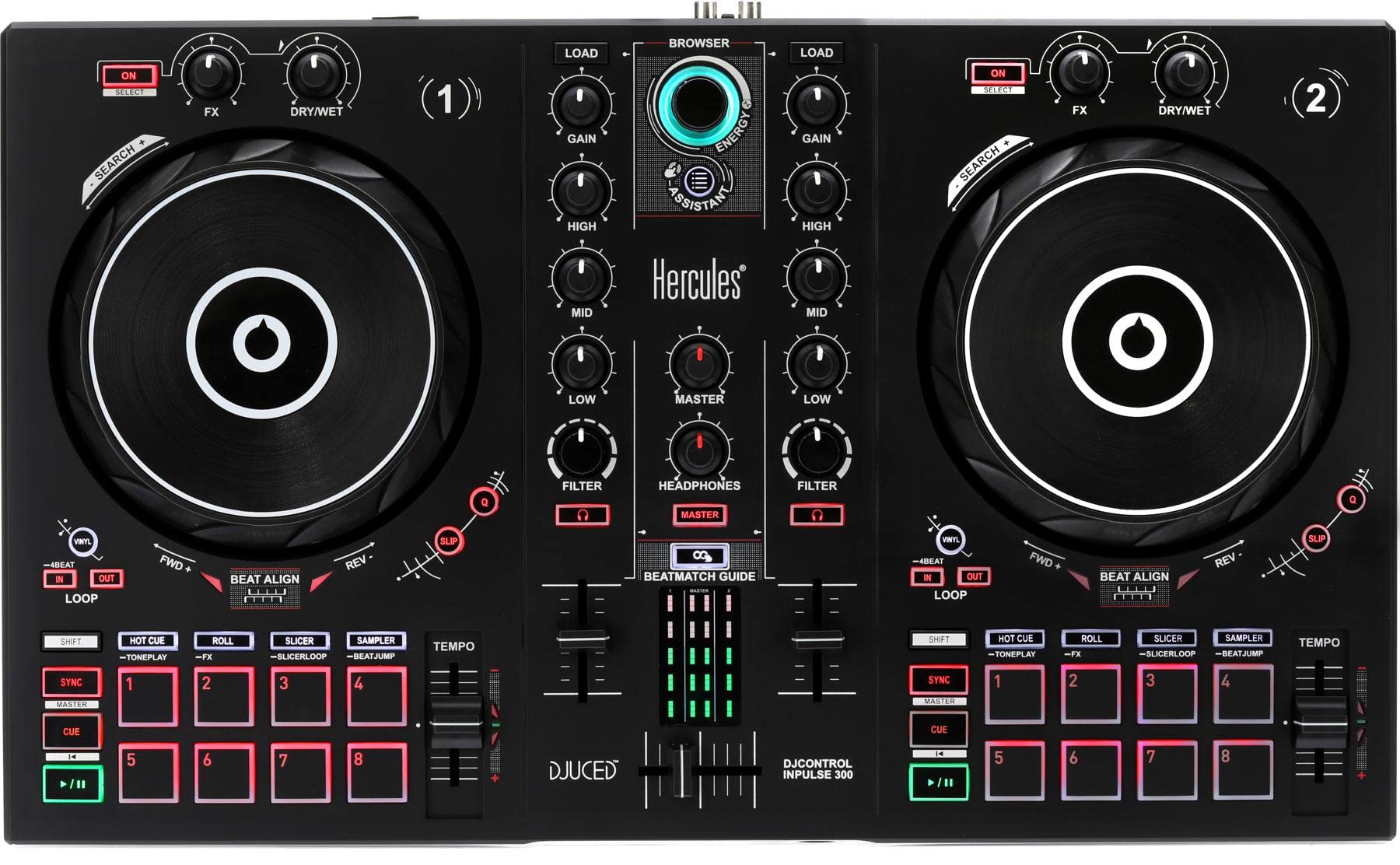
This is the controller that takes “learning to DJ” seriously. Its signature feature is the Beatmatch Guide — a set of LED lights around the jog wheels that show you whether the track is playing slow or fast. Instead of just pressing a sync button, you nudge the wheel until the lights are quiet, which trains your ear to hear the beatmatch. This ear-training skill transfers directly to any professional DJ gear you’ll use later. It also includes 16 pads for hot cues and loops, plus a built-in sound card, so it’s a complete package right from the start.
Buyers report the build quality as the standout feature, and there’s a legendary story of one unit that “Survived spills; stuck buttons still function.” That’s the kind of durability that matters when you’re lugging gear to house parties. The bundled DJUCED software is genuinely fun and includes tutorial videos, but it also works with Virtual DJ for those who prefer it. The trade-off is the USB connection can be finicky — some owners find they need to unplug and replug the cable on boot for the software to recognize it. The tempo slider is also a touch sensitive, so smooth transitions take a gentle hand.
Weighing in at just 1,800 grams (about 3.97 lbs), it’s light enough to toss in a backpack. It gives you a pro-style button layout that mirrors more expensive units, so the muscle memory you build here transfers directly to bigger gear. For the beginner who wants to learn the craft properly without spending a fortune, this is the gold standard.
Why It Wins
- Beatmatch Guide LEDs actively teach you to mix by ear
- Light and portable at 3.97 lbs
- 16 pads give you room to grow beyond basic mixing
The Trade-Offs
- USB connection can need a manual replug on some computers
- Tempo slider is overly sensitive for precise adjustments
- No mic input for talk-over announcements
Ideal for beginners: This is the smartest first controller because it teaches the fundamentals instead of hiding them behind auto-sync.
Look elsewhere if: You need a mic input for MC’ing or you’re an intermediate player looking for a serious upgrade rather than a learning tool.
2. Numark M2 2-Channel Scratch DJ Mixer
The no-computer-needed workhorse for DJs who still spin real vinyl or CDs.
This isn’t a controller in the traditional sense — it’s an analog mixer, meaning you plug your turntables or CD players directly into it without needing a laptop. That makes it a different beast entirely from the software-based controllers above. It’s designed for the DJ who wants to scratch and mix with physical media, or who wants a standalone mixer to route game consoles and TVs through for home entertainment. It’s a versatile box that works in a club rack or on a dorm room desk.
You can tune the crossfader’s tension and behavior to your scratching style, thanks to a replaceable crossfader with reverse and slope controls. Each channel has a three-band EQ to shape your sound. At 6 pounds, it’s noticeably heavier than many controllers, which means a sturdy build, and it includes rackmount facilities. For connectivity, you get two phono/line switchable RCA inputs, two line RCA inputs, a mic input, plus master, record, and headphone outputs.
Owners mention the mixing quality is the standout feature, with punchy EQ that brings out bass and mids for both music and films. The downside, as some owners put it, is that the sliders and crossfade move too easily and feel cheap, requiring an unexpectedly unbalanced mic cable. If you’re purely a digital DJ who lives in software, this isn’t for you. But if you’re building a vinyl setup on a budget, this is a strong, feature-packed foundation.
One key difference from the Behringer NOX101: users report the Numark’s preamp is weaker, but the layout and crossfader control are preferred by many for scratching. Its simple, effective layout and 6-pound build make it a reliable, portable scratch mixer.
Built to move: At 6 lbs with a rackmount kit included, this is a gig-ready mixer that won’t flinch when you pack it weekly.
Grab it for: Vinyl DJs, mobile setups, or anyone wanting a standalone scratch mixer that doesn’t need a laptop.
skip it if: You want to mix streaming music from a computer — this is a purely analog device with no USB audio interface.
3. Behringer PRO MIXER NOX101
The budget mixer that punches above its weight with a preamp that beats the competition.
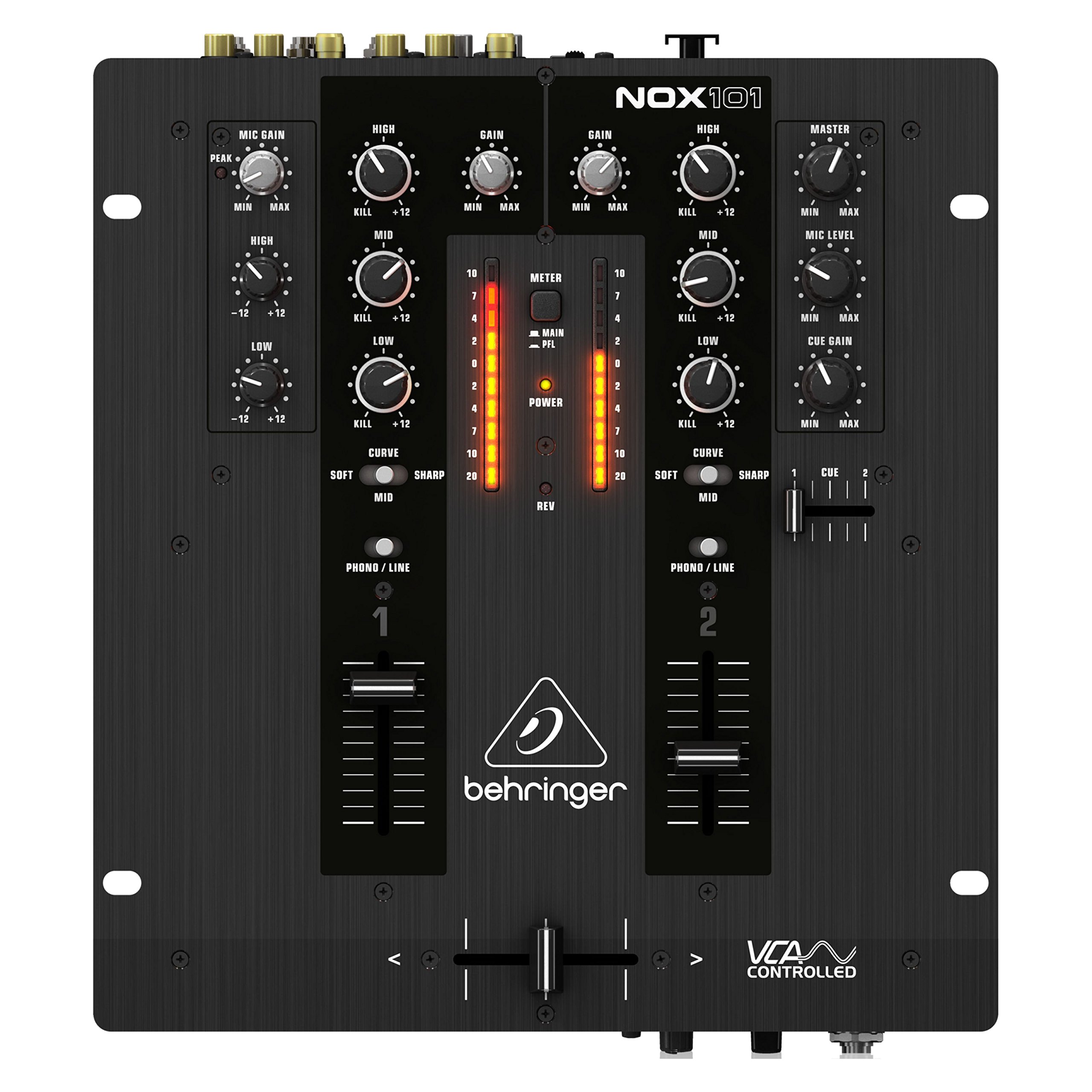
If you’re pairing a mixer with a pair of Technics 1200s, the Behringer NOX101 is a name that keeps coming up. This 2-channel mixer is lighter than the Numark M2 at 4.6 pounds, yet buyers consistently report it has a stronger, better-sounding preamp. That means your vinyl records will sound punchier and cleaner through this unit. It’s a basic, old-school mixer that comes with 3-band EQs featuring “full-kill” filters, which lets you completely cut the bass or treble for dramatic effect.
What makes this a rare find at its price point is the balanced XLR output — usually reserved for much pricier gear — which lets you plug straight into professional PA speakers. The build quality earns praise, specifically the sturdy rubber-grip knobs and a smooth crossfader with an adjustable curve. Owners say “It’s possible to do scratching on it,” confirming it handles the core task of any scratch mixer. The fader has the responsiveness you need for quick cuts.
There are a couple of honest caveats. The level sliders could use more resistance, and cranking the master volume all the way up can introduce a slight noise floor — one owner described it as “some what noisy when the master out is cranked up.” It lacks effects, but that’s standard for a bare-bones mixer. At its price, the XLR output and strong preamp make it a top pick for home and small gigs.
What Shines
- Balanced XLR outputs for pro PA connection
- Stronger preamp than the Numark M2
- Sturdy metal build with rubber-grip knobs
What to Know
- Slight noise when the master volume is maxed out
- Level sliders could be more resistive
- No master cue function
Reach for this if: You’re a turntablist wanting the cleanest phono preamp and XLR output for the money.
Consider the alternative: If you need a rack-mountable mixer for a permanent setup, the Numark M2’s included rack ears serve better.
4. Numark Party Mix Live
A complete party-in-a-box that brings its own speakers and light show to the backyard table.
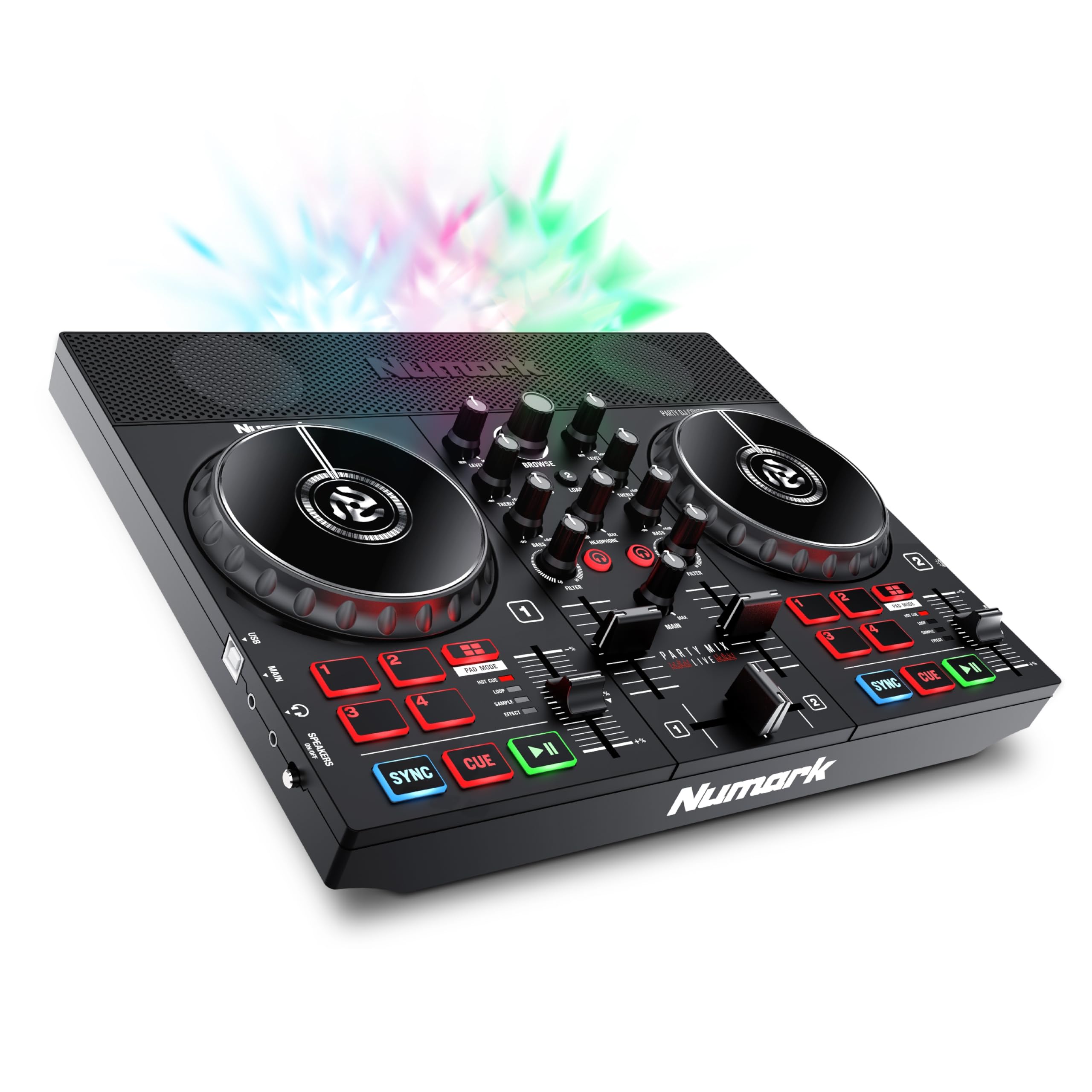
This is the controller that turns any gathering into a dance floor without needing to haul a PA system. The Party Mix Live is uniquely self-contained — it has built-in stereo speakers rated at 10 watts and an integrated LED light show that syncs to the beat. You just plug it into a laptop via USB, load up Serato DJ Lite, and you’re the life of the party. The 2.69-pound weight makes it easy to bring to a friend’s barbecue or a dorm room jam.
Beyond the a neat extra, it’s a genuinely capable 2-deck controller. You get performance pads with four pad modes (Effects, Cue, Loop, Sampler), filter knobs, and pitch sliders on each deck. The touch-capacitive jog wheels give you hands-on control for nudging tracks, and the built-in mixer lets you blend between channels. It’s a complete Serato DJ Lite system with plug-and-play connectivity for both Mac and Windows.
Buyers consistently call it starter-friendly and tons of fun, especially for teaching kids the basics of DJing. The honest trade-off is that the built-in speakers aren’t meant to fill a club — the volume is modest, and for a bigger sound you’ll want to use the 1/8-inch main output to connect external speakers. Compatibility has also been a minor sticking point for some, with reports of the Serato app failing to download on a MacBook. If you want a low-friction way to bring music and lights to small gatherings, this is a blast.
Perfect for: Complete beginners, families, and anyone who wants an all-in-one entertainment unit for small parties.
Think twice if: You’re serious about DJing as a craft — the built-in speakers add weight and cost for features you’ll outgrow, and you’ll want a more precise controller.
5. AlphaTheta DDJ-FLX2
The featherweight that turns your couch and phone into a full DJ booth.
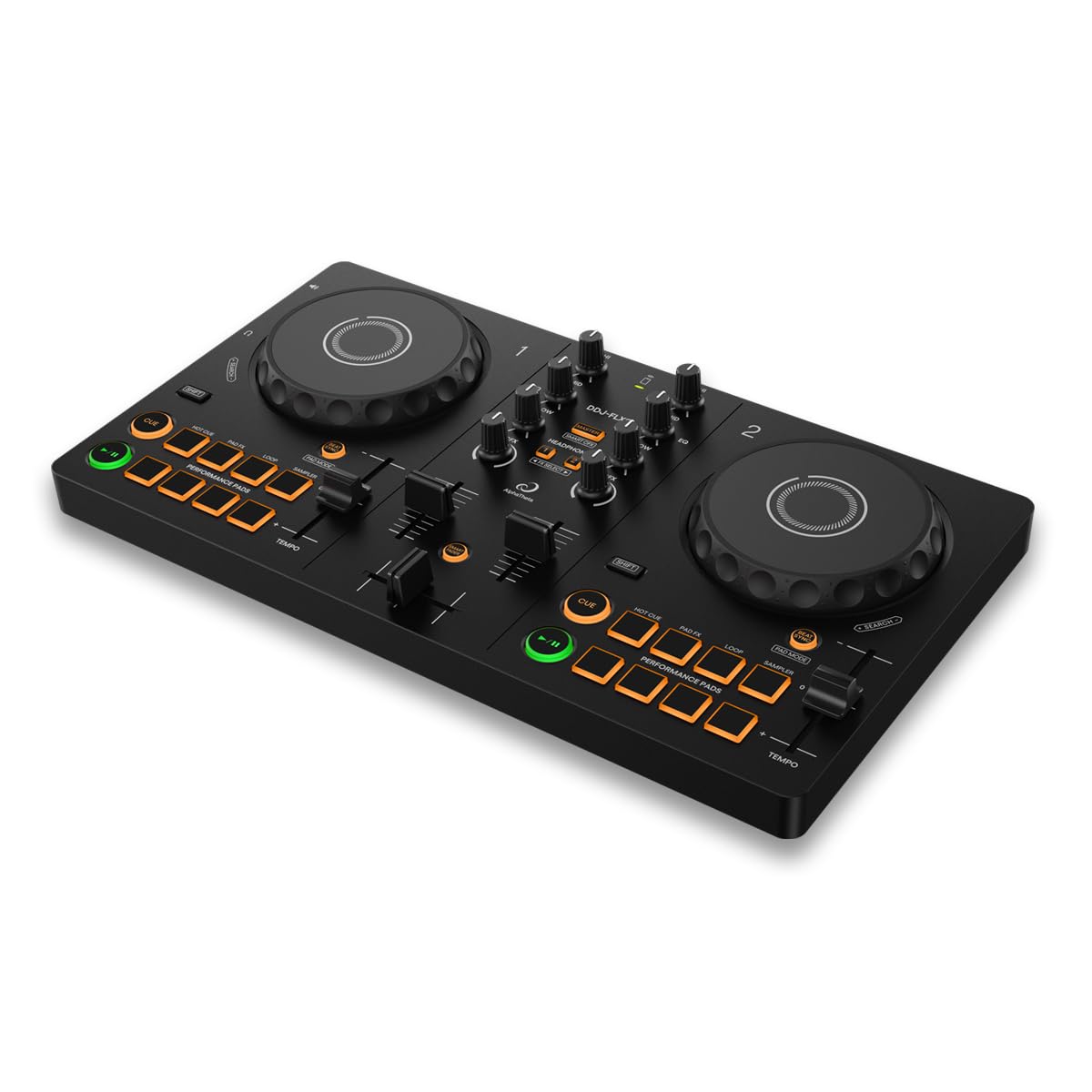
This is AlphaTheta’s lightest and most compact controller, and it’s a revelation for casual DJing. At just 2.7 pounds and a slim 1.9 inches tall, it runs entirely on USB-C bus power — meaning you can plug it into a phone, tablet, or laptop with the included double-sided USB-C cable and start mixing. You don’t even need external speakers, as you can play through your device’s own speaker or connect via the 3.5 mm output. This is the ultimate “grab it and go” controller for couch sessions and travel.
Its headline feature is the Smart Fader, which automatically matches volume, BPM, and bass as you move the crossfader — even across different genres. That’s a powerful crutch for a beginner, but it’s also a fun creative tool for experienced DJs who want to slam transitions without manual beatmatching. Beyond the fader, you get a surprising amount of control for the size: it’s compatible with rekordbox, djay, and Serato DJ Lite, and it can pull music from Apple Music, Spotify, and Tidal through those apps.
Buyers praise the build quality and the precision of the jog wheels, noting they feel tight and responsive despite the compact size. The layout has tactile notches on the faders and knobs, which helps you feel your way around the controls during a set. It’s billed as superior to comparable Numark models by owners who’ve tried both. The main limitation is physical — the small jog wheels don’t offer the same surface area for complex scratching as full-size platters. For lap mixing and travel, though, nothing else here comes close to this level of portability and polish.
Made for the couch: At 2.7 lbs running on USB-C power, this is the easiest way to practice your sets from your sofa with your phone or laptop.
Best for: Travel DJs, commuters, and anyone who wants a capable practice deck that fits in a backpack without a power brick.
Not for: Heavy scratchers who need large platters to perform complex routines — the compact jogs are precise but small.
6. Hercules DJControl Inpulse 300 MK2

The improved sequel that makes scratching easier with a bigger detection zone and smoother rotation.
This is the second generation of the Inpulse 300, and the headline upgrade is the jog wheels. Hercules redesigned them for better rotation and an enlarged detection zone, which makes scratching noticeably easier for beginners learning the technique. It’s the same 2-deck layout with 16 performance pads, but now it ships ready for Serato DJ Lite and DJUCED, with compatibility for Serato DJ Pro when you’re ready to level up. It even supports Stems control for real-time isolation of beats and vocals.
The Beatmatch Guide returns, using built-in LED light guides to help you manually adjust tracks to match the tempo. That’s the feature that keeps this line a favorite for learners — it’s direct, visual feedback that trains your ear. The included DJUCED software adds the Intelligent Music Assistant (IMA), which suggests the best-suited tracks to help you prepare your sets. You can also stream from Beatport, Beatsource, SoundCloud, or Tidal through the software, expanding your library beyond your local files.
Owners describe it as plug-and-play, particularly with the free Mixxx software, and a great gift for aspiring DJs. Set up is fast and you can be gigging straight from the start with Serato. One practical note from buyers: you’ll need an RCA to jack cable to connect it, as the output isn’t a TRS jack. It’s a straightforward, well-refined evolution of an already-solid beginner controller, with the better jogs making it the better pick if scratching is your primary goal.
The Upgrades
- Redesigned jog wheels with a larger detection zone for easier scratching
- Works with Serato, DJUCED, and Mixxx from the start
- Built-in sound card for simple 2-cable setup
Keep in Mind
- Needs an RCA-to-jack cable, not TRS, for connection
- Limited to Windows hardware platform officially
Choose this if: Learning to scratch is your main ambition, and you want the improved jog wheels plus the Beatmatch Guide teaching aid.
Consider the original instead: If you’re on a Mac or want the lightest possible unit, the earlier Inpulse 300 model is more platform-agnostic.
7. Pioneer DJ DDJ-REV1

The industry-standard layout rebuilt for hip-hop and open-format scratching.
Pioneer DJ is the name you see in clubs worldwide, and the DDJ-REV1 brings that heritage to the budget tier. Its defining feature is the open, battle-style layout that mirrors a classic turntable and battle mixer setup — the kind of gear pro turntablists use. The tall pitch faders and quick effect controls put scratch and battle techniques within easy reach, making this a purpose-built tool for hip-hop and scratch DJs rather than a general-purpose controller.
It open up Serato DJ Lite for free, so you can plug in via USB and start performing right away. The layout is designed around battle moves: the crossfader is positioned for a DJ’s preferred scratch hand, and the platters have a wide, low-slung profile that sits naturally under your palms. It’s a compact unit at 5 pounds and just 2.33 inches tall, making it an easy travel companion for mobile DJs who want to practice on the road.
Buyers call it a top-quality, feature-packed starter controller with room for intermediate and advanced techniques. Owners note it makes a great bedroom practice controller, and vinyl DJs find it a reliable plug-and-play backup for Serato gigs. The honest limits are the small jog wheels, which some find hinder complex scratching versus a real turntable, and the lack of an analog input to route external gear through the mixer. For its intended market — beginner and intermediate scratch DJs — it hits the mark perfectly.
Made for: Hip-hop, scratch, and open-format beginners who want to learn on a layout that mirrors professional battle gear.
Look elsewhere if: You’re a house or techno DJ who wants 4-deck mixing — this is a focused 2-deck battle unit.
8. Roland DJ-202 Compact DJ Controller
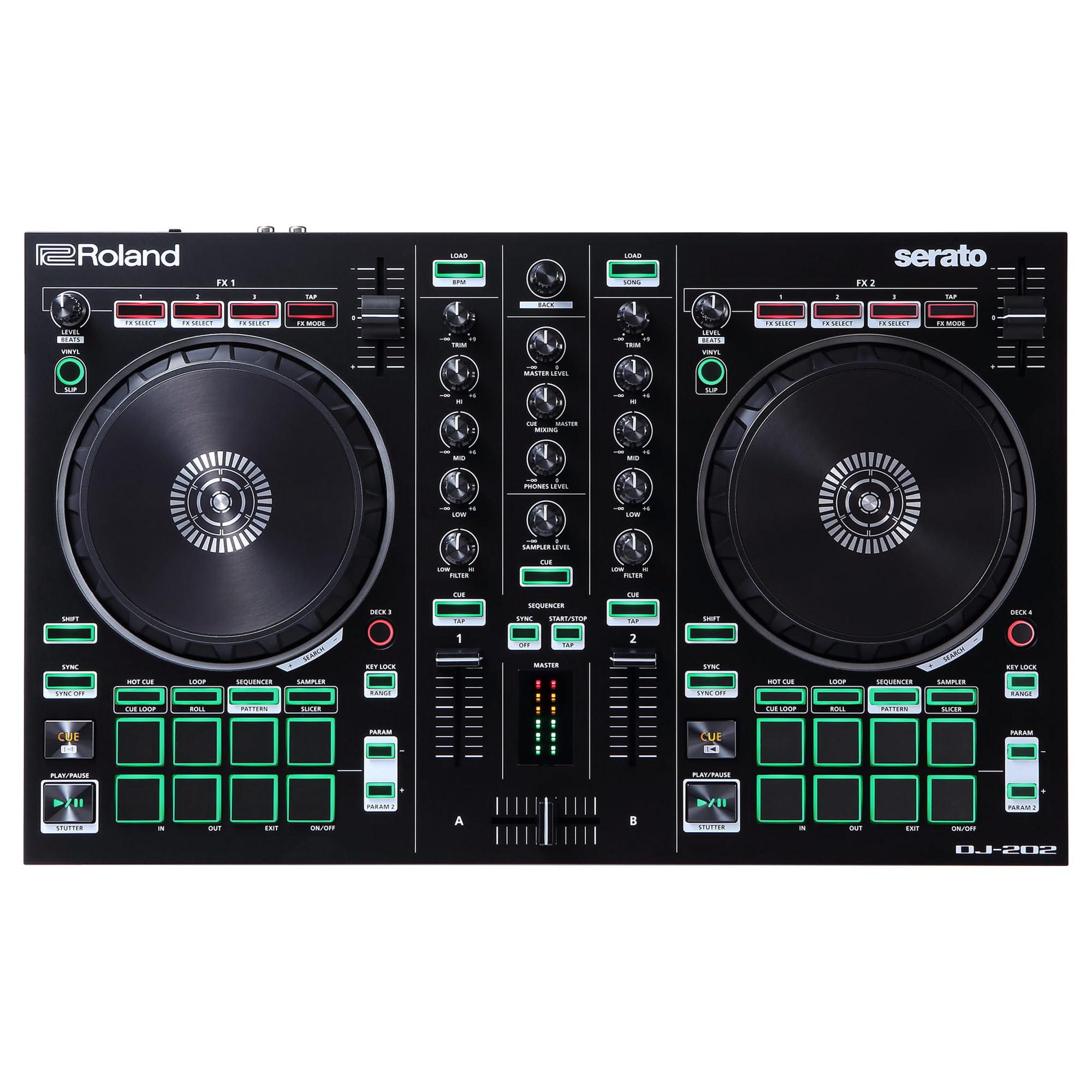
A DJ controller that doubles as a drum machine and sequencer for on-the-fly beat creation.
This is the controller for DJs who also make beats. The DJ-202 is infused with Roland’s legendary drum sounds — the TR-808, TR-909, and TR-606 — realized with advanced Analog Circuit Behavior (ACB) technology. That means you get the exact same booming kick drums and snappy snares that have defined genres for decades, playable right from the performance pads. There’s even a 16-step sequencer that controls Serato DJ Lite’s sampler for creating beats on the fly, and a MIDI output to sync external instruments.
The turntable side is serious too, with large, low-latency platters designed for scratching. Reviews praise the sound quality, specifically highlighting the drum sounds and the pristine 24-bit/48 kHz high-resolution audio output. The controller gives you Serato DJ Lite with the option to upgrade to Pro, and the included RCA cables and microphone jack mean you have what you need to get started. The mic input even has gate, hi-pass, reverb, and echo effects built in.
Value is a recurring theme — the controller often comes bundled with a free Serato DJ Pro license, which is worth a significant amount on its own. Owners warn about a steep learning curve and note the manuals can be unhelpful, but most agree the features are deep. The main hardware gripe is the crossfader, which some describe as feeling cheap and clacky. It’s lightweight with easy-grab handles, designed for portability, though it’s not built for road-tough abuse. If you want to add production flair to your DJ sets, this is a unique tool.
Producer’s edge: The built-in TR-808/909 drum kits and sequencer let you build beats live that other controllers can’t touch.
Best for: Beat-making DJs who want to trigger drum patterns and samples during their sets without a separate drum machine.
Consider the DJ-505 instead: If you want the full four-deck Serato DJ Pro experience with more hands-on TR controls at a higher price point.
9. Reloop 2 Channel DJ Controller (BUDDY)

The ultra-compact mobile companion built for iPad DJs on the go.
If your DJ setup is an iPad rather than a laptop, the Reloop BUDDY is a uniquely compelling option. This is a 2-channel controller designed specifically to work with the Algoriddim djay app, and it’s incredibly light at just 2.3 pounds. It uses a stainless steel chassis, giving it a sturdy feel that defies its diminutive size. The highlight feature is the extensive neural mix controls (pad/EQ mode) that can isolate beats, instruments, and vocals of any song in real-time — a powerful creative tool for live remixing.
The layout focuses on functionality in a compact form factor, with buttons and a touch pad for controlling the djay software. It’s portability-first, designed for the DJ who wants to mix anywhere with just a tablet and this small controller. For basic mixing and cueing, it handles all the essentials, and the DJs who gel with it find the app integration surprisingly powerful — some owners are genuinely enthusiastic about how much music they can play with it.
The reviews are genuinely mixed, so this is a “try before you commit” pick. Some owners describe the build quality as cheap, with reports of the buttons feeling less premium than the stainless steel suggests. The most serious complaint is the headphone output producing a loud static noise in some units, and the RCA sound card inputs becoming loose after heavy use. The iOS plugin is a common pain point, with some users forced to use the PC configuration instead. Quality control is inconsistent, so it’s a gamble best suited for dedicated djay app users.
Reach for this if: You’re an iPad DJ using Algoriddim djay and want the most portable physical controller possible.
Proceed with caution: Build quality reports are mixed, and some units have headphone static or loose RCA ports — check return policies.
10. Pioneer DJ DDJ-FLX4
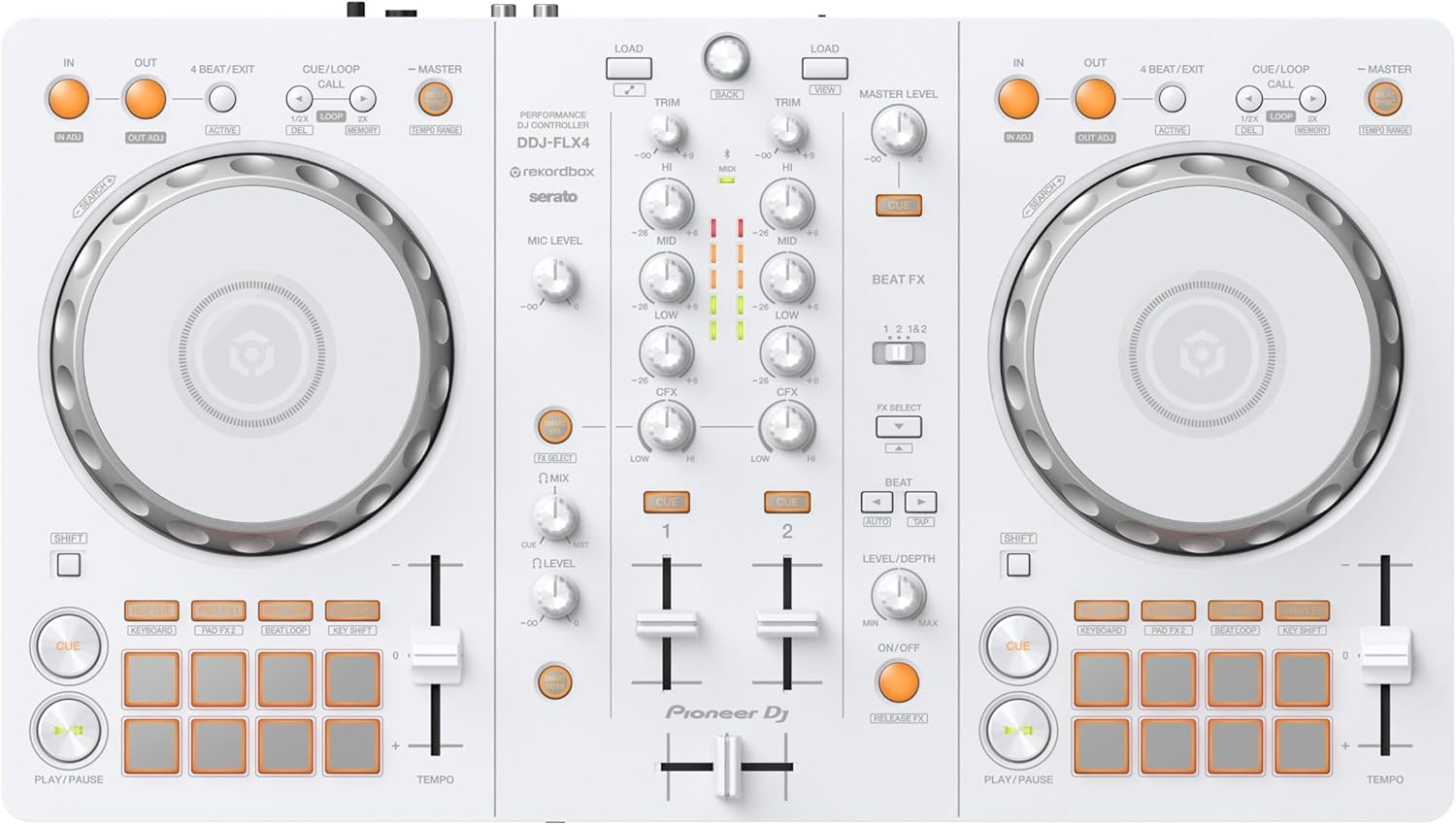
The club-standard learning tool that grows with you from first mix to live stream.
The DDJ-FLX4 is positioned as the all-rounder to learn on, inheriting a simple, user-friendly layout from Pioneer DJ’s pro gear. That means the muscle memory you build on this controller translates directly to the CDJs and DJMs you’ll find in actual clubs. It’s a 2-channel, 2-deck controller with 16 Performance Pads for Hot Cues, Pad FX, Beat Jump, and Sampler — giving you a full suite of tools that you’ll use the same way at a professional level. The layout is clean and approachable for the absolute beginner.
The key convenience feature is the Smart Fader, which auto-adjusts volume, bass, and BPM as you move the fader, letting you blend tracks from different genres without knowing how to beatmatch manually. It also has Smart CFX for adding filter effects. It’s built for the streaming era, too — you can mix from Apple Music, Tidal, and Beatport, and use it to live-stream or MC from a single device. Compatibility spans rekordbox, djay, and Serato DJ Pro, so you’re not locked into one ecosystem.
Buyers consistently highlight the build quality as the standout feature, calling it reliable, user-friendly, and versatile across different settings. One owner who’s been DJing for nearly a year called it the “absolute best budget starting equipment,” even suggesting skipping the smaller FLX2 model in favor of this. It’s a fantastic tool for a teenage beginner or an adult picking up the hobby. Its genuine Pioneer DJ layout means you’re learning on the club-standard gear from day one.
Why It Stands Out
- Pro-grade layout inherited from club-standard Pioneer gear
- Smart Fader handles beatmatching for you while you learn
- Works with rekordbox, djay, and Serato DJ Pro
The Fine Print
- Priced above entry-level models — it’s an investment
- Smart Fader can be a crutch if you rely on it too long
The smart investment: If you’re serious about DJing long-term, learning on Pioneer’s layout means club gear won’t feel foreign later.
Save money if: You just want to try DJing casually — a cheaper controller like the Inpulse 300 covers the basics.
11. Roland DJ-505 Two-Channel, Four-Deck Serato DJ Controller

The hybrid weapon for the DJ-producer who wants club sound and studio drum machines in one box.
This top-tier hybrid blurs the line between DJing and live production. The DJ-505 has two channels but can control up to four decks with Deck Select, and it’s ready for Serato DVS (Digital Vinyl System) when you want to use timecoded vinyl. The large, low-latency platters are tune for scratching, giving you the tactile feel of turntables. What truly separates it is the built-in, fully editable drum kits from the TR-909, TR-808, TR-707, and TR-606, each with eight sounds (Bass Drum, Snare, Closed Hat, Open Hat, Tom, Rim, Clap, Ride) playable on the performance pads and triggerable from the sequencer.
It open up the full Serato DJ Pro license and comes with a Serato Tool Kit that includes Pitch ‘n Time DJ, Serato Flip, and all the FX packs — a software bundle worth several hundred dollars on its own. The 16-step sequencer can trigger either TR drum sounds or the Serato Sampler, with new features like nudge (TR-S), step-roll, and instrument/sample mute. You can shape the drum sounds in real time with Level, Attack, Decay, and Tune knobs, which is essentially a drum machine built into your DJ setup. For connectivity, it has balanced XLR outputs for pro PA systems, plus a Booth Out and separate 1/4-inch and 1/8-inch headphone outputs.
Serious DJs find it intuitive and responsive, and customers note it works brilliantly as a standalone Serato controller or as an analog turntable mixer with a built-in 808. The most glowing reports come from long-term owners — one who’s used it for four years calls it one of the best pieces of DJ equipment they’ve ever purchased. The honest caveat is reliability: a minority of reviewers point out the platter freezing up mid-set and tracks freezing during play, a known issue worth being aware of before you stake a club gig on it. It’s a premium tool with a premium price, but the feature set is class-leading in this list.
Serato Pro open up: The included full Serato DJ Pro and Tool Kit license represents massive software value on top of the hardware.
For the serious hybrid: If you produce beats and DJ live, this is the most powerful creative tool here — just be ready for its heft and complexity.
Heads up: A minority of shoppers say platter freezing issues during sets, so have a backup plan for high-stakes gigs.
Understanding the Specs
Jog Wheels and Platters
The jog wheels are the spinning platters you touch to nudge a track into sync or perform scratches. Full-size platters like the 5-inch ones on the Roland DJ-202 feel more like real turntables for complex scratching, while compact touch-capacitive wheels on models like the Numark Party Mix Live are fine for basic adjustments but less accurate for advanced techniques. For a scratch-focused DJ, larger and more responsive platters are worth the extra cost.
Software and Compatibility
Your controller is just a keyboard for DJ software. Most units bundle a “Lite” version — either Serato DJ Lite, rekordbox, or a proprietary app like DJUCED — which is enough to learn the basics. Before buying, check whether the controller supports the same software you might want to upgrade to (like Serato DJ Pro) and whether it can stream from services like Tidal or Beatport. The Roland DJ-505 uniquely open up full Serato DJ Pro, a significant value add.
FAQ
What’s the difference between a 2-channel controller and a 4-channel one?
Can I use streaming services like Spotify with a DJ controller?
What does a built-in sound card mean for a DJ controller?
Is a DJ controller the same as a DJ mixer?
What is the Smart Fader feature and do I need it?
What are performance pads used for?
Why do some controllers come with software and others don t?
How many pads or buttons do I need as a beginner?
Can I use a DJ controller with an iPad or phone?
What does a “battle-style” layout mean?
Is a heavier DJ controller always better quality?
Final Thoughts: The Verdict
Across the board, the 2-channel dj controller winner is the Hercules Inpulse 300 because it actively teaches you to beatmatch with its light guides while offering a durable, portable, and affordable package. If you want a controller that doubles as a beat-making drum machine, grab the Roland DJ-202. And for the DJ who needs an ultra-portable practice deck with Smart Fader convenience, the AlphaTheta DDJ-FLX2 is the one to reach for.
How We Picked
We do not accept paid placement. Every pick is matched to a real buyer and a real use-case; we do not hands-on test units.
Sources & Methodology
Specifications: manufacturer listings and product documentation. Review insights: verified customer reviews, as of August 2026. Pricing: not shown on this page (it changes often); check the current price via the retailer link.
As an Amazon Associate, Gadgets Feed earns from qualifying purchases. This does not affect which products we feature.