
The 2-in-1 gaming laptop is the most misunderstood category in portable computing. Buyers expect the raw frame rates of a dedicated gaming brick fused with the tablet flexibility of a convertible, but the engineering trade-offs are severe — thermal constraints, GPU power limits, and hinge durability all compress into a chassis that needs to do double duty. The result is a narrow field where only a handful of designs genuinely balance discrete graphics performance with a touchscreen that folds, spins, or detaches without throttling your session mid-raid.
I’m Min — the co-founder and writer behind Gadgets Feed. Over the last few months, I’ve pored over thermal benchmarks, GPU TGP charts, display refresh rates, and real-world battery drain patterns across every 2-in-1 gaming laptop that ships with a dedicated graphics solution, filtering out the pretenders from the machines that actually hold a steady frame rate when the hinge is flipped.
Whether you need stylus support for creative work or a compact convertible that slips into a bag alongside a controller, finding the right best 2-in-1 gaming laptop means weighing discrete GPU wattage against tablet-mode thermals, and this guide breaks down every meaningful spec on the market right now.
How To Choose The Best 2-In-1 Gaming Laptop
A proper 2-in-1 gaming laptop is a compromise machine by definition, but the compromise should never land on GPU wattage or display response time. You need a hinge that survives hundreds of folds, a cooling system that doesn’t choke when the screen is flipped back, and a touchscreen with a refresh rate high enough that you aren’t sacrificing competitive advantage. Here are the three specs that define the category.
GPU TGP and Thermal Headroom in a Convertible Frame
Thinner convertible chassis cannot fit the same vapor chambers and fan arrays as a standard gaming clamshell. A GeForce RTX 5070 Ti in a 2-in-1 might run at 85W while the same chip in a traditional laptop pushes 140W. Look for advertised TGP figures and check whether the manufacturer uses liquid metal or a vapor chamber — without serious thermal engineering, sustained gaming in tablet mode will force aggressive clock throttling within minutes.
Display Refresh Rate and Touch Responsiveness
A 60Hz touchscreen defeats the purpose of a gaming convertible. The minimum viable spec is 120Hz, but the best units now hit 180Hz or 240Hz with pen support and low-latency touch digitizers. Verify that the panel supports VRR (variable refresh rate) or G-SYNC, because screen tearing is more noticeable on a convertible you might hold closer to your face in tent mode.
Hinge Durability and Kickstand Versatility
The hinge is the single point of mechanical failure on any 2-in-1. Gaming machines are heavier than standard convertibles, so the hinge must resist wobble when you tap the screen during a firefight. Detachable designs with built-in kickstands — like the ROG Flow Z13 — offer better stability on a desk than a 360° hinge that relies on friction for tent and tablet positions.
Quick Comparison
On smaller screens, swipe sideways to see the full table.
| Model | Category | Best For | Key Spec | Amazon |
|---|---|---|---|---|
| ASUS ROG Flow Z13 | Premium Convertible | Ultimate 2-in-1 gaming & tablet hybrid | 180Hz WQXGA touchscreen / Ryzen AI MAX+ 395 | Amazon |
| ASUS ROG Strix SCAR 18 (RTX 5090) | Premium Clamshell | Max desktop-replacement gaming power | 240Hz Mini LED / RTX 5090 175W | Amazon |
| Acer Predator Helios Neo 16 AI | Mid-Range Gaming | High-refresh 240Hz value with RTX 5070 Ti | 240Hz WQXGA / RTX 5070 Ti / Core Ultra 9 | Amazon |
| ASUS TUF Gaming F16 | Mid-Range Gaming | Budget-friendly entry into RTX 4050 gaming | 144Hz FHD+ / RTX 4050 115W | Amazon |
| MSI Vector 16 HX AI | Premium Gaming | High-end RTX 5070 Ti with 32GB DDR5 | 240Hz QHD+ / RTX 5070 Ti / Thunderbolt 5 | Amazon |
| ASUS ROG Strix SCAR 16 (RTX 5080) | Premium Gaming | Best balance of 16-inch portability and RTX 5080 | 240Hz Mini LED / RTX 5080 / 2TB SSD | Amazon |
| ASUS ROG Strix SCAR 18 (RTX 5070 Ti) | Premium Gaming | Large 18-inch screen with RTX 5070 Ti | 240Hz Mini LED / RTX 5070 Ti / 18-inch display | Amazon |
| ASUS ROG Strix SCAR 16 (RTX 5090) | Premium Gaming | Compact 16-inch with flagship RTX 5090 | 240Hz Mini LED / RTX 5090 / 2TB SSD | Amazon |
| HP OmniBook 7 Flip | Premium Convertible | Business convertible with Intel Arc graphics | Arc 140V GPU / 32GB DDR5 / Wi-Fi 7 | Amazon |
| Lenovo Yoga 7 7i | Mid-Range Convertible | Versatile 16-inch 2-in-1 for work & light gaming | AMD Radeon 680M / 16GB RAM / 1TB SSD | Amazon |
| NIMO 17.3″ Gaming Laptop | Entry-Level | Budget-friendly large-screen productivity | AMD Radeon 680M / 32GB DDR5 / 180° hinge | Amazon |
| Alienware 18 Area-51 (RTX 5090) | Ultra-Premium | Maximum power with RTX 5090 and 64GB RAM | RTX 5090 / 64GB DDR5 / 2TB SSD | Amazon |
| Alienware 18 Area-51 (RTX 5080) | Ultra-Premium | High-refresh 300Hz with RTX 5080 | 300Hz WQXGA / RTX 5080 / Cryo-Chamber | Amazon |
In‑Depth Reviews
1. ASUS ROG Flow Z13 2.5K 180Hz 3ms ROG Nebula Touchscreen 13.4″ Convertible 2-in-1 Gaming Notebook AMD Ryzen AI MAX+ 395 32GB RAM 1TB SSD Off Black

The ROG Flow Z13 is the only true 2-in-1 gaming laptop on this list that doesn’t compromise on form factor — it’s a detachable tablet with a 170° kickstand, a 13.4-inch WQXGA 180Hz Nebula touchscreen, and the brand-new AMD Ryzen AI MAX+ 395 processor with RDNA 3.5 graphics. That 180Hz refresh rate on a touch panel with PANTONE validation is unheard of in the convertible space, and the 32GB of LPDDR5X 8000MHz quad-channel memory ensures the integrated GPU never starves for bandwidth during demanding titles.
The kickstand design solves the wobble problem that plagues 360° hinges on heavy gaming machines. You get a stable typing angle on a desk, and the 10-hour battery life on mixed tasks means it genuinely works as a daily driver between gaming sessions. The 16-core CPU with up to 50 TOPS NPU power also makes it one of the few convertibles that can handle local AI workloads without breaking a sweat.
Fan noise is noticeable under sustained load, and the 13.4-inch chassis limits the thermal headroom compared to larger clamshells, so expect some throttling on extended Cyberpunk sessions. But if you need a single device that flips from a drawing tablet to a 180Hz gaming machine without a second box, this is the only pick that fully delivers on the 2-in-1 promise.
Why it’s great
- True detachable tablet design with sturdy kickstand
- 180Hz WQXGA touchscreen with Dolby Atmos audio
- AMD Ryzen AI MAX+ 395 delivers impressive CPU/GPU performance in a compact chassis
Good to know
- Fan noise ramps up during extended gaming
- Integrated GPU still lags behind high-TGP discrete solutions on triple-A titles
2. ASUS ROG Strix SCAR 18 (2025) Gaming Laptop, 18” ROG Nebula HDR 16:10 2.5K 240Hz/3ms, NVIDIA GeForce RTX 5090, Intel Core Ultra 9 275HX, 32GB DDR5, 2TB PCIe Gen 4 SSD, Wi-Fi 7, Win 11 Pro, G835LX-XS97

The 2025 SCAR 18 with an RTX 5090 at 175W TGP is the ceiling for portable gaming performance. The 18-inch ROG Nebula HDR Mini LED display packs over 2,000 dimming zones, 240Hz refresh, and 100% DCI-P3 color coverage, delivering HDR visuals that rival high-end desktop monitors. Paired with the Intel Core Ultra 9 275HX and 32GB of DDR5-5600MHz, this machine shreds through 4K gaming and creative workloads without hesitation.
The cooling system is the real engineering story here — an end-to-end vapor chamber, tri-fan technology, and Conductonaut Extreme liquid metal on the chipset keep the RTX 5090 at full boost without thermal throttling in clamshell mode. The tool-free access latch on the bottom panel makes RAM and SSD upgrades trivial, and the customizable AniMe Vision lid adds a level of personalization that feels purposeful rather than gimmicky.
The trade-off is weight and battery life — at over 6 pounds with a 330W power brick, this is not a laptop you casually throw in a backpack, and the battery barely lasts 90 minutes under gaming load. The plastic chassis, while durable, lacks the premium aluminum feel of competitors at this price point. But for raw, uncompromised gaming horsepower in an 18-inch package, the SCAR 18 is the undisputed king.
Why it’s great
- Flagship RTX 5090 175W TGP with no cooling compromise
- Stunning 240Hz Mini LED display with 2,000+ dimming zones
- Tool-free access for easy RAM/SSD upgrades
Good to know
- Extremely heavy and bulky — not portable for daily carry
- Plastic chassis feels less premium than metal alternatives
3. acer Predator Helios Neo 16 AI Gaming Laptop | Intel Core Ultra 9 Processor 275HX | NVIDIA GeForce RTX 5070 Ti | 16″ WQXGA 240Hz G-SYNC | 16GB DDR5 | 1TB Gen 4 SSD | Killer Wi-Fi 6E | PHN16-73-92B8

The Predator Helios Neo 16 AI strikes an aggressive balance between price and performance. The combination of an Intel Core Ultra 9 275HX with an RTX 5070 Ti at a mid-range price point is hard to beat, and the 16-inch WQXGA 240Hz G-SYNC display with 100% DCI-P3 coverage delivers smooth, color-accurate visuals that punch above the category expectation. The 1TB Gen 4 SSD and 16GB DDR5 RAM handle modern game libraries and multitasking with zero bottleneck.
Acer packed Killer Wi-Fi 6E and a 3ms overdrive response time into this chassis, making it a legitimate choice for competitive esports titles where latency matters. The NVIDIA Advanced Optimus and G-SYNC suite eliminate screen tearing without requiring manual reboots, and the 500-nit peak brightness means the display remains usable in well-lit rooms. The NPU integration offloads background tasks like audio optimization and background removal, freeing CPU cycles for gameplay.
Bloatware is a persistent annoyance — the preloaded software suite practically demands a clean Windows install out of the box. The 16GB RAM is also a tight ceiling for modern gaming; upgrading to 32GB is recommended if you plan to keep this laptop for more than two years. The chassis runs warm on the WASD side during extended sessions, so a cooling pad is a worthwhile investment.
Why it’s great
- Excellent price-to-performance ratio with RTX 5070 Ti
- 240Hz WQXGA G-SYNC display with 100% DCI-P3
- NPU offloading reduces CPU load during gaming
Good to know
- Preloaded bloatware requires a clean Windows reinstall
- Only 16GB RAM — consider upgrading to 32GB immediately
4. ASUS ROG Strix SCAR 16 (2025) Gaming Laptop, 16” ROG Nebula HDR 16:10 2.5K 240Hz/3ms, NVIDIA GeForce RTX 5090, Intel Core Ultra 9 275HX, 32GB DDR5, 2TB PCIe Gen 4 SSD, Wi-Fi 7, Win 11 Pro, G635LX-XS97

The 16-inch SCAR with an RTX 5090 is the most portable way to access ASUS’s flagship GPU without dropping to an 18-inch chassis. The ROG Nebula HDR Mini LED panel with 2,000+ dimming zones and 240Hz refresh rate delivers the same breathtaking HDR performance as its larger sibling, but in a form factor that fits more comfortably into a standard backpack. The Intel Core Ultra 9 275HX and 32GB DDR5-5600MHz ensure no CPU bottleneck, and the 2TB PCIe Gen 4 SSD provides ample storage for a triple-A library.
The cooling solution — end-to-end vapor chamber, tri-fan array, and Conductonaut Extreme liquid metal — is identical to the 18-inch model, so you aren’t sacrificing thermal performance for the smaller footprint. The tool-free access latch makes upgrading RAM or storage a 30-second job, and the customizable AniMe Vision lid with full-surround RGB adds aesthetic versatility without feeling overdone. The 360° light bar in Stealth Mode allows you to toggle all lighting off for a professional look in office environments.
Battery life remains the category’s weakest link — expect about 2 hours on the RTX 5090 and around 5 hours on integrated graphics during light web browsing. Some units ship with suboptimal liquid metal application that requires immediate re-pasting for peak thermal performance, and the preinstalled Armoury Crate software is notoriously buggy; many users replace it with G-Helper for better fan curve control and lighting management. If you’re willing to invest the post-purchase tuning time, the SCAR 16 is a beast.
Why it’s great
- Flagship RTX 5090 in a more portable 16-inch chassis
- Same premium Mini LED display as the 18-inch model
- Tool-free access for easy upgrades
Good to know
- Armoury Crate software is buggy; many users switch to G-Helper
- Some units require re-pasting liquid metal out of the box
5. msi Vector 16 HX AI 16” 240Hz QHD+ Gaming Laptop: Intel Core Ultra 9-275HX, NVIDIA Geforce RTX 5070Ti, 32GB DDR5, 2TB NVMe SSD, Thunderbolt 5, Wi-Fi 7, Win 11 Pro: Cosmo Gray A2XWHG-060US

The MSI Vector 16 HX AI packs an RTX 5070 Ti with 12GB of GDDR7 memory — a meaningful VRAM upgrade over the 8GB found on many competitors — paired with an Intel Core Ultra 9 275HX and 32GB of DDR5 RAM. The 16-inch QHD+ 240Hz display offers excellent motion clarity, and the inclusion of Thunderbolt 5 (80Gbps bidirectional) and Wi-Fi 7 makes this one of the most future-proof connectivity suites on the market. The 2TB NVMe SSD means you can install dozens of modern titles without worrying about storage.
The cooling system is capable but loud — the fans spin up aggressively under load, though the noise profile is manageable with a closed-back headset. The chassis is solidly built with a subtle Cosmo Gray finish that doesn’t scream “gamer,” making it suitable for professional environments. The internal layout is clean and easy to service, with accessible RAM and SSD slots that encourage future upgrades without voiding the warranty.
The preloaded software suite is the Vector’s biggest flaw. MSI ships Nahimic audio, Killer networking, and A-Volute utilities that are deeply integrated into the system; some users report that these drivers cause audio dropouts, performance degradation, and even system crashes. A clean Windows install is strongly recommended unless you need the specific Killer networking optimization tools. The fans also require a cooling pad for sustained gaming sessions — without one, the chassis gets uncomfortably hot on the underside.
Why it’s great
- RTX 5070 Ti with 12GB GDDR7 — more VRAM than the competition
- Thunderbolt 5 and Wi-Fi 7 for ultra-fast connectivity
- Easy internal access for RAM and SSD upgrades
Good to know
- Aggressive fan noise under load
- Preloaded bloatware can cause system instability
6. 2026 HP OmniBook 7 Flip (Next Gen Envy x360) 2-in-1 Laptop (16″ FHD+ Touchscreen, Intel Ultra 7 258V, 32GB DDR5 RAM, 1TB SSD, Arc 140V GPU (16GB), MPP Stylus), AI PC, IR Webcam, Wi-Fi 7, Win 11 Pro

The HP OmniBook 7 Flip is the successor to the Envy x360, and it brings a genuine gaming-adjacent GPU experience to the 360° convertible form factor. The Intel Arc 140V GPU with access to up to 16GB of shared system memory is capable of running esports titles at 1080p medium settings and even handles older triple-A games at playable frame rates. The 16-inch WUXGA 400-nit touchscreen with micro-edge bezels offers a crisp, bright surface for both productivity and stylus work, and the included MPP 2.0 stylus with 4,096 pressure levels is a genuine tool for digital artists.
The Intel Core Ultra 7 258V with a 47 TOPS NPU makes this a Copilot+ AI PC that can run local Stable Diffusion models and handle real-time video effects without taxing the CPU cores. The 32GB of DDR5 RAM ensures heavy multitasking never stutters, and the Wi-Fi 7 + Bluetooth 5.4 combo is the fastest wireless stack available in a convertible. The 5MP IR camera with temporal noise reduction delivers crisp video calls in low light, and the 360° hinge is smooth and confidence-inspiring.
This is not a gaming laptop in the traditional sense — the Arc 140V GPU cannot compete with a dedicated RTX 4050, let alone a 5070 Ti, so do not expect to run Cyberpunk at 60fps. The keyboard has a shallow stroke that may feel cramped for long typing sessions, and the backlight is dim enough to be nearly invisible in a dark room. If your gaming is limited to indie titles, emulators, and older AAA releases, the OmniBook 7 Flip offers the best convertible experience on this list with a GPU that can actually game.
Why it’s great
- Intel Arc 140V GPU with 16GB shared memory for light gaming
- Included MPP 2.0 stylus with 4,096 pressure levels
- Wi-Fi 7 and Bluetooth 5.4 for future-proof connectivity
Good to know
- Arc 140V cannot match discrete GPU performance for demanding titles
- Shallow keyboard stroke and dim backlight may frustrate some users
7. ASUS ROG Strix SCAR 16 (2025) Gaming Laptop, 16” ROG Nebula HDR 16:10 2.5K 240Hz/3ms, NVIDIA GeForce RTX 5080, Intel Core Ultra 9 275HX, 32GB DDR5, 2TB PCIe Gen 4 SSD, Wi-Fi 7, Win 11 Pro, G635LW-XS97
The SCAR 16 with an RTX 5080 occupies the sweet spot between the 5070 Ti and the 5090 — you get Blackwell architecture, fourth-gen RT Cores, and fifth-gen Tensor Cores, but at a lower price point than the flagship. The 16-inch ROG Nebula HDR Mini LED display with 2,000+ dimming zones, 240Hz refresh, and 100% DCI-P3 is identical to the 5090 version, so you aren’t compromising on visual quality. The Intel Core Ultra 9 275HX and 32GB DDR5-5600MHz handle every current-gen title without bottlenecking the RTX 5080.
ASUS’s Intelligent Cooling — vapor chamber, tri-fan, and Conductonaut Extreme liquid metal — keeps the RTX 5080 at its full thermal limit without aggressive throttling. The tool-free access latch is genuinely convenient for upgrades, and the customizable AniMe Vision lid adds a unique visual flair. The Advanced Optimus MUX switch provides a 5–10% performance boost in gaming while automatically switching to integrated graphics for better battery life during productivity tasks.
The price gap between the RTX 5080 and 5090 variants is substantial, and for most users, the 5080 delivers 95% of the gaming performance at a significantly lower cost. However, the 32GB RAM ceiling (non-upgradable without replacing the entire SODIMM kit) may become restrictive for future game installations that demand more system memory. A few users report random display driver crashes that require a BIOS reboot — this seems to be a persistent firmware issue that ASUS has not fully resolved across the SCAR lineup.
Why it’s great
- Excellent value — RTX 5080 performance close to the 5090 at a lower price
- Stunning 240Hz Mini LED display with 2,000+ dimming zones
- Tool-free upgrades and Advanced Optimus for battery optimization
Good to know
- Some units experience random display driver crashes
- 32GB RAM may limit future-proofing for heavy users
8. ASUS ROG Strix Scar 18 (2025) Gaming Laptop, 18” ROG Nebula HDR 16:10 2.5K 240Hz/3ms, NVIDIA GeForce RTX 5070 Ti, Intel Core Ultra 9 275HX, 32GB DDR5, 1TB PCIe SSD, Wi-Fi 7, Win 11 Pro, G835LR-XS96
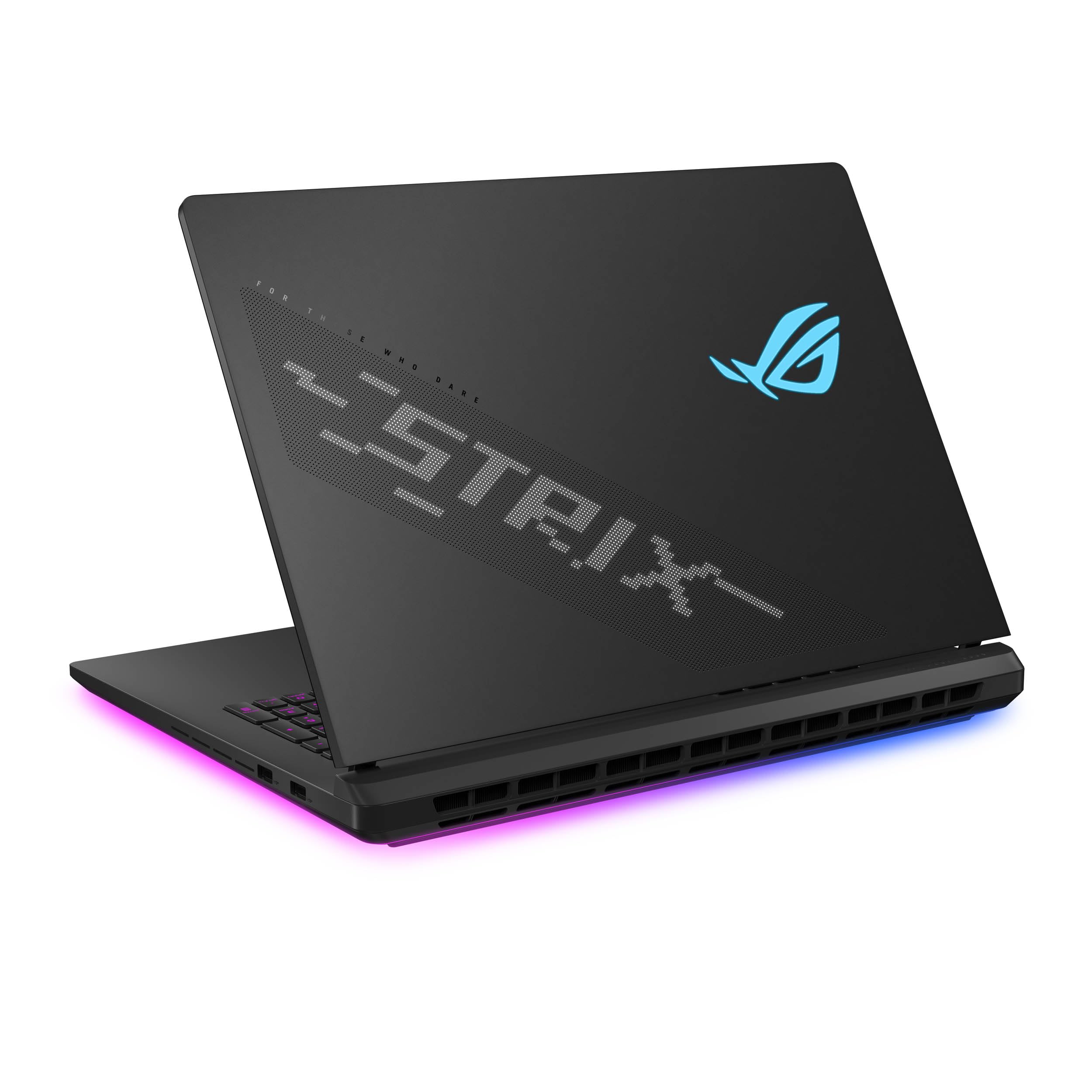
The 18-inch SCAR with an RTX 5070 Ti is the most screen you can get for the money while still accessing ROG’s Nebula HDR Mini LED technology. The 2,000+ dimming zones and 240Hz refresh on an 18-inch panel create an immersive visual experience that larger-screen laptops typically sacrifice for portability. The Intel Core Ultra 9 275HX and 32GB DDR5 RAM ensure the RTX 5070 Ti is never CPU-bound, and the 1TB PCIe Gen 4 SSD offers fast load times with room for a decent game library.
The cooling solution is identical to the higher-tier SCAR models, with a full vapor chamber covering the CPU and GPU, tri-fan technology, and Conductonaut Extreme liquid metal. The tool-free access latch is a welcome feature at this price point, allowing easy RAM and SSD upgrades without voiding the warranty. The customizable AniMe Vision lid and full-surround RGB light bar add visual flair, and the Stealth Mode allows you to disable all lighting for a more professional appearance.
The 1TB SSD fills up quickly if you install modern triple-A titles — Call of Duty alone consumes over 200GB, so expect to upgrade storage within the first year. The chassis runs warm during extended gaming sessions, and a cooling pad is strongly recommended to maintain boost clocks. A few units have shipped with damaged or opened packaging, suggesting inconsistent quality control during fulfillment. For buyers who prioritize screen size over GPU power, this is the best 18-inch value on the list.
Why it’s great
- Massive 18-inch Mini LED display with 240Hz and 2,000+ dimming zones
- Same premium cooling and tool-free access as the flagship SCAR models
- Customizable AniMe Vision lid and Stealth Mode
Good to know
- 1TB SSD fills up fast with modern games — plan for an upgrade
- Inconsistent packaging quality from fulfillment
9. ASUS TUF Gaming F16 Gaming Laptop, 16” FHD+ 144Hz IPS-Level 16:10 Display, Intel® Core™ 5 210H, NVIDIA® GeForce RTX™ 4050, 16GB DDR5, 512GB PCIe Gen4 SSD, Wi-Fi 6, Win11 Home, FX607VU-SS53

The TUF Gaming F16 is the entry-level gaming laptop that doesn’t cut corners on build quality. The MIL-STD-810H certification means this chassis can survive drops, temperature extremes, and vibration that would destroy a plastic convertible, and the 144Hz FHD+ IPS display with 100% sRGB coverage delivers smooth visuals at a resolution that the RTX 4050 can actually drive at high settings. The Intel Core 5 210H and 16GB of DDR5 RAM provide enough CPU headroom for modern esports titles and lighter AAA games.
The 115W Max TGP on the RTX 4050 is significantly higher than the 35–40W you’d get in a thin-and-light convertible, so this machine actually performs like a gaming laptop rather than an office laptop with a dGPU sticker. The Arc Flow Fans, four exhaust vents, and five dedicated heat pipes keep temperatures under control during extended sessions, and the anti-dust filter extends the cooling system’s lifespan in dusty environments. The subtle embossed TUF logo on the lid makes it office-friendly without the aggressive gamer aesthetic.
Battery life is poor — expect around 2 hours of gaming and 4 hours of general browsing — and the 512GB SSD fills up rapidly with modern game installs. The fan noise is noticeable even under medium load, and the chassis gets warm on the lap during gaming. The AC adapter placement on the left side is an odd ergonomic choice that interferes with mouse space on smaller desks. For budget-conscious buyers who need a rugged, serviceable gaming machine with a genuine discrete GPU, the TUF F16 delivers reliable value.
Why it’s great
- MIL-STD-810H certified for rugged durability
- 115W RTX 4050 delivers genuine gaming performance
- 144Hz FHD+ display with 100% sRGB at an entry-level price
Good to know
- 512GB SSD fills up fast — plan for an immediate upgrade
- Poor battery life and noticeable fan noise under load
10. Alienware 18 Area-51 Gaming Laptop AA18250-18.0″ WQXGA 300Hz 3ms Display, Intel Core Ultra 9 275HX, NVIDIA GeForce RTX 5080, 32GB 2x16GB DDR5, 2TB SSD, 2MP FHD IR Camera, Windows 11 Home

The Alienware Area-51 returned in 2025 with a design philosophy that prioritizes raw performance over portability, and the 18-inch model with an RTX 5080 and 300Hz WQXGA display is the clearest expression of that ethos. The 300Hz refresh rate with a 3ms response time is the fastest panel on this list, making it the definitive choice for competitive esports players who need every millisecond of advantage. The Intel Core Ultra 9 275HX and 32GB of DDR5 RAM eliminate any CPU bottleneck, and the 2TB SSD provides ample storage for an entire game library.
The Cryo-Chamber design is the Area-51’s defining feature — a hinged prop that lifts the laptop to increase air intake, paired with a clear Gorilla Glass panel that showcases the AlienFX fans. This mechanical solution provides dramatically better airflow than standard bottom-intake designs, keeping the RTX 5080 at peak boost clocks even during extended sessions. The ambient Aurora Borealis-inspired AlienFX lighting adds a premium aesthetic touch that feels cohesive rather than garish.
This laptop is extraordinarily heavy — over 8 pounds with a 360W power brick — and it is not portable in any practical sense. The design also lacks a fingerprint reader, relying solely on the IR camera for biometric authentication. A few users have reported defective units that freeze and crash within days, highlighting potential quality control issues at launch. For desktop-replacement buyers who value raw frame rates and unique engineering over mobility, the Area-51 delivers a 300Hz gaming experience no other 18-inch laptop can match.
Why it’s great
- Fastest 300Hz WQXGA display on the market
- Innovative Cryo-Chamber design for superior thermal performance
- 2TB SSD and 32GB RAM for a massive game library
Good to know
- Extremely heavy — not portable for daily carry
- Potential quality control issues at launch; check return policy
11. Lenovo Yoga 7 7i 2-in-1 Business Laptop (16″ FHD+ Touchscreen, AMD Ryzen 7 7735U (Beat i7-1255U), 16GB RAM, 1TB SSD, IST Precision Pen), Backlit, Fingerprint, FHD IR Webcam, Win 11 Pro, Arctic Grey
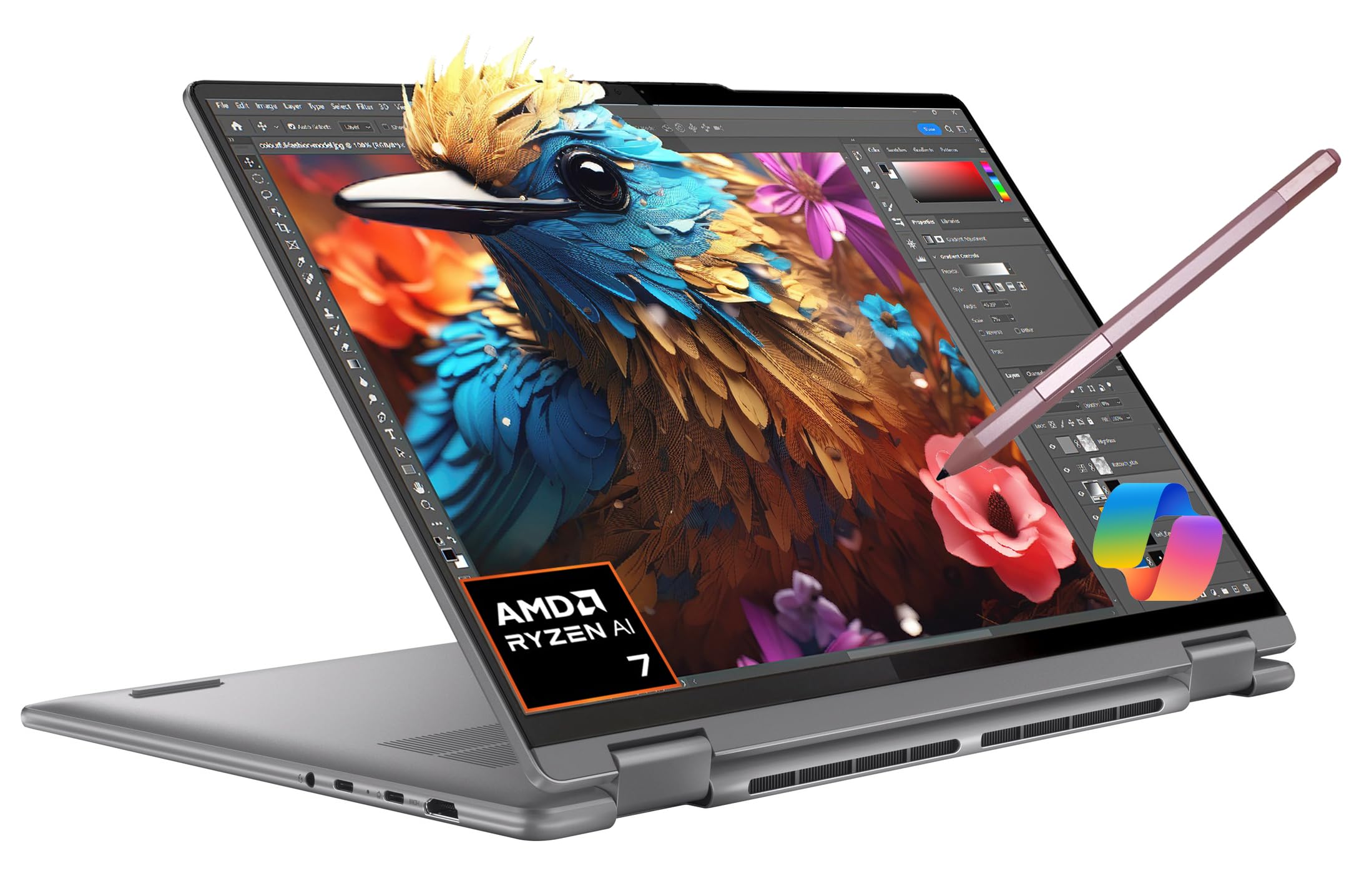
The Lenovo Yoga 7 7i is a 16-inch 2-in-1 convertible that leverages the AMD Ryzen 7 7735U’s Radeon 680M integrated graphics to deliver playable frame rates in lighter games without the thermal compromises of a discrete GPU in a thin chassis. The 16-inch WUXGA 1920×1200 IPS touchscreen with Dolby Vision and 300 nits brightness provides a spacious canvas for both productivity and media consumption, and the included IST Precision Pen adds genuine utility for note-taking and digital sketching. The 71WHr battery rated for up to 19.5 hours of video playback means this machine can survive a full workday and then some.
The 360° hinge is smooth and confidence-inspiring, allowing seamless transitions between laptop, tent, stand, and tablet modes. The Radeon 680M GPU, while not a discrete solution, is capable of running esports titles like Valorant and League of Legends at 1080p medium settings, and it handles indie games and emulators without issue. The 16GB of LPDDR5 4800MHz RAM and 1TB SSD ensure snappy multitasking and ample storage for a productivity-focused workflow.
The speakers are notably weak — worse than a mid-range tablet — and the keyboard requires higher press force than comfortable for long typing sessions. The touchpad is mechanical and only clickable near the bottom edge, which can be frustrating during navigation. The FHD screen is adequate but not remarkable; buyers who prioritize display quality for digital art should consider an OLED variant. This is not a gaming laptop, but for users who need a well-built 2-in-1 convertible that can handle light gaming alongside heavy productivity, the Yoga 7 7i offers excellent build quality and battery life.
Why it’s great
- Excellent battery life with 71WHr battery and Ryzen 7 efficiency
- Radeon 680M handles esports and indie games at playable settings
- Included IST Precision Pen for note-taking and sketching
Good to know
- Speakers are weak and keyboard requires high press force
- Touchpad is mechanical and only clickable near the bottom edge
12. Dell Alienware 18 Area-51 Gaming Laptop 18″ 2.5K WQXGA Anti-Glare Display (Intel Ultra 9 275HX, GeForce RTX 5090, 64GB DDR5, 2TB PCIe SSD, Wi-Fi 7, Backlit KYB, Bluetooth 5.4, Windows 11 Home)

The Alienware 18 Area-51 with an RTX 5090 and 64GB of DDR5 RAM is the most powerful gaming laptop on this list, designed for users who need uncompromised performance for 4K gaming, video editing, and local AI model training. The RTX 5090 with DLSS 4 Multi Frame Generation and NVIDIA Reflex 2 Frame Warp technology delivers frame rates that were impossible in a portable form factor just two years ago. The Intel Core Ultra 9 275HX and 64GB of DDR5 RAM ensure no workload ever hits a resource ceiling, and the 2TB PCIe SSD provides fast storage for massive project files.
The 18-inch 2.5K WQXGA anti-glare display is calibrated for color accuracy, with NVIDIA Broadcast AI enhancements that improve video call quality and content creation workflows. The build quality is genuinely tank-like — the chassis feels indestructible, with a Liquid Teal finish that stands out without being obnoxious. The 360W power adapter is enormous, but it’s a necessary trade-off for the RTX 5090’s 175W TGP plus the CPU’s peak draw.
The weight is prohibitive — over 8.5 pounds — making this a true desktop replacement rather than a portable machine. The system runs hot even in balanced mode, and some units have suffered from hardware hinge issues after several months of use. Dell’s support has also been criticized for responsiveness on out-of-warranty repairs. For buyers who need the absolute maximum GPU performance available in a laptop and can tolerate the weight and thermal management requirements, the Area-51 with RTX 5090 is the ultimate statement machine.
Why it’s great
- Maximum GPU performance with RTX 5090 and 64GB DDR5 RAM
- DLSS 4 Multi Frame Generation and Reflex 2 for competitive gaming
- Indestructible build quality with tank-like chassis
Good to know
- Extremely heavy — not portable for daily carry
- Some units develop hinge issues after extended use
13. NIMO 17.3″ Gaming Laptop, AMD Ryzen 7 7735HS 8 Cores, 32GB DDR5 1TB SSD, Windows 11, FHD IPS 180° View, Fingerprint, Backlit Keyboard, 100W Fast Charging, WiFi 6E Computer, for Business & Student
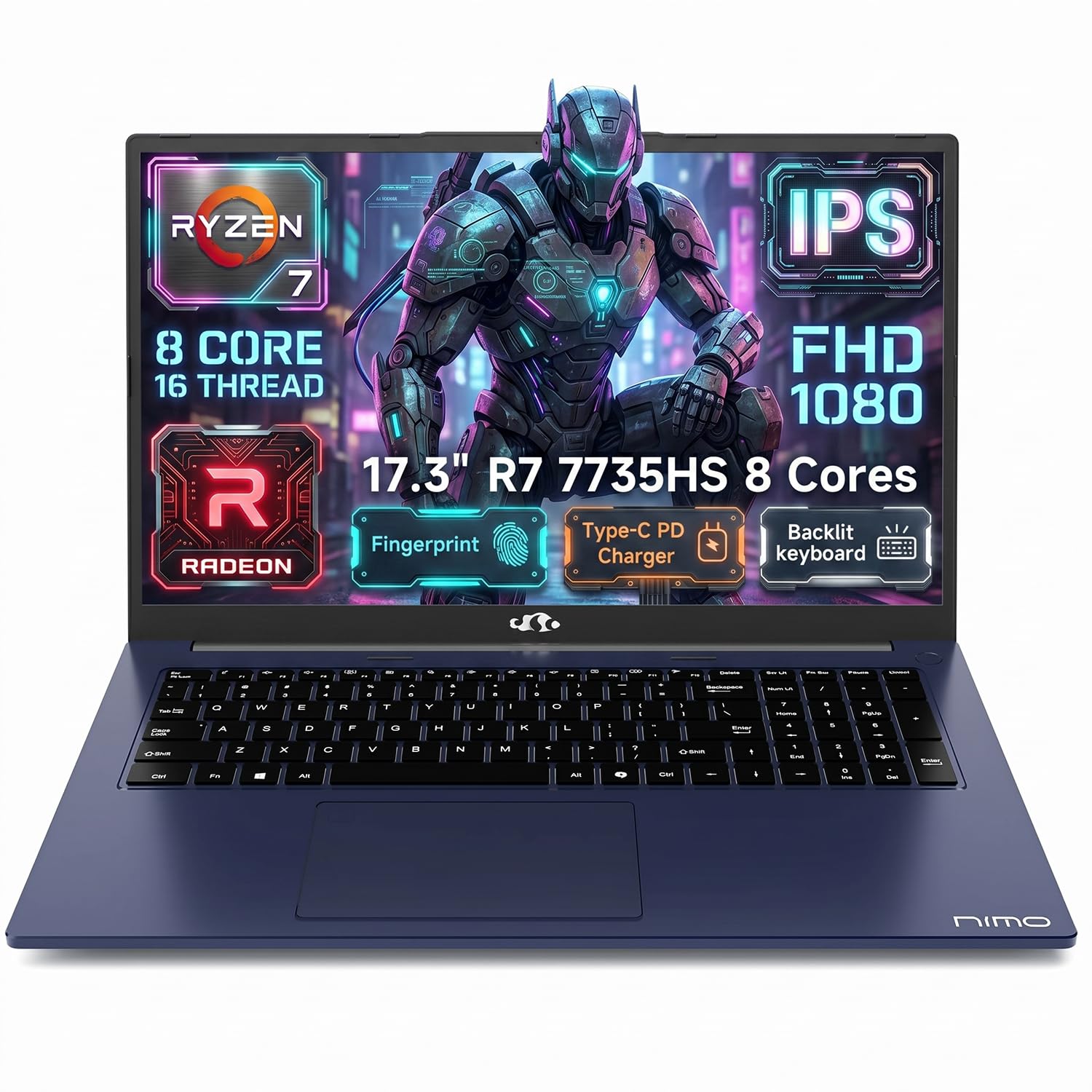
The NIMO 17.3-inch laptop is a budget-friendly productivity machine that includes a 180° lay-flat hinge and Radeon 680M integrated graphics, making it a viable option for light gaming and heavy multitasking at the lowest price point on this list. The AMD Ryzen 7 7735HS processor with 8 cores and 16 threads handles productivity workloads with ease, and the 32GB of DDR5 RAM is an unusual amount of memory at this price, ensuring smooth multitasking across dozens of browser tabs and office applications. The 1TB SSD provides ample storage for files and a modest game library.
The 17.3-inch FHD IPS display offers wide viewing angles and clear visuals, and the 180° lay-flat hinge makes it easy to share the screen during presentations or collaborative work. The 100W USB-C fast charging is a significant convenience — you can charge both the laptop and compatible mobile devices with a single charger. The 2-year manufacturer warranty and 90-day hassle-free return policy provide peace of mind for budget-conscious buyers.
The Radeon 680M integrated graphics is not a discrete GPU — do not expect to run modern triple-A titles at playable settings. The plastic casing is flimsy, the keyboard flexes under pressure, and the screen wobbles when the hinge is at certain angles. Battery life is mediocre at about 2 hours under gaming loads and 4 hours during general browsing. The backlit keyboard has inconsistent illumination, with some keys appearing brighter than others. This is an excellent budget laptop for productivity and light gaming, but it is not a gaming laptop in the traditional sense.
Why it’s great
- Generous 32GB DDR5 RAM and 1TB SSD at a budget-friendly price
- 100W USB-C fast charging reduces cable clutter
- 2-year manufacturer warranty for peace of mind
Good to know
- Integrated Radeon 680M cannot handle modern triple-A gaming
- Plastic build feels flimsy with keyboard flex and screen wobble
FAQ
Can a 2-in-1 gaming laptop actually run modern triple-A titles at high settings?
Will the 360° hinge on a gaming convertible hold up over years of use?
How much battery life should I expect from a 2-in-1 gaming laptop during gaming?
Final Thoughts: The Verdict
For most users, the best 2-in-1 gaming laptop winner is the ASUS ROG Flow Z13 because it is the only truly convertible design that delivers genuine gaming performance without sacrificing the tablet form factor, with a 180Hz touchscreen and AMD Ryzen AI MAX+ 395 that handles both competitive gaming and creative work. If you want maximum raw GPU power in a clamshell chassis without price being the primary concern, grab the ASUS ROG Strix SCAR 18 with RTX 5090 for its 240Hz Mini LED display and 175W GPU that rivals desktop performance. And for a budget-friendly entry into 360° convertible gaming that handles esports titles and productivity equally well, nothing beats the Lenovo Yoga 7 7i with its excellent battery life and included stylus support.