
Our readers keep the lights on and my morning glass full of iced black tea. As an Amazon Associate, I earn from qualifying purchases.
Specs are compiled from manufacturer listings and verified buyer reviews and can change over time — please confirm the key details on the product page before buying.
You want a laptop that doubles as a digital sketchpad for jotting notes or drawing ideas. The challenge is finding a 2-in-1 that balances battery life, screen quality, and speed across both laptop and tablet modes. This guide covers eight 2-in-1 laptops with pen support, from budget-friendly convertibles to premium powerhouses, so you can match the right machine to your daily workflow.
I’m Min — the founder and writer behind Gadgets Feed. This guide is built by comparing the manufacturers’ published specifications and the patterns across verified customer reviews, so you get each pick’s real strengths and trade-offs instead of marketing spin.
Whether you are a student taking handwritten notes, a designer sketching on the go, or a professional who needs a versatile daily driver, finding the right 2-in-1 laptops with pen support means balancing screen quality, processor performance, and battery life against your budget.
Quick Picks
- Samsung Galaxy Book Pro 360 (NP950QED) — Best Overall
- Microsoft Surface Pro 13″ (Snapdragon X Plus) — Premium Pick
- Lenovo Yoga 7i (83JQ0001US) — Top Performer
- Samsung Galaxy Book5 Pro 360 — Elite Choice
- LG gram Pro 2in1 16-inch — Ultra-Light
- Acer Spin 5 (SP513-54N-58XD) — Best Value
- Lenovo IdeaPad Flex 5i (14″, i5-1235U) — Student Choice
- Lenovo Flex 14 (81SS000DUS) — Budget Champion
How To Choose The Best 2-In-1 Laptops With Pen
Choosing a 2-in-1 with pen support means matching the machine to your specific workflow. Key specs separate a natural drawing experience from a frustrating one.
Screen Quality: Resolution, Refresh Rate, and Panel Type
The display is the canvas for all pen input. A higher resolution — measured in pixels across the screen — gives you more detail, which matters when you are sketching fine lines or reading dense text. Some models use a taller 3:2 aspect ratio (like 2256 x 1504) that gives you more vertical space compared to the standard 16:9 (1920 x 1080), making it feel closer to a sheet of paper. An OLED panel delivers richer colors and deeper black levels than a traditional IPS LCD, but it also costs more.
Processor Performance and RAM
The processor (CPU) determines overall system responsiveness. A newer generation Intel Core i5 or i7, or an AMD Ryzen 5 or 7, handles multitasking, creative apps, and casual gaming without stuttering. Pair that with at least 8GB of RAM for smooth operation — 16GB is better if you plan to run heavy programs like photo editors or design software. More RAM lets you keep multiple browser tabs and apps open without the system slowing down.
Pen Technology: Included or Separate, Active or Passive
Some models come with a pen in the box; others support one but sell it separately. An active stylus uses technology from companies like Wacom — known as AES (Active Electrostatic) — to give you palm rejection, tilt sensitivity, and precise line control that feels like a real pen. A cheap passive stylus just mimics a finger. Always check whether the included pen needs a battery or recharges, and how it stores on the laptop (some have a built-in silo, while others require a separate holder).
Battery Life: The Real Number vs. The Marketing Number
Manufacturers’ battery-life claims are based on ideal conditions; real-world use with high brightness and an active pen drains the battery significantly faster. A model claiming 15 hours may deliver only 4 to 6 hours of mixed use. Check buyer reports and third-party reviews for realistic battery-life estimates. Fast charging is a helpful bonus if you need a quick top-up between classes or meetings.
Quick Comparison
On smaller screens, swipe sideways to see the full table.
| Model | Best For | Screen Resolution | Battery Life (Claimed) | RAM / Storage | Amazon |
|---|---|---|---|---|---|
| Samsung Galaxy Book Pro 360 | Creative professionals | 1920 x 1080 (FHD AMOLED) | 18 Hours | 16GB / 1TB | $1,099.99Amazon |
| Microsoft Surface Pro 13″ | Portable productivity | 2880 x 1920 (3K) | 14 Hours | 16GB / 512GB | Amazon |
| Lenovo Yoga 7i | Premium value | 1920 x 1200 (OLED) | 3 Hours | 16GB / 1TB | Amazon |
| Samsung Galaxy Book5 Pro 360 | All-day power | 2880 x 1800 (3K AMOLED) | 25 Hours | — | Amazon |
| LG gram Pro 2in1 | Ultra-light travel | — | 19 Hours | 32GB / 2TB | Amazon |
| Acer Spin 5 | Budget creative work | 2256 x 1504 (2K) | 15 Hours | 8GB / 256GB | Amazon |
| Lenovo IdeaPad Flex 5i | Student value | 1920 x 1200 (FHD) | 9 Hours | 8GB / 512GB | Amazon |
| Lenovo Flex 14 | Budget multitasking | 1920 x 1080 (FHD) | 10 Hours | 12GB / 256GB | Amazon |
In‑Depth Reviews
1. Samsung Galaxy Book Pro 360 (NP950QED)

The creative powerhouse that transforms into a sketchbook without skipping a beat.
This is the 2-in-1 for anyone who lives inside creative apps and needs a machine that keeps up. The Intel Core i7-1260P processor (a central processing unit that can boost up to 5.0 GHz for demanding tasks) with 16GB of RAM and a 1TB SSD handles heavy multitasking — think Photoshop, Lightroom, and a dozen browser tabs — without stuttering. The 15.6-inch FHD AMOLED display (a screen type where each pixel emits its own light, giving vibrant colors and deep blacks) makes photo editing and movie watching a treat.
You also get the S Pen included, which sits neatly in the device for quick note-taking or sketching. The 360-degree hinge lets you switch to tent or stand mode, and you can connect up to two 8K external monitors via the Thunderbolt 4 port (a very fast USB-C connector that handles video, data, and charging) for a serious multi-screen setup. At 18 hours of claimed battery life versus the Lenovo IdeaPad Flex 5i’s 9 hours, buyers still warn you will see more like 4 to 6 hours of real-world use. One reviewer put it simply: “Great laptop. Do not believe the statistic you will get 15+ hours of life from this.”
What stands out
- Included S Pen with natural tilt sensitivity (line width changes as you angle the pen) for drawing and notes
- Super AMOLED screen with vivid colors and deep contrast
- Thunderbolt 4 supports dual 8K monitors for a massive workspace
What to watch for
- Real-world battery life is closer to 4-6 hours, not the 18 hours advertised
- Some buyers report spontaneous screen cracks that Samsung blames on the user
Best for you if: You are a photographer, designer, or video editor who needs a powerful 2-in-1 with a gorgeous screen and a solid included stylus.
Consider something else if: Your budget is tight, or you need a device that truly lasts a full workday on a single charge — this one will have you hunting for an outlet by mid-afternoon.
2. Microsoft Surface Pro 13″ (Snapdragon X Plus)
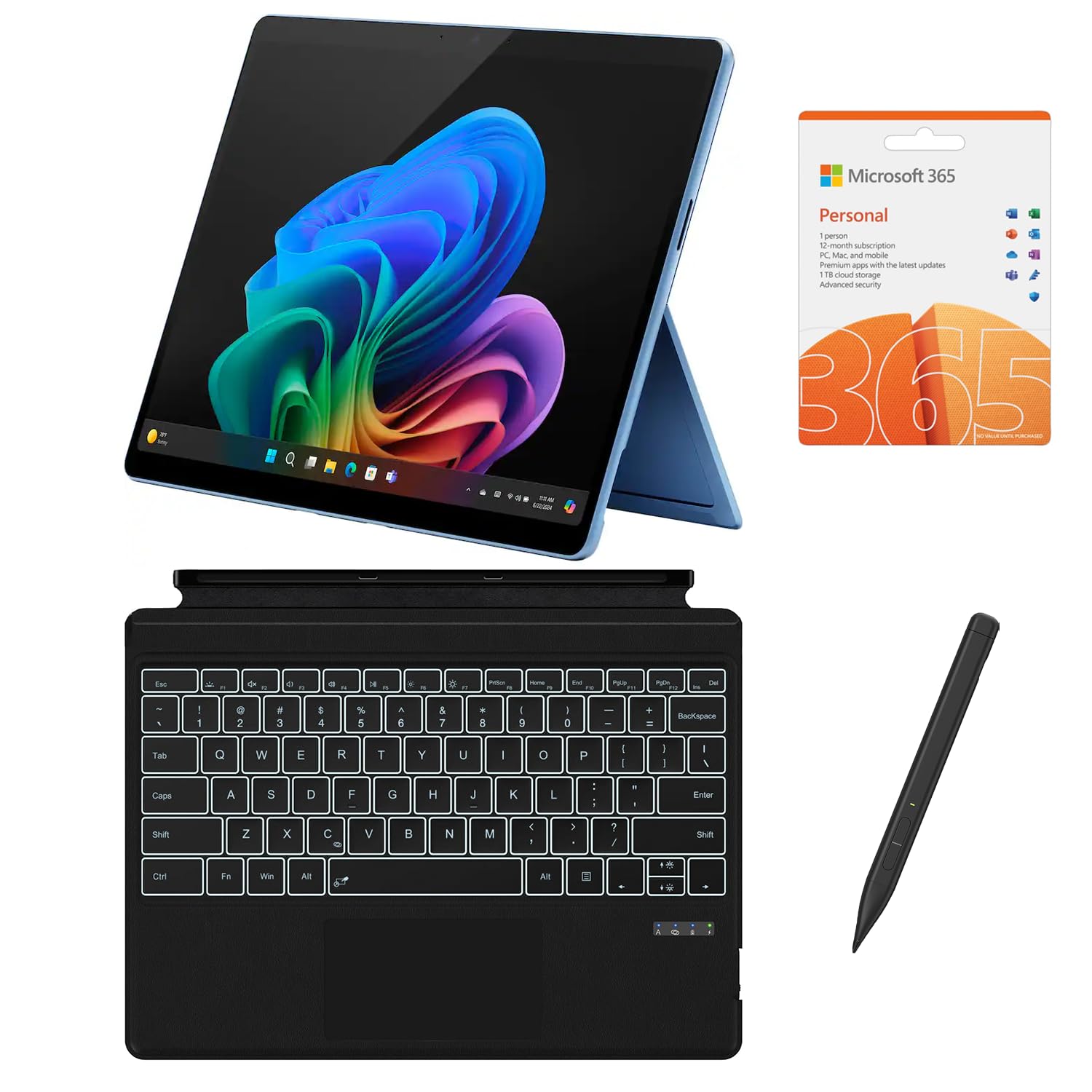
The ultra-portable tablet-laptop hybrid that puts a stunning 3K screen in your bag.
The screen makes this one special. Its 13-inch 2880 x 1920 PixelSense Flow display refreshes at a smooth 120Hz — the screen redraws 120 times per second, making scrolling and pen strokes feel incredibly fluid, especially compared to the standard 60Hz found on models like the Acer Spin 5. The Snapdragon X Plus processor (a 10-core chip built for AI tasks, handling 45 TOPS (trillions of operations per second) for features like automatic video call framing or real-time photo effects) powers the Copilot+ AI features. It also comes with a backlit keyboard and stylus in the box, plus a 12-month Microsoft 365 subscription.
With a claimed battery life of 14 hours, this machine is built for all-day portability. Previous Surface owners praise its longevity — one reviewer noted their old Surface still works after 5 years. The 13-inch size makes it a true tablet replacement, though the keyboard is third-party in this bundle, not the official Microsoft model. Owners mention the included pen does not fit the charging dock, and the keyboard does not charge from the laptop itself — so check what you are actually getting.
Why you will like it
- 13-inch 3K PixelSense Flow display with a 120Hz dynamic refresh rate for smooth pen input
- AI-powered Snapdragon X Plus processor for next-gen Copilot features
- Ultra-portable design that works as both a tablet and a laptop
What could be a letdown
- Bundled keyboard and stylus are third-party, not genuine Microsoft accessories — some buyers felt misled
- Limited to 512GB storage with no easy upgrade path
Reach for this if: You want a lightweight, tablet-first device with a gorgeous high-resolution screen and the latest AI processing for productivity tasks.
Look elsewhere if: You need a traditional laptop hinge for stability on your lap, or you want a first-party keyboard and pen without hunting for them.
3. Lenovo Yoga 7i (83JQ0001US)
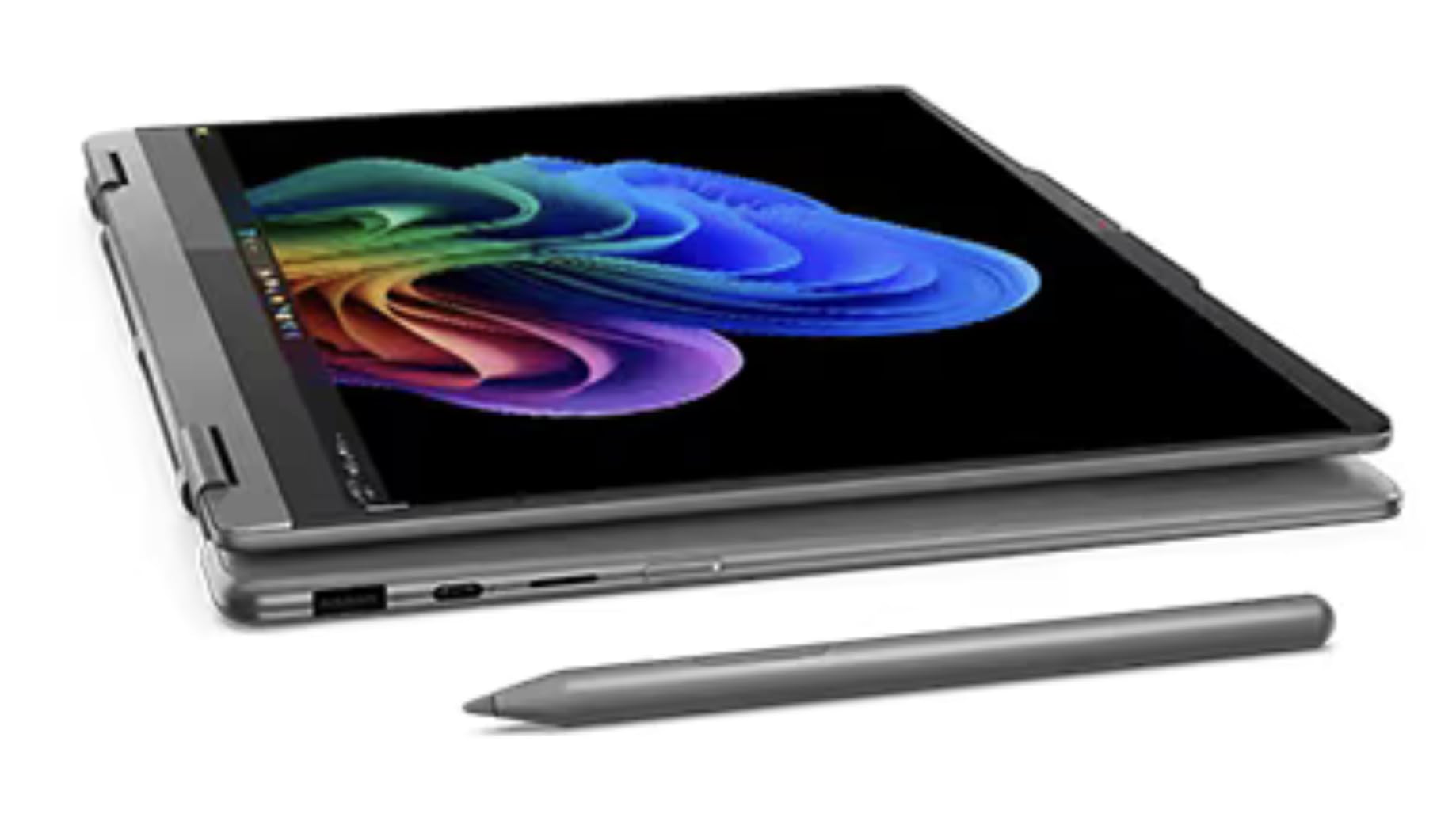
The OLED showstopper that brings a pen to every meeting and coffee shop.
The Yoga 7i focuses on the one spec that changes everything: the display. It packs a 14-inch WUXGA OLED panel — a high-resolution 1920 x 1200 screen where each pixel creates its own light — with HDR 500 True Black certification (a standard guaranteeing deep black levels and bright highlights) and 100% DCI-P3 color coverage (a wide color range used in film production), meaning colors pop and black levels are truly deep. This makes it better for photo editing and movies than the Lenovo IdeaPad Flex 5i’s standard IPS screen. The Intel Core Ultra 5 226V processor and 16GB of LPDDR5X RAM keep things snappy for everyday work, creative apps, and even light music production. Buyers confirm it loads FL Studio quickly and handles multitasking without a hiccup.
The included Yoga Pen stores in a built-in silo, so you never lose it. At just 0.61 inches thick and 3.04 pounds, it is easy to toss in a bag and take anywhere. One reviewer called it “fast, reliable, versatile 2-in-1 with smooth touchscreen.” However, the claimed battery life is only 3 hours — the shortest on this list — so expect to stay near an outlet. The keyboard also requires a bit more press force than some users like, which can get tiring during long typing sessions.
What we like
- 14-inch OLED display with HDR 500 and 100% DCI-P3 for true-to-life colors
- Included Yoga Pen with silo storage — no separate holder needed
- Ultra-light chassis at 3.04 lbs, tested against 12 military-grade durability standards
What could improve
- Battery life is limited — claimed just 3 hours, which is unusually short
- Keyboard requires high press force, which some users find fatiguing
Best suited for: Creative users who prioritize a stunning OLED display and portability over all-day battery life.
Not ideal for: Anyone who needs a laptop that lasts through a full day of classes or meetings — you will need to carry the charger.
4. Samsung Galaxy Book5 Pro 360

The 16-inch canvas that promises 25 hours of battery and delivers on creative freedom.
Samsung’s latest 2-in-1 flagship is built around two big numbers: a 2880 x 1800 Dynamic AMOLED 2X display that runs at 120Hz (the screen refreshes 120 times per second for fluid motion), and a claimed battery life of 25 hours versus the LG gram Pro 2in1’s 19 hours. The 120Hz refresh rate makes every scroll and S Pen stroke feel buttery smooth, while the 3K resolution gives you crisp detail for editing high-res photos or reading dense documents. The Intel Core 7 Ultra processor (Lunar Lake) handles demanding workflows like Android Studio coding or heavy multitasking without breaking a sweat — one buyer called it “worth every penny-fast, light, and perfectly responsive.”
The included S Pen features enhanced tilt sensitivity, making handwriting and drawing feel natural on the large touchscreen. You also get plenty of ports: HDMI, USB-A, two Thunderbolt 4 ports, and a microSD slot — no dongles needed. Reviewers praise the quad AKG speakers with Dolby Atmos and the smooth integration with Samsung phones via Quick Share and Phone Link. But not everyone has a perfect experience: one buyer mentioned a fragile screen and frequent freezing, calling it the “worst laptop owned.”
The highlights
- 16-inch Dynamic AMOLED 2X display at 3K resolution and 120Hz for fluid visuals
- Claimed 25-hour battery life — the highest on this list
- Included S Pen with tilt sensitivity and smooth Samsung ecosystem integration
The trade-offs
- Very expensive — one of the priciest options here
- Some customers note durability issues including screen cracks and system freezing
Go with this if: You want the biggest, sharpest AMOLED screen in a 2-in-1 and rely on long battery life for all-day work.
skip it if: You are on a tight budget or prefer a smaller, more portable device — this 16-incher is a handful.
5. LG gram Pro 2in1 16-inch
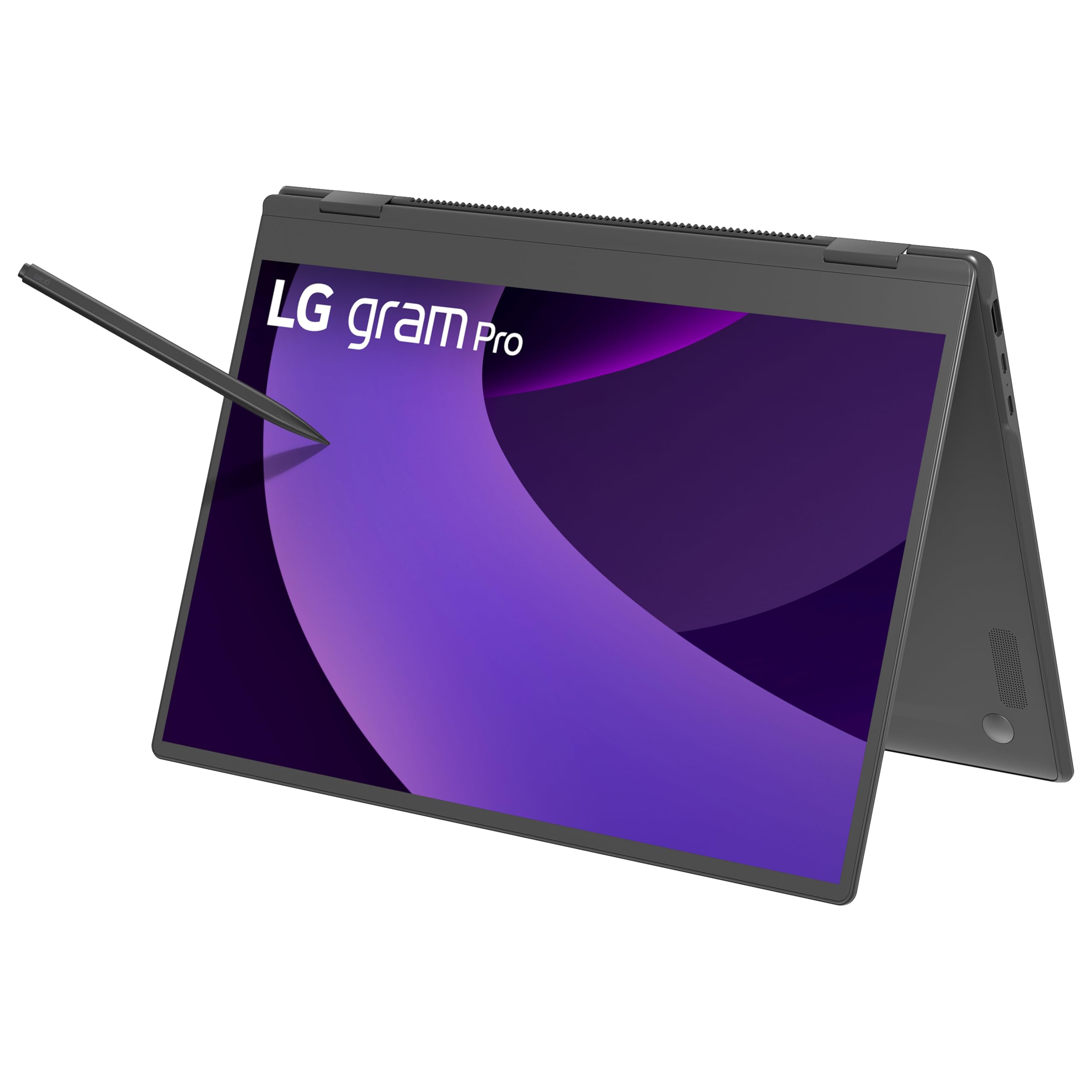
The featherweight 16-inch that defies gravity and carries a pen wherever you go.
If portability is your absolute priority, the LG gram Pro 2in1 weighs 3.08 pounds, while the Lenovo Yoga 7i weighs 3.04 pounds. The Intel Core Ultra 7 255H processor and a massive 32GB of RAM with a 2TB SSD make it a powerhouse for heavy multitasking — think running multiple virtual machines, editing 4K video, or keeping dozens of browser tabs open. The included stylus pen offers 4096 levels of pressure sensitivity (the pen detects 4096 distinct amounts of pressure), which means fine control for detailed drawing or note-taking.
LG claims up to 19 hours of video playback, and the 77Wh battery is backed by an AI Smart Assistant that optimizes power use based on your habits. The 360-degree hinge lets you switch between laptop, tent, stand, and tablet modes. One buyer summed it up: “Super lightweight; superior performance; great convertible device.” However, the pen has some shortcomings — reviewers point out unreliable palm rejection and an eraser button that does not work as expected. Also, the laptop lacks Thunderbolt 4 support despite some listings claiming it has, which could be a dealbreaker if you plan to connect an external GPU.
Why it stands out
- Weighs just 3.08 lbs — the lightest 16-inch 2-in-1 available
- Enormous 32GB RAM and 2TB SSD for serious multitasking and storage
- 4096 levels of pressure sensitivity on the included stylus for detailed creative work
Where it stumbles
- Pen palm rejection and button mapping are unreliable, according to buyers
- Advertised with Thunderbolt 4, but the actual unit lacks it — check carefully before buying
Perfect for you if: You travel constantly and need a ridiculously light 16-inch machine with high-end specs and a very large battery.
Not for you if: You rely heavily on the pen for professional drawing or require Thunderbolt 4 connectivity verified in the box.
6. Acer Spin 5 (SP513-54N-58XD)

The budget-friendly convertible that packs a high-res 2K screen and an active stylus.
The Acer Spin 5 proves you don’t need to spend a fortune to get a good 2-in-1 with pen support. Its 13.5-inch VertiView display runs a sharp 2256 x 1504 resolution instead of the standard 1920 x 1080 and uses a 3:2 aspect ratio (the screen is 3 units wide for every 2 tall) that gives you more vertical space, which feels great for reading documents and browsing the web. The 10th Gen Intel Core i5-1035G4 processor and 8GB of RAM handle everyday tasks like web browsing, email, and light photo editing without trouble.
The real win here is the included rechargeable Acer Active Stylus based on Wacom AES 1.0 technology (Active Electrostatic, a standard that gives palm rejection and tilt sensitivity). That means you get palm rejection (your hand can rest on the display while writing), tilt sensitivity, and precise line control — the same pen tech found in much pricier devices. One owner reported a clever use: “Magnet prevents falls from music stand; includes stylus for writing on music.” The Spin 5 also has Thunderbolt 3, Wi-Fi 6, a fingerprint reader, and a backlit keyboard. Just be aware some buyers reported the screen failing within a year, and customer service can be slow.
Best traits
- High-resolution 13.5-inch 2K display (2256 x 1504) with a 3:2 aspect ratio for more vertical space
- Included rechargeable Acer Active Stylus with Wacom AES 1.0, comparable to premium pens
- Thunderbolt 3, Wi-Fi 6, and a fingerprint reader offer excellent connectivity for the price
Weak spots
- Some buyers experienced screen failure within the first year
- Only 8GB of RAM and a 256GB SSD — limited for heavy multitasking or large file storage
Pick this up if: You want an affordable 2-in-1 with a crisp 2K screen and a proper included stylus for note-taking and sketching.
Think twice if: You need more than 256GB of storage or plan to run demanding creative applications — the 8GB RAM and older processor will show their limits.
7. Lenovo IdeaPad Flex 5i (14″, i5-1235U)

The affordable student laptop that flips into a tablet for taking notes in class.
For students on a budget, the IdeaPad Flex 5i hits a balance between price and performance. The 12th Gen Intel Core i5-1235U (10-core) processor with Intel Iris Xe graphics (an integrated graphics chip built into the CPU for handling video and light gaming) handles everyday schoolwork — writing essays, running spreadsheets, streaming lectures — without lag. The 14-inch FHD IPS touchscreen display has a slightly taller 1920 x 1200 resolution, giving you a bit more vertical room compared to the more common 1920 x 1080 panels found on the Lenovo Flex 14. The 360-degree hinge lets you fold it into tablet mode for reading textbooks or annotating PDFs with the included stylus.
Connectivity is strong for the price, with a Thunderbolt 4 port that supports fast data transfer, power delivery, and external displays, plus USB 3.2 ports, HDMI, and a microSD card reader. The battery is rated at a claimed 9 hours — short compared to the Samsung Galaxy Book Pro 360’s 18 hours. Unfortunately, buyers have reported some reliability problems: one wrote, “It stopped taking a charge after 5 weeks, one week after return period,” and another complained it came in Windows S Mode (a restricted mode that blocks installing apps from outside the Microsoft Store) without warning.
What you get
- 12th Gen Intel Core i5-1235U processor with Iris Xe graphics for smooth everyday performance
- Thunderbolt 4 port for fast charging, data, and video output
- Included stylus and a 14-inch FHD touchscreen with a 16:10 aspect ratio
What to watch out for
- Some units arrived in Windows S Mode, limiting app installation without a workaround
- A few buyers experienced complete failure within weeks of purchase
Good for: Students and casual users who need a flexible 2-in-1 for notes, browsing, and light productivity on a budget.
Not for: Anyone who needs reliable long-term durability or wants to run demanding creative software without slowdowns.
8. Lenovo Flex 14 (81SS000DUS)

The value king that crams 12GB of RAM and a Ryzen 5 into a pen-ready chassis.
The Lenovo Flex 14 is for buyers who need solid performance at a low price and are willing to accept some trade-offs. The AMD Ryzen 5 3500U processor — which one reviewer confirmed “outperforms i5-8250U” — paired with 12GB of DDR4 RAM and Radeon Vega 8 graphics handles office work, coding, light photo editing, and even some casual gaming surprisingly well for the price. Its 12GB RAM versus the Acer Spin 5’s 8GB gives it a clear edge for multitasking without spending much more. The 14-inch FHD touchscreen (1920 x 1080) is responsive, and the included active pen lets you take notes or sketch in OneNote or similar apps.
The battery is rated up to 10 hours, plus it charges to 80% in an hour. However, buyers consistently point out a few pain points. One detailed review noted “fast Ryzen 5, 12GB RAM, great battery (~4h at 30%), fingerprint reader works well” but also complained about the “dim screen, short key travel, poor Dolby Audio, and no USB-C charging.” The pen also lacks alt-key mapping in Photoshop, which can be frustrating for creative work. And finding a good place to store the pen can be tricky — the holster on the side is awkward, according to multiple users.
Why it works
- AMD Ryzen 5 3500U with Vega 8 graphics outperforms many Intel i5 options in this price range
- 12GB of RAM is generous for a budget machine — great for multitasking
- Included active pen and rapid charging to 80% in one hour
Why it stumbles
- Screen is dim and battery life is weak — expect around 4-5 hours, not the advertised 10
- No USB-C charging, so you must carry the proprietary power brick
Choose this if: You need a budget-friendly 2-in-1 with surprisingly strong processing power and plenty of RAM for multitasking.
Avoid it if: You want a bright display, all-day battery life, or the convenience of USB-C charging — this machine falls short in all three areas.
Understanding the Specs
Active Pen vs. Passive Stylus
An active pen — like the S Pen or the Wacom AES stylus — contains electronics that communicate with the screen. This gives you palm rejection (so your hand can rest on the display while you write), tilt sensitivity (line thickness changes as you angle the pen), and precise cursor tracking. A passive stylus is just a piece of conductive plastic that mimics a finger — no palm rejection, no tilt, and no pressure sensitivity. Every product in this guide supports or includes an active pen, which is essential for anything beyond tapping buttons.
Screen Resolution and Aspect Ratio
Resolution tells you how many pixels the screen has — more pixels means sharper text and images. A standard 1920 x 1080 (FHD) display works fine for most tasks, but a 2256 x 1504 (2K) or 2880 x 1920 (3K) screen gives you noticeably more detail, especially when drawing fine lines or editing high-resolution photos. The aspect ratio describes the screen’s shape: 16:9 is wide like a TV show, while 3:2 or 16:10 is taller — that extra vertical space is a big plus for reading long documents or web pages without scrolling as much.
Battery Life: Claimed vs. Real-World
Manufacturers test battery life under controlled, low-stress conditions — dim screen, light browsing, no background apps. In the real world, using the touchscreen, running creative apps, or connecting to Wi-Fi at full brightness can cut that number in half or more. A machine that claims 15 hours may give you 5 to 6 hours of mixed use. Always check real buyer reports to get an accurate picture. Fast charging (like reaching 80% in one hour) is a useful backup feature if you are often near an outlet.
Processor Generation and GPU
The processor (CPU) model number tells you its generation and relative performance. A 12th Gen Intel Core i5 is several generations newer and significantly faster than a 10th Gen model from a few years ago. The GPU (graphics processor, which handles rendering images, video, and games) can be integrated (built into the CPU) like Intel Iris Xe or AMD Radeon Vega graphics, which handle light creative work and casual gaming. For heavier tasks like 3D modeling or high-end video editing, look for a dedicated GPU — though those are rare in 2-in-1 designs.
FAQ
Can I use any pen with a 2-in-1 laptop?
What is the difference between a 2-in-1 convertible and a detachable?
Does a higher resolution screen drain more battery?
Is 8GB of RAM enough for a 2-in-1 with pen support?
Can I replace or upgrade the SSD in a 2-in-1 laptop?
How does palm rejection work on a 2-in-1?
Are 2-in-1 laptops good for drawing and digital art?
Can I run Photoshop or Lightroom on these 2-in-1 laptops?
What does Wi-Fi 6E or Wi-Fi 7 mean for a 2-in-1 laptop?
How long should a 2-in-1 laptop last before needing a replacement?
Final Thoughts: The Verdict
For most buyers, the 2-in-1 laptops with pen winner is the Samsung Galaxy Book Pro 360 because it combines a powerful Intel Core i7 processor, a gorgeous AMOLED screen, the included S Pen, and 16GB of RAM into a polished package that handles creative work and everyday tasks with ease. If you want the absolute best display and longest battery life, grab the Samsung Galaxy Book5 Pro 360 — its 16-inch 3K AMOLED panel at 120Hz with a claimed 25-hour battery is class-leading. And for budget-conscious students who still need a solid pen experience, the Acer Spin 5 delivers a sharp 2K screen and a proper Wacom AES stylus for a fraction of the price.
How We Picked
We do not accept paid placement, and we did not hands-on test every unit. Instead, we match each pick to a real buyer and use-case by comparing the manufacturers’ published specifications against the patterns in verified customer reviews — so you get each pick’s real strengths and trade-offs instead of marketing copy.
Sources & Methodology
Specifications: manufacturer listings and product documentation. Review insights: verified customer reviews, as of July 2026. Pricing: not shown on this page (it changes often); check the current price via the retailer link.
As an Amazon Associate, Gadgets Feed earns from qualifying purchases. This does not affect which products we feature.
Product prices and availability are accurate as of the date/time indicated and are subject to change. Any price and availability information displayed on Amazon at the time of purchase will apply to the purchase of this product. As an Amazon Associate I earn from qualifying purchases.
CERTAIN CONTENT THAT APPEARS ON THIS SITE COMES FROM AMAZON. THIS CONTENT IS PROVIDED "AS IS" AND IS SUBJECT TO CHANGE OR REMOVAL AT ANY TIME.
Amazon and the Amazon logo are trademarks of Amazon.com, Inc. or its affiliates.