
Our readers keep the lights on and my morning glass full of iced black tea. As an Amazon Associate, I earn from qualifying purchases.
Specs are compiled from manufacturer listings and verified buyer reviews and can change over time — please confirm the key details on the product page before buying.
If your gaming headset hisses, crackles, or drops the left ear when plugged into a PC with separate headphone and microphone jacks, you likely have a poorly shielded splitter. A 2 male 1 female audio splitter (a Y-cable with two plugs that go into your PC and one jack for your headset) needs proper shielding to keep the audio signal clean. This guide helps you pick one that survives daily yanking and keeps your voice chat clear.
I’m Min — the founder and writer behind Gadgets Feed. This guide is built by comparing the manufacturers’ published specifications and the patterns across verified customer reviews, so you get each pick’s real strengths and trade-offs instead of marketing spin.
Whether you’re reviving an older PC with separate mic and headphone jacks or sharing audio between two consoles, the right 2 male 1 female audio splitter preserves every layer of your sound without cutting the microphone input.
Our Picks at a Glance


How To Choose The Best 2 Male 1 Female Audio Splitter
Before you buy, you need to know whether you’re splitting one signal into two or combining two sources into one. Most of these cables do both, but the way you use them changes which length and build you need.
Check the connector standard first
Most modern headsets use the CTIA standard, which routes the microphone through the same plug as the audio. If you’re pairing an Apple or Beats headset, you’ll need to double-check compatibility — several of these splitters explicitly exclude those brands. Your computer also needs two separate 3.5mm jacks, one for output and one for input.
Match the length to your setup
A splitter that’s too short turns into a frustrating puzzle of extension cables. If your PC tower sits on the floor under the desk, a 2-foot cable is plenty. If you’re running from two separate devices across a desk, you’ll want something closer to the 8-foot range. Coiled cables stretch from 10 to 30 inches, which keeps things tidy but only if your gear sits close together.
Look for shielding that fights static
When you plug two devices into one cable, you’re inviting electrical interference. Dual or triple shielding layers — usually braided copper and foil wrapped in PVC — keep that hum out of your ears. Oxygen-free copper wiring carries the signal cleaner than standard copper, and 24K gold-plated contacts resist the corrosion that causes crackles over time.
Quick Comparison
| Model | Best For | Length | Connector Finish | Shielding | Amazon |
|---|---|---|---|---|---|
| DUKABEL Y Splitter★ Best Overall | Gaming headsets on dual-jack PCs | 12 inches | 24K Gold-Plated | Triple | Amazon |
| SOLMIMI Headset AdapterCrisper Audio | Crisp, louder audio on combo headsets | 1 foot | 24K Gold-Plated | Triple | Amazon |
| J&D Y-Splitter | Dual audio sources to one speaker | 1.96 feet | Gold-Plated | Dual | Amazon |
| Kxable Splitter | Early PCs with separate audio jacks | 2 feet | 24K Gold-Plated | Cotton Jacket | Amazon |
| Qaoquda Coiled Splitter | Close-range streaming setups | 10–30 inches stretch | Gold-Plated | Coiled Spring | Amazon |
| FENGHAISHUN Y Splitter | Budget-friendly basic splitting | 19.68 inches | Gold-Plated | None Listed | Amazon |
| MillSO Sapphire Splitter | Long reach across desks | 8 feet | 24K Gold-Plated | Quadruple | Amazon |
In‑Depth Reviews
1. DUKABEL Gold-Plated Y Splitter
Our pick — over 4.5★ from 3,500+ verified ratings; the strongest balance of quality and price.
The crowd-favorite that turns a single-plug headset into a dual-jack PC connection with zero hiss.
If your gaming headset has one 4-pole plug but your PC has two separate jacks, this 12-inch adapter is the bridge that makes voice chat work. The 3.5mm female port accepts a TRRS headset, then splits into two 3.5mm male plugs — one for audio out, one for your microphone. Buyers report the braided exterior and 24K gold-plated contacts hold up to daily plugging and unplugging without the static that plagues cheaper adapters.
The build quality is what wins people over — the fishing-wire-grade braid over a triple shielding jacket feels substantial in hand, and the oxygen-free copper inside keeps the signal clean. Functionality and quality are the two most-praised aspects by far, with hundreds of owners calling it out. The step-down design on the plug also fits phones that live in thick cases, so it works as a travel adapter too, not just a desk accessory.
One buyer reports using it for about a month before writing a review, noting the material “feels not too cheap at all” — and that verdict holds up across the review pages. Sound quality is the only mixed area, with a minority reporting a faint hiss through their headsets, so if you’re a noise purist, test it early. For most people, this is the one to grab for a gaming PC setup.
What owners praise
- Braided jacket survives daily use without fraying
- Gold-plated contacts keep connections tight and secure
- Works straight from the start with no drivers
The trade-off
- Sound quality is mixed — occasional hissing reported
- 12-inch length limits placement near the PC
Reach for this if: you need a durable everyday splitter for a dual-jack gaming PC and want the most proven option on this list.
Look elsewhere if: you’re a critical listener who hates even faint background hiss — test this one first.
2. SOLMIMI Nylon Braided Headset Adapter
The 1-foot adapter that replaces a failing splitter with heavier-gauge wire and noticeably louder output.
If the splitter you have now makes your headset sound annoyingly soft, this one fixes that. The SOLMIMI uses upgraded oxygen-free copper inside a triple-shielded, nylon-braided jacket, and owners consistently note the audio comes through “very crisp and louder” than their previous cable. That’s a direct upgrade over a worn-out adapter, not just a side-grade.
The glossy jade-green metal housing and 24K gold-plated connectors give it a premium feel, and the recessed plug design makes it easier to grip when pulling it out of a tight jack. One owner bought four different splitters to compare and found this one’s durability noticeably better than a rival’s — the braid and heavier gauge insulation hold up where others feel cheap.
It also handles the dual-job scenario: split a TRRS headset into mic and audio for a dual-jack PC, or combine two sources into one output. The step-down design on the plug works with phone cases too. Just keep in mind the 1-foot length is for setups where the headset sits close to the PC — this is not a cable for stretching across a desk.
Why it wins: the louder, crisper output and heftier build make it the best replacement cable if your current one has degraded.
The catch: short 1-foot reach means your PC or laptop needs to be right next to you.
3. J&D Gold Plated Y-Splitter

The 1.96-foot combiner that lets two audio sources feed one speaker without touching the cables.
This is the splitter for the person with a TV and a phone that both need to reach one stereo. The J&D combines one 3.5mm female jack with two 3.5mm male plugs, so you can connect two sources and switch between them by just pausing one — no more crawling behind the desk to swap cables. The gold-plated connectors and copper shell provide minimal signal loss, and the anti-scratch PVC jacket handles daily wear.
Functionality and quality are the most-praised aspects, with owners noting the cable snaps in securely and delivers stereo sound in both ears. One owner uses it between an iPad and a PC monitor’s audio-out jack to feed a desktop mixer, and it works flawlessly. The dual shielding keeps noise out, which several reviewers confirm with no feedback or hum in the output.
The 1.96-foot length is a middle ground — long enough for a compact desk setup, short enough to keep tidy. It’s also backed by a 1-year limited warranty from J&D, which is more than most splitter cables offer. If you want one cable that does both splitting and combining while staying affordable, this is the one.
Smart for: anyone juggling two PCs, a TV and phone, or an iPad and piano into one pair of headphones or one set of speakers.
Note: only play one source at a time — running two simultaneously drops the louder output’s volume.
4. Kxable Headphone Splitter
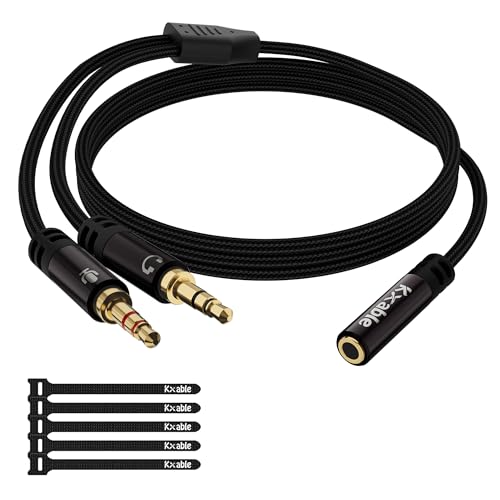
The 2-foot splitter built for early PCs, with a cotton jacket that shrugs off scratches and snags.
For an older desktop with separate headphone and microphone jacks, the Kxable adapter is built for that setup. Its TRRS female port (the single jack that carries both audio and mic signals) splits into two TRS male plugs (one for headphones, one for mic). It’s verified to work with Turtle Beach, Razer Kraken X, Bose, and HyperX Cloud 2 headsets, among others. The 2-foot length suits a tower under your desk, so you won’t have slack tangling your feet.
The 24K gold-plated plugs resist corrosion, and the black cotton jacket protects the pure copper conductors from damage. Owners mention clean sound on both channels with no static and no loose connections, and the mic input stays stable without dropping out during calls. The plug-and-play design means no drivers — your PC recognizes it instantly.
This one is CTIA-standard only, so it won’t work with OMTP headsets, Apple earbuds, or Beats — the listing is upfront about that. It also needs your PC to have dual 3.5mm TRS jacks to function. If your setup matches those requirements, this is a reliable, affordable choice that owners describe as durable and well-made.
Solid points
- Verified compatibility with major gaming headset brands
- Cotton jacket resists scratches and damage
- Pure copper conductors for maximum conductivity
Check before buying
- No support for OMTP standard headsets
- Incompatible with Apple earbuds and Beats
Best for: owners of CTIA-standard gaming headsets on older dual-jack desktops who want verified compatibility.
Pass on it: if you use Apple or Beats gear — this cable explicitly won’t work with those.
5. Qaoquda Coiled Y Splitter

The spring-coiled splitter that keeps cable clutter at bay when your devices sit close together.
For a streamer running one microphone into two wireless transmitters, or a desktop setup where both devices are right next to each other, the coiled design is the point. This Qaoquda stretches from 10 to 30 inches, so it stays compact when not in use and reaches exactly as far as you need. One owner uses it to feed two amps from a single Chromecast Audio and calls the short length “a feature.”
It works as both a splitter and a combiner — send one headset mic to two systems, or connect two PCs to one set of speakers. Customers note it works flawlessly for streaming to two systems from one headset mic, and the coiled cord keeps things tidy on a crowded desk. The gold-plated connectors hold up to the flex without signal loss.
The catch is physics: if your devices aren’t close to each other, you’ll fight the coil’s natural springiness trying to separate the two wires. One owner notes the coil design isn’t needed and a straight cable would be easier to work with in some setups. This is a niche pick for tight spaces, not for spanning a wide desk.
Standout for: streamers and multi-amp users whose gear lives within a foot or two of each other.
Who should skip: anyone needing to reach across a wide desk — the coil will fight you the whole way.
6. FENGHAISHUN 3.5mm Y Splitter
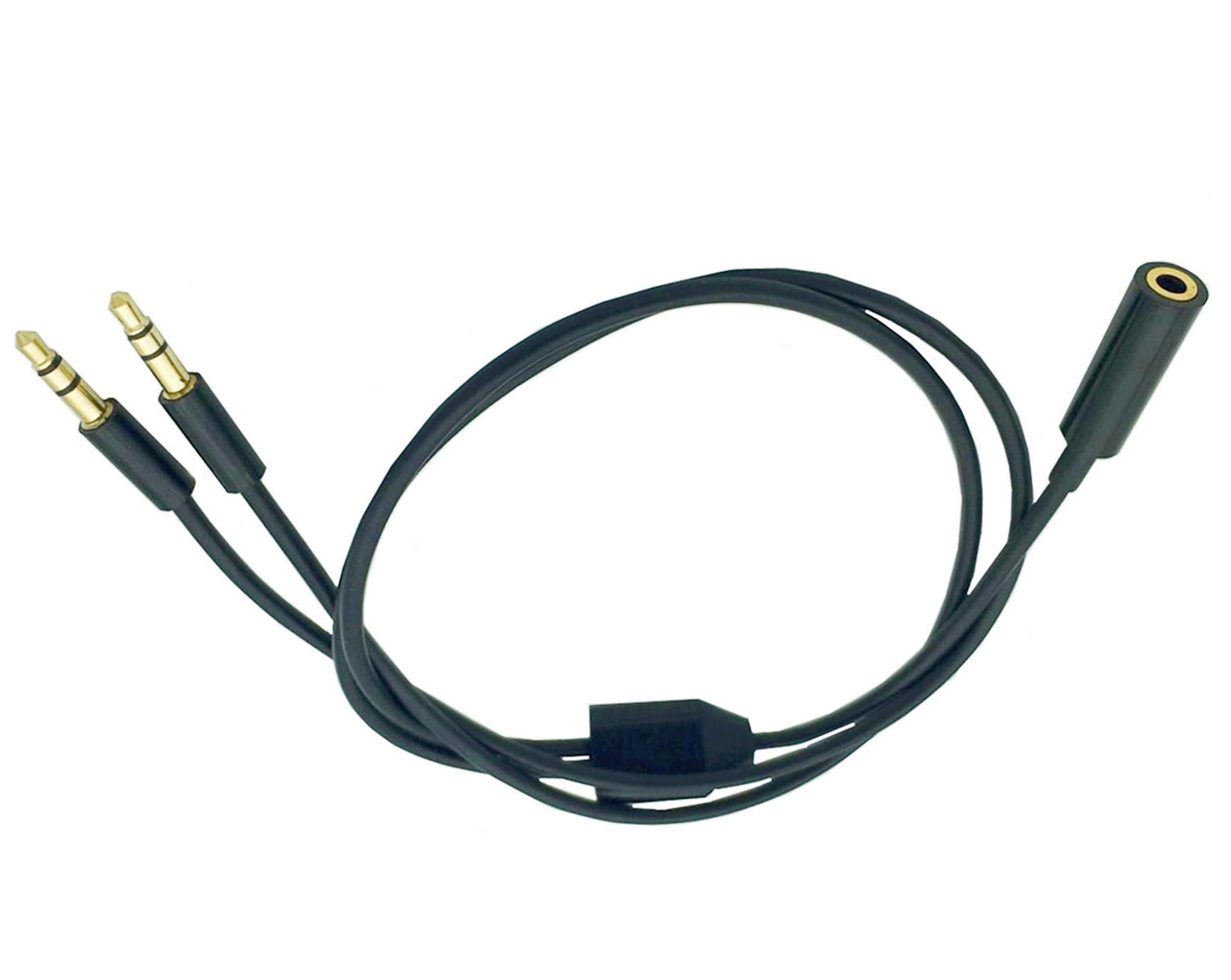
The entry-level splitter that’s cheap, sturdy, and exactly long enough for a two-device desk setup.
At 19.68 inches (50cm), this FENGHAISHUN is a no-frills option for splitting one audio source into two headphones or combining two devices into one speaker. It’s plug-and-play with no drivers, and the gold-plated connectors ensure stable contact. One owner splits piano audio to two sets of headphones with no distortion — the exact use case this cable handles best.
The non-braided build is simple, but “cheap but sturdy” is how it comes across, and it does exactly what it’s supposed to. It also functions as a 50cm extension cable when you only need one side, with identical sound quality. For a basic splitter that’s just well-made enough, this fits the bill at a budget-friendly price.
The honest downside shows up on the review pages: the split sides are under 10 inches each, which is “too short for practical use without extra cables” if your devices aren’t right next to each other. And if you try to play two different audio sources at once, the volume of the more powerful output drops — a quirk common to passive splitters. Keep both sources paused except the one you’re listening to.
Reach for it: as a cheap, functional splitter when your two devices sit side by side and you don’t need extra reach.
Move on if: your setup demands longer arms on the Y — measure before you buy.
7. MillSO Sapphire Blue Splitter

The 8-foot cable that lets you feed one speaker from two PCs without playing cable Tetris.
If your two computers sit on opposite sides of a desk — or you’re running through a KVM switch — this MillSO gives you the reach no short splitter can match. The 8-foot length splits in the middle, so you get about 4 feet on each side, enough to reach a PC and a monitor’s audio-out jack comfortably. One owner uses it to hook up two PCs to a single speaker, and another runs PC plus PS4 plus Switch audio through it to computer speakers.
The cable is dense rubber rather than braided, and owners call it high quality and durable. The 24K gold-plated connectors and quadruple shielding — tinned copper, aluminum foil, and soft PVC layers — keep the signal clean even over that longer run. Cable quality is the most-praised aspect, with owners noting the flexibility and build.
This is a pure audio splitter with no mic support, so it’s for headphones and speakers, not headset chat. The sapphire blue color is a nice touch of personality on an otherwise black desk. If long reach and clean signal are your priorities, this is the clear winner for connecting multiple devices to one output.
Why it stands out
- 8-foot length covers wide desk setups
- Quadruple shielding prevents signal loss over distance
- Works with KVM switch setups for multiple PCs
Keep in mind
- No microphone pass-through — audio only
- Dense rubber isn’t as tangle-resistant as braided
Pick this for: multi-PC desks, KVM setups, or anywhere the source and speaker are far apart.
Not for: gamers who need mic support in the same cable — grab the DUKABEL instead.
Understanding the Specs
TRRS vs TRS connectors
The number of metal rings on the plug tells you what it carries. A TRRS plug has four sections and carries both audio and microphone through one jack — this is what modern headsets use. A TRS plug has three sections and carries stereo audio only. Splitters bridge the two: the TRRS female port accepts your headset, and the two TRS male plugs route audio and mic to separate PC jacks.
Shielding and gold plating
Shielding is the layered protection around the wire that blocks electrical interference from other devices — the more layers, the cleaner the signal. Gold plating on the contacts resists corrosion, which is what causes crackling and static as a cable ages. Look for dual, triple, or quadruple shielding and 24K gold plating if you want a splitter that sounds the same in year two as it did on day one.
FAQ
Will a 2 male 1 female splitter work with my Apple or Beats headset?
Can I combine two audio sources into one speaker with these cables?
What is the difference between CTIA and OMTP standards?
How long should my splitter cable be?
Will these splitters work with a gaming console like PS4?
Why does my audio get quiet when I plug in two sources?
Do I need drivers to use a headphone splitter?
How do I stop static or hissing on my splitter?
Final Thoughts: The Verdict
For the majority of shoppers, the best 2 Male 1 Female Audio Splitter is the DUKABEL because it’s the most proven option with hundreds of owners praising its durability and secure connection. If you want the loudest, crispest audio for a headset, the SOLMIMI is the one to reach for. And for connecting two PCs to one speaker across a wide desk, the MillSO‘s 8-foot reach saves you from a tangle of extension cables. Skip the FENGHAISHUN if your devices aren’t within 10 inches of each other — its arms are just too short. The DUKABEL’s 4.6-star rating from over 3,800 owners confirms it as the safest bet for most dual-jack PC setups.
How We Picked
We do not accept paid placement. Every pick is matched to a real buyer and a real use-case; we do not hands-on test units.
Sources & Methodology
Specifications: manufacturer listings and product documentation. Review insights: verified customer reviews, as of August 2026. Pricing: not shown on this page (it changes often); check the current price via the retailer link.
As an Amazon Associate, Gadgets Feed earns from qualifying purchases. This does not affect which products we feature.