
Juggling two computers with two monitors usually means a rat’s nest of cables behind your desk and constant plugging and unplugging of your keyboard, mouse, or webcam every time you switch machines. A dedicated 2 monitor KVM switch solves this by letting a single set of peripherals control both PCs across both screens, instantly cutting the clutter and the workflow friction.
I’m Min — the co-founder and writer behind Gadgets Feed. I’ve spent hundreds of hours combing through technical datasheets, customer reviews, and real-world compatibility reports to separate the few KVM switches that actually deliver on their promises from the many that fall short on bandwidth, EDID handshaking, or USB stability.
This guide breaks down the best models on the market right now, comparing connectivity standards, resolution support, and switching reliability so you can pick the best 2 monitor kvm switch for your specific dual-PC setup and never touch another USB cable again.
How To Choose The Best 2 Monitor KVM Switch
Selecting the right dual-monitor KVM comes down to matching your computers’ video outputs, the resolution and refresh rate you need, and the switching method that fits your workflow. Here are the three factors that matter most.
Video Connectivity: DisplayPort vs. HDMI vs. USB-C
Your KVM’s video input must match your computers’ available ports. DisplayPort 1.4 KVMs offer the highest bandwidth for dual 4K@144Hz or even 8K@30Hz, making them ideal for gaming and design work. HDMI 2.0 KVMs cap out at 4K@60Hz per monitor but are simpler to integrate with laptops and consumer hardware. USB-C KVMs consolidate video, data, and charging into one cable, perfect for modern laptops with Thunderbolt or DP Alt Mode support, but they often limit macOS to mirrored output across dual screens.
EDID Emulation: Why It Matters for Dual Monitors
When you switch computers, the KVM must tell each PC the exact capabilities of your monitors — resolution, refresh rate, color depth — so they don’t blank, flicker, or rearrange your desktop icons. KVMs with built-in EDID emulation store this data and feed it to both computers continuously, preventing the dreaded “monitor re-detection” delay. Without EDID emulation, you may see a 5-10 second blackout on every switch, and some PCs may forget which monitor is left or right.
USB Ports and Switching Speed
A true KVM switch includes a built-in USB hub for sharing a keyboard, mouse, webcam, microphone, and storage drives. USB 3.0 at 5Gbps is the standard, but USB 3.2 Gen 2 at 10Gbps is appearing on premium models. Switching speed — measured from button press to full peripheral and video recovery — ranges from under 1 second on high-end units with EDID to 3-5 seconds on budget models. If you switch computers dozens of times a day, every second of delay becomes a tangible productivity cost.
Quick Comparison
On smaller screens, swipe sideways to see the full table.
| Model | Category | Best For | Key Spec | Amazon |
|---|---|---|---|---|
| TESmart HDMI KVM | Premium | High-refresh gaming & 8K workstations | HDMI 2.1, 8K@60Hz, EDID, 1G Ethernet | Amazon |
| AV Access KD-E10 Dock | Premium | Laptop + desktop docking setup | 11-in-1 dock, 100W PD, 1G Ethernet | Amazon |
| DGYBDFC Dock KVM | Mid-Range | USB-C laptop dual monitor sharing | 13-in-1 dock, 100W PD, DP 4K120Hz | Amazon |
| KCEVE USB-C KVM | Mid-Range | Triple monitor USB-C setups | 3 monitors, 10Gbps data, 65W PD | Amazon |
| AV Access 4KSW21-DM | Mid-Range | Reliable EDID & hotkey switching | EDID emulation, 4K@60Hz, USB 3.0 hub | Amazon |
| GREATHTEK 4-Port KVM | Mid-Range | Up to 4 computers sharing 2 monitors | 4 computers, 4K@60Hz, 3 USB 3.0 ports | Amazon |
| NAWEN USB-C KVM | Budget-Friendly | Simple USB-C laptop + desktop sharing | USB-C MST, 4K@60Hz, wired remote | Amazon |
| UGREEN DP KVM | Budget-Friendly | High-res DP monitors on a budget | DP 1.4, 8K@60Hz, aluminum build | Amazon |
| DXchip DP KVM | Budget-Friendly | Value 3-computer DP dual monitor | 3 computers, DP 1.4, 5Gbps USB 3.0 | Amazon |
In‑Depth Reviews
1. TESmart HDMI KVM Switch 2 Monitors 2 Computers 8K@60Hz
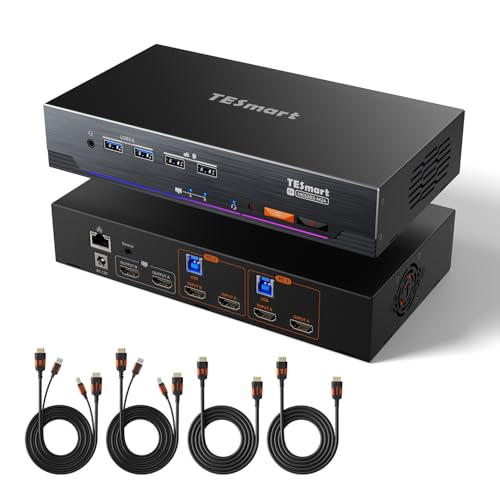
The TESmart sits at the top of the dual-monitor KVM stack for a simple reason: it is the only model here built on HDMI 2.1 silicon with full EDID emulation on every input. This means it supports 8K@60Hz with DSC, 4K@144Hz for high-refresh gaming, Variable Refresh Rate, Auto Low Latency Mode, and Dynamic HDR metadata including Dolby Vision. For owners of dual 4K 144Hz monitors or emerging 8K displays, no other KVM on this list matches its raw video bandwidth.
Beyond the video pipeline, the TESmart includes a Gigabit Ethernet port so both connected PCs share a single wired network connection, a built-in microphone and L/R audio breakout that stays active during switches, and four switching methods — front panel button, keyboard hotkeys, mouse wheel, and an IR remote. The all-metal chassis with panel-mount lugs makes it rack-ready for professional AV environments. Every necessary HDMI 2.1 cable is included in the box, removing guesswork from the setup.
The primary trade-off is price — this is the most expensive unit in the roundup — and the requirement that both computers must output video through HDMI. Laptops with USB-C only will need an active USB-C to HDMI adapter. Some users have reported intermittent USB mouse lag, though this appears to vary by peripheral and cable quality. For uncompromised dual-monitor performance at the highest available resolutions, the TESmart is the definitive choice.
Why it’s great
- HDMI 2.1 delivers 8K@60Hz and 4K@144Hz with full DSC support
- Built-in Gigabit Ethernet eliminates the need for a separate network switch
- EDID emulation on every port prevents monitor handshake delays during switches
Good to know
- Requires HDMI outputs on both computers — no native DisplayPort or USB-C inputs
- Intermittent USB peripheral lag reported by some users
- Premium pricing places it above casual or single-PC-plus-laptop setups
2. AV Access KVM Switch Docking Station (KD-E10)
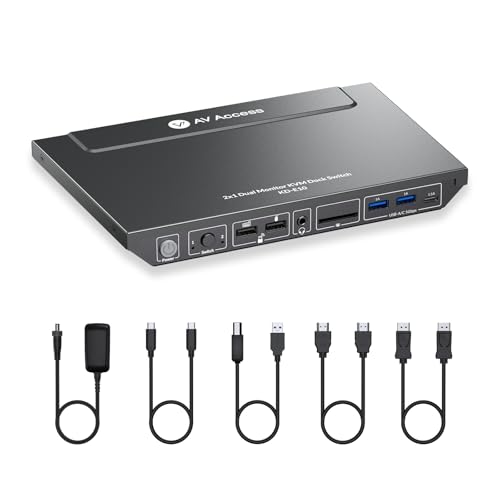
The AV Access KD-E10 is engineered for the specific use case of one laptop plus one desktop sharing dual monitors, combining a KVM switch with an 11-in-1 docking station into a single box. It connects to your laptop over USB-C with up to 100W pass-through charging, while the desktop connects via HDMI, DisplayPort, and USB-B. This hybrid design means your laptop gets power, data, and dual video from one cable — a major desk-cable reduction versus traditional KVMs that require separate power and video cables for each computer.
Port selection is generous: three USB 3.0 ports, two USB 2.0 ports, one USB-C data port, a 1G Ethernet jack that specifically serves the laptop connection, SD and Micro SD card slots, and a 3.5mm AUX audio output. The built-in EDID emulation keeps monitor configurations stable across switches, and the front button switches between computers in roughly 2-3 seconds. AV Access includes all necessary cables — USB-C, USB-B, HDMI, and DP — in the package.
The biggest limitation is macOS support: like most USB-C KVMs, the KD-E10 only handles mirrored mode on Macs, not extended dual displays. The Ethernet port only works for the laptop, not the desktop, so the desktop still needs its own network connection. A few users have reported occasional flickering after several months of use, often resolved by power cycling. For Windows users who want a dock-like KVM, this is the most polished option in the mid-premium tier.
Why it’s great
- Combines KVM switching with a full 11-port docking station for laptop users
- 100W USB-C PD passthrough charges the laptop during use
- EDID emulation preserves monitor layout across switches
Good to know
- MacOS limited to mirrored dual display — extended mode not supported
- Gigabit Ethernet only serves the laptop, not the desktop
- Some users report periodic monitor flickering after extended use
3. DGYBDFC KVM Switch Docking Station 13-in-1
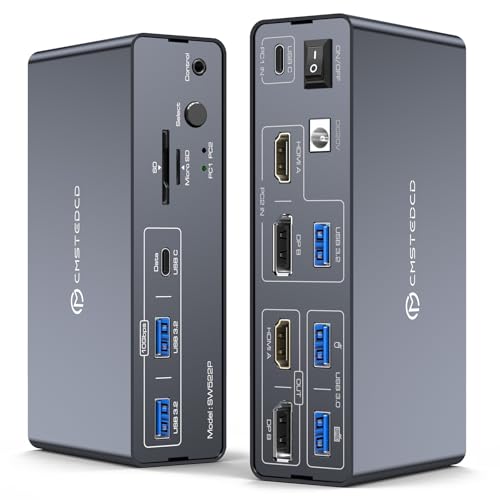
The DGYBDFC is a 13-in-1 docking station with integrated KVM switching, designed primarily for USB-C laptops like MacBooks and Dell XPS sharing dual monitors and peripherals with a desktop PC. Its defining physical feature is the full aluminum alloy casing, which improves heat dissipation and gives it a dense, premium feel on the desk. The video outputs are split: one HDMI port supports 4K@60Hz, while the DisplayPort output pushes up to 4K@120Hz, making it a strong match for users who mix productivity with high-refresh gaming.
The port array is detailed: two USB 3.0 ports for keyboard and mouse, two USB 3.2 Gen 2 ports running at 10Gbps for fast external SSDs, one USB-C data-only port, SD and Micro SD card slots, a 3.5mm audio jack, and a dedicated 100W PD input for laptop charging. Switching between the two connected computers is handled by a front panel button or an included wired desktop controller. The included 120W power adapter ensures all ports stay powered even with storage drives and peripherals drawing current.
On the downside, macOS users hit the same mirrored-mode wall — Macs cannot address two external monitors independently through this KVM. The wired controller cable is on the shorter side at roughly 1 meter, limiting placement flexibility. The manual is minimal, and the lack of keyboard hotkey switching means you must reach for the button or remote every time. For Windows users wanting a solidly built dock-KVM hybrid with fast USB-C data transfer, this is a compelling mid-range choice.
Why it’s great
- Aluminum chassis provides excellent heat dissipation and a premium feel
- USB 3.2 Gen 2 ports offer 10Gbps data transfer for fast external drives
- DisplayPort output supports 4K@120Hz for smoother motion
Good to know
- MacOS only supports mirrored dual display, not extended
- No hotkey switching — requires front button or wired remote
- Wired controller cable is only 1 meter long
4. KCEVE USB-C KVM Switch for 3 Monitors
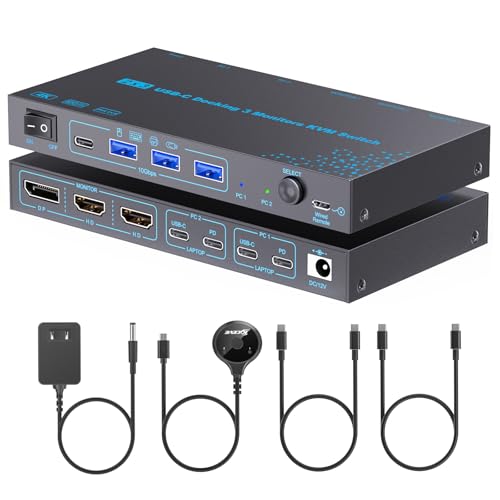
The KCEVE USB-C KVM stands out by supporting three monitors (2 HDMI + 1 DisplayPort) from two USB-C laptops, which is rare at this price point. Each connected laptop gets video, data, and up to 65W PD charging through a single USB-C cable, assuming the laptop’s port supports DP Alt Mode. On Windows, both SST (mirror) and MST (extended) modes are available, so you can run three independent displays. The USB-C ports run at 10Gbps, making this one of the fastest data-transfer KVMs in the mid-range tier.
Switching is handled through a front button or an included 1.5-meter wired remote, and the LED indicators clearly show which computer is active. The package includes two USB-C cables, but no power adapter, so you’ll need to supply your own USB-C PD charger if you want laptop charging. The metal casing feels durable for the price, and the overall footprint is compact at roughly 4 by 3 inches.
The catch is macOS: Apple Silicon Macs don’t support MST, so all three monitors will show the same mirrored image, not independent desktops. A few users note occasional flickering on one input that requires a power cycle. For Windows users with two modern laptops — or a laptop and a desktop with USB-C video output — this delivers triple-screen KVM functionality at a fraction of the cost of enterprise alternatives.
Why it’s great
- Supports three monitors (2 HDMI + 1 DP) from two USB-C laptops
- USB-C ports run at 10Gbps for fast peripheral data transfer
- Includes 1.5-meter wired remote for flexible placement
Good to know
- MacOS limited to mirrored output across all three monitors
- No power adapter included — requires separate USB-C PD charger
- Occasional flickering on one input reported by some users
5. AV Access KVM Switch 2 Monitors 2 Computers (4KSW21-DM)

The AV Access 4KSW21-DM is a purpose-built HDMI dual-monitor KVM with two features that justify its mid-range positioning: proper EDID emulation and keyboard hotkey switching. The EDID emulation ensures that both connected PCs always “see” your monitors’ full capabilities — resolution, refresh rate, and color format — so switching between the two computers is fast and doesn’t trigger Windows display resets or icon rearrangements. Hotkey switching (Scroll Lock + Scroll Lock + 1/2) lets you toggle computers without reaching for a button.
The physical design is compact and sturdy, with a grey metal body that fits comfortably on a desk or in a 1RU rack space. It offers three USB 3.0 ports and one USB 1.1 port for peripherals, plus a 3.5mm audio jack that passes microphone and speakers. Dual application modes allow standard KVM operation or a USB-only mode where each monitor displays a different video source independently. The package includes a locking power connector that won’t accidentally unplug.
The downsides: macOS only supports mirror mode, so Mac users get duplicate screens rather than extended desktops. Some users have reported USB port failures after several months, and the audio pass-through can produce slight pops when switching sources. The USB 1.1 port is too slow for anything beyond basic input devices. For Windows-centric users who switch frequently and value fast, stable transitions, this remains one of the most reliable HDMI KVM options in the mid-range.
Why it’s great
- EDID emulation prevents monitor blackouts and desktop icon rearrangement
- Keyboard hotkey switching (Scroll Lock + Scroll Lock) is fast and hands-free
- Compact metal body with locking power connector for reliability
Good to know
- MacOS only supports mirror mode, not extended dual displays
- USB 1.1 port is too slow for anything beyond basic keyboards or mice
- Some users report USB port failure after extended use
6. GREATHTEK HDMI KVM Switch 4 Computers 2 Monitors
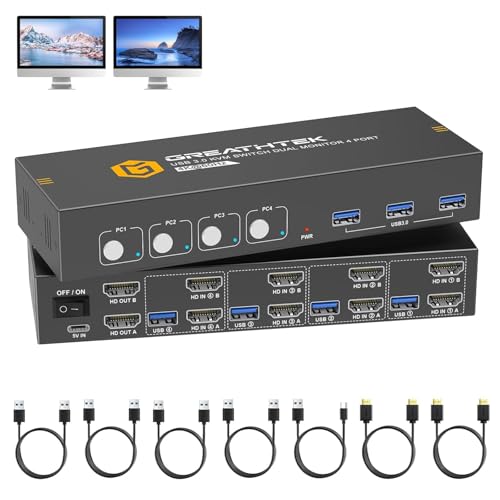
Most dual-monitor KVMs support exactly two computers. The GREATHTEK breaks that pattern by allowing up to four computers to share the same pair of monitors and USB peripherals, making it the only multi-seat KVM in this roundup. It connects each computer via dual HDMI inputs (2 per PC) plus one USB-B cable, and it supports a maximum resolution of 4K@60Hz per monitor. The adaptive EDID helps maintain display stability during switches, though it lacks dedicated full-time EDID emulation.
The front panel has four clearly labeled buttons — one per computer — with LED indicators showing which machine is active. Three USB 3.0 ports on the front face let you share a keyboard, mouse, and a third device like a webcam or printer. The package includes two HDMI 2.0 cables, four USB 3.0 cables, and a USB-C power cable, so you have everything needed to connect four PCs out of the box. The compact 1x1x1-inch body hides easily behind monitors or under a desk.
Reliability is a mixed bag: early reviews praise fast switching and solid video quality, but several long-term users report the unit freezing after roughly five months, requiring a power cycle. Customer support is reportedly difficult to reach. The lack of keyboard hotkey switching means you must press the front button each time. For users who genuinely need four computers on two monitors — a rare but real use case — this KVM offers a unique solution at a fair price.
Why it’s great
- Supports up to four computers on dual monitors — unique in this category
- Includes all necessary HDMI and USB cables for a full four-PC setup
- Compact body fits easily into tight desktop spaces
Good to know
- Long-term reliability is questionable, with some units freezing after months
- No keyboard hotkey switching — front button only
- Customer support can be difficult to reach
7. NAWEN USB-C HDMI KVM Switch for 1 Desktop + 1 Laptop
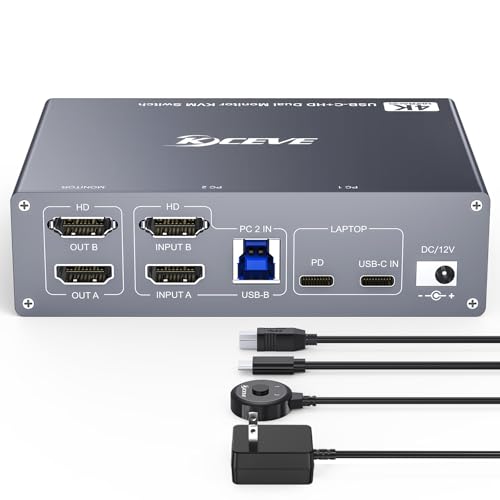
The NAWEN USB-C KVM is built for the most common dual-computer scenario: one laptop with USB-C and one desktop PC. Its key differentiator is USB-C MST (Multi-Stream Transport), which lets a single USB-C cable from the laptop drive two separate HDMI monitors in extended mode — no dock or adapter required. This one-cable approach dramatically simplifies the laptop side of your setup. The desktop connects via two HDMI cables and one USB-B cable.
The switch itself is small — roughly 4 by 3 by 1 inches — and offers four USB 3.0 ports (three USB-A plus one USB-C) for peripheral sharing. Video output is capped at 4K@60Hz per monitor, which is fine for office productivity, design work, and most non-gaming use. Two switching methods are available: a front-panel button and a 1.5-meter wired remote, both with LED status indicators. The unit requires an external 12V power supply, which is included.
The NAWEN has two notable weaknesses. First, multiple users report a pink tint or multicolor banding on the second monitor after a few hours of use, which requires cable reseating to fix. Second, the switch does not preserve display window positions — when you switch back to the laptop, your windows may need to be rearranged. For budget-conscious users with straightforward needs, this KVM works when it works, but the quality control inconsistency makes it a gamble.
Why it’s great
- USB-C MST drives dual monitors from one laptop cable in extended mode
- Compact footprint with wired remote for convenient switching
- Four USB 3.0 ports provide ample peripheral connectivity
Good to know
- Some units develop pink tint or color banding on the second monitor
- Does not preserve window positions across computer switches
- Requires external 12V power supply with no PD pass-through
8. UGREEN 8K@60Hz DisplayPort KVM Switch 2 Monitors 2 Computers

The UGREEN DP KVM is the most affordable entry point for a DisplayPort 1.4 dual-monitor KVM that actually delivers high resolutions. It supports up to 8K@60Hz on a single monitor and 4K@144Hz on dual monitors, making it a perfect match for PC gamers or video editors running high-refresh-rate DisplayPort panels. The housing is full aluminum, which keeps it cool and gives it a density that belies its price point. Two USB-A cables and a desktop controller are included in the box.
On the connectivity side, it offers four USB 3.0 ports (three USB-A and one USB-C) for peripherals, and switching happens via a front button or the wired desktop controller. The switch is plug-and-play with no drivers required, and it works with Windows, macOS, and Linux. Many users report near-instant switching times — under one second — for both video and USB, which is impressive at this price. The EDID handling is decent but not emulated, so expect a brief monitor re-detection on some switches.
The limitations are real: this KVM lacks EDID emulation, which can cause display resets. It also doesn’t support keyboard hotkey switching, so you must use the button or remote. A minority of users report intermittent monitor flickering and USB disconnects, particularly with high-bandwidth cables longer than 2 meters. The power adapter is required — it won’t run on bus power. For the price, the UGREEN DP KVM delivers extraordinary video bandwidth in a premium-feeling package, with the caveat that reliability can vary.
Why it’s great
- DisplayPort 1.4 supports 8K@60Hz and dual 4K@144Hz at a budget price
- Aluminum alloy casing provides excellent heat dissipation
- Near-instant switching speed under one second for most users
Good to know
- No EDID emulation — monitors may briefly blank during switches
- No keyboard hotkey support — button or remote only
- Some users report flickering or USB dropouts with long cables
9. DXchip 8K/4K DisplayPort KVM Switch 2 Monitors 3 Computers
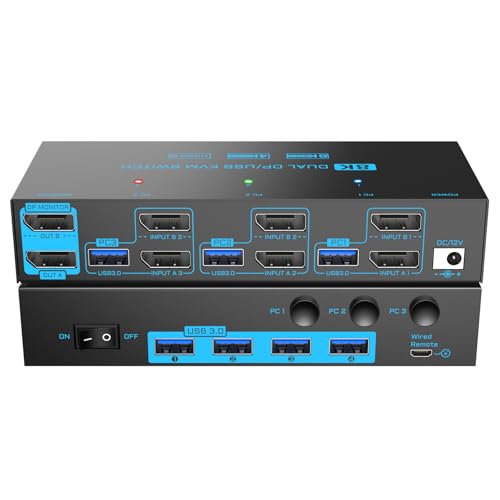
The DXchip DP KVM is one of the rare budget-tier models that supports three computers on dual DisplayPort monitors. Each computer requires two DisplayPort outputs and one USB-A port — a fairly demanding requirement, but one that matches many desktop workstations and gaming rigs. Video resolution goes up to 8K@30Hz or 4K@144Hz via DisplayPort 1.4, and the four USB 3.0 ports run at a full 5Gbps for fast peripheral sharing. A wired remote and a 12V power adapter are included.
The switching experience is straightforward: a front-panel button or the 1.5-meter wired remote toggles between machines, with LED indicators showing the active computer. Setup is plug-and-play with no drivers needed, and the unit supports Windows, macOS, and Linux equally. Several users report a 2-4 second switching delay that is consistent and predictable — not instant, but perfectly usable for productivity workflows. The build quality is basic plastic but functional.
The negative reviews highlight two issues: some units fail entirely after a few months, and the bright blue LEDs on the front panel are distractingly intense — a black marker solves the latter. The KVM also requires external power at all times; it will not draw power from USB. For users who need exactly three DisplayPort computers sharing two monitors and want to spend as little as possible, the DXchip gets the job done, provided you’re willing to roll the dice on long-term durability.
Why it’s great
- Supports three computers over dual DisplayPort — rare at this price point
- DP 1.4 delivers 8K@30Hz or 4K@144Hz for high-resolution workflows
- Four USB 3.0 ports with fast 5Gbps data transfer
Good to know
- Some units fail after a few months of normal use
- Front-panel LEDs are extremely bright and may need to be covered
- Requires external 12V power supply at all times
FAQ
Why do my monitors go black for 10 seconds every time I switch computers?
Can I use a 2 Monitor KVM with a mix of HDMI and DisplayPort monitors?
Will a dual-monitor KVM work with a MacBook Pro for extended displays?
What cables do I need for a 2 Monitor KVM switch?
Final Thoughts: The Verdict
For most users, the best 2 monitor kvm switch is the TESmart HDMI KVM because it delivers true 8K@60Hz performance with HDMI 2.1, full EDID emulation on every port, and rock-solid switching for the most demanding dual-monitor setups — professional or gaming. If you want a dock-style solution that charges your laptop and simplifies cabling, grab the AV Access KD-E10. And for a budget-friendly DisplayPort option that still handles 4K@144Hz, nothing beats the UGREEN DP KVM for sheer value.