
Managing two computers with two separate monitors, keyboards, and mice turns a productive workspace into a sprawling desk of clutter. The constant swapping of peripherals between a work laptop and a personal desktop wastes time and breaks focus. A dedicated hardware solution centralizes control, letting you operate both systems through a single keyboard, mouse, and dual-screen setup.
I’m Min — the co-founder and writer behind Gadgets Feed. I’ve spent hundreds of hours analyzing EDID handshake protocols, USB 3.0 throughput benchmarks, and multi-stream transport compatibility across dozens of KVM models to separate reliable performers from finicky failures. This guide is built from that deep database of real-world spec analysis.
Whether you are a remote worker, a video editor, or a power user running two PCs side-by-side, finding the best 2 pc 2 monitor kvm switch comes down to matching your display setup and peripheral demands to the unit’s video bandwidth, switching speed, and USB hub quality.
How To Choose The Best 2 PC 2 Monitor KVM Switch
A dual-monitor KVM switch must juggle two independent video streams, a USB uplink, and often an audio channel — all without introducing lag or display dropouts. Your choice hinges on the physical ports your computers and monitors use, the resolution and refresh rate you need, and how cleanly the switch handles peripheral reconnection. Skip the wrong spec, and you will face flickering screens, misaligned desktops, or a dead USB port when you need it most.
Video Ports: HDMI, DisplayPort, or Both
Every dual-monitor KVM expects a specific port combo from each computer. Some models require two HDMI outputs per PC, which works well for desktops but forces laptops to use adapters. Others mix one HDMI and one DisplayPort per system, cutting adapter dependency if your GPU already carries both. If you run high-refresh gaming monitors above 60Hz, prioritize a unit with DP 1.4 support — HDMI 2.0 alone tops out at 4K@60Hz. Always confirm the KVM expects native ports, not conversion cables, since HDMI-to-DP adapters often break video detection.
Switching Method and Speed
How you flip between systems matters daily. Front-panel buttons are universal, but cable-management-friendly units include a wired remote that lets you keep the KVM hidden. Hotkey switching (usually Scroll Lock or Ctrl double-tap) is the most convenient once keyboard pass-through works reliably. Be aware that some budget models disable hotkeys entirely. Switching latency ranges from under two seconds on premium units with EDID emulation to five seconds on simpler designs that re-negotiate the display handshake each time.
USB Hub Capability and Audio Integration
A shared webcam, microphone, or external drive requires USB bandwidth. Look for at least two USB 3.0 ports (5Gbps) for high-speed peripherals; USB 2.0 is acceptable for keyboard and mouse but chokes on HD webcam streams. Separate audio jacks (3.5mm combo) let you connect a headset directly to the KVM so your headset follows whichever computer is active. Without a dedicated audio port, you must route sound through your monitors’ HDMI connection, which can introduce a half-second audio delay on some units.
Quick Comparison
On smaller screens, swipe sideways to see the full table.
| Model | Category | Best For | Key Spec | Amazon |
|---|---|---|---|---|
| StarTech.com USB31DOCKH2DP | Premium | Professional content creation | 4x USB 2.0 HID + 2x USB 3.0, 4K@60Hz, EDID emulation | Amazon |
| TESmart USB 3.0 DP+HDMI | Premium | Hybrid DP and HDMI setups | 2x DP + 2x HDMI input, 4K@60Hz, IR remote, hotkey | Amazon |
| CKL 922HUA-3 | Mid-Range | Reliable office dual-monitor | 2x HDMI in, 2x HDMI out, USB 3.0 hub, hotkey & remote | Amazon |
| AV Access 4KSW21-DM | Mid-Range | Budget dual-monitor productivity | 2x HDMI in, 3x USB 3.0, 4K@60Hz, hotkey switching | Amazon |
| VPFET 8K HDMI KVM | Budget | High-res single-monitor users | 2x HDMI in, 4x USB 3.0, 8K@60Hz / 4K@120Hz, wired remote | Amazon |
| TIGKTING KVM Switch | Budget | High-refresh DP gaming | 1x HDMI + 1x DP per PC, 4x USB 3.0, 8K@60Hz / 4K@120Hz | Amazon |
In‑Depth Reviews
1. StarTech.com 2 Port Dual Monitor HDMI KVM Switch

This StarTech unit delivers the most robust video feature set among the premium tier: dual HDMI 2.0 inputs supporting 4K@60Hz with HDR10 on both monitors simultaneously. The EDID and HDCP emulation is what sets it apart — your computers retain the correct monitor EDID even when switched away, so desktop icons and window positions never scramble when you toggle back. For CAD/CAM operators or video editors who switch between a powerful render station and a laptop, this stability is the difference between seamless workflow and constant frustration.
The integrated USB 3.0 hub (two ports at 5Gbps) alongside four dedicated USB 2.0 HID ports ensures a high-end webcam or external SSD gets full bandwidth without competing with your keyboard and mouse. It also supports both stereo analog 3.5mm and 7.1 digital audio output, which is rare at this tier. The steel housing is compact but dense, and the forward-facing USB switch lets you share a flash drive between computers without cycling the whole KVM. Users report reliable operation with cables up to 3 meters, far beyond the typical 1.8-meter limit of most competitors.
On the downside, the StarTech ships with no HDMI cables or USB-B cables — you must supply six HDMI cables (or DP-to-HDMI adapters) and two USB 3.0 Type-A to Type-B cables separately, which adds to the upfront cost. A small number of owners experienced HDMI port failure after 18 months, a worrying durability note for a premium-priced device. Still, for professionals who cannot tolerate display resets mid-project, this remains the most spec-complete option in the group.
Why it’s great
- EDID and HDCP emulation prevents desktop layout scrambling
- Dedicated USB 2.0 HID ports guarantee keyboard and mouse responsiveness
- Supports 7.1 digital audio and analog output
Good to know
- No cables included; budget for six HDMI and two USB-B cables
- Some reports of HDMI port failure after 12-18 months
2. TESmart USB 3.0 DisplayPort + HDMI KVM Switch

The TESmart stands out because it accepts both DisplayPort and HDMI from each connected computer (two DP plus two HDMI inputs routed to two HDMI outputs). This hybrid approach is a lifesaver when your desktop uses DP monitors but your laptop only has HDMI — you can connect each system natively without adapter kludges. The passthrough mode for keyboards and mice handles wired, wireless, mechanical, and gaming peripherals reliably, though Bluetooth devices are not supported since the KVM cannot emulate a Bluetooth pairing handshake.
Resolution support reaches 4K@60Hz with EDID emulators on each input, which prevents the dreaded re-detection delay that cheap KVMs trigger every time you switch. The unit includes an IR remote control, front button, and hotkey switching (though some owners report the hotkey function does not always activate). One USB 3.0 port can charge a phone, a thoughtful convenience for a desk KVM. Build quality feels solid with a metal enclosure, and the box includes all necessary cables — a rarity at this price point.
Long-term reliability is a mixed bag. A large batch of user reports describe the unit working flawlessly for months, then suddenly losing video output while USB remains active. TESmart offers extended warranty registration and responsive customer support, but the failure rate seems higher than the StarTech. For users who need a flexible multi-port solution and are comfortable with some risk, the TESmart delivers features no other mid-range unit matches — especially the combined DP/HDMI input design.
Why it’s great
- Accepts both DP and HDMI from each computer natively
- EDID emulators prevent display resets on switch
- IR remote and full cable kit included
Good to know
- Some units lose video output after months of use
- Hotkey switching unreliable for some users
3. CKL KVM Switch Dual Monitor HDMI 4K@60Hz (922HUA-3)
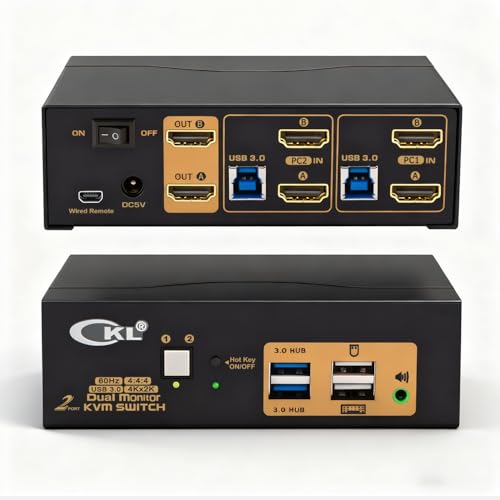
The CKL 922HUA-3 hits the sweet spot between price and reliability for a pure HDMI dual-monitor setup. It accepts two HDMI inputs per computer and outputs to two HDMI monitors, supporting 4K@60Hz with auto-detection and EDID memory that retains your display configuration even after a power loss. The integrated two-port USB 3.0 hub (5Gbps) handles webcams and external drives comfortably, and the switch supports push-button, hotkey, mouse click, and wired remote switching — the most switching method variety in this price bracket.
Cross-platform compatibility is solid; it works with Windows, Linux, Mac, and even DVR/NVR systems that lack keyboard-mouse input. The hotkey implementation (Scroll Lock double-tap) is responsive and consistent, which is not guaranteed on cheaper KVMs. The unit draws power through the USB 3.0 cable itself, eliminating the need for a separate power brick in most setups — though a barrel connector is present if you need extra juice for high-power USB peripherals. Several long-term owners report trouble-free operation over multiple years, a durability indicator that punches above its tier.
The main limitation is that each computer needs two HDMI outputs. Most laptops lack dual HDMI ports, so you will need adapters (USB-C to HDMI or DP to HDMI) for laptop connections, which adds complexity and potential failure points. A few units shipped with defective USB 3.0 hubs, though CKL support can often remap the hub via a factory reset keystroke sequence. For desktop users with dual-HDMI GPUs who want dependable hotkey switching, the CKL is the most balanced option in the mid-range segment.
Why it’s great
- Four switching methods including hotkey and mouse click
- EDID memory survives power loss
- USB-powered option reduces cable clutter
Good to know
- Requires dual HDMI outputs per computer
- Some units need a factory reset for USB hub activation
4. AV Access KVM Switch 2 Monitors 2 Computers (4KSW21-DM)

The AV Access 4KSW21-DM offers the most generous USB 3.0 hub of any unit in the mid-range tier — three USB 3.0 ports plus a dedicated USB 1.1 port for keyboard and mouse. This means you can keep a webcam, microphone, and external drive all connected at full 5Gbps speed without fighting for bandwidth. The 3.5mm audio jack is another thoughtful inclusion: it routes headphone and microphone signals to whichever computer is active, which is essential for users who jump between conference calls on a work laptop and gaming on a personal desktop.
Video support hits 4K@60Hz (4:4:4) with HDMI 2.0 and also handles high refresh rates — 1080p up to 240Hz and 1440p up to 144Hz — making it one of the few affordable dual-monitor KVMs that does not force you to sacrifice refresh for convenience. Switching is available via front button or keyboard hotkey, and the unit includes EDID emulation for faster transitions. The metal chassis feels premium, and the threaded power connector prevents accidental disconnection.
Several users report that the unit works flawlessly for the first 3-6 months but then develops HDMI signal dropouts or flaky USB connectivity. AV Access has a replacement policy, but the failure pattern suggests the internal components may degrade under constant daily use. Also, MacOS only supports mirror mode — if you need extended desktop on a Mac, look at the iDock M10 model instead. For Windows and Linux users on a tight budget who need three high-speed USB ports, this KVM provides exceptional peripheral flexibility at a low price.
Why it’s great
- Three USB 3.0 ports plus dedicated USB 1.1 for HID
- Supports 1080p@240Hz and 1440p@144Hz
- Locking power connector prevents disconnection
Good to know
- Some units experience HDMI dropout after 3-6 months
- MacOS only works in mirror mode, not extended display
5. VPFET 8K HDMI KVM Switch 2 Monitors 2 Computers
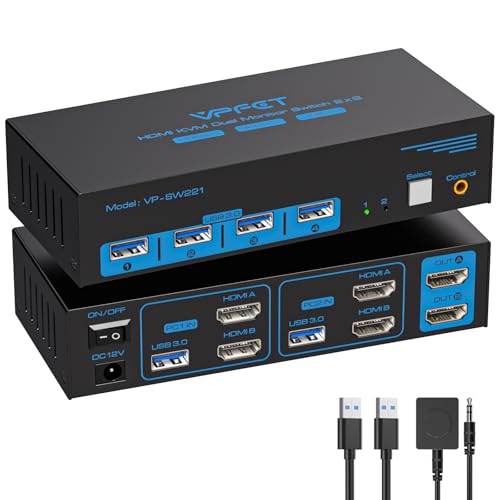
The VPFET KVM is the only unit in this guide that officially supports 8K@60Hz and 4K@120Hz, making it a strong candidate for users with next-generation monitors or those who want headroom for future upgrades. It uses HDMI 2.1 bandwidth and connects via two HDMI ports per computer, so your PC must have dual HDMI outputs. The four USB 3.0 ports operate at 5Gbps each, providing fast peripheral switching without bottleneck.
Switching is handled by a front button or the included wired remote — no hotkey support, which is a notable omission for a device at this capability level. The wired remote is large and chunky, making it easy to press without looking, but it adds a physical cable to your desk. The included accessories cover the essentials: two USB 3.0 Type-A to Type-A cables and a 12V power adapter. HDMI cables are not included, so budget for those separately. The metal casing and compact footprint (roughly 6 x 2.5 inches) fit well under a monitor arm.
User reports indicate the unit works reliably with high-refresh gaming monitors at 4K@60Hz, but some owners note a 2-second switching delay and the absence of any auto-switching feature. For a dual-monitor setup, the unit supports both extended and mirror modes, but the computer must have two separate HDMI outputs. The lack of hotkey switching is the biggest ergonomic downside — you must reach for the button or remote every time. If you need the absolute highest resolution and refresh support on a tight budget and do not mind manual switching, the VPFET delivers where no other entry-level KVM dares to go.
Why it’s great
- 8K@60Hz and 4K@120Hz support for high-refresh monitors
- Four USB 3.0 ports offer ample peripheral bandwidth
- Sturdy metal enclosure with compact footprint
Good to know
- No hotkey switching; button or wired remote only
- Requires dual HDMI output from each computer
6. TIGKTING KVM Switch 2 Monitors 2 Computers (HDMI+DP)

The TIGKTING KVM fills the specific gap for users who have one HDMI monitor and one DisplayPort monitor per computer but do not want to buy two separate KVMs. It uses a fixed HDMI + DP input per computer and outputs the same combo to two monitors, supporting up to 8K@60Hz or 4K@120Hz with DP 1.4 bandwidth. This is the cheapest way to get dual-monitor support with DisplayPort included, and it happily drives 144Hz gaming monitors once you supply certified DP 1.4 cables.
The unit includes four USB 3.0 ports operating at 5Gbps, labeled clearly for easy peripheral assignment. Switching is available via the front button or the included wired remote, but there is no hotkey support. Setup is genuinely plug-and-play — the box includes two USB 3.0 Type-A to Type-B cables and a 12V power adapter, but you must supply your own DP and HDMI cables. The metal housing lacks rubber feet, so it slides on smooth desks unless you add adhesive pads yourself.
User feedback consistently praises the sharp display output and fast USB reconnection after switching (typically 2-3 seconds). The main caution is that the KVM does not accept conversion cables — you must use native HDMI and DP outputs on your computers. Laptop users may need a USB-C hub with native DP output to make this work. For a pure desktop dual-PC setup with one HDMI and one DP monitor, the TIGKTING offers the most port-specific value in the budget tier, though the lack of hotkeys means you will always reach for the button box.
Why it’s great
- Native HDMI plus DP input supports mixed monitor ecosystems
- 4K@120Hz and 8K@60Hz ready with DP 1.4
- Quick and stable USB reconnection
Good to know
- No hotkey switching; wired remote or button only
- Not compatible with HDMI-to-DP conversion cables
FAQ
Will a 2 PC 2 monitor KVM switch work if my laptop only has one HDMI port?
Why does my KVM switch sometimes lose keyboard or mouse connection after switching?
Can I use a 2 PC 2 monitor KVM switch with one computer and one monitor only?
Final Thoughts: The Verdict
For most users, the best 2 pc 2 monitor kvm switch winner is the StarTech.com 2 Port Dual Monitor HDMI KVM Switch because it combines EDID emulation, USB 3.0 bandwidth, and 4K@60Hz support with the most robust build quality in the group. If you need a mixed DP and HDMI ecosystem without adapter complexity, grab the TESmart USB 3.0 DP+HDMI KVM Switch for its unmatched input versatility. And for budget-conscious desktop users running dual HDMI monitors who want reliable hotkey switching, nothing beats the CKL 922HUA-3.