
Our readers keep the lights on and my morning glass full of iced black tea. As an Amazon Associate, I earn from qualifying purchases.
Specs are compiled from manufacturer listings and verified buyer reviews and can change over time — please confirm the key details on the product page before buying.
If you run a work laptop and a personal desktop on the same monitor, you already know the daily annoyance: reaching behind the screen to swap cables, or keeping two keyboards on a desk that has room for one. A 2 PC KVM switch (a small box that lets two computers share one screen, keyboard, and mouse) fixes that in one button press. The trick is picking the right one — the wrong box stutters on video, drops your mouse, or refuses to wake a sleeping PC. The picks below all control exactly two computers, and the winner here is the Alxum HDMI KVM Switch, which pairs the highest score in this group with a wired remote and a genuinely useful audio jack.
I’m Min — the founder and writer behind Gadgets Feed. This guide is built by comparing the manufacturers’ published specifications and the patterns across verified customer reviews, so you get each pick’s real strengths and trade-offs instead of marketing spin.
Resolution ceilings, USB generation, and switching method decide whether a box feels instant or feels like a chore. Here is what separates a smooth 2 pc kvm switch from one you will unplug in a week.
Our Picks at a Glance
How To Choose The Best 2 PC KVM Switch
Every box in this category does the same headline job: two computers, one keyboard, one mouse, one screen. What separates them is how cleanly they do it. Before you pick, match three things — your connector type, your resolution, and your switching habit.
Connectors first, everything else second
Your two computers and your monitor must all speak the same video language. Most modern desktops and laptops use HDMI, which is why HDMI boxes dominate this list. Older office towers often carry VGA (the blue trapezoid port), and one pick here is built specifically for that. Check the back of both computers before you buy anything — a mismatched port is the one problem no setting can fix.
Resolution tells you what the box can actually push
A box rated for 4K@60Hz refreshes the screen 60 times a second at 3840×2160 pixels — smooth enough for video editing and most games. An 8K rating on a budget box does not automatically look better; many of these units run 8K only at 30Hz, which is a slower refresh and can feel choppy in motion. For everyday work, 4K@60Hz is the honest balance.
How you switch changes how you work
Hotkey switching means tapping a key combo — often Scroll Lock twice — to jump between machines without touching a box. Button switching is a physical press. A wired remote puts that button on your desk while the box hides behind the monitor. None is strictly better; it depends on if you want your hands to stay on the keyboard or your eyes to stay on the screen.
Quick Comparison
| Model | Best For | Video Standard | USB Ports | Switching | Amazon |
|---|---|---|---|---|---|
| Alxum HDMI KVM Switch★ Best Overall | All-round pick | 4K@60Hz, HDMI 2.0/1.4 | USB 3.0 | Button + Remote | Amazon |
| TRENDnet TK-207KBest for Legacy PCs | Legacy VGA towers | VGA up to 2048×1536 | USB 2.0 | Button + Hotkey | Amazon |
| GREATHTEK 4K HDMI KVMBest for Multi-Monitor | Dual-monitor desks | 4K@60Hz, HDMI 2.0 | 3 x USB 3.0 | Button + Remote | Amazon |
| Hearvo S7232H | Mixed-port setups | 4K@60Hz, HDCP 2.2 | 3 x USB-A, 1 x USB-C | Button + Remote | Amazon |
| UGREEN HDMI KVM | Cable-included kit | 4K@60Hz, HDMI 2.0 | 4 x USB | Button + Remote | Amazon |
| BDFFLY 4K KVM Switch | Legacy printer sharing | 4K@60Hz, HDMI 2.0 | 3 x USB 3.0 | Button + Remote | Amazon |
| GREATHTEK 8K KVM Switch | High-refresh gaming | 8K@30Hz, 4K@240Hz, HDMI 2.1 | 3 x USB 3.0 | Button + Remote | Amazon |
| SUIDEK HDMI KVM | Wall-powered stability | 4K@60Hz | 4 x USB 3.0 | Button + Remote | Amazon |
| GREATHTEK 8K@60Hz KVM | Budget 8K claim | 8K@60Hz, 4K@120Hz | 3 x USB 3.0 | Button + Remote | Amazon |
In‑Depth Reviews
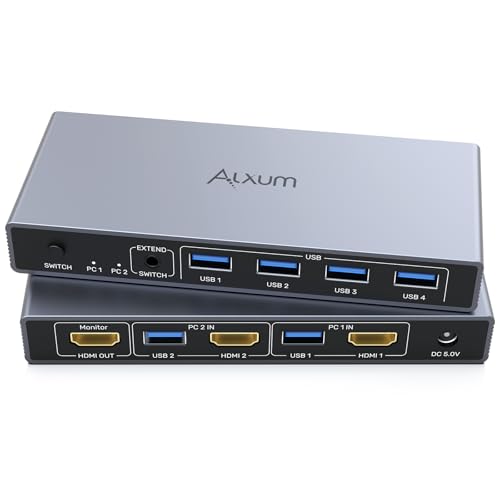
1. Alxum HDMI KVM Switch 1 Monitor 2 Computers with Audio Jack
Our pick — 4.5★ from 150+ verified ratings; the strongest balance of quality and price.
The one box here that carries an audio jack, a remote, and the steadiest reputation for just working.
The Alxum runs your monitor at 4K Ultra HD — that is 3840×2160 at 60Hz, a picture sharp and smooth enough for photo work, gaming, or high-quality streaming. Both audio and video pass through the box via an audio jack, which many rivals skip. Switching takes about four seconds, triggered by a button on the unit or the bundled remote, so you never reach behind your monitor.
What wins people over is build and function above all else — the two things buyers single out most in this unit’s feedback. It draws just 2 A, runs on a 1-way circuit, and asks nothing of you beyond plugging in. Owners describe HDMI switching between Windows 10 and 11 systems as clean, with the remote button feeling solid in the hand. As buyers report put it: “You have to use usb AND hdmi for each computer. Works well and the switch only takes about 4 seconds on my system.” Its Amazon rating runs about 2.0x the TRENDnet TK-207K’s, despite both sitting at the same buy-in tier.
There is one honest snag: a handful of owners found a single USB port dead on arrival and simply lived with it, and the unit can feel light for its size. That is a rare-unit complaint, not a pattern — most buyers plug in and go. For a wired remote, real audio passthrough, and 4K@60Hz with no driver install, this is where your money goes furthest. Note it ships at 5.75 x 2.44 x 0.81 inches, small enough to tuck under a monitor stand and forget about.
What Lands Well
- 4K@60Hz, HDMI 2.0/1.4, and HDCP support — clean picture, no HDCP drop-outs
- USB 3.0 speeds up to 5Gbps for drives, controllers, and printers
- Button or wired remote switching, alongside ESD protection against static damage
Where It Won’t Win You Over
- Occasional unit arrives with one dead USB port — check all ports in the first week
- No hotkey switching, so you always press a button or tap the remote
Reach for this if: you want the fullest-featured all-rounder — audio passthrough, remote, 4K@60Hz — with the least risk.
Look elsewhere if: you insist on keyboard hotkey switching, which this box does not offer.
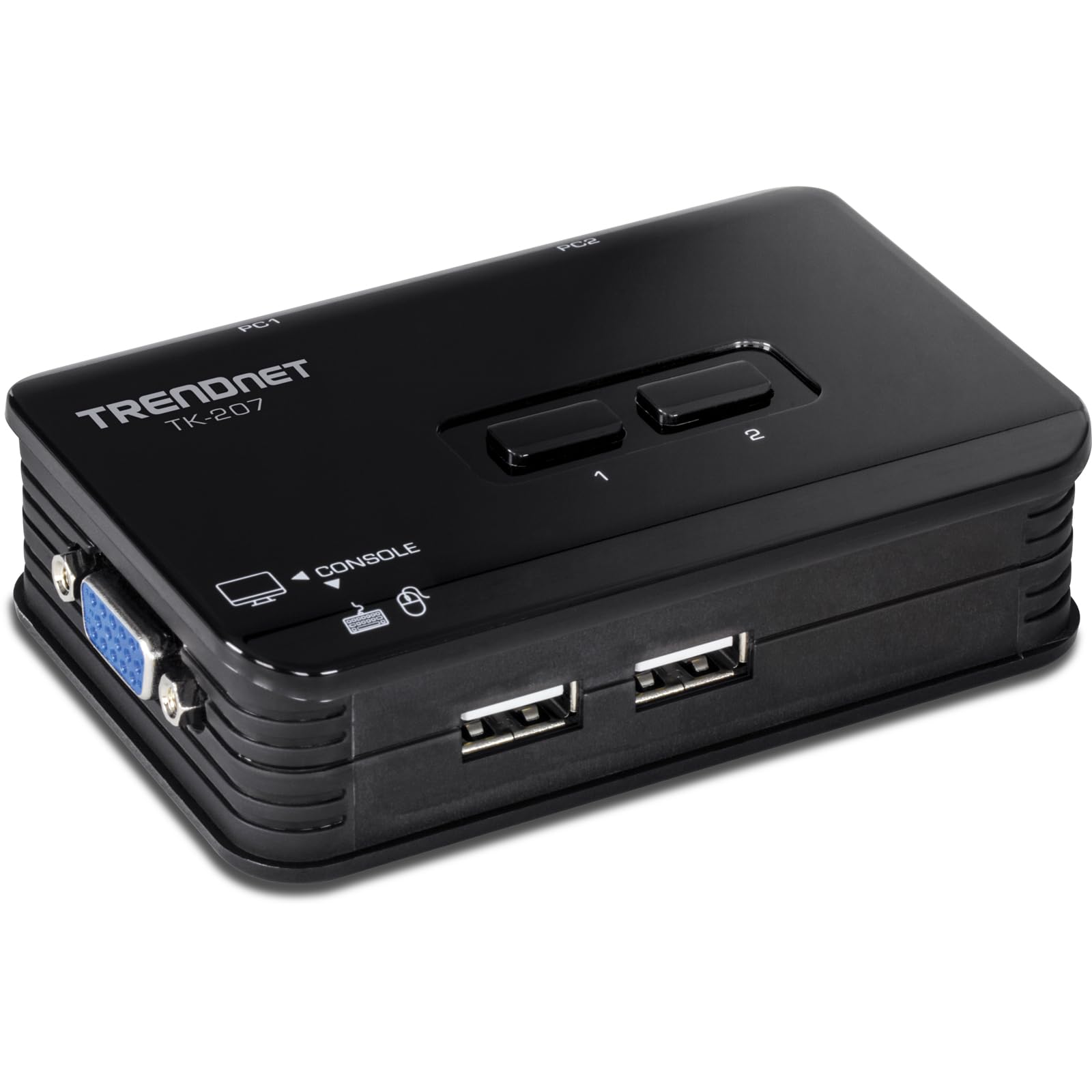
2. TRENDnet 2-Port USB KVM Switch, TK-207K
The veteran box for VGA-era towers — instant switching, hotkeys, and no power brick to hide.
If your two computers still carry VGA ports — the wide blue trapezoid connector older desktops use — this is your match. The TK-207K delivers VGA resolution up to 2048×1536 at a 60Hz refresh rate, and it is bus-powered, meaning it draws its current from the computers themselves rather than a wall adapter. That 1 A draw means no power brick cluttering your floor, and two included 1.2m (4ft) VGA/USB cables mean you can start switching the moment it arrives.
Reliability is the story here, far more than any single feature. Hotkey switching (tapping Scroll Lock twice, or Num Lock twice on Linux) lets you jump between machines without touching the box, and a physical button on the front panel handles the rest. Owners describe switching as instant and the small footprint as desk-friendly. As one long-term review sums it up: still working great after 6 months. It keeps a USB 2.0 pair of keyboard/mouse ports active, and it plays nicely with a Logitech S510 wireless combo and Windows 10 Dell desktops.
Where this older unit can trip you up is Apple hardware. On Mac OS 9, you have to be sitting in the Finder when you switch, or open applications can freeze, and you need to wait a few seconds before your mouse and keyboard respond again. Compatibility with keyboard and mouse recognition is genuinely hit-or-miss across mixed setups, so know your OS before you commit. For Windows and Linux users, though, it has earned its keep.
Who it fits: VGA-era Windows or Linux tower owners who want instant hotkey switching and zero power adapter.
What to weigh: no audio passthrough, no HDMI, and Mac users will find the switching sequence fussy.
Buy it when: you have VGA ports on both machines and want the simplest possible bus-powered box.
Pass it by when: either of your computers is on HDMI, which no adapter here will cleanly bridge.
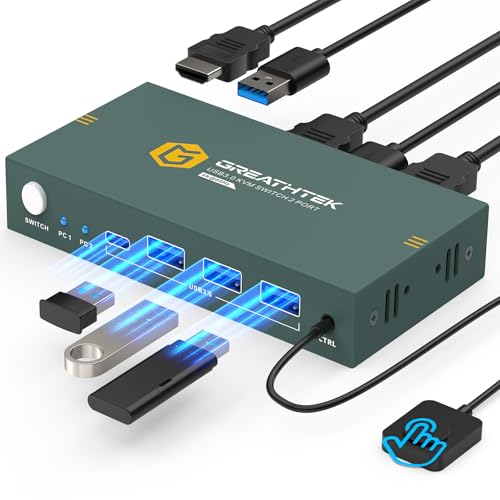
3. GREATHTEK HDMI KVM Switch 1 Monitor 2 Computers 4K@60Hz
A metal-cased switcher that keeps two desktops sharing one screen, keyboard, and mouse with almost no fuss.
This GREATHTEK box targets the classic two-machine desk: a personal tower and a work tower, one screen between them. It pushes 4K resolution at 3840×2160 and 60Hz, with backward compatibility down to 1080P, and it carries three USB 3.0 ports for sharing keyboards, mice, printers, scanners, and flash drives. Adaptive EDID (a protocol that stops your screen from flickering when switching) keeps the picture stable, and the whole thing runs without a power supply or driver software — just connect every cable and go.
The wired remote is the feature that keeps coming up in buyer feedback, and it earns its place. You can mount the button where you can reach it and route the cable cleanly, so the box itself stays tucked out of sight. Owners describe it as eliminating redundant monitors, keyboards, and mice, and praise the fast, quiet switch between desktop and work laptop. One owner who had cycled through several KVMs called it the best they had tried after months of daily use, noting it avoided the keyboard dropout and boot-up screen-recognition issues that plagued the earlier boxes.
The catch is that this unit ships without the HDMI cables you need — you supply three of them, one out to your monitor and two back to your computers. Some owners also ran into units that failed quickly or dropped HDMI adapters, so test everything while it is still returnable. It is a compact box, but its luck depends on quality cables on both ends.
Choose this for: a two-monitor, two-tower setup where you want one clean switching point on the desk.
Think twice if: you cannot supply your own 4K-rated HDMI cables, or you depend on HDMI adapters.
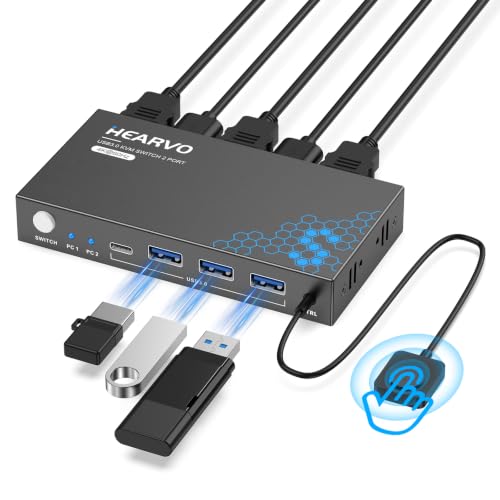
4. Hearvo USB 3.0 HDMI KVM Switch, S7232H
Four USB 3.0 ports — three classic and one USB-C — for the desk with more gear than slots.
Extra ports are this Hearvo unit’s calling card. It packs four USB 3.0 ports with data transfer up to 5Gbps, and that count includes a USB-C port alongside three USB-A, so newer keyboards, webcams, and dongles can plug straight in. Video runs to 4K at 60Hz with HDCP 2.2, which means streaming services and protected content display without blackout. Adaptive EDID smooths the switch, and like most boxes here it installs with no drivers or power brick.
What makes it practical is the wired remote. You can tuck the box on the back of your desk or under a shelf and still reach the switch, which keeps cable clutter out of sight. Setup is genuinely quick for most owners, and the switching itself is crisp when it works. That said, this is the pick where compatibility gets choosy: mixed results turn up with wireless keyboard-and-mouse combos, and some setups show a four-to-six-second lag on switching rather than the near-instant response you get from the Alxum above.
The biggest honest gap is audio. This box has no audio in or out — if you route your speakers or headset through your monitor or a separate audio switcher, you are fine, but if you wanted one box to carry sound too, you will need a workaround. Also note it wants a specific setup (matched resolutions, no exotic adapters) to behave. Buy it for the four USB 3.0 ports and the remote, not for audio.
The real draw: four USB 3.0 ports, one of them USB-C, plus HDCP 2.2 for protected streaming and a remote to hide the box.
The honest gap: no audio pass-through at all, and wireless peripherals are hit-or-miss.
Best for: desks running several USB peripherals where one more cable run is not an option.
skip it if: you want audio to follow your switch, which it simply will not do.
5. UGREEN HDMI KVM Switch 1 Monitor 2 Computers

The one that shows up ready to run, cables and desktop controller in the box.
Most switches make you hunt for HDMI cables separately. This UGREEN kit does not — it arrives with two HDMI cables, two USB-A-to-B cables, and a desktop controller, so setup is genuinely plug-and-play with nothing left to buy. It runs 4K at 60Hz and also handles 4K@30Hz, 2560×1440@120Hz, and lower resolutions, with HDMI 2.0 and HDCP 2.2/1.4 support across Windows, Mac, and Linux, plus game consoles like the PS5 and Nintendo Switch.
The single-button plus remote arrangement is what most owners praise. Direct feedback highlights swapping a keyboard, mouse, and headset between a PC and a Mac mini with minimal delay, and remote control that lets you stow the box while keeping the button within reach. The desktop controller reads clearly, connections hold, and for home-office work it does its job without ceremony. As one reviewer put it in the most useful line in the reviews: “If you use more than 3 peripherals buy a hub.”
Be warned: this unit needs every included cable connected, or it does not perform. Owners note a must-use-all-cables quirk and a few reports of mild USB bugginess, so plan for the full harness. Its 4K rating is honest — 60Hz at 3840×2160 is exactly what a modern desk wants — but if you rely on a docking station or want automatic screen-mode keeping, this box will not be your friend.
Where It Shines
- Two HDMI cables, two USB cables, and the desktop controller all included
- 4K@60Hz plus 1440p@120Hz and 4K@30Hz support, ideal for a modern single-screen desk
- Wide OS support: Windows 11 down to XP, Mac OS, Linux, and game consoles
Where It Gets Fussy
- Requires every included cable connected, or it stops behaving
- No EDID emulation and no hotkey switching — button or remote only
Pick this when: you want the full kit — cables, power, remote — and hate sourcing parts piece by piece.
pass on it if: you already own quality cables and want to save the bulk.
6. BDFFLY 4K@60Hz HDMI KVM Switch with 3 USB 3.0 Ports
A tidy two-in-one-out box with a wired remote that keeps old printers in the loop.
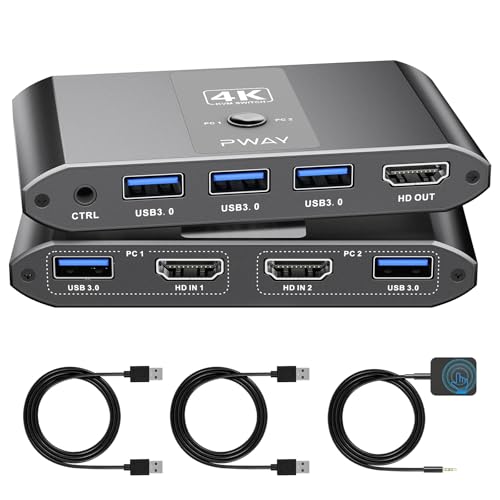
This BDFFLY unit does the standard job — two computers in, one monitor out — with a 4K@60Hz ceiling and backward support for 4K@30Hz and 1080P@60Hz. It carries three USB 3.0 ports for a keyboard, mouse, printer, or USB drive, and the whole thing runs without a power supply or driver software. Adaptive EDID keeps image transmission stable, and HDMI 2.0 and HDCP 2.2 cover protected streaming content.
The wired remote is what most buyers mention, and it fixes a real annoyance. The controller connects over a standard stereo audio connector (the 3.5mm jack), so you can reposition it freely instead of being stuck reaching for a hidden box. Owners describe plug-and-play setup that took minutes, sharp displays, and reliable USB sharing — including keeping a legacy Windows 7 PC connected alongside a main workstation for an older printer.
One quirk to know: a portion of owners received a remote that did not work, though the button on the main unit works fine, so it is a liveable flaw if the box sits on your desk. Compatibility with certain wireless peripherals can be inconsistent, so if your keyboard and mouse are Bluetooth, check with the seller first. Everyone else gets a clean, unobtrusive switcher at a friendly price point.
Standout feature: wired remote over standard stereo audio connection — reposition it anywhere without needing a special dock.
Keep in mind: the remote can arrive non-functional, and Bluetooth peripherals are hit-or-miss here.
Great fit for: owners who want a simple, repairable setup and don’t rely on the remote working.
Not for: desks that depend on wireless Bluetooth input devices or a working remote every time.
7. GREATHTEK 8K@60Hz HDMI KVM Switch 2 Computers 1 Monitor
Pushes refresh rates far past the pack if your monitor can follow along.
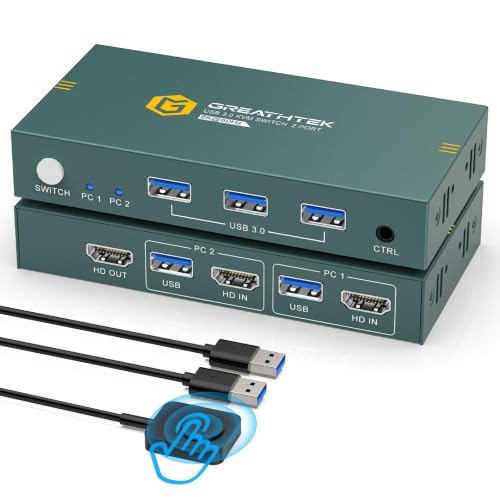
If refresh rate is your measure, this GREATHTEK is the sharpest tool here. It supports resolutions up to 8K@30Hz, with a standout 4K@240Hz option on top of 4K@144Hz, 4K@120Hz, 2K, 3D, and 1080P. That 240Hz ceiling means gaming and motion-heavy work stay fluid. Support for HDMI 2.1 and HDCP 2.3 rounds out the modern connectivity, and the whole box runs plug-and-play with a physical button and wired remote and no power supply needed.
The unit’s build and OS flexibility are what keep owners coming back. It works across Windows, macOS, dual-boot Linux, and ChromeOS, and it handles USB storage sharing via the front hub alongside its three USB 3.0 ports. Owners describe plugging something into every port and having it just work, and one customer service report notes the seller responded within 24 hours on an issue. It is a small, well-formed box with a clean remote toggle.
The honest limit is that this unit is more finicky with some laptop hardware. Some MacBook Pro and Mac mini owners found their keyboard and mouse would not register through the switch even after a replacement, though monitors worked fine. And if your mouse or keyboard connects by wireless dongle, this box will not reliably detect it. If your setup is straightforward desktops and wired peripherals, though, it delivers the fastest refresh rate in the group.
Why It Ranks High
- 8K@30Hz and up to 4K@240Hz — the highest refresh ceiling on this list
- HDMI 2.1 and HDCP 2.3 support for the newest hardware and protected content
- Plug-and-play across Windows, macOS, Linux, and ChromeOS
What Can Trip It Up
- Some MacBook Pro and Mac mini setups fail to recognize keyboard and mouse through the switch
- No support for Bluetooth or wireless-dongle input devices
Reach for this when: you game or work at high refresh rates and want the fastest switching video on the list.
Look elsewhere if: you run a Mac laptop or rely on wireless input devices.
8. SUIDEK HDMI KVM Switch 1 Monitor 2 Computers

Aluminum body, wall power, four USB 3.0 ports — the sturdiest switcher in the lineup.
This SUIDEK unit is built like a small piece of hardware rather than a plastic toy. It uses an aluminum case, ships with a DC 5V power adapter so it never leans on your computer’s USB power, and drives 4K at 60Hz. It carries four USB 3.0 ports for sharing a mouse, keyboard, flash drive, and printer, and it obeys the setup rule that input and output resolutions need to match for the cleanest picture. Edge-to-edge it is IP60-rated, meaning it shrugs off dust ingress better than most here.
what separates it is the power adapter. Because it runs from the wall, there is no USB strain and no flicker when a low-power port drops charge. Owners describe it as solid and heavy in the hand, switching hot with no dropouts, and staying reliable for months — a common theme in the unit’s feedback. The wired remote and one-button switch keep your switching simple, and four front USB ports handle a keyboard, mouse, printer, and scanner at once, provided you supply the HDMI and USB cables yourself.
The trade-offs are honest and clear: this unit ships with no HDMI cables and requires the adapter to stay plugged in. If you’re going to use it on a shelf or wall it is ideal; if you want a battery-free box that never needs a wall outlet, look at the Alxum instead. For buyers prioritizing build quality across years of daily use, the aluminum case and wall power make this the pick to beat.
Build story: aluminum shell, dedicated 5V wall power, 4 USB 3.0 ports, and a wired remote — the most desk-solid unit here.
Setup caveat: HDMI and USB cables are not included, and it must stay connected to the wall adapter.
Ideal for: anyone betting on durability and wall power to keep switching rock-steady.
Wrong pick if: you want a cable-free setup or a laptop-only workflow.
9. GREATHTEK 8K@60Hz KVM Switch 2 Port

A budget switcher with a button-free remote and an 8K label that wants the right cable.
The headline here is 8K@60Hz, with support down through 4K@120Hz, 3D, and 1080P — but make sure you feed it an HDMI 2.0 cable to hit that top figure, or you will not get the resolution you paid for. It carries three USB 3.0 ports for keyboard, mouse, printer, or USB drives, and it wants no power adapter. Windows, Mac OS, Linux, and Chrome OS are all supported with no driver installation, via button or wired remote, so you can hide the box and reach for the switch without giving the desk another cable run.
What owners value most is the low-friction feel. Button-free switching is the standout, and the remote lets you tap between machines without a box on your desk. Buyers describe compact, sturdy metal cases, quick installs, and good value, with the unit being a common pick for an office and living-room TV. When the switching works, it works instantly.
The honest caveat is consistency. Reliability is the aspect most questioned in this unit’s feedback, with some units needing a swap for a version carrying a front USB power port to fix USB detection, and a couple working with only keyboard and mouse rather than a full spread of USB peripherals. For a basic wired setup, it delivers the budget 8K label for less, but expect to swap a unit if USB detection fails.
Buy this when: you want a button-free remote, HDMI 2.0 handling, and 8K label at the friendlier buy-in point.
Wait and save if: you need rock-solid USB detection on the first box, since this unit may take a swap to settle.
Understanding the Specs
Resolution and Refresh Rate
Resolution is how many pixels fill your screen; refresh rate is how many times per second the picture redraws, measured in Hz. A 4K box refreshes at 3840×2160 pixels, and the Hz figure decides whether motion looks fluid or steppy. The advertised ceiling only works if your monitor, your HDMI cable, and your source all support that same rate — plug a 4K@60Hz box into a 1080p monitor and you get 1080p, no matter what the box claims.
USB Version and Device Sharing
USB 3.0 ports move data up to 5Gbps and handle modern peripherals like webcams and external drives, while older USB 2.0 ports cover keyboards and mice but stall on heavy transfers. Match the port generation to the devices you actually plug in. If you feed a hub, remember that USB draws a limited current per port, so a switched hub feeding three wireless receivers at once can act sluggish.
FAQ
Will a 2 PC KVM switch run both computers at the same time?
Do I need to plug in the USB cables as well as the video cables?
What is the difference between HDMI and VGA on a KVM switch?
Why does my KVM switch take several seconds to show a picture?
Can I use wireless keyboards and mice with a KVM switch?
Will a KVM switch let both my computers share one printer?
Does a KVM switch need a power adapter?
Can I run two monitors from a single 2 PC KVM switch?
How do I know which HDMI cable to buy for my KVM switch?
Will hotkey switching work on my Mac or Linux machine?
Final Thoughts: The Verdict
For most two-computer desks, the Alxum HDMI KVM Switch is the safest call: 4.5 stars across 170+ owners, audio passthrough, a wired remote, and 4K@60Hz from the start. If your two computers still run VGA ports, the TRENDnet TK-207K handles hotkey switching and needs no power brick. For a desk that wants four USB slots and a USB-C port, the Hearvo S7232H is your pick — just plan around its missing audio. And if you game at high refresh or run a mixed Mac-and-PC desk, weigh the GREATHTEK 8K KVM Switch against your peripherals first.
How We Picked
We do not accept paid placement. Every pick is matched to a real buyer and a real use-case; we do not hands-on test units.
Sources & Methodology
Specifications: manufacturer listings and product documentation. Review insights: verified customer reviews, as of September 2026. Pricing: not shown on this page (it changes often); check the current price via the retailer link.
As an Amazon Associate, Gadgets Feed earns from qualifying purchases. This does not affect which products we feature.