
Our readers keep the lights on and my morning glass full of iced black tea. As an Amazon Associate, I earn from qualifying purchases.
Specs are compiled from manufacturer listings and verified buyer reviews and can change over time — please confirm the key details on the product page before buying.
A 200mm case fan moves a huge wall of air, but the wrong one turns your quiet PC build into a desk-side wind tunnel. The challenge is finding a 200mm fan that delivers high CFM without audible noise and matches your case’s non-standard mounting holes. This guide compares published specs and verified owner feedback to help you pick the right fan quickly.
I’m Min — the founder and writer behind Gadgets Feed. This guide is built by comparing the manufacturers’ published specifications and the patterns across verified customer reviews, so you get each pick’s real strengths and trade-offs instead of marketing spin.
Whether you are upgrading an old case or building fresh, this breakdown of the best 200mm case fan gives you the straight facts on noise, airflow, and fit so you don’t end up with a box of parts that doesn’t work.
Our Picks at a Glance


How To Choose The Best 200mm Case Fan
A 200mm fan’s larger size and slower speed let it move equivalent air at a lower, less intrusive noise than 120mm or 140mm fans. Not all 200mm fans share the same mounting pattern, and minor spec variations significantly affect real-world performance.
Mounting Hole Spacing & Thickness
Unlike smaller fans, 200mm models do not have a universal mounting pattern. Some use 154x154mm holes, others 170x170mm, and a few use a wider 110x180mm spacing. Measure your case’s mounting holes before you buy, because a fan that is 0.5mm off will not bolt down. Also check the thickness — most 200mm fans are 30mm thick, but a few are slimmer at around 25mm, which matters if you have a radiator or a tight panel clearance.
Noise Level vs Airflow
Aim for a fan that pushes at least 100 CFM while staying under 25 dB for a quiet build. A fan at 25 decibels is generally quiet enough for a living room PC, while anything over 28 decibels can sound like a low hum under load. Pay attention to the fan bearing type: hydraulic and fluid-dynamic bearings run quieter and last longer than basic sleeve bearings.
PWM vs Fixed Speed
PWM fans (4-pin) let your motherboard automatically adjust the speed based on temperature, which keeps things quieter at idle and ramps up only when needed. Fixed-speed 3-pin fans run at a constant RPM unless you use a manual resistor or a fan controller. PWM fans offer the best balance of quiet idle and on-demand cooling for most builders.
Quick Comparison
| Model | Best For | Noise Level | Airflow (CFM) | Max RPM | Amazon |
|---|---|---|---|---|---|
| Thermaltake Pure 20 Series★ Best Overall | Budget High Airflow | 28.2 dB | 129.64 CFM | 800 RPM | Amazon |
| Noctua NF-A20 FLXSilent King | Silent Builds | 18.1 dB | 88 CFM | 800 RPM | Amazon |
| Cooler Master SickleFlow 200 aRGB | Lowest Noise with RGB | 15.7 dB | 102.8 CFM | 800 RPM | Amazon |
| Thermaltake CT200 ARGB PWM | Best Airflow with PWM | 27.2 dB | 131.6 CFM | 900 RPM | Amazon |
| Phanteks PH-F200SP_BBK | Static Pressure for Radiators | 25 dB | 110.1 CFM | 1100 RPM | Amazon |
| Cooler Master MasterFan MF200R | ARGB with Speed Control | 28 dB | 90.3 CFM | 950 RPM | Amazon |
| Thermaltake CT200 PWM (Non-RGB) | Max Airflow without Bling | 27.2 dB | 131.6 CFM | 900 RPM | Amazon |
In‑Depth Reviews
1. Thermaltake 200mm Pure 20 Series Black 200x30mm Thick Quiet High Airflow Case Fan
Our pick — 4.5★ from 2,500+ verified ratings; the strongest balance of quality and price.
The Thermaltake Pure 20 Series is a proven, affordable option that pushes a lot of air.
You get a 200mm fan that moves 129.64 CFM — second only to the CT200 in raw airflow on this list. It is a 30mm thick fan (the deep kind) that generates high air pressure and flow, and it runs at a noise level of 28.2 decibels. Many buyers use it for unusual applications: one owner reported it was an “excellent RV exhaust fan,” describing it as quiet with good airflow and a handy night-light. Another reviewer said it is “barely audible at 100%” when used in a 3D-printed rack for positive pressure.
This fan uses a long life sleeve bearing, which is less durable than the hydraulic bearings found in the CT200 and Noctua fans. It is also heavier at 15.04 ounces (about 0.43 kg) compared to the 0.2 kg CT200 ARGB, and some buyers mention the included screws are sometimes unusable and need to be replaced with standard case screws.
Why it sells well
- Very high airflow at 129.64 CFM for the price
- Proven reliable after a year of use, per owner reports
- LED version available for visual flair
Limitations
- Louder than most at 28.2 dB
- Sleeve bearing is less durable than hydraulic bearings
- Mounting holes may not align with all cases
The budget airflow champion: If you need high CFM on a tight budget and can handle the noise, the Pure 20 Series is a solid pick.
Look elsewhere if: You want a whisper-quiet fan or need a bearing that lasts through years of 24/7 operation.
2. Noctua NF-A20 FLX, Premium Quiet Fan, 3-Pin (200x30mm, Brown)
The Noctua NF-A20 is the fan you pick when silence is non-negotiable.
For a bedroom or office PC where fan noise is unacceptable, this is the fan to choose. At its maximum 800 RPM, it measures just 18.1 decibels — about the same as a quiet library — and pushes 88 CFM. Its 88 CFM is not the highest, but Noctua’s Flow Acceleration Channels and Advanced Acoustic Optimisation frame deliver smooth, non-turbulent airflow.
This is a 3-pin FLX fan, not PWM, so you control the speed using the included Low-Noise Adaptor (which drops it to 550 RPM for near-silent operation). Buyers report using it in unusual places like ventilating a trailer’s under-bed area, noting the ultra-low power draw of 0.08A DC and the high 150,000-hour MTTF rating. The three sets of mounting holes (154×154, 170×170, and 110x180mm) make it among the most compatible 200mm fans across different cases.
What makes it worth the premium
- Industry-leading quiet at 18.1 dB
- Three mounting patterns for wide case compatibility
- Excellent 150,000-hour estimated lifespan
The trade-offs
- 3-pin only (no automatic PWM speed control)
- Lower max airflow than competing 200mm fans
The quietest pick: If your priority is a near-silent PC and you do not need automatic PWM control, the Noctua is the top choice.
Watch out for: The lower 88 CFM means it may not be the best for high-heat gaming rigs pushing over 400W of components.
3. Cooler Master SickleFlow 200 aRGB Case Fan, 200mm aRGB Gen2 Lighting, Dynamic PWM 800 RPM

The SickleFlow 200 delivers RGB lighting at a noise level that beats nearly everything else.
At only 15.7 decibels, this is the quietest fan in the entire roundup, and it pushes a respectable 102.8 CFM. At 15.7 dB, the SickleFlow is much quieter than the Thermaltake Pure 20 Series at 28.2 dB, meaning you can run this fan at max speed and barely hear it. The frosted blade design diffuses the aRGB Gen2 lighting evenly, so it looks good from any angle. The hybrid frame uses flexible anti-resonance mounts to cut vibration noise further.
A PWM 4-pin header gives you full speed control from 0 to 800 RPM, which lets you set a quiet curve for desktop work and ramp up when gaming. One reviewer noted it was “super quiet at max speed” and used it in a push-pull configuration. Unlike the heavier Cooler Master MasterFan MF200R (which is 0.5 kilograms), the SickleFlow weighs the same 0.5 kg but is much quieter.
Standout strengths
- Lowest noise floor at 15.7 dB
- PWM controllable from 0-800 RPM
- Smooth, even aRGB lighting with frosted blades
Consider this
- Some owners mention case clearance issues due to the hybrid frame design
- Not the highest CFM for extreme airflow needs
Perfect for quiet RGB builds: If you want addressable RGB lighting without the fan being audible, this is the one to get.
Not for you if: You need maximum airflow for a high-heat, overclocked system — the 102.8 CFM is decent but not the top of the class.
4. Thermaltake CT200 ARGB PWM Fan Single Pack, PWM Controlled 500~900 rpm, 5V Motherboard Sync

The CT200 ARGB combines PWM flexibility, high 131.6 CFM airflow, and vibrant addressable lighting.
This fan gives you the best airflow on the list at 131.6 CFM, thanks to its 9 tune blades, and a static pressure of 1.92mm-H20 that is strong enough for radiator use. It runs at a noise level of 27.2 dB, which is quieter than the Pure 20 Series but louder than the SickleFlow. The PWM range from 500 to 900 RPM gives you fine control, and the daisy chainable 4-pin connectors make cable management easier.
The 5V ARGB connector lets you sync lighting with your motherboard software (Asus, ASRock, MSI, and others), and the 9 individual addressable LEDs create a smooth color effect. One buyer mentioned they used it to replace Cooler Master 200mm non-RGB fans, saying these have “higher air flow, lower noise in comparison.” Another owner noted that the daisy chaining process can be tricky for first-time builders, but the results are worth it.
Why it wins
- Highest airflow at 131.6 CFM
- PWM speed control with wide 500-900 RPM range
- Full ARGB with 9 addressable LEDs
Caveats
- Louder than the SickleFlow and Noctua at 27.2 dB
- Daisy chain setup can be fiddly for beginners
The all-rounder pick: Best for builders who want a single fan that delivers top-tier airflow, PWM control, and addressable RGB without paying a premium.
skip it if: You are noise-sensitive and need a fan under 20 dB for a completely silent build.
5. Phanteks PH-F200SP_BBK, 200mm Premier Case Fan

The Phanteks PH-F200SP is built for overcoming airflow restriction, perfect for radiators or dense mesh panels.
If your 200mm fan needs to push air through a radiator or a fine mesh dust filter, you want static pressure, and this Phanteks delivers. It has a maximum rotational speed of 1100 RPM — the highest on this list — which helps drive 110.1 CFM even through resistance. The nine MVB (Maximum Vane Blade) blades are precisely angled to create a downdraft vortex that reduces turbulence. At 25 decibels, it is noticeably quieter than the 28.2 dB Thermaltake Pure 20 Series.
The fan uses Phanteks’ UFB (Updraft Floating Bearing) system, which uses MOSS (Micro O-ring Sealing System) and SSC (Self-Stabilizing Compensator) to reduce vibration and increase bearing life. A reviewer who bought these for a head-to-head test against six other 200mm fans (including the Noctua NF-A20 and Thermaltake Pure 20) called it quiet with good CFM, and noted it was the smoothest-running fan in the group. The eight pre-installed rubber pads are larger than older models to absorb more vibration.
What makes it different
- Highest RPM (1100) for strong static pressure
- Effective vibration dampening with large rubber pads
- UFB bearing for longer, quieter operation
Things to check
- 3-pin only, no PWM automatic control
- Thickness may cause clearance issues in tight cases
Best for radiators and restricted airflow: If you are mounting a 200mm fan on a liquid cooler rad or behind a dense front panel, the Phanteks is your top choice.
Not ideal if: You want automatic PWM speed control — this is a fixed-speed 3-pin fan.
6. Cooler Master MasterFan MF200R, 200mm ARGB Addressable RGB Fan

The MasterFan MF200R offers addressable RGB and a wide speed range for a balanced cooling experience.
This fan has a maximum rotational speed of 950 RPM and produces a noise level of 28 decibels, which is similar to the Pure 20 Series but with lower airflow at 90.3 CFM. Its hybrid blade design combines elements of a jet engine blade and a helicopter blade, aiming to deliver strong static pressure without sacrificing airflow. The ARGB is certified compatible with Asus Aura, ASRock RGB, and MSI RGB, so it integrates easily into existing lighting ecosystems.
One owner reported that a Mastercase H500 series case is “incomplete without” this fan, using it as a top intake with proper ARGB syncing. The built-in Smart Fan Sensor offers jam protection, which stops the fan if a cable gets snagged. Be aware that the mounting holes may not line up perfectly with every case; one owner had to drill new holes in their case for a secure fit.
Key features
- Addressable RGB compatible with major motherboard software
- Hybrid blade design for balanced pressure and flow
- Smart Fan Sensor prevents cable jam damage
Drawbacks
- Lower CFM (90.3) than most 200mm fans
- Mounting holes may require case modification
For the lighting enthusiast: If you want ARGB that syncs with your existing RGB setup and a fan profile that runs between 600 and 1490 RPM, this fits.
Not if: Raw airflow is your priority — the 90.3 CFM is the lowest on this list.
7. Thermaltake CT200 PWM Fan Single Pack, PWM Controlled 500~900 RPM, Airflow 131.6 CFM
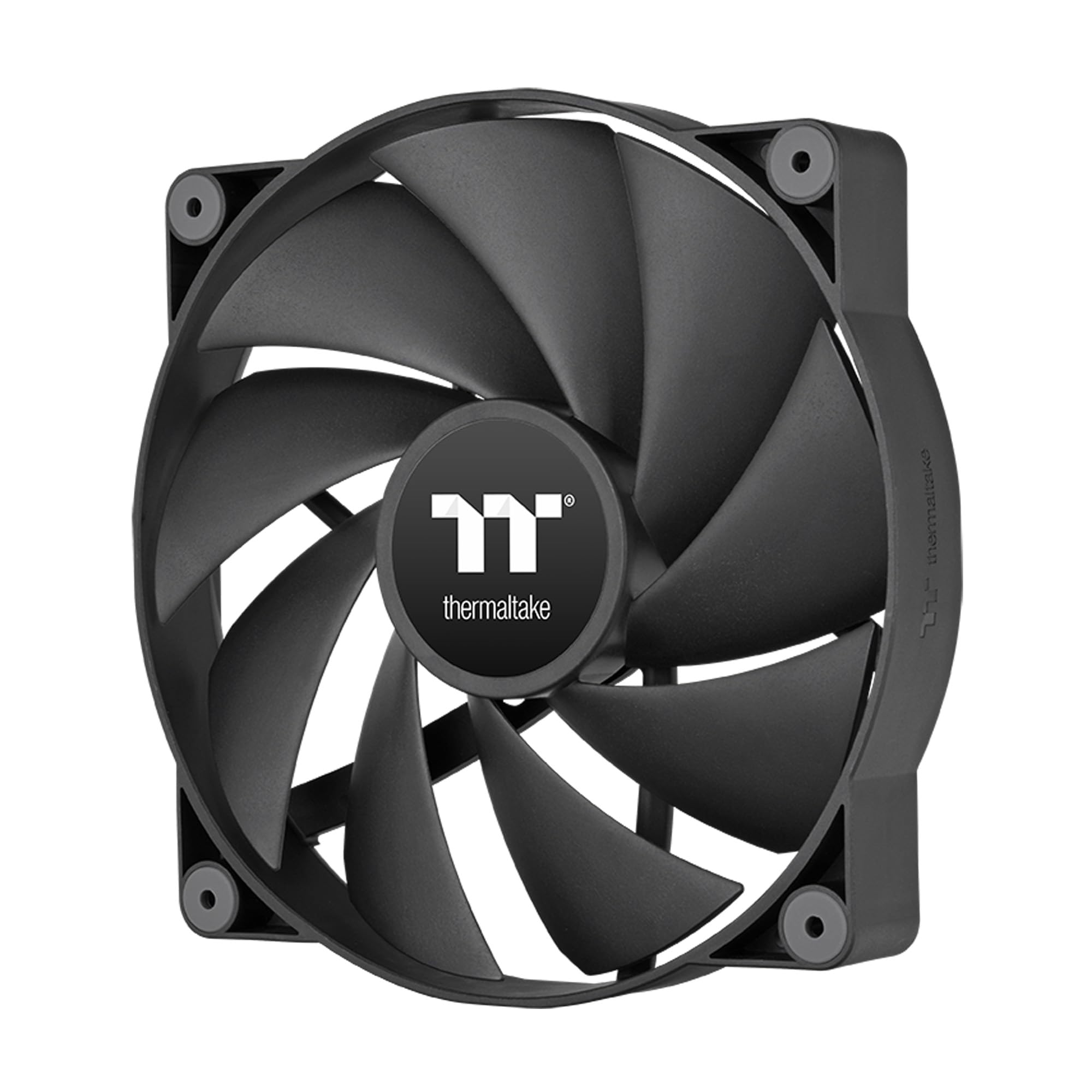
This is the CT200 without the RGB — just pure 131.6 CFM airflow with PWM control.
If you do not care about lighting and just want the best airflow in a 200mm fan, the non-RGB CT200 is your match. It shares the same 9-blade tune design and hydraulic bearings as the ARGB version, pushing 131.6 CFM at 27.2 dB with a PWM range of 500 to 900 RPM. The hydraulic bearing is a step up from the sleeve bearing in the Pure 20 Series, generally lasting longer and running more reliably.
Customers note it is “quiet and powerful,” feeding fresh cool air effectively and keeping components cooler than older fan models. One customer observed occasional bearing noise, describing it as “possibly due to uneven lubrication,” which can come and go but is not a widespread issue. The daisy chainable 4-pin PWM connectors make installation clean, and the included extension cables reach distant fan headers easily.
Why pick this one
- Top-tier 131.6 CFM airflow
- PWM speed control for quiet operation at low loads
- Hydraulic bearing for better longevity than sleeve bearings
Be aware
- Occasional bearing noise reported by some owners
- No RGB or lighting at all
Best for function-first builders: If you want maximum airflow and PWM control without paying extra for lights, the CT200 PWM is a smart choice.
pass on it if: You want any form of case lighting — this fan is solid black with no LEDs.
Understanding the Specs
CFM (Cubic Feet Per Minute)
This measures how much air the fan moves per minute. Higher CFM means more cooling, but not always — a fan with 131.6 CFM (like the CT200) is great for open airflow, while a lower 88 CFM fan (like the Noctua) might be enough if your system is not running super hot. Match the CFM to your case’s airflow and your CPU/GPU’s heat output.
dB(A) — Noise Level
Measured in decibels, this tells you how loud the fan will be. Every 10 dB doubles the perceived loudness. A fan at 15.7 dB (SickleFlow) is basically silent, while a fan at 28.2 dB (Pure 20) makes a noticeable low hum. For a bedroom PC, aim for under 25 dB. For a gaming rig on the floor, anything under 30 dB is usually fine.
PWM vs 3-Pin
A 4-pin PWM fan lets your motherboard adjust the speed automatically based on temperature. A 3-pin fan runs at a fixed speed unless you connect a manual resistor (Low-Noise Adaptor) or use a separate controller. PWM is more convenient and efficient for most builds.
Fan Thickness (30mm vs 25mm)
Most 200mm case fans are 30mm thick, which is deep enough to generate good static pressure. Some slim cases may only fit 25mm thick fans. Always measure the clearance between your case frame and the nearest component (like a GPU or drive cage) before ordering a 30mm fan.
FAQ
Will a 200mm fan fit in my case?
What is the difference between a 200mm fan and a 140mm fan?
Can I use a 200mm fan on a radiator?
How loud is a 28-decibel fan?
What does a sleeve bearing vs a hydraulic bearing mean?
Can I control the speed of a 3-pin fan?
How many 200mm fans can I install in a typical case?
Are 200mm fans compatible with Corsair cases?
How do I clean a 200mm case fan?
What is the best 200mm fan for a home server?
Final Thoughts: The Verdict
For most buyers, the best 200mm case fan winner is the Thermaltake CT200 ARGB PWM because it delivers a strong balance of high 131.6 CFM airflow, PWM control, and addressable RGB lighting at a fair price. If you want a near-silent build and don’t mind losing a bit of airflow, grab the Cooler Master SickleFlow 200 aRGB. And for the quietest experience at any speed with legendary build quality, the standout is the Noctua NF-A20 FLX.
How We Picked
We do not accept paid placement. Every pick is matched to a real buyer and a real use-case; we do not hands-on test units.
Sources & Methodology
Specifications: manufacturer listings and product documentation. Review insights: verified customer reviews, as of July 2026. Pricing: not shown on this page (it changes often); check the current price via the retailer link.
As an Amazon Associate, Gadgets Feed earns from qualifying purchases. This does not affect which products we feature.