
Our readers keep the lights on and my morning glass full of iced black tea. As an Amazon Associate, I earn from qualifying purchases.
Specs are compiled from manufacturer listings and verified buyer reviews and can change over time — please confirm the key details on the product page before buying.
If you have a tiny 2230 SSD from a Steam Deck, a Surface Pro, or a laptop upgrade, you need a case that turns that bare circuit board into a portable external drive you can actually use. The market is full of cheap metal tubes and expensive smart boxes, but only a few actually keep your data safe and your transfer speeds fast. This guide breaks down the seven best 2230 SSD cases available right now, matching each one to the specific buyer who will actually enjoy using it.
I’m Min — the founder and writer behind Gadgets Feed. This guide is built by comparing the manufacturers’ published specifications and the patterns across verified customer reviews, so you get each pick’s real strengths and trade-offs instead of marketing spin.
You have a tiny 2230 SSD (a drive the size of a stick of gum) and you want to turn it into a portable external drive. The right 2230 ssd case keeps that drive cool, moves files fast, and fits how you actually work — whether that is editing 4K video, expanding an iPhone, or reusing a leftover drive.
Quick Picks
- DockCase Pocket M.2 2230 NVMe SSD Enclosure — Top Performer
- Sharge Disk M.2 NVMe SSD Enclosure — Tough Traveler
- Satechi M.2 NVMe Mini SSD Enclosure — Premium Pick
- ORICO Full Metal M.2 NVMe 2230 SSD Enclosure (XAM2) — All-Metal Workhorse
- fanxiang SSD Enclosure MP88 — Featherweight
- fanxiang SSD Enclosure MP83 — Dual-Cable Value
- SABRENT USB-C Enclosure for M.2 2230 PCIe NVMe SSDs (EC-NE30) — Massive Capacity
How To Choose The Best 2230 SSD Case
Picking the right enclosure for your tiny 2230 NVMe drive is straightforward once you know what really matters. The three biggest factors are whether the case can keep your SSD cool under heavy use, what transfer speed it supports, and whether the physical design fits how you actually carry and connect the drive.
Active vs Passive Cooling
A 2230 drive is small, so it heats up fast without a good heat sink (a metal piece that pulls heat away). Most enclosures use a metal body and a thermal pad — that is passive cooling, and it works fine for occasional file transfers. But if you edit video directly from the drive or run an operating system off it, you need active cooling: a tiny fan that pulls heat out so the SSD never slows down (throttles) to protect itself.
Transfer Speed — USB 3.2 Gen 2 at 10Gbps
Nearly every modern 2230 enclosure uses USB 3.2 Gen 2, which delivers a theoretical cap of 10Gbps. That is roughly 1,250 MB/s in real-world reads. This is fast enough to saturate most 2230 NVMe drives and handle large files like 4K video or game installs without a bottleneck. Going cheaper to an older USB 3.0 (5Gbps) enclosure halves that bandwidth and is not worth the savings for a 2230 drive.
Portability and Cable Design
Because 2230 drives are so small, the enclosure should be pocketable. Most weigh under 35 grams and are about the size of a disposable lighter. Look for a design with an integrated USB-C connector or a short captive cable — this eliminates the need to remember a separate cable when you are on the go. Also check for an included lanyard or keyring loop so you do not lose it down the side of a bag.
Quick Comparison
| Model | Best For | Cooling Type | Max Capacity | Weight | Amazon |
|---|---|---|---|---|---|
| DockCase Pocket | Data safety & diagnostics | Passive (metal shell) | 2 TB | ~40g (est.) | $35.99Amazon |
| Sharge Disk | Rugged outdoor use | Active (built-in fan) | 2 TB | 24 g | $39.99Amazon |
| Satechi Mini | Apple ecosystem users | Active (adaptive fan) | 2 TB | 35 g | $49.99$59.99Amazon |
| ORICO XAM2 | iPhone 4K ProRes recording | Passive (full metal) | — | ~35g (est.) | $20.24$26.99PrimeAmazon |
| fanxiang MP88 | Ultra-portability | Passive (aluminum + pad) | 2 TB | 24 g | $17.99$18.99Amazon |
| fanxiang MP83 | Dual-cable convenience | Passive (aluminum + pad) | 2 TB | 24 g | $18.99$20.99Amazon |
| SABRENT EC-NE30 | Large-capacity SSDs | Passive (aluminum + ABS) | 8 TB | 65 g | $19.99Amazon |
In‑Depth Reviews
1. DockCase Pocket M.2 2230 NVMe SSD Enclosure

The only 2230 case that shows you exactly what your drive is doing, in real time.
This is not just a metal box with a USB-C port. The DockCase Pocket enclosure has an HD display screen that shows your SSD’s health status, remaining life, and remaining capacity as soon as you power it on. That screen also shows live transfer speed, so you see exactly how fast your files are moving — no guessing, no separate software. If you have lost data to a surprise drive failure before, the 3-second Power Loss Protection (PLP) sells it: a small capacitor gives the drive enough time to finish writing after a sudden power cut, preventing corruption.
Buyers report that the build quality is excellent with its aluminum body and tool-less installation, though a few noted that the passive cooling gets uncomfortably hot during prolonged transfers. It supports up to 2TB 2230 NVMe SSDs (M-Key and B+M Key) and runs at 10Gbps via USB 3.2 Gen 2. The integrated USB-C cable keeps it tangle-free in a bag.
The Read Only Mode is a practical bonus when you are connecting to a public computer — it prevents accidental deletion or malware from writing to your drive. Compared to the simpler fanxiang enclosures below, this one gives you data confidence that no other 2230 case in this list matches.
Smart edge over the basics: The built-in display and 3-second PLP make this the safest choice for irreplaceable work files. The catch is that the metal body gets hot during long file sessions — it lacks a fan.
Reach for this if: you travel with sensitive project files and want to monitor your drive’s health without installing an app.
Look elsewhere if: your workflow involves writing multi-gigabyte files for hours straight — you will want the active cooling of one of the fan-equipped picks below.
2. Sharge Disk M.2 NVMe SSD Enclosure

A bright yellow tank that cools itself and shrugs off rain and drops.
Most 2230 cases are delicate aluminum tubes that overheat if you push them hard. The Sharge Disk takes the opposite approach: it sticks a high-speed fan inside and wraps everything in an IP54-rated waterproof and dustproof shell with 6.6-foot drop protection. You can actually take this one on a dusty hike or a job site without worrying about a bricked drive. The built-in USB-C male connector — no separate cable — makes it even easier to clip to a keyring or bag strap. Owners mention the fan works well to keep the drive cool, but a few described it as “loud” and wished for a way to turn it down or off.
At just 24 grams and half the size of a credit card, it is as light as the fanxiang MP88 but with active cooling the passive enclosures cannot match. The 10Gbps USB 3.2 Gen 2 interface delivers what Sharge claims is a 20GB 4K movie transfer in 22 seconds. It also includes a Write Protection switch to lock your data when plugging into untrusted machines.
One honest trade-off: the silicone case has a door that must be open for the fan to pull air through, which means the drive is more exposed to dust in that state. And only M-Key 2230 NVMe drives are supported — B&M Key or SATA drives will not fit.
What stands out
- Built-in fan prevents thermal throttling during heavy writes
- IP54 dust/water resistance with drop protection
- No separate cable needed — integrated male USB-C connector
The trade-off
- Fan is not silent — noticeable in quiet spaces
- Silicone door must stay open for airflow, reducing dust protection during use
Best for on-the-go creators: Photographers and outdoor shooters who need a rugged, cooled drive for dumping cards in the field will love this. skip it if you work in a library-quiet studio and cannot tolerate fan noise.
3. Satechi M.2 NVMe Mini SSD Enclosure

Beautifully machined aluminum that matches your MacBook and keeps cool silently.
Satechi’s enclosure is the one you buy when design matters as much as function. The body is a single piece of aluminum with chamfered edges, a scratch-resistant tempered glass cover held shut by magnets, and a braided USB-C cable that feels high-end. Under the refined look is active cooling: a mini fan that spins up to 10,000 RPM only when the internal temperature hits 122°F (50°C), operating between 40 and 60 decibels — quieter than the constant hum of the Sharge Disk. One reviewer noted the fan “never activates” during normal use, so for light work it operates as a passive enclosure.
It exclusively fits M-Key M.2 2230 NVMe drives up to 2TB. It includes a write lock switch and supports USB 3.2 Gen 2 at 10Gbps. Buyers highlight the “exceptional craftsmanship” and the flexible rubber mount for the SSD that requires no screws.
One buyer mentioned inconsistent behavior: it worked flawlessly on a Windows laptop but showed poor performance on an Android phone and was semi-reliable on a Windows desktop with a USB-C-to-A adapter. If your main machine is a Mac or a modern Windows laptop, you are likely fine; older or Android gear may be hit-and-miss.
The refined choice for Apple users: It pairs beautifully with a MacBook or iPad and stays quiet most of the time. The catch is the possibly spotty performance on Android phones and older desktops, so check compatibility before buying.
Reach for this if: you want a premium-looking, magnetically-sealed case that barely makes a sound. Look elsewhere if you need guaranteed cross-platform reliability with Android or adapter setups.
4. ORICO Full Metal M.2 NVMe 2230 SSD Enclosure (XAM2)

Solid, no-nonsense metal that turns your old 2230 into a 3-second file shuttle.
ORICO’s XAM2 does not try to be smart or flashy — it just works. The full-metal casing acts as a giant heat sink, and buyers confirm it sustains “huge raw video writes without throttling” while only getting warm, not dangerously hot. One reviewer specifically noted that transferring a 1GB file takes around 3 seconds. That speed is thanks to the USB 3.2 Gen 2 interface running at 10Gbps.
It comes with a 30cm USB-C to C/A 2-in-1 cable, so you can plug into a standard USB-A port on an older laptop or a USB-C port on a modern phone without carrying two cables. That is a small but meaningful convenience compared to the fanxiang MP88, which only includes a single USB-C cable. The ORICO is specifically marketed for iPhone 15 Pro/Pro Max 4K ProRes recording, and reviews confirm it works flawlessly for that use case.
The only real drawback is that the included cable is short — about 12 inches — so the drive has to sit close to the device. That is by design for pocketability, but it can be awkward with a desktop tower or a laptop on a desk.
What works
- Full-metal body with silicone thermal pad provides strong passive cooling
- 2-in-1 USB-C to C/A cable covers both old and new ports
- Sustains large writes without throttling, verified by multiple reviewers
The limitation
- Short 30cm cable can be restrictive on a desk
- No integrated connector — you have to remember the cable
Best value for creatives: iPhone videographers and Steam Deck owners who need a durable, fast passive enclosure will find this hits the balance. pass on it if you want a built-in cable or fan cooling for very long transfer sessions.
5. fanxiang SSD Enclosure MP88
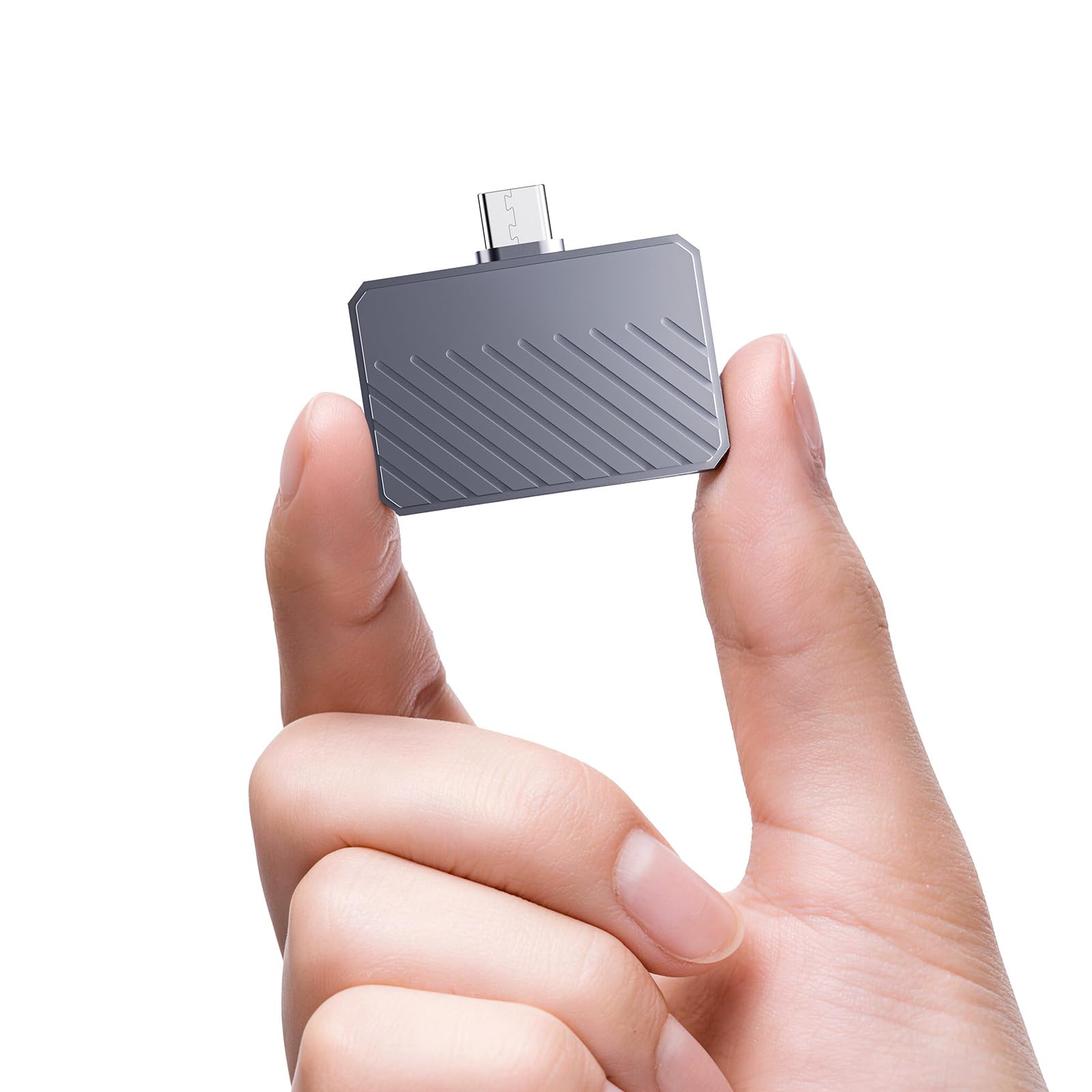
A 24-gram enclosure that disappears in your pocket and turns a drive into a USB stick.
The MP88 is the lightest enclosure in this lineup at 24 grams, and it is also among the most straightforward. You slide your 2230 NVMe drive in, screw the two halves together, and you have an external drive roughly the size of a pack of gum. Customers note it is an “excellent 2230 NVMe enclosure; tiny, turns drive into USB stick.” The aluminum body and integrated thermal silicone pad handle heat decently for normal transfers, though one reviewer warned that copying over 150GB of files pushed the temperature high enough to require an external fan.
It supports SSDs up to 2TB and the USB 3.2 Gen 2 interface delivers the full 10Gbps. The included lanyard lets you secure it to a bag or keychain, which is handy because something this small is easy to lose. Compared to the MP83 below, the MP88 is slightly more compact (1.65 x 1.4 x 0.4 inches) and comes with a single USB-C cable, while the MP83 includes both USB-C and USB-A cables.
The main downside: at this price point, there is no active cooling, no write protection switch, and no smart display. It is a pure passive enclosure that gets the job done at a budget-friendly cost.
The pure minimalist: No frills, no extra cables, just an extremely light shell that makes your spare SSD portable. The catch is that it runs hot during sustained big-file transfers — fine for casual use, less so for heavy workloads.
Reach for this if: you need the smallest and lightest enclosure for occasional use, like keeping a recovery drive on your keychain. it’s not for you if you plan to edit video directly from the drive — the heat buildup will cause throttling.
6. fanxiang SSD Enclosure MP83
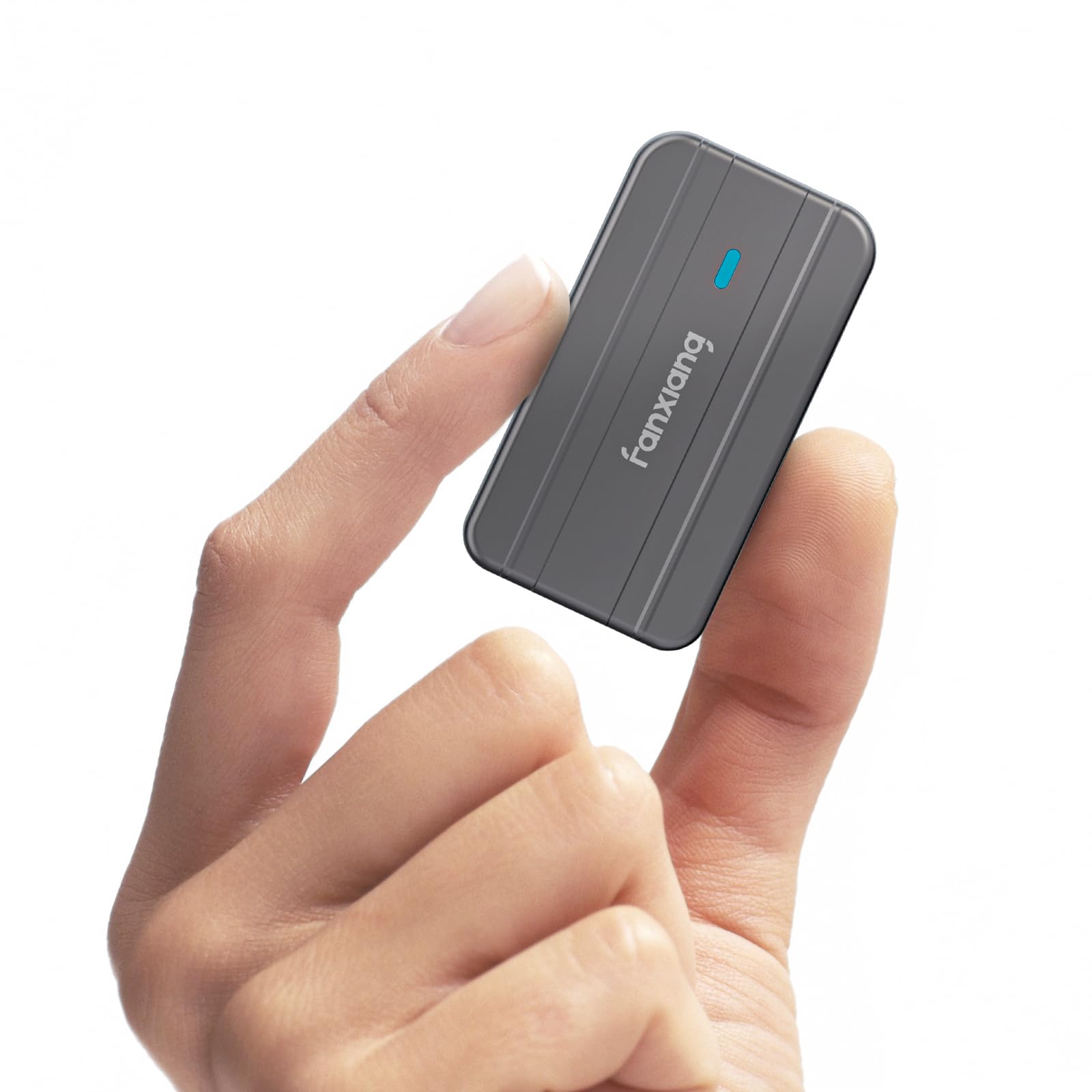
The same compact size as the MP88 but with the cables you actually need for both old and new devices.
The MP83 is fanxiang’s slightly wider sibling to the MP88. It uses the same aluminum alloy body and thermal silicone pad, supports the same 2TB capacity and 10Gbps USB 3.2 Gen 2 speeds, and weighs the same 24 grams. The main difference is the inclusion of both a USB-C to USB-C cable and a USB-C to USB-A cable, so you can plug directly into an older laptop or desktop without needing an adapter. Buyers describe it as a “good value” that “works perfectly with a 512 GB mini NVMe” and note the enclosure does not get too hot during normal use.
One reviewer, however, flagged it as “not for continuous use” — the enclosure runs “piping hot” during sustained file writes, which they worried could shorten the SSD’s lifespan. This makes the MP83 better suited for periodic backups and file dumps than as a primary working drive. The dimensions are a bit taller and narrower than the MP88 (1.13 x 0.4 x 2.13 inches), so it fits differently in a bag, but both are equally portable.
It is still a passive design with no fan, no smart display, and no write protection. At an entry-level price point, those omissions are expected, but compared to the ORICO XAM2 which also lacks a fan but handles sustained writes better, the MP83 falls short for heavy users.
Why choose this over the MP88
- Comes with both USB-C and USB-A cables, covering more devices from the start
- Plug-and-play with no drivers needed on Windows, Mac, Linux, and Android
The serious limit
- Runs very hot during sustained large-file writes, which may shorten drive life over time
- No lanyard attachment point included
A good occasional-use companion: Ideal for repurposing an old drive as a backup shuttle between old and new computers. Not ideal as a daily driver for continuous 4K video editing or large database transfers.
7. SABRENT USB-C Enclosure for M.2 2230 PCIe NVMe SSDs (EC-NE30)

The only enclosure in this roundup that supports up to 8TB of storage.
If you need a truly massive portable drive from a single 2230 enclosure, the SABRENT EC-NE30 is your only option among these seven. While every other enclosure here tops out at 2TB, the SABRENT officially supports up to 8TB. It uses an aluminum and ABS plastic shell that is noticeably larger (1.92 x 1.6 x 0.52 inches) and heavier (65 grams) than the competition — at 65 grams versus the fanxiang MP88’s 24 grams. Buyers appreciate the tool-free setup, reliable quality, and USB 3.2 Gen 2 speeds at 10Gbps, along with a built-in on/off switch that makes swapping drives easy.
The integrated USB-C cable is a nice convenience, and the retention clasp secures the drive without tools. Reviewers point out that the drive works great with Xbox Series X/S using a high-speed USB-A to USB-C cable, and they like the included thermal pad. One buyer did mention it “gets hot during heavy writes” — similar to the passive enclosures above — but the aluminum body handles heat better than the smaller fanxiang cases.
The main drawbacks are the larger size and heavier weight. At 65 grams, it is noticeably heavier than the compact Sharge Disk or Satechi, so it is less ideal for clipping to a keychain. But if capacity is your priority, the SABRENT leaves every other 2230 enclosure in the dust.
The capacity king: 8TB support means you can build a full game library or video archive on one drive. The trade-off is the bulkier build — it is not a pocket-friendly thumb drive replacement.
Reach for this if: you need the absolute highest storage capacity from a 2230 enclosure, like a massive portable game drive for an Xbox or a media backup archive. look elsewhere if weight and pocket size matter more to you than capacity.
Understanding the Specs
Active vs Passive Cooling
The biggest performance killer for a 2230 SSD is heat. Because the drive is so physically small, it heats up fast during writes. Passive enclosures (like the SABRENT, fanxiang, and ORICO) rely on a metal body and a thermal pad to pull heat away from the chip. They work well for short bursts but can cause thermal throttling — your drive slows down to protect itself — during sustained file transfers. Active enclosures (like the Sharge Disk and Satechi) use a built-in fan to actively pull hot air out, which keeps the drive at peak speed for much longer. The trade-off is fan noise and a slightly larger design.
USB 3.2 Gen 2 (10Gbps)
This is the standard speed rating you will see on every good 2230 enclosure. It means the connection between the enclosure and your computer can handle up to 10 Gigabits per second, which works out to about 1,250 MB per second in real-world reads. All seven enclosures in this guide support USB 3.2 Gen 2, so you are not bottlenecked by the interface. If you see an older enclosure rated at USB 3.0 (5Gbps), skip it — it will cut your transfer speed in half for no good reason at the current price points.
FAQ
What is a 2230 SSD case exactly?
Will any 2230 enclosure fit my Steam Deck drive?
Why does my 2230 enclosure get so hot?
Can I use a 2230 enclosure with my iPhone 15 Pro?
What is Power Loss Protection (PLP) in an enclosure?
Can I boot a laptop from a 2230 enclosure?
What is the difference between M-Key and B&M-Key SSDs?
How long does a 2230 enclosure last before I need to replace it?
Final Thoughts: The Verdict
If you want one dependable pick, the 2230 ssd case winner is the DockCase Pocket because it packs a smart display, Power Loss Protection, and solid build quality into one compact package — no other enclosure gives you that level of data awareness. If you want a rugged, fan-cooled companion for outdoor work, grab the Sharge Disk. And for massive storage capacity up to 8TB, the SABRENT EC-NE30 is the one to get.
How We Picked
We do not accept paid placement. Every pick is matched to a real buyer and a real use-case; we do not hands-on test units.
Sources & Methodology
Specifications: manufacturer listings and product documentation. Review insights: verified customer reviews, as of July 2026. Pricing: not shown on this page (it changes often); check the current price via the retailer link.
As an Amazon Associate, Gadgets Feed earns from qualifying purchases. This does not affect which products we feature.
Product prices and availability are accurate as of the date/time indicated and are subject to change. Any price and availability information displayed on Amazon at the time of purchase will apply to the purchase of this product. As an Amazon Associate I earn from qualifying purchases.
CERTAIN CONTENT THAT APPEARS ON THIS SITE COMES FROM AMAZON. THIS CONTENT IS PROVIDED "AS IS" AND IS SUBJECT TO CHANGE OR REMOVAL AT ANY TIME.
Amazon and the Amazon logo are trademarks of Amazon.com, Inc. or its affiliates.