
Our readers keep the lights on and my morning glass full of iced black tea. As an Amazon Associate, I earn from qualifying purchases.
Specs are compiled from manufacturer listings and verified buyer reviews and can change over time — please confirm the key details on the product page before buying.
The 2242 SATA M.2 SSD stumps most shoppers because it is short, uses SATA III, and only fits slots designed for its 42mm length. A 2242 drive measures just 42mm long, compared to a standard 2280 SSD’s 80mm length, and uses the older SATA III interface instead of the faster NVMe. The challenge is that most laptops and mini PCs with a 2242 slot (like a ThinkPad WWAN port or an Intel NUC) are stuck with this specific size and connection, leaving you with a thin market.
I’m Min — the founder and writer behind Gadgets Feed. This guide is built by comparing the manufacturers’ published specifications and the patterns across verified customer reviews, so you get each pick’s real strengths and trade-offs instead of marketing spin.
Whether you are upgrading a compact ultrabook, reviving a mini PC, or filling the secondary slot in a ThinkPad, the 2242 sata m.2 ssd you choose determines how snappy your system feels for years.
Our Picks at a Glance

How To Choose The Best 2242 SATA M.2 SSD
Buying an NVMe drive that fits physically but uses the wrong protocol is the most common mistake — it will not be detected in a SATA-only slot. Stick to SATA III with a B+M key, and match the capacity to your workload.
DRAM Cache vs. DRAM-Less
A controller with a built-in DRAM cache (a small pool of high-speed memory) lets the SSD handle small, random reads and writes much faster. Without it, the drive has to read the mapping table directly from the slower NAND flash every time you open a file, which creates a slight delay. For a boot drive, DRAM makes day-to-day use feel smoother.
Capacity and Endurance (TBW)
The 2242 form factor caps out at 512GB in most consumer models. Look at the Terabytes Written (TBW) rating — the total amount of data you can write before the drive wears out. A 70TB rating is decent for light OS use, but if you write a lot of data daily, go higher. The drive’s NAND type (3D TLC) is also a durability indicator, as it balances cost and longevity.
Heat Management
These tiny drives can run hot, especially inside cramped mini-PCs or sealed ultrabooks. One unit here idles at 67°C in a poorly cooled case. If your device has little airflow, consider a model that runs cooler or plan to add a small heatsink.
Quick Comparison
| Model | Best For | Capacity | Read Speed | DRAM Cache | Amazon |
|---|---|---|---|---|---|
| Transcend MTS430S★ Best Overall | Reliable boot drive with cooling | 128 GB | 560 MB/s | DDR3 | $59.99Amazon |
| KINGDATA 256GB | ThinkPad WWAN upgrades | 256 GB | 580 MB/s | No (specs not listed) | $63.99Amazon |
| S SHARKSPEED 256GB | Budget-friendly OS drive | 256 GB | 550 MB/s | No | $65.99Amazon |
| OSCOO 512GB | High-capacity Surface Pro upgrade | 512 GB | 550 MB/s | No (specs not listed) | $80.99$89.99Limited time dealAmazon |
In‑Depth Reviews
1. Transcend 128GB M.2 2242 SATA III SSD, MTS430S B+M Key with DRAM Cache
Our pick — over 4.5★ from 2,500+ verified ratings; the strongest balance of quality and price.
The only drive in this list with a dedicated DDR3 DRAM cache, clocking 560 MB/s sequential reads.
The standout spec is the 128MB DDR3 DRAM cache, which speeds up everyday file access by storing the data map in fast memory instead of slower NAND. You feel this as faster app launches and less stutter when juggling multiple Windows VMs. The SLC cache (a temporary fast-write area) pairs with it to hit that 560 MB/s read ceiling.
One big catch is heat. Buyers report it “runs very hot: 67°C idle, exceeds 70°C under load” in a poorly cooled mini-PC. In a laptop with decent airflow, it is fine, but inside a tight NUC or tablet, you want a tiny heatsink or a well-vented slot. The 128GB capacity is the smallest in this roundup — good for a lean OS boot drive, but you will fill it fast if you install many apps.
What earns it the top spot
- DDR3 DRAM cache cuts data access latency noticeably.
- 560 MB/s read speed is a solid SATA III speed.
- 3D TLC NAND plus LDPC error correction for data integrity.
- DevSleep mode saves battery in ultrabooks.
The trade-offs to know
- 128GB capacity is tight for Windows 11 plus apps.
- Runs very hot (67°C idle) in poorly cooled enclosures.
- Higher price per gigabyte than DRAM-less competitors.
Reach for this if: You need a responsive OS drive for an ultrabook or mini-PC with decent airflow, and 128GB is enough for the operating system and essential programs.
Look elsewhere if: Your machine runs hot with little ventilation, or you need more than 128GB of storage without spending on a second drive.
2. KINGDATA 256GB M.2 2242 6Gb/s SSD

The go-to pick for anyone slotting a drive into a ThinkPad T-series WWAN port.
This KINGDATA drive is a B+M key SATA SSD, which means it slides right into the WWAN (wireless wide area network) slot on models like the ThinkPad T470, T480, and T570. Owners mention it “works great with thinkpad t570 or anything thinkpad with wwan port,” turning a cellular antenna slot into a 256GB storage bay. At 580 MB/s sequential reads and 530 MB/s writes, it is slightly faster on paper than the S SHARKSPEED 550 MB/s read speed.
Unlike the Transcend above, the KINGDATA does not list a DRAM cache in its specs, so you may notice a small lag when loading many small files. The three-year warranty is solid, and the drive comes with spare screws in a tough plastic case — a nice touch for DIY installers.
Why it stands out
- Specifically fits ThinkPad WWAN slots.
- 256GB capacity at a good value.
- 3-year replacement warranty included.
- Comes with spare mounting screws.
The downsides
- No DRAM cache — slower on random small reads.
- Fewer reviews than the Transcend (only 91 ratings).
- Some compatibility issues with mislabeled Chinese laptops.
Grab it for: A ThinkPad with a free WWAN port — you double your storage without touching the main drive bay, and the 3-year warranty covers you.
Pass if: Your device has poor SATA compatibility or you need DRAM cache for heavy multitasking.
3. S SHARKSPEED 2242 NGFF 256GB M.2 SSD Plus

A budget-friendly 256GB option that boots Windows 10 in under 30 seconds.
At 550 MB/s sequential reads and 500 MB/s writes, this S SHARKSPEED drive is a hair slower than the KINGDATA (580 MB/s) but still feels snappy for daily use. It uses 3D TLC NAND and includes ECC (error correction code) and a bad-block management system to keep data safe.
The data spec list shows a cache installed size of just 1 (likely 1MB or a generic placeholder), which means it is effectively DRAM-less. For light office work and booting, that is fine — the SLC cache handles the burst. Just do not expect it to match the Transcend’s responsiveness when opening many small files at once.
Value highlights
- 256GB for a budget price.
- Runs cool according to buyers — no overheating complaints.
- Supports DevSleep for low power draw.
- Works as OS drive in mini PCs and ThinkPads.
Watch out for
- No DRAM cache — slower on random small reads.
- Speeds cap at 550 / 500 MB/s, slightly below KINGDATA.
- Available capacity slightly less due to manufacturer vs OS calculation.
Best for: A no-fuss OS drive in a compact build or budget laptop where every dollar counts, and you can live without DRAM.
skip it if: You need higher write speeds or run many virtual machines on the same drive.
4. OSCOO 512GB M.2 2242 SATA III SSD
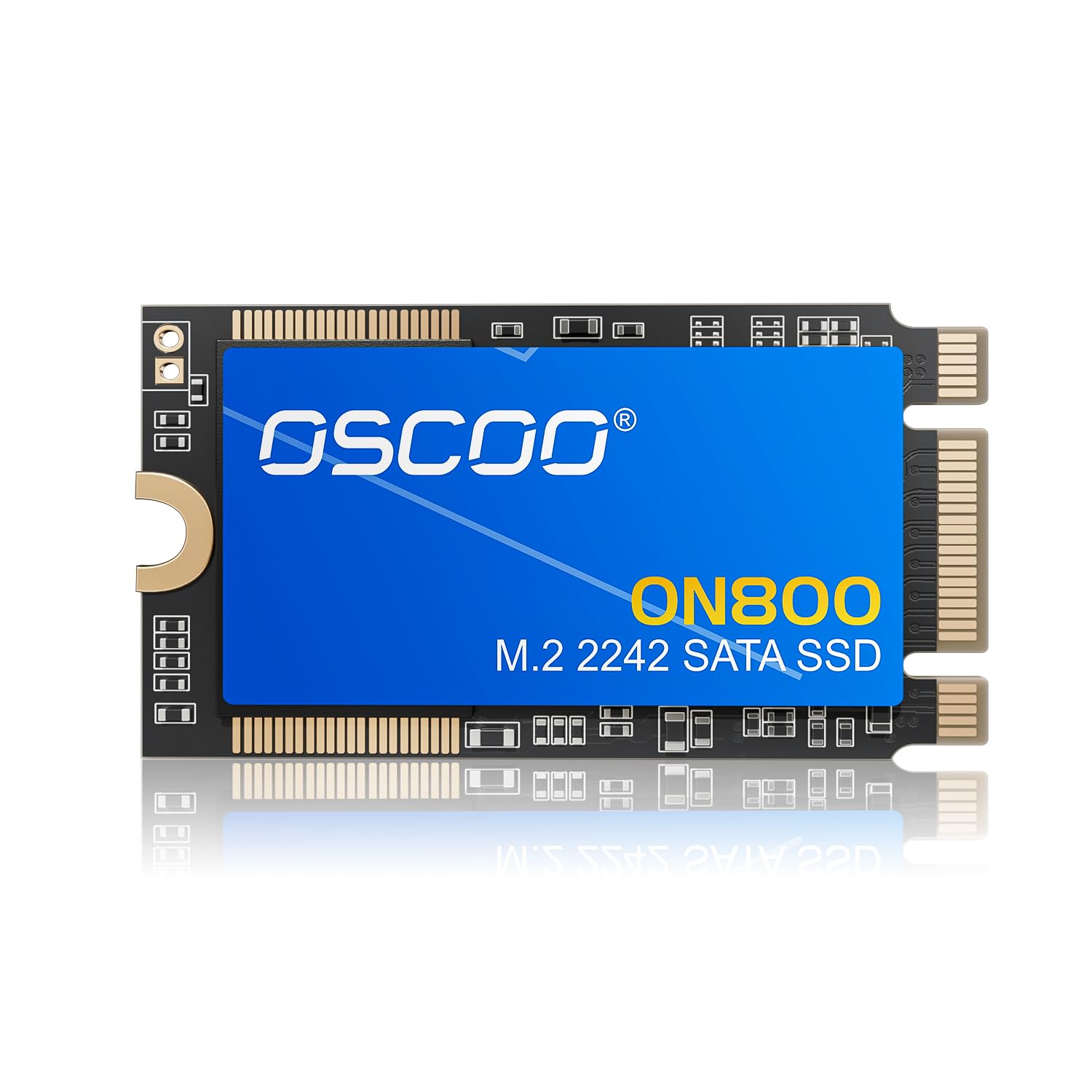
The highest capacity in this roundup at 512GB — compared to the Transcend’s 128GB.
This OSCOO drive is the only one here with a 512GB digital storage capacity, compared to the KINGDATA and S SHARKSPEED at 256GB. It reaches up to 550 MB/s sequential reads and 500 MB/s writes, right in line with the S SHARKSPEED. Customers note it “installed in Surface Pro 9; cloned OEM 256GB” and booted Windows without issues, making it a direct drop-in upgrade for tablets and thin-and-lights that accept 2242 SATA drives.
It supports TRIM, SMART monitoring, LDPC ECC (low-density parity check error correction), and wear leveling — the same data integrity features as the Transcend, although it does not advertise a dedicated DRAM cache. The 512GB size gives you room for a full OS plus a sizable game library or project files, which none of the other picks in this list can match.
The big advantage
- 512GB is the largest 2242 SATA III capacity in this comparison.
- Direct upgrade for Surface Pro, Dell Latitude 7200, Intel NUC.
- Supports TRIM, SMART, and LDPC for data stability.
- Plug-and-play clone without formatting issues.
The compromises
- No DRAM cache — small-file performance lags behind Transcend.
- Runs warm under load (reviewers point out similar to OEM drives).
- Higher upfront cost than the 256GB options.
Get this if: You need the highest possible capacity in 2242 format — ideal for cloning a 256GB drive in a Surface Pro or Dell 2-in-1 without losing space.
Choose a smaller drive if: Your budget is tight or you only need a lean OS boot drive and rarely install large files.
Understanding the Specs
DRAM Cache
It stores a mapping table of where data lives on the NAND flash. The Transcend in this list is the only model that includes a DDR3 DRAM cache.
Sequential Read / Write Speed
These numbers (like 560 MB/s or 550 MB/s) tell you how fast the drive can read or write large, contiguous files — think copying a 4K movie. SATA III caps out at about 560 MB/s, so any drive in this list near that limit is already at the interface’s maximum. For everyday booting and app loading, random read speed (measured in IOPS) matters more, but manufacturers rarely advertise that number for 2242 SATA drives.
FAQ
What does 2242 mean in an M.2 SSD?
Will a 2242 SATA SSD work in an NVMe slot?
Can I use a 2242 SSD in a 2280 slot?
Why do 2242 SATA drives cost more per gigabyte than 2280 drives?
How hot is too hot for a 2242 SSD?
Is 128GB enough for Windows 11 on a 2242 SSD?
What is DRAM cache and why does it matter?
How do I know if my laptop has a 2242 SATA slot?
Final Thoughts: The Verdict
If you want one dependable pick, the 2242 sata m.2 ssd winner is the Transcend 128GB MTS430S because of its DDR3 DRAM cache that makes everyday file access feel faster than any other drive in this list. If you need maximum capacity for a Surface Pro or NUC, grab the OSCOO 512GB. And for the best value per gigabyte in a ThinkPad WWAN slot, the standout is the KINGDATA 256GB.
How We Picked
We do not accept paid placement. Every pick is matched to a real buyer and a real use-case; we do not hands-on test units.
Sources & Methodology
Specifications: manufacturer listings and product documentation. Review insights: verified customer reviews, as of July 2026. Pricing: not shown on this page (it changes often); check the current price via the retailer link.
As an Amazon Associate, Gadgets Feed earns from qualifying purchases. This does not affect which products we feature.
Related Guides
Product prices and availability are accurate as of the date/time indicated and are subject to change. Any price and availability information displayed on Amazon at the time of purchase will apply to the purchase of this product. As an Amazon Associate I earn from qualifying purchases.
CERTAIN CONTENT THAT APPEARS ON THIS SITE COMES FROM AMAZON. THIS CONTENT IS PROVIDED "AS IS" AND IS SUBJECT TO CHANGE OR REMOVAL AT ANY TIME.
Amazon and the Amazon logo are trademarks of Amazon.com, Inc. or its affiliates.