
Our readers keep the lights on and my morning glass full of iced black tea. As an Amazon Associate, I earn from qualifying purchases.
Specs are compiled from manufacturer listings and verified buyer reviews and can change over time — please confirm the key details on the product page before buying.
Finding a 24-inch monitor with built-in speakers can feel like a game of trade-offs: you want a screen that looks sharp for work, but you also want to skip the extra speakers cluttering your desk. Modern 24-inch models pair sharp IPS panels with usable built-in audio, so you won’t sacrifice image quality for convenience. Focus on refresh rate for fluid scrolling and IPS panels for accurate colors, ignoring specs that don’t affect your daily workflow.
I’m Min — the founder and writer behind Gadgets Feed. This guide is built by comparing the manufacturers’ published specifications and the patterns across verified customer reviews, so you get each pick’s real strengths and trade-offs instead of marketing spin.
This roundup covers home offices, dorm rooms, and console setups with clear, practical recommendations. Here is your clear, honest path to the best 24 inch computer monitor with speakers that fits your space, your eyes, and your budget.
Our Picks at a Glance


How To Choose The Best 24 Inch Computer Monitor With Speakers
Choosing a 24-inch monitor with built-in speakers means balancing the picture quality you need against the convenience of not buying separate audio gear. Your ideal choice hinges on whether you prioritize office clarity, cinematic contrast, or gaming smoothness.
Check the Panel Type and Resolution
At this size, you will see a Full HD (1920 x 1080) resolution across most models, which keeps text sharp without needing a powerful graphics card. The panel technology matters more for colors and viewing angles. An IPS panel keeps colors accurate when you view from the side, while a VA panel often delivers deeper blacks and a higher contrast ratio. For everyday office work or watching videos, a 1080p IPS screen is a reliable, comfortable choice.
Understand Refresh Rate for Smoothness
Most standard monitors run at 60Hz, but many 24-inch models now offer 75Hz or 100Hz, meaning the screen redraws the image that many times per second. A higher refresh rate makes moving your mouse cursor and scrolling through long documents feel noticeably smoother. It also reduces visible flicker in fast-moving video scenes, so it is a spec worth prioritizing even if you do not play competitive games.
Don’t Overlook the Stand and Ports
Built-in speakers save desk space, but the stand and connectivity determine how the monitor fits into your setup. Look for a stand with height adjustment if you sit at a desk for long hours, as proper eye level reduces neck strain. Check for both HDMI and DisplayPort inputs—HDMI connects to most laptops and consoles, while DisplayPort is common on desktops and supports higher refresh rates. If you plan to mount the screen on an arm, you will need a VESA mount pattern on the back, typically 100x100mm.
Quick Comparison
| Model | Best For | Refresh Rate | Panel Type | Stand Adjustability | Amazon |
|---|---|---|---|---|---|
| HP 24mh★ Best Overall | Office ergonomics | 75 Hz | IPS | Height/Tilt | Amazon |
| Sceptre PrimeBest Value | Budget gaming | 100 Hz | LCD | Tilt | Amazon |
| Amazon BasicsBarebones Pick | Barebones value | 75 Hz | IPS | Tilt | Amazon |
| BenQ GW2490 | Eye comfort | 100 Hz | IPS | Tilt | Amazon |
| ASUS VA24DQSB | USB hub needs | 75 Hz | IPS | Height/Pivot | Amazon |
| Dell S2425HSM | Fast, smooth visuals | 144 Hz | LCD | Height/Pivot | Amazon |
| ASUS TUF VG249QL3A | Serious gaming | 180 Hz | Fast IPS | Height/Swivel | Amazon |
| LG 24BP75CP | All-in-one desk setup | 75 Hz | IPS | Height/Pivot | Amazon |
| Dragolftie Touchscreen | Interactive touch work | 75 Hz | VA | Height/Pivot | Amazon |
In‑Depth Reviews
1. HP 24mh FHD Monitor
Our pick — over 4.5★ from 25,000+ verified ratings; the strongest balance of quality and price.
The ergonomic desk champ that adjusts to you, not the other way around.
This HP is the pick that gives you the full package for a home office. It pairs a crisp 23.8-inch IPS display with a 1920 x 1080 resolution at 75 Hz, so text stays sharp and scrolling feels fluid. The IPS technology keeps colors accurate from a wide 178° angle, which means you can share your screen with a colleague without everything washing out.
Its stand offers 100mm height travel, 5° forward and 23° backward tilt, plus rotation and swivel for a stable, tool-free setup. Buyers report the stand is stable and easy to adjust without tools. Setup is genuinely tool-free, and the micro-edge design makes it a clean fit for a dual-monitor setup.
On the audio front, the two built-in 2W speakers work immediately, but owners mention a simple fix to lift the volume. The recurring tip is to raise the monitor’s menu volume from the default 50% up to 100%, which makes the sound much more usable for calls and video. With a 1-year limited warranty and a design that favors comfort, this is the monitor most people should start with.
Built for All-Day Comfort
- Height, tilt, and swivel stand beats most rivals for ergonomics.
- IPS panel delivers consistent color from wide viewing angles.
- Includes HDMI, DisplayPort, and VGA for easy hookup.
- Low Blue Light mode reduces eye strain during long sessions.
The Volume Catch
- Speakers are quiet until you raise the on-screen menu volume to 100%.
- A few customers note durability concerns over time.
Reach for it if: you want a comfortable, adjustable screen for work that sounds decent from the start after one menu tweak.
Look elsewhere if: you plan to do serious gaming, since the 75 Hz refresh rate is modest compared to gaming-focused models.
2. Sceptre Prime 24-inch Gaming Monitor
A 100Hz refresh rate makes this the budget king for smooth, fast play.
If your main goal is gaming on a budget, this Sceptre delivers the specs that matter most. It runs a 100 Hz refresh rate—a third faster than the HP’s 75 Hz—with a 1ms response time, which translates to noticeably smoother motion in fast-paced shooters. The 1920 x 1080 resolution covers a 100% sRGB color gamut, giving you vivid, natural colors right from the start.
You get smoother gameplay with AMD FreeSync (a technology that syncs the monitor’s refresh rate to your graphics card to stop screen tearing), plus custom FPS and RTS game modes that adjust display settings for those genres. The edgeless design and 5.8-pound frame make setup easy, and reviewers point out the picture quality is “much better than expected.” It lacks the height-adjustable stand of pricier models, but it does offer VESA wall mounting (a standard 100x100mm bracket pattern) if you want to free up desk space.
The built-in speakers are adequate for casual use, but the included HDMI cable is a common failure point that’s cheap to replace. For the price, the image quality and smoothness are hard to argue with.
Gamer’s verdict: This is the pick for console and PC players who want a high refresh rate without the premium price tag. The trade-off is a simpler stand and the need to budget a few dollars for a replacement cable.
3. Amazon Basics 24-inch Full HD IPS Monitor
A no-frills IPS screen that handles the basics without breaking a sweat.
Sometimes you just need a dependable screen for spreadsheets and webinars, and this Amazon Basics model delivers exactly that. It uses an In-Plane Switching (IPS) panel for rich colors that look accurate from all angles, so you don’t have to sit perfectly centered. The 1920×1080 resolution at 75 Hz keeps everyday tasks looking sharp and scrolling smooth.
Setup lives up to the “basics” name: shoppers say getting it plugged in and running in under five minutes. You get a flexible set of ports, including HDMI 1.4, DisplayPort 1.2, VGA, and a bonus 4 USB 3.2 ports, which is unusual at this price. The stand tilts from -5 to 23 degrees, and it is VESA compatible with a 100x100mm pattern if you want to mount it.
The built-in speakers are the one area where opinions split—some find them adequate, while others describe them as barely audible and recommend a soundbar. If you want an Energy Star certified screen with strong connectivity for a low price, this is a solid, no-surprises choice.
Function over flair: A straightforward workhorse for basic office tasks with better-than-expected ports. Just plan for external audio if you care about sound quality.
4. BenQ GW2490 24” Computer Monitor

A 100Hz IPS screen that puts eye comfort before everything else.
BenQ’s Low Blue Light Plus and flicker-free backlight reduce eye strain during marathon work sessions. The GW2490 uses a 100Hz refresh rate to reduce lag and motion blur, combined with BenQ’s Low Blue Light Plus technology that filters out harmful blue-violet light without washing out the colors. It also has a flicker-free backlight for a more comfortable viewing experience during marathon sessions.
The display covers a professional 99% sRGB color gamut, so images and video look true-to-life. It offers dual HDMI ports and a DisplayPort, plus an Input Hotkey that lets you switch between two connected devices with a single click. Buyers report the controls are easy to use, though the joystick can be sensitive and you may want the manual handy to fine-tune it.
One buyer tips to keep the Low Blue Light mode off or at level 1 for the best color balance. The speakers are a recurring point of feedback: they work but sound tinny at default volume, and nudging the volume up to 95 improves them, though external speakers are still recommended. It carries a 3-year warranty, which is a nice safety net.
Miles for your eyes: A great pick for students or office workers who stare at screens all day. The audio is functional but not a reason to buy—use it for the panel and the eye-care features.
5. ASUS VA24DQSB 24” Monitor

One cable frees your laptop, with a stand that bends to any position.
The VA24DQSB is a smart choice for laptop users because it pulls triple duty as a monitor and a dock. It has a 23.8-inch Full HD IPS panel—so colors stay true from a 178° angle—and the USB hub lets you plug in a webcam or numpad directly into the screen. The 75Hz refresh rate with Adaptive-Sync keeps video playback crisp without tearing.
Ergonomics are a genuine highlight here. The stand offers +35 to -5 degrees of tilt, 180 degrees of swivel, 90 degrees of pivot, and 130mm of height adjustment. Owners mention the stand is sturdy and the setup is easy, though one notes the swivel works via a rotating base rather than a true pivot, which takes some getting used to.
You can connect it via HDMI, DisplayPort, or D-sub (VGA), and it includes a free 1-month Adobe Creative Cloud subscription. The catch is the speakers—buyers are blunt that they are weak, calling them “a joke” and advising external audio for anything serious. The 3-year warranty with advanced replacement (they ship a new unit before you return the old one) adds confidence.
Dock first, display second: Ideal for a minimal setup where the USB hub saves you a separate dock. Confirm your audio expectations before buying, since these speakers are best for system beeps, not music.
6. Dell 24 Plus Monitor (S2425HSM)

A 144Hz refresh rate makes this the smoothest all-rounder for mixed use.
If your day mixes spreadsheets, video calls, and a bit of gaming, this Dell threads the needle. It hits a 144Hz refresh rate with 1ms Moving Picture Response Time, delivering tear-free, fluid motion that feels great whether you are gaming or just scrolling long documents. The 23.8-inch screen runs a standard 1920×1080 resolution but adds a 1500:1 contrast ratio that makes blacks deeper and colors punchier than many rivals at this size.
Dell packed in dual 3W speakers, and buyers actually approve of the sound quality here—a rare compliment for integrated monitor audio. It is a 4-star TÜV-certified display for eye comfort, reducing blue light emissions while keeping colors accurate. Setup is plug-and-play, with buyers mentioning it works perfectly with a MacBook with zero configuration.
The stand supports height, tilt, pivot, and swivel adjustments so you can dial in the perfect viewing angle. The only real limitation is connectivity: it relies on HDMI, so you won’t find a DisplayPort or USB hub here. For a clean, fast, and comfortable daily driver, this is a very strong contender.
Daily driver plus: The blend of a fast panel, good sound, and a fully adjustable stand makes this the pick for users who want one screen for everything. Check that your devices connect via HDMI before committing.
7. ASUS TUF Gaming VG249QL3A

A blistering 180Hz Fast IPS panel built for competitive edge.
For gamers who take their K/D ratio seriously, this ASUS TUF model is the speed king of the list. It packs an 180Hz refresh rate on a 23.8-inch Full HD Fast IPS panel with a 1ms response time, which gives you a massive smoothness advantage over the 75Hz standard monitors. It even supports both FreeSync Premium and G-SYNC compatibility for tear-free play on a wide range of graphics cards.
The 99% sRGB color gamut ensures games look vivid, and ASUS’s Extreme Low Motion Blur (ELMB) technology reduces ghosting in fast scenes. Shadow Boost is a gamer’s best friend, brightening dark areas of a map without washing out the bright spots. The stand offers height, swivel, pivot, and tilt adjustments, and buyers describe the plastic build as sturdy and the overall value as excellent.
Buyers flag two things: the speakers are weak, so external audio is recommended, and the box only includes an HDMI cable, not the DisplayPort cable the listing implies. If you are on a PS5, note that HDMI caps at 120Hz for that console. For the price, the picture quality and smoothness are tough to top at this size.
Competitive Edge
- 180Hz refresh rate with 1ms Fast IPS response for ultra-smooth play.
- FreeSync Premium and G-SYNC compatible for tear-free visuals.
- Height-adjustable stand with swivel, pivot, and tilt built in.
Kitchen Sink
- Weaker speakers mean most gamers will add a headset or soundbar.
- No DisplayPort cable in the box, despite what the listing suggests.
Best for: the dedicated player who wants every millisecond of advantage and a silky-smooth 1080p picture.
Think twice if: you are a casual user who won’t feel the difference between 75Hz and 180Hz—that premium is better spent on other features.
8. LG 24BP75CP Professional PC Screen

A whole video-conferencing kit hidden inside a sleek 24-inch display.
This LG is the monitor that tries to replace your webcam, microphone, and charger all at once. It features a built-in full-HD pop-up webcam with a mic for video calls, so you can declutter your desk of separate peripherals. The centerpiece is USB-C support with up to 65W of power delivery—a single cable can carry video, data, and charge your laptop simultaneously.
The 24-inch IPS panel shows a 1920×1080 resolution at 75Hz, with a 1000:1 contrast ratio. Flicker Safe and Reader Mode are included to reduce eye strain during long stretches of reviewing documents. The slim 3-sided bezel design and two-way swivel make it a tidy fit for a dual-monitor workstation where you are constantly comparing data.
This is the priciest standard monitor here, and reviews are mixed. Buyers with a Mac Mini love the easy hookup, but the big caveat is the built-in camera and microphone: without a driver disc in the box, one buyer found them non-functional and got no support. The poor setup instructions are a recurring complaint. It is a great concept if you get a working unit, but it requires patience.
The convergence experiment: Buying this makes sense only if you specifically need USB-C charging and an integrated camera. If you don’t need those, the HP or Dell above give you a better experience for less complexity.
9. Dragolftie 24 Inch Touchscreen Monitor
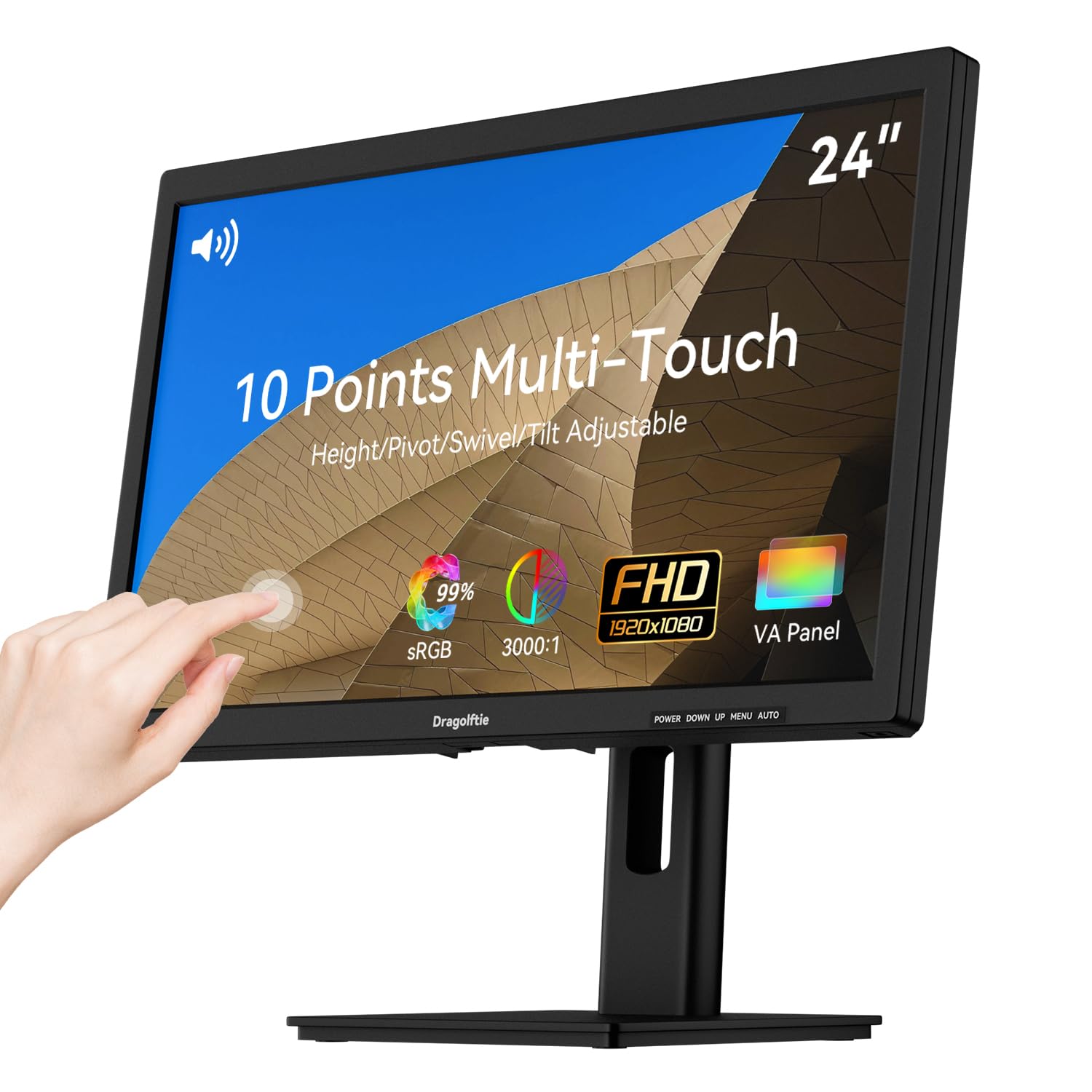
Touch control brings a new way to interact with your workspace.
This is the wildcard of the group—a 24-inch monitor that lets you tap, swipe, and zoom directly on the screen. It uses 10-point multi-touch technology, so you can use multiple fingers for gestures like pinch-to-zoom, making it useful for interactive apps, POS software, or creative work. The screen is a VA panel with a 3000:1 contrast ratio, which gives you deeper blacks and richer detail than most IPS screens at this size.
The ergonomic stand offers height, pivot, swivel, and tilt adjustments, with a -90° to +90° vertical rotation that makes portrait mode easy for coding or reading long documents. Note that the display doesn’t auto-rotate, so you’ll need to switch the orientation in your OS settings first. It also supports dual 5W built-in speakers, which buyers find decent for conferencing, though music needs a bit of tuning.
There are important compatibility warnings to heed: the touch function does not work on Apple devices, gaming consoles, Linux, or XP systems, and it requires a Type-A to Type-B cable to enable touch. Build quality is a gamble—while some customers note a sharp, responsive screen, others hit dead zones on the touch layer and intermittent signal drops. If you are all-in on Windows touch workflows, it’s an intriguing option, but check it thoroughly on arrival.
Specialist tool: A niche pick for Windows users running touch-based point-of-sale or interactive displays. skip it if you’re on a Mac or need a reliable everyday monitor, as the touch layer adds risk.
Understanding the Specs
Refresh Rate and Response Time
Refresh rate measures how many times per second your screen redraws the image, shown in Hertz (Hz). A 60Hz screen redraws 60 times a second, which is fine for office work, but a 75Hz or 100Hz panel feels noticeably smoother when moving windows or watching fast video. Response time, measured in milliseconds (ms), is how quickly a pixel changes color; a 1ms panel is great for gaming because it reduces blur in fast motion, but 5ms is perfectly fine for everyday tasks.
Panel Type: IPS vs VA
The panel type controls how colors look from different angles. IPS (In-Plane Switching) panels keep colors accurate and consistent even when you view the screen from the side, which is why they are favored for shared screens and color-sensitive work. VA (Vertical Alignment) panels typically offer higher contrast ratios for deeper blacks, but colors can shift if you view from an extreme angle. For most home and office use, an IPS panel is the safe, high-quality choice.
FAQ
Why are the built-in speakers on my monitor so quiet?
Is a 23.8 inch screen the same as a 24 inch monitor?
What is the difference between 75Hz and 100Hz on a monitor?
Can I connect a monitor with built-in speakers to my game console?
Will a 24 inch monitor fit on my small desk?
Is an IPS panel worth the higher price for office work?
How do I know if my computer supports a 100Hz or 144Hz refresh rate?
Are the speakers good enough to replace a soundbar?
Final Thoughts: The Verdict
For the majority of shoppers, the 24 inch computer monitor with speakers winner is the HP 24mh because it pairs a crisp IPS panel with the most comfortable, height-adjustable stand in this roundup, making all-day work genuinely easier. If you want a fast 144Hz panel for a mix of work and play, grab the Dell 24 Plus. And for budget gaming with a smooth 100Hz refresh rate, the Sceptre Prime is the one to reach for. The HP 24mh leads the list thanks to thousands of positive owner reviews praising its ergonomics and reliability.
How We Picked
We do not accept paid placement. Every pick is matched to a real buyer and a real use-case; we do not hands-on test units.
Sources & Methodology
Specifications: manufacturer listings and product documentation. Review insights: verified customer reviews, as of August 2026. Pricing: not shown on this page (it changes often); check the current price via the retailer link.
As an Amazon Associate, Gadgets Feed earns from qualifying purchases. This does not affect which products we feature.