
Our readers keep the lights on and my morning glass full of iced black tea. As an Amazon Associate, I earn from qualifying purchases.
Specs are compiled from manufacturer listings and verified buyer reviews and can change over time — please confirm the key details on the product page before buying.
A 24-inch computer monitor is the just-right size for a desk — big enough to spread out two windows side by side, small enough that you are not craning your neck to see the corners. The catch is that prices have dropped so much that you can accidentally buy a blurry, slow screen if you grab the first cheap option. This guide breaks down the real differences in refresh rate, color accuracy, and connectivity that separate a rewarding daily screen from one you will want to replace in a year.
I’m Min — the founder and writer behind Gadgets Feed. This guide is built by comparing the manufacturers’ published specifications and the patterns across verified customer reviews, so you get each pick’s real strengths and trade-offs instead of marketing spin.
if you need a fast refresh rate for gaming, accurate color for creative work, or a simple solid panel for the home office, this roundup of the 24 inch computer monitor options will help you match the right specs to your daily routine.
Our Picks at a Glance



How To Choose The Best 24 Inch Computer Monitor
Most 24-inch monitors look similar from the front, but a few key specs separate a comfortable daily driver from a screen that strains your eyes. Here is what actually matters.
Refresh Rate: Beyond the Gaming Hype
Refresh rate — measured in hertz (Hz) — is how many times per second the screen refreshes the image. A standard 60Hz monitor updates sixty times each second. Jumping to 75Hz or 100Hz makes cursor movement feel noticeably smoother in everyday use, not just in games. At 120Hz or 144Hz, scrolling through long documents and websites becomes almost liquid — your eyes track the motion without that stuttery feel.
Panel Type: Why IPS Dominates This Size
Three main panel types exist: TN (twisted nematic), VA (vertical alignment), and IPS (in-plane switching). For a 24-inch monitor, IPS is the safe bet because it holds color accuracy and brightness when you look from an angle — you get 178° viewing angles without color washing out. VA panels offer higher contrast ratios (darker blacks), but they often shift in color when you are not sitting dead center.
Connectivity: What Your Setup Actually Needs
HDMI is the universal standard, but check if you need DisplayPort for higher refresh rates or USB-C for a single-cable laptop connection with power delivery. VGA is still found on budget monitors for legacy desktops, but it limits resolution and quality. A built-in USB hub — like the 4-port Type-A hub on some Dell models — saves reaching around to the back of your computer for plugging in a flash drive.
Quick Comparison
| Model | Best For | Refresh Rate | Panel Type | Contrast Ratio | Amazon |
|---|---|---|---|---|---|
| LG 24U411A-B★ Best Overall | Value + Features | 120Hz | IPS | 1500:1 | $94.99$99.99Amazon |
| Dell S2425HSMAlso Great | Everyday + Light Gaming | 144Hz | LCD IPS | 1500:1 | $119.99$149.99Amazon |
| ASUS ProArt PA247CVColor-Pro Grade | Color-Critical Work | 60Hz | IPS | — | $179.00$239.00Amazon |
| LG 24G411A-B | Competitive Gaming | 120Hz (144Hz OC) | IPS | 1500:1 | $129.99Amazon |
| ASUS VA249QG | Budget Gaming | 120Hz | IPS | 1000:1 to 3000:1 | $118.99Amazon |
| Dell P2425H | Professional Office | 100Hz | IPS | 1000:1 | $229.99Amazon |
| ViewSonic VA2448-MH | Simple Home Office | 120Hz | IPS | 1500:1 | $94.99$99.99Amazon |
| ViewSonic VA2456A-MHD | Multi-Device Setup | 120Hz | IPS | 1500:1 | $109.99Amazon |
| Amazon Basics 24-inch | Ultra-Budget Office | 75Hz | LCD IPS | 1000:1 | $105.99Amazon |
In‑Depth Reviews
1. LG 24U411A-B
Our pick — over 4.5★ from 800+ verified ratings; the strongest balance of quality and price.
The value monitor that brings gaming-level smoothness to everyday computing.
The LG 24U411A-B delivers 120Hz refresh rate and 1ms Motion Blur Reduction at a price that competes with basic 60Hz office monitors. HDR10 support makes streaming video look richer by expanding the range between the brightest whites and darkest blacks. The IPS panel covers 99% sRGB color gamut, keeping colors accurate for photo browsing and design work.
Reader Mode lowers blue light levels for comfortable reading — a switch you can toggle on for late-night document work. The Switch app lets you split the screen into up to six sections by dragging windows into zones, helping multitaskers line up a browser, a spreadsheet, and a messaging app side by side without resizing manually. Black Stabilizer brightens dark game scenes, and Dynamic Action Sync reduces input lag.
The 3-side virtually borderless design works well for dual-monitor setups where you do not want thick bezels breaking the view. It adjusts in tilt only (−5° to 20°), so you cannot raise the height without a separate stand or VESA arm. The 250 cd/m² brightness is typical for the price tier but not the strongest in this list.
Why It Impresses
- 120Hz refresh rate and 1ms MBR at a budget-friendly tier
- 99% sRGB and HDR10 for richer color
- Split-screen app supports up to 6 zones
Limitation to Know
- Height is not adjustable — only tilt
Good fit for: Anyone wanting a smooth 120Hz screen without paying a gaming monitor premium.
Look further if: You need height adjustment — this tilts but does not raise.
2. Dell 24 Plus Monitor – S2425HSM
The desk screen that keeps up with work, play, and shifting positions all day long.
This Dell delivers a 144Hz refresh rate — meaning the image refreshes 144 times every second — for buttery-smooth scrolling and fluid gameplay. The 1500:1 contrast ratio makes blacks deeper than typical office monitors, and its 300 candela per square meter brightness keeps the screen readable even near a bright window. Unlike cheaper models that hit 250 nits, this one has a bit more headroom.
You can tilt, swivel, pivot, and raise the screen to a comfortable height, which is a rare find at this level. It also packs dual 3-watt speakers — enough for casual YouTube or calls without needing external speakers. One reviewer noted that the built-in speakers sound clear enough for daily video meetings, removing one extra cable from the desk.
The 99% sRGB color gamut coverage (99% of the standard sRGB color space) means photos and videos look accurate and not washed out. It beats the Amazon Basics 75Hz model by a wide margin — Dell’s screen refreshes nearly twice as fast and delivers 50% more contrast ratio (1500:1 vs 1000:1).
Why This Wins
- Height, tilt, swivel, and pivot adjustment for all-day ergonomics
- 1500:1 contrast ratio delivers noticeably deeper blacks than 1000:1 panels
- 144Hz refresh rate is unusually high for a non-gaming monitor
One Trade-Off
- Only HDMI connectivity — no DisplayPort or USB-C for modern laptops
Best sitting: Anyone who wants a single desk monitor that handles work, media, and casual gaming without compromise.
Think twice if: You need a USB-C port for a one-cable laptop hookup — this uses HDMI only.
3. ASUS ProArt Display PA247CV
The photo editor’s reference screen that doesn’t need calibration from the start.
If color accuracy is your priority, this ASUS is the specialist choice. It covers 100% of the sRGB and 100% of the Rec. 709 color standards — meaning every shade you edit matches what professional video and print workflows expect. The panel is Calman Verified and factory-calibrated to a Delta E (a measure of color error) of less than 2, so you are not guessing whether a skin tone is too warm.
The USB-C port delivers 65 watts of power delivery — enough to charge a laptop over a single cable while sending video. Buyers report that this single-cable convenience simplifies their desk setup significantly, cutting cable clutter for MacBook users. You also get a DisplayPort and HDMI port, plus a USB 3.1 hub for plugging in peripherals.
The trade-off is the 60Hz refresh rate. It is not built for gaming — the Dell S2425HSM above runs at 144Hz, more than double this screen’s rate. For color-critical creative work, that is the right compromise. ASUS backs it with a 5-year warranty (3 years plus 2 more with online registration).
Color Credentials
- Factory calibrated with Delta E < 2 for out-of-box accuracy
- USB-C with 65W Power Delivery charges your laptop
- 100% sRGB and 100% Rec. 709 coverage
The Limit
- 60Hz refresh rate — not designed for smooth gaming
Reach for this if: You edit photos or video and need accurate color that stays consistent across devices.
Look elsewhere if: You want high-refresh gaming — this is a work-first panel.
4. LG 24G411A-B Ultragear

The fast, frugal gaming monitor that does not ask you to overclock to enjoy 120Hz.
This LG UltraGear runs natively at 120Hz and can be overclocked to 144Hz — giving you the same fluidity as the Dell above but with a gaming-focused feature set. It supports both NVIDIA G-Sync Compatible and AMD FreeSync, which match the monitor’s refresh rate to your graphics card’s output. That eliminates screen tearing (a horizontal split in the image) during fast-paced shooters.
HDR10 support (a high-dynamic-range format) adds richer contrast and color in supported games and videos. The 99% sRGB color gamut keeps visuals punchy. Black Stabilizer brightens dark corners so you can spot opponents hiding in shadows, and Dynamic Action Sync cuts input lag — the delay between pressing a button and seeing the response on screen.
The slim stand design gives the monitor a minimal footprint, plus it is tilt-adjustable. You get both HDMI and DisplayPort inputs, giving flexibility for connecting a PC and a console at the same time. One thing to note: the 250 cd/m² brightness is lower than the Dell’s 300 cd/m², so you might want to avoid placing it directly in front of a sunlit window.
Why Gamers Grab It
- 144Hz overclock, G-Sync and FreeSync compatible
- 1ms Motion Blur Reduction keeps fast action sharp
- Black Stabilizer and Dynamic Action Sync for competitive edge
A Brightness Check
- 250 cd/m² brightness is modest — not ideal for very bright rooms
Best for: Competitive gamers who want adaptive sync and overclocking on a budget.
skip it if: Your desk is in a very bright room — the 250-nit brightness may feel dim.
5. ASUS VA249QG

The affordable 120Hz panel that does not skip on color or connectivity.
This ASUS brings a 120Hz refresh rate and 1ms MPRT (Moving Picture Response Time, which measures how quickly a pixel changes color) to a price point that undercuts most gaming monitors. The IPS panel covers 99% sRGB and offers 178° viewing angles — so colors stay true whether you are centered or leaning over to show someone else the screen.
Adaptive-Sync (FreeSync) technology reduces screen tearing without adding input lag. You get HDMI, DisplayPort, and VGA inputs, plus built-in 2-watt speakers that save desk clutter for casual use. ASUS Eye Care technology, which includes TÜV-certified Flicker-Free and Low Blue Light modes, helps reduce eye strain during long sessions — useful if you are working on spreadsheets by day and gaming by night.
The 1000:1 to 3000:1 contrast ratio depends on panel variance, so you might get deeper blacks or more typical office-level contrast. The frameless design is clean for multi-monitor setups, and it is VESA mountable if you prefer an arm.
Why It Stands Out
- 120Hz with 1ms response at a friendly price
- 99% sRGB and frameless IPS panel
- HDMI, DisplayPort, and VGA support legacy devices
Worth Knowing
- Contrast ratio varies between 1000:1 and 3000:1 per unit
Smart pick for: Budget-conscious gamers who still want smooth 120Hz motion and accurate IPS color.
Consider alternatives if: Consistent contrast is critical to you — the variance means you might get 1000:1.
6. Dell P2425H
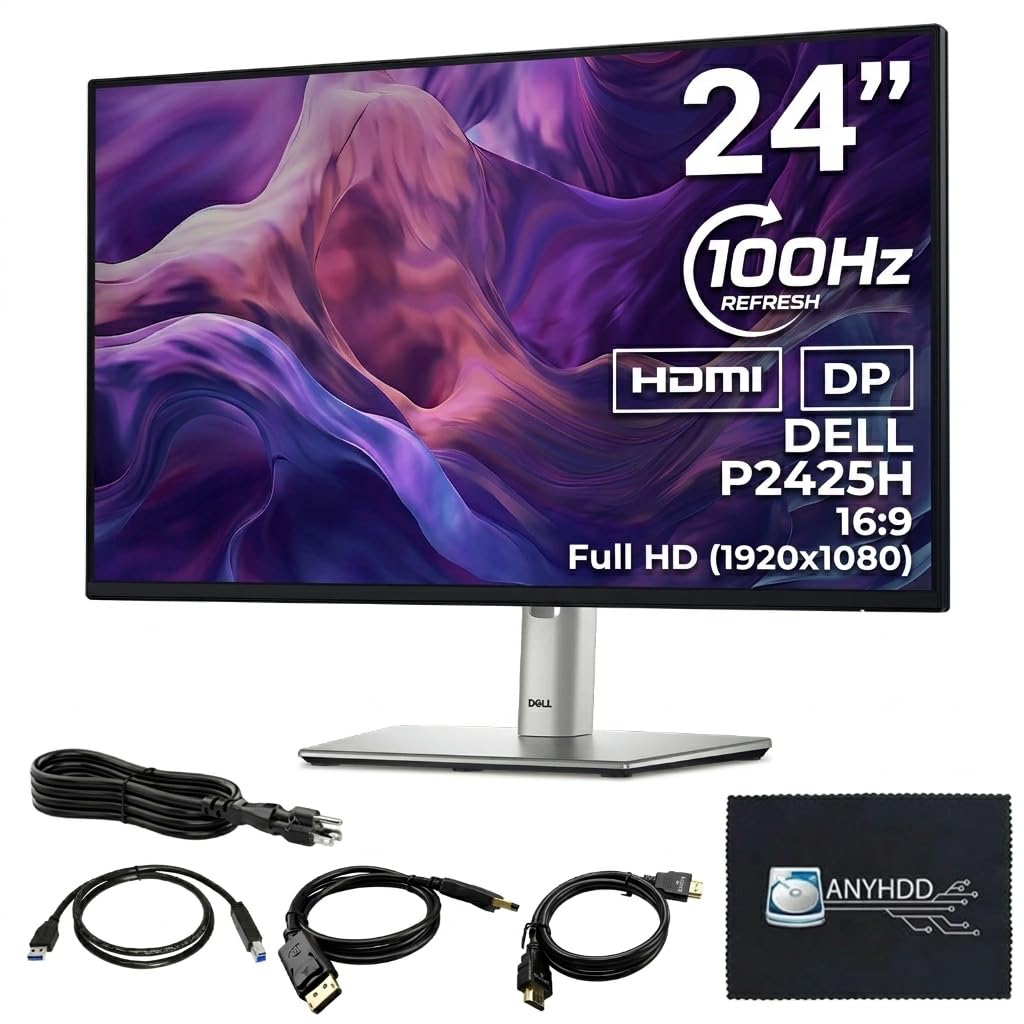
The executive desk monitor that adjusts every way you move and cleans up cable mess.
This Dell P-series monitor is built for long office hours. The 100Hz refresh rate is a meaningful step above the standard 60Hz — scrolling through documents and webpages feels noticeably smoother on the eyes. It runs a 1000:1 contrast ratio and 250 cd/m² brightness, which is adequate for indoor office lighting.
The standout feature for productivity is the built-in 4-port USB Type-A hub. You plug one cable from your PC to the monitor, and all four USB ports become accessible on your desk for flash drives, a mouse receiver, or a webcam. The screen adjusts in tilt, swivel, pivot, and height — making it easy to find a comfortable position without stack of books. ComfortView Plus technology reduces blue light emission without making the screen look yellow.
Inputs cover HDMI 1.4, DisplayPort 1.2, and VGA, so it fits older office PCs as well as modern laptops. The 5ms response time (GtG) is fine for office tasks but not fast enough for competitive gaming. Owners mention that the anti-glare coating works well under overhead lights, reducing reflections that cause squinting.
Productivity Highlights
- Height, tilt, swivel, and pivot adjustment for all-day comfort
- Built-in 4-port USB hub cleans up cable clutter
- 100Hz refresh rate is smoother than typical 60Hz office monitors
Not For Gaming
- 5ms response time is slower than 1ms gaming panels
Ideal for: Professionals who sit at a desk all day and need ergonomic flexibility plus a USB hub.
Pass on this if: You need a fast response time for gaming — the 5ms will feel sluggish.
7. ViewSonic VA2448-MH
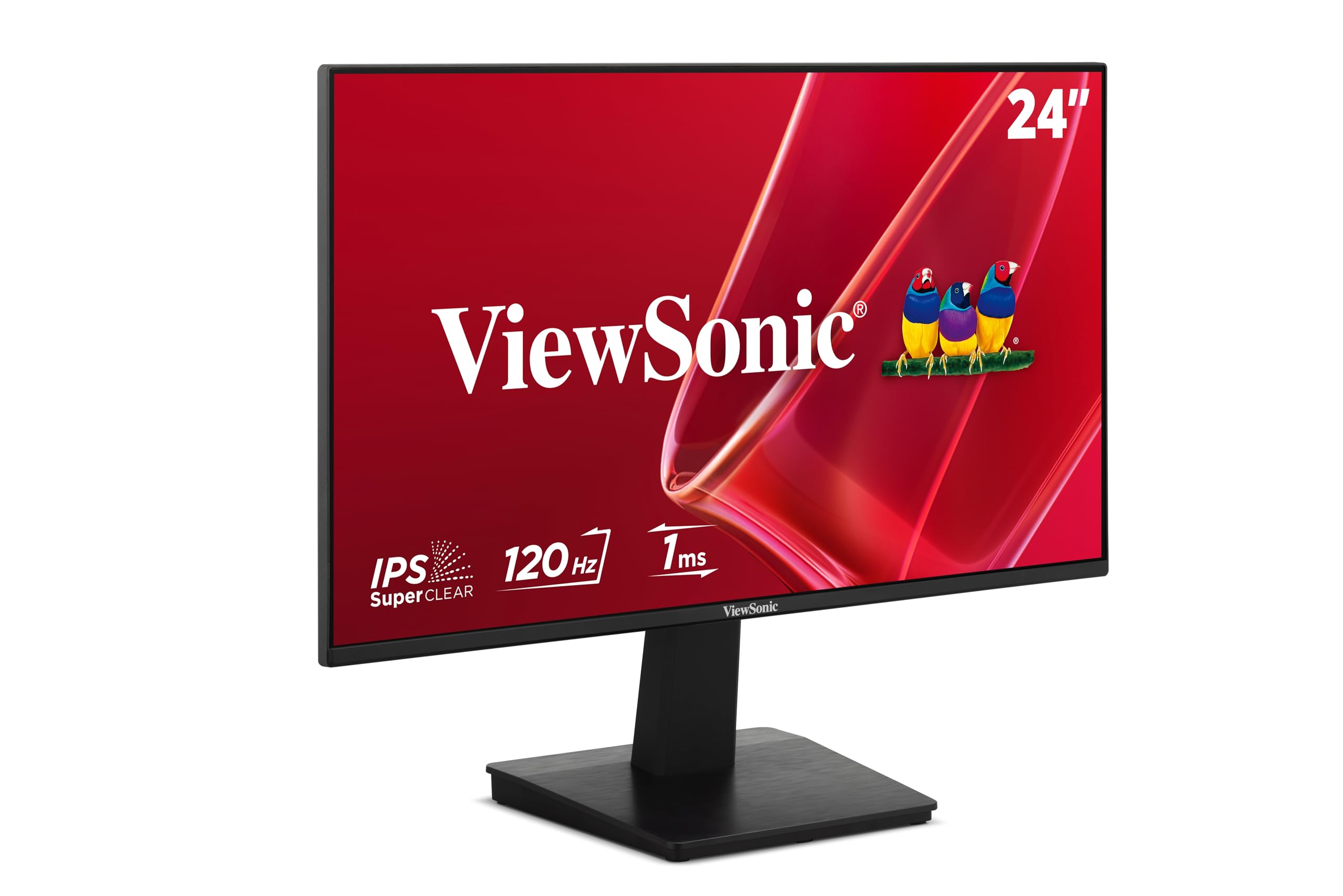
The straightforward 120Hz monitor that skips the frills and gets the basics right.
ViewSonic keeps this one clean: a 24-inch Full HD IPS panel with 120Hz refresh rate, 1500:1 contrast ratio, and 300 cd/m² brightness. The 300-nit brightness is higher than the LG 24U411A-B (250 nits) and ViewSonic’s own VA2456A-MHD (250 nits), making it a better fit for brighter rooms. Variable Refresh Rate (FreeSync) helps reduce screen tearing without complex setup.
The frameless bezel gives a clean appearance, and the anti-glare screen cuts reflections if you sit near a window. Inputs include HDMI and VGA — no DisplayPort here, but that covers most standard desktop and laptop connections. It includes Flicker-Free technology and a Blue Light Filter to reduce eye fatigue during long work sessions.
Preset modes for Game, Movie, Web, Text, and Mono let you switch between tune settings depending on what you are doing. The display tilts but does not adjust in height. Buyers mention it is easy to set up right from the start, with the HDMI cable and power cable included.
Good Points
- 300 cd/m² brightness is strong for a monitor at this level
- 120Hz refresh rate and 1500:1 contrast ratio
- Frameless design works well side-by-side
Missing Feature
- No DisplayPort — limited to HDMI and VGA
Works well for: A straightforward home office screen with smooth 120Hz scrolling and good brightness.
Check other picks if: You need DisplayPort connectivity.
8. ViewSonic VA2456A-MHD

The slim-bezel 120Hz monitor with the one port the VA2448-MH left out.
This ViewSonic is nearly identical to the VA2448-MH above, but it adds DisplayPort alongside HDMI and VGA — giving you three input options to switch between a desktop, a laptop, and a gaming console without swapping cables. The 24-inch IPS panel runs at 120Hz with a 1500:1 contrast ratio, and SuperClear IPS technology keeps colors and brightness consistent from any viewing angle.
At 250 cd/m² brightness, it is a step dimmer than the 300-nit VA2448-MH, though still fine for most indoor lighting. It includes the same Flicker-Free and Blue Light Filter eye-care features and the same five presets: Game, Movie, Web, Text, and Mono. The thin bezels create a clean look for dual-monitor setups, where two screens sit side by side with minimal gap.
Buyers appreciate that the box includes an HDMI cable, saving a trip to the store. The display tilts back for angle adjustment but does not raise up. For connecting multiple devices without a KVM switch, having three video ports is a practical advantage.
Why It Helps
- HDMI, DisplayPort, and VGA — connect three devices at once
- 120Hz with 1500:1 contrast ratio for smooth, rich visuals
- Thin bezels suit multi-monitor layouts
The Cost of Ports
- 250 cd/m² brightness is lower than the 300-nit VA2448-MH
Right for: Users who switch frequently between a desktop, laptop, and console — the triple inputs save hassle.
Skip if: You only need one input — the VA2448-MH is brighter for the same price range.
9. Amazon Basics 24-inch Full HD IPS Monitor

The no-nonsense office screen that proves 75Hz is still two steps above 60Hz.
At 75Hz, this Amazon Basics monitor offers a 25% improvement over the standard 60Hz displays found in many office cubicles — casual scrolling and cursor movement feel a bit smoother. The IPS panel gives you accurate colors from any angle, which is a real upgrade from old TN screens in this budget tier. The 1000:1 contrast ratio is typical for entry-level IPS monitors.
It includes built-in speakers, so you can hear system sounds or join a video call without external speakers. The stand tilts from −5° to 23° and the 100x100mm VESA pattern lets you mount it on an arm or wall if desk space is tight. Connectivity covers HDMI 1.4, DisplayPort, and VGA, plus a 3.5mm audio jack, giving solid flexibility for a budget monitor. It comes with an HDMI cable in the box.
At 6.92 pounds, it is lighter than most monitors here. The Energy Star certification means it draws less power in standby mode. The main limitation is the 75Hz refresh rate — it hits less than half the smoothness of the 144Hz Dell or the 120Hz LG options above. For pure office work it is fine, but the difference is noticeable side by side.
Budget Strengths
- 75Hz refresh rate is smoother than common 60Hz office screens
- Built-in speakers, HDMI, DP, and VGA
- VESA mountable and Energy Star certified
Where It Falls Short
- 75Hz lacks the fluid feel of 120Hz or 144Hz panels
Best for: A cheap, reliable second monitor or a basic office screen where 60Hz is the baseline.
Avoid if: You have seen a 120Hz screen — going back to 75Hz feels choppy in comparison.
Understanding the Specs
Refresh Rate (Hz)
Refresh rate tells you how many times per second the monitor redraws the entire image. A 60Hz monitor updates 60 times each second, which is the old standard. Jumping to 75Hz feels slightly smoother when moving your mouse or scrolling. At 120Hz or 144Hz, motion becomes noticeably fluid — quick cursor movements leave less blur, and fast-paced games look much sharper. The difference is among the most obvious visual upgrades you can make, even outside of gaming.
Contrast Ratio
Contrast ratio compares the brightest white to the darkest black the monitor can display. A 1500:1 ratio means white is 1500 times brighter than black — that produces deeper, more realistic shadows and richer images than a 1000:1 screen. Higher contrast is especially noticeable in dark movie scenes or games with shadowy environments. IPS panels typically land between 1000:1 and 1500:1, while VA panels can reach 3000:1 or higher for even deeper blacks.
FAQ
Is a 24 inch monitor big enough for split-screen work?
What is the difference between 60Hz, 75Hz, 120Hz, and 144Hz?
Will a 24 inch monitor fit on a standard desk?
Can I use a 24 inch monitor for photo editing?
What does VESA mount compatibility mean?
Do I need G-Sync or FreeSync on my monitor?
What is the ideal brightness for a 24 inch monitor?
Is a 24 inch monitor good for gaming?
Can I connect a laptop to a 24 inch monitor with just one cable?
How long do 24 inch monitors typically last?
Final Thoughts: The Verdict
For most buyers, the 24 inch computer monitor winner is the Dell S2425HSM because it combines a fluid 144Hz refresh rate with excellent 1500:1 contrast, height-adjustable ergonomics, and built-in speakers at a mid-range price. If you want color accuracy for creative work, grab the ASUS ProArt PA247CV with its factory-calibrated 100% sRGB coverage and USB-C 65W power delivery. And for pure competitive gaming on a budget, the standout is the LG 24G411A-B Ultragear with its 144Hz overclock and full G-Sync plus FreeSync support.
How We Picked
We do not accept paid placement. Every pick is matched to a real buyer and a real use-case; we do not hands-on test units.
Sources & Methodology
Specifications: manufacturer listings and product documentation. Review insights: verified customer reviews, as of July 2026. Pricing: not shown on this page (it changes often); check the current price via the retailer link.
As an Amazon Associate, Gadgets Feed earns from qualifying purchases. This does not affect which products we feature.
Related Guides
Product prices and availability are accurate as of the date/time indicated and are subject to change. Any price and availability information displayed on Amazon at the time of purchase will apply to the purchase of this product. As an Amazon Associate I earn from qualifying purchases.
CERTAIN CONTENT THAT APPEARS ON THIS SITE COMES FROM AMAZON. THIS CONTENT IS PROVIDED "AS IS" AND IS SUBJECT TO CHANGE OR REMOVAL AT ANY TIME.
Amazon and the Amazon logo are trademarks of Amazon.com, Inc. or its affiliates.