
Choosing the right 24-inch monitor means balancing pixel density, refresh rate, and ergonomic adjustability in a size that fits tight desks and dual-screen rigs without sacrificing clarity. A common mistake is grabbing the cheapest 60Hz panel only to regret the eye strain and sluggish responsiveness during daily productivity and light gaming.
I’m Min — the co-founder and writer behind Gadgets Feed. This guide is the result of many hours of research, cross-referencing real user experiences, and peeling back spec sheets to separate marketing claims from real-world performance across nine very different models.
Whether you need a color-accurate panel for photo editing, a high-refresh display for gaming, or a budget-friendly workhorse for the home office, you’ll find the right fit in this roundup of the best 24 inch monitor options currently available on Amazon.
How To Choose The Best 24 Inch Monitor
The 24-inch form factor is the sweet spot for dual-monitor setups and smaller desks, but the internal specs vary wildly. Focusing on the wrong feature — like a high refresh rate when you need color accuracy — leads to regret. Here’s what actually matters.
Panel Type: IPS vs VA vs TN
IPS panels dominate the 24-inch category for good reason: they offer the widest 178-degree viewing angles and the most consistent color reproduction across the screen. VA panels deliver deeper blacks and higher contrast ratios, making them better for dark-room movie watching, but they suffer from slower pixel response and narrower viewing angles. TN panels are all but extinct at this size outside of esports-specific models — the color shift is too severe for general use.
Refresh Rate: 60Hz vs 100Hz vs 120Hz vs 144Hz
A 60Hz panel shows 60 frames per second, which feels perceptibly stuttery during cursor movement, scrolling, and gaming after you’ve experienced anything higher. The sweet spot for productivity and light gaming is between 100Hz and 120Hz — motion looks fluid without the premium cost of 144Hz. Even a jump from 60Hz to 100Hz cuts perceived motion blur by nearly half, making long Excel sessions and web browsing noticeably easier on the eyes.
Ergonomics: The Stand Is Half the Monitor
Height-adjustable stands with tilt, swivel, and pivot capability let you align the top of the display with your eye level, which directly reduces neck strain during eight-hour workdays. Many budget models ship with fixed-tilt stands that force you onto a monitor arm immediately — factor that – into your total cost if you care about posture. VESA 100x100mm compatibility ensures you can mount any of these panels on a third-party arm later.
Connectivity: Beyond HDMI
Look for at least one DisplayPort input if you want adaptive sync (FreeSync or G-Sync Compatible) at higher refresh rates. USB-C with Power Delivery (65W or higher) is the gold standard for laptop users — a single cable delivers video, data, and charging, eliminating the need for a separate docking station. A built-in USB hub with downstream ports simplifies peripheral management on a clean desk.
Quick Comparison
On smaller screens, swipe sideways to see the full table.
| Model | Category | Best For | Key Spec | Amazon |
|---|---|---|---|---|
| LG 24G411A-B UltraGear | Gaming | 144Hz Overclocked Gaming | 144Hz / 1ms MBR / IPS | Amazon |
| Dell S2425HSM Plus | Premium Multi-Purpose | Full Ergonomics + 144Hz | 144Hz / 1ms MPRT / 1500:1 | Amazon |
| ASUS ProArt PA247CV | Professional | Color-Critical Work | ΔE < 2 / USB-C 65W PD | Amazon |
| ViewSonic VP2488-4K | Professional 4K | 4K Pixel Density / Mac | 4K UHD / Thunderbolt 4 | Amazon |
| BenQ GW2490T | Office Ergonomic | Height-Adjustable Productivity | 100Hz / Brightness IQ | Amazon |
| HP 24mh | Office All-Rounder | 75Hz + Height Adjustable | 75Hz / Dual 2W Speakers | Amazon |
| Samsung S3 S32GF | Everyday Value | 120Hz on a Budget | 120Hz / IPS / Slim Bezel | Amazon |
| ASUS VA249QG | Entry-Level | Budget 120Hz Combo | 120Hz / 1ms / Adaptive-Sync | Amazon |
| ViewSonic VA2456A-MHD | Entry-Level | Lowest-Cost 120Hz IPS | 120Hz / IPS / 1500:1 | Amazon |
In‑Depth Reviews
1. LG 24G411A-B UltraGear

The LG UltraGear 24G411A-B hits the sweet spot of value for a 24-inch monitor. Its native 120Hz refresh rate overclocks to 144Hz, and the 1ms Motion Blur Reduction keeps fast-paced gaming clean and ghost-free. The IPS panel delivers up to 99% sRGB coverage and HDR10 support, so colors pop in both competitive shooters and open-world titles.
Connectivity covers HDMI and DisplayPort, and the monitor supports both NVIDIA G-Sync Compatible and AMD FreeSync for tear-free gameplay. The Dynamic Action Sync and Black Stabilizer features reduce input lag and improve visibility in dark scenes, which directly translates to better reaction times in games like Call of Duty or Apex Legends.
The slim bezel and minimal stand create a clean look, though the stand itself is tilt-only and has a reputation for wobbling. At this price, you get gaming-grade motion handling and respectable color — the stand is the only area where you might want to swap to a VESA arm for a rock-solid setup.
Why it’s great
- 144Hz overclock delivers elite smoothness for competitive gaming.
- IPS panel with 99% sRGB keeps colors accurate for mixed use.
- G-Sync Compatible and FreeSync support for tear-free frames.
Good to know
- Stand is tilt-only and can feel wobbly on uneven desks.
- Brightness caps at 250 nits, not ideal for very bright rooms.
2. Dell S2425HSM Plus

The Dell S2425HSM Plus is a rare find: a 24-inch monitor that combines a full ergonomic stand (height, tilt, swivel, and pivot) with a 144Hz refresh rate and 1ms MPRT. The IPS panel delivers a 1500:1 contrast ratio, which is noticeably higher than the 1000:1 typical of this size, producing deeper blacks and better perceived detail in movies and games.
Integrated dual 3W speakers outperform the typical tinny monitor audio — they produce a wider frequency range, making them genuinely usable for conference calls and casual video playback without external speakers. The Ash White finish and ultra-thin bezels match modern Mac and PC setups well, and the 300-nit brightness gives you more headroom in brighter rooms than the 250-nit competition.
The TÜV-certified 4-star eye comfort system reduces harmful blue light without washing out colors, which matters for all-day coding or spreadsheet work. The only connectivity limitation is the single HDMI port — you’ll need to rely on the included HDMI cable for your primary input, with no DisplayPort or USB-C on board.
Why it’s great
- Full height, tilt, swivel, and pivot stand for perfect ergonomics.
- 1500:1 contrast ratio delivers better depth than standard IPS panels.
- Dual 3W speakers sound better than most built-in monitor audio.
Good to know
- Only one HDMI input; no DisplayPort or USB-C connectivity.
- Ash White color may not match black desk accessories.
3. ASUS ProArt PA247CV

The ASUS ProArt PA247CV is built for color-critical work, not for gaming. It comes factory-calibrated with a Delta E < 2 rating and covers 100% sRGB and 100% Rec. 709, making it a reliable tool for photo editing, video color grading, and digital design. The IPS panel with 178-degree viewing angles ensures your color decisions hold when a client looks over your shoulder.
The standout feature is USB-C with 65W Power Delivery — one cable powers your laptop, carries the video signal, and connects to the built-in USB 3.1 hub. That single-cable simplicity is invaluable for laptop-centric workflows where every dongle counts. The 75Hz refresh rate isn’t gaming-tier, but it’s enough to make cursor movement and scrolling feel noticeably smoother than a standard 60Hz office panel.
The stand offers tilt, swivel, pivot, and height adjustment, and the monitor ships with HDMI, DisplayPort, USB-C, and USB-A cables. On the downside, the integrated speakers are weak, and the ASUS calibration software mentioned in older marketing has been discontinued — you’ll need a hardware colorimeter for recalibration.
Why it’s great
- Factory-calibrated Delta E < 2 out of the box for accurate color.
- USB-C with 65W Power Delivery simplifies laptop connectivity.
- 100% sRGB and 100% Rec. 709 coverage for professional workflows.
Good to know
- No calibration software included; requires third-party colorimeter.
- Built-in speakers are weak and suitable only for system sounds.
4. ViewSonic VP2488-4K

The ViewSonic VP2488-4K delivers a 3840×2160 resolution in a 24-inch frame, resulting in a pixel density that makes text razor-sharp and images look printed. It covers 100% sRGB and 98% DCI-P3, is Pantone Validated, and is specifically designed to match the color performance of Mac Studio and MacBook Pro displays — making it the best choice for macOS users who need 4K in a compact size.
Thunderbolt 4 connectivity provides up to 40 Gbps data transfer, 100W Power Delivery for charging larger laptops, and daisy-chaining for dual 4K setups over a single cable. The 500-nit brightness is class-leading for a 24-inch panel, giving you the luminance to work in bright environments and view HDR content with more punch than the 250–300 nit competition.
The ergonomic stand covers tilt, swivel, pivot, and height adjustment. However, some units exhibit firmware bugs with sleep/wake cycles on Macs, and the AdobeRGB coverage falls short of 99% — it measured 88% on a Spyder X Elite tester. At this price, you’re paying for the 4K resolution and Thunderbolt convenience, not gaming features.
Why it’s great
- 4K resolution at 24 inches provides extremely sharp text and images.
- Thunderbolt 4 with 100W Power Delivery and daisy-chain support.
- Pantone Validated with 98% DCI-P3 for Mac-accurate color.
Good to know
- AdobeRGB coverage is around 88%, not suitable for high-end print work.
- Some users report sleep/wake bugs and USB disconnect issues.
5. BenQ GW2490T

The BenQ GW2490T focuses on what matters most for long office sessions: a height-adjustable stand and BenQ’s Brightness Intelligence Technology, which automatically adjusts brightness and color temperature to ambient light. The 100Hz refresh rate is a meaningful upgrade over 60Hz for scrolling through documents and web pages, reducing eye fatigue without the gaming premium.
The 24-inch IPS panel covers 99% sRGB and produces consistent color across wide viewing angles. The stand offers height, tilt, swivel, and pivot adjustment, making it ideal for multi-monitor setups where aligning bezels is critical. The edge-to-edge glass design minimizes bezel distraction when pairing multiple units side by side.
The built-in speakers are weak, and the base of the stand is surprisingly large — it takes up significant desk depth. Users also report that the monitor sometimes fails to wake from PC sleep, requiring a power cycle. For pure office productivity with ergonomic flexibility, however, few monitors at this tier match the BenQ’s adjustability.
Why it’s great
- Full ergonomic stand with height, tilt, swivel, and pivot.
- Brightness Intelligence Technology reduces eye strain automatically.
- 100Hz refresh rate makes scrolling smoother than 60Hz panels.
Good to know
- Large stand base consumes more desk space than expected.
- Internal speakers are weak; plan to use external audio.
6. HP 24mh

The HP 24mh has been a consistent best-seller for good reason: it combines a 75Hz refresh rate, a height-adjustable stand with tilt and swivel, and dual 2W speakers into a single reliable package. The 75Hz is a step up from 60Hz and noticeably smooths out cursor movement and window dragging without the cost of a gaming-focused panel.
The micro-edge bezel design makes it excellent for multi-monitor arrays, and the connectivity suite includes HDMI, DisplayPort, and VGA — covering legacy office equipment and modern laptops alike. The stand rotates 90 degrees for portrait mode, which is a rare find at this price and hugely useful for coding or document review.
Built-in speakers are adequate for voice calls but lack bass for music or video. Some users report yellow light bleed on dark scenes during gaming. At this price, you get genuine ergonomic flexibility and a solid 75Hz IPS panel that works equally well for WFH spreadsheets and occasional console gaming.
Why it’s great
- Height-adjustable stand with tilt, swivel, and 90-degree rotation.
- 75Hz refresh rate improves perceived smoothness over 60Hz.
- HDMI, DisplayPort, and VGA inputs for broad compatibility.
Good to know
- Light bleed on dark scenes may be noticeable during gaming.
- Speakers are fine for voice, but lack bass for music or movies.
7. Samsung S3 S32GF
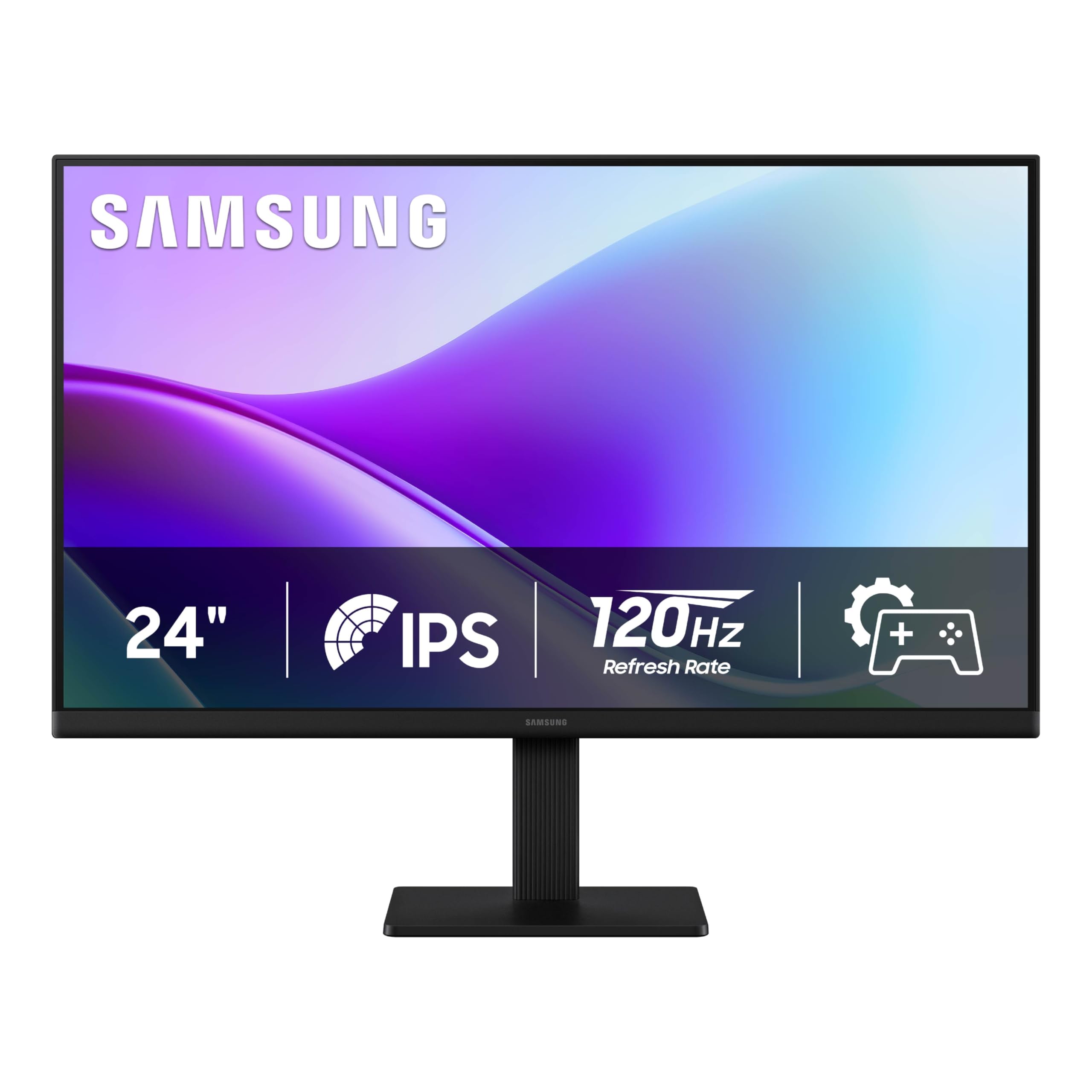
The Samsung S3 S32GF delivers a 120Hz IPS panel at an entry-level price, making it one of the most accessible ways to step up from a standard 60Hz monitor. The slim borderless design and lightweight frame make it easy to integrate into any setup, and the included HDMI cable gets you up and running immediately with laptops, desktops, or consoles.
The IPS panel maintains consistent color from wide angles, and the 120Hz refresh rate dramatically smooths scrolling, video playback, and casual gaming. The Eye Saver Mode reduces blue light without the harsh yellow tint of older filters, and the Flicker-Free backlight helps during extended work sessions. Game Picture Mode lets you adjust contrast per genre, which is a nice bonus for the price.
There is no DisplayPort input — only HDMI connectivity — so you cannot use it with adaptive sync at higher refresh rates from a PC that relies on DP. The color gamut covers around 72% sRGB, which is acceptable for general use but falls short of the 99% sRGB panels aimed at creative professionals. It’s a pure productivity and light-gaming monitor, and it excels in that lane.
Why it’s great
- 120Hz refresh rate at an entry-level price point.
- Ultra-slim bezels and lightweight design for easy mounting.
- Eye Saver and Flicker-Free technology reduce strain during long sessions.
Good to know
- Only HDMI connectivity; no DisplayPort for PC adaptive sync.
- Color gamut covers about 72% sRGB, not suitable for color-critical work.
8. ASUS VA249QG

The ASUS VA249QG brings a 120Hz IPS panel and 1ms MPRT Adaptive-Sync to a price point that rivals many 60Hz office monitors. The 99% sRGB coverage and wide 178-degree viewing angles are surprising at this tier — colors look vivid, and the frameless design makes it a clean option for a secondary monitor or a home-office starter build.
Connectivity includes HDMI, DisplayPort, and VGA, giving you the flexibility to connect modern laptops and legacy desktops alike. The TÜV-certified Flicker-Free and Low Blue Light technology are genuinely effective — the default eco mode is dim, but disabling it reveals a bright, sharp image with minimal eye fatigue during long reading sessions.
The built-in speakers are widely criticized as some of the worst in this class — reviews describe them as sounding like a 1990s PC speaker — so budget for external audio. The stand offers only tilt adjustment with no height adjustment, and the plastic build feels light. If you can live with those trade-offs, the 120Hz smoothness and IPS color make this an exceptional bargain.
Why it’s great
- 120Hz IPS panel with 1ms MPRT for smooth motion.
- 99% sRGB coverage and wide viewing angles for the price.
- TÜV-certified eye care reduces strain during long work sessions.
Good to know
- Built-in speakers are very poor — external audio is almost mandatory.
- Stand offers only tilt; no height adjustment or VESA support out of the box.
9. ViewSonic VA2456A-MHD

The ViewSonic VA2456A-MHD is the definition of stripped-down value: a 24-inch 1080p IPS panel with 120Hz refresh rate and a 1500:1 contrast ratio at a price that undercuts most 60Hz office monitors. The SuperClear IPS technology maintains vivid color and consistent brightness at wide angles, and the 120Hz makes everyday scrolling feel genuinely fluid.
Connectivity covers HDMI, DisplayPort, and VGA, ensuring compatibility with everything from a modern gaming PC to an older office desktop. The Flicker-Free technology and Blue Light Filter are standard but effective, and the monitor ships with an HDMI cable for immediate setup. The adaptive sync support reduces screen tearing during casual gaming.
The stand is the main compromise — it offers tilt only with no height adjustment, and the brightness maxes out at 250 nits, which can feel dim in a sunlit room. There is no USB hub and no built-in speakers. If you need a basic 120Hz IPS panel that just works without extra features, this is the most cost-effective entry point in the lineup.
Why it’s great
- 120Hz IPS panel with 1500:1 contrast at the lowest price in the lineup.
- HDMI, DisplayPort, and VGA inputs for wide device compatibility.
- Flicker-Free and Blue Light Filter protect eyes during long sessions.
Good to know
- Stand offers only tilt; no height or swivel adjustment.
- No built-in speakers or USB hub — plan for external audio.
FAQ
What refresh rate should I choose for a 24-inch monitor in 2025?
Is 1080p resolution enough for a 24-inch screen?
Do I need a monitor with built-in speakers?
What is VESA mounting and why does it matter?
Final Thoughts: The Verdict
For most users, the best 24 inch monitor winner is the LG 24G411A-B UltraGear because it combines a 144Hz overclockable panel with IPS color quality and adaptive sync at an aggressive price. If you want full ergonomic adjustability with a premium stand and 144Hz smoothness, grab the Dell S2425HSM Plus. And for color-critical professional work with USB-C one-cable simplicity, nothing beats the ASUS ProArt PA247CV.