
Our readers keep the lights on and my morning glass full of iced black tea. As an Amazon Associate, I earn from qualifying purchases.
Specs are compiled from manufacturer listings and verified buyer reviews and can change over time — please confirm the key details on the product page before buying.
Note on sizing: 24-inch monitors are often sold as 23.8-inch models — the nearest standard size. Every pick here fits that 24-inch class and is ready for a dual setup.
Setting up two screens side by side can transform your workday, but getting the pairing right matters more than you’d think. Mismatched heights, color tones, or refresh rates turn a dual setup into a compromise, not an upgrade. You need to match bezels so the seam between screens disappears, choose a refresh rate that suits your actual work, and pick ports that let both monitors connect to one PC cleanly.
I’m Min — the founder and writer behind Gadgets Feed. This guide is built by comparing the manufacturers’ published specifications and the patterns across verified customer reviews, so you get each pick’s real strengths and trade-offs instead of marketing spin.
Whether you’re pairing two for a home office, student desk, or gaming corner, knowing the budget-versus-premium trade-offs is key to a smooth setup.knowing which 24 inch monitors for dual setup deliver matching quality and smooth connectivity is exactly what this guide will show you as it breaks down all nine picks.
Our Picks at a Glance



How To Choose The Best 24 Inch Monitors For Dual Setup
Choosing a single monitor is straightforward, but choosing two for a side-by-side setup adds a few extra rules. The goal is a unified screen, not two displays fighting for your attention.
Match the Bezel, Kill the Seam
When you push two monitors together, the thickness of the frame around the screen becomes the “seam” between your displays. Ultra-thin bezels keep that gap small, so your cursor and windows move from one screen to the other with less visual interruption. For a cleaner look, some prefer a “frameless” or “borderless” design where the bezel is minimized on three sides.
Align the Heights and Angles
A dual setup works best when both screens sit at the same height and tilt. If the stands have different height adjustments, or no height adjustment at all, you may be forced to prop one screen on books. Look for stands that offer tilt, swivel, and height adjustment so you can align the tops of both panels perfectly.
Count Your Video Outputs
Before buying two monitors, check the back of your PC or laptop. You need at least two usable video outputs — such as two HDMI ports, two DisplayPorts, or one of each. Then verify the monitors have those matching inputs. A monitor that only has one HDMI port is a common source of frustration when you’re trying to hook up a second screen.
Quick Comparison
| Model | Best For | Refresh Rate | Panel Type | Height Adjust | Amazon |
|---|---|---|---|---|---|
| ViewSonic VA2456A-MHD★ Best Overall | Dual office setup | 120Hz | IPS | No | Amazon |
| LG 24U411A-BBest Value | Multitasking hub | 120Hz | IPS | No | Amazon |
| LG 24G411A-B UltraGearGaming Pair | Entry gaming pair | 144Hz | IPS | No | Amazon |
| Dell 24 Plus S2425HSM | Ergonomic work pair | 144Hz | LCD | Yes | Amazon |
| ViewSonic VX2476-SMHD | Crisp text and office tasks | 100Hz | IPS | No | Amazon |
| ASUS TUF VG249QL3A | High-refresh gaming pair | 180Hz | Fast IPS | Yes | Amazon |
| Kado Curved 2-Pack | rich curved pair | 75Hz | LCD | No | Amazon |
| Kado Gaming 2-Pack | Budget gaming pair | 165Hz | LCD | No | Amazon |
| Dell S2421HS | Fully adjustable work pair | 75Hz | IPS | Yes | Amazon |
In‑Depth Reviews
1. ViewSonic VA2456A-MHD
Our pick — over 4.5★ from 400+ verified ratings; the strongest balance of quality and price.
The dual-desk workhorse pairing sharp IPS panels with 120Hz smoothness at a price that’s easy to stomach twice over.
For a side-by-side office setup, the ViewSonic VA2456A-MHD is the pick we keep coming back to. It pairs a 24-inch Full HD (1920×1080) IPS panel with a 120Hz refresh rate, which makes scrolling through long spreadsheets and web pages feel noticeably fluid. The thin bezels keep the seam between the two screens tight, so your cursor glides from one display to the other without jumping a chunky black frame.
Connectivity is where this unit earns its keep for a dual setup. It offers HDMI, DisplayPort, and even VGA inputs, giving you multiple ways to hook up both screens to your PC or laptop. With SuperClear IPS technology, colors stay accurate and brightness stays consistent even when you’re viewing the screen from an off-angle — a real benefit when two monitors are angled toward you in a gentle arc. Flicker-Free tech and a Blue Light Filter cut eye strain during marathon typing sessions.
The main trade-off for this price is the stand. It doesn’t offer height adjustment, so aligning the tops of two screens may require a third-party VESA mount or some creative desk stacking. The built-in speakers are serviceable but not impressive, and one owner noted the 250-nit brightness is fine for most rooms but not a sun-drenched office. Buyers report the reliability is a strong suit — a long-time ViewSonic owner notes their earlier units have run for years, and these models were “still working great” after six months of daily use. The display quality earns the most praise from owners by far, with 36 buyers singling it out as the standout trait.
What wins people over
- Sharp 1080p IPS picture with vivid, accurate colors
- 120Hz refresh makes daily scrolling feel buttery smooth
- HDMI, DisplayPort, and VGA give flexible hookup options
- Proven track record for long-term reliability
The honest trade-offs
- Basic stand with no height adjustment
- Built-in speakers are weak; plan on externals
- 250-nit brightness is average, not blinding
Reach for this if: You want a dependable, budget-friendly pair that looks great side by side and won’t strain your eyes during the workday.
Look elsewhere if: You need to raise and lower the screens to match your eye line — you’ll want to add a mount or step up to a model with a height-adjustable stand.
2. LG 24U411A-B
A virtually borderless pair that makes the gap between screens all but disappear for a clean, floating desk look.
The LG 24U411A-B is built for the person who wants their dual setup to look as good as it functions. With a 3-side virtually borderless design, the bezels are so slim that two of these pushed together read almost like one continuous display. The sleek stand and base add to that “floating” aesthetic, making it a strong fit for a tidy, minimalist workspace.
You get a 24-inch Full HD (1920 x 1080) IPS panel (a screen type known for wide viewing angles and accurate colors) with a 120Hz refresh rate (the screen updates 120 times per second) and 1ms Motion Blur Reduction (MBR, a feature that reduces ghosting on fast-moving images). That combination keeps fast-moving windows and video crisp, whether you’re multitasking between apps or doing a bit of casual gaming. The color performance is a highlight: with HDR10 support (a standard for high dynamic range, making bright and dark areas more detailed) and up to 99% sRGB color gamut coverage (a measure of how many standard colors the screen can show), this LG monitor delivers rich, vivid tones that work for light creative projects like editing photos in Photoshop as well as everyday productivity.
The catch here is the connectivity. This monitor comes with just one HDMI port and one VGA port, so you’ll need to make sure your PC can drive a second HDMI or VGA connection before you commit to a pair. The adjustable tilt range of -5° to 20° is handy for finding a good angle, though there’s no height adjustment on the stand itself. On the color front, the numbers back up the fuss: at 99% sRGB coverage this LG beats the ViewSonic VA2456A-MHD’s 0.8% — a huge gap that matters if you notice color depth. One buyer using it with a Mac mini called the anti-glare screen a blessing, adding that “though not quite as bright as the Mac 27, it is still a very good monitor.” Overall quality leads the owner feedback, with 81 buyers highlighting it as the top positive aspect.
Why it shines
- Ultra-slim, virtually borderless design for a smooth pair
- Wide 99% sRGB color coverage for vivid, accurate tones
- 120Hz refresh with 1ms MBR keeps motion crisp
- Reader Mode cuts blue light for comfortable all-day reading.
Watch out for
- Only one HDMI port limits connection flexibility
- No height adjustment on the stand
- Basic HDR performance — it’s HDR10, not full HDR
Buy it for: A sleek, modern office pair where the near-invisible bezel makes your two screens feel like one big display.
skip it if: Your PC relies on DisplayPort outputs, since this LG expects you to work with HDMI or VGA.
3. LG 24G411A-B UltraGear
The 144Hz entry point for gamers building a dual-screen battlestation without emptying the wallet.
If your dual setup is split between work and play, the LG UltraGear 24G411A-B is the bridge. It takes the same sharp 24-inch Full HD (1920 x 1080) IPS panel and cranks the refresh rate to a native 120Hz, which overclocks to 144Hz for that extra-smooth competitive edge. With 1ms Motion Blur Reduction (MBR), fast-moving action stays sharp with less ghosting trailing behind.
What sets this monitor apart for a dual gaming rig is its adaptive sync support. It’s both NVIDIA G-SYNC Compatible and AMD FreeSync, meaning it can match its refresh rate to your graphics card’s output to eliminate screen tearing. That’s a huge plus if you run an NVIDIA card and want both screens to sync without tearing. It also includes gaming-focused extras like Black Stabilizer to brighten dark scenes and a Crosshair overlay for first-person shooters. The slim bezel and minimal stand keep the look clean, and the tilt adjustment lets you angle each screen toward your chair.
The honest downside? The speakers are minimal, and the stand offers no height adjustment, so matching the tops of two screens means a VESA mount (a standard bracket pattern for attaching monitors to arms or wall mounts). One owner noted noticeable IPS glow (a slight halo of light) on darker screens — a common trait of IPS panels, not a defect. At this price point, owners overwhelmingly call it a value win, with “value for money” the most-praised aspect (25 mentions). As one buyer summed it up in the review pages: “is ok for the price for sure is no Oled but for 90 bucks is a solid support monitor” — and it looks sharp next to pricier UltraGear models.
Built for play
- 120Hz native, overclockable to 144Hz for smooth frames
- Both G-Sync Compatible and FreeSync for tear-free play
- 1ms MBR cuts motion blur in fast games
- Crosshair overlay and Black Stabilizer for FPS edge
Keep in mind
- Basic stand lacks height adjustment
- Noticeable IPS glow on dark screens
- Built-in speakers are weak
Grab it for: The gamer who wants a fast 144Hz pair that supports both major adaptive sync standards.
Think twice if: You need a workstation-grade stand with full ergonomic adjustments right from the start.
4. Dell 24 Plus S2425HSM

The one that finally lets you line up both screens perfectly — height, tilt, pivot, and swivel, all included.
The Dell 24 Plus S2425HSM (23.8-inch viewable) is the answer for anyone whose neck has suffered from mismatched dual monitors. Its stand delivers height, tilt, pivot, and swivel adjustments, so you can raise, angle, and rotate each screen to create a perfectly aligned pair. That’s a rare feature at this price level and a godsend for long workdays.
It’s not just about ergonomics though. This 23.8-inch Full HD (1920×1080) display runs at 144Hz with a 1ms Moving Picture Response Time (MPRT), so the picture stays smooth and tear-free when you’re reorganizing windows or doing light gaming. With a 1500:1 contrast ratio, blacks look deeper and text looks crisp — a 300-nit brightness also gives it extra punch in brighter rooms compared to many budget panels. Integrated dual 3W speakers deliver a wider range of frequencies than you’d expect, and the display is even 4-star TÜV-certified for reduced blue light emissions, which helps during marathon spreadsheet sessions.
Owners consistently praise the picture quality and easy setup, with quality ranking as the most-discussed aspect (43 mentions). One buyer called the screen “clear and easy on the eyes, which makes a big difference during long workdays,” while another highlighted the 144Hz feel as “smooth for everyday use.” The catch is minimal: connectivity is limited to a single HDMI port, so you’ll need to plan how both screens will hook up to your PC. The Ash White color gives your desk a lighter, more modern look that stands out from the black monitor crowd.
The comfort factor
- Height, tilt, pivot, and swivel stand for perfect alignment
- 144Hz with 1ms MPRT for smooth, tear-free visuals
- 300-nit brightness and 1500:1 contrast for a crisp image
- Dual 3W speakers sound better than most built-ins
The only drawbacks
- Single HDMI port limits hookup flexibility
- Ash White finish won’t match everyone’s desk
Choose this when: Ergonomic alignment is non-negotiable — you want both screens at the exact same height without buying extra mounts.
Pass if: You need DisplayPort connectivity, since this Dell runs on HDMI alone.
5. ViewSonic VX2476-SMHD

The text-clarity champion that makes pairs of spreadsheets and documents look pin-sharp all day long.
The ViewSonic VX2476-SMHD has carved out a loyal following for one simple reason: text looks incredible on it. A 24-inch Full HD (1920×1080) IPS panel with a 100Hz refresh rate (the screen updates 100 times per second) delivers sharp, crisp characters that make coding, writing, and spreadsheet work far less straining on the eyes. Owners regularly note that at 24 inches, 1080p offers better text clarity than a larger 27-inch display at the same resolution.
For a dual setup, the ultra-thin bezel is a big draw. Two of these side by side create a tight seam, and the frameless design gets regular, positive feedback — 31 owners single out the appearance, and 22 specifically praise the thin design. The stand features a sturdy metal base, though there’s no height adjustment. That’s the recurring gripe: you’ll need a VESA mount or a book stack to match the tops of two screens. The anti-glare screen and Flicker-Free tech ease eye strain, while FreeSync keeps after-hours gaming tear-free.
Connectivity covers HDMI, DisplayPort, and VGA, giving you plenty of options for wiring up two displays. The built-in speaker is widely described as terrible, so plan on external audio. This unit also holds the highest single-aspect praise in this group: 73 owners put display quality at the top of their list, well ahead of every other feature. It’s a proven performer with a 102% color gamut rating — among the strongest color specs in this lineup — making it a safe bet for anyone who prioritizes a clean, accurate picture over gaming speed.
Why it’s a favorite
- Pin-sharp text clarity for reading and writing
- Ultra-thin, frameless design makes a smooth pair
- Broad connectivity with HDMI, DP, and VGA
- Strong 102% color gamut for accurate tones
The caveats
- No height adjustment on the stand
- Built-in speaker is poor; use externals
- 100Hz is calmer than the 144Hz gaming panels
Ideal for: Writers, coders, and office workers who live in documents and want razor-sharp text on both screens.
Not for: Competitive gamers chasing the highest refresh rates — this caps at 100Hz.
6. ASUS TUF Gaming VG249QL3A

The 180Hz speed demon that brings full ergonomic adjustability to a dual gaming setup.
The ASUS TUF Gaming VG249QL3A (23.8-inch viewable) is the speed pick of this lineup, pushing a Fast IPS panel to a 180Hz refresh rate with a 1ms (GTG) response time. That’s the kind of speed that makes competitive shooters feel almost instant, and it pairs beautifully with ASUS’s Extreme Low Motion Blur (ELMB) technology, which further reduces ghosting so fast-moving objects stay crisp. Owners call it “the Honda Accord of monitors” — reliable, no-frills, and exactly what it claims to be.
What makes this stand out for a dual setup is that it combines gaming speed with a genuinely useful stand. You get tilt, swivel, pivot, and height adjustment, so you can align two screens perfectly at eye level for both work and play. A 350 cd/m2 brightness is the highest in this roundup, giving the picture extra punch in well-lit rooms. It also supports both FreeSync Premium and G-SYNC Compatible, so it adapts to whatever graphics card you run. The Shadow Boost feature brightens dark areas without over-exposing the bright spots — handy for spotting enemies hiding in shadows.
The quirks are worth knowing. The box comes with an HDMI cable only, not the DisplayPort cable the listing might suggest, which frustrated a few buyers. The built-in speakers are on the weak side, and 20 owners flagged the missing DisplayPort cable as a specific complaint. One owner also mentioned occasional flickering lines, though this appears isolated rather than a pattern. Quality is the most-praised aspect (32 mentions), with color close behind (15 mentions). For a dual gaming rig that doubles as a work setup, this is the most complete package here.
The speed advantage
- 180Hz refresh with 1ms response for competitive play
- Full ergonomic stand: height, tilt, swivel, pivot
- Bright 350 cd/m2 panel for daytime rooms
- FreeSync Premium and G-Sync Compatible
Before you buy
- DisplayPort cable not included in the box
- Built-in speakers are basic
- Price sits at the premium end of this list
Choose it if: You want the fastest refresh and full ergonomic control in one package for a dual gaming workstation.
pass on it if: Budget is the priority and you don’t need 180Hz — you can save money with a 144Hz panel.
7. Kado Curved 2-Pack Dual 24″

The ready-to-go dual pack that brings a gentle 1500R curve to your desk for a wrap-around feel.
The Kado 2-Pack solves one of the biggest headaches of a dual setup: it arrives as two matched monitors, so you never have to worry about buying two separate units that look or perform differently. Each 24-inch Full HD (1920×1080) display uses a 1500R curved panel, which gently wraps around your field of view. The 1500R curve wraps the image around your field of view, reducing edge distortion and eye strain during long sessions.
With a 75Hz refresh rate and built-in speakers, this pair is tuned for office work and casual gaming rather than hardcore esports. The 98% sRGB color gamut delivers vibrant, true-to-life tones for creative and multimedia tasks. The bezels are thin, and the adjustable stands let you find a decent angle. Since the whole package weighs 11.6 pounds and arrives as a pair, it’s a practical drop-in upgrade for a home office or student desk. Connectivity includes HDMI and DisplayPort, which covers most modern PCs.
Owners are consistently pleased with the value — quality leads the praise at 34 mentions, with value for money close behind at 27. One buyer loves “using them for work everyday,” while another calls them “competitive with pricier options.” The honest caveat is that the 60Hz-plus range is adequate but not built for hardcore gaming or color-critical professional work, and reliability gets mixed feedback in the reviews (23 mentions). If you want the rich feel of a curved display without paying a premium, this two-pack is the easy button.
The easy-button appeal
- Two matched monitors arrive in one box
- 1500R curve wraps around your vision
- Built-in speakers save desk space
- 98% sRGB for vibrant color
Keep expectations grounded
- 75Hz is modest for fast-paced gaming
- Reliability gets mixed feedback from owners
- Not suited to color-critical pro work
Best for: Anyone who wants a complete, matched curved pair without hunting down two identical singles.
Not for: Competitive gamers or color-accurate editing — the 75Hz refresh and reliability questions are real.
8. Kado Gaming 2-Pack Dual 24″
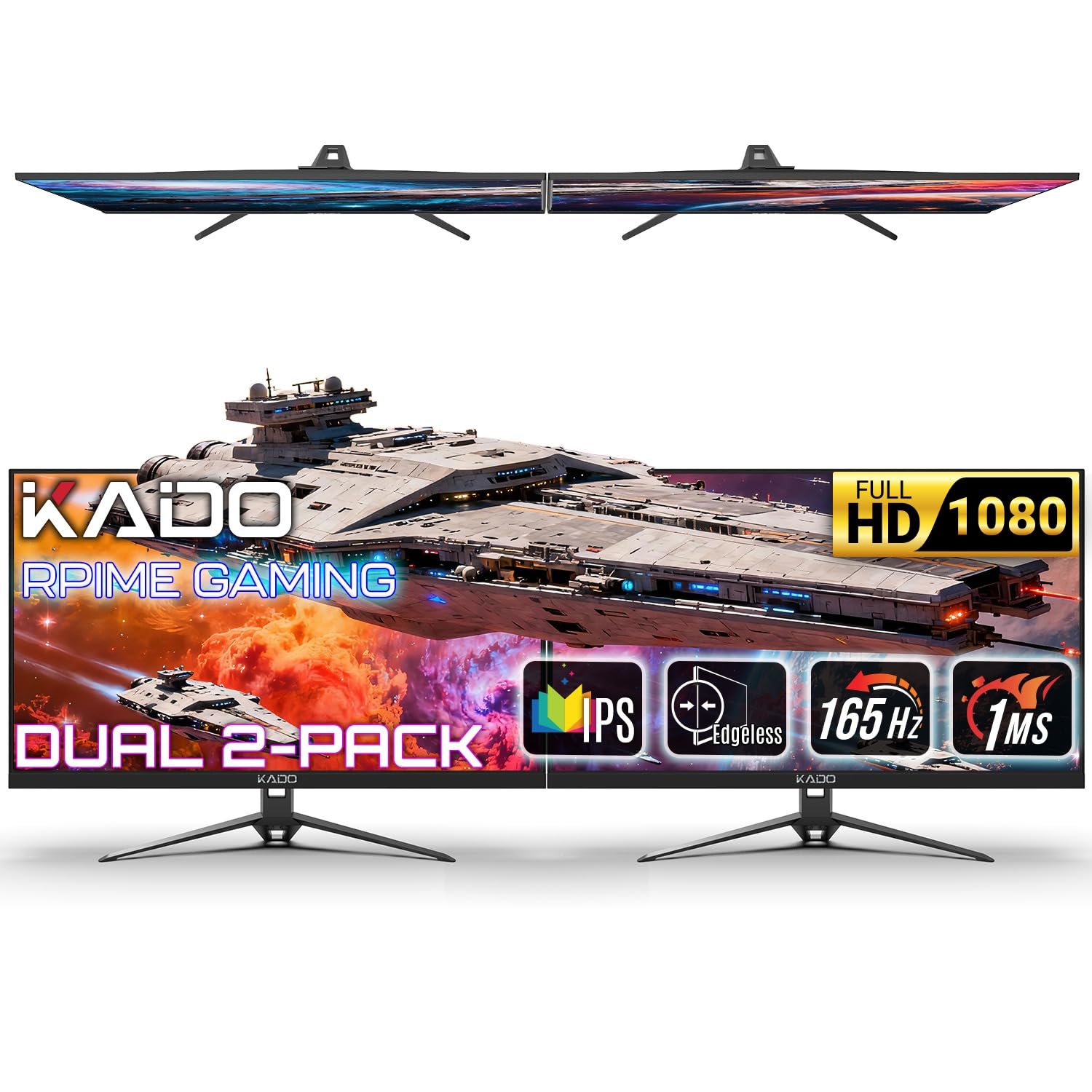
A budget two-pack that brings a rapid 165Hz refresh to side-by-side shooters without the premium price tag.
If your dual setup is all about gaming, the Kado Gaming 2-Pack is a clever way to get two fast displays in one purchase. Each 24-inch Full HD (1920×1080) panel runs at 165Hz with a 1ms response time, which is serious speed for the price. That combination keeps motion clear and competitive-ready, whether you’re tracking targets across both screens in a shooter or taking a panoramic view in a racing game.
The pair runs parallel flat screens side by side to create a wide, rich field of view, and AMD FreeSync Premium (a technology that syncs the screen’s refresh rate with your graphics card to prevent tearing) eliminates tearing and stuttering across both displays. Each monitor includes both HDMI and DisplayPort inputs, giving your PC or console flexible hookup options. They’re also VESA-ready, so you can mount both screens cleanly on an arm to free up desk space. Built-in speakers keep the setup streamlined and cable-efficient.
The reviews are short but positive — owners call them “great, great pictures” that work well for a home office and gaming, with one noting the displays are “great as advertised.” Since this is a new model with only 33 ratings, the long-term reliability picture is still unfolding. One specific design gripe: two units set up side by side can show a “clear height difference” because the stands aren’t perfectly level, which is annoying for a dual setup. Package weight comes in at 18.9 pounds for the pair. This two-pack is the value route to a high-refresh gaming pair.
The speed for your money
- 165Hz with 1ms response for competitive play
- FreeSync Premium stops tearing on both screens
- HDMI and DisplayPort for flexible hookup
- VESA-ready for clean arm mounting
Eye on the details
- Stands may not align perfectly level side by side
- Short review history, so long-term reliability is unproven
- Built-in speakers are basic
Go for it if: You want a two-screen, high-refresh gaming setup at the lowest possible cost per frame.
Hesitate if: Perfect monitor alignment from the start matters to you — the stands have a known leveling quirk.
9. Dell S2421HS

The ergonomic office workhorse that lets you pivot, tilt, swivel, and adjust height on a proven IPS panel.
The Dell S2421HS is a classic for a reason: it’s a dependable 24-inch Full HD (1080p) IPS monitor that gets the fundamentals right. The In-Plane Switching (IPS) technology offers a wide 178°/178° viewing angle, so colors stay consistent even when you’re looking at a screen from an angle — a real benefit when two monitors arc toward you. Owners praise the “photo-like” picture quality and “true white” colors, making it a reliable choice for both work and photography.
For a dual setup, the stand is the headline feature. It offers pivot, tilt, swivel, and height adjustment, which means you can align two of these perfectly at eye level without buying extra hardware. You can even pivot one into portrait mode for reading long documents or code, then keep the other landscape. Dell’s EasyArrange software (for Windows) helps you stay organized across applications, emails, and windows, which multiplies the benefit of having two screens. Connectivity covers HDMI and DisplayPort, though the included cable situation can feel limited if you’re hooking up two units.
The 75Hz refresh rate is modest compared to the 144Hz and 180Hz gaming panels in this list, so this isn’t a pick for competitive play. It’s tune for comfortable, long-duration work instead. The monitor quality is the most-praised aspect (18 mentions), with picture quality close behind (16 mentions). It’s reliable enough for years of daily use — one owner’s earlier Dell ran for over two years of constant 24/7 operation. The trade-off is the price: it’s on the higher end of this list despite the calmer 75Hz refresh, so you’re paying for the brand reliability and ergonomic flexibility.
Why it’s a classic
- Full ergonomic stand: height, tilt, pivot, swivel
- True-to-life IPS colors with wide 178°/178° angles
- Proven reliability for daily work use
- Pivot to portrait mode for reading and code
Consider the cost
- 75Hz refresh is fine for work, not for gaming
- Premium price for a calmer spec sheet
- Limited port options can complicate a dual hookup
Reach for it if: You want the ultimate ergonomic control for a work-focused dual setup with a trusted brand name.
Look elsewhere if: You want high refresh rates for gaming — the 75Hz panel will feel slow by comparison.
Understanding the Specs
Refresh Rate (Hz)
This is how many times the screen updates its image per second. A 60Hz monitor refreshes 60 times per second, which is fine for email and documents. A 120Hz, 144Hz, or 180Hz monitor doubles or triples that, making scrolling, video, and games feel far smoother. For a dual setup, matching the refresh rate on both screens prevents one side from feeling laggy when you drag a window across.
Panel Type (IPS vs LCD)
IPS (In-Plane Switching) panels are known for accurate colors and wide viewing angles, meaning the picture looks right even when you’re not staring straight at it. This matters a lot when two screens are angled toward you. Basic LCD panels are cheaper but often shift in color when viewed off-center. For a dual setup where you glance between screens, IPS is the safer bet.
FAQ
Will a 23.8-inch monitor work in a 24-inch dual setup?
What refresh rate should I pick for a dual office setup?
How do I know if my PC can run two monitors at once?
Should I buy a two-pack or two separate monitors?
What does adaptive sync (FreeSync or G-Sync) do for a dual setup?
Can I mount 24-inch monitors on a VESA arm for a dual setup?
Is a curved monitor good for a dual setup?
Why do the colors look different on each of my two monitors?
Final Thoughts: The Verdict
For the majority of shoppers, the 24 inch monitors for dual setup winner is the ViewSonic VA2456A-MHD because it pairs a sharp 120Hz IPS panel with flexible HDMI, DisplayPort, and VGA inputs at a price that works whenbuying two. If you want a virtually borderless pair that feels like one smooth display, grab the LG 24U411A-B. And for a fully adjustable, ergonomic work pair with a trusted name, the Dell 24 Plus S2425HSM is the one to reach for.
How We Picked
We do not accept paid placement. Every pick is matched to a real buyer and a real use-case; we do not hands-on test units.
Sources & Methodology
Specifications: manufacturer listings and product documentation. Review insights: verified customer reviews, as of August 2026. Pricing: not shown on this page (it changes often); check the current price via the retailer link.
As an Amazon Associate, Gadgets Feed earns from qualifying purchases. This does not affect which products we feature.