
A 24-inch USB-C monitor is the sweet spot for desk setups where screen real estate and cable management are equally critical. This size fits comfortably into small offices, dorm rooms, and dual-monitor rigs without overwhelming your field of view.
I’m Min — the co-founder and writer behind Gadgets Feed. For this guide, I spent many hours cross-referencing customer feedback, warranty policies, and the nitty-gritty of connectivity standards — from power delivery wattage to daisy-chain compatibility — so you don’t have to guess which monitor actually works with your laptop.
After filtering through dozens of models based on build quality, color accuracy, and real-world charging performance, I’ve narrowed down the best 24 inch usb-c monitor list to nine options that solve the one-cable dream without compromising on image clarity or ergonomics.
How To Choose The Best 24 Inch USB-C Monitor
A 24-inch USB-C monitor acts as your laptop’s docking station, video output, and charging hub in one package. To pick the right one, you need to match your laptop’s power demands and port selection against the monitor’s power delivery and connectivity options. Below are the key factors that separate a seamless one-cable experience from a frustrating setup.
Power Delivery (PD) Wattage
The wattage a monitor delivers over USB-C determines whether your laptop charges while connected. Most 24-inch monitors offer 60W to 65W, which is sufficient for ultrabooks like the MacBook Air and Dell XPS 13. However, larger laptops — such as the 16-inch MacBook Pro or a high-performance workstation — may require 90W or 100W to charge at a reasonable speed. If your laptop needs more power than the monitor provides, the battery will still drain slowly while plugged in.
Resolution and Pixel Density
At 24 inches, Full HD (1920×1080) gives a pixel density of about 92 PPI, which is acceptable for text and spreadsheets but may look a bit soft if you sit close. QHD (2560×1440) jumps to roughly 122 PPI, offering sharper text and more screen real estate without scaling issues on most operating systems. 4K (3840×2160) on a 24-inch panel pushes density to about 185 PPI — that’s Retina-class sharpness — but you’ll likely need to use macOS’s scaling or Windows’ display settings to avoid tiny UI elements.
Refresh Rate and Response Time
Standard office monitors run at 60Hz, but many 24-inch USB-C models now offer 75Hz, 100Hz, or even 120Hz. A higher refresh rate makes cursor movement, scrolling, and window dragging noticeably smoother. For general productivity, 75Hz is a nice upgrade from 60Hz. If you occasionally play fast-paced games or simply want the most fluid desktop experience, 100Hz or 120Hz is worth the extra cost. Response time (typically 5ms GtG on IPS panels) is less critical for office work but matters for gaming.
USB Hub and Ethernet Connectivity
The USB-C port is just the start. The best 24-inch USB-C monitors also act as a USB hub, with two or three USB-A ports for connecting a mouse, keyboard, webcam, or external drive. Some include an RJ-45 Ethernet port, which is a huge advantage in workplaces with spotty Wi-Fi or when you need a stable wired connection. Make sure the monitor’s USB-C port supports DisplayPort Alt Mode — otherwise, you’ll still need a separate video cable.
Quick Comparison
On smaller screens, swipe sideways to see the full table.
| Model | Category | Best For | Key Spec | Amazon |
|---|---|---|---|---|
| ASUS ProArt PA247CV | Pro | Color-accurate creative work | 100% sRGB, ΔE < 2 | Amazon |
| Samsung ViewFinity S6 S60UD | Premium | Daisy-chain and KVM workflow | 90W USB-C PD + LAN | Amazon |
| ViewSonic VP2488-4K | Pro | Mac-based 4K workflow | Thunderbolt 4, 100W PD | Amazon |
| AG Neovo EM2451 | Premium | 24-inch 4K with color depth | 3840×2160, 185 PPI | Amazon |
| Dell UltraSharp U2424H | Pro | 120Hz productivity | 120Hz, 98% DCI-P3 | Amazon |
| ViewSonic VG2455-2K | Premium | QHD sharpness at 24 inch | 2560×1440, 60W PD | Amazon |
| Dell P2425H | Value | Budgets with 100Hz smoothness | 100Hz, 4-port USB hub | Amazon |
| ASUS VA24ECPSN | Value | 65W PD with built-in hub | 65W USB-C, RJ-45 | Amazon |
| BenQ GW2486TC | Value | Eye-care with noise-cancelling mic | 60W USB-C, Coding Mode | Amazon |
In-Depth Reviews
1. ASUS ProArt Display PA247CV

The ASUS ProArt PA247CV is the best all-around 24-inch USB-C monitor because it delivers factory-calibrated color accuracy right out of the box. With 100% sRGB and 100% Rec. 709 coverage and a Delta E < 2 rating, this monitor is Certified by Calman and ready for professional photo editing, graphic design, or video color grading. The USB-C port provides 65W Power Delivery and handles video through DisplayPort Alt Mode, while a four-port USB 3.1 hub lets you plug in peripherals without reaching under the desk.
The ergonomic stand supports tilt, swivel, pivot, and height adjustments, making it easy to position for all-day comfort. The IPS panel offers 178-degree viewing angles and a 75Hz refresh rate, which is a step above standard 60Hz models. User reviews highlight excellent picture quality and reliable USB-C connectivity with both Windows laptops and Macs — multiple units run for years without flickering or dead pixels.
One notable downside is the lack of an RJ-45 Ethernet port, so if you need a wired network connection built into the monitor, you will need to look elsewhere. The included speakers are on the weaker side and the Adobe RGB coverage is not explicitly rated. Still, for color-critical work in a compact 24-inch footprint, the ProArt PA247CV is the most complete package.
Why it’s great
- Factory-calibrated Delta E < 2 color accuracy ideal for publishing
- 65W USB-C PD charges laptops while transmitting video
- Full ergonomic stand plus VESA mount compatibility
Good to know
- No built-in RJ-45 Ethernet port
- Integrated speakers are weak; external audio is recommended
2. Samsung ViewFinity S6 S60UD

The Samsung ViewFinity S6 S60UD is built for power users who need high-wattage charging and advanced connectivity. Its USB-C port delivers 90W Power Delivery, enough to charge larger laptops like the 16-inch MacBook Pro or Dell Precision workstations while transmitting video and data. A built-in LAN port provides reliable wired Ethernet, and the monitor supports daisy chaining via DisplayPort so you can connect a second display with minimal cable clutter.
The QHD (2560×1440) resolution on a 24-inch panel gives you around 122 PPI — noticeably sharper than Full HD without the scaling complexity of 4K. The 100Hz refresh rate makes scrolling and multitasking feel fluid, and HDR10 adds some extra contrast for video content. The included KVM switch lets you control two connected computers with a single keyboard and mouse, switching sources easily through the on-screen display.
Some users report occasional signal loss when daisy chaining through a USB hub after several months, and the bezels are not as thin as some competitors. The stand is fully height-adjustable and pivots 90 degrees for portrait mode. For professional workflows where stable Ethernet and 90W PD are priorities, this ViewFinity model is a top-tier choice.
Why it’s great
- 90W USB-C PD charges most high-power laptops under load
- Built-in LAN port for wired networking
- Daisy chain and KVM support for multi-PC setups
Good to know
- Daisy chain stability can be inconsistent via USB hubs
- Bezels are slightly thicker than premium ultra-thin models
3. ViewSonic VP2488-4K

The ViewSonic VP2488-4K is designed specifically for Mac users who demand Retina-class sharpness in a 24-inch frame. With a native 4K (3840×2160) resolution and a pixel density of 185 PPI, text and UI elements appear exceptionally crisp on macOS. The monitor is Pantone Validated and covers 100% sRGB and 98% DCI-P3, aligning closely with the color performance of the MacBook Pro and Mac Studio displays.
Connectivity is the standout feature here: a Thunderbolt 4 port delivers up to 100W of power delivery and supports daisy chaining of two 4K monitors, plus a separate USB hub with two USB-A 3.2 Gen 2 ports. The IPS panel offers a 1300:1 contrast ratio and 500 cd/m² peak brightness, which is substantially brighter than most 24-inch monitors. The ergonomic stand provides tilt, swivel, pivot, and 150mm height adjustment.
The biggest drawbacks are the price and reliability concerns. Some users report that the monitor occasionally fails to wake from sleep and that USB devices disconnect unexpectedly. The Adobe RGB coverage is only about 88%, which may be a limitation for high-end photography printing. For Mac-oriented 4K workstations where single-cable Thunderbolt 4 throughput matters, this monitor is unmatched in this size class.
Why it’s great
- Thunderbolt 4 with 100W PD and daisy chain
- Pantone Validated with 98% DCI-P3 coverage
- 500 nits brightness — among the brightest 24-inch panels
Good to know
- Some units exhibit wake-from-sleep bugs with USB
- Adobe RGB limited to ~88% for photo professionals
4. AG Neovo EM2451

The AG Neovo EM2451 is a rare breed: a 24-inch 4K monitor that doesn’t cost a fortune. Its 3840×2160 panel delivers 185 PPI, making text appear incredibly sharp for coding, document editing, and data analysis. The IPS display covers 100% sRGB and 93% DCI-P3 with 10-bit color depth, so gradients are smooth and colors are rich. USB-C connectivity provides 65W Power Delivery and supports DisplayPort Alt Mode for video.
The stand is height-adjustable with pivot and tilt, and the matte anti-glare coating keeps reflections in check in bright rooms. With a 60Hz refresh rate, this is a productivity-focused display, but the dual HDMI 2.1 ports and DisplayPort 1.4 make it easy to connect a gaming console or secondary PC. User reviews praise its sharpness and color accuracy, especially for the price — one reviewer called it the only non-Apple high-DPI 24-inch option that works well on macOS.
On the downside, some users note that colors appear slightly dull compared to the MacBook’s built-in display, and the monitor lacks a built-in USB hub aside from the USB-C port itself. There is an external power brick instead of an internal power supply. For a budget-friendly 4K experience at 24 inches, the EM2451 is hard to beat.
Why it’s great
- 4K resolution on a 24-inch panel for maximum pixel density
- 93% DCI-P3 with 10-bit color depth
- Fully ergonomic stand with height and pivot
Good to know
- Colors may appear less vibrant compared to MacBook Retina
- External power brick adds cable bulk
5. Dell UltraSharp U2424H

The Dell UltraSharp U2424H brings a 120Hz refresh rate to the 24-inch USB-C monitor category, making it one of the smoothest options for productivity. Scrolling through spreadsheets, switching between browser tabs, and general mouse movement feel significantly more fluid than standard 60Hz displays. The IPS panel covers 98% DCI-P3, which is excellent for a Full HD monitor and delivers vibrant, accurate colors out of the box.
Connectivity includes two USB-C ports — one for upstream data and video with up to 15W charging, and a second for downstream peripheral connection — plus two DisplayPort inputs, an HDMI port, and three USB-A ports. The built-in Ambient Light Sensor automatically adjusts brightness and color temperature to match your room lighting, reducing eye strain over long work sessions. The stand supports height, tilt, swivel, and pivot adjustments.
One limitation is that the USB-C port only delivers 15W, so it won’t charge a laptop — you’ll need to plug in a separate power cable. Some users report that the USB-C port cannot charge devices at all, which is a significant caveat for a monitor marketed as USB-C. The resolution is limited to 1920×1080, so if pixel density matters more than refresh rate, the ViewSonic VG2455-2K or AG Neovo EM2451 might be better picks.
Why it’s great
- 120Hz refresh rate for ultra-smooth desktop navigation
- 98% DCI-P3 color gamut for vivid images
- Auto brightness sensor reduces eye fatigue
Good to know
- USB-C only delivers 15W — not enough to charge a laptop
- Only Full HD resolution at 24 inches
6. ViewSonic VG2455-2K

The ViewSonic VG2455-2K is a QHD (2560×1440) 24-inch monitor that balances pixel density and power delivery at a mid-range price point. The 122 PPI output is noticeably sharper than Full HD, making it excellent for coding, reading, and office work without needing scaling adjustments. The USB-C port provides 60W Power Delivery, enough to charge most ultrabooks while transmitting video and data through the monitor’s built-in USB 3.0 hub.
The IPS panel offers 300 cd/m² brightness and a 1000:1 contrast ratio, delivering consistent colors from any viewing angle. The stand is fully ergonomic with 40 degrees of tilt, swivel, 130mm height adjustment, and 90-degree pivot for portrait mode. Users consistently praise the image quality when paired with MacBooks, noting it nearly matches the Retina display after calibration. The monitor includes a carrying handle on the stand for easy repositioning.
User reports mention a recurring problem where the monitor displays a black screen with a “no input” message weekly, requiring a power cycle to recover. The built-in speakers are widely considered useless for anything beyond system beeps, and the 60Hz refresh rate is standard rather than high. For QHD sharpness on a 24-inch screen with functional USB-C charging, this is a solid mid-range option.
Why it’s great
- QHD resolution provides crisp text without scaling issues
- 60W USB-C PD charges ultrabooks reliably
- Full ergonomic stand with pivot and carrying handle
Good to know
- Some units experience weekly black screen issues
- Speakers are weak; external audio is necessary
7. Dell P2425H
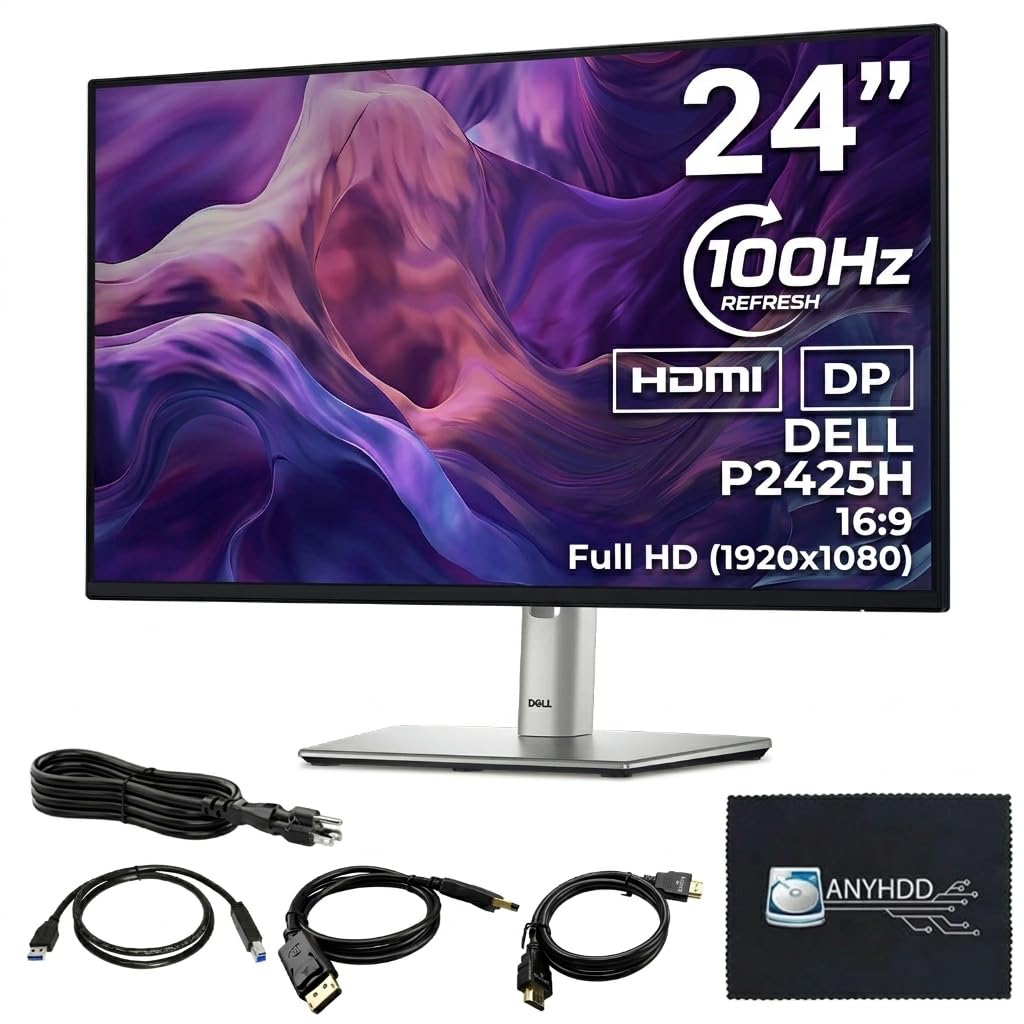
The Dell P2425H is a no-nonsense 24-inch Full HD monitor that delivers strong everyday productivity value. Its 100Hz refresh rate makes desktop navigation noticeably smoother than 60Hz models, and the IPS panel provides accurate colors and wide viewing angles straight out of the box. The monitor includes a four-port USB Type-A hub, allowing you to plug in a keyboard, mouse, and webcam without reaching for your laptop.
The stand is fully adjustable with height, tilt, swivel, and pivot options, and the ultra-thin bezels make it well-suited for dual-monitor setups. Connectivity covers the basics: HDMI 1.4, DisplayPort 1.2, and even a VGA input for legacy devices. The anti-glare coating reduces reflections in bright offices, and the blue light filter helps reduce eye fatigue. User reviews consistently highlight the sharp, bright display and the stable, space-efficient stand.
The biggest limitation is that this monitor does not appear to include a USB-C port that supports video or power delivery — the USB-C cable in the box is only for upstream data connection. This means you cannot charge your laptop or transmit video over USB-C alone. The resolution is 1920×1080, so if you need higher pixel density or full USB-C functionality, this model may not suit you. For a simple, smooth 100Hz display with a built-in USB hub, it delivers good value.
Why it’s great
- 100Hz refresh rate for fluid scrolling and navigation
- Four USB-A ports for easy peripheral connection
- Fully adjustable stand with pivot
Good to know
- USB-C port is data-only, no video or laptop charging
- Limited to Full HD resolution
8. ASUS VA24ECPSN

The ASUS VA24ECPSN is one of the few budget-tier 24-inch monitors that includes a fully functional USB-C port with 65W Power Delivery and an RJ-45 Ethernet port. For its price, the connectivity suite is exceptional: HDMI, DisplayPort, a USB-C port that handles video and data, and a four-port USB 3.2 Gen 1 hub, plus the built-in LAN port. The 23.8-inch IPS panel delivers Full HD resolution with a 75Hz refresh rate, making it a step above standard 60Hz office displays.
The stand supports height, tilt, swivel, and pivot adjustments, which is rare at this price point. The monitor also includes Adaptive-Sync technology compatible with both NVIDIA and AMD graphics cards. Users note that the USB-C docking works seamlessly with mini PCs and laptops, recognizing Ethernet and audio without extra drivers. The monitor includes a stretch reminder feature to encourage breaks.
Some performance issues are worth noting. The built-in speakers are weak, and the USB hub can shut down as a failsafe if a peripheral draws too much power. When the monitor enters standby, USB and Ethernet devices lose connection, which can be inconvenient if you rely on a wired network. Despite these quirks, the VA24ECPSN offers the best connectivity-to-price ratio in the budget segment.
Why it’s great
- 65W USB-C PD with RJ-45 Ethernet at a low price
- Full ergonomic stand with height adjustment
- 75Hz refresh rate with Adaptive-Sync support
Good to know
- USB hub disconnects in standby mode
- Speakers are low quality for audio
9. BenQ GW2486TC

The BenQ GW2486TC focuses on eye comfort with features like Brightness Intelligence technology and a dedicated Coding Mode that adjusts contrast to make text sharper. The IPS panel covers 99% sRGB for decent color accuracy, and the USB-C port provides 60W Power Delivery for charging a connected laptop. A unique addition is the built-in noise-cancelling microphone, which reduces background noise during video calls with a single click.
The monitor includes daisy chain support via DisplayPort, so you can link multiple displays without extra cables. The white bezel and edge-to-edge glass design give it a clean, modern look that stands out from the standard black office monitor. The stand is height-adjustable and supports tilt, making it easy to find a comfortable viewing angle. User reviews note that image quality is comparable to the iMac display when paired with a Mac Mini.
Not all feedback is positive. Some users report that motion can appear slightly blurry when moving windows quickly, and the 60Hz refresh rate is standard rather than high. The microphone only works when connected via USB-C, so HDMI users won’t benefit from it. Additionally, warranty service has been flagged as slow, with one user waiting over six weeks for a response. For value-conscious buyers who prioritize eye care and a built-in microphone, this is a solid choice.
Why it’s great
- Brightness Intelligence and Coding Mode reduce eye strain
- Built-in noise-cancelling microphone for calls
- Daisy chain support and 99% sRGB color coverage
Good to know
- Motion blur is noticeable during quick window moves
- Warranty service has slow response times reported
FAQ
What is the minimum power delivery I need for a 24-inch USB-C monitor to charge my laptop?
Does a 24-inch USB-C monitor work with both Windows and macOS over USB-C?
What does daisy chain mean and do I need it for a dual-monitor setup?
Final Thoughts: The Verdict
For most users, the best 24 inch usb-c monitor winner is the ASUS ProArt PA247CV because it delivers factory-calibrated color accuracy, a fully ergonomic stand, and reliable 65W USB-C charging at a price that beats most competitors. If you need 90W PD and a built-in Ethernet port, grab the Samsung ViewFinity S6 S60UD. And for a 4K Mac workflow with Thunderbolt 4 speed, nothing beats the ViewSonic VP2488-4K.