
Our readers keep the lights on and my morning glass full of iced black tea. As an Amazon Associate, I earn from qualifying purchases.
Specs are compiled from manufacturer listings and verified buyer reviews and can change over time — please confirm the key details on the product page before buying.
You need one device that turns spotty Wi-Fi, constant buffering, and slow file transfers into a fast, wired connection for every device you own. That device is a 24-port gigabit switch. But the wrong one adds noise, heat, or setup headaches. Here, you get the six that actually deliver — if you want dead-silent operation, low power bills, or full cloud management.
I’m Min — the founder and writer behind Gadgets Feed. This guide is built by comparing the manufacturers’ published specifications and the patterns across verified customer reviews, so you get each pick’s real strengths and trade-offs instead of marketing spin.
After digging through the raw specs and real-world feedback, these six picks represent the best 24 port gigabit switch options for everyone from the budget-conscious home user to the IT pro building a managed network.
Quick Picks
- TP-Link Omada SG3428 — Best Overall
- NETGEAR GS324 — Silent Operator
- D-Link DGS-1024D — Enduring Value
- TP-Link TL-SG1024 — Rack-Ready Workhorse
- TRENDnet TEG-S24DG — Desktop Cleanup
- Tenda TEG1024D — Budget Champion
How To Choose The Best 24 Port Gigabit Switch
Picking the right switch depends on where you will put it, what you will plug in, and how much control you need. These three factors separate a good fit from a frustrating buy.
Unmanaged vs. Smart vs. Managed
An unmanaged switch is pure plug-and-play. You plug in cables, and it forwards traffic without any setup. You want this for a home network or a small office where you just need extra ports. A smart managed or L2+ managed switch (like the TP-Link Omada SG3428) lets you create VLANs (virtual local area networks that separate traffic for security), set up link aggregation (combining ports for more speed), and manage everything from a cloud dashboard. If you run a business with guest Wi-Fi, security cameras, and employee networks, go managed.
Noise and Heat: The Fanless Advantage
A 24-port switch may sit in your living room or a bedroom closet. The loudest part in most switches is the cooling fan. Every switch on this list except one uses a fanless design — zero moving parts, zero noise, and less dust inside the case. If the switch will sit in a quiet space, a fanless model (like the D-Link DGS-1024D or the NETGEAR GS324) keeps your setup peaceful instead of humming.
Switching Capacity and Jumbo Frames
Switching capacity is the total data the switch can handle per second across all ports. For a 24-port gigabit switch, you want at least 48Gbps — that means the switch can run all ports at full speed at the same time. Some budget switches advertise lower capacities, so they will drop packets or slow down under heavy loads. Also look for support for Jumbo Frames (frames larger than the standard 1500 bytes, typically 9000 bytes or 12K bytes). Jumbo frames let you transfer large files faster because each packet carries more data, reducing CPU work on your devices.
Quick Comparison
| Model | Best For | Switching Capacity | Form Factor | Key Extra | Amazon |
|---|---|---|---|---|---|
| TP-Link Omada SG3428 | Managed networks / IT pros | — | 1.93 kg / Rackmount | 4 SFP slots, Omada SDN | $199.99Amazon |
| NETGEAR GS324 | Silent home office / media center | — | 13.5″ x 11.12″ x 3.12″ | Wall-mount kit included | $76.32$109.99Amazon |
| D-Link DGS-1024D | Energy-conscious / long-term reliability | 48 Gbps | 10.95″ x 4.95″ x 1.73″ | Fanless, Green Tech | $79.99Amazon |
| TP-Link TL-SG1024 | Heavy load / small business | — | 17.32″ x 7.09″ x 1.73″ | Standard 19″ rackmount | $79.99$99.99Limited time dealAmazon |
| TRENDnet TEG-S24DG | Desktop tidy installation / energy savings | 48 Gbps | 11″ x 7″ x 1.7″ / 1.1 lbs | GREENnet (up to 70% savings) | $69.99$74.99Amazon |
| Tenda TEG1024D | Budget / security camera networks | 48 Gbps | Metal case / Fanless | 4M buffer, 12K Jumbo Frame | $64.99Amazon |
In‑Depth Reviews
1. TP-Link Omada SG3428

The only switch here that lets you create VLANs and manage the whole network from a cloud dashboard without ever touching the hardware.
This switch gives you full L2+ management — you can create VLANs that separate guest Wi-Fi from your office devices, set up static routing to direct internal traffic efficiently, and control everything from the cloud using TP-Link’s Omada SDN platform (a software-defined networking system that ties all your network devices together). It has 24 gigabit RJ45 ports plus 4 SFP slots (small form-factor pluggable slots for fiber optic connections), so if your ISP or server room uses fiber, you plug directly in without an extra converter.
Buyers report the Omada app makes the powerful features accessible. One reviewer wrote it is a “great managed switch for omada environment is easy to use and to configure everything.” The fanless design keeps it quiet despite the advanced hardware. Owners mention security features — including IP-MAC-Port Binding, ACL (access control lists that filter traffic), and DHCP Snooping (which prevents rogue DHCP servers) — are sturdy enough for a small business. The trade-off is that learning to set up complex VLANs may require tech support, and the boot time is slower than simpler unmanaged switches.
Compared to the unmanaged D-Link DGS-1024D, the SG3428 adds a layer of control genuinely useful for networks with cameras, guest networks, or multiple departments. If you never want to physically visit the switch to change settings, this is your pick.
What Powers It
- Omada SDN cloud management — control from anywhere
- 4 Gigabit SFP slots for fiber uplinks
- Advanced security: VLAN, ACL, DHCP Snooping
- Fanless and quiet despite managed hardware
The Hurdles
- Complex VLAN setup may need tech support, per buyers
- Web UI requires saving running config separately (not automatic)
- Slower boot time than unmanaged switches
Who it serves: The IT-minded home user or small-business owner who needs VLANs, fiber uplinks, and cloud management — all in one fanless box.
One real limit: The learning curve is steep for a pure beginner; the Omada app helps, but basic VLAN configuration still demands reading a guide.
2. NETGEAR GS324

The quietest way to add 24 ports — no fans, no hum, just blinking lights and instant plug-and-play.
If your switch will sit on a desk or inside a media cabinet where you can hear it, the GS324 is built for silence. Its fanless design means zero moving parts. One reviewer noted it “eliminated buffering/drops for TV, gaming, and work setup with Orbi 370.” Plug-and-play is literal: power it on, connect your devices, and you are done. No software, no app, no setup.
The compact metal chassis supports desktop, wall-mount, or rack-mount placement. The box includes rubber feet, rackmount ears, and wall-mount hardware — a convenience you do not always get at this level. The switch uses IEEE 802.3az Energy Efficient Ethernet (a standard that cuts power when ports are idle) to save electricity without any configuration.
A reviewer also noted an upload speed drop from about 950 Mbps to 800 Mbps, though they called it barely noticeable in daily use.
Built for Peace
- Silent fanless design — perfect for quiet rooms
- Includes wall-mount and rackmount hardware in the box
- Zero-setup plug-and-play
- Energy Efficient Ethernet reduces power waste
Know Before Buying
- No SFP ports for fiber connections
- A reviewer noted upload speed dropped from 950 to ~800 Mbps, though barely noticeable
Best suited for: Anyone putting a switch in a quiet living space — gamers, streamers, and work-from-home setups who need 24 ports without noise.
Look elsewhere if: You need full non-blocking throughput on all 24 ports simultaneously; the 24Gbps capacity may be a bottleneck in heavy-load scenarios.
3. D-Link DGS-1024D

The unmanaged switch that keeps running year after year, sipping power and making zero noise — and its 48Gbps capacity matches the premium options.
D-Link has made network gear for over 40 years, and the DGS-1024D proves why. Its full 48Gbps switching capacity handles all 24 gigabit ports at full speed at the same time — unlike the NETGEAR GS324, which stops at 24Gbps. It is fanless and silent, and it includes Green Technology features: Link status detection automatically powers down ports with no cable connected, and Energy-Efficient Ethernet (EEE) reduces power when data activity is low.
Customers note incredible longevity. One owner said they installed four of these switches in 2011 and all were still working without a single issue, powered by a UPS (uninterruptible power supply). At 2.4 pounds and roughly 11 inches wide, it is compact enough for a desktop yet comes with rackmount ears for a wiring closet. It also includes Storm Control, which protects your network from broadcast storms (a flood of data packets that can slow everything down).
The DGS-1024D is unmanaged with no VLAN support. If you need to segment traffic, the TP-Link Omada SG3428 is the better choice. For just wanting ports that work for a decade without fuss, this is the pick.
what separates it
- 48Gbps full wire-speed switching capacity
- Fanless, silent, and runs cool per long-term owners
- Green Tech: auto power-down on idle ports + EEE
- Numerous reports of decade-long reliability
What It Lacks
- Unmanaged — no VLANs or QoS for traffic prioritization
- No SFP ports for fiber uplinks
- Reviewers point out the fan is usually audible on some units, but this model is specifically fanless
Grab it for: A low-power, long-life home network backbone that you plug in and forget about — ideal for parents, renters, or small offices on a strict budget.
Pass if: You need to segment traffic with VLANs or have fiber internet that requires an SFP port.
4. TP-Link TL-SG1024
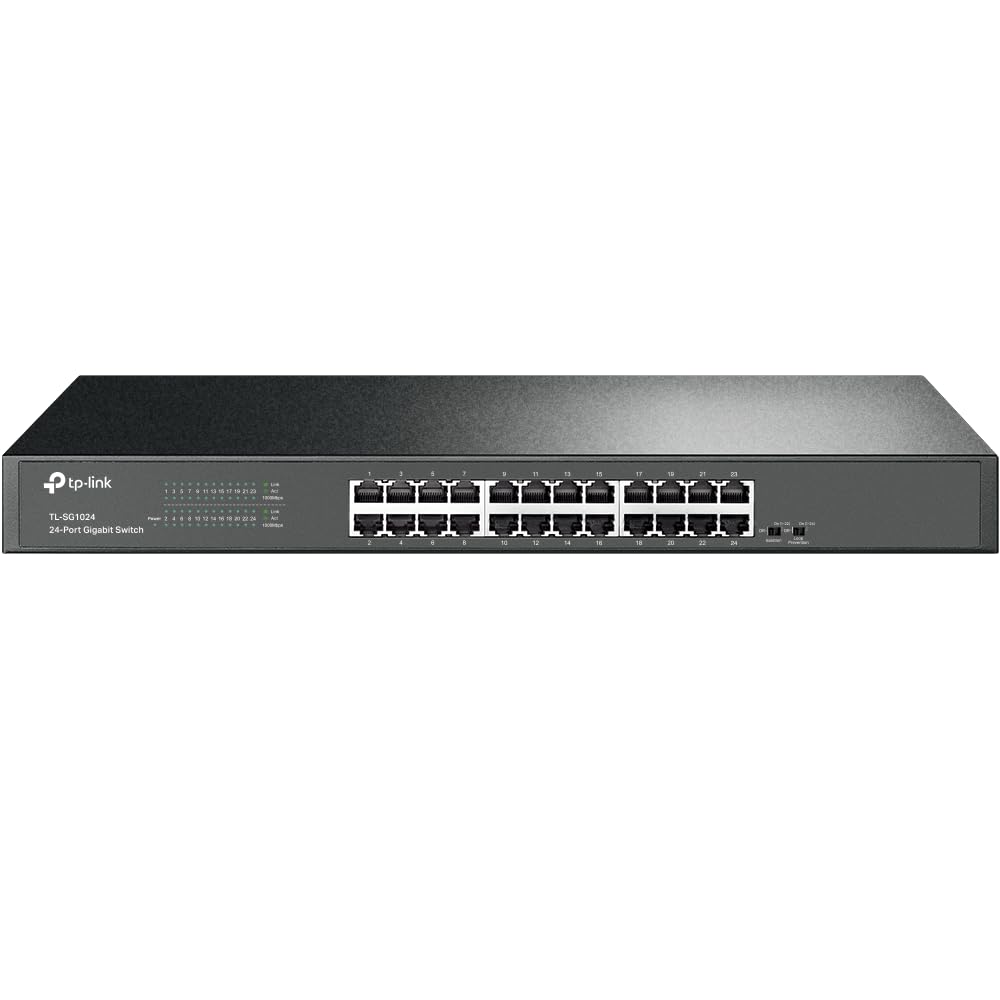
Built to survive harsh environments and heavy traffic without a single reboot — one owner ran it in a Bitcoin mining setup for nine months straight.
The TL-SG1024 is a tank. Its alloy steel 19-inch rackmount case houses 24 shielded gigabit ports and a fanless design that stays silent even under full load. Where some switches show budget with lightweight plastic, this one has serious heft — 2000 grams of metal. One buyer mentioned it survived five years in a non-climate-controlled shed with no issues.
Buyers praise its performance under saturation. One owner reported using it in a Bitcoin mining setup where it handled 20Gbps of traffic (ten machines at 100MB/s each) without a single reboot over nine months. It supports 10K jumbo frames for faster large-file transfers, and the included rackmount ears offer both normal and right-angle installation options. The TL-SG1024 draws a maximum of just 6.59 watts, making it among the most power-efficient 24-port switches available.
Compared to the NETGEAR GS324, the TL-SG1024 offers a full-size 19-inch rackmount form factor and higher build quality for extreme environments, though it is larger and heavier if you plan to desk-mount it.
Built Tough
- Alloy steel case with shielded ports for interference protection
- Handled 20Gbps saturation in real-world use per buyers
- Ultra-low power consumption: max 6.59W
- Includes normal and right-angle rackmount ears
One Caveat
- Some units have an audible fan — this model is fanless, but verify the specific variant
- No SFP or fiber port for chaining switches
- Larger footprint than desktop-focused competitors
Ideal for: Small businesses, workshops, or garage/server rooms where dust, temperature swings, and heavy loads are normal — and where you need a switch that simply never needs a reboot.
skip it if: You want a compact desktop unit; the TL-SG1024 is built for a standard 19-inch rack.
5. TRENDnet TEG-S24DG

The only switch here that puts all cables on the back and all blinking lights on the front — so your desk stays tidy and you can see link status at a glance.
If you have ever struggled to see which port is active because the LEDs were on the back, the TEG-S24DG solves that. The RJ45 ports and power connector are on the back, while all status LEDs are on the front. One reviewer called it “the only one I could find with the LED’s on the front and the RJ45 and power connectors on the back.” It is compact — 11 inches wide by 7 inches deep by 1.7 inches tall, weighing only 1.1 pounds, at 11″ x 7″ x 1.7″ versus the NETGEAR GS324 at 13.5″ x 11.12″ x 3.12″.
The 48Gbps switching capacity ensures smooth data flow. TRENDnet’s GREENnet technology adjusts power consumption as needed, reducing power usage by up to 70% compared to standard switches per the brand. The fanless metal design keeps operation silent, and it comes with Lifetime Manufacturer Protection for U.S. and Canada customers — a rarity at this price. NDAA (National Defense Authorization Act) and TAA (Trade Agreements Act) compliance means it is approved for government installations.
Buyers did note a quirk: the front LEDs are very bright and flash in a fast, consistent pattern rather than flickering with data traffic. One owner used dimming stickers to solve it.
Smart Layout
- Rear ports + front LEDs for neat cable management
- 48Gbps switching capacity for full speed
- GREENnet reduces power consumption by up to 70%
- Lifetime protection (U.S. & Canada)
The Bright Side Problem
- LEDs are too bright and constantly flash — distracting on a desktop
- Optional rackmount brackets sold separately
- Some units required RMA replacement; warranty fulfilled quickly per reviews
Best for: Desktop users who obsess over cable management and want link status visible without cables blocking the view.
Consider the alternative if: Bright blinking LEDs in your peripheral vision would drive you crazy — you will need dimming stickers or a different switch.
6. Tenda TEG1024D

The entry-level metal switch that matches premium 48Gbps capacity and big-frame perks for a fraction of the price — proven with 18 IP cameras and 3 access points.
Do not let the budget price fool you. The TEG1024D packs the same core specs as switches costing more: 48Gbps switching capacity, 24 gigabit ports, fanless metal case, and support for 12K jumbo frames to speed up large file transfers. It includes a 4M buffer, which helps smooth out traffic spikes when many devices transfer at once. One buyer installed it for a security network with 18 IP cameras and 3 APs (access points), calling the results “flawless” with no power or data drops.
The full steel housing with ventilation holes on three faces dissipates heat without a fan. After six months, another reviewer noted it was “fast enough to support fiber to the house” and handled multiple PCs and laptops without issues. It supports IEEE 802.3X flow control, which prevents packet loss when the switch buffer is full — a feature usually found on pricier models.
At this price point, you give up brand-name cachet and any management features (no VLANs, no QoS, no cloud). For a pure “connect everything and forget it” role, the TEG1024D delivers surprising value. It feels heavier and more solid than its price suggests.
Surprising Spec
- 48Gbps switching capacity — matches premium models
- 12K jumbo frame support for faster large-file transfers
- Fanless metal case with multi-face ventilation
- Proven reliable with 18+ cameras + access points per buyers
Trade-offs
- Unmanaged — no VLANs, QoS, or any advanced features
- No rackmount ears or wall-mount hardware included
- Basic build compared to premium all-steel TP-Link/NETGEAR options
Who it works for: Budget-first buyers who need 24 gigabit ports with full 48Gbps capacity — especially for camera systems or home networks where management features are not needed.
Pass if: You need VLANs, SFP ports, or the confidence of a major brand’s warranty and support network.
Understanding the Specs
Switching Capacity (Gbps)
This is the total data the switch can process per second across all ports at once. For a 24-port gigabit switch, you want at least 48Gbps — that means all ports can run at full 1Gbps speed simultaneously without dropping packets. Some switches advertise 24Gbps or lower, meaning they cannot sustain full speed on every port at once and may cause slowdowns in busy networks.
Jumbo Frames (9K / 12K)
Standard Ethernet frames are 1500 bytes. Jumbo frames let you pack more data into each frame — typically 9000 or 12000 bytes. This reduces the number of frames the switch has to process, lowering CPU overhead on your computers and NAS devices (network-attached storage boxes that serve files over your network). The result is faster large-file transfers, especially useful for video editing, backups, and media servers. Not all devices support jumbo frames, and if they are mismatched, performance can break, so only enable them if every device in the chain supports the same frame size.
Fanless vs. Fan-Cooled
A fanless switch uses a metal chassis and ventilation holes to passively shed heat. It runs completely silent, pulls in no dust, and has zero moving parts to fail. A fan-cooled switch uses one or more small fans to move air through the chassis, which keeps temperatures lower under heavy load but introduces noise and attracts dust. For anywhere the switch is within earshot — desk, living room, bedroom — fanless is almost always the better choice.
Managed vs. Unmanaged
An unmanaged switch is a dumb pipe: plug in cables, traffic flows, no configuration needed. A managed switch (or smart switch) lets you control how traffic moves — you can create VLANs to separate networks (guest Wi-Fi vs. office devices), set up link aggregation to combine ports for more bandwidth, configure QoS (Quality of Service) to prioritize voice or video traffic, and monitor port statistics. Managed switches cost more and require some networking knowledge, but they give you control. Unmanaged is simpler and cheaper.
FAQ
Can I use a 24-port gigabit switch at home?
What is the difference between a 24-port switch and a router?
Do I need a managed switch for my home?
How much power does a 24-port gigabit switch consume?
Can I mount a 24-port switch in a rack?
What is a PoE switch and do I need one?
Will a gigabit switch work with my older router?
How many devices can I connect to a 24-port switch?
Is a fanless switch better than one with a fan?
What is the difference between 10/100 and gigabit?
Final Thoughts: The Verdict
For most buyers, the 24 port gigabit switch winner is the TP-Link TL-SG1024 because it pairs a fanless, rugged steel body with low power draw (max 6.59W) and proven real-world performance under heavy loads at a mid-range tier. If you want cloud-based VLAN control and fiber uplinks, grab the TP-Link Omada SG3428. And for a silent, compact desktop switch that keeps cable management clean, the standout is the TRENDnet TEG-S24DG with its front-LED, rear-port layout.
How We Picked
We do not accept paid placement. Every pick is matched to a real buyer and a real use-case; we do not hands-on test units.
Sources & Methodology
Specifications: manufacturer listings and product documentation. Review insights: verified customer reviews, as of July 2026. Pricing: not shown on this page (it changes often); check the current price via the retailer link.
As an Amazon Associate, Gadgets Feed earns from qualifying purchases. This does not affect which products we feature.
Related Guides
Product prices and availability are accurate as of the date/time indicated and are subject to change. Any price and availability information displayed on Amazon at the time of purchase will apply to the purchase of this product. As an Amazon Associate I earn from qualifying purchases.
CERTAIN CONTENT THAT APPEARS ON THIS SITE COMES FROM AMAZON. THIS CONTENT IS PROVIDED "AS IS" AND IS SUBJECT TO CHANGE OR REMOVAL AT ANY TIME.
Amazon and the Amazon logo are trademarks of Amazon.com, Inc. or its affiliates.