
Our readers keep the lights on and my morning glass full of iced black tea. As an Amazon Associate, I earn from qualifying purchases.
Specs are compiled from manufacturer listings and verified buyer reviews and can change over time — please confirm the key details on the product page before buying.
If you are hunting for 2400 MHz RAM, the real challenge is not speed — it is getting the exact right physical stick for your machine. A laptop SO-DIMM (small outline dual inline memory module — the shorter, 260-pin stick for laptops) will not fit a desktop DIMM (dual inline memory module — the taller, 288-pin stick for desktops) slot, and mixing kits can cause boot failures that look terrifying. This guide separates the six strongest options by their exact fit, capacity, and the real-world stability buyers actually report.
I’m Min — the founder and writer behind Gadgets Feed. This guide is built by comparing the manufacturers’ published specifications and the patterns across verified customer reviews, so you get each pick’s real strengths and trade-offs instead of marketing spin.
Here is the short version: for most people, the smartest buy is whichever 2400 MHz stick matches your existing slot type and capacity needs, backed by a reliable brand and a lifetime warranty. To find your best option among the best 2400 mhz ram, read through the detailed reviews below and check the quick comparison table first.
Our Picks at a Glance


How To Choose The Best 2400 MHz RAM
2400 MHz RAM is a balance for older DDR4 systems, but buying the wrong one is surprisingly easy. The biggest mistake? Grabbing a desktop DIMM when you need a laptop SO-DIMM (small outline dual inline memory module — the shorter, more compact stick used in laptops and small-form-factor PCs). The match is not optional: the wrong physical size will not fit the slot. Your first move is always checking your motherboard or laptop manual for the exact form factor it accepts.
Capacity: 8 GB, 16 GB, or 32 GB
8 GB is enough for basic office work and web browsing but will struggle with modern gaming or heavy multitasking. 16 GB is the comfortable middle ground for most users. 32 GB matters if you run virtual machines, video editing software, or large data sets. Remember that many laptops have only two RAM slots — if you fill both with 16 GB sticks, you are capped at 32 GB, so plan ahead.
CAS Latency: CL16 vs CL17
CAS latency (Column Address Strobe latency — the number of clock cycles it takes for the RAM to deliver data after the CPU asks for it) means a lower number equals slightly snappier response. Among 2400 MHz sticks, you will see CL16 and CL17. The difference is small — about 6% faster for CL16 — but if you are choosing between two sticks at the same price, the lower CL number wins. Most 2400 MHz sticks in this list are CL17, with one notable exception at CL16.
Single Stick vs Dual-Channel Kit
One stick of 16 GB will work fine, but two sticks of 8 GB in dual-channel mode (the motherboard reads from both sticks at once) give a real performance boost in games and creative apps. If you are building new or upgrading both slots, buy a matched kit — two sticks sold together that are tested to run as a pair. Mixing two random single sticks can cause boot loops or system instability, as some buyers have found the hard way.
Quick Comparison
| Model | Best For | Form Factor | Capacity | CAS Latency | Amazon |
|---|---|---|---|---|---|
| Samsung 8GB SO-DIMM★ Best Overall | Reliable laptop match | SO-DIMM | 8 GB (1×8 GB) | CL17 | $59.75Amazon |
| Crucial 32GB KitTop Performer | Desktop power users | DIMM | 32 GB (2×16 GB) | CL17 | $184.00Amazon |
| G.SKILL Ripjaws 32GB | Laptop performance | SO-DIMM | 32 GB (2×16 GB) | CL16 | $204.99$269.99Amazon |
| Samsung 16GB SO-DIMM | Laptop upgrade match | SO-DIMM | 16 GB (1×16 GB) | CL17 | $104.79$110.31Amazon |
| A-Tech 16GB Desktop | Budget desktop build | DIMM | 16 GB (1×16 GB) | CL17 | $99.01$115.99Amazon |
| Kingston ValueRAM 8GB | Desktop value upgrade | DIMM | 8 GB (1×8 GB) | CL17 | $64.50Amazon |
In‑Depth Reviews
1. Samsung 8GB DDR4 2400 MHz SO-DIMM (M471A1K43CB1-CRC)
Our pick — over 4.5★ from 950+ verified ratings; the strongest balance of quality and price.
The 8 GB laptop stick that buyers trust because it passes memtest with zero errors.
This is the most-reviewed 2400 MHz module on the list (970 ratings at 4.7/5), and the reason is consistency. It is a single 8 GB SO-DIMM (260-pin laptop stick) running at CL17, and buyers repeatedly report that it is recognized immediately by the BIOS. One reviewer specifically said: “Works perfect, I ran memtest from bios, no errors.” That kind of reliability is what you want when upgrading a laptop that cannot boot without working RAM.
Compared to the Kingston ValueRAM below, this Samsung stick uses the same CL17 spec but comes from the original manufacturer of many laptop memory chips, which often makes it a perfect match for existing Samsung-equipped machines. One gamer reported that going from 8 GB to 16 GB made games run smoother on an AMD Ryzen 5 3500U laptop.
One honest note: a single buyer received a faulty first stick that shut down the motherboard, but the replacement worked fine. No product is perfect, but the overall track record here is strong.
Why people buy it
- Highest rating on the list at 4.7/5 from nearly 1,000 reviews.
- OEM-grade Samsung silicon ensures compatibility with most laptops.
- Easy 8 GB jump doubles memory for basic users while staying affordable.
The honest catch
- 8 GB total may feel tight for gaming or heavy multitasking — the 16 GB version above is a better long-term bet.
- One owner reported a DOA (dead on arrival) stick on the first order; returns are straightforward but annoying.
Reach for this if: you need a single 8 GB laptop upgrade and want the confidence that comes with Samsung’s quality control and thousands of positive reviews.
pass on it if: you need more than 8 GB capacity — jump to the 16 GB Samsung or the 32 GB G.SKILL kit instead.
2. Crucial 32GB Kit (16GBx2)
The desktop 32 GB kit that brings old PCs back to life without drama.
If you have a desktop with four RAM slots or you simply want to max out your motherboard’s capacity, this Crucial kit is the gold standard. It delivers 32 GB total as two 16 GB DIMMs (the tall 288-pin sticks for desktop motherboards) at 2400 MHz with a CAS latency of CL17. The density means you can run multiple virtual machines or a dozen browser tabs without the system stuttering. Buyers report that the installation requires a firm push until you hear the “click” — one reviewer admitted their PC would not boot until they reseated the sticks properly.
Compared to the Kingston single 8 GB stick below, this kit holds four times the capacity, so it suits anyone who edits video, runs large datasets, or wants to “future-proof” a DDR4 build. It is a premium choice, but for desktop users who need real headroom, it solves the problem immediately.
One owner mentioned that Crucial memory has been reliable for over ten years with zero failures — a strong sign of build quality.
Why it leads
- 32 GB capacity handles heavy workloads without breaking a sweat.
- Dual-ranked x8 configuration works well with Ryzen and Intel systems.
- Backed by a strong brand reputation for reliability over years of use.
The one catch
- At CL17, it is slightly slower than the G.SKILL kit below (CL16).
- Desktops only — the DIMM form factor will not fit any laptop.
Reach for if: you have a desktop and need maximum DDR4 capacity at a trusted price point — this is the most reliable 32 GB choice in the 2400 MHz range.
Look elsewhere if: you need laptop RAM or you want the absolute lowest latency (CL16) — the G.SKILL Ripjaws beats it by one clock cycle.
3. G.SKILL Ripjaws DDR4 SO-DIMM 32GB (2x16GB)

The laptop kit that outruns OEM Samsung memory with tighter CL16 timings.
This G.SKILL kit takes the edge in latency — its CAS latency of CL16-16-16-39 is one tick faster than the CL17 standard found on virtually every other 2400 MHz stick in this guide, including the Crucial kit above. That 6% faster responsiveness might not sound huge, but reviewers who tested it in laptops like the ASUS G751JY and Dell P51 report it feels snappier than the original Samsung modules. The kit is two 16 GB SO-DIMMs (260-pin sticks for laptops and small-form-factor PCs), giving you 32 GB total.
An experienced buyer who built around 200 sticks over a decade noted that only one failed, and G.SKILL replaced it with just the serial number — no receipt needed. That is a warranty policy that inspires confidence if you are investing in a high-capacity laptop upgrade.
One tip from a reviewer: the first boot may be slow as the system performs “memory training” (the motherboard calibrating the new RAM), so be patient before you assume it is broken.
Tighter timing
- CAS latency CL16 beats every CL17 stick here by one clock cycle.
- 32 GB capacity in a matched kit ensures dual-channel stability.
- Lifetime warranty policy with no purchase proof required, per buyers.
Minor caveat
- At 30 grams, slightly heavier than single-stick SO-DIMMs — trivial for installation.
- Requires removing the laptop bottom cover; not a quick swap on all models.
Who it fits: laptop users who want the fastest 2400 MHz latency available and the convenience of a matched dual-channel kit.
skip it if: you are on a strict budget or you only need 8 GB or 16 GB — the Samsung single sticks below cost less per gigabyte.
4. Samsung 16GB DDR4 SO-DIMM (M471A2K43CB1-CRC)

The exact OEM stick that guarantees compatibility with your Dell or Lenovo.
Buying Samsung’s own 16 GB SO-DIMM (the compact 260-pin stick for laptops) is the safest bet if your machine already has Samsung memory inside. One reviewer noted that it matched the stock RAM in a Dell Inspiron 7567 perfectly, yielding 32 GB of dual-channel memory without any BIOS tweaking. The stick runs at 2400 MHz with CL17 latency and 1.2V, which is the JEDEC (industry standard) spec that virtually every DDR4 laptop expects.
Reviewers have used this module to upgrade an Acer Aspire 3 from 8 GB to 20 GB and an Intel NUC to 32 GB — all without issues. The consistent feedback is that it is recognized instantly and runs stable.
Unlike the cheaper 8 GB Samsung stick below, this 16 GB module gives you capacity headroom for gaming and content creation, though its CL17 latency is a step behind the G.SKILL’s CL16.
OEM-grade reliability
- Exact Samsung part number often matches pre-installed RAM for a smooth upgrade.
- Rated 4.7/5 from over 800 reviews — buyers consistently report easy installation and zero errors.
- Single 16 GB stick leaves a second slot open for future expansion.
Know before you buy
- Not a matched kit — buy two if you want dual-channel; mixing batches carries a small risk.
- CL17 is the standard, but the G.SKILL kit below is one tick faster for the same MHz.
Reach for this if: you own a Samsung-equipped laptop and want a drop-in upgrade that your BIOS will recognize without drama.
Look elsewhere if: your laptop already has two sticks and you need a matched set — grab the G.SKILL kit instead.
5. A-Tech 16GB DDR4 2400 MHz UDIMM

The affordable 16 GB DIMM that pairs a lifetime warranty with easy desktop installation.
If you are building a budget desktop or upgrading an old office PC, this A-Tech 16 GB DIMM (288-pin, full-size desktop stick) offers the same CL17 latency as the big brands at a lower cost. It is a single-rank (2Rx8) module running at 1.2V, so it does not stress your power supply. One buyer mentioned it was easy to install in their son’s gaming PC with no problems — a common refrain in the reviews.
The standout here is the lifetime warranty and free tech support before and after purchase. That makes it less risky than buying unknown-brand RAM from third-party sellers. Compared to the Crucial kit above, this is a single stick at half the capacity, but for someone who only needs 16 GB and wants to spend less, it is a solid call.
One reviewer cautioned that processors are pickier than they used to be — double-check your motherboard’s memory compatibility list before buying any single stick.
Value highlights
- 16 GB at 2400 MHz with CL17 — matches the speed of costlier options.
- Lifetime warranty and responsive U.S.-based tech support, per the manufacturer.
- Single stick keeps the door open for a second 16 GB module later.
Trade-off
- Not a matched kit — mixing with another brand’s stick may cause instability.
- Fewer verified reviews than Samsung or Crucial, so the long-term track record is less proven.
Reach for if: you need a single 16 GB desktop stick on a budget and want the safety net of a lifetime warranty.
Look elsewhere if: you are upgrading a laptop (this is a desktop DIMM) or you need a dual-channel kit.
6. Kingston ValueRAM 8GB DDR4 2400 MHz DIMM
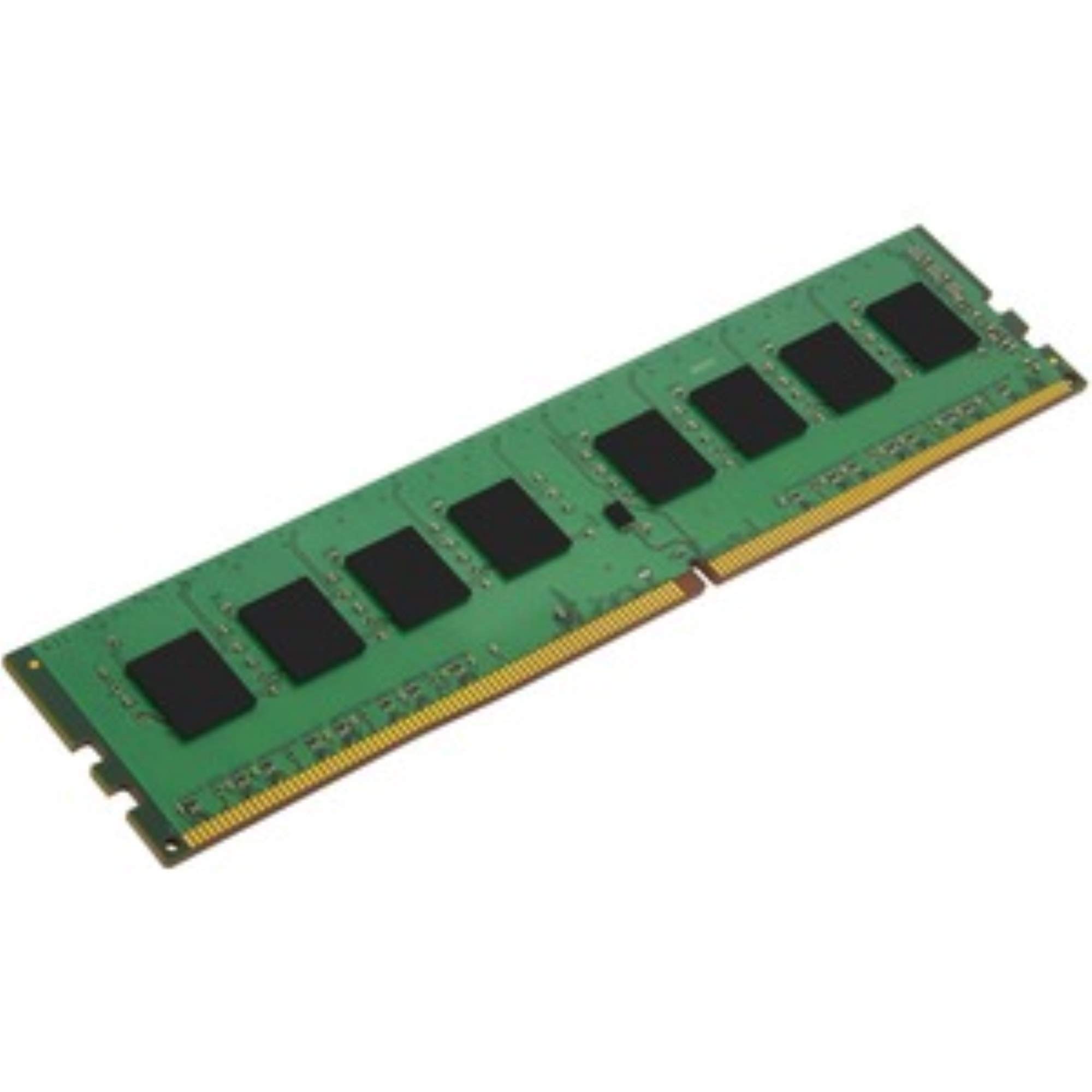
The everyday 8 GB desktop stick that matches the RAM already inside most office PCs.
This Kingston ValueRAM is a single 8 GB DIMM (288-pin, full-size desktop stick) at 2400 MHz with CL17 latency. It is the sort of RAM that comes pre-installed in many pre-built desktops, so if you are adding a second stick to a PC that already has one, owners mention it “matched 2 sticks already installed” and posted without any BIOS adjustment. At 14 grams, it is extremely lightweight and takes seconds to slot in.
Compared to the Samsung 8 GB SO-DIMM above, this is a desktop-only DIMM — they look completely different and are not interchangeable. The form factor is the main decision point here. For an older desktop that you want to give a second life, one customer observed it maxed out an older computer’s memory without issues.
It is not the fastest RAM on the market, but buyers consistently say it is reliable and a great value for the price. As one reviewer put it, “It is definitely not the fastest out there but it is reliable.”
Solid basics
- Standard CL17 latency at 2400 MHz — works in any DDR4 desktop.
- Ideal for matching an existing Kingston stick in a pre-built PC.
- Extremely light at 14 grams, making installation almost easy.
Limitations
- 8 GB capacity is the minimum for modern use; you may outgrow it quickly.
- Not available as a 16 GB or 32 GB kit — stick with Crucial or G.SKILL for higher capacities.
Who it works for: desktop users who need a cheap, reliable 8 GB stick to match existing RAM in an office or home PC.
Look elsewhere if: you need more than 8 GB, laptop RAM, or the lowest latency — this is the entry-level option for a reason.
Understanding the Specs
DIMM vs SO-DIMM
These two physical shapes are the single most important spec to get right. A DIMM (dual inline memory module) is the full-size stick used in desktop motherboards — it is 133.35 mm long with 288 pins. A SO-DIMM (small outline dual inline memory module) is shorter at about 67.6 mm with 260 pins and is designed for laptops, mini PCs, and small-form-factor desktops. They are not physically compatible: a SO-DIMM will not lock into a desktop slot, and a DIMM is too long for a laptop bay. Always check your device’s manual or look at the physical slot before buying.
CAS Latency (CL)
CAS latency, written as CL16 or CL17, measures how many clock cycles the memory takes to respond to a request from the CPU. A lower number means slightly faster access to data. For 2400 MHz RAM, CL16 delivers data about 6% faster than CL17. In everyday use — opening apps, loading games, switching between browser tabs — the difference is small but measurable. If you are choosing between two sticks at the same price, pick the one with the lower CL number. The G.SKILL Ripjaws at CL16 is the only pick in this list that beats the rest.
FAQ
Can I use 2400 MHz RAM in a motherboard that supports 2666 MHz or 3200 MHz?
What happens if I install a desktop DIMM into a laptop SO-DIMM slot?
Is CL16 noticeably faster than CL17 in real-world use?
How do I know if my laptop uses SO-DIMM or DIMM RAM?
Can I mix a 2400 MHz stick with a 2666 MHz stick?
What does “dual-channel” mean and do I need it?
How long does 2400 MHz DDR4 RAM typically last?
Why does my BIOS not recognize the new RAM stick?
Is 2400 MHz RAM still good for gaming in 2025?
Does 2400 MHz RAM need heatsinks?
Final Thoughts: The Verdict
If you want one dependable pick, the best 2400 mhz ram overall is the Crucial 32GB Kit because it pairs massive capacity with proven reliability and a trusted brand — the ideal upgrade for any DDR4 desktop. If you need laptop RAM, the G.SKILL Ripjaws 32GB delivers the lowest latency in this category (CL16) plus a 32 GB matched kit for serious multitasking. And for a budget-friendly single-stick upgrade that still comes with a lifetime warranty, the A-Tech 16GB Desktop module is the best value pick.
How We Picked
We do not accept paid placement. Every pick is matched to a real buyer and a real use-case; we do not hands-on test units.
Sources & Methodology
Specifications: manufacturer listings and product documentation. Review insights: verified customer reviews, as of July 2026. Pricing: not shown on this page (it changes often); check the current price via the retailer link.
As an Amazon Associate, Gadgets Feed earns from qualifying purchases. This does not affect which products we feature.
Related Guides
Product prices and availability are accurate as of the date/time indicated and are subject to change. Any price and availability information displayed on Amazon at the time of purchase will apply to the purchase of this product. As an Amazon Associate I earn from qualifying purchases.
CERTAIN CONTENT THAT APPEARS ON THIS SITE COMES FROM AMAZON. THIS CONTENT IS PROVIDED "AS IS" AND IS SUBJECT TO CHANGE OR REMOVAL AT ANY TIME.
Amazon and the Amazon logo are trademarks of Amazon.com, Inc. or its affiliates.