
Our readers keep the lights on and my morning glass full of iced black tea. As an Amazon Associate, I earn from qualifying purchases.
Specs are compiled from manufacturer listings and verified buyer reviews and can change over time — please confirm the key details on the product page before buying.
You want a 240mm AIO cooler (an all-in-one liquid cooler with a 240mm radiator) that keeps your CPU cool without sounding like a jet engine and fits your case without a fight. A 240mm radiator is the balance for most builds — it slides into far more cases than a bulky 360mm unit while still taming hot chips like the Ryzen 7 9800X3D or Intel Core i9. Here are nine top contenders, broken down by the numbers that matter, so you can match the cooler to your CPU, your case, and your tolerance for fan hum.
I’m Min — the founder and writer behind Gadgets Feed. This guide is built by comparing the manufacturers’ published specifications and the patterns across verified customer reviews, so you get each pick’s real strengths and trade-offs instead of marketing spin.
Whether you’re chasing single-digit temperature drops or a display that shows your system stats, the best 240mm aio cooler is the one that fits your case, your CPU, and your ears.
Our Picks at a Glance
How To Choose The Best 240mm AIO Cooler
Before you buy, ask yourself four questions: Does it fit my case and socket? Will it keep my specific chip cool under load? How loud will it be? And what am I paying for the privilege? Answering these four questions narrows the field to the cooler that matches your case, CPU, and noise tolerance.
Match the Radiator to Your Case and Socket
A 240mm AIO needs a case with mounting points for a dual-fan radiator, usually on the top or front. Before you buy, check your case’s radiator clearance in millimeters and confirm your motherboard socket is on the cooler’s supported list. Most modern coolers cover Intel LGA 1700/1851 and AMD AM4/AM5, but if you’re on an older platform like LGA 1200 or AM3+, you need to verify that specific model supports it.
Read the Noise and Airflow Numbers Together
Fan speed (RPM) and airflow (CFM) tell you how much air a cooler can push, but higher numbers don’t automatically mean better. A fan spinning at 2100 RPM with 61.8 CFM of airflow will move plenty of air, but it can also get loud. The trick is finding a cooler that hits strong airflow without a high decibel (dB) rating — that’s where the engineering really shows.
Know What You’re Paying For
Budget AIOs deliver solid cooling with basic RGB. Mid-range models add quieter pumps, better fans, and sometimes a small display. Premium coolers push the price up for larger LCD screens, advanced pump designs, or a famous brand name. Decide whether visual flair or raw thermal performance matters more to you, then spend accordingly.
Quick Comparison
| Model | Best For | Max Fan Speed | Airflow | Noise Level | Amazon |
|---|---|---|---|---|---|
| be quiet! Light Loop 240★ Best Overall | Whisper-quiet performance | 2100 rpm | 61.8 cfm | 34.9 dB | Amazon |
| ARCTIC Liquid Freezer III Pro 240Best Value | Aggressive cooling value | — | 77 cfm | — | Amazon |
| Thermalright FW 240 ARGB V2Budget LCD | Budget LCD screen | 3000 rpm | 70.84 cfm | 23 dB | Amazon |
| Thermaltake TH240 ARGB Sync V2 | Motherboard RGB sync | 2000 rpm | — | 25.8 dB | Amazon |
| Thermaltake Floe 240 | Classic dual-ring RGB | 1400 rpm | 42.34 cfm | 24.7 dB | Amazon |
| Corsair Nautilus 240 RS LCD | Clean low-noise LCD | 2100 rpm | — | 20 dB | Amazon |
| ASUS ROG RYUO III 240 | Anime Matrix display | 1200 rpm | — | 36.45 dB | Amazon |
| Noctua NL-LC1-24 | Near-silent SFF builds | 1800 rpm | 107.3 m³/h | 22.5 dB | Amazon |
| NZXT Kraken Elite 240 RGB | Biggest LCD display | 1000 rpm | — | 30 dB | Amazon |
In‑Depth Reviews
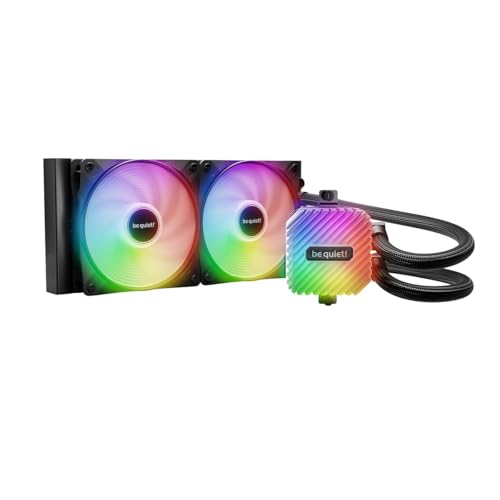
1. be quiet! Light Loop 240mm Black
Our pick — over 4.5★ from 350+ verified ratings; the strongest balance of quality and price.
The crowd favorite that cools hard while staying nearly inaudible, with a refillable tank as a bonus.
If you want a cooler that disappears into your build — both visually and acoustically — this is the one. The stand-out feature isn’t a flashy screen; it’s the engineering underneath. A metal jet plate inside speeds up the coolant flow, and a progressive motor IC cuts switching noise so the pump stays quiet even under load. Buyers report keeping a Ryzen 7 9800X3D under 65°C during four-plus hours of maxed-out gaming, with some seeing temps as low as 45 degrees. Reviewers consistently confirm this cooler delivers strong thermal performance with minimal noise.
The two Light Wings LX 120mm fans spin up to 2100 rpm and push 61.8 cfm of airflow, which is a strong combination for a 240mm radiator. That’s noticeably more airflow than the Thermaltake Floe 240’s 42.34 cfm at 1400 rpm, and it shows in the headroom for overclocked chips. Buyers also love that the reservoir is refillable, with coolant included in the box — a rarity at this level. The RGB setup is generous too: 48 LEDs across the block and fans, all manageable through an included hub that syncs up to 6 PWM fans and 6 ARGB components from a single motherboard header.
Installation is genuinely simple, with brackets that go on without frustration. The one real catch: the RGB and fan controller hub needs SATA power, which adds a cable to manage. The noise rating of 34.9 dB doesn’t look ultra-low on paper, but owners say the fans stay whisper-quiet in practice, comparing it favorably to loud stock coolers. Buyers repeatedly praise its solid construction and value for the price.
Why It Wins
- Refillable coolant tank with fluid included
- Dead-simple bracket install
- 48 RGB LEDs with a 6-fan hub
- Owners praise cooling and quiet operation
Small Trade-offs
- RGB hub needs SATA power
- Thermal paste needs patience to spread evenly
The pick if: you want proven, quiet cooling for a hot modern CPU like the 9800X3D without paying premium prices.
Think twice if: you hate extra cables — the SATA-powered hub is mandatory for the RGB and fan control.
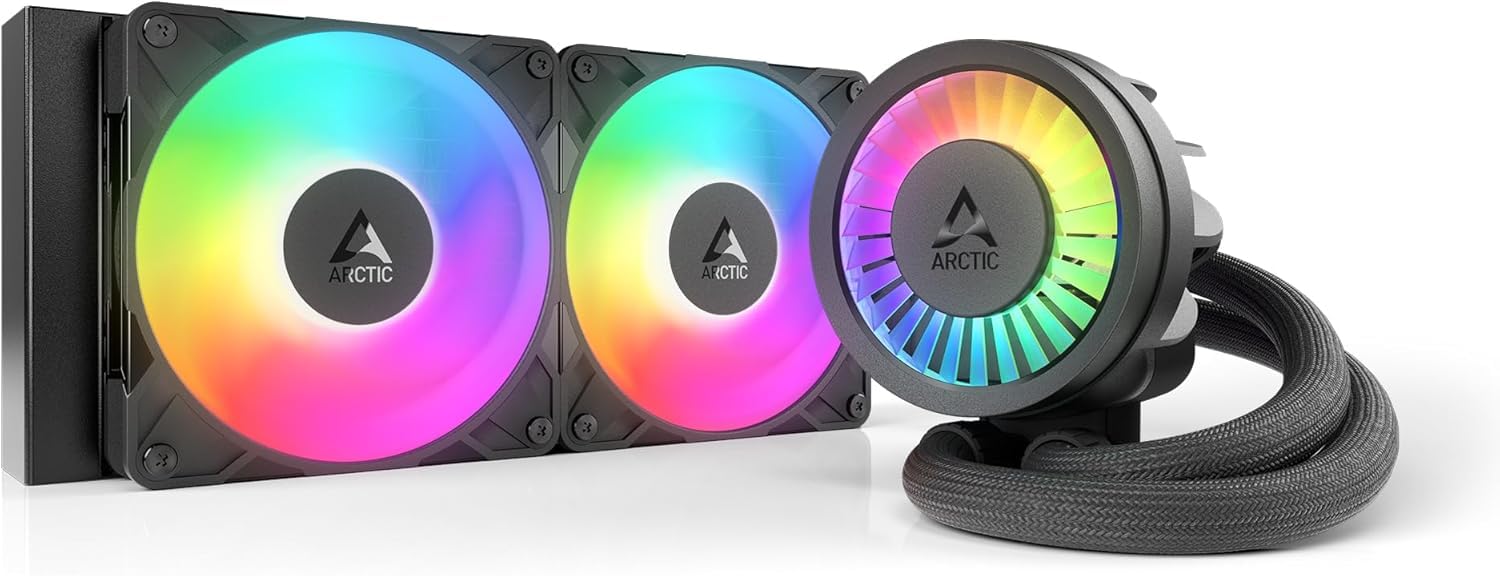
2. ARCTIC Liquid Freezer III Pro 240 A-RGB
The thermal powerhouse that pushes 77 cfm through a thick radiator, topping the airflow charts here.
This is the cooler you reach for when raw cooling capacity is the whole point. Light Loop’s 61.8 cfm — which explains why owners see dramatic drops. One buyer measured a 30°C improvement over stock air cooling on a Ryzen 9 3900, never exceeding 65°C where the stock cooler had throttled. On a Core i9-14900KF, another owner stayed in the low 70s during CPU-heavy games. Its thermal performance is the standout feature in owner reviews.
What sets this AIO apart is the extra hardware you don’t usually get. There’s an integrated VRM fan — a small PWM-controlled fan that cools the voltage regulators around your CPU socket, keeping them reliable under sustained load. The native offset mounting shifts the cold plate toward the CPU’s hotspot for more efficient heat transfer on both Intel and AMD. On Intel LGA1851 and LGA1700, a contact frame tune pressure distribution across the CPU for better heat dissipation. The radiator is thicker than most, which is exactly why it cools so well.
The trade-off is installation. That thick radiator needs about a half-inch of extra case clearance, and the fit is tight in smaller builds. Owners mention that mini-ITX cases can be problematic, and the process may involve removing your motherboard’s backplate — a step that intimidates first-timers. Noise is mostly a non-issue with the pump running at 100% and fans rarely above 80%, though a few owners note slight noise under heavy load. The hoses also lack cable management, which bothers some builders. Owners consistently recommend it as a top-value budget AIO.
The thermal king: 77 cfm airflow and a contact frame make this the pick for hot Intel chips, as long as your case has the clearance.
Buy it for: maximum cooling per dollar on a thick radiator that drops temps by double digits.
Skip if: you’re building in a mini-ITX case or want a tool-free install — this one needs patience and YouTube.
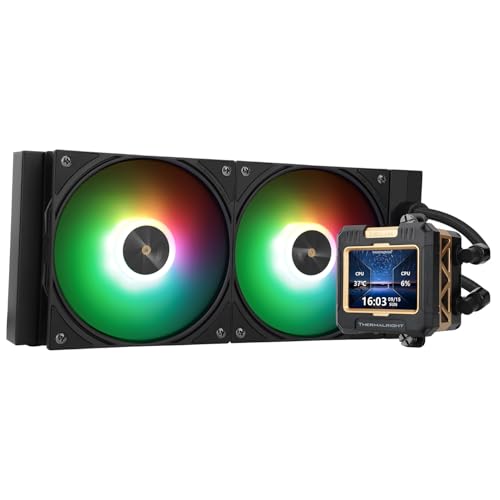
3. Thermalright FW 240 Black ARGB V2
A budget AIO with a detachable IPS LCD screen — a feature that usually costs double this price.
The headline here is the screen. A detachable IPS LCD with 320 x 240 resolution sits on the pump, and it’s the thing owners consistently call out as exceeding expectations. You can load static images, GIFs, or even mirror your system stats, and the included software handles the customization. For a cooler in this price tier, having a display at all is remarkable — most competitors charge a serious premium for the same trick. The screen runs off a motherboard USB 9-pin header, so make sure your board has one free.
Cooling holds up its end too. The two TL-P12-S fans spin up to a claimed 3000 rpm — the highest fan speed on this list — and push 70.84 cfm of airflow. Customers note keeping their CPUs between 50-70°C under gaming loads, and the noise rating of 23 dB is one of the lowest here. The fans use S-FDB bearings (fluid-dynamic bearings that reduce friction and vibration) and a blade design aimed at cutting noise. The pump itself runs quietly, with buyers noting no pump whine even after long sessions.
Where the budget nature shows is in the software and included thermal paste. The RGB control software is finicky — some owners can’t control fan RGB through it, and one had the fan ARGB cut out until a reboot. The included thermal paste is dry and thick, spreading poorly, so expect to add your own for best results. Owners also note the TRCC image needs reloading each time you log in. Despite software quirks, owners agree it offers reliable cooling, a customizable screen, and low noise at a price well below premium LCD coolers.
Screen for less: the most affordable way to get a functional LCD on your pump, with quiet 23 dB fans to match.
Reach for this if: you want a flashy LCD display without paying flagship prices.
Look elsewhere if: you want polished software — the RGB and screen apps are the rough edge here.
4. Thermaltake TH240 ARGB Sync V2

The value pick that plays nice with every major motherboard RGB ecosystem from the start.
If your whole build is already synced through your motherboard’s software, this cooler wants to join the party. It’s designed to synchronize with ASUS Aura Sync, GIGABYTE RGB Fusion, MSI Mystic Light Sync, and ASRock Polychrome — so no extra controller or conflicting app is needed. The Infinity Mirror lighting on the water block adds a layered visual effect, and the cap rotates a full 360 degrees so the logo always sits upright no matter how you mount it. The RGB is a genuine highlight, not an afterthought.
This cooler keeps low-to-mid-tier CPUs cool without breaking a sweat. The copper base plate (copper transfers heat faster than aluminum) paired with a reliable pump does the job — owners on a Ryzen 5 8400F and even an older AM3+ FX-9370 report good results, with one measuring around 38°C at idle. The fans spin from 500 to 2000 rpm at a 25.8 dB rating, so they stay quiet at normal speeds. It’s best suited to CPUs up to roughly a 100W TDP (thermal design power, or how much heat the chip produces); it’s not the first choice for a heavily overclocked flagship chip.
The honest catch is installation and build feel. Setup is doable but the instructions are vague, with owners noting extra unused connectors and a 4-pin fan cable that didn’t work on the CPU header (the socket on the motherboard for the CPU fan), forcing a switch to a chassis header. The build quality reads a bit cheap on the outside — functional, but not premium. Noise is generally fine, though a few owners found it louder than expected under load. Buyers widely agree it’s a good-value AIO that performs well, with a two-year warranty adding confidence.
Sync-and-go: zero-fuss motherboard RGB sync with a rotating mirror cap, ideal for mid-range builds.
Pick this if: you live inside one RGB ecosystem and want a cooler that just syncs without extra software.
Pass if: you’re cooling a high-wattage flagship or hate fiddly installs with vague manuals.
5. Thermaltake Floe 240
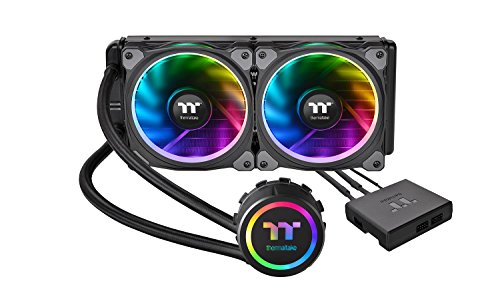
A long-serving RGB classic with 12 individually controlled LEDs per fan and a distinctive dual-ring look.
This is the veteran of the group, a cooler that’s been around long enough to build a massive following — and the reviews show it. The defining feature is the lighting: 12 separately controlled RGB LEDs (red, green, blue light-emitting diodes) on each fan, arranged in a dual-ring pattern that’s unmistakable, plus 6 LEDs on the pump block that double to match the fan count for a cohesive look. The software supports Thermaltake’s RGB Plus, Alexa voice control, and Razer Chroma, which is a flexibility few coolers this age can match. Each fan’s LEDs run independently for truly granular effects.
Cooling performance is genuinely strong for the 1400 rpm fan speed. Reviewers point out keeping a Ryzen 7 2700X below 55°C while gaming and an idle temp around 34°C. On a Threadripper 3970X under full 64-thread load, it holds around 80°C in near-silent operation. That 1400 rpm cap keeps noise low at a 24.7 dB rating, and buyers describe the fans as super quiet until you push them. The 42.34 cfm airflow is the lowest on this list, but the efficient radiator and pump make up for it in everyday use.
The honest concerns are reliability and software. The noise level and value reviews are genuinely mixed — while most owners are happy, a meaningful minority report a continuous buzzing from the pump. The software is widely described as mediocre, and installation instructions are poor with stiff, short tubing.
RGB first, cooler second: class-leading lighting control on a solid performer, but reliability reports are genuinely split down the middle.
Choose this if: the dual-ring LED look is exactly what your build needs and you want Alexa or Razer Chroma integration.
Avoid if: you’re not comfortable with mixed reliability reports — consider the newer Thermaltake TH240 instead.
6. Corsair Nautilus 240 RS LCD
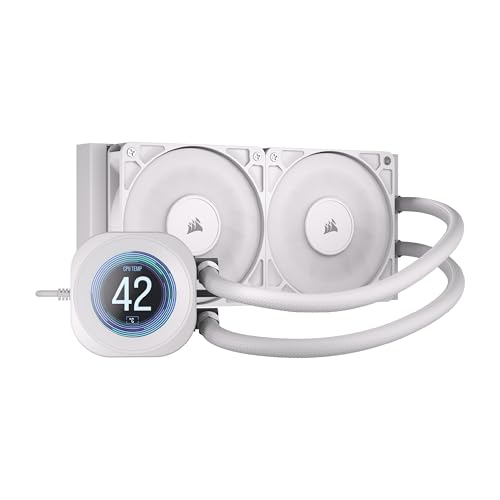
A clean, low-noise LCD cooler with the quietest rated pump on this list at 20 dBA.
This Corsair brings the polish you’d expect from the brand, led by a 2.1-inch IPS LCD screen on the pump for showing temps or custom images. The headline number, though, is the pump noise: 20 dBA, the lowest pump rating in this roundup. That whispers territory — quieter than the ASUS ROG RYUO III’s 36.45 dB by a wide margin. On the thermal side, shoppers say CPU temps around 40-45°C while gaming, which is excellent for a 240mm unit. The convex cold plate is the trick: it’s slightly bowed so it presses evenly across the CPU’s heat spreader, and pre-applied thermal paste makes installation nearly tool-free.
The included RS120 fans are built for static pressure — meaning they push air effectively through the dense radiator fins rather than just moving air noisily in open space. Corsair’s AirGuide technology and Magnetic Dome bearings keep that airflow strong while holding noise down. The fans spin to 2100 rpm, and the daisy-chain design means you manage fewer cables during installation. Owners describe mounting as super easy, with the pre-pasted plate making it “as easy as screwing in and turning on.”
No cooler is perfect, and the recurring gripe here is a bubble sound from the pump for some owners — a few report it while others say the unit is utterly silent. Cable routing also draws comments, with tubes that have a twist memory and snake across the front of the case less cleanly than some rivals. The software is mostly solid but has minor glitches that a quick app reopen fixes. At this price, you’re paying for the combination of a screen, a quiet pump, and Corsair’s fit-and-finish — and for most buyers, that equation works out.
Quiet and complete: a 20 dBA pump, pre-applied paste, and a 2.1-inch screen wrap into one clean package.
Grab this if: you want a quiet LCD cooler that installs in minutes with minimal cable fuss.
Consider the NZXT if: you need a larger, higher-resolution display — this 2.1-inch screen is on the smaller side.
7. ASUS ROG RYUO III 240 ARGB

The flagship-flavored ASUS with a mini LED Anime Matrix display and a 6-year warranty.
ASUS brings the ROG treatment with the Anime Matrix — a mini LED array on the pump that can display ROG-exclusive anime content, core system stats, or your own custom animations. It’s a different vibe from a full LCD, more of a retro dot-matrix aesthetic that ROG fans love, framed in aluminum with a vacuum-coated lens. The pump inside is the latest 8th-gen Asetek design with a 3-phase motor, which delivers higher flow and lower impedance for strong cooling. Owners on an i9-12900K at 5.2GHz report great temps with quiet fans and an inaudible pump even at 100%.
Cooling credentials are proven on hot chips. One owner running an i9-14900K saw a 4-5°C improvement over a 280mm NZXT unit in Cinebench, which is impressive for a smaller 240mm radiator. Another reports an i9 idle at 26°C and gaming under 60°C with an overclock. The included ROG AF 12S ARGB fans are praised as brighter, quieter, and thicker than most stock fans, spinning to 1200 rpm. Owners consistently call the build quality fantastic, as expected from a premium ROG product.
The downsides are software and noise perception. The Armoury Crate software is buggy for some, occasionally requiring a reinstall, and some owners find the pre-programmed animations cheesy. The noise level is genuinely mixed — while many call it whisper-quiet, others find it too noisy for the price, and the 36.45 dB rating is the highest on this list. When the PC is off, the matrix screen shows a default animation unless you disable USB in the BIOS. The 6-year warranty is a genuine safety net, but make sure the software quirks won’t annoy you before committing.
The ROG Appeal
- Anime Matrix mini-LED display with custom animations
- 6-year warranty for confidence
- Beats a 280mm rival by 4-5°C in testing
- Premium aluminum build quality
The ROG Tax
- Armoury Crate software can be buggy
- Highest noise rating on this list at 36.45 dB
- Matrix screen shows default animation when off
Buy for the badge: you’re building a full ROG setup and want the anime display with a long warranty.
Think twice if: noise is your top priority — the 36.45 dB rating is the loudest here, and the software can fight you.
8. Noctua NL-LC1-24
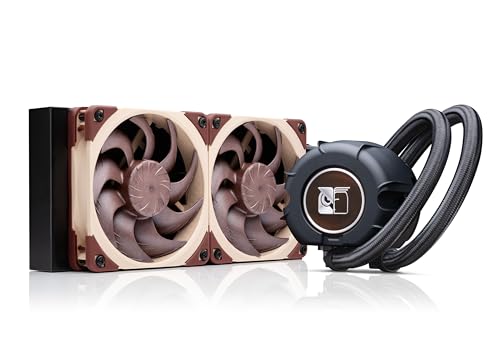
The quiet-obsessed SFF specialist where a tuned-mass damper silences the pump and the famous brown fans do the rest.
Noctua’s first AIO is built around one obsession: silence. The pump uses a 3-layer acoustic soundproofing structure plus a tuned-mass damper effect that physically absorbs vibration, and the proof is in the ratings — 22.5 dB, among the quietest here, with owners saying they never hear the pump or fans while gaming. The bundle includes two NF-A12x25 G2 PWM fans (pulse-width modulation, which lets the motherboard control fan speed), arguably the most celebrated 120mm fans in the industry, with a speed-offset setting for acoustic optimization. Airflow is rated at 107.3 cubic meters per hour — the highest on this list when you convert it. The result, as owners describe it, is quieter than an air purifier.
This is a compact 240mm unit aimed squarely at Small Form Factor (SFF) builds. The SecuFirm2 mounting system includes offset options for hotspot optimization on AMD AM5 and Intel LGA1851, specifically ideal for the Ryzen 9800X3D, 9900X3D, 9950X3D, and Intel Core Ultra 285K lineup. Owners have crammed it into tight cases like the Hyte Revolt 3 and SFF TR100, reporting a Ryzen 9850X3D maxing at 72°C while gaming very quietly. The box includes Noctua’s premium NT-H2 thermal paste plus a paste guard for AM5, and there’s even an optional auxiliary fan accessory for cooling VRMs, M.2 SSDs, and RAM — sold separately.
The price is the obvious hurdle — this costs a serious premium over most rivals here. The installation documentation draws repeated criticism as unclear, particularly the offset instructions for some current Intel models, which confuses builders. At idle, the pump can emit a faint noise for some owners, and the hoses may touch a side panel in ultra-tight cases. But for the SFF builder who wants near-silent, effective cooling in a tiny case, owners consistently call it worth the premium — the packaging quality and build standard are unmistakably Noctua.
Silence engineered: a 3-layer pump damper and the best 120mm fans made, wrapped in a compact SFF-friendly frame.
Buy it for: a near-silent SFF build where every decibel counts and you want the best fans on the market.
Pass if: you’re on a budget or want plug-and-play instructions — the setup guide needs some deciphering.
9. NZXT Kraken Elite 240 RGB

The biggest, sharpest LCD in this roundup — a 2.72-inch, 640 x 640 display with 60 Hz smoothness.
If the screen is the build, this is the cooler for you. The Kraken Elite swaps small displays for a dominant 2.72-inch IPS LCD at a crisp 640 x 640 resolution with a 60 Hz refresh rate and an ultra-bright 690 cd/m² backlight, plus vibrant 24-bit color. It’s the most visually impressive screen in this list, and it integrates with Google Photos, Spotify, and YouTube — so you can show album art or video alongside system stats. The RGB LED ring around the screen syncs with on-screen content for a cohesive effect that owners call a major upgrade to their build’s look.
Cooling comes from the custom-designed NZXT Turbine pump, which the company claims delivers a 10% performance boost with less noise thanks to higher flow rate and head pressure. Owners running a Ryzen 7 9800X3D report steady 60-70°C under load, with the Zero RPM Mode letting fans shut off completely at low loads for silent operation. Installation is genuinely tool-free with pre-applied thermal paste, a single breakout cable, and tool-free mounting brackets for AMD AM5/AM4 and Intel LGA 1851/1700/1200/115X. Owners call setup easy and quick.
The honest caveats: temperatures run a touch higher than some rivals, with one owner recording 60-70°C and calling it “higher than expected” for the price. The CAM software must run at startup for your chosen image to load, and the app doesn’t always recognize swapped fans. Some buyers report ticking noises from the pump at lower RPM, and the noise rating of 30 dB is mid-pack. Most concerning, a small number of owners mention pump failure within months — though they’re hopeful for warranty replacements. This is a premium visual experience, but you’re paying a significant premium for the screen over raw cooling value.
Screen first, cooler second: the most beautiful display here with solid cooling, but you pay a premium for the visuals.
Reach for this if: the LCD is the centerpiece of your build and you want Google Photos or Spotify integration on your pump.
Consider the Arctic if: pure cooling value matters more than a screen — you can save a lot and get similar thermals.
Understanding the Specs
Fan Speed (RPM) and Airflow (CFM)
Fan speed, measured in rotations per minute (RPM), tells you how fast the fan blades spin. Airflow, measured in cubic feet per minute (CFM), tells you how much air actually moves. Higher RPM usually means more airflow, but it also means more noise. A cooler with high CFM at a moderate RPM — like the Noctua at 107.3 m³/h — is the sign of an efficient fan design. Don’t chase RPM alone; look for the balance between airflow and the decibel rating.
Noise Level (dB / dBA)
Decibels (dB) measure sound pressure, and dBA is the same scale weighted to how human ears actually hear. Every 10 dB increase sounds roughly twice as loud, so a 20 dB pump is dramatically quieter than a 36.45 dB pump. But the number only tells part of the story — the quality of the sound matters too. A smooth hum at 30 dB can be less annoying than an electrical buzz at 25 dB. Read owner experiences about pump whine and fan tone, not just the spec sheet.
Cold Plate and Pump Design
This is where the cooling actually happens. The cold plate is the metal surface that sits directly on your CPU, and its job is to pull heat off the chip into the liquid. Copper is the best conductor, so copper cold plates are standard. Some designs — like the Corsair’s convex plate or Arctic’s offset mounting — add subtle curves or positioning changes to improve contact with the CPU’s heat spreader. The pump circulates the liquid, and its quality determines both cooling efficiency and noise. An Asetek 8th-gen pump, for instance, is a proven, reliable design used across many premium coolers.
Radiator Size and Case Compatibility
The 240mm radiator is the reason you’re looking at this category: it fits a far wider range of cases than a 360mm unit while cooling more effectively than a 120mm one. A 240mm radiator pairs with two 120mm fans. Check your case’s radiator mounting clearance in millimeters before buying — some coolers, like the Arctic, run thicker than others and need more room. This is the single most common compatibility mistake, so measure twice, buy once.
FAQ
Will a 240mm AIO fit in my case?
Is a 240mm AIO enough for an i9 or Ryzen 9?
What is the difference between an AIO and a custom loop?
How long does a 240mm AIO last?
Can I use a 240mm AIO in a Small Form Factor (SFF) build?
What is the VRM fan on some AIO coolers for?
Do I need to apply thermal paste with a new AIO?
Is a 240mm AIO better than a high-end air cooler?
What does a higher pump rotational speed mean?
What is the difference between ARGB and standard RGB?
– STRUCTURE: Do NOT write the `
How We Picked
We do not accept paid placement. Every pick is matched to a real buyer and a real use-case; we do not hands-on test units.
Sources & Methodology
Specifications: manufacturer listings and product documentation. Review insights: verified customer reviews, as of August 2026. Pricing: not shown on this page (it changes often); check the current price via the retailer link.
As an Amazon Associate, Gadgets Feed earns from qualifying purchases. This does not affect which products we feature.