
Our readers keep the lights on and my morning glass full of iced black tea. As an Amazon Associate, I earn from qualifying purchases.
Specs are compiled from manufacturer listings and verified buyer reviews and can change over time — please confirm the key details on the product page before buying.
If you are running a 240V circuit for a garage fan, a pump, or a wall light, the switch you pick decides whether the job goes smoothly or turns into a wiring headache. The traps are real: a switch rated only for 120V, a unit that drops its Wi-Fi connection, or an app setup that fights you every step of the way. This list cuts to the three picks that actually handle high-voltage loads and explains what each one is genuinely good at.
I’m Min — the founder and writer behind Gadgets Feed. This guide is built by comparing the manufacturers’ published specifications and the patterns across verified customer reviews, so you get each pick’s real strengths and trade-offs instead of marketing spin.
Fair warning before you buy anything: this list uses flexible, human-like matching for 240V rated (100–240V or 220–240V) switches, so not every pick is the exact number you searched. The nearest same-type fit serves the same purpose. With that said, here is the honest breakdown of each 240v smart switch worth your wiring time.
Our Picks at a Glance

How To Choose The Best 240V Smart Switch
A 240V smart switch is not simply a higher-voltage version of a standard wall switch. The electronics inside must be rated to handle the extra voltage, and the relay has to survive the inrush current that motors and high-wattage loads pull when they first kick on. Miss that detail and the switch works for a week, then stops.
Voltage rating and current rating come first
Check the input voltage range printed on the spec sheet before anything else. A switch rated 90–250V or 100–240V can handle a 240V line; a switch rated only 120V cannot. The current rating matters too — a 15A switch and a 10A switch are not interchangeable on a heavy motor load. If you are switching a garage exhaust fan, a pump, or anything with a motor, you need a switch the maker explicitly lists as suitable for motor loads, not just incandescent bulbs.
Neutral wire requirement
Most smart switches in this class need a neutral wire (the white wire in your box) to power their internal radio. If your wall box only has a live and a load wire with no neutral, you cannot use these switches without running a new cable. Figure that out before you order, because it is the single most common reason a smart switch installation stalls halfway through.
Protocol and hub compatibility
This is where the three main options diverge. Matter is an open smart-home standard, so a Matter-certified switch works with Apple Home, Samsung SmartThings, Google Home, and Amazon Alexa natively — no brand lock-in. Tuya/Smart Life switches work through the Tuya cloud app and pair with Alexa and Google. Tasmota is a local firmware that runs entirely on your own network with no cloud at all, but it requires Home Assistant or another local hub to be useful. Pick the protocol that matches the hub you already own.
Quick Comparison
| Model | Best For | Voltage Range | Current Rating | Protocol | Amazon |
|---|---|---|---|---|---|
| Duchow WiFi Smart Outlet and Switch Combo★ Best Overall | Outlet plus switch in one unit | 90–250V AC | 15 A | Wi-Fi (Tuya/Smart Life) | Amazon |
| Intermatic Smart Wi-Fi Switch – Matter Certified | Motor loads and multi-platform control | 120–277VAC | 15 A | Matter | Amazon |
| TASMOTA Smart Switch by Martin Jerry | Local-only Home Assistant setups | 100–240V | 10 A (Max) | Wi-Fi (Tasmota/ESP8266) | Amazon |
In‑Depth Reviews
1. Duchow WiFi Smart Outlet and Switch Combo
Our pick — over 4.5★ from 70+ verified ratings; the strongest balance of quality and price.
One wall plate, two jobs: a touch light switch and a Wi-Fi outlet sharing the same box.
If you are short on wall space and want to switch a light and power a device from the same in-wall unit, this Duchow combo is the one to start with. It runs on a 90–250V AC range with a 15A current rating, so it handles a 240V circuit without any special wiring drama — the same voltage range you would expect from a switch built specifically for high-voltage lines. The touch panel is tempered glass, which gives it a clean, flat surface rather than a mechanical rocker, and the whole thing wires back-and-side with connectors that accept up to 12AWG copper or copper-clad wire.
Both the light switch and the outlet are controlled individually through the Smart Life / Tuya app, and it works with Alexa and Google Assistant for voice control. The real appeal here is that it packs both functions into a single gang box, which means you get smart control over a light and a separate always-on or switched receptacle without adding a second device. For anyone wiring a garage, bedroom, or living room where an outlet and a switched light sit side by side, that combination saves both space and one run of cable. It also supports 3-way configurations, so if you already have a second switch at the other end of a hallway, this can slot into that setup.
The honest catch is reliability. Buyers report that the device can lose its network connection, and Amazon’s customer summary notes several reports of dropped network connections alongside mostly positive quality-control feedback. — Amazon’s customer summary notes several reports of dropped network connections alongside mostly positive quality-control feedback. On the wiring side, a few buyers mention the junction box footprint runs larger than a standard plug and can be a tight fit in metal boxes, sometimes requiring you to reposition wires. It is a fit-and-finish note, not a defect, but worth knowing if your box is already crowded.
What earns its spot
- Combines a smart light switch and a Wi-Fi outlet in one unit, saving a gang box
- 90–250V AC range and 15A rating make it 240V-ready from the start
- Touch glass panel and screwless snap-on cover give it a clean, minimalist look
What to weigh first
- Neutral wire is required, so a box without one will need new cable
- Larger back footprint than a standard plug; tight metal boxes may need wire repositioning
- Network reliability draws mixed reports, so keep the app handy for reconnects
Reach for this if: you want one device that switches a light and powers an outlet from the same wall box without giving up a gang.
Think twice if: your box has no neutral wire, or you need a switch that stays rock-solid on Wi-Fi without ever needing a reconnect.
2. Intermatic Smart Wi-Fi Switch – Matter Certified

The heavy-load specialist that switches a garage fan or pump and speaks every major smart-home language.
Here is the number that separates this pick from the competition: a 120–277VAC input range, which is the widest on this list and the only one that reaches up to 277VAC. Where the Duchow tops out at 250V and the Martin Jerry at 240V, the Intermatic’s higher ceiling means it comfortably handles a 240V circuit with headroom to spare. More importantly, the maker explicitly rates it for motor loads — up to 1 HP at 120V or 3 HP at 240V — so it can switch LED, incandescent, ballast, inductive, and motor loads, not just lights. If you are automating a garage exhaust fan, a ceiling fan, or a small pump, this is the one built for that job.
It is Matter-certified, which is the open standard that lets one switch talk to Apple Home, Samsung SmartThings, Google Home, and Amazon Alexa natively — no brand walled garden, no hub required for setup. You control it through voice, the Intermatic ABRA app, or any Matter-compliant third-party app, and it supports both single-pole and 3-way installations using your existing wall switch in multi-way setups, so you do not need to buy a special companion switch. The connections are wire leads, which makes the install straightforward for anyone comfortable working in a junction box.
Setup is where the experience splits. The overall quality earns strong marks — buyers praise it as a heavy-duty, well-built unit with labeled wires and a red traveler for 3-way work. But the ABRA app setup draws its share of frustration: the QR code in the printed instructions has been reported as invalid on some units, and the setup flow can be glitchy on iPhone. One buyer who tested it as a network engineer found it “only stays connected for a couple of weeks,” while others report it working exactly as it should once paired through Alexa or the Matter QR code. As with any smart switch, the platform you pair it with shapes the experience.
Where it pulls ahead: the 277VAC ceiling and 3 HP at 240V motor rating mean this is the pick that will not flinch at a high-draw fan or pump — a genuine step up from the 250V ceiling and the 10A limit on the other two.
The trade-off to accept: Matter and multi-platform freedom come with a setup app that has frustrated some buyers, and the faceplate is not included, so budget for one.
This is your switch if: you are driving a motor load, want a 3-way setup without a companion switch, or need one device that works across Apple, Google, Alexa, and SmartThings.
skip it if: you want a frictionless first-time app setup, or you need a faceplate in the box.
3. TASMOTA Smart Switch by Martin Jerry
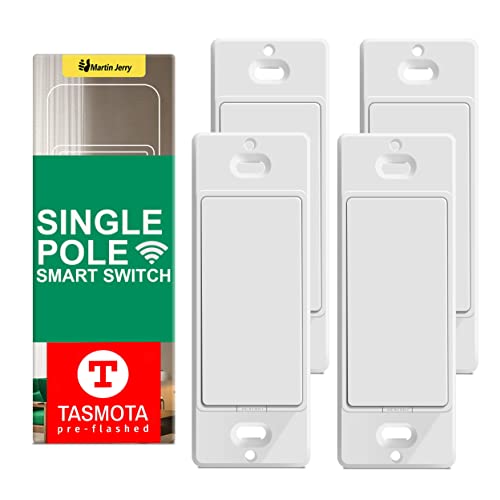
The no-cloud renegade: pre-flashed Tasmota firmware that runs entirely on your own network.
For Home Assistant users who want nothing to do with the cloud, this Martin Jerry switch is the one that fits. It ships with Tasmota firmware already installed — you do not have to flash it yourself — and it runs on a 100–240V range with a 10A max rating at 50/60Hz. The 240V support is genuine and the ESP8266 chip inside handles the 2.4GHz Wi-Fi connection, but understand the ceiling: at 10A max it is rated lower than the 15A switches above, so it is best suited to standard lighting circuits rather than heavy motor loads. This four-pack gives you enough switches to outfit a room or a small floor in one go.
The real story is local control. Everything runs through MQTT on your own network, so once it is set up with Home Assistant, there is no cloud dependency and no app required — a point owners consistently appreciate, since the switch keeps working even if the internet goes down. It supports voice control through Alexa and Google Home once linked, and it auto-syncs time with manual latitude and longitude for sunrise/sunset scheduling and automatic DST. The momentary push-button design means every paddle click registers reliably. Note that this is a single-pole switch, not a 3-way, and it is an ON/OFF relay rather than a dimmer — so it is for straightforward switching, not scene control or multi-tap.
The buyers who love this switch tend to be tinkerers who value local-first control. It pairs cleanly with Home Assistant from the start and flashes easily to ESPHome for those who want to go further, and it can control smart plugs with near-instant response. The catch is connectivity: pairing can sometimes be finicky, and because there is no cloud and no app, the switch is essentially useless without a local hub like Home Assistant. It also needs a neutral wire, and a Leviton-style faceplate is required since one is not included. If you are comfortable with MQTT and enjoy owning your own setup, the small setup friction is a fair trade for total local control.
Why it wins its niche
- Ships pre-flashed with Tasmota — no flashing required
- 100–240V and ESP8266 Wi-Fi cover high-voltage and 2.4GHz needs
- Fully local via MQTT, so it keeps working without internet
Where it asks more of you
- 10A max rating limits it to lighter loads, not high-draw motors
- Single-pole, relay-only — no 3-way and no dimming
- Pairing can be finicky, and it needs a hub since there is no app
Best for: Home Assistant and ESPHome users who want a pre-flashed, cloud-free switch pack they fully control.
Not the pick if: you need a phone app, a 3-way circuit, dimming, or a switch rated for a heavy motor.
Understanding the Specs
Voltage Rating (What It Actually Handles)
The voltage range tells you the highest line the switch can safely switch. A unit rated 90–250V, 100–240V, or 120–277VAC can sit on a 240V circuit. A switch rated only 120V cannot — running it on a 240V line risks damaging the electronics. Always match the ceiling of the switch’s range to your circuit’s voltage, and leave a little headroom if you expect any fluctuation.
Current Rating and Motor Loads
The amperage rating sets how much current the switch can pass. A 15A switch handles more load than a 10A switch, and switches rated for motor loads can survive the brief current spike a fan or pump pulls at startup — something a light-only switch may not. If you are switching anything with a motor, choose a switch the maker lists as suitable for inductive or motor loads rather than lighting only.
Neutral Wire Requirement
Smart switches need a small amount of power to run their Wi-Fi radio, so most require a neutral wire in the box. If your wall box lacks a neutral, you cannot use these switches without pulling new cable. Check your wiring before ordering; this single detail accounts for more stalled installations than any other compatibility issue.
Protocol: Matter, Tuya, or Tasmota
Matter is an open standard that works across Apple Home, Google Home, Alexa, and SmartThings without locking you into one brand. Tuya/Smart Life is a cloud app that pairs with Alexa and Google but keeps your automations on Tuya’s servers. Tasmota is local firmware that runs entirely on your network with no cloud, but it needs Home Assistant or another local hub. Your existing hub decides which protocol belongs in your home.
FAQ
Can I use a 240V smart switch on a standard 120V circuit?
Do I need a neutral wire for a 240V smart switch?
What is the difference between Matter and Tasmota smart switches?
Can these switches control a garage exhaust fan or pump?
Will a 240V smart switch work with Alexa and Google Home?
What happens if a smart switch loses its Wi-Fi connection?
Do I need a special faceplate for these switches?
Can a 240V smart switch be used in a 3-way circuit?
How hard is it to install a 240V smart switch?
Is Tasmota better than Matter for a 240V smart switch?
Final Thoughts: The Verdict
For most 240V installs, the 240v smart switch winner is the Duchow WiFi Smart Outlet and Switch Combo because it pairs a 15A, 90–250V switch with a Wi-Fi outlet in a single gang box, so you get both functions without giving up wall space. If you are switching a motor load like a garage fan or pump, or you want one switch that works across Apple, Google, Alexa, and SmartThings, the Intermatic Smart Wi-Fi Switch is the one to reach for — its 120–277VAC range and 3 HP motor rating at 240V handle the heavier jobs. And if you run Home Assistant and want a pre-flashed switch pack with no cloud dependency at all, the TASMOTA Smart Switch by Martin Jerry is the local-first pick that gives you full control. Before you buy any of them, confirm your wall box has a neutral wire — it is the one detail that stops more installations than any spec mismatch.
How We Picked
We do not accept paid placement. Every pick is matched to a real buyer and a real use-case; we do not hands-on test units.
Sources & Methodology
Specifications: manufacturer listings and product documentation. Review insights: verified customer reviews, as of September 2026. Pricing: not shown on this page (it changes often); check the current price via the retailer link.
As an Amazon Associate, Gadgets Feed earns from qualifying purchases. This does not affect which products we feature.