
That ancient laptop you have relegated to desk duty or the slim mini PC in your server closet has one glaring bottleneck: a spinning hard drive or a meager SATA flash module that chokes on even basic multitasking. The mSATA slot — a narrow, card-like connector hiding under the bottom panel — is the single most effective upgrade path for reviving these machines, and a 256 GB mSATA Solid State Drive offers the ideal capacity to host an operating system and daily applications without breaking the bank.
I’m Min — the co-founder and writer behind Gadgets Feed. I’ve spent countless hours cross-referencing benchmark data, scouring verified customer experiences, and comparing controller firmware and NAND types to separate the genuine speed upgrades from the deceptive entry-level candidates in this niche footprint.
This guide distills thousands of data points into a decisive shortlist of the best 256 GB mSATA Solid State Drive options that deliver genuine performance for legacy hardware, ensuring your money lands on a drive that will transform boot times and application loading for years to come.
How To Choose The Best 256 GB mSATA Solid State Drive
Selecting a 256 GB mSATA SSD is about matching the drive’s performance characteristics to your machine’s interface capabilities and your typical workload. Unlike standard 2.5-inch SATA SSDs, the mSATA form factor is fixed, but variations in controller quality, NAND type, and cache architecture directly impact real-world speed and longevity.
DRAM Cache vs. DRAM-less Architecture
The single most important performance differentiator in a 256 GB mSATA drive is whether it includes a dedicated DRAM cache chip. A DRAM cache maps the logical and physical addresses of your files, allowing the controller to quickly locate data without repeatedly reading the NAND’s translation tables. Drives with DDR3 DRAM, like the Transcend MSA230, deliver significantly better random read/write performance and more consistent write speeds during sustained transfers. DRAM-less drives rely on Host Memory Buffer (HMB) or static SLC caching, which works fine for bursty office tasks but will show noticeable lag during large file copies or when the drive is nearly full.
NAND Type and Endurance
The overwhelming majority of modern 256 GB mSATA drives use Triple-Level Cell (TLC) NAND, often in a 3D vertical stack. 3D TLC offers a good balance of cost, density, and write endurance, typically rated between 50 and 150 TBW (Terabytes Written) for a 256 GB capacity. Older Multi-Level Cell (MLC) NAND, found on the premium Samsung 860 EVO, offers roughly double the write endurance per cell, but is increasingly rare and commands a price premium. For an OS and application drive, a modern 3D TLC drive with LDPC error correction will comfortably outlast the host computer’s useful life.
Sequential vs. Random Performance
Sequential read speeds across most quality 256 GB mSATA drives hover around 520–550 MB/s, limited by the SATA III interface. The real-world performance gap comes from random IOPS (Input/Output Operations Per Second), particularly 4K random read. A drive that delivers 90,000+ IOPS random read will make Windows boot in under ten seconds and launch applications nearly instantly, while a drive with 40,000 IOPS will feel merely “fast.” The Samsung 860 EVO leads in this metric, but quality alternatives like the fanxiang S301 and S SHARKSPEED also offer strong random performance when backed by a capable controller.
Quick Comparison
On smaller screens, swipe sideways to see the full table.
| Model | Category | Best For | Key Spec | Amazon |
|---|---|---|---|---|
| Samsung 860 EVO 250GB | Premium | Maximum endurance & random IOPS | 97,000 IOPS random read | Amazon |
| Transcend MSA230 256GB | Premium | DRAM cache reliability | DDR3 DRAM Cache on board | Amazon |
| fanxiang S301 256GB | Mid-Range | Balanced daily driver | 550 MB/s sequential read | Amazon |
| S SHARKSPEED 256GB | Mid-Range | 5-year warranty coverage | 550 MB/s read / 500 MB/s write | Amazon |
| Kingshark Gamer 256GB | Mid-Range | Low-cost gaming boot drive | 1.92M MTTF rating | Amazon |
| Gamerking 256GB | Budget | Ultra-budget OS boot | 3D NAND flash architecture | Amazon |
| Integral 256GB | Budget | Simple plug-and-play replacement | Aluminum enclosure | Amazon |
In‑Depth Reviews
1. Samsung SSD 860 EVO 250GB mSATA

The Samsung 860 EVO is the undisputed performance king of the mSATA category, leveraging Samsung’s proprietary V-NAND technology and a proven MJX controller to deliver 550 MB/s sequential reads and up to 97,000 random read IOPS. This random IOPS number is the metric that matters: it translates directly to sub-ten-second Windows boots and near-instantaneous application launches, even when the drive is hosting a full operating environment. The 250 GB model carries a 150 TBW endurance rating on a 5-year warranty, which is the highest rating in this roundup and reflects the MLC-grade reliability baked into this hardware.
Real-world customer experiences confirm the drive’s reputation. Users report successful cloning from aging 1 TB HDDs using tools like EaseUS, with cold boot times dropping by 75 percent on Dell XPS and Samsung Series 9 Ultrabooks. One reviewer noted the drive survived five years of constant daily use before wear leveling became an issue due to near-full capacity—a testament to its build quality. The only catch is that mSATA drives of this caliber are becoming harder to source, and the premium price reflects their diminishing availability, but for a drop-in upgrade that feels like a new machine, the 860 EVO remains the gold standard.
For users who prioritize absolute reliability and maximum random performance in a legacy ultrabook or high-end thin client, the Samsung 860 EVO is the only choice that requires no compromises. It outperforms every other drive on this list in sustained random writes, making it the ideal candidate for a primary boot drive that will handle daily OS paging, application loading, and background updates without ever feeling strained.
Why it’s great
- Industry-leading 97,000 random read IOPS for instant application loading
- 5-year or 150 TBW warranty, the best endurance guarantee in the class
- Samsung Magician software enables firmware updates and performance optimization
Good to know
- Premium price well above budget and mid-range competitors
- Listed at 250 GB formatted capacity rather than the standard 256 GB
- Physical mSATA form factor is being phased out, making stock inconsistent
2. Transcend MSA230 256GB mSATA SSD
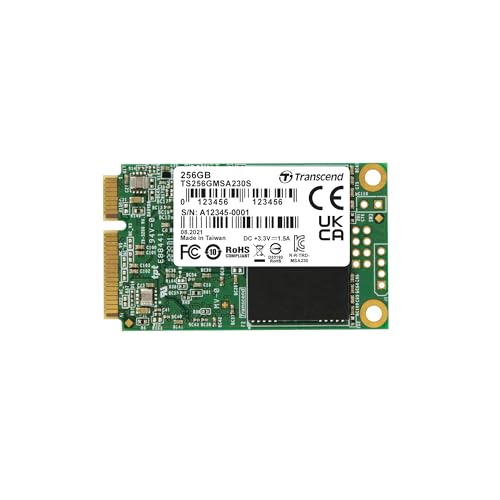
The Transcend MSA230 distinguishes itself as the only drive in this group besides the Samsung 860 EVO that ships with a dedicated DDR3 DRAM cache. This cache is transformative for real-world performance: it allows the controller to maintain a fast address lookup table, eliminating the stutter that DRAM-less drives exhibit during simultaneous read/write operations. The drive uses 3D TLC NAND paired with a Realtek controller and LDPC error correction, delivering 550 MB/s reads and 400 MB/s writes. The write speed is slightly lower than the fanxiang and S SHARKSPEED options, but the DRAM cache ensures this speed is consistent even under heavy multi-threaded workloads.
Customer feedback reveals a niche but appreciative audience. One user successfully fitted the MSA230 into a Compaq Armada M700 from 1999 via a mini-SATA to IDE adapter, reporting phenomenal performance under Linux antiX. Another installed it in a thin client as a reliable OS drive. The drive’s Green and Black PCB is distinctly branded, and the three-year limited warranty from Transcend—a well-regarded memory manufacturer—adds a layer of purchase confidence that generic rebranded drives lack. The lower sequential write speed is a trade-off for the cache advantage, but for OS and application use, the DRAM benefit outweighs raw sequential numbers.
If your workload involves running multiple applications simultaneously, virtual machines, or any scenario where the drive must juggle reads and writes without dropping into the single-digit MB/s crawl characteristic of DRAM-less drives, the Transcend MSA230 is the smartest middle-ground. It delivers cache-equipped reliability at a price that sits below the Samsung, making it the value-oriented choice for anyone who understands the importance of DRAM in an SSD.
Why it’s great
- DDR3 DRAM cache provides consistent performance under mixed workloads
- LDPC error correction extends NAND lifespan and data integrity
- Reputable Transcend brand with reliable customer support and warranty
Good to know
- Sequential write speed capped at 400 MB/s, lower than some competitors
- Premium price approaches the Samsung 860 EVO without matching its IOPS
- Form factor may be physically too large for some half-height mSATA slots
3. fanxiang S301 256GB mSATA SSD

The fanxiang S301 occupies the sweet spot in the 256 GB mSATA landscape, offering 550 MB/s sequential read and 500 MB/s sequential write speeds that match the theoretical SATA III ceiling at a price point that undercuts most of the premium competition. The S301 uses 3D TLC NAND in a plastic enclosure, but the controller firmware appears well-optimized, with consistent customer feedback praising hassle-free recognition and performance in Dell Precision laptops and thin clients. The 3-year warranty is standard for this tier, but the brand has been responsive to queries based on user reports.
Buyers consistently note that the fanxiang S301 works perfectly as a primary boot drive in older machines that have a dedicated mSATA slot. One reviewer specifically mentions using it inside a Dell Precision M4800, setting it as the primary boot device while a larger 2.5-inch SSD serves as secondary storage. This dual-drive scenario is exactly where a 256 GB mSATA shines—large enough for the OS and essential applications, while bulk data lives elsewhere. The drive’s compact plastic housing runs cool under load, and there are no reported firmware compatibility issues with Windows, OpenSUSE, or other Linux distributions.
For the vast majority of users reviving a legacy ultrabook or thin client, the fanxiang S301 offers the best balance of price-to-performance in this guide. It provides near-maximum SATA III bandwidth, has a low failure rate in verified reviews, and its 256 GB capacity is ample for Windows, Linux, or macOS operating systems plus daily productivity tools. If you need a no-fuss, high-speed boot drive without paying the premium for the Samsung badge or the DRAM cache of the Transcend, the fanxiang S301 is the pragmatic winner.
Why it’s great
- 500 MB/s sequential write matches the fastest drives in this roundup
- Competitive price-to-performance ratio for a 256 GB SATA III drive
- Works reliably as primary boot drive across Dell, HP, and Lenovo systems
Good to know
- Plastic enclosure feels less robust than metal alternatives
- DRAM-less architecture may show slower sustained writes under heavy load
- Limited to a 3-year warranty compared to the Samsung’s 5-year coverage
4. S SHARKSPEED 256GB mSATA SSD

The S SHARKSPEED 256 GB mSATA SSD matches the fanxiang’s sequential read and write performance at 550 MB/s and 500 MB/s respectively, but it stands apart by offering an industry-leading 5-year warranty—the same duration as the Samsung 860 EVO but at a significantly lower price point. The drive uses an intelligent TLC chip with 3D NAND technology, and the manufacturer specifically emphasizes smart temperature management and error-correction code (ECC) technology to protect data integrity. The polycarbonate enclosure is lightweight and runs cool, a key consideration for thin laptops with limited ventilation.
Customer experiences highlight the transformative impact of this drive on aging hardware. One verified review describes upgrading a 12-year-old MSI GE70 laptop: boot times dropped from over a minute with the original HDD to under seven seconds for Windows 10. The reviewer notes that a BIOS boot setting change was required, but after that, the system ran “near-silent operation even during sustained reads.” Another user points out that the drive’s physical dimensions match a full-size mSATA card, so buyers with half-height mSATA slots need to measure their space before purchasing. The 5-year warranty provides peace of mind that is rare at this price tier.
For anyone who wants the long warranty coverage of a premium drive but needs to stay within a mid-range budget, the S SHARKSPEED is the clear front-runner. Its performance numbers are identical to the fastest DRAM-less drives on the market, the warranty duration beats every competitor except Samsung, and the customer feedback confirms it dramatically speeds up machines that are over a decade old. If the prospect of a dead drive two years in worries you, this is the drive that covers its own bet.
Why it’s great
- 5-year warranty is the best in class alongside the Samsung 860 EVO
- 550 MB/s read and 500 MB/s write hit the SATA III interface ceiling
- Quiet, cool operation verified by users running as primary OS drive
Good to know
- Full-size mSATA card may not fit half-height slots in certain devices
- Lacks DRAM cache, so sustained writes may dip under extreme load
- Brand is less established than Samsung or Transcend
5. Kingshark Gamer 256GB mSATA SSD

The Kingshark Gamer 256 GB mSATA SSD leans into reliability specifications, advertising a Mean Time To Failure (MTTF) of 1.92 million hours—a figure that suggests the drive is built with above-average controller and NAND binning. It supports industry-standard TRIM, garbage collection, S.M.A.R.T. monitoring, and ECC error correction, all of which are essential for maintaining performance over years of daily use. The drive is advertised as having a 6000 MB/s data transfer rate, which is clearly a misprint for the SATA III interface speed; the actual sequential throughput will match the SATA III 6 Gb/s ceiling when paired with a compatible controller.
Verified buyers report dramatic speed gains in older gaming laptops. One customer installed the Kingshark in a 2013-era Alienware 14, noting that “boot speed and program response improved dramatically” and calling it a “low-cost, high-impact upgrade.” Another user explicitly warns that some mobile WWAN slots share the physical mSATA form factor but lack SATA signal routing, so the drive must be installed in a dedicated mSATA slot to be recognized. This is a category-specific pitfall that applies to every mSATA drive, and the Kingshark handles it reliably once the correct slot is identified.
For budget-conscious gamers or professionals upgrading an older laptop who want an established performance floor backed by strong reliability metrics, the Kingshark Gamer delivers. Its MTTF rating leads the mid-range pack, and the feature set covers every SSD technology that matters for long-term health. The drive’s firmware appears to handle sustained writes better than some cheaper DRAM-less alternatives, making it a solid choice for a primary OS drive in a secondary gaming machine or workstation.
Why it’s great
- High 1.92M MTTF rating suggests robust component quality
- Full SSD feature support: TRIM, GC, S.M.A.R.T., and ECC
- Proven drop-in upgrade for Alienware, Dell, and Lenovo mSATA slots
Good to know
- Advertised “6000 MB/s” transfer rate is a labeling error; actual speed is SATA III
- May not be detected if installed in a WWAN slot rather than an mSATA slot
- Limited warranty duration compared to S SHARKSPEED or Samsung
6. Gamerking 256GB mSATA SSD

The Gamerking 256 GB mSATA SSD is an entry-level option that prioritizes affordability while still delivering the fundamental speed advantage of solid-state storage over any spinning hard drive. It uses a 3D NAND flash architecture built on TLC cells and supports Native Command Queuing (NCQ) along with Windows TRIM optimization to prevent performance degradation over time. The drive’s read/write performance is competitive for the price bracket, though the manufacturer does not specify exact sequential speeds in the listing. The Gamerking includes Wear-Leveling technology and ECC error correction to prolong NAND lifespan.
Customer reviews reveal a mixed picture typical of budget SSDs. One verified buyer reports that the drive works as a primary Windows drive with “no problems at all,” while another received a unit that was not detected across two different laptops and a PC. This variance suggests that quality control may be less consistent than premium brands. The same reviewer noted the drive appeared to be an M.2 card, indicating possible mislabeling or a packaging error. For users willing to accept a small risk of a return, the Gamerking can serve well as an OS boot drive in less critical machines.
For an ultra-budget rescue of a laptop that is not worth a significant monetary investment, the Gamerking 256 GB mSATA provides the SSD experience—faster boot, snappier file access, and quieter operation—at the lowest possible cost. It is best suited as a secondary test drive, a Linux playground SSD, or a backup boot device where absolute reliability is not the top priority. If your budget is extremely tight and you need any mSATA drive to fill a slot, this is the floor.
Why it’s great
- Lowest price point in this roundup for a 256 GB mSATA form factor
- 3D NAND and NCQ support provide acceptable OS-level performance
- Easy installation; recognized immediately by BIOS and Windows
Good to know
- Customer reports of DOA units suggest variable quality control
- No precise sequential read/write speeds published by manufacturer
- Limited performance for heavy write workloads or near-full operation
7. Integral 256GB mSATA Internal SSD

The Integral 256 GB mSATA SSD is a no-frills upgrade option that focuses on compatibility and ease of installation. It is rated for sequential reads up to 500 MB/s and writes up to 400 MB/s, which puts it slightly below the SATA III ceiling but still an enormous leap over any 5400 RPM or 7200 RPM laptop HDD. The drive uses an aluminum enclosure that aids in passive heat dissipation—a useful feature for thin laptops where airflow is minimal. Integral markets this as a plug-and-play upgrade with no formatting required out of the box.
Customer feedback skews extremely positive, with multiple 5-star reviews noting that the drive was recognized immediately upon installation and required no additional configuration. One user replaced a failed 10-year-old laptop HDD with the Integral mSATA and reinstalled Windows 10 in about an hour, reporting that “speed matches old drive expectations.” International buyers from Portugal report fast shipping and flawless operation. The drive’s SATA 3 Gb/s specification in the technical details suggests SATA II compatibility as well, making it a safe bet for older machines that predate SATA III controllers.
If you are resurrecting a genuinely ancient laptop—something from the Windows 7 or even Windows Vista era—the Integral 256 GB mSATA provides the highest assurance of compatibility at a budget-friendly price. Its aluminum body helps manage heat, the plug-and-play nature eliminates tedious setup steps, and the speed improvement over any mechanical drive is transformative. For the simplest possible SSD upgrade in a machine where cost must be minimized, the Integral is a reliable choice.
Why it’s great
- Aluminum enclosure improves heat dissipation in constrained spaces
- Plug-and-play operation with no formatting or driver installation
- Extremely high rate of positive feedback for compatibility and reliability
Good to know
- Sequential speeds (500/400 MB/s) are below category-leading alternatives
- SATA 3 Gb/s spec suggests it may not fully utilize SATA III bandwidth
- Limited warranty and brand support compared to major manufacturers
FAQ
Can I clone my existing OS to a 256 GB mSATA SSD without reinstalling Windows?
Does a DRAM-less 256 GB mSATA SSD degrade noticeably over time?
How do I confirm that my laptop has a full-size mSATA slot and not a mini PCIe slot?
Final Thoughts: The Verdict
For most users, the 256 gb msata solid state drive winner is the Samsung 860 EVO because it delivers unmatched random performance and long-term durability that makes any compatible machine feel brand new. If you want DRAM-cache reliability at a lower cost, grab the Transcend MSA230. And for the best price-to-performance in a daily driver, nothing beats the fanxiang S301.