
For years, the 27-inch monitor has reigned as the sweet spot of display real estate — wide enough for immersive gaming and detailed spreadsheets, yet compact enough to fit comfortably on a standard desk. But within this popular size class, the gap between a mediocre office panel and a true high-performance display is measured in hertz, color gamut coverage, and response time. Too many monitors sell on inches alone, leaving buyers with washed-out colors, visible ghosting, and a 60Hz ceiling that feels sluggish the moment you scroll a dense webpage or enter a competitive match.
I’m Min — the co-founder and writer behind Gadgets Feed. I’ve spent hundreds of hours dissecting monitor specifications, from panel uniformity and backlight bleed to pixel response consistency and adaptive sync implementation, to separate marketing claims from real-world performance.
Whether you are upgrading from a decade-old workhorse or building a fresh dual-monitor command center, this guide cuts through the noise to identify the best 26 inch monitor options that deliver tangible improvements in clarity, speed, and color accuracy.
How To Choose The Best 26 Inch Monitor
Selecting the right monitor is a balance of three factors: your primary workload (gaming, creative work, or office tasks), your graphics hardware’s capability to drive the resolution and refresh rate, and your desk environment. A premium 27-inch IPS panel with 95% DCI-P3 coverage is a treat for photo editing, while a 240Hz QD-OLED is wasted on a system that cannot output more than 60 frames per second. Match the panel to the use case, not the hype.
Resolution and Pixel Density
At 27 inches, Full HD (1920×1080) yields roughly 82 PPI — sufficient for general productivity but noticeably soft for reading small text or editing high-resolution images. QHD (2560×1440) delivers a much sharper 109 PPI, giving you more screen real estate without scaling headaches on Windows. 4K (3840×2160) at 27 inches provides a stunning 163 PPI, though you need a powerful GPU for gaming and may require scaling at 125% or 150% for comfortable text sizing.
Refresh Rate and Response Time
Standard office monitors operate at 60Hz, which feels fine for static documents but produces visible judder when moving windows or scrolling long pages. A 100Hz panel already feels significantly smoother. For competitive gaming, 144Hz to 240Hz has become the baseline, with 300Hz now appearing in premium models. Response time measured in milliseconds (GtG or MPRT) determines how fast individual pixels change color — lower figures reduce ghosting behind fast-moving objects. Aim for 1ms GtG in gaming panels; 4ms to 5ms GtG is acceptable for general use.
Panel Technology: IPS, VA, and OLED
IPS panels dominate the 27-inch category due to their wide 178-degree viewing angles and accurate color reproduction. VA panels offer deeper blacks and higher contrast but suffer from worse off-axis color shift. QD-OLED, as seen in the premium tier, delivers perfect black levels, infinite contrast, and sub-1ms response times — but at a higher cost and with potential concerns over burn-in over many years of static UI use. For most buyers, a modern Fast IPS panel with good color gamut (DCI-P3 90% or above) is the safest and most versatile choice.
Quick Comparison
On smaller screens, swipe sideways to see the full table.
| Model | Category | Best For | Key Spec | Amazon |
|---|---|---|---|---|
| Acer Predator X27U | Premium | Competitive & HDR Gaming | 240Hz / 0.03ms QD-OLED | Amazon |
| LG 27G640A-B | Premium | Ultra-Smooth Esports | 300Hz / 1ms IPS HDR400 | Amazon |
| ASUS TUF Gaming VG27AQL5A | Mid-Range | All-Round Gaming & Work | 210Hz / 0.3ms Fast IPS | Amazon |
| Alienware AW2725DM | Mid-Range | Console & PC Hybrid Gaming | 180Hz / 1ms IPS HDR400 | Amazon |
| Samsung Odyssey G5 G53F | Mid-Range | Value 1440p Gaming | 200Hz / 1ms IPS FreeSync | Amazon |
| HP Series 3 327se | Mid-Range | Ergonomic Office Work | 100Hz / IPS 4-Way Adjustable | Amazon |
| Amazon Basics 27-Inch | Budget | Simple Multi-Monitor Setup | 100Hz / IPS Built-in USB Hub | Amazon |
| Dell SE2725HM | Budget | Business Productivity | 100Hz / IPS ComfortView Plus | Amazon |
| INNOCN 25G2S | Budget | High-FPS Budget Gaming | 240Hz / 1ms 1440p IPS | Amazon |
In‑Depth Reviews
1. Acer Predator X27U W1bmiipprx

The Acer Predator X27U is the monitor that redefines what a 27-inch display can deliver, packing a 26.5-inch WQHD QD-OLED panel that produces perfect black levels and a DCI-P3 99% color gamut. At 240Hz with a 0.03ms GtG response time, motion clarity is essentially instantaneous, with no ghosting or visible smearing even in the fastest-paced esports titles.
Connectivity is robust with dual DisplayPort 1.4 and dual HDMI 2.1 ports, supporting full bandwidth for modern GPUs and consoles alike. The stand offers full ergonomic adjustment — tilt, swivel, pivot, and height — a rarity at this price point for OLED monitors. AMD FreeSync Premium ensures tear-free gameplay, and the built-in speakers are usable for system sounds but lack the volume and bass for an immersive movie experience.
Image retention cleaning cycles run automatically when the monitor enters standby, a standard OLED maintenance feature that buyers should be aware of. The panel brightness peaks lower than premium OLED competitors at around 250 nits in SDR, which is still comfortable indoors but not ideal for a brightly sunlit room. For gamers and content consumers who want the deepest blacks and most vibrant colors available, the X27U is a clear category leader.
Why it’s great
- Infinite QD-OLED contrast ratio with true 10-bit color depth
- 240Hz refresh rate and sub-1ms response for zero motion blur
- Full ergonomic stand with height, pivot, swivel, and tilt
Good to know
- Peak SDR brightness is lower than premium IPS alternatives
- Glossy screen coating reflects direct light sources
- Built-in speakers are adequate for alerts but not for media
2. LG 27G640A-B Ultragear

The LG 27G640A-B pushes the envelope for high-speed IPS panels with a native 300Hz refresh rate and 1ms GtG response time, making it one of the fastest 27-inch QHD monitors on the market. The IPS panel covers 95% of DCI-P3 and carries VESA DisplayHDR 400 certification, delivering punchy highlights and wide color coverage that satisfies both competitive gamers and visual-content consumers. Motion handling is exceptionally clean thanks to the combination of high refresh and LG’s Dynamic Action Sync for reduced input lag.
Connectivity is forward-looking with two HDMI 2.1 ports, DisplayPort 1.4, and a USB-C port with 15W power delivery — enough to charge a phone or low-power peripheral. The stand is fully adjustable with height, tilt, swivel, and pivot, allowing precise ergonomic positioning. The built-in speakers are present but weak, best reserved for system notifications rather than primary audio. The aggressive sleep-mode timeout reported by some users can be adjusted in the on-screen menu.
At its price point, the LG 27G640A-B offers a rare combination of peak refresh rate, accurate QHD resolution, and pro-level ergonomics. The only real compromises are the mediocre onboard speakers and the slightly lower peak brightness compared to mini-LED competitors. For anyone building a high-FPS gaming rig who wants to maximize smoothness without stepping up to a 360Hz panel, this is the standout pick.
Why it’s great
- Blistering 300Hz refresh rate with 1ms GtG for ultra-smooth motion
- Full ergonomic stand with height, pivot, swivel, and tilt
- Dual HDMI 2.1 plus USB-C connectivity for modern hardware
Good to know
- Built-in speakers are low-volume and lack bass
- Aggressive sleep timer requires menu adjustment on first use
- Included DisplayPort cable may be faulty in rare cases
3. ASUS TUF Gaming VG27AQL5A

The ASUS TUF Gaming VG27AQL5A strikes a nearly ideal balance between gaming speed and everyday usability, featuring a 27-inch QHD Fast IPS panel that overclocks to 210Hz with a 0.3ms GtG response time. ASUS Extreme Low Motion Blur Sync (ELMB Sync) allows variable refresh rate and backlight strobing to run simultaneously, eliminating both ghosting and motion blur without the usual brightness penalty. Color reproduction is excellent with a 130% sRGB gamut and DCI-P3 coverage that makes games and media look vibrant straight out of the box.
Build quality is notably solid for its tier, with a full ergonomic stand offering height, swivel, pivot, and tilt adjustments. The DisplayWidget Center software lets you tweak monitor settings using a mouse instead of the on-screen joystick, a practical convenience for dual-monitor setups. Connectivity includes DisplayPort 1.4 and dual HDMI ports, though it lacks USB-C. Built-in speakers are present but are best described as backup options — they output clear voice but suffer from a thin sound signature.
Backlight uniformity is above average with no noticeable edge bleed on most units, and the 1300:1 contrast ratio provides decent depth for an IPS panel. The on-screen menu is comprehensive but the joystick is located on the back-right edge, which can be awkward to reach in a dual-monitor arrangement if this monitor sits on the left. For a mixed workflow of gaming, creative work, and daily browsing, the VG27AQL5A is a polished package that rarely sacrifices one priority for another.
Why it’s great
- Fast IPS with 210Hz OC and 0.3ms response for sharp motion
- ELMB Sync eliminates ghosting without losing brightness
- Full ergonomic stand and DisplayWidget Center software support
Good to know
- No USB-C port for modern laptops or peripherals
- Joystick placement on rear right edge is awkward for left-monitor use
- Built-in speakers are usable but lack significant bass
4. Alienware AW2725DM

The Alienware AW2725DM brings the brand’s premium design DNA to a 27-inch QHD IPS panel with a 180Hz refresh rate and 1ms GtG response time, hitting a sweet spot where high refresh is accessible to a wider range of GPUs. The panel covers 95% of DCI-P3 and carries VESA DisplayHDR 400 certification, delivering bright highlights and rich color saturation that elevates both gaming and media consumption. A dedicated console mode optimizes compatibility with PlayStation and Xbox, automatically adjusting for 120Hz output.
The build quality is excellent, with a fully adjustable stand that includes height, swivel, pivot, and tilt, plus a striking white-and-black aesthetic that matches Alienware peripherals. The anti-glare coating effectively diffuses overhead lighting without introducing a grainy texture. Port selection includes DisplayPort 1.4, HDMI, and a USB hub with Type-A and Type-B connections, but notably lacks USB-C. The Dell ecosystem integration is seamless if you already use Alienware Command Center for peripheral management.
Users report consistent color accuracy out of the box with no dead pixels and minimal backlight bleed, though IPS glow is visible in dark room scenes as expected. The monitor has no built-in speakers, so you will need external audio. For the asking price, the AW2725DM competes directly with mid-range gaming monitors while offering the build quality and support of Dell’s premium gaming division. It is a smart pick for buyers who want a reliable, good-looking 1440p 180Hz panel without chasing the highest refresh numbers.
Why it’s great
- Excellent build quality with a robust, fully adjustable stand
- Vibrant 95% DCI-P3 color gamut with DisplayHDR 400
- Console mode automatically optimizes for 120Hz output
Good to know
- No built-in speakers or headphone jack
- Lacks USB-C connectivity for modern laptops
- Full 180Hz requires DisplayPort, not HDMI
5. Samsung Odyssey G5 G53F

The Samsung Odyssey G5 G53F is a straightforward 27-inch QHD IPS gaming monitor built around a 200Hz refresh rate and 1ms MPRT response time, offering a no-nonsense path to smooth 1440p gaming at a competitive price. The IPS panel delivers a 178-degree wide viewing angle and a 300-nit peak brightness that works well in most indoor lighting conditions. The 72% color gamut is more modest than premium competitors, but colors still look natural and balanced for mainstream gaming and browsing.
FreeSync Premium certification provides tear-free frame synchronization across a wide variable refresh range, and the Black Equalizer function is genuinely useful for spotting opponents in dark corners without washing out the entire image. The Auto Source Switch+ feature automatically detects and switches to the last connected active device, which is convenient in multi-PC or PC-plus-console setups. The stand offers only tilt adjustment, which is a significant limitation for ergonomic setup — the cable management loop has also been reported as flimsy.
Image quality is satisfying for the price, with punchy colors and no dead pixels reported in the majority of units. The included cables (HDMI and DP) are a nice bonus. The main trade-offs are the minimal ergonomic stand and the absence of USB ports for peripherals. For gamers on a strict budget who want a genuine 1440p QHD experience at 200Hz without stretching into premium territory, the Odyssey G5 G53F delivers the core performance metrics that matter most.
Why it’s great
- True QHD 1440p resolution at 200Hz for smooth competitive gaming
- FreeSync Premium ensures tear-free variable refresh rate
- Auto Source Switch+ simplifies multi-device setups
Good to know
- Stand only provides tilt adjustment — no height or swivel
- 72% color gamut is lower than competing IPS panels
- Plastic build quality feels lower-end; cable management loop is fragile
6. HP Series 3 327se

The HP Series 3 327se is a 27-inch FHD IPS monitor designed for productivity, with a 100Hz refresh rate that provides noticeably smoother cursor movement and window scrolling than standard 60Hz office displays. The 1920×1080 resolution at 27 inches results in a lower pixel density of roughly 82 PPI, which means text will appear slightly softer than on a 24-inch FHD or 27-inch QHD panel — a compromise acceptable for general office tasks but less ideal for detailed design work.
What sets the 327se apart in the mid-range office category is its full ergonomic stand with height, tilt, swivel, and pivot adjustment — a feature rarely seen at this price point. The built-in dual 2W speakers produce adequate volume for voice calls and system alerts, though they lack bass for music. HP Eye Ease with Eyesafe certification provides always-on low-blue light filtering without the yellow tint that often plagues software-based blue light modes.
Connectivity covers the essentials with VGA, HDMI 1.4, and DisplayPort 1.2, plus the 1300:1 contrast ratio delivers deeper blacks than typical 1000:1 panels. The 2025 model uses at least 90% post-consumer recycled plastics in the enclosure. For anyone building a home office or upgrading a bank of cubicle monitors, the 327se offers the ergonomic flexibility and eye comfort features that directly impact long work sessions, even if the FHD resolution is a step below the QHD panels in this roundup.
Why it’s great
- Full 4-way ergonomic stand with height, pivot, swivel, and tilt
- Always-on low-blue light filter with Eyesafe certification
- Built-in dual 2W speakers for calls and basic audio
Good to know
- FHD resolution at 27 inches results in lower text sharpness
- Speakers are fine for voice but weak for music or movies
- Only two video inputs (HDMI, DisplayPort) plus legacy VGA
7. Amazon Basics 27-Inch Monitor

The Amazon Basics 27-Inch Monitor is a utilitarian FHD IPS display built for simplicity and value, offering a 100Hz refresh rate and a built-in USB hub that sets it apart from other entry-level panels. The 1080p resolution at 27 inches provides a wide workable area for spreadsheets and web browsing, though individual pixels become visible at typical viewing distances if you are accustomed to sharper panels. The box contains a protective film on the panel with a date code printed on it — removing this before powering on is essential as it is not a screen protector.
The standout feature for this segment is the integrated USB hub, which includes four downstream USB ports — a rarity at this price level that allows you to connect a keyboard, mouse, and flash drive directly to the monitor, keeping your PC tower out of reach. The built-in speakers are functional for basic audio output, though sound quality is compressed and tinny compared to dedicated speakers. The contrast ratio is rated at 1500:1, which is higher than many competing IPS panels and provides slightly deeper blacks.
The stand offers only slight tilt adjustment and several users report that the panel leans slightly forward on the included base. VESA mount compatibility (100x100mm) is present for arm or wall mounting, which is the recommended path for achieving proper ergonomic height. For buyers looking to equip a budget-friendly multi-monitor setup where color accuracy and pixel density are secondary to screen real estate and peripheral connectivity, the Amazon Basics 27-Inch Monitor delivers exactly what the name implies — no surprises, just function.
Why it’s great
- Built-in 4-port USB hub for convenient peripheral connection
- 1500:1 contrast ratio delivers deeper blacks than typical 1000:1 IPS
- Easy plug-and-play setup with HDMI and DVI inputs
Good to know
- FHD resolution at 27 inches results in visible pixel structure
- Basic stand only tilts and may lean forward on the desk
- Built-in speakers are adequate for alerts but poor for media
8. Dell SE2725HM

The Dell SE2725HM is a 27-inch FHD IPS monitor that embodies Dell’s reputation for reliable, business-oriented displays, now upgraded with a 100Hz refresh rate that makes daily scrolling and window management feel fluid. The panel features Dell’s ComfortView Plus, an always-on hardware low-blue light solution that reduces harmful blue light emissions by up to 35% without introducing the warm color cast typical of software-based filters. The anti-glare matte coating effectively handles overhead office lighting with minimal reflection.
Build quality is solid with a compact stand that has a small footprint and an integrated cable holder to keep the desk tidy. The monitor tilts for angle adjustment, but lacks height adjustment, swivel, or pivot — a limitation for users who need precise ergonomic positioning. Connectivity is limited to HDMI 1.4 and VGA, with no DisplayPort or USB ports. The power supply is built into the monitor body, which eliminates the brick-style external adapter that clutters cable management.
The VESA mount supports 100x100mm patterns for arm installation, which compensates for the stand’s limited adjustability. Color accuracy is consistent across units, as Dell typically bin-matches panels even in their consumer lineup. The SE2725HM is not a gaming monitor, but its 100Hz refresh and FreeSync compatibility make casual gaming viable. For office environments, school setups, or multi-monitor workstations where text clarity and eye comfort are the primary requirements, the SE2725HM is a disciplined, well-built choice.
Why it’s great
- ComfortView Plus reduces blue light without yellow tint
- 100Hz refresh rate provides smoother daily motion than 60Hz panels
- Built-in power supply and cable holder keep desk clean
Good to know
- Stand only tilts — no height, swivel, or pivot adjustment
- No DisplayPort or USB ports for modern connectivity
- FHD resolution at 27 inches limits sharpness for text-heavy work
9. INNOCN 25G2S
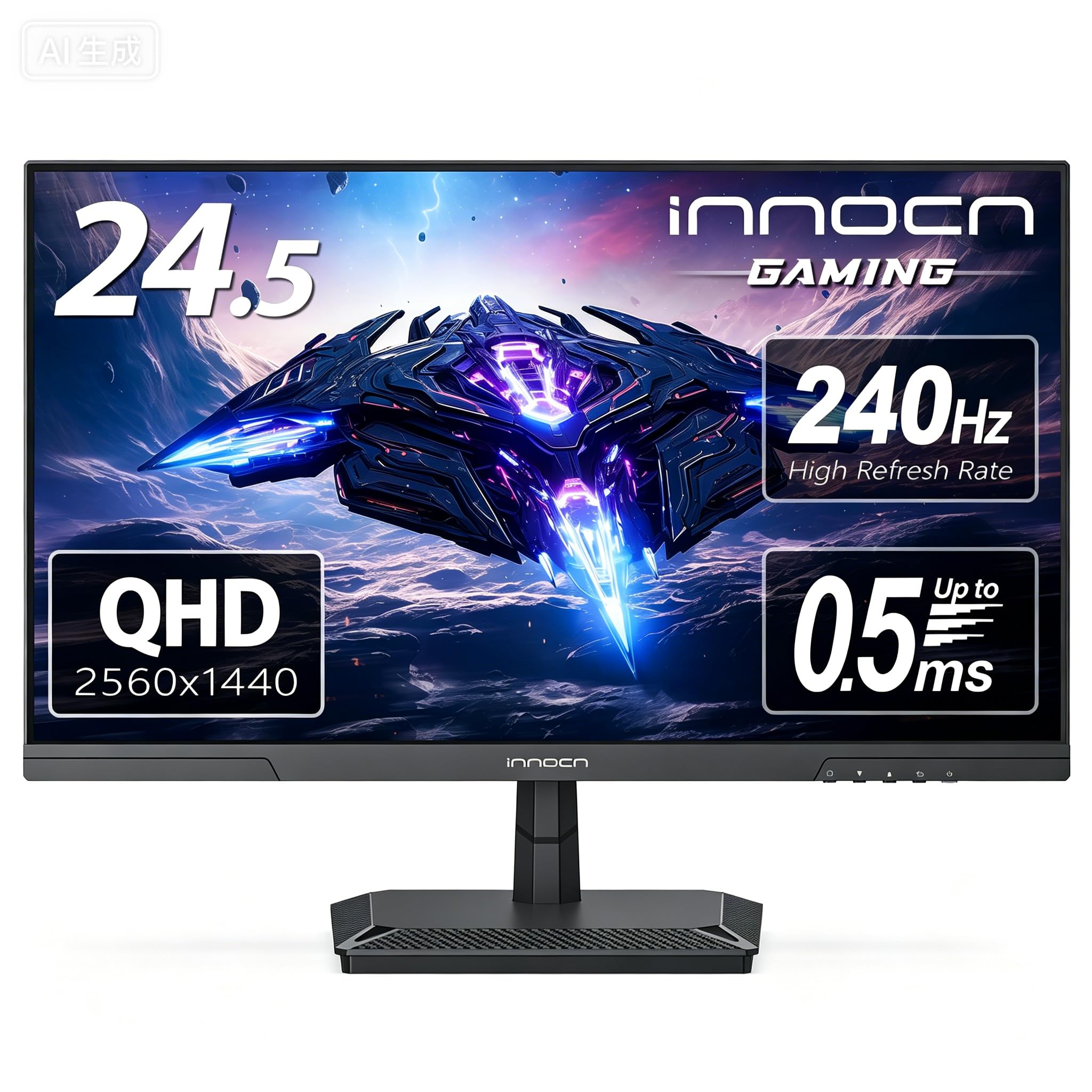
The INNOCN 25G2S is a 24.5-inch QHD IPS gaming monitor that packs a 240Hz refresh rate and 1ms response time into an aggressively low price point, making it the budget champion for competitive gamers who prioritize frame rate over screen size. The 2560×1440 resolution on a 24.5-inch panel yields a sharp ~120 PPI, which is noticeably crisper than 27-inch QHD and offers a distinct advantage for spotting fine details in tactical shooters and RTS games. The 99% sRGB color gamut produces accurate, punchy colors for the segment.
Connectivity includes HDMI 2.1 and DisplayPort 1.4, allowing full 240Hz operation at QHD resolution via DP. The monitor supports G-Sync compatibility in addition to FreeSync, broadening its compatibility with NVIDIA and AMD GPUs. The stand is metal but offers only tilt adjustment, and the overall chassis feels lightweight and somewhat plasticky. Users consistently note that the stand wobbles easily on an uneven desk, so VESA wall mounting (100x100mm) is recommended for a stable setup.
The built-in speakers are present but their quality trails even the modest expectations for monitor audio — they suffice for system sounds only. Flicker-free technology and a blue light reduction mode help reduce eye strain during long sessions. Reports of units failing within the first month are concerning, though the majority of users report excellent performance after several months. At its price, the INNOCN 25G2S delivers a 240Hz 1440p experience that was unheard of a few years ago, with trade-offs in build quality and stand stability that are easy to overlook for the performance offered.
Why it’s great
- True 240Hz refresh rate at QHD 1440p for under
- Sharp ~120 PPI pixel density on the 24.5-inch screen
- HDMI 2.1 and DP 1.4 support full bandwidth gaming
Good to know
- Stand is wobbly and offers only tilt adjustment
- Chassis feels cheap and lightweight with thin plastic
- Built-in speakers are barely usable for system sounds
FAQ
Is a 27-inch 1080p monitor too blurry for daily use?
Do I need HDMI 2.1 for a 1440p 240Hz monitor?
What kind of GPU do I need to drive a 1440p 200Hz monitor?
Final Thoughts: The Verdict
For most users, the best 26 inch monitor winner is the ASUS TUF Gaming VG27AQL5A because it combines a blistering 210Hz OC refresh rate, sub-0.5ms response times, and a full ergonomic stand at a price that does not require a second mortgage. If you want the deepest blacks and most vibrant colors possible, grab the Acer Predator X27U. And for ultra-competitive gamers who prioritize raw frame rate over everything else, nothing beats the LG 27G640A-B.