
Our readers keep the lights on and my morning glass full of iced black tea. As an Amazon Associate, I earn from qualifying purchases.
Specs are compiled from manufacturer listings and verified buyer reviews and can change over time — please confirm the key details on the product page before buying.
Buying a 27-inch 120Hz gaming monitor should be simple, but the spec sheets make it feel like you need a degree in display engineering. The truth is, you only need to know two things about a monitor: how fast the picture refreshes and how clear the image stays when things get quick. This guide cuts through the alphabet soup of refresh rates, resolution, and panel types to show you which monitors actually deliver on their promises for your games.
I’m Min — the founder and writer behind Gadgets Feed. This guide is built by comparing the manufacturers’ published specifications and the patterns across verified customer reviews, so you get each pick’s real strengths and trade-offs instead of marketing spin.
Whether you play competitive shooters, story-driven single-player games, or spend just as much time on creative work, you need a display that keeps up without washing out colors or introducing lag. Here is the definitive breakdown of the best 27 inch 120hz gaming monitor options this year.
Quick Picks
- LG 27GX700A-B — Best Overall
- Samsung 27” Odyssey OLED G5 (G50SF) — Premium Pick
- ROG Strix XG27AQDMES — Pro Grade
- LG 27GR83Q-B — Best Value
- Acer Nitro XV272U F3bmiiprx — Speed King
- KTC 27 Inch 240Hz Curved Gaming Monitor (H27S25E) — Budget Champion
- Dell 27 Plus 4K Monitor (S2725QS) — 4K Work & Play
How To Choose The Best 27 Inch 120Hz Gaming Monitor
A 27-inch monitor that refreshes 120 times per second (120Hz) gives you smooth motion without taking up your whole desk. But not all 120Hz monitors are the same — some reach that speed at 4K resolution (3840 x 2160 pixels), others at 1440p (2560 x 1440 pixels), and the panel type changes how colors and contrast actually appear to your eyes.
Refresh Rate vs Response Time
Refresh rate tells you how many times the screen updates per second (120Hz means 120 updates). Response time tells you how fast a pixel changes from one color to another. For competitive games, a low response time — like 0.03ms or 1ms (GTG) — is just as important as a high refresh rate because it prevents ghosting (a blurry trail behind fast-moving objects). A monitor with 120Hz but a slow response time will still look blurry in action scenes.
Resolution: 1440p vs 4K
At a 27-inch size, 1440p (2560 x 1440) gives you sharp text and detailed game worlds without requiring a top-tier graphics card to run smoothly. 4K at 27 inches is incredibly sharp, but you need a powerful GPU to push 120 frames per second at that resolution in modern games. Most buyers are better off with a 1440p 120Hz monitor unless you primarily play older titles or have a high-end graphics card from recent generations.
Panel Technology: IPS vs OLED
IPS panels (In-Plane Switching) offer wide viewing angles and good color accuracy, and they are generally more affordable. OLED panels (Organic Light Emitting Diode) deliver true blacks (since each pixel turns off individually) and infinite contrast ratios — blacks are actually black, not dark gray. The trade-off with OLED is higher cost and a potential risk of burn-in (permanent image retention) over years of static desktop use. QD-OLED (Quantum Dot OLED) improves brightness and color volume beyond standard OLED.
Adaptive Sync and Variable Refresh Rate
Technologies like AMD FreeSync and NVIDIA G-Sync make your monitor’s refresh rate match your graphics card’s frame rate in real time. This eliminates screen tearing (where the image looks split horizontally) and stuttering. Aim for a monitor that supports at least FreeSync Premium or G-Sync Compatible, which ensures smooth gameplay across a wide range of frame rates.
Quick Comparison
| Model | Best For | Refresh Rate | Resolution | Panel Type | Amazon |
|---|---|---|---|---|---|
| LG 27GX700A-B | Ultimate OLED gaming | Up to 280Hz | 2560 x 1440 (QHD) | OLED (4th Gen) | from $729.00Amazon |
| Samsung Odyssey OLED G5 | Hyper-real QD-OLED | Up to 180Hz | 2560 x 1440 (QHD) | QD-OLED | $339.95$499.99Limited time dealAmazon |
| ROG Strix XG27AQDMES | Competitive esports | Up to 240Hz | 2560 x 1440 (QHD) | QD-OLED | $529.99Amazon |
| LG 27GR83Q-B | Versatile IPS gaming | Up to 240Hz | 2560 x 1440 (QHD) | IPS | $262.99$289.97Amazon |
| Acer Nitro XV272U | Extreme speed at 300Hz | Up to 300Hz | 2560 x 1440 (WQHD) | IPS | $229.99Amazon |
| KTC H27S25E | Curved immersion on a budget | Up to 240Hz | 2560 x 1440 (QHD) | VA (1000R Curve) | $229.49$269.99Amazon |
| Dell S2725QS | Sharp 4K clarity for work & play | Up to 120Hz | 3840 x 2160 (4K) | IPS | $218.49$299.99Amazon |
In‑Depth Reviews
1. LG 27GX700A-B

The brightest OLED gaming monitor LG has ever made, ready for 280Hz competition.
If you want the most vivid picture you can get, this is the monitor to beat. The LG 27GX700A-B uses LG’s 4th Gen OLED (organic light-emitting diode) with Primary RGB Tandem technology, which pushes brightness up to 1500 nits — that is the brightness level that keeps details visible even in sunlit rooms, not just in a dark gaming cave. It runs at up to 280Hz refresh rate with a 0.03ms (GTG) response time, meaning motion blur is basically non-existent and your eyes see every frame in a fast shooter instantly.
The contrast ratio sits at 1500000:1, which is 1500 times deeper than the 1000:1 you get on a typical IPS panel like the LG 27GR83Q-B. Blacks here are truly black, not dark gray, thanks to the VESA DisplayHDR True Black 500 certification that ensures shadow details stay crisp. It also supports a 99.5% DCI-P3 color gamut, so HDR movies and games look punchy and lifelike. Buyers report the thin bezels and adjustable stand (height, tilt, swivel, pivot) make it easy to fit into a multi-monitor setup without bezel gaps.
The catch? You are paying premium money for OLED, and if you leave static HUD elements on for hundreds of hours, burn-in risk exists over many years. However, LG includes OLED burn-in prevention features. This monitor is pure performance.
What Stands Out
- Infinite contrast with true blacks — 1500000:1 ratio
- Bright enough for daytime use — 1500 nits peak
- Zero ghosting at 0.03ms response time
The Real Trade-Offs
- OLED burn-in possible with static HUDs over years
- Higher price tier than IPS alternatives
- Peak brightness lower than some IPS panels for SDR content
Reach for this if: you want the best-looking gaming picture available — deep blacks, rich HDR, and buttery-smooth motion at up to 280Hz.
Look elsewhere if: your budget is tighter or you leave the same game UI on screen 10 hours daily for years.
2. Samsung 27” Odyssey OLED G5 (G50SF)

Samsung’s QD-OLED brings hyper-real colors and a 1000000:1 contrast ratio to QHD gaming.
This monitor uses Samsung’s QD-OLED (Quantum Dot OLED) technology, which combines the deep blacks of OLED with quantum dots for higher brightness and richer color volume than standard OLED. The contrast ratio is 1000000:1 — a massive leap from the 1000:1 you get on the LG 27GR83Q-B IPS panel. That means in a dark game like “Alan Wake 2,” flashlight beams actually look bright against true blacks instead of washed out.
It runs at 180Hz refresh rate with a 0.03ms (GTG) response time, making it fast enough for all but the most extreme competitive players. The screen is Pantone Validated for 2100+ colors, so if you also edit photos or video, the color accuracy is professional-grade. Reviewers mention the Glare Free coating is a practical bonus — it cuts reflections from windows or lights so you don’t have to game in a cave. Safety wise, Samsung’s OLED Safeguard uses a Thermal Modulation System to actively cool the panel and reduce burn-in risk.
At 280 cd/m², SDR brightness is not the highest in this list — but in HDR, the QD-OLED really shines. This is a mid-range OLED price that delivers close to top-tier image quality.
Key Strengths
- Stunning QD-OLED color volume and 1000000:1 contrast
- Pantone Validated for accurate color work
- Glare Free coating for bright rooms
Limitations
- SDR brightness lower than premium IPS panels — 280 cd/m²
- Only 180Hz, while some competitors hit 240-300Hz
- No built-in speakers
Best for: the gamer who wants OLED image quality at a more approachable price and values color accuracy for creative work.
Not ideal if: you need the absolute highest refresh rate for esports or you game in a very bright room where low SDR brightness bothers you.
3. ROG Strix XG27AQDMES
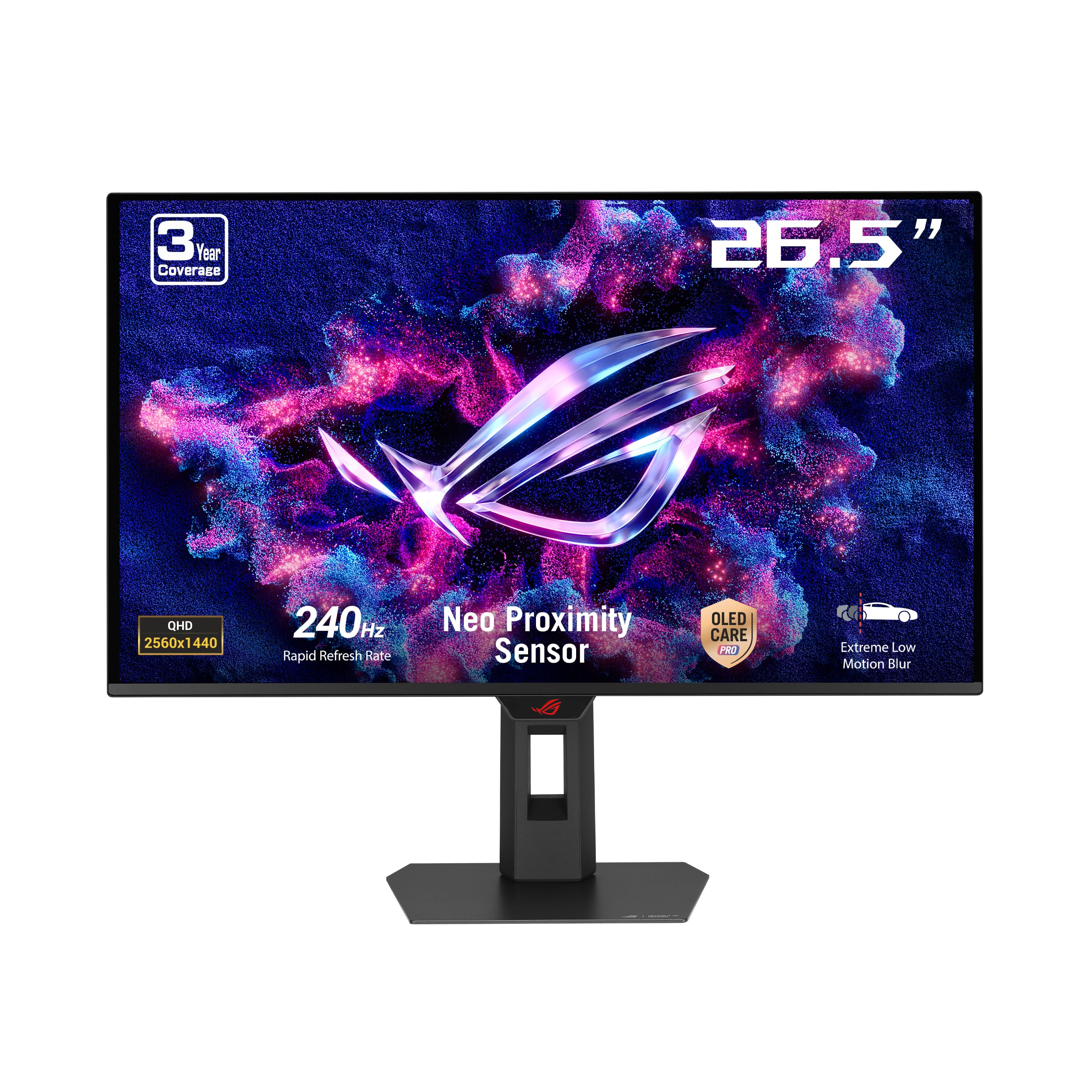
A 240Hz QD-OLED made for competitive gamers who also want gorgeous visuals.
The ASUS ROG Strix XG27AQDMES hits 240Hz with a 0.03ms (GTG) response time on a QD-OLED panel, which means it is fast enough for top-tier esports while delivering the deep contrast that OLED is known for. It covers 99% of the DCI-P3 color gamut with true 10-bit color and Delta E < 2 color difference, so HDR gaming looks accurate and punchy straight from the start.
What really sets this monitor apart for confidence is the Neo Proximity Sensor. It detects when you walk away from the desk and switches the screen to black to reduce burn-in risk automatically — you do not have to remember to turn it off. The ASUS OLED Care Pro suite works with this sensor to actively manage pixel wear. It also supports G-Sync Compatible (NVIDIA’s technology that matches the monitor’s refresh rate to your graphics card’s frame rate) for tear-free gameplay, which is crucial at high frame rates.
Reviewers praise the DisplayWidget Center software that lets you adjust settings with a mouse instead of fumbling with the on-screen menu buttons. At 6.8 kg (about 15 lbs), it is heavier than most monitors in this list, so make sure your desk mount or stand is solid. This is a premium-price pick for the serious player.
Why It Wins
- 240Hz + 0.03ms response time for competitive frame rates
- Neo Proximity Sensor reduces burn-in by auto-blanking
- 99% DCI-P3 with Delta E < 2 for accurate HDR
Worth Noting
- Heavy build at 6.8 kg — needs sturdy support
- Premium OLED price
- No stand height adjustment from the start (check included stand specs)
Get this if: you play competitive shooters at 240+ fps and want OLED’s contrast without constantly worrying about burn-in.
Pass if: your budget caps out below premium OLED pricing or you need a lighter monitor for frequent moves.
4. LG 27GR83Q-B

A 240Hz IPS workhorse that balances high speed with everyday usability at a fair price.
The LG 27GR83Q-B is the classic jack-of-all-trades that does not cut corners. It gives you 240Hz refresh rate and 1ms (GTG) response time on an IPS panel, with both DisplayPort 1.4 and HDMI 2.1 supporting that full 240Hz speed. That means you can plug in a PS5 or Xbox Series X and get 120Hz at 1440p without any hassle — the HDMI 2.1 port handles it natively. It also covers up to 95% of the DCI-P3 color gamut, which is great for HDR gaming with VESA DisplayHDR 400 certification.
In real use, the IPS panel gives you consistent 178-degree viewing angles, so colors do not shift if you lean back or have a friend watching on a couch. Buyers mention the 4-pole headphone jack with DTS Headphone:X is a thoughtful touch — it delivers 3D spatial audio through a single connection that also carries your microphone signal. The stand gives you tilt, height, swivel, and pivot adjustments, making it easy to find a comfortable angle.
The contrast ratio is 1000:1, which is standard for IPS — so blacks are dark gray, not true black like OLED. If you do not care about perfect blacks, this is the best price-to-performance monitor in this list.
Solid Performer
- Full 240Hz over HDMI 2.1 for consoles
- Versatile ergonomic stand — tilt, height, swivel, pivot
- DTS Headphone:X for spatial 3D audio
Minor Setbacks
- 1000:1 contrast means blacks look gray in dark rooms
- Only 95% DCI-P3 vs 99% on some competitors
- No built-in speakers
Ideal for: the gamer who wants high refresh rate, HDMI 2.1 for consoles, and an ergonomic stand without spending on OLED.
Skip if: you absolutely need deep black levels for dark games and are willing to pay extra for OLED.
5. Acer Nitro XV272U F3bmiiprx

A 300Hz IPS monitor that outpaces every other display here for pure frame-rate speed.
The Acer Nitro XV272U hits 300Hz — that is 2.5 times the base 120Hz you might be searching for, and a full 60Hz faster than many 240Hz monitors on this list. In a competitive shooter like “Valorant” or “CS2,” that extra smoothness gives you a real edge in tracking fast-moving enemies. It also has a 0.5ms (GTG) response time, so ghosting is virtually eliminated. The catch is the resolution: WQHD (2560 x 1440), which is sharper than the Dell S2725QS’s 4K (3840 x 2160) is not, but it lets you actually run 300 fps in many games without a supercomputer.
The IPS panel covers 99% sRGB and supports DisplayHDR 400, so colors are accurate and bright enough for SDR gaming and content consumption. Buyers mention the ErgoStand is a big plus — it offers height, pivot, swivel, and tilt adjustments, making it easy to position for long sessions. The zero-frame design gives you a nearly edge-to-edge screen, which pairs well with a multi-monitor setup.
The trade-off is brightness at 250 nits (cd/m²), which is lower than most competitors. In a sunlit room, the screen will look dim. It also uses Acer’s ACM (Active Contrast Management) for a claimed 100 Million:1 max contrast ratio, but that is dynamic contrast — real native contrast is closer to typical IPS levels (around 1000:1). For speed-focused gamers who game in controlled lighting, this is a monster.
Speed Highlights
- 300Hz refresh rate — fastest in this comparison
- 0.5ms GTG response time eliminates ghosting
- Full-motion ergonomic stand built in
Real Caveats
- Low 250-nit brightness — poor in bright rooms
- sRGB is 99% but DCI-P3 coverage not listed
- ACM contrast is not native — blacks still IPS gray
Perfect for: competitive esports players who want the highest possible refresh rate and can control their room lighting.
Avoid if: you play in a bright living room or prioritize picture quality over raw speed.
6. KTC 27 Inch 240Hz Curved Gaming Monitor (H27S25E)
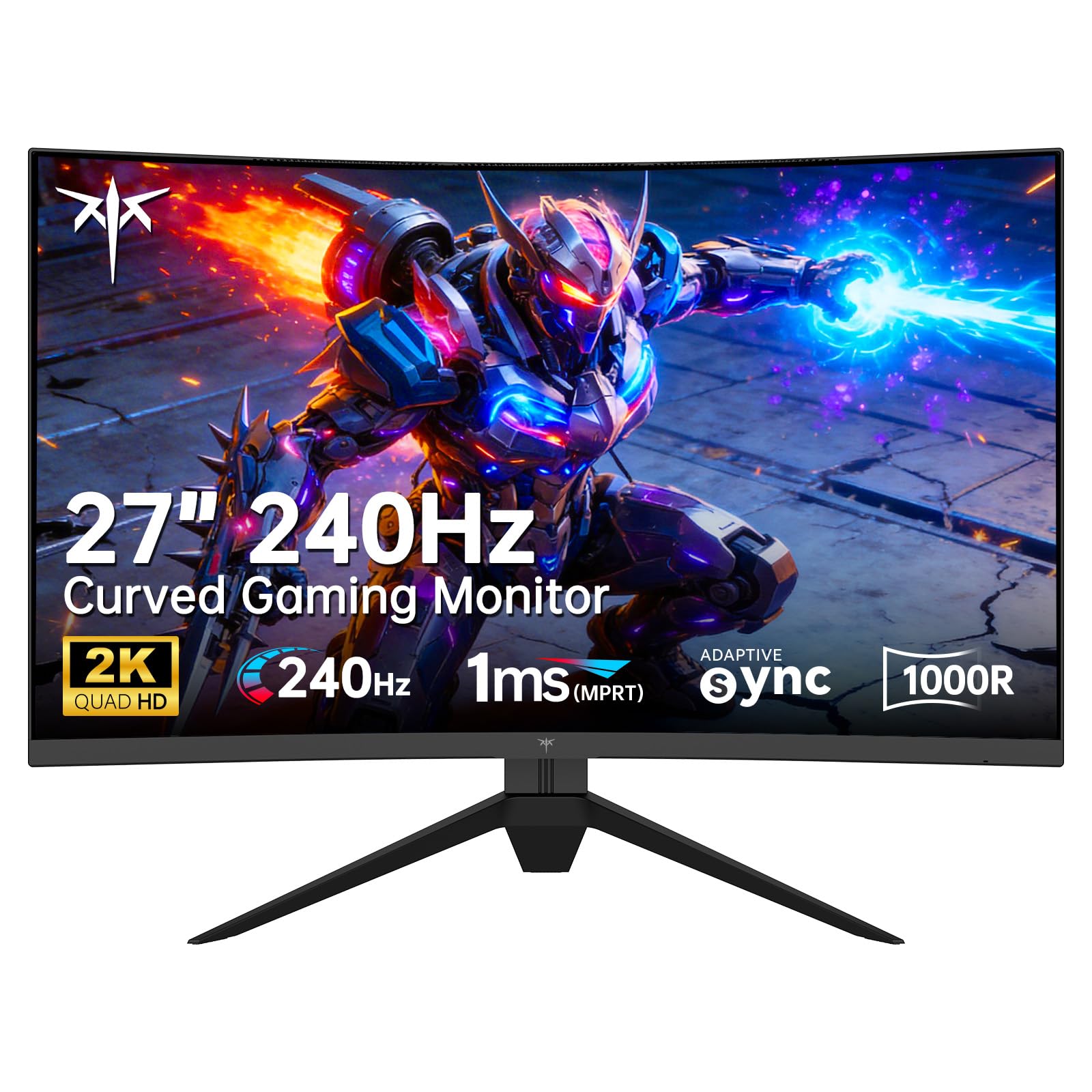
An aggressively-priced 240Hz curved monitor that wraps the game around your field of view.
The KTC H27S25E is the only curved monitor in this list, and its 1000R curvature (a 1000mm radius bend) is tight enough to mimic your eyes’ natural shape — it feels more rich than a flat screen because the edges of the display are the same distance from your eyes as the center. It runs at 240Hz with a QHD (2560 x 1440) resolution, offering a pixel density that looks sharp on a 27-inch screen. The contrast ratio is 2500:1, which is 2.5x deeper than the typical 1000:1 IPS panel — blacks look noticeably darker, though not OLED black.
It boasts a 124% color gamut (likely sRGB coverage) and 178-degree viewing angles, so colors stay consistent even if you are not dead-center. Buyers appreciate the included DisplayPort 1.4 cable in the box, which supports the full 240Hz bandwidth without needing to buy an extra cable. Adaptive Sync (FreeSync and G-Sync Compatible) ensures tear-free gameplay across your frame rate range.
The biggest compromise is the build — it only offers tilt adjustment, not height or swivel, so you may need a monitor arm to get the perfect eye level. It also lacks HDMI 2.1 (it uses HDMI 2.0), so console gamers at 1440p 120Hz will need to check compatibility. For the price, this is a huge spec sheet.
Bang for Buck
- 240Hz + 1440p at a very accessible price point
- 2.5x deeper contrast than IPS — 2500:1
- 1000R curve feels rich in racing and FPS games
Budget Trade-Offs
- Only tilt adjustment — no height or swivel
- HDMI 2.0 limits max bandwidth for some consoles
- Brand has less warranty support than Dell/LG/ASUS
Choose this if: you want a high-refresh curved monitor on a tight budget and do not need an advanced stand.
Look past it if: you need a fully adjustable stand or HDMI 2.1 for a next-gen console at full speed.
7. Dell 27 Plus 4K Monitor (S2725QS)

A 4K 120Hz IPS monitor that doubles as a productivity powerhouse for creative pros.
The Dell S2725QS is the only 4K (3840 x 2160) monitor in this roundup, giving you 50% more pixels than the 2560 x 1440 on the Acer Nitro XV272U. At 27 inches, 4K makes text razor-sharp and game textures incredibly detailed — you will see individual blades of grass in “Red Dead Redemption 2” that you might miss at 1440p. It runs at a smooth 120Hz with AMD FreeSync Premium, which is enough for most single-player games and console gaming, though not as fast as dedicated 240Hz+ displays for esports.
The IPS panel covers 99% sRGB and delivers a 1500:1 contrast ratio, which is better than the typical 1000:1 you see on many IPS monitors (including the LG 27GR83Q-B). The real standout for all-day use is ComfortView Plus — it reduces harmful blue light emissions to ≤35% without washing out colors, so you can work on spreadsheets or edit documents for hours without eye fatigue. It also includes integrated speakers that offer more output power and deeper frequency response than the previous generation, so you can watch YouTube or take calls without external speakers.
The catch is clear: 4K 120Hz requires a serious graphics card to drive at high settings in modern games. If you are on a mid-range GPU, you will likely need to run games at a lower resolution or turn down settings to hit 120 fps. The ultra-thin bezel and ash white finish make it look modern on a desk, but the stand only offers tilt and height — no pivot or swivel.
4K Advantages
- Breathtaking 4K (3840 x 2160) sharpness at 27 inches
- ComfortView Plus reduces eye strain — ≤35% blue light
- Built-in speakers with deeper sound than most monitors
4K Drawbacks
- Only 120Hz — not ideal for competitive esports
- Needs a powerful GPU to run 4K games at 120+ fps
- Ergonomics limited to tilt and height adjustment
Go for this if: you split your time between gaming and productivity/creative work and want the sharpest text and images at 27 inches.
Steer clear if: you are a competitive gamer who needs 240Hz+ or you have a budget graphics card that cannot drive 4K at high frame rates.
Understanding the Specs
Refresh Rate Explained
Measured in Hz (hertz), refresh rate is how many times your screen draws a new image every second. 120Hz means 120 images per second. A higher refresh rate makes motion look smoother — scrolling a webpage becomes fluid, and in a game like “Call of Duty,” you see enemies move frame-by-frame instead of as a blurry jump. Every monitor in this list exceeds 120Hz (240Hz is the most common here), giving you headroom for higher frame rates than the minimum search target.
Response Time (GTG)
Gray-to-Gray (GTG) response time measures how fast a pixel changes from one shade of gray to another. A lower number means less ghosting — the smeary trail behind fast-moving objects. Look for 1ms (GTG) or lower on IPS and VA panels, or 0.03ms on OLED monitors. The difference between 1ms and 0.03ms is small to most eyes, but if you play competitive shooters at 240Hz+, every millisecond of clarity helps you track targets.
Adaptive Sync (FreeSync / G-Sync)
Your graphics card outputs frames at varying rates — sometimes 110 fps, sometimes 95 fps. Without adaptive sync, the monitor uses a fixed refresh rate, causing screen tearing (a visible horizontal split) or stuttering. AMD FreeSync Premium and NVIDIA G-Sync Compatible sync the monitor’s refresh rate to the GPU’s frame rate in real time, making gameplay smooth. All monitors in this guide support some form of adaptive sync.
Contrast Ratio and HDR
Contrast ratio describes the difference between the brightest white and darkest black a monitor can show. A value like 1000:1 (common for IPS) means white is 1000x brighter than black. OLED and QD-OLED panels reach 1000000:1 or 1500000:1 because black pixels turn completely off. HDR (High Dynamic Range) certification like DisplayHDR 400 or True Black 500 ensures the monitor can display bright highlights and dark shadows simultaneously without crushing details.
FAQ
Can my graphics card run 1440p at 120Hz?
Is HDMI 2.1 necessary for a 27-inch 120Hz monitor?
Does a curved 27-inch monitor make sense for gaming?
Will an OLED monitor burn in from HUD elements?
What is the difference between FreeSync Premium and G-Sync Compatible?
Do I need a DisplayPort cable for 240Hz at 1440p?
How important is color gamut (sRGB vs DCI-P3) for gaming?
Can I use a 27-inch 120Hz monitor for console gaming on PS5 or Xbox?
What is VESA mounting and why does it matter?
Does a higher refresh rate like 240Hz make a visible difference over 120Hz?
Final Thoughts: The Verdict
For most people, the 27 inch 120hz gaming monitor winner is the LG 27GR83Q-B because it delivers 240Hz, HDMI 2.1 for consoles, and excellent color accuracy at a price that does not require a loan. If you want the absolute best image quality with deep blacks and infinite contrast, grab the LG 27GX700A-B for its 4th Gen OLED and 280Hz speed. And for a budget-friendly curved option that wraps the action around you, the standout is the KTC H27S25E.
How We Picked
We do not accept paid placement. Every pick is matched to a real buyer and a real use-case; we do not hands-on test units.
Sources & Methodology
Specifications: manufacturer listings and product documentation. Review insights: verified customer reviews, as of July 2026. Pricing: not shown on this page (it changes often); check the current price via the retailer link.
As an Amazon Associate, Gadgets Feed earns from qualifying purchases. This does not affect which products we feature.
Product prices and availability are accurate as of the date/time indicated and are subject to change. Any price and availability information displayed on Amazon at the time of purchase will apply to the purchase of this product. As an Amazon Associate I earn from qualifying purchases.
CERTAIN CONTENT THAT APPEARS ON THIS SITE COMES FROM AMAZON. THIS CONTENT IS PROVIDED "AS IS" AND IS SUBJECT TO CHANGE OR REMOVAL AT ANY TIME.
Amazon and the Amazon logo are trademarks of Amazon.com, Inc. or its affiliates.