
Our readers keep the lights on and my morning glass full of iced black tea. As an Amazon Associate, I earn from qualifying purchases.
Specs are compiled from manufacturer listings and verified buyer reviews and can change over time — please confirm the key details on the product page before buying.
Buying a 2K 144Hz monitor is about escaping two frustrations at once: the soft, pixelated image of a 1080p screen and the blurry, stuttering motion of a low-refresh-rate display. A 1440p panel gives your games and work that sharp, detailed look, while a high refresh rate makes everything from cursor movement to fast-paced combat feel instantly smoother and more responsive. This guide breaks down the best models for different needs and budgets, focusing on the real-world specs that matter—resolution, refresh rate, panel type, and response time.
I’m Min — the founder and writer behind Gadgets Feed. This guide is built by comparing the manufacturers’ published specifications and the patterns across verified customer reviews, so you get each pick’s real strengths and trade-offs instead of marketing spin.
This is the definitive breakdown of the 2k 144hz monitor landscape, helping you find your ideal screen by understanding the key specs and real owner feedback.
Our Picks at a Glance



How To Choose The Best 2K 144Hz Monitor
Choosing the right 2K 144Hz monitor means weighing your gaming style, desk space, and graphics card power. A high refresh rate only helps if your GPU can push matching frame rates.
Resolution and Refresh Rate: The Core Duo
Resolution and refresh rate are the two headline specs. The “2K” or “QHD” resolution means 2560×1440 pixels, offering a significant clarity boost over 1080p without the steep performance cost of 4K. The refresh rate, measured in Hertz (Hz), is how many times the screen updates per second. A 144Hz display updates 144 times per second, making motion look dramatically smoother than a standard 60Hz screen.
Panel Technology: IPS, VA, or TN?
Panel type dictates color accuracy, contrast, and viewing angles. IPS (In-Plane Switching) panels are the most popular choice for their excellent, consistent colors from wide angles. VA (Vertical Alignment) panels offer the deepest blacks and highest contrast ratios, which is great for dark scenes and movies. TN (Twisted Nematic) panels are the fastest but have the worst colors and viewing angles, making them a niche choice for pure esports.
Response Time and Adaptive Sync Explained
Response time (ms) measures how fast a pixel changes color, reducing ghosting in fast motion. Lower response times mean less blur in fast-paced games. Adaptive Sync (AMD FreeSync, NVIDIA G-Sync) matches refresh rate to frame output, eliminating screen tearing.
Quick Comparison
| Model | Best For | Refresh Rate | Response Time | Panel Type | Amazon |
|---|---|---|---|---|---|
| Alienware AW2725DM★ Best Overall | The All-Around Best | 180Hz | 1ms | IPS | Amazon |
| Dell S2725DSMTop Value | Work & Casual Play | 144Hz | 1ms | IPS | Amazon |
| AOC CQ27G4Hrich Pick | rich Curve & Contrast | 180Hz | 0.5ms | VA | Amazon |
| Acer XV272U W2 | Esports Speed | 240Hz | 1ms (0.5ms) | IPS | Amazon |
| Samsung Odyssey G5 | Vivid Color & Gaming Features | 200Hz | 1ms | IPS | Amazon |
| LG 27G610A | Brightness & Adjustability | 200Hz | 1ms | IPS | Amazon |
| ASUS VG27AQA1A | Brand Trust & Features | 170Hz | 1ms | IPS | Amazon |
| LG 27GR83Q | High-End 240Hz Performance | 240Hz | 1ms | IPS | Amazon |
| ASUS VG27BQ | Blur-Free Esports Motion | 165Hz | 0.4ms | TN | Amazon |
In‑Depth Reviews
1. Alienware 27 Gaming Monitor AW2725DM
Our pick — over 4.5★ from 450+ verified ratings; the strongest balance of quality and price.
The all-around champion that nails color, speed, and comfort in one affordable package.
You get a premium gaming experience without the premium price. The Alienware AW2725DM pairs a crisp 2560×1440 resolution (that’s QHD, or quad high definition) with a fast 180Hz refresh rate, so games look sharp and move with impressive fluidity. Its 1ms gray-to-gray response time (the time it takes a pixel to change shades) keeps fast action clear, and you get rich colors thanks to a DCI-P3 95% color coverage (a wide color gamut standard) and VESA DisplayHDR 400 certification (a brightness and color standard for high dynamic range).
It also includes a low blue light mode and a fully adjustable stand for marathon gaming. A dedicated hardware-based low blue light solution is designed to reduce eye strain without washing out the colors you see on screen. The included stand offers height, pivot, swivel, and tilt adjustments, so you can dial in the perfect ergonomic angle for your desk setup.
Buyers report it “works well with no problems” and praise it for delivering vibrant colors and crisp images from a variety of systems. Some note it’s not pro-grade, with minor IPS quirks like edge lighting and weaker blacks, but for the price, it’s considered a fantastic value. The thing that wins people over is the overall quality, with over a hundred owners calling it solid, supported by nearly fifty more highlighting its value for money.
What Gamers Love
- Fast and smooth 180Hz refresh rate with a 1ms response time for responsive play
- Vibrant color with 95% DCI-P3 coverage and VESA DisplayHDR 400 for a bright, punchy image
- Highly adjustable stand (height, pivot, swivel, tilt) for custom comfort
Minor IPS Trade-offs
- Like all IPS panels, blacks aren’t truly deep and some edge lighting can be visible
- No built-in speakers, so you’ll need your own or a headset
Reach for this if: you want a top-tier 1440p gaming experience—great color, high refresh, and a premium adjustable stand—at a mid-range price.
Look elsewhere if: you need a monitor for professional color-critical work or require built-in speakers for a clutter-free desk.
2. Dell 27 Plus QHD Monitor – S2725DSM
An office upgrade that doubles as a capable gaming screen with genuinely useful speakers.
This Dell is a fantastic choice if your monitor pulls double duty for work and play. It offers a bright and clear QHD picture with a 144Hz refresh rate, making games and videos look smooth. Its 1ms Moving Picture Response Time (MPRT) helps cut motion blur. A key advantage here is its color coverage: at 99% it leads the Alienware’s 95% by a small margin in the spec sheet.
The standout feature for many is the audio. The integrated dual 3W speakers deliver surprisingly full sound for a monitor, something most competitors don’t offer. Owners mention the speakers are “really impressive for a monitor built-ins” and note games at 144 Hz look “fantastic.” This model replaces a 12-year-old Dell to “pleasant surprise,” a common theme among owners upgrading from older screens.
It’s also designed with comfort in mind. The stand offers full height, tilt, pivot, and swivel adjustments, and its 4-star TÜV-certified display reduces blue light emissions to protect your eyes during long workdays. Its 1,500:1 contrast ratio provides a bit more depth than the 1,000:1 you find on many gaming IPS panels.
Best of Both Worlds: This is the rare monitor that excels in the office with crisp, comfortable text and impresses in the evening with smooth gaming and good built-in speakers.
Pick this if: you spend all day working but still enjoy gaming—the 99% color gamut, comfortable stand, and capable speakers make it a true all-rounder.
Who should pass: competitive esports players who want a refresh rate beyond 144Hz.
3. AOC 27″ Curved Gaming Monitor CQ27G4H
A curved VA panel that offers lightning-fast response and the deepest blacks on this list.
If you love getting lost in single-player worlds or watching movies, the AOC CQ27G4H’s 1500R curvature (a curve radius of 1500mm) wraps around your field of view for a more rich experience. It runs on a VA panel (vertical alignment, known for deep blacks), which is the secret to its biggest strength: a class-leading 3000:1 contrast ratio. That’s a 3.0x gap over the 1,000:1 you’ll get from the Alienware, meaning blacks look truly black and dark scenes have far more depth.
It’s also blisteringly fast. The monitor boasts a 0.5ms response time, which is twice as quick as the Dell’s 1ms spec. Fast-moving objects stay sharp with minimal ghosting. Owners frequently praise its picture quality, with some reporting “zero dead pixels from the start.”
Connectivity is sturdy with DisplayPort 1.4 and dual HDMI 2.0 ports, letting you hook up a PC and multiple consoles. Flicker-Free and low blue light technology helps reduce eye strain during marathon sessions. Some buyers have noted the monitor can wobble if bumped, and a few expected a full 180Hz but saw 144Hz, which often depends on the cable and port used—make sure to use the DisplayPort for the maximum refresh rate.
Immersion & Speed
- High 3000:1 contrast ratio delivers true, deep blacks
- Fast 0.5ms response time keeps motion crisp
- 1500R curve creates a wide and engaging field of view
Desk Fit Notes
- The monitor can wobble if its stand is bumped
- Some units have been reported to run at 144Hz instead of 180Hz, often depending on the connection
Best suited for: gamers who prefer story-rich, atmospheric titles and movie fans who value deep blacks and an rich curve over the wide viewing angles of IPS (in-plane switching, a panel type with better viewing angles but lower contrast).
4. Acer Nitro XV272U W2bmiiprx

Pushes beyond 144Hz to a blazing 240Hz for competitive gamers who need every advantage.
This Acer Nitro is for players who take their esports titles seriously. It offers a stunningly fast 240Hz refresh rate when using the DisplayPort connection, which is a huge leap in smoothness over a 144Hz screen. With a 1ms (G-to-G) response time, going up to 0.5ms, it minimizes ghosting so you can track enemies accurately during frantic firefights.
It’s not just a one-trick pony for speed. The 27-inch QHD IPS panel delivers sharp details and supports 99% of the sRGB color space for vibrant, accurate colors. The included ergonomic stand offers a wide 4.7-inch height adjustment range, 360° swivel, and +/- 90° pivot, making it fantastic for multi-monitor setups.
Its combination of speed and visual fidelity is a major talking point among owners, who find the 1440p picture “amazing.” However, it’s a screen that demands a powerful GPU to feed those frames. Quality control is a mixed bag for some, with occasional reports of backlight bleed and color accuracy issues that required adjustment.
Pure Performance: This screen delivers top-tier esports speed at a mid-range price, with an adjustable stand that makes it a dream for a multi-screen battle station.
Choose this for: competitive shooters and esports fans whose graphics card can consistently push past 200 frames per second.
Think twice if: you’re sensitive to backlight bleed or prefer a monitor that’s ready to go right from the start without color tweaking.
5. Samsung 27″ Odyssey G5 (G53F) Series

Delivers a vibrant, high-contrast picture with gaming smarts that improve your play.
Samsung’s Odyssey G5 is a compelling option for those who crave vivid color and performance-boosting features. Its IPS panel provides a wide 178° viewing angle, so colors remain consistent off-angle. It packs a punch with a 200Hz refresh rate and 1ms (MPRT) response time, keeping fast motion clear and fluid, all while AMD FreeSync Premium works to eliminate stuttering and tearing.
what separates it are its exclusive gaming tools. HDR10 (a high dynamic range format) supports brighter highlights and nuanced shadows for added depth in supported titles. The Black Equalizer improves visibility in dark areas—perfect for spotting enemies hiding in shadows—while the Virtual Aim Point increases on-screen aiming accuracy.
Owners consistently call the picture “sharp, clear, and vibrant,” with excellent color accuracy and no visible bleeding. It’s often described as a fantastic look for the price point on budget-to-mid-range builds. That said, the stand only offers tilt adjustment, which some find limiting, and there have been rare reports of connection issues after several months of use.
Vivid & Smart
- Sharp and vibrant picture quality with accurate colors
- Fast 200Hz refresh rate and 1ms response time for smooth and responsive gameplay
- Handy gaming features like Black Equalizer and Virtual Aim Point give a competitive edge
Stand & Compatibility
- The included stand only offers tilt, no height or swivel adjustment
- Some owners have reported device compatibility issues after a period of use
Snag this if: you want a gorgeous, well-priced screen for competitive and story games and like having a few built-in tools to fine-tune your visibility.
skip it if: an ergonomic stand with height adjustment is a must-have for your desk setup.
6. LG 27G610A-B Ultragear
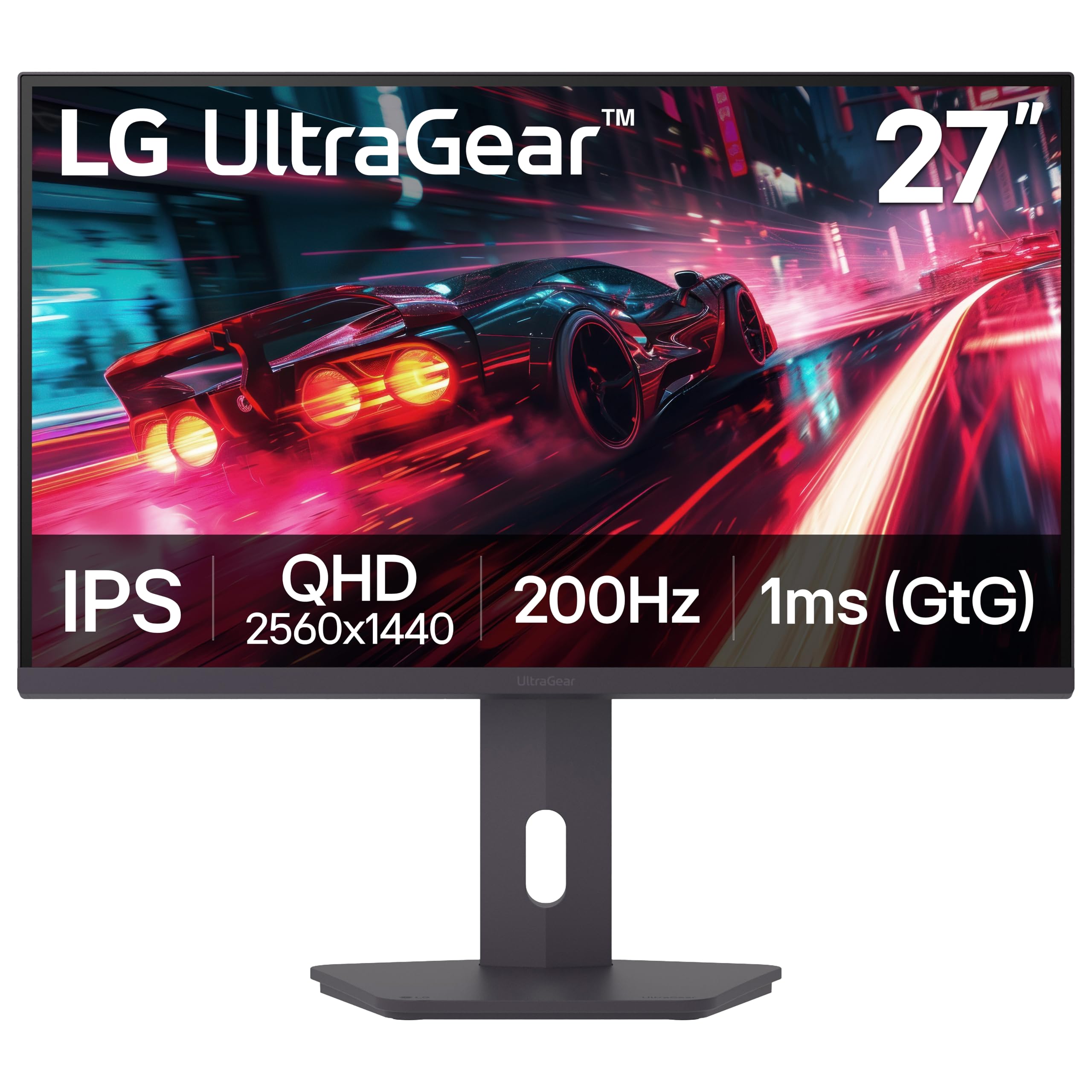
A bright, 200Hz IPS panel wrapped in a fully adjustable stand for the ideal view.
This LG UltraGear focuses on blending high performance with excellent ergonomics from the start. It gives you a bright 400 cd/m² IPS display with VESA DisplayHDR 400 and up to 99% sRGB color coverage, resulting in a vibrant and detailed QHD picture. The 200Hz refresh rate and 1ms (GtG) response time ensure your gameplay is exceptionally fluid and sharp.
For comfort, it’s a step above many rivals. The stand grants full control with adjustable height, tilt, swivel, and pivot, allowing you to find the perfect viewing angle for long sessions and position it flawlessly in a multi-screen array. Gamers get access to LG’s suite of tools, including Dynamic Action Sync to reduce input lag and a Black Stabilizer to brighten dark scenes.
Owners find it well-made with a sharp picture and easy setup, offering solid value for the specs. However, this panel’s 1,000:1 contrast ratio trails the AOC’s VA panel in raw contrast, and some buyers have reported seeing ghosting in web browsers. A couple of reviews also note the plastic stand feels less premium than the screen itself.
Ergonomic High-Flyer: You get a serious 200Hz gaming display and the most flexible stand, ready for a triple-monitor setup or a user who changes posture throughout the day.
Choose this if: ergonomic adjustability is a top priority and you want a bright screen with a very high refresh rate for gaming.
Pass if: you’re looking for the deepest blacks, where a VA panel is a better fit.
7. ASUS TUF Gaming VG27AQA1A

A feature-rich TUF gaming monitor that balances speed, clarity, and sturdy build quality.
ASUS equips this 27-inch monitor to handle both rich and competitive gaming. It’s a QHD display (2560×1440 resolution) with a 170Hz refresh rate (overclocked from its standard 144Hz) that you can push to for that extra smoothness. It features a 1ms (MPRT) response time (a measure of motion blur), and ASUS’s Extreme Low Motion Blur (ELMB) technology kicks in to further reduce ghosting on fast-moving scenes.
For visuals, it includes High Dynamic Range (HDR) support for the HDR-10 format, enhancing bright and dark areas for more depth. The screen enjoys a strong reputation among owners for its high build quality. Customers note the refresh rate is “as advertised” and that setup is incredibly fast, taking under five minutes. It also has built-in speakers and a sturdy set of ports, including DisplayPort 1.2 and two HDMI 2.0 connections.
Connectivity is solid for hooking up a gaming PC and a console simultaneously. The main compromises are the stand, which does not offer height adjustment, and the speakers, which several owners say are “not very loud.” It’s a screen that has proven its reliability for those who’ve owned it for a couple of years, with quality so good one owner is already planning to buy a second.
Proven Performance
- Solid build quality that stands the test of time
- Overclockable to 170Hz with ELMB to reduce motion blur
- Quick and easy setup with DisplayPort and twin HDMI ports
Known Shortfalls
- Stand has no height adjustment, only tilt
- Built-in speakers are fairly quiet
Ideal for: gamers who value a sturdy, long-lasting monitor with a high refresh rate and want a low-maintenance setup experience.
Not ideal for: anyone who needs an adjustable-height stand for ergonomic comfort or expects loud built-in audio.
8. LG 27GR83Q-B Ultragear

Premium 240Hz performance with dual adaptive sync support for the smoothest possible play.
This is the top-tier LG for gamers who refuse to compromise on refresh rate and want maximum compatibility. It hits an ultra-smooth 240Hz refresh rate through both its HDMI 2.1 and DisplayPort 1.4 connections, with a fast 1ms (GtG) response time. It’s a screen that truly shines in fast-paced competitive titles, offering high-fidelity color with up to 95% (Typ.) DCI-P3 coverage.
Its biggest advantage is support for both NVIDIA G-SYNC and AMD FreeSync Premium. It’s officially validated by NVIDIA as G-SYNC Compatible, meaning it’s tested to reduce screen tearing and stutter. This flexibility makes it a safe bet regardless of whether you have an NVIDIA or AMD graphics card in your PC.
Gamers praise its stunning visuals and crisp picture, calling it “great for competitive gaming and media.” The 240Hz refresh rate is a common highlight. However, it is a power-user product; owners have reported rare instances of stuck pixels and a minority experiencing failures after several months. There are no built-in speakers, aside from a 4-pole headphone jack for DTS Headphone:X spatial audio.
Peak Performance
- Extremely high 240Hz refresh rate for unbeatable smoothness in esports
- Supports both G-Sync and FreeSync Premium for any GPU
- Great out-of-the-box color accuracy and a sturdy, adjustable stand
Premium Caveats
- No integrated speakers, so you need a headset or external audio
- Potential for pixel issues and reliability concerns reported by a small number of owners
Reach for this if: you have a high-end graphics card and want the smoothest, tear-free 240Hz experience with the freedom to switch between NVIDIA and AMD GPUs.
Think twice if: you’re on a strict budget or want the convenience of built-in speakers.
9. ASUS TUF Gaming VG27BQ

A speed-first TN panel with an incredible 0.4ms response for the absolute least motion blur.
If you’re a pure esports purist who prioritizes motion clarity above all else, this ASUS TUF monitor is a niche but brilliant choice. It uses a TN (Twisted Nematic) panel, which has a major advantage: a ridiculously fast 0.4ms (GTG) response time. This is the fastest on our list and effectively eliminates ghosting and smearing in fast-moving scenes.
It boasts a 165Hz refresh rate (which supports 144Hz standard mode) and includes ASUS’s Extreme Low Motion Blur (ELMB Sync) technology. Owners who are tired of “the 1ms GTG lie that is IPS screens” praise it for offering true, blur-free motion tracking. Some even claim it performs faster than monitors rated at 240Hz—this screen’s response speed is its superpower.
TN panels have traditionally had poor color, but this model gets surprisingly close to IPS quality, according to owners. They note excellent colors and “no backlight bleed or glow,” a common annoyance on IPS panels. The trade-off is its Achilles’ heel: TN viewing angles are narrow, especially vertically. Colors shift if you don’t view it dead-on. It also comes with a full ergonomic stand and built-in speakers, but the audio is quiet.
The Speed Demon’s Choice: This monitor is a specialist tool for competitive gaming, offering outstanding motion clarity if you can accept its narrow viewing angles.
Best for: hardcore esports athletes who sit directly in front of their screen and demand the absolute fastest pixel response to track movement perfectly.
Not for: anyone who watches movies from a couch, has an angled desk setup, or needs wide viewing angles for color-critical work.
Understanding the Specs
Refresh Rate (Hz)
This tells you how many times a monitor redraws the image every second. A 144Hz monitor updates twice as often as a standard 60Hz screen, making on-screen motion look much smoother and less blurry. This is a must for fast-paced games, where it helps you track targets and react quicker. For a 2K 144Hz monitor, hitting that refresh rate requires a strong graphics card that can push out a matching number of frames.
Response Time (ms)
This is the time a pixel takes to change from one color to another, measured in milliseconds (ms). A faster response time (lower number) means less “ghosting,” the trailing blur you see behind fast-moving objects. A 1ms response is great for gaming, but a 0.5ms response is even better for those who are highly sensitive to motion blur.
FAQ
What does a 2K 144Hz monitor mean?
Is a 2K 144Hz monitor worth it for a PS5 or Xbox Series X?
Can my graphics card run a 2K 144Hz monitor?
What is the difference between FreeSync and G-Sync?
Are IPS and VA panel types different?
How many hertz can the AOC CQ27G4H run on HDMI?
Will a 144Hz monitor improve my gaming?
Why are there so many monitors with a 180Hz refresh rate on this list?
Final Thoughts: The Verdict
For most buyers, the winner in the 2k 144hz monitor category is the Alienware AW2725DM because it brilliantly balances a high 180Hz refresh rate with vibrant colors and a top-tier adjustable stand, all at a very accessible price. If you want the best of work and play, grab the Dell S2725DSM for its excellent color gamut and impressive built-in speakers. And for an rich, high-contrast experience, the AOC CQ27G4H is the one to reach for.
How We Picked
We do not accept paid placement. Every pick is matched to a real buyer and a real use-case; we do not hands-on test units.
Sources & Methodology
Specifications: manufacturer listings and product documentation. Review insights: verified customer reviews, as of September 2026. Pricing: not shown on this page (it changes often); check the current price via the retailer link.
As an Amazon Associate, Gadgets Feed earns from qualifying purchases. This does not affect which products we feature.