
The jump to a 2K 360Hz monitor is not just about seeing more frames; it’s about erasing the boundary between input and output. At this refresh rate, motion blur becomes a memory, and the combination with QHD resolution means you no longer have to choose between silky smooth motion and crisp detail.
I’m Min — the co-founder and writer behind Gadgets Feed. This guide is the result of countless hours cross-referencing panel technologies, response time measurements, and real-world user experiences to separate the genuine performance leaders from the marketing hype.
Whether you’re a competitive esports player or a hardcore enthusiast seeking the ultimate visual fidelity, finding the right best 2k 360hz monitor requires understanding modern OLED panel nuances and connectivity requirements.
How To Choose The Best 2K 360Hz Monitor
Selecting a 360Hz monitor is a premium decision driven by one goal: eliminating all perceptible motion blur in competitive gaming. The technology has matured, but key differences in panel type, connectivity, and burn-in protection separate the leaders from the pack.
Panel Technology: OLED vs. The Rest
Every monitor on this list uses QD-OLED, and for good reason. The near-instantaneous 0.03ms response time of OLED pixels eliminates ghosting entirely, something traditional IPS or TN panels cannot achieve even at 360Hz. The trade-off is burn-in risk, which premium manufacturers now address with custom heatsinks, pixel shifting, and comprehensive warranties. If you prioritize motion clarity above all else, OLED is non-negotiable.
Connectivity and Bandwidth
Driving a 2560×1440 display at 360Hz requires substantial bandwidth. DisplayPort 1.4 with Display Stream Compression (DSC) is the standard method. Some monitors claim HDMI 2.1 compatibility, but be wary — certain units only offer HDMI 2.0 bandwidth, which is insufficient for the full 360Hz signal, forcing reliance on DSC and potentially causing brief black screens when alt-tabbing. Verify the port specifications before committing.
Quick Comparison
On smaller screens, swipe sideways to see the full table.
| Model | Category | Best For | Key Spec | Amazon |
|---|---|---|---|---|
| Alienware AW2725DF | QD-OLED | Overall Value & Color | 99.3% DCI-P3 Delta E<2 | Amazon |
| MSI MPG 271QRX | QD-OLED | Connectivity & KVM | HDMI 2.1 48Gbps + KVM | Amazon |
| ASUS ROG Strix XG27ACDNG | QD-OLED | Burn-In Protection | Custom Heatsink + 3yr Warranty | Amazon |
| Philips Evnia 27M2N8500 | QD-OLED | Immersive Atmosphere | Ambiglow Lighting + Silver Design | Amazon |
| Samsung Odyssey OLED G6 G60SD | QD-OLED | Anti-Glare & Cooling | Dynamic Cooling + Glare Free | Amazon |
In‑Depth Reviews
1. Alienware AW2725DF QD-OLED

The Alienware AW2725DF strikes an exceptional balance for its price tier, delivering the full QD-OLED experience without compromise. Its 99.3% DCI-P3 coverage and factory-calibrated Delta E<2 accuracy produce visuals that are as suitable for color-sensitive work as they are for fast-paced gaming. The infinite contrast ratio of the OLED panel makes every scene pop with depth.
Motion clarity is outstanding thanks to the 360Hz refresh rate paired with a 0.03ms gray-to-gray response time. The monitor supports both AMD FreeSync Premium Pro and VESA AdaptiveSync, ensuring tear-free gameplay across a wide range of frame rates. The ergonomic stand offers height, tilt, swivel, and pivot adjustments, making long sessions comfortable.
Some users note a slight purple tint to the anti-glare coating and that the screen is a fingerprint magnet. Periodic pixel refresh cycles are required, but the 3-year burn-in warranty provides peace of mind. Text clarity is slightly softer than on IPS panels, a known QD-OLED characteristic.
Why it’s great
- Stunning QD-OLED color accuracy with Delta E<2
- Infinite contrast and VESA DisplayHDR True Black 400
- Full ergonomic stand with pivot
Good to know
- Anti-glare coating has a slight purple tint
- Prone to fingerprints on the screen surface
- HDMI 2.1 bandwidth is limited, relying on DSC
2. MSI MPG 271QRX QD-OLED

The MSI MPG 271QRX is built for the multitasking gamer. Beyond the expected QD-OLED vibrancy and 360Hz fluidity, it includes a built-in KVM switch, allowing you to control multiple devices with a single keyboard and mouse setup. This feature, rarely found on dedicated gaming monitors, adds genuine utility for users who frequently switch between a gaming PC and a work laptop.
Connectivity is a strong point: the monitor provides an HDMI 2.1 port with full 48 Gbps bandwidth, enabling uncompressed 4K signal from consoles and high-bandwidth PC inputs. The MSI OLED Care 2.0 suite actively manages pixel refresh and image retention risks. The stand is fully adjustable, and the design is understated yet aggressive.
A few reviews point to the chunky stand base, which takes up significant desk space. The built-in brightness is rated at 250 nits, which is standard for OLED panels but may require a controlled lighting environment for best HDR impact. Some users on older GPUs may need to enable DSC to hit the full 360Hz refresh.
Why it’s great
- Full HDMI 2.1 bandwidth at 48 Gbps
- Integrated KVM switch for multi-device setups
- MSI OLED Care 2.0 for burn-in prevention
Good to know
- Stand base is large and occupies desk space
- Peak brightness is moderate at 250 nits
- Requires DSC for full 360Hz on some inputs
3. ASUS ROG Strix XG27ACDNG

ASUS has prioritized longevity with the ROG Strix XG27ACDNG. A highly efficient custom heatsink and advanced airflow design are paired with the ASUS OLED Care+ suite, actively reducing the risk of burn-in. The monitor also features ROG-exclusive OLED Anti-flicker technology, which minimizes flicker during refresh rate fluctuations, a subtle but valuable enhancement for competitive play.
The panel delivers a true 10-bit color depth with 99% DCI-P3 gamut and VESA DisplayHDR 400 True Black compliance, ensuring deep blacks and brilliant highlights coexist without clipping. The DisplayWidget Center software allows for easy tweaking of OLED Care functions and settings directly from the desktop. G-Sync Compatible and FreeSync Premium Pro support ensure wide compatibility.
Some users report that the height adjustment range is limited compared to competitors, and the mandatory pixel cleaning pop-up can interrupt gameplay. A few found that certain older games have compatibility issues with the 360Hz signal. The 3-year warranty with burn-in coverage is a strong safety net.
Why it’s great
- Dedicated heatsink for superior burn-in prevention
- True 10-bit color and HDR 400 True Black
- G-Sync Compatible and FreeSync Premium Pro
Good to know
- Limited height adjustment range
- Pixel cleaning pop-up can interrupt gameplay
- Some older games may not display correctly
4. Philips Evnia 27M2N8500 QD OLED
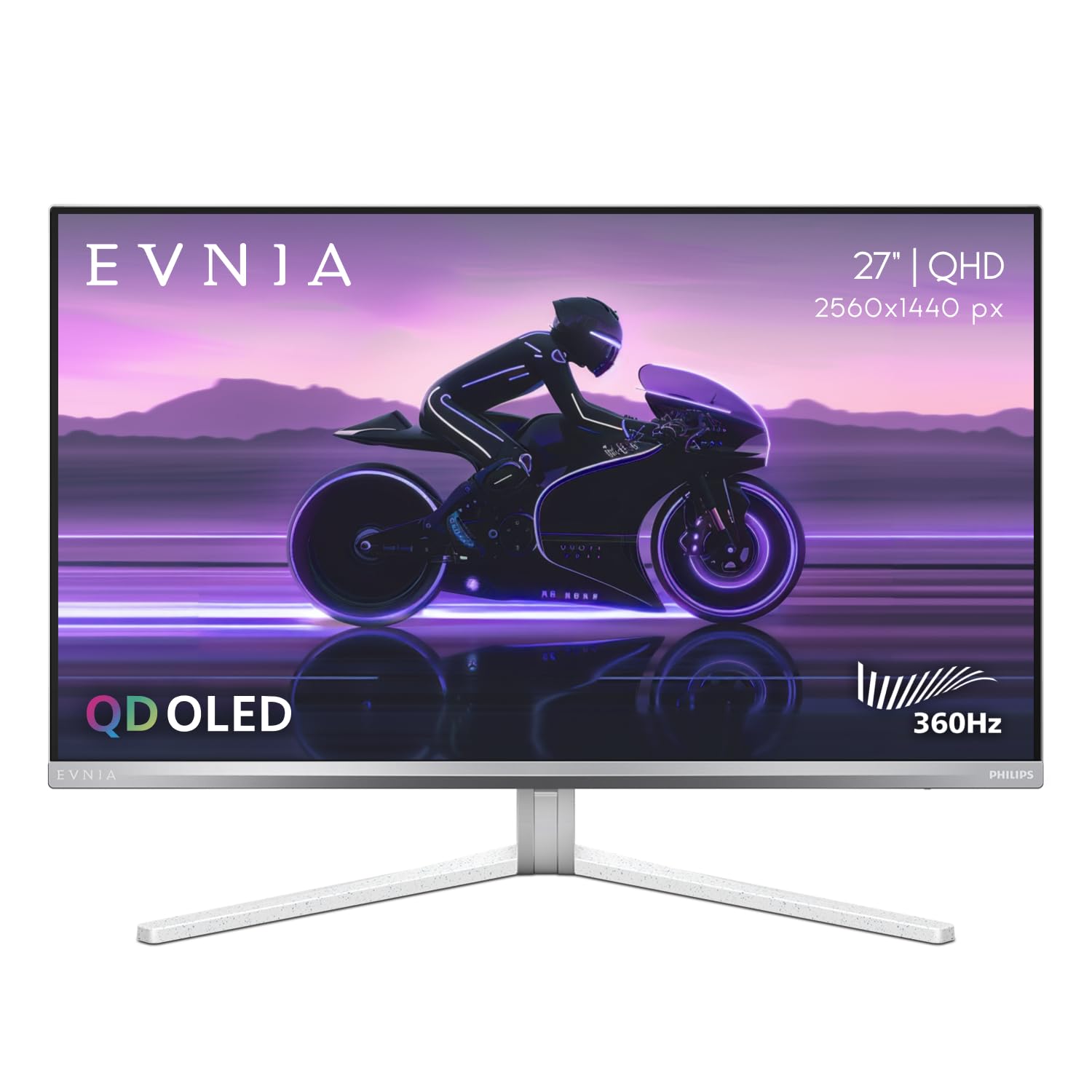
The Philips Evnia 27M2N8500 differentiates itself with its signature Ambiglow technology, which casts a halo of light that matches the on-screen content. This feature enhances immersion without introducing distracting glare, and it can reduce eye strain during extended sessions. The silver metallic finish is a welcome departure from the standard black gaming aesthetic.
It shares the same Samsung QD-OLED panel found in other premium monitors, providing the expected deep blacks and 360Hz fluidity. The monitor includes a fully ergonomic stand with a metal base and a built-in headphone hanger. Philips backs this unit with a 4-year advance replacement warranty, a standout commitment to reliability.
Customer experiences highlight a few caveats: the white balance leans warm, and the Ambiglow sampling rate is low, causing a noticeable delay in color response. Some units have arrived with scratches from inadequate packaging, and Philips customer support has been criticized for not covering these as manufacturing defects.
Why it’s great
- Ambiglow lighting creates immersive bias lighting
- 4-year advance replacement warranty
- Silver design with metal stand and headphone hanger
Good to know
- Ambiglow has a low sampling rate with visible delay
- Some units arrive with scratches from packaging
- Customer support may not cover damage on arrival
5. Samsung Odyssey OLED G6 G60SD

The Samsung Odyssey OLED G6 G60SD introduces a unique dynamic cooling system that uses a pulsating heat pipe to diffuse heat five times better than traditional graphite sheets. This innovation directly addresses the primary longevity concern of OLED technology, making it a compelling choice for users who plan to keep their monitor for years.
The glare-free technology is exceptionally effective, preserving the QD-OLED contrast in brightly lit rooms without the distracting reflections common on glossy panels. The monitor includes a full suite of Samsung OLED Safeguard+ features, including logo and taskbar detection that automatically dims static elements. The design is incredibly thin at just 3.9mm at its slimmest point.
A notable drawback: the HDMI ports are only HDMI 2.0, despite marketing to the contrary. To achieve 360Hz, you must use DisplayPort 1.4 with DSC, which can cause a 1-2 second black screen when alt-tabbing. The built-in speakers do not function in HDR mode, and the included stand lacks a standard VESA mounting screw.
Why it’s great
- Dynamic cooling system with pulsating heat pipe
- Excellent anti-glare technology for bright rooms
- Sleek, ultra-thin design at 3.9mm
Good to know
- HDMI ports are only HDMI 2.0, not 2.1
- DSC causes brief black screen on alt-tab
- No VESA mounting screws included with stand
FAQ
Can I achieve 360Hz on a 2K monitor without Display Stream Compression?
Is a 360Hz OLED monitor worth the premium over a 240Hz IPS model for gaming?
What GPU do I need to drive a 2K 360Hz monitor effectively?
Final Thoughts: The Verdict
For most users, the best 2k 360hz monitor winner is the Alienware AW2725DF because it delivers exceptional QD-OLED color accuracy and a complete ergonomic stand at a compelling price point. If you want the best modern connectivity for multi-device setups, grab the MSI MPG 271QRX. And for the most advanced burn-in protection and a sleek design, nothing beats the Samsung Odyssey OLED G6 G60SD.