
Our readers keep the lights on and my morning glass full of iced black tea. As an Amazon Associate, I earn from qualifying purchases.
Specs are compiled from manufacturer listings and verified buyer reviews and can change over time — please confirm the key details on the product page before buying.
Buying a 2K OLED gaming monitor is about escaping the two biggest frustrations in gaming: washed-out blacks on an LCD and motion blur that hides enemies in fast games. This guide focuses on refresh rate, response time, color accuracy, and the glossy-vs-matte finish debate to help you pick the right panel for your room and GPU.
I’m Min — the founder and writer behind Gadgets Feed. This guide is built by comparing the manufacturers’ published specifications and the patterns across verified customer reviews, so you get each pick’s real strengths and trade-offs instead of marketing spin.
Whether you’re a competitive FPS player or a single-player enthusiast, finding the right 2k oled gaming monitor means balancing speed with the deep-contrast visuals that only OLED can deliver.
Our Picks at a Glance



How To Choose The Best 2K OLED Gaming Monitor
OLED gaming monitors use panels where each pixel produces its own light, allowing individual pixels to turn off completely for true blacks. This creates the infinite contrast ratio that makes games look dramatically more vibrant than on traditional LED screens.
Refresh Rate and Response Time
Refresh rate, measured in Hertz (Hz), tells you how many times the screen updates per second. A 240Hz monitor shows 240 frames per second, while a 360Hz model shows 360. Response time, at 0.03ms on these panels, measures how quickly a pixel changes color, which eliminates the ghosting trails you see on slower displays.
The Glossy vs Matte Finish Question
Glossy screens deliver punchier colors and deeper blacks because there’s no anti-glare coating scattering the light. Matte finishes reduce reflections from windows and lamps but can make the image look slightly softer. If you game in a dark room, glossy wins; if your monitor faces a window, matte is the safer choice.
Quick Comparison
| Model | Best For | Refresh Rate | Color Gamut | Contrast Ratio | Amazon |
|---|---|---|---|---|---|
| LG 27GX704A-B★ Best Overall | Best Overall Glossy Pick | 240Hz | 98.5% DCI-P3 | 1,500,000:1 | Amazon |
| Samsung G61SHBudget Champion | Entry-Level QD-OLED | 240Hz | 0.99 (DCI-P3) | 1,000,000:1 | Amazon |
| AOC AG276QZD2Speed First | Budget Speed | 280Hz | 101% DCI-P3 | 1,500,000:1 | Amazon |
| Alienware AW2725DF | Esports 360Hz | 360Hz | 99.3% DCI-P3 | 1.5 million:1 | Amazon |
| MSI MAG 271QPX E2 | Fanless Design | 240Hz | — | High | Amazon |
| AOC Q27G4ZD | Budget Glossy | 240Hz | 110.2% DCI-P3 | 1,500,000:1 | Amazon |
| LG 27GS93QE | WOLED with Warranty | 240Hz | 98.5% DCI-P3 | 1.5M:1 | Amazon |
| ASUS XG27AQDMG | Glossy WOLED Clarity | 240Hz | 99% DCI-P3 | High | Amazon |
| MSI MPG 271QRX | Versatile 360Hz | 360Hz | Delta E≤2 | 1,000,000:1 | Amazon |
| Samsung G60SD | Premium Cooling Tech | 360Hz | 0.99 (DCI-P3) | 1,000,000:1 | Amazon |
| ASUS ROG XG27ACDNG | AI Gaming Features | 360Hz | 99% DCI-P3 | 4000:1 | Amazon |
In-Depth Reviews
1. LG 27GX704A-B 27-inch Ultragear QHD OLED
Our pick — over 4.5★ from 450+ verified ratings; the strongest balance of quality and price.
The glossy OLED that owners call a jaw-dropping upgrade for both gaming and movies.
This LG UltraGear pairs a glossy 27-inch QHD OLED panel with a 240Hz refresh rate and a 0.03ms response time, which owners say delivers zero ghosting and zero tearing when paired with G-Sync. The 2560×1440 resolution and 98.5% DCI-P3 color gamut deliver crisp text and vivid game worlds without the washed-out look of standard LED screens.
Dark scenes keep their detail while bright highlights pop, thanks to a 1,500,000:1 contrast ratio and VESA DisplayHDR True Black 400 certification (a standard that ensures deep blacks and vivid highlights). Owners praise the “stunning QHD OLED” for its “glossy finish” and “true blacks.” Brightness is rated at 275 nits standard, peaking at 1300 nits—plenty for a dim room, but not for a sunlit one.
Connectivity covers dual HDMI 2.1 ports plus DisplayPort 1.4, so it handles both next-gen consoles and a PC without adapter fuss. The stand adjusts for height, tilt, swivel, and pivot, and the 3-pole headphone jack simplifies audio routing.
Owners Praise
- Quality is the most-praised aspect, with well over 70 owners single it out for build and image
- Color quality earns 48 mentions, with buyers noting rich, vibrant output
- True blacks and glossy finish make movies and games look cinematic
Consider This
- Brightness gets mixed feedback—great in a dark room, but not a bright-room monster
- Some buyers report flickering that requires adjusting Black Level settings
Reach for this if: you want a single monitor that excels at competitive gaming speed and cinematic movie nights without breaking your desk budget.
Look elsewhere if: your desk faces a bright window—the glossy finish will reflect light.
2. Samsung 27″ Odyssey OLED G6 (G61SH) QD-OLED
The value-first QD-OLED with a warning: calibrate it before you judge it.
This Samsung Odyssey G6 delivers a QD-OLED panel (a quantum-dot OLED that boosts color brightness) at 2560×1440 resolution with a 240Hz refresh rate and 0.03ms response time. It’s the budget entry point into premium OLED gaming, with owners calling it a great deal when bought on discount rather than at full price.
The 1,000,000:1 contrast ratio and Glare Free Technology reduce reflections, a real advantage in rooms with windows. The stand adjusts for height, tilt, swivel, and portrait orientation—rare at this tier.
The recurring buyer insight is blunt: “At first I thought it was a terrible display, factory settings are not good.” After tuning and activating HDR in Windows, owners say the experience completely reverses. This is a monitor that rewards a few minutes of setup, and the Pantone Validated screen reproduces 2100+ lifelike colors once dialed in.
Worth the tweak: Display quality is the top-mentioned aspect, with 21 owners citing it, and color quality follows at 17.
Pick this if: you want QD-OLED color without the premium markup and don’t mind a settings session.
skip it if: you expect perfect factory calibration from the start.
3. AOC Agon Pro 27″ QD OLED (AG276QZD2)
The overclocked 280Hz OLED that punches above its price in dim rooms.
The AOC Agon Pro runs a 26.5-inch QD-OLED panel at 2560×1440 with a 280Hz refresh rate—higher than the standard 240Hz—and a 0.03ms GtG response time. Owners consistently call it an “affordable gem” for gaming, with flawless performance in fast titles and even smooth use for music production.
Its 101% DCI-P3 and 136.7% sRGB coverage means colors are rich, and the 1,500,000:1 contrast ratio delivers true blacks. The rear RGB lighting lets you sync it with other AOC devices for a coordinated setup.
The catch is that owners say it’s best for dim rooms—bright front lighting washes out the image. HDR needs a bit of NVIDIA Digital Vibrance adjustment to look right, but once set, the price-to-performance ratio is outstanding.
Gaming-first panel: Monitor quality is the clear winner among owners, with 118 mentions, and value for money follows with 77.
Choose this for: high-FPS gaming on a budget where you control ambient light.
Think twice if: your room is bright and you want a monitor for photo editing too.
4. Alienware AW2725DF QD-OLED Gaming Monitor

The 360Hz QD-OLED built for players who react in milliseconds.
For competitive shooters, this Alienware delivers motion clarity that owners call “god-like,” thanks to a 26.7-inch QD-OLED (a panel that uses quantum dots for richer colors) with a 360Hz refresh rate and 0.03ms gray-to-gray response time (the time it takes a pixel to change shades). The 2560×1440 resolution keeps it at the 2K balance, making it one of the fastest panels on this list.
It delivers 99.3% DCI-P3 color coverage with Delta E under 2 accuracy, so it doubles as a color-work monitor. The 1.5 million:1 contrast ratio and VESA DisplayHDR True Black 400 mean deep blacks and bright highlights coexist in the same scene. The stand adjusts for height, tilt, swivel, and pivot.
Owners praise the adjustable stand and RGB lighting, but they’re clear that it’s a premium buy—”worth it on sale” is a recurring theme. The 5-minute pixel refresh every few hours is a minor annoyance, and the glossy finish can show reflections.
What Wins People Over
- Monitor quality is praised most, with 115 owners noting it
- Picture quality follows with 53 mentions, highlighting true blacks
- 360Hz refresh is noticeably smooth for fast-paced titles
The Honest Trade-off
- Value for money is mixed—a premium price for a premium panel
- Occasional reports of refurbished units arriving with missing cables
Best for: competitive players who want the highest refresh rate and have the GPU to feed it.
Not for: casual buyers who won’t notice the jump from 240Hz to 360Hz.
5. MSI MAG 271QPX QD-OLED E2

The QD-OLED that runs silent and cool without an active fan.
This MSI MAG 271QPX E2 uses a QD-OLED panel at 2560×1440 with a 240Hz refresh rate and 0.03ms GtG response time. Its defining feature is the custom heatsink with graphene film, which lets the monitor run completely fanless while still managing heat—a genuine advantage if you hate system noise.
Owners call the glossy finish “mirror-like” and praise how colors pop in games and movies. The 0.03ms response eliminates screen tearing, and text stays sharp enough for daily work between gaming sessions. OLED Care 2.0 (a built-in pixel refresher) reduces the risk of screen aging, and there’s a 3-year burn-in warranty for confidence.
One owner found the included HDMI cable faulty, which caused washed-out colors until replaced with a high-bandwidth HDMI 2.1 cable. The stand is height and tilt adjustable but bulky, and it’s not curved.
Quiet quality: Display quality is the most-praised feature with 48 mentions, and color quality follows with 35.
Ideal for: gamers who want OLED vibrancy without a cooling fan whirring in the background.
Check first: if your setup needs a curved panel or a compact stand footprint.
6. AOC 27″ QHD 240Hz QD OLED (Q27G4ZD)

The budget glossy OLED that delivers deep blacks without the purple tint.
This AOC Q27G4ZD runs a 27-inch QD-OLED panel at 2560×1440 with a 240Hz refresh rate and 0.03ms GTG response time. It’s one of the more affordable glossy OLEDs, and owners specifically praise its deep blacks compared to the Samsung G6 QD-OLED, noting no purple raised blacks—a win for pure black level fans.
The 110.2% DCI-P3 and 147.6% sRGB coverage means colors are vivid, and the 1,500,000:1 contrast ratio keeps scenes punchy. It includes HDMI, DisplayPort, and USB cables in the box, and Windows 11 auto-detects the 240Hz mode without needing a driver.
The glossy screen causes reflections even with blinds closed—owners say it’s fine at night. The 2-piece stand offers height, tilt, and rotate, and there’s a 4-hour pixel maintenance prompt you can disable. A few owners note the DisplayPort can arrive damaged in shipping, so check it on arrival.
Budget black levels: Monitor quality leads with 45 mentions, with value for money close behind at 32.
Reach for it if: you want glossy OLED depth on a tight budget and game mainly at night.
Pass if: your room is bright—reflections will be a constant companion.
7. LG 27GS93QE 27-inch UltraGear OLED

The WOLED that one owner says beats QD-OLED on true blacks and brightness.
This LG UltraGear uses a WOLED panel (white OLED with color filters) at 2560×1440 with a 240Hz refresh rate and 0.03ms GtG response time. It’s a different OLED flavor than the QD-OLED picks, and owners who’ve tried both argue the WOLED delivers truer blacks without the purple tint that can appear on QD-OLED panels in certain lighting.
The 1.5M:1 contrast ratio and VESA DisplayHDR True Black 400 certification keep dark scenes detailed. It covers up to 98.5% of DCI-P3 color space, and the anti-glare/low-reflection screen minimizes distractions during play. The stand adjusts for height, tilt, and pivot.
It comes with a 2-year UltraGear OLED warranty covering the display panel, which adds real confidence. Owners using it for a PS5 and MacBook dual setup say a good DisplayPort dock is essential for full resolution and color, and the pixel cleaning routine works well to fix any initial lines.
Exceeds expectations: Display quality is the top aspect with 55 mentions, and value for money follows with 28.
Choose it for: a scratch-resistant matte finish and true blacks that some prefer over QD-OLED.
Be aware: brightness gets mixed reviews, so a controlled-light room is best.
8. ASUS ROG XG27AQDMG 27″ 1440p 240Hz Glossy OLED

The third-generation WOLED that owners say has the inkiest blacks of all.
This ASUS ROG Strix runs a 26.5-inch third-generation WOLED panel at 2560×1440 with a 240Hz refresh rate and 0.03ms response time. Owners are emphatic that it’s the closest thing to a CRT for clarity and responsiveness, and the glossy finish delivers “perfect gloss” with inky blacks that QD-OLED can’t quite match.
The 99% DCI-P3 coverage and ROG-exclusive OLED Anti-flicker technology make it suitable for both gaming and content creation. It includes a custom heatsink and advanced airflow design to reduce burn-in risk, plus ASUS OLED Care functions. The display supports G-SYNC Compatible and FreeSync Premium for tear-free gaming.
The 3-year warranty includes burn-in coverage, which is a strong safety net. Owners note the pixel cleaning takes 6 minutes and is necessary but annoying, and the VESA mount attachment is very difficult to install. A few report flickering that’s fixed by disabling VRR.
Owner Favorites
- Quality is the standout, with 175 owners mentioning it
- Color quality gets 84 mentions, with buyers praising deep blacks
- Glossy W-OLED clarity beats QD-OLED for true black levels
Honest Caveats
- Display reliability is mixed—some report image retention issues
- Brightness varies between SDR and HDR modes
Ideal for: gamers who prioritize black levels and don’t mind a glossy screen.
Consider the catch: the 6-minute pixel refresh cycle is a recurring owner gripe.
9. MSI MPG 271QRX QD-OLED 27″ 360Hz

The 360Hz QD-OLED with USB-C power delivery that handles both gaming and laptops.
This MSI MPG 271QRX runs a QD-OLED panel at 2560×1440 with a 360Hz refresh rate and 0.03ms GtG response time. It’s the same class as the Alienware but adds a USB-C port with 90W power delivery, which owners say is ideal for MacBook users—one cable carries video and charges the laptop.
The panel hits Delta E≤2 color accuracy and VESA DisplayHDR True Black 400, so both gaming and color-sensitive work look right. A KVM switch lets you control two devices with one keyboard and mouse, and Console Mode provides HDMI 2.1 with full 48 Gbps bandwidth for PS5 and Xbox.
MSI OLED Care 2.0 reduces burn-in risk, and the adjustable stand handles ergonomics. Owners call it a “10/10, no competition” for gaming, though the plastic stand is a minor letdown compared to metal options, and occasional sleep-wake failures require a reset.
Top-tier praise: Display quality leads with 105 mentions, and color quality follows with 77—both clearly positive.
Great for: owners who want one monitor for high-refresh gaming and a MacBook workstation.
Watch out for: the plastic stand and occasional firmware quirk on wake.
10. Samsung 27″ Odyssey OLED G6 (G60SD) 360Hz

The Samsung 360Hz QD-OLED with a first-ever pulsating heat pipe for burn-in prevention.
This Samsung Odyssey G6 uses a QD-OLED panel at 2560×1440 with a 360Hz refresh rate and 0.03ms response time. Its standout engineering is the Dynamic Cooling System—a pulsating heat pipe that Samsung says diffuses heat 5x better than the older graphite sheet method, specifically targeting burn-in prevention.
The 1,000,000:1 contrast ratio and Glare Free Technology keep blacks pure and reflections low. A Thermal Modulation System predicts surface temperature and auto-controls brightness to reduce heat, while the screen saver dims after 10 minutes of inactivity.
Owners mention no burn-in after 5 months of daily use, which is a strong vote of confidence for the cooling tech. It works well with both an RTX 4070 and PS5. The main trade-offs are lower brightness than Mini-LED panels and a fragile rear joystick button—one owner had it break at 6 months.
Cool under pressure: Quality leads with 57 mentions, and picture quality follows with 36.
Pick it for: the most advanced burn-in prevention on this list, backed by a 3-year warranty.
Handle with care: the rear navigation button is a known weak point.
11. ASUS ROG Strix XG27ACDNG 26.5″ QD-OLED
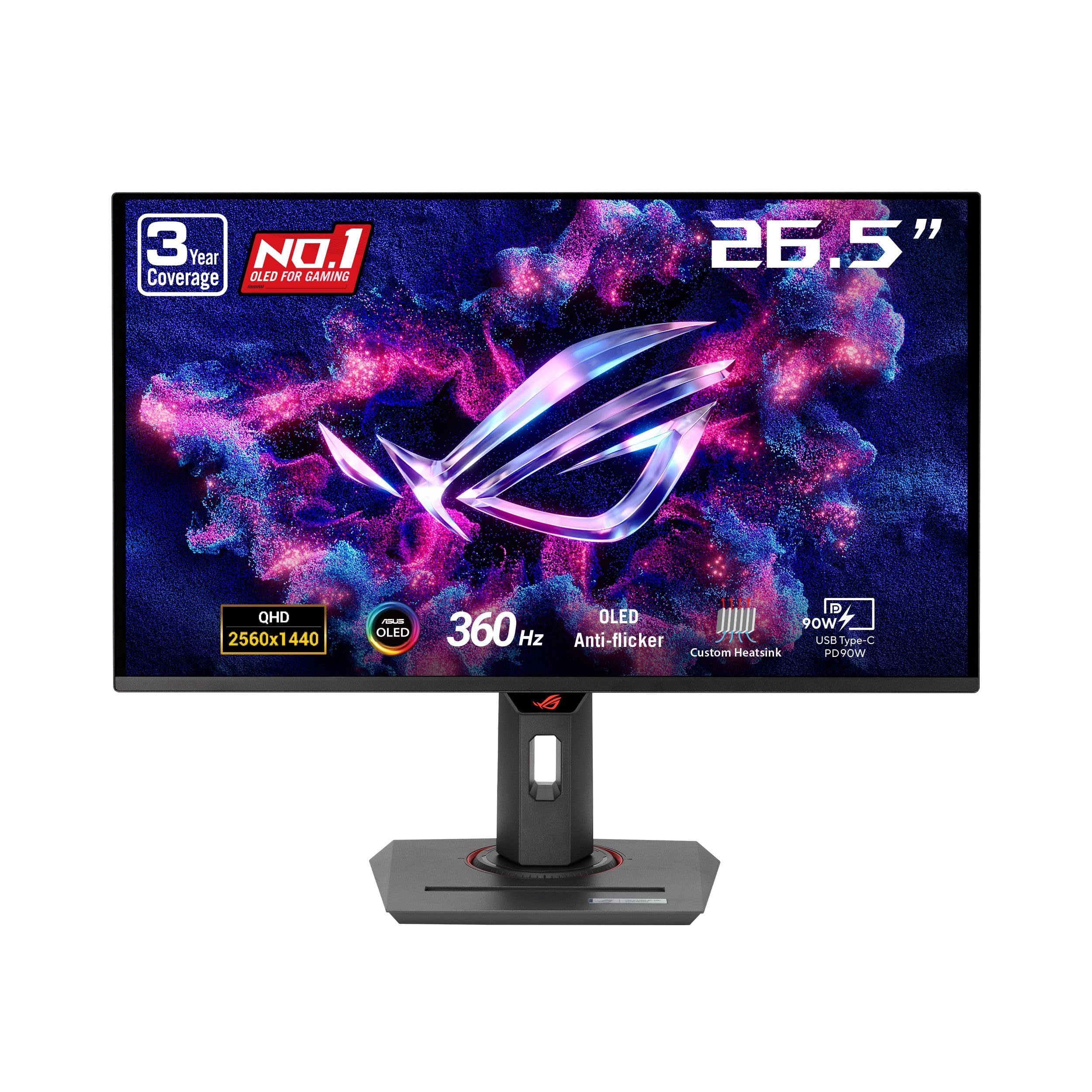
The ASUS ROG with AI features that one owner went back to after trying 4K.
This ASUS ROG Strix runs a 26.5-inch QD-OLED panel at 2560×1440 with a 360Hz refresh rate and 0.03ms response time. It’s the AI-enabled pick here, with ASUS AI Gaming features that tune visuals and performance automatically, plus a DisplayWidget Center for mouse-based settings control.
The custom heatsink and OLED Care+ reduce burn-in risk, and ROG-exclusive anti-flicker tech smooths refresh-rate fluctuations. It hits VESA DisplayHDR 400 True Black, 99% DCI-P3, true 10-bit color, and Delta E under 2—making it a serious hybrid gaming-and-content monitor.
Owners say it delivers “inky blacks” and is perfect for FPS and fast-paced titles. One buyer who tried 27-inch and 32-inch 4K monitors “scaled back down to 1440p, to this monitor,” finding the QD-OLED panel and 360Hz refresh make the better gaming experience. Text clarity is the main weakness, with workarounds available.
The Highlights
- Quality is the most-praised aspect, with 73 owners mentioning it
- Color and picture quality each get 43 mentions, with true blacks cited
- 360Hz refresh with 0.03ms response makes it elite for FPS
The Trade-offs
- Performance is mixed—some report random shutdowns
- Text clarity is poor, though workarounds exist
Best for: gamers who want AI-assisted tuning and are willing to pay for 360Hz smoothness.
Remember: occasional random shutdowns are reported by a minority of owners.
Understanding the Specs
Refresh Rate and Response Time
Refresh rate, in Hertz (Hz), is how many times the screen redraws each second—240Hz shows 240 frames, 360Hz shows 360. Response time, at 0.03ms on these OLEDs, is how fast a pixel changes color, which kills the ghosting trails you see on slower panels. For fast shooters, higher is smoother; for RPGs, 240Hz is already plenty.
Color Gamut and Contrast
Color gamut, like 98.5% or 99% DCI-P3, measures how much of the film industry’s color space the panel can show—higher means richer, more accurate colors. Contrast ratio, like 1,500,000:1, compares the brightest white to the darkest black; OLED’s per-pixel dimming makes blacks truly black, which is why these ratios are so extreme versus LED screens.
FAQ
What does 2K resolution mean on an OLED gaming monitor?
Is OLED burn-in still a real risk on gaming monitors?
What is the difference between QD-OLED and WOLED?
Do I need HDMI 2.1 or DisplayPort for 240Hz gaming?
Does a glossy or matte screen matter for OLED gaming?
What refresh rate is best for competitive gaming?
Can I use a 2K OLED gaming monitor for photo editing or work?
Why do I need to calibrate HDR in Windows on these monitors?
Final Thoughts: The Verdict
If you want one dependable pick, the best 2k oled gaming monitor pick is the LG 27GX704A-B because it pairs a 240Hz refresh rate with a glossy 98.5% DCI-P3 OLED (a color space that covers 98.5% of the cinema-standard palette) at a price that undercuts the premium tier while matching its speed. If you want maximum esports smoothness, the Alienware AW2725DF brings the 360Hz refresh rate that competitive players crave. And for the best value entry into QD-OLED, the Samsung G61SH is the one to reach for—just budget a few minutes for calibration.
How We Picked
We do not accept paid placement. Every pick is matched to a real buyer and a real use-case; we do not hands-on test units.
Sources & Methodology
Specifications: manufacturer listings and product documentation. Review insights: verified customer reviews, as of August 2026. Pricing: not shown on this page (it changes often); check the current price via the retailer link.
As an Amazon Associate, Gadgets Feed earns from qualifying purchases. This does not affect which products we feature.