
Buying a used laptop used to mean rolling the dice on a worn-out machine with a faded screen and a battery that lasts through one Zoom call. The market for certified refurbished business-class laptops has matured, and the savings — often 50% or more off retail — now come with genuine warranties, working batteries, and grade-A or grade-B cosmetics. The trick is knowing which models to target and which specs matter most in a pre-owned chassis.
I’m Min — the co-founder and writer behind Gadgets Feed. I spend my time deep in the refurbished laptop ecosystem, analyzing thousands of listings, grading disclosures, and benchmark data to separate the true bargains from the overpriced hand-me-downs.
Every machine reviewed below passed a filter for build quality, upgrade potential, and real-world usability. This guide is built to help you confidently pick the right 2nd hand laptop computer without wasting money on a dud.
How To Choose The Best 2nd Hand Laptop Computer
The used laptop market is a minefield of expired batteries, missing keys, and counterfeit chargers if you walk in blind. Understanding a few key pillars — chassis origin, processor generation, RAM floor, and storage type — turns this from a gamble into a strategic purchase that can outperform a brand-new budget laptop at half the price.
Prioritize Business-Class Builds
Consumer laptops (Inspiron, Pavilion, IdeaPad) are built to a price with plastic hinges and soldered RAM. Business-class lines like Dell Latitude, HP EliteBook, Lenovo ThinkPad, and Apple MacBook Pro are designed for 3-5 year enterprise deployment cycles. They use magnesium-alloy frames, hot-swappable batteries on many models, and serviceable internals. On the used market, these machines were often leased and then returned in decent condition, making them structurally superior to a consumer laptop that was used by a single owner until it broke.
CPU Generation Matters More Than Clock Speed
An 8th-gen Intel Core i5 (8350U or 8365U) will handily outpace a 7th-gen i7 in multi-threaded work because of the core count jump to four cores and eight threads. The sweet spot for a used Windows laptop in 2024 is an 8th-gen or newer Intel Core i5 or i7. For Apple Silicon, the M1 MacBook Pro is still a beast, but on the Intel side, a 2019 MacBook Pro with an 8th-gen i5 remains a capable machine — just watch for thermal paste degradation in the 13-inch chassis.
RAM and Storage: The Upgradeability Test
8GB of RAM is the absolute floor for Windows 11 and macOS Ventura. 16GB is the recommended standard. Many business laptops use SO-DIMM slots, meaning you can buy an 8GB model and upgrade later for about . SSD is non-negotiable — any used laptop still running a spinning hard drive is an instant pass. M.2 NVMe drives cost as little as for a 512GB upgrade, so prioritize machines with user-accessible storage slots over models with soldered SSDs (looking at you, Surface Laptop Go).
Battery Health: The Silent Dealbreaker
Used laptop batteries degrade. A battery reporting 80% of its original design capacity will still give you 4-6 hours of light use, but anything below 60% means you’re tethered to a wall outlet. On Windows, use a free tool like BatteryInfoView to check cycle count and wear level. Many Amazon Renewed sellers do not test batteries at all — the reviews above show dead-on-arrival batteries are the #1 complaint. If the listing doesn’t mention battery condition, ask the seller for a screenshot of the battery report before buying.
Quick Comparison
On smaller screens, swipe sideways to see the full table.
| Model | Category | Best For | Key Spec | Amazon |
|---|---|---|---|---|
| Lenovo ThinkPad L14 | Business | Best Overall Performance | Ryzen 5 PRO 7530U / 16GB RAM / 512GB SSD | Amazon |
| HP EliteBook 840 G7 | Business | Premium Build Quality | i5-10310U / 16GB RAM / 512GB NVMe | Amazon |
| Apple MacBook Pro 13″ (2019) | Premium Ultrabook | Ecosystem-Loyal Users | i5 / 8GB RAM / 256GB SSD / Retina | Amazon |
| Dell Latitude 5490 | Business | Best Value with 16GB RAM | i5-8350U / 16GB RAM / 512GB SSD | Amazon |
| Microsoft Surface Laptop Go | Ultraportable | Lightweight Touchscreen | i5-1035G1 / 16GB RAM / 256GB SSD | Amazon |
| Dell Latitude 5400 | Business | Budget Business Workhorse | i5-8365U / 8GB RAM / 256GB SSD | Amazon |
| Apple MacBook Pro 13″ (Mid 2019) | Premium Ultrabook | Second Mac at Low Cost | i5 / 8GB RAM / 256GB SSD | Amazon |
| ASUS 15.5″ Laptop | Consumer | Entry-Level Budget Pick | Celeron / 4GB RAM / 128GB SSD | Amazon |
In‑Depth Reviews
1. Lenovo ThinkPad L14 Ryzen 5 PRO 7530U
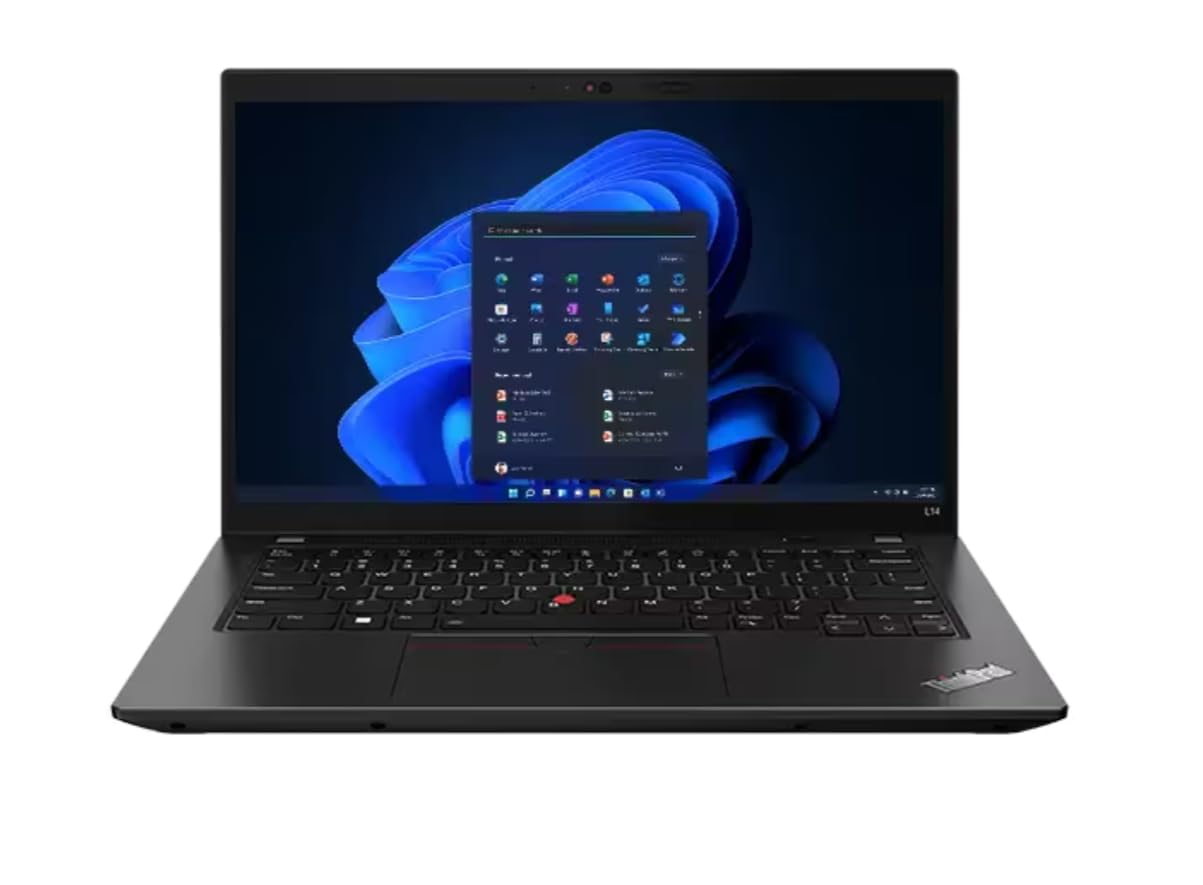
The Lenovo ThinkPad L14 Gen 4 is the outlier on this list — it’s a modern platform with a Ryzen 5 PRO 7530U processor that beats every Intel 8th-10th gen chip here by a wide margin. The 6-core, 12-thread Zen 3 architecture delivers desktop-grade multi-threading for compiling code, running multiple VMs, or editing 1080p video. With 16GB of DDR4 RAM and a 256GB NVMe SSD, this machine needs zero upgrades out of the box.
Build quality is classic ThinkPad: a spill-resistant keyboard, MIL-STD-810H certification, and a TrackPoint nub for keyboard-fanatics. The 14-inch FHD IPS panel is bright and color-accurate, and the port selection includes USB-C, HDMI 2.1 (4K@60Hz), Ethernet, and a MicroSD reader — something ultrabooks have abandoned. Buyers report units arriving in “like new” condition with battery life touching 5 hours under mixed use.
The catch is the higher price floor compared to older used machines, and the non-backlit keyboard on some configurations. If your budget allows, this is the only “future-proof” used laptop on the list — it supports WiFi 6E and Bluetooth 5.3, standards that will remain relevant for years.
Why it’s great
- Modern 6-core Ryzen PRO CPU outperforms used Intel i5/i7 options
- Full port selection: 2x USB-C, HDMI 2.1, Ethernet, SD reader
- Spill-resistant keyboard with TrackPoint
Good to know
- Premium price relative to older used machines
- Some configurations lack a backlit keyboard
2. HP EliteBook 840 G7

The HP EliteBook 840 G7 is what enterprise leasing looks like — buyers consistently report receiving units that appear brand new, with pristine aluminum chassis and zero scuffs. Inside, the 10th-gen Intel Core i5-10310U with vPro boosts to 4.8 GHz, and the 16GB of DDR4 RAM paired with a 512GB PCIe NVMe SSD qualifies this as a proper daily driver for everything from Office 365 to light photo editing in Photoshop.
HP’s EliteBook line features a 180-degree hinge, a privacy shutter for the 720p webcam, and a backlit keyboard that reviewers describe as having “crisp” key travel. The 14-inch FHD IPS display, while not touch-enabled, offers accurate color reproduction suitable for spreadsheet work and video playback. Battery reports vary, but multiple customers confirm strong performance — some seeing 6+ hours on a single charge after the refurbishment process.
The minor friction point: a handful of buyers received units that failed to boot, which is a reminder that refurbished quality control varies by seller. Look for listings from Amazon Renewed with a 90-day warranty. If you get a good unit, this is one of the best-built used Windows laptops you can buy at this price point.
Why it’s great
- Near-mint cosmetic condition on most units
- vPro support for enterprise management features
- Backlit keyboard with excellent tactile feedback
Good to know
- Some DOA units reported — warranty coverage is critical
- Non-touch display (standard FHD only)
3. Apple MacBook Pro 13″ (2019)

Apple’s 2019 MacBook Pro remains a hot choice on the used market because it offers the classic pre-Apple Silicon experience: a Retina display with True Tone (2560×1600 native resolution), the Touch Bar for creative workflow shortcuts, and Touch ID for instant login. The 8th-gen quad-core i5 is adequate for Xcode, Logic Pro, and Final Cut Pro basic editing, though the machine runs warm under prolonged load — several reviews note the fan becomes audible during extended rendering sessions.
The 16GB RAM configuration (available on some listings like this one via the “B08977P3ZX” ASIN) provides headroom for Safari tabs, Slack, and music production software without hitting memory pressure. The 256GB SSD is on the small side, but external Thunderbolt 3 storage is easy to add. Battery life from refurb units is reported at 8-10 hours for light use, matching Apple’s original claims.
The biggest risk with used Intel MacBooks is the butterfly keyboard. The 2019 model includes the third-generation butterfly mechanism with a silicone membrane to reduce dust ingress, but failures still occur. Check the listing for a “keyboard service program” mention, and prepare for a potentially expensive repair if keys start double-typing. For the price, this is a solid entry point into the macOS ecosystem if you don’t mind the Intel trade-offs.
Why it’s great
- Excellent Retina display with True Tone color accuracy
- Touch ID and Touch Bar add real workflow convenience
- Good battery life for consumption and office work
Good to know
- Butterfly keyboard is prone to failure over time
- Runs hot and loud under sustained load
4. Dell Latitude 5490

The Dell Latitude 5490 is the epitome of the “buy a corporate workhorse” strategy. For a very low price, you get an 8th-gen Intel Core i5-8350U, 16GB of RAM, and a 512GB SSD — specs that still handle Windows 11, Office, and browser-based workflows without any noticeable lag. The 14-inch 1920×1080 display is standard LCD, not IPS on all configurations, so viewing angles are narrower, but for a productivity machine, it does the job.
Buyers praise this machine for its reliability under Linux — several reviewers have successfully installed Linux Mint and Ubuntu, with all drivers working out of the box. The laptop weighs a bit over 3.5 pounds, which is fine for a backpack, and the port selection includes USB-C, HDMI, and an Ethernet jack. The battery on this model is user-replaceable, a dying breed in modern laptops, meaning a replacement can restore full 5-hour runtime.
The downsides: some units ship without a backlit keyboard despite the listing claiming otherwise, and the charging port can be finicky. A small number of buyers report DOA units where the laptop won’t charge at all. Given the price, the risk is manageable, but prepare to test immediately upon arrival.
Why it’s great
- Generous 16GB RAM and 512GB SSD for the price
- User-replaceable battery extends usable life
- Works flawlessly with Linux distributions
Good to know
- Non-IPS display with narrow viewing angles on some models
- Backlit keyboard not guaranteed despite listing claims
5. Microsoft Surface Laptop Go
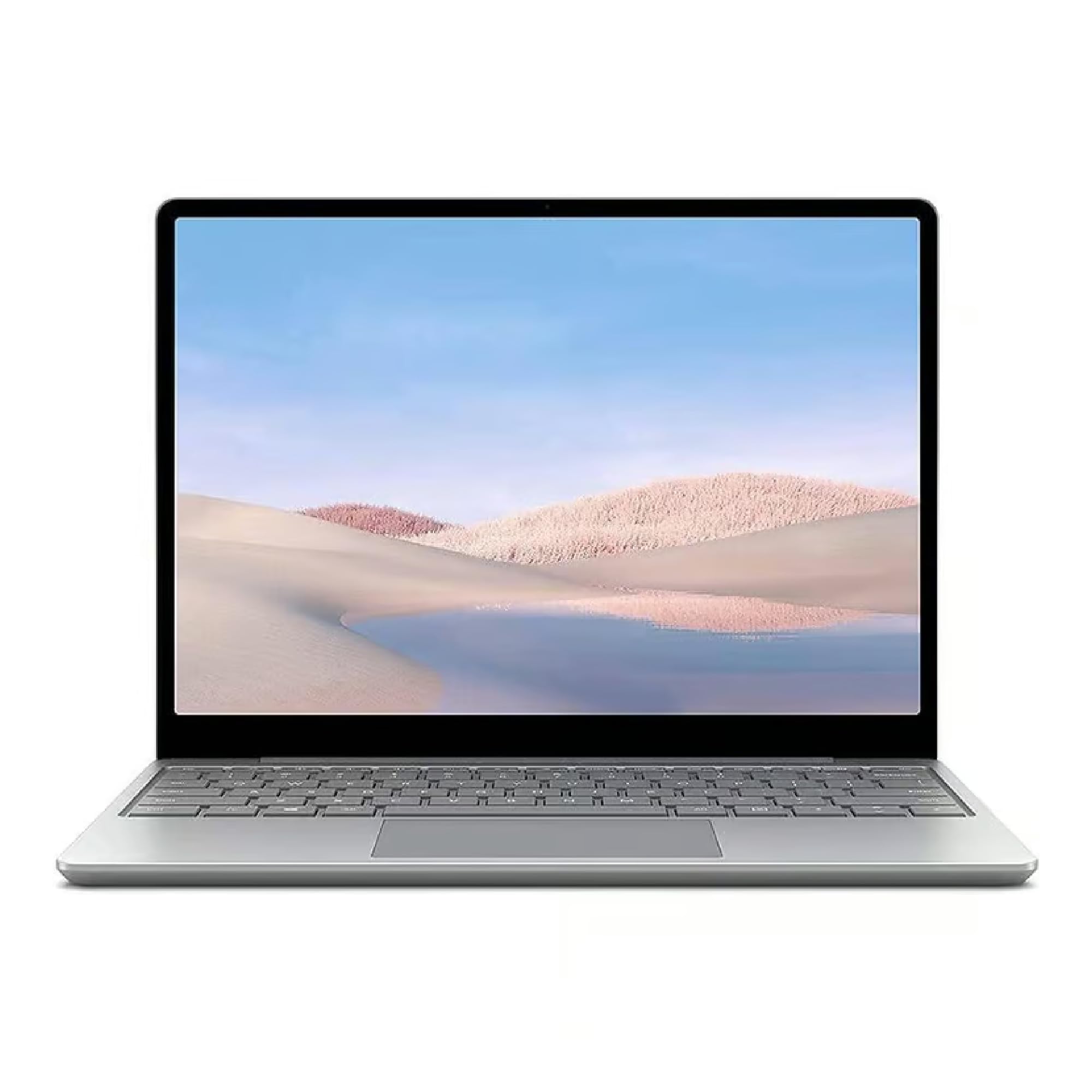
The Surface Laptop Go is Microsoft’s take on a budget ultraportable, and in the renewed market, it offers something unique: a 12.4-inch PixelSense touchscreen display with a 3:2 aspect ratio that gives you more vertical screen real estate for reading documents and browsing. The 1536×1024 resolution is not Retina, but for the price, the touch capability and thin form factor (2.4 pounds) make it a compelling choice for students and on-the-go workers.
The key differentiator here is the 16GB RAM configuration — most Surface Laptop Go listings come with 8GB. With 16GB, the Intel Core i5-1035G1 can handle multitasking without choking, and the 256GB SSD is adequate for cloud-centric users. The Alcantara palm rest (on Platinum models) feels premium, and the fingerprint power button works reliably with Windows Hello.
The trade-offs are significant. The display resolution is low by modern standards (148 PPI), and the design uses a proprietary Surface Connect charger — no USB-C charging support. The non-serviceable SSD and RAM mean you’re stuck with whatever configuration you buy. If portability and touch input matter more than upgrade potential, this is a capable secondary machine.
Why it’s great
- Ultra-light 2.4 lb design with touchscreen
- 3:2 aspect ratio display for productivity
- 16GB RAM version handles multitasking well
Good to know
- Low-resolution display (1536×1024) with 148 PPI
- Non-upgradeable RAM and SSD
- Proprietary charger instead of USB-C
6. Dell Latitude 5400

The Dell Latitude 5400 is the entry-level business machine that gets the fundamentals right. The Core i5-8365U is a 4-core, 8-thread chip that boosts to 4.1 GHz, and combined with 8GB of RAM and a 256GB SSD, this machine boots Windows 11 Pro in under 10 seconds. The 14-inch FHD display is LCD but adequate for productivity, and the chassis features a privacy shutter for the webcam — a nice touch for remote workers.
Buyer feedback highlights a split in quality control: many received laptops that look and run like new, with “great value” and “sturdy” being common refrains. A notable minority, however, encountered dead batteries, faulty trackpads, or unresponsive keys, which speaks to the inconsistency of entry-level refurbishment. The unit runs cool and quiet during office tasks, and the keyboard is reported to have “tactile feedback” that exceeds typical budget machines.
At this price, you are gambling more on the specific unit’s battery health and component condition. If you get a good one, the Latitude 5400 is an absolute steal. If you get a dud, the Amazon Renewed 90-day return policy is your safety net. Consider spending the savings on a replacement battery (-50) ahead of time.
Why it’s great
- Very low price for a business-class core i5 laptop
- Cool and quiet operation under light load
- Includes privacy shutter for the webcam
Good to know
- Inconsistent refurb quality — battery and keyboard issues reported
- Only 8GB RAM and a standard LCD display
7. Apple MacBook Pro 13″ (Mid 2019) – Renewed

This is the same 2019 MacBook Pro chassis as the earlier review (ASIN B08977P3ZX), but listed under a different ASIN (B08376JQLJ) with an 8GB RAM and 256GB SSD configuration. The 1.4GHz quad-core i5 is slightly lower-clocked than the 2.4GHz version, but in real-world use (web browsing, email, light coding, music production with GarageBand), the difference is negligible. The Retina display remains the standout feature — 227 PPI with P3 wide color is still gorgeous by any standard.
Reviewers who received good units report the machine “looks brand new” and works perfectly for school and light creative work. The battery on well-refurbished examples holds 8-10 hours. The 8GB RAM limit means you’ll hit memory pressure sooner with multiple apps open — expect to manage browser tabs carefully. The Touch Bar and Touch ID are present, and the Force Touch trackpad is still the best in the business.
The same caveats apply: the butterfly keyboard is a ticking clock, and the Intel chip runs hot. If you can stretch your budget to 16GB or an M1 MacBook Air, you’ll get a better long-term experience. For a secondary or budget macOS machine, this fills the role competently.
Why it’s great
- Stunning Retina display with P3 wide color
- Compact and well-built aluminum chassis
- Touch ID and excellent trackpad experience
Good to know
- Only 8GB RAM limits multitasking
- Butterfly keyboard failure risk remains
- Intel chip runs hot under load
8. ASUS 15.5″ FHD Laptop (Intel Celeron)

This ASUS is the definition of a rock-bottom budget machine: an Intel Celeron N4020 (2-core, up to 2.76 GHz), 4GB of LPDDR4 RAM, and a 128GB eMMC SSD. It will run Windows 11, but just barely. Expect slow boot times (30+ seconds), stuttering in web browsers with more than five tabs, and near-uselessness for anything beyond basic word processing, email, and YouTube. The 15.5-inch FHD display is genuinely decent for the price — large, bright enough, and 1920×1080 native resolution.
Buyer reviews confirm the trade-offs: one reviewer called it “worth the price to get refurbished” and reported good cosmetic condition. Another, however, found it “extremely slow and buggy,” with WiFi connectivity issues and insufficient storage for game downloads. The 4GB RAM is the real bottleneck — Windows 11 consumes ~3GB at idle, leaving almost nothing for apps. Upgrading the RAM (if possible) and replacing the storage with a larger SSD would help, but this is a machine best suited for a specific, low-demand use case like running a single Windows application in a garage or workshop.
If your budget forces you to the absolute bottom of the market, this ASUS is functional. If you can save an extra -50, the Dell Latitude 5400 is a dramatically better experience in every measurable way.
Why it’s great
- Very low entry price for a full Windows laptop
- Decent 15.5-inch FHD display
- Lightweight and well-built for a consumer chassis
Good to know
- Celeron processor and 4GB RAM are too slow for multitasking
- 128GB eMMC storage is inadequate for modern apps
- WiFi connectivity issues reported after updates
FAQ
What is the difference between “”Renewed”” and “”Used”” on Amazon for laptops?
How can I check the battery health of a used laptop before buying?
Is it safe to buy a used Intel MacBook Pro in 2024?
Can I upgrade the RAM and storage on a used business laptop?
What is the sweet spot price for a used laptop that will last 2-3 more years?
Final Thoughts: The Verdict
For most users, the 2nd hand laptop computer winner is the Lenovo ThinkPad L14 because its Ryzen 5 PRO processor and 16GB RAM configuration offer modern performance that will stay relevant for years, all while retaining the legendary ThinkPad durability and upgrade potential. If you want a premium build with a backlit keyboard and a sleek all-metal chassis, grab the HP EliteBook 840 G7. And for the best value-to-specs ratio on a tight budget, nothing beats the Dell Latitude 5490 — just be prepared to test the unit immediately upon arrival.