
Our readers keep the lights on and my morning glass full of iced black tea. As an Amazon Associate, I earn from qualifying purchases.
If your computer takes a minute to boot up or games stutter while loading a level, the drive inside is the bottleneck. A fast solid state drive is the single biggest upgrade you can make to a sluggish PC or laptop, and a 2TB capacity gives you room for your operating system, programs, games, and files without running out of space. The right one will make your machine feel brand new in a single swap.
I’m Min — the co-founder and writer behind Gadgets Feed. This guide is built by comparing the manufacturers’ published specifications and the patterns across verified customer reviews, so you get each pick’s real strengths and trade-offs instead of marketing spin.
Whether you are upgrading an old desktop or building a new rig, finding the best 2tb solid state drive comes down to matching the speed and form factor to what your system supports.
How To Choose The Best 2TB Solid State Drive
The most important decision you will make is picking the right connector for your system. A SATA drive fits almost any computer made in the last ten years and is the easiest drop-in upgrade. An NVMe drive, which plugs into an M.2 slot on your motherboard, runs many times faster. Check your system’s manual or open your case to see if you have an M.2 slot before you buy.
Understand the speed tiers
SATA III drives top out at about 550 MB/s. That is still a massive jump over a mechanical hard drive — fast enough for boot times under 15 seconds. NVMe Gen 4 drives run at 6000 to 7450 MB/s, so they are ideal for moving huge video files or loading modern games quickly. The catch is you need a motherboard that supports Gen 4 to get those speeds.
Know your NAND type
Most 2TB drives use either TLC (Triple-Level Cell) or QLC (Quad-Level Cell) NAND flash memory. TLC drives are faster and last longer — they handle heavy writes better over years of use, making them a better pick for an operating system drive. QLC drives are cheaper and fine for bulk storage like game installs or media libraries where you write once and read often.
Check for a heat sink
High-speed NVMe drives can get hot during sustained transfers, triggering a slowdown. Some drives include a graphene or aluminum heat sink to keep things cool. If your motherboard already has a heat sink built in, you do not need one on the drive itself.
Quick Comparison
On smaller screens, swipe sideways to see the full table.
| Model | Category | Best For | Key Spec | Amazon |
|---|---|---|---|---|
| Samsung 990 EVO Plus | NVMe Gen 5 Ready | High-end gaming & content creation | 7,250 MB/s read | Amazon |
| BIWIN Black Opal NV7400 | NVMe Gen 4 | Best overall performance | 7,450 MB/s read | $289.99Amazon |
| SABRENT Rocket 4 | NVMe Gen 4 | High TBW endurance | 7,450 MB/s read | Amazon |
| WD Blue SN5100 | NVMe Gen 4 | Everyday reliable speed | 7,100 MB/s read | Amazon |
| Kingston NV3 | NVMe Gen 4 | Value NVMe upgrade | 6,000 MB/s read | Amazon |
| Crucial BX500 | SATA III | Old laptop upgrade | 540 MB/s read | Amazon |
| TEAMGROUP T-Force Vulcan Z | SATA III | Budget SATA storage | 500 MB/s read | Amazon |
In‑Depth Reviews
1. Samsung 990 EVO Plus 2TB

7,250 MB/s sequential reads make the Samsung 990 EVO Plus 2TB the top pick for power users who need maximum transfer speeds today and PCIe Gen 5×2 compatibility for future systems. Its sequential writes hit 6,300 MB/s, moving a 100GB file in about two minutes instead of over 15 on an old SATA drive; buyers report boot times drop from roughly 25 seconds to under 8, and games like Cyberpunk 2077 load in about 9 seconds compared to over 30.
Samsung’s Intelligent TurboWrite 2.0 cache speeds up large file transfers, while Host Memory Buffer (HMB) uses a small portion of system RAM instead of requiring its own DRAM chip, keeping performance steady under sustained workloads. A nickel-coated controller helps it run cooler and draw less power than comparable drives.
The one thing to know is that it does not come with a heat sink, so you will need to rely on your motherboard’s built-in M.2 heat sink. For a drive this fast that also supports both PCIe Gen 4×4 and Gen 5×2 for future-proofing, it delivers unmatched speed and reliability in one package.
Why it’s great
- Blazing 7,250 MB/s read speed makes boot times drop under 8 seconds
- Future-proof PCIe Gen 5×2 support means it will work in newer motherboards
- Excellent power efficiency and thermal control from the nickel-coated controller
Good to know
- No included heat sink — you need a motherboard M.2 heatsink
- No dedicated DRAM chip (relies on HMB technology instead)
2. BIWIN Black Opal NV7400 2TB

Against the top-pick Samsung, the BIWIN Black Opal NV7400 matches its Gen 4 speed with a read speed of 7,450 MB/s and a write speed of 6,500 MB/s — actually ahead of the Samsung’s 7,250 MB/s — while costing significantly less. Where the Samsung edges ahead on brand trust, the BIWIN delivers identical raw performance for a lower price, making loading times and file transfers virtually indistinguishable from drives that cost much more.
It includes a 0.5mm graphene-aluminum heat sink in the box to prevent overheating, and owners mention it runs at a consistent 42 degrees Celsius when used as an operating system drive. The drive uses 3D TLC NAND flash and a power management IC (PMIC) that improves power efficiency. A reviewer using it with a 9070XT graphics card notes fast file extraction and unzipping, and another says it works perfectly with a PS5 with zero issues.
The free Biwin Intelligence management software lets you run performance tests, migrate data, and update firmware. If you want the same Gen 4 speed as the most expensive drives but prefer to keep more money in your pocket, choose this over the top pick for the stronger value.
Where it shines
- Fastest in class at 7,450 MB/s read and 6,500 MB/s write
- Includes a graphene-aluminum heat sink to keep temps low
- Great compatibility with PS5 gaming consoles
Worth noting
- Newer brand compared to Samsung or WD, so long-term track record is shorter
- No dedicated DRAM chip (relies on HMB technology)
3. SABRENT Rocket 4 2TB

If you plan to write a huge amount of data to your drive over its lifetime — like using it as a cache drive in a NAS (a home network storage box) or routinely moving hundreds of gigabytes — the SABRENT Rocket 4 is the one to grab. It delivers the same 7,450 MB/s read and 6,400 MB/s write speeds as the BIWIN, but its claim to fame is a high TBW (Total Bytes Written) rating, which is the measure of how much data you can write to the drive before it wears out. A buyer notes, “I bought it because of the high tbw rating, hope it works for a good while.”
The Rocket 4 also pushes up to 1000K/950K random IOPS (Input/Output Operations Per Second, which tells you how quickly it handles many small tasks like opening apps or loading game assets) while generating minimal heat. Its single-sided M.2 2280 design means it fits in slim laptops and the Sony PS5 without any clearance issues. Another reviewer says it works perfectly and is “easy to install” for a straightforward upgrade.
A copper heat sink label helps with heat dissipation, though you might still want a motherboard heat sink for sustained heavy transfers. For a drive that balances top-tier speed with the endurance to handle constant rewriting, the SABRENT Rocket 4 leads the field.
What stands out
- High TBW endurance rating built for heavy workloads like NAS caching
- Up to 7,450 MB/s read and 6,400 MB/s write for fast transfers
- Single-sided design fits PS5 and slim laptops without worry
The trade-offs
- Copper heat sink is thin — some users add a motherboard heat sink for extra cooling
- Price sits in the premium tier alongside Samsung
4. WD Blue SN5100 2TB
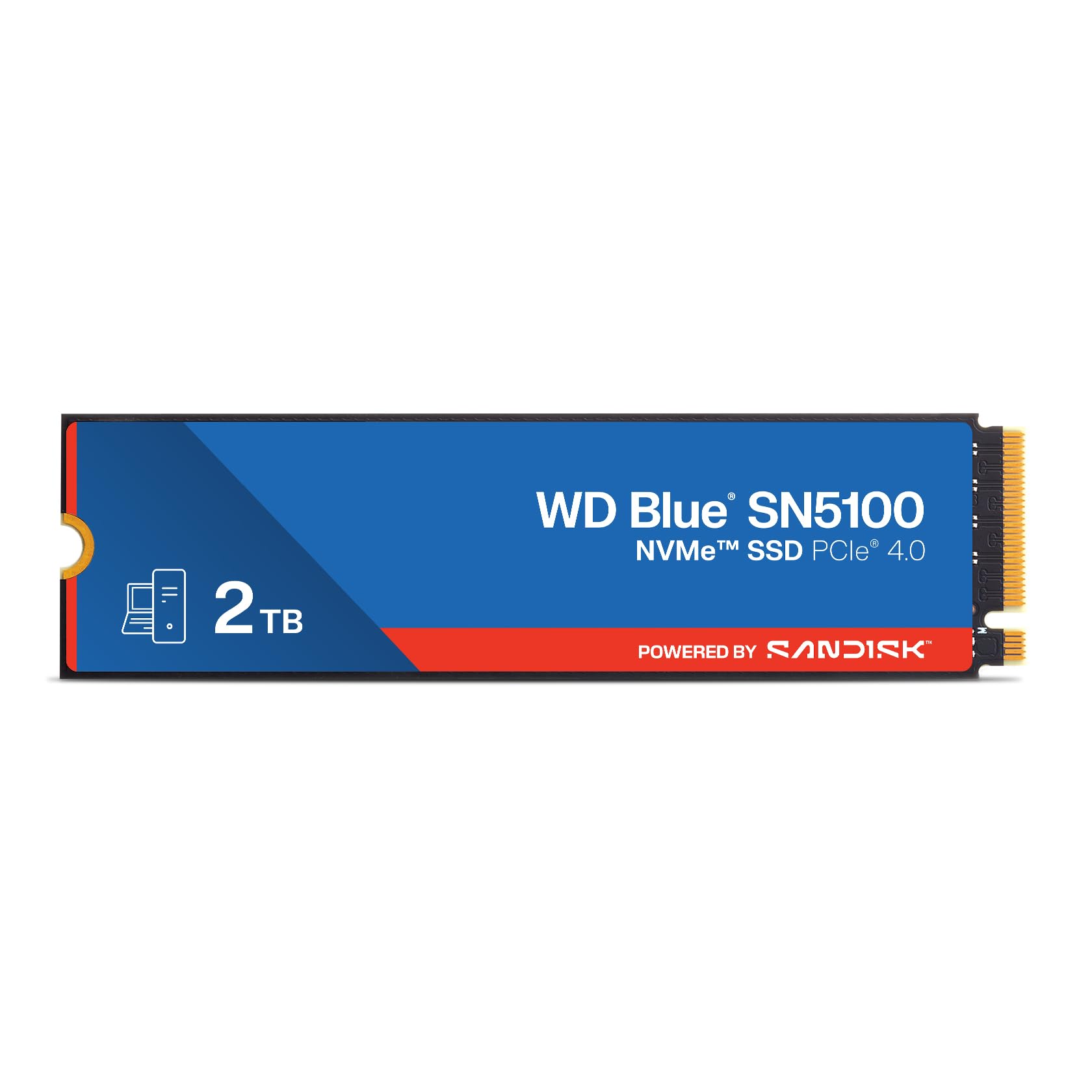
The single number that matters most in this category is sequential read speed, and the WD Blue SN5100 hits up to 7,100 MB/s — about 30% faster than the previous generation WD Blue drive. That is still more than fast enough for any professional workload, from 4K video editing to compiling code. It is a tier slightly below the 7,450 MB/s leaders, but in real use you will not notice the difference unless you are running benchmarks.
Customers note it is “cheap, easy, no nonsense” and that it provides “very fast boot up.” The drive uses Sandisk 3D CBA NAND technology (a memory type that stacks cells vertically for higher density and reliability) and nCache 4.0 technology (a smart write cache that speeds up copying large folders). You also get free access to Acronis True Image software for data migration, which makes cloning your old drive simple.
One buyer mentions they needed to purchase separate screws and spacers to mount the SSD to their motherboard — so check what your system includes. At its price point, the SN5100 delivers reliable everyday Gen 4 performance without the premium mark-up of the flagship models, making it a strong mid-range value choice.
The upsides
- Fast 7,100 MB/s read speed at a more accessible price than top-tier rivals
- Sandisk 5-year limited warranty adds long-term peace of mind
- Acronis True Image cloning software makes migration easy
Keep in mind
- Mounting screws are not always included in the box
- No built-in heat sink — plan to use a motherboard heatsink
5. Kingston NV3 2TB

The Kingston NV3 is the most affordable NVMe drive on this list, yet it still delivers Gen 4 speeds up to 6,000 MB/s — over ten times faster than a SATA drive. It uses PCIe Gen 4×4 (a four-lane interface that provides enough bandwidth for serious workloads) and 3D TLC NAND flash for reliable performance. A reviewer who installed it in a Mac Studio via a hub says it is “everything I wanted it to be. No nonsense. Fast. Reliable. Decently priced.”
You trade some top-end speed compared to the 7,250 MB/s or 7,450 MB/s drives, but for most people the difference between 6,000 MB/s and 7,450 MB/s is not noticeable in everyday boot times or game loading. One reviewer noted the NV3 was “over 2x faster” than their original Thinkpad drive, and commented on its simple installation and stable operation. It also keeps things cool and runs quietly, even under sustained loads.
The downside is that at this price point you are getting a Gen 4 drive that is slower than the competition, but if your motherboard only supports Gen 4 or you are upgrading from a SATA drive, the Kingston NV3 delivers a massive improvement for the lowest cost. It is perfect for budget-conscious builders who still want modern NVMe performance.
Why we’d pick it
- Best price-to-performance ratio among NVMe drives reviewed here
- 6,000 MB/s read speed still provides fast boots and quick app loading
- Runs cool and quiet, works in external hubs like the Mac Studio
A few caveats
- Slower than flagship Gen 4 drives (6,000 vs 7,450 MB/s)
- No data cloning software included in the box
6. Crucial BX500 2TB

If your computer does not have an M.2 slot — many laptops from before 2018 and some budget desktops — the Crucial BX500 is the best SATA III drive you can buy. It runs at up to 540 MB/s read speed, which is about three times faster than a typical hard drive, so your system will boot in seconds instead of minutes. It is also 45 times more energy efficient than a mechanical hard drive, which directly improves battery life on a laptop.
Reviewers point out boot times under 15 seconds after the swap, and one reviewer called it “giving my 2018 laptop Main Character energy.” The drive uses Micron 3D NAND (a proven memory technology from Crucial’s parent company, which has been making memory for 40 years) and comes with a 3-year limited warranty. It runs silently and produces very little heat during normal use, though it can get warm during large file transfers.
The trade-off is that SATA III will never match the speed of an NVMe drive — but if your system physically cannot take an M.2 drive, that comparison is irrelevant. For anyone stuck with an old hard drive who wants a massive, affordable performance boost, the BX500 is the simplest drop-in upgrade you can make, though its SATA III interface remains its one speed limitation.
Strong points
- Huge upgrade over a mechanical HDD with boot times under 15 seconds
- 45x more energy efficient than a hard drive, improving laptop battery life
- From Crucial/Micron, a trusted brand with a 3-year warranty
Before you buy
- Slowest option here at 540 MB/s — not suitable for heavy content creation
- Can run warm during sustained large file transfers
7. TEAMGROUP T-Force Vulcan Z 2TB

The TEAMGROUP T-Force Vulcan Z is the most budget-friendly SATA drive here, making it a good entry point if you need a 2TB storage upgrade for the lowest possible cost. It is rated for sequential read speeds up to 550 MB/s and write speeds up to 470 MB/s, which is fast enough to noticeably improve an older system. One buyer used four of these in a media server and reports they are “still running strong after 3 years” with plenty of room for movies and TV shows.
The honest trade-off with this drive is that some shoppers say the actual speed falls short of the advertised rating. One reviewer measured read speeds of 402 MB/s and write speeds of 343 MB/s — a 20% drop from the advertised numbers — and noted that the drive uses QLC NAND (Quad-Level Cell flash), which is slower and less durable than TLC. Another buyer who used it as a replacement for a 500GB HDD found the boot speed and application performance to be “great,” so mileage varies.
This drive shines for one specific use case: bulk media storage in a secondary slot or external enclosure where speed is not critical but capacity and low cost are. If you need a 2TB drive solely for game installs or a movie collection, and you are on a tight budget, the T-Force Vulcan Z gets the job done while staying affordable. The one clear reason to choose it is that it offers the lowest price for a 2TB SATA SSD, making it the best option for budget-focused bulk storage.
What we like
- Very low price for a 2TB capacity — great for media storage
- Stable, no thermal issues according to long-term user reports
- Easy drop-in upgrade for any system with a SATA port
The downsides
- Real-world speeds can be 20% lower than advertised (some units)
- Uses QLC NAND, which is slower and less durable than TLC
Understanding the Specs
Sequential Read/Write Speed
This is the headline number you see on the box — measured in MB/s (megabytes per second). It tells you how fast the drive can read or write one large file, like a movie or a game installer. A drive rated at 7,450 MB/s will copy a 4K movie in under a second, while a SATA drive at 540 MB/s will take about 7 seconds. Your actual speed depends on the files and your motherboard’s PCIe version.
NAND Type (TLC vs QLC)
NAND is the memory chip that stores your data. TLC (Triple-Level Cell) stores three bits per cell and is faster and lasts longer — about 3,000 program/erase cycles per cell. QLC (Quad-Level Cell) stores four bits per cell, making it cheaper but giving it a shorter lifespan of roughly 1,000 cycles. For an operating system drive, pick TLC. For a game or media drive, QLC works fine.
Form Factor (M.2 vs 2.5-inch)
M.2 drives are small sticks that plug directly into the motherboard — lighter, faster, and neater. 2.5-inch drives are the same shape as old laptop hard drives and connect via a SATA cable and power wire. Check whether your computer has an M.2 slot (look for a narrow slot about 22mm wide near the CPU or chipset) before buying an M.2 drive; if it does not, a 2.5-inch SATA drive is your only option.
DRAM vs DRAM-less (HMB)
DRAM (Dynamic Random-Access Memory) on a drive acts as a temporary map of where all your data is stored, speeding up file access. DRAM-less drives skip this chip to cut cost and rely on HMB (Host Memory Buffer), which borrows a small amount of your system’s main RAM as a workaround. For most everyday use, HMB works just fine — the performance difference is small. Heavy video editors doing constant big file transfers may benefit from a drive with dedicated DRAM.
FAQ
Will a 2TB NVMe drive work in my PS5 or Xbox Series X?
Do I need a heat sink for my NVMe solid state drive?
Can I use a 2.5-inch SATA SSD and an NVMe drive together?
Final Thoughts: The Verdict
If you want one dependable pick, the 2tb solid state drive winner is the BIWIN Black Opal NV7400 because it offers the fastest Gen 4 speeds you can buy at a price that undercuts the premium brands, plus it includes a heat sink. If you want the absolute best endurance for heavy daily writing, grab the SABRENT Rocket 4. And for an old laptop that only supports SATA, the standout is the Crucial BX500 as a simple drop-in upgrade that makes the machine feel years younger.
Product prices and availability are accurate as of the date/time indicated and are subject to change. Any price and availability information displayed on Amazon at the time of purchase will apply to the purchase of this product. As an Amazon Associate I earn from qualifying purchases.
CERTAIN CONTENT THAT APPEARS ON THIS SITE COMES FROM AMAZON. THIS CONTENT IS PROVIDED "AS IS" AND IS SUBJECT TO CHANGE OR REMOVAL AT ANY TIME.
Amazon and the Amazon logo are trademarks of Amazon.com, Inc. or its affiliates.