
Our readers keep the lights on and my morning glass full of iced black tea. As an Amazon Associate, I earn from qualifying purchases.
Specs are compiled from manufacturer listings and verified buyer reviews and can change over time — please confirm the key details on the product page before buying.
You take a great shot on your phone. But it stays trapped in the camera roll — a 2×3 print you can actually hold, stick in a journal, or hand to a friend changes everything. The best 2×3 photo printer for you is the one that delivers true-to-life color fast enough to keep the moment alive, without a fussy setup that kills the fun before the first photo comes out.
I’m Min — the founder and writer behind Gadgets Feed. This guide is built by comparing the manufacturers’ published specifications and the patterns across verified customer reviews, so you get each pick’s real strengths and trade-offs instead of marketing spin.
Here are seven of the best options on the market right now for pocket-sized instant printing. This guide to the 2×3 photo printer category breaks down what each model actually delivers in print quality, speed, portability, and long-term running costs so you can pick the one that truly fits your photo-sharing life.
Quick Picks
- Liene Pearl N200 Pro Portable AI Photo Printer — Best Overall
- Nelko Photo Printer, PP01 Mini Color Instant Inkjet Printer — Value Pick
- Polaroid Hi-Print 2nd Generation (Standard Bundle) — Reliable Dye-Sub
- Fujifilm INSTAX Mini Link 3 Smartphone Printer — Classic Film Feel
- The Imaging World Polaroid Hi-Print (40 Sheets Bundle) — Premium Bundle
- Kodak Step Instant Smartphone Photo Printer (75 Sheets Bundle) — Budget Champion
- HP Sprocket Portable 2×3 Instant Photo Printer (Black Noir) Zink Paper Bundle — ZINK with AR Flair
How To Choose The Best 2X3 Photo Printer
Picking your first pocket photo printer usually depends on three things: the print technology, the editing app, and how much you want to spend on paper and cartridges over the long haul. Here is what to watch for before you click the button.
Print Technology — Dye-Sub vs. ZINK
The biggest split in this category is between dye-sublimation (dye-sub) and ZINK (Zero Ink) technology. Dye-sub printers like the Polaroid Hi-Print and Liene Pearl use heat to transfer dye onto the paper layer by layer. That process delivers richer, more accurate colors and a protective coating that resists water and fingerprints. ZINK printers, like the HP Sprocket and Kodak Step, have the color crystals embedded directly into the paper — heat activates them, so you never buy a separate ink cartridge. ZINK is simpler and cheaper up front, but many buyers report slightly muted colors or a color cast (the HP Sprocket users mention a common orange tint). If true-to-life color is your priority, dye-sub prints win.
Print Size and Paper Cost
Every printer in this list outputs 2×3 inch prints, but the way you buy refills varies enormously. Some use proprietary paper-and-cartridge packs (dye-sub), while others only require new paper packs (ZINK). The Nelko PP01 prints about 80 photos per ink cartridge, which brings the cost per print way down compared to bundles that yield only 10 or 20 prints per pack. Before you commit, check the included starter paper count — some bundles come with only 10 sheets, which disappears at a party fast.
App Quality and Editing Features
Every 2×3 photo printer requires the companion app to print — these are not standalone printers. The app experience directly determines how much you actually use the thing. Look for an app that offers filters, frames, text, collages, and, in the case of the Liene Pearl, AI-powered background removal and artistic style transfers. Buyers consistently rate the Kodak Step app as fun and intuitive, while some Polaroid Hi-Print users note the app works reliably without crashes. Do not underestimate a bad app: a clunky interface turns a quick print into a chore.
Battery Life and Portability
Since these printers are meant to travel, battery life is a real decider. The Fujifilm INSTAX Mini Link 3 offers about 20 exposures per charge (standard Instax film count), while the Liene Pearl N200 Pro prints about 27 stickers on a full charge. The Kodak Step claims 25 photos per charge. Keep in mind that capacity drops as the battery ages, so a model that prints 25 photos new might only do 15 after a year of regular use. Weight also matters — the Nelko PP01 weighs just 0.6 pounds and the Liene Pearl is 340 grams, both pocket-friendly, but the Fujifilm is a bit more substantial at 0.44 kg.
Quick Comparison
On smaller screens, swipe sideways to see the full table.
| Model | Best For | Print Technology | Print Resolution | Battery Life (prints) | Amazon |
|---|---|---|---|---|---|
| Nelko PP01 | Budget-friendly high volume | Inkjet | 600 DPI | ~80 per cartridge | $69.99$79.99Amazon |
| Polaroid Hi-Print | Reliable dye-sub quality | Dye-Sub | — | ~10 per cart | $88.39$109.99Amazon |
| HP Sprocket | ZINK simplicity with AR fun | ZINK | — | ~20 sheets | $104.99Amazon |
| Liene Pearl N200 Pro | Best color accuracy | Dye-Sub | — | 27 stickers | $119.99Amazon |
| Kodak Step | Classic ZINK in a compact shell | ZINK | — | 25 photos | $129.99Amazon |
| Fujifilm INSTAX Mini Link 3 | Classic film look + AR effects | Instax Film | 600 dpi | 20 exposures | $134.95Amazon |
| Polaroid Hi-Print (Bundle) | Extra paper included from start | Dye-Sub | — | ~10 per cart | $139.99Amazon |
In‑Depth Reviews
1. Liene Pearl N200 Pro Portable AI Photo Printer

The pocket printer that makes ZINK look washed out with true-to-original color.
If you care most about color accuracy, this is the one to beat. The Liene Pearl N200 Pro uses thermal dye-sublimation (a process that heats solid dye into gas and bonds it to the paper) rather than ZINK (zero-ink paper with embedded color crystals). Owners mention the prints show “superior color accuracy vs. Zink printers (muted, blue cast)” and call it “brighter, more saturated, crisper.” It prints on adhesive-backed paper that reviewers describe as thinner than ZINK paper, which means it does not bulk up your journal pages as much.
The built-in AI features in the Liene app let you transform portraits into artistic styles or remove backgrounds for custom borders, all without switching platforms. But there is a catch — the printer is slightly larger than the HP Sprocket at 5.69″D x 3.44″W x 1.16″H and 340 grams, so it is still pocketable but a bit more substantial. Also, it requires separate ink cartridges, which adds to the running cost. A full charge prints up to 27 stickers, so you can keep going through a party or a scrapbooking session without hunting for an outlet.
Color Champs
- True-to-original color accuracy that customers note is better than Kodak Step
- AI-powered background removal and artistic style transfers in the app
- Compact at 340 grams, easy to toss in a bag
Real Trade-Offs
- Slightly larger than some rivals at 5.69″D x 3.44″W x 1.16″H
- Requires separate ink cartridges — ongoing cost is higher than ZINK
- Sticker print is thin (half of ZINK), which some might find less substantial
Grab this if: color fidelity is your hill to die on — you want prints that match what you see on your phone screen, without warm casts or washed-out tones.
Look elsewhere if: you want the absolute smallest footprint or prefer the zero-cartridge simplicity of ZINK paper.
2. Nelko Photo Printer, PP01 Mini Color Instant Inkjet Printer

A budget-friendly inkjet that prints 80 photos per cartridge — the lowest cost-per-print here.
The Nelko PP01 uses advanced inkjet technology (tiny droplets of cyan, magenta, yellow, and black ink sprayed onto paper) instead of dye-sub or ZINK. That means you get 600 DPI resolution (dots per inch, a measure of sharpness — 600 DPI produces finer detail than typical 300 DPI portable printers). Each ink cartridge prints up to 80 full-color 2×3 photos on sticky-backed paper, which is far more per refill than most rivals that stop at 10 or 20. Reviewers point out the colors are “vibrant, crisp” and that the setup via the Nelko app is quick over Bluetooth.
The trade-off is that inkjet prints are not as water-resistant as dye-sub or ZINK. The first page comes out in about 60 seconds, which is in line with the rest of the category. The printer itself is small at 4.2″D x 1.69″W x 5.04″H, while the Liene Pearl is 5.69″D x 3.44″W x 1.16″H, making the Nelko a very portable option if space is tight. Just remember: you need an adapter (not included) for the USB charging cable.
High-Volume Hero
- 80 prints per ink cartridge — far more than any other sub- option
- Lightest in the roundup at 0.6 pounds, perfect for a field trip or day bag
- Simple Bluetooth pairing and a user-friendly editing app with AI features
What to Watch
- Inkjet prints are less water- and smudge-resistant than dye-sub or ZINK
- Power adapter not included — you need your own USB-A to USB-C charger
- First-time users should clean the ink cartridge head periodically to prevent clogs
Choose it for: high-volume projects like event favors, party giveaways, or school photo strips where low per-print cost matters most.
skip it if: you need water-resistant or tear-resistant prints that can survive being tossed in a bag or pocket.
3. Polaroid Hi-Print 2nd Generation (Standard Bundle)

The dependable dye-sub workhorse with zero jams reported across dozens of prints.
The Polaroid Hi-Print uses dye-sublimation (heat-activated dye transfer) to produce 2×3 prints in under 50 seconds — slightly faster than the average 60-second speed of the competition. One reviewer noted “no jams or connection issues after ~30 prints,” which is rare reliability for this category. The colors land somewhere between the ZINK and the Liene: reviewers describe the quality as “perfect color and clarity” and “professional-level color accuracy” for the small format. The paper comes in cartridges that include both the ink ribbon and adhesive-backed paper.
The catch — and it is a real one — is reliability. While most reviews are glowing, a single one-star report described a first unit jamming immediately and a replacement failing after one cartridge. This is not a pattern across all units, but it is worth noting. The battery life is average: you will want to keep it plugged in for heavy use.
Smooth Operator
- Prints in under 50 seconds — faster than most rivals
- Dye-sub produces crisp, flat photos with minimal color shift
- Shoppers say near-zero jams or connection problems during normal use
Heads Up
- Paper cartridges hold only 10 prints each, so you burn through refills fast
- Some users report units failing after a few cartridge swaps
- Battery life is modest — better kept plugged in for extended sessions
Best for: someone who wants a dependable, fast, dye-sub print with good color and does not mind the 10-sheet refill cycle.
Not for: high-volume users who will run through a cartridge in minutes and want a lower cost-per-print.
4. Fujifilm INSTAX Mini Link 3 Smartphone Printer

The only printer on this list that uses real Instax film — complete with that classic white border.
The Fujifilm INSTAX Mini Link 3 is different from everything else here. Instead of ZINK or dye-sub, it uses genuine Fujifilm INSTAX Mini instant film (the same 2×3-inch format you get from the popular cameras). The photos develop in front of your eyes after being ejected, which is a tactile experience no other model here can match. It connects via Bluetooth 5.1 (a newer standard for stable, longer-range wireless) and the app includes INSTAX AiR Studio for adding 3D AR effects — you can place a virtual object into the photo before printing. The bundle includes film packs and a microfiber cleaning cloth.
The biggest difference is cost. Each 10-shot pack of Instax film is more expensive per print than the paper-and-cartridge combos of dye-sub printers or the ZINK packs. The camera also prints about 20 photos per charge, and the initial charge takes a while. Buyers report the prints “develop better than typical Fuji film cameras” and that colors and detail are better than expected from the format. But it is not a photo-quality printer in the same sense as the Liene or Polaroid — the film look is part of the appeal.
Film Aesthetic
- Real INSTAX film with the iconic white frame — no other printer here does this
- AR effects in the app let you add 3D objects to photos before printing
- Buyers confirm colors are “great” and the app works smoothly with Photos and Google Photos
Format Reality
- Most expensive per-print cost in the group — film is pricier than paper refills
- Only about 20 prints per full charge
- Not a photo-quality printer — the film grain and look are part of the charm, not a flaw
Reach for it if: you love the nostalgic Instax film look and want the AR party trick, not pixel-perfect sharpness.
Pass if: you want the lowest per-print cost or the sharpest resolution — this is about experience, not precision.
5. The Imaging World Polaroid Hi-Print (40 Sheets Bundle)

The same reliable Polaroid dye-sub, but with 40 sheets to start.
This is essentially the same Polaroid Hi-Print printer as product 3, but packaged with 40 total sheets and a microfiber cloth. The printing is dye-sub (heat-transfer dye) with the same sub-50-second speed and the same reliable Bluetooth connection. The prints come out crisp and flat — reviewers call them “clear” and “good quality for the size.”
The caution here mirrors the standard Polaroid bundle: the cartridges hold only 10 prints each, so the bundle gives you four cartridges worth of paper. The battery is still modest — one buyer mentioned it is “poor battery life (keep plugged in).” Also, the printer “fails to capture pale yellow shades” according to one review, which could be a problem if you print lots of warm-toned photos. The dimensions are listed as 6″D x 1″W x 3″H, making it one of the slimmer options.
Better-Value Start
- 40 sheets of paper included
- Dye-sub prints in under 50 seconds — faster than average for 2×3 printers
- Adhesive backing on every print, ready for sticking in a journal
Still True
- Paper is still 10-sheet cartridges — you swap often
- Struggles with pale yellow tones, so golden-hour photos might look off
- Same battery limitation as the standard Polaroid — plan to keep it plugged in
Grab the bundle if: you already decided on the Polaroid Hi-Print and want a head start on paper so you are not buying refills on day one.
Still not for: high-volume scrapbooking — the 10-sheet cartridges mean constant reloads and a higher cost-per-print than the Nelko.
6. Kodak Step Instant Smartphone Photo Printer (75 Sheets Bundle)
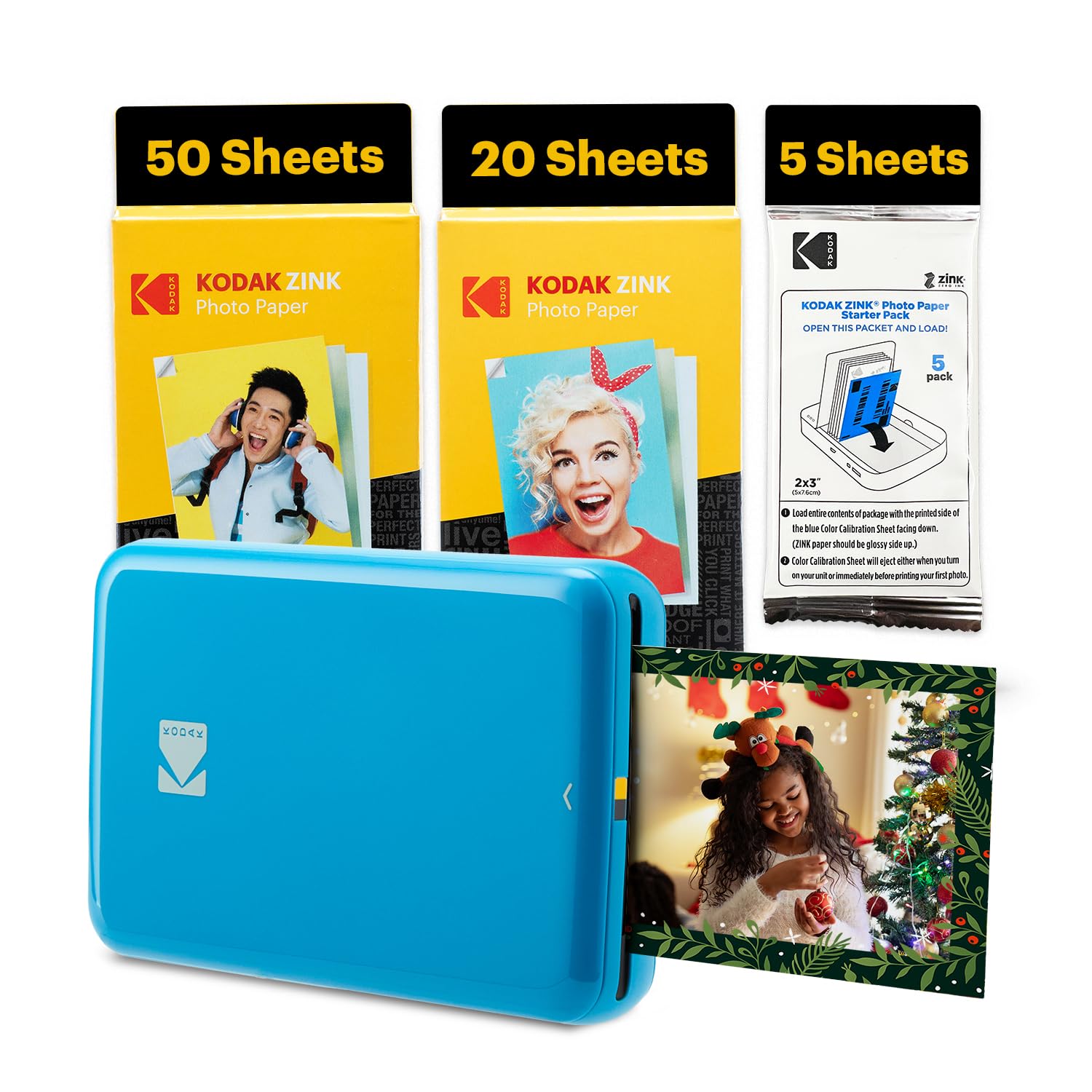
A compact ZINK printer that bundles 75 sheets so you do not run out at the first party.
The Kodak Step uses ZINK (Zero Ink) technology — the color crystals are inside the paper itself, and heat activates them. That means you never buy a cartridge; you just replace the paper pack. This bundle comes with 75 sheets of 2×3 adhesive-backed paper, enough for many scrapbooking sessions. The printer itself is very slim at 4.6″D x 3.5″W x 0.65″H, making it one of the flattest options. The free Kodak App offers filters, stickers, borders, and collage layouts, and prints come out in under 60 seconds.
Owners mention it is “quick and convenient” and have printed “40+ pictures” without failure. But the color accuracy is a mixed bag: one user notes that prints have a “sepia tone” and are “inconsistent color” compared to the original. Another says it is “great quality for what I paid.” The battery claims 25 photos per charge, but one user found it dies after about 20 prints in practice. It also requires paper refills every 10 prints (standard ZINK pack size), so you swap often during a heavy session.
Zero-Cartridge Life
- ZINK paper means no ink cartridges to buy, ever — just replace the paper
- 75 sheets bundled is a great value for getting started
- Ultra-slim 0.65-inch height — the flattest printer in this list
Color Compromise
- Inconsistent color reports — some buyers get a warm sepia cast
- Battery life often falls short of the claimed 25 prints
- Paper refill needed every 10 prints — constant reloading in a group setting
Pick this if: you want the simplest system — no cartridges, just paper packs — and the bundled 75 sheets give you a generous start.
pass on it if: you need reliable true-to-image colors without any warm tint creeping in.
7. HP Sprocket Portable 2×3 Instant Photo Printer (Black Noir) Zink Paper Bundle

A ZINK classic with Bluetooth 5.3 and an augmented reality mode hidden in the app.
The HP Sprocket 2nd Edition is a ZINK printer that has been around long enough to have a proven track record. Customers note it is “built to last” — one owner reported it still working after a long time with kids using it. The ZINK paper is glossy, sticky-backed, and designed to be water- and tear-resistant. The HP Sprocket app adds a unique Augmented Reality (AR) layer: you can hide a video or a message in a photo, and when someone scans it with the app, the AR content plays. It also supports shared print queues and social media hashtag printing.
The bundle includes the printer and a 20-sheet paper pack. But there is a well-documented color issue: “prints often have an orange tint/filter, possibly due to app settings,” according to buyers. This might be fixable by adjusting the app color settings, but it is a common complaint. The printer uses Bluetooth 5.3 (a newer version for wireless connectivity), but the app is listed as iPhone-only for the controller type, which is a limitation if you are on Android.
Longevity Pick
- Buyers confirm it “still around working after long time” — durable build
- Water-, smudge-, and tear-resistant ZINK paper
- AR feature lets you hide videos in prints — a unique social trick
The Orange Problem
- Common buyer complaint of an orange tint on prints that you have to dial out in settings
- App is listed as iPhone-only — Android users should double-check compatibility
- Paper pack is only 20 sheets — you will buy refills fast if you print often
Good for: iPhone users who want the AR party trick and a printer that has proven its durability over time.
Not for: anyone who wants print-ready color straight from the start — budget time for tweaking the orange cast, or choose a dye-sub model instead.
Understanding the Specs
Dye-Sub vs. ZINK
Dye-sublimation (dye-sub) uses heat to turn solid dye into a gas that bonds to the paper layer by layer. This produces richer, more accurate colors and a protective coating that resists water and fingerprints. ZINK (Zero Ink) has color crystals embedded in the paper that are activated by heat — no cartridge needed, so running cost is lower, but colors can look slightly muted or have a tint (many HP Sprocket users report an orange cast). For true-to-photo color, choose dye-sub. For simplicity and lower ongoing cost, choose ZINK.
600 DPI Resolution
DPI stands for Dots Per Inch — it measures how many tiny dots of ink or dye the printer can pack into each inch of the photo. A 600 DPI print has 600 dots per inch, while a 300 DPI print has 300 dots per inch, meaning sharper fine details like hair strands, text on signs, or distant leaves. The Nelko PP01 and Fujifilm Mini Link 3 both advertise 600 DPI, which gives you noticeably clearer prints than older 300 DPI models.
FAQ
What is the difference between ZINK and dye-sub for a 2×3 photo printer?
How many photos can a 2×3 photo printer print on a full charge?
Is the adhesive backing on 2×3 photo prints strong enough for scrapbooking?
Can I print from my Android phone with all these printers?
How long does a 2×3 photo take to print?
What happens if the ink cartridge runs out mid-print on a dye-sub printer?
Can I print without the companion app?
Do the prints fade over time?
Which 2×3 photo printer gives the best color accuracy?
Can I use third-party paper or ink cartridges with these printers?
Final Thoughts: The Verdict
For most buyers, the 2×3 photo printer winner is the Liene Pearl N200 Pro because it delivers the most accurate, vibrant colors of any pocket printer — true-to-original prints that rival professional results. If you want the lowest cost per print and the lightest device to carry around, grab the Nelko PP01. And for the classic film look and a fun AR experience at gatherings, the standout is the Fujifilm INSTAX Mini Link 3.
How We Picked
We do not accept paid placement, and we did not hands-on test every unit. Instead, we match each pick to a real buyer and use-case by comparing the manufacturers’ published specifications against the patterns in verified customer reviews — so you get each pick’s real strengths and trade-offs instead of marketing copy.
Sources & Methodology
Specifications: manufacturer listings and product documentation. Review insights: verified customer reviews, as of July 2026. Pricing: not shown on this page (it changes often); check the current price via the retailer link.
As an Amazon Associate, Gadgets Feed earns from qualifying purchases. This does not affect which products we feature.
Product prices and availability are accurate as of the date/time indicated and are subject to change. Any price and availability information displayed on Amazon at the time of purchase will apply to the purchase of this product. As an Amazon Associate I earn from qualifying purchases.
CERTAIN CONTENT THAT APPEARS ON THIS SITE COMES FROM AMAZON. THIS CONTENT IS PROVIDED "AS IS" AND IS SUBJECT TO CHANGE OR REMOVAL AT ANY TIME.
Amazon and the Amazon logo are trademarks of Amazon.com, Inc. or its affiliates.