
Moving from a physical object to a digital 3D model used to require industrial equipment with five-figure price tags. The landscape has shifted dramatically, with handheld 3D scanners now delivering sub-millimeter accuracy, full-color texture mapping, and wireless operation for a fraction of the historical cost. Whether you’re reverse-engineering a car part, digitizing a sculpture for archival, or feeding data directly into a 3D printer, the primary challenge is no longer access—it’s choosing the right sensor technology for your specific object size, surface type, and required precision.
I’m Rikta — the co-founder and writer behind Gadgets Feed. I’ve spent hundreds of hours analyzing technical specifications, comparing point cloud densities, and studying the real-world accuracy claims and failure modes of the current generation of consumer and prosumer 3D scanners. (And Homer 🐱 supervised from the warmest corner of the laptop, unimpressed by the lack of dangling cables).
This guide breaks down eleven distinct models ranging from entry-level structured light units to professional-grade LiDAR systems. By the end, you’ll know exactly which 3 dimensional scanner matches your workflow, budget, and the specific surfaces you need to capture.
How To Choose The Best 3 Dimensional Scanner
Selecting the right scanner begins with understanding the relationship between your object and the sensor. A scanner optimized for a human face will struggle with a shiny car bumper, and a unit designed for large architectural spaces lacks the resolution for intricate jewelry. Three core specifications define the decision: light source technology, single-point accuracy, and scanning volume.
Structured Light vs. Laser vs. LiDAR
Structured light projectors (blue or infrared LED) are ideal for small to medium objects with matte surfaces, offering high resolution at close range. Multi-line laser scanners handle reflective and dark surfaces without spray, making them more versatile for automotive and metallic objects. LiDAR systems like the Matterport Pro3 use time-of-flight measurements for large spaces (up to 100m range) but trade fine-detail resolution for speed and distance capability. If you scan objects smaller than a shoebox, structured light delivers the best texture detail. If you need to digitize a room or a building, LiDAR is the only practical choice.
Accuracy, Precision, and Point Distance
Accuracy tells you how close the scanned model is to the real object’s dimensions—look for 0.1mm or better for functional parts. Precision (often listed as fused point distance) describes the spacing between individual data points; a smaller number means denser point clouds and sharper edges. A scanner with 0.02mm precision will capture fine engraving and edge details that a 0.1mm precision unit would smooth over. For 3D printing, aim for accuracy under 0.1mm and precision at or below 0.05mm to avoid post-processing headaches.
Tracking Method and Surface Requirements
Handheld scanners use either feature tracking (matching geometry between frames) or marker tracking (detecting adhesive dots placed on the object). Feature tracking is faster and cleaner but fails on uniform or shiny surfaces. Many mid-range scanners include anti-shake algorithms and 6-axis or 9-axis IMUs that stabilize the scan during hand movement. If you frequently scan dark, reflective, or translucent objects, consider a model that includes a dedicated laser mode (like the Revopoint INSPIRE 2) to avoid dependency on scanning spray.
Quick Comparison
On smaller screens, swipe sideways to see the full table.
| Model | Category | Best For | Key Spec | Amazon |
|---|---|---|---|---|
| Revopoint INSPIRE 2 Premium | Mid-Range | Dual-mode scanning for mixed surfaces | 0.03mm Precision, Dual Laser/Structured Light | Amazon |
| Revopoint INSPIRE 2 Standard | Mid-Range | Budget dual-mode structured light scanning | 0.03mm Precision, 11 Infrared Laser Lines | Amazon |
| Revopoint POP3 Plus | Mid-Range | High-detail medium objects, full-color | 0.04mm Precision, 18fps Scan Speed | Amazon |
| Shining 3D Einstar | Mid-Range | Hair/body scanning, outdoor use | 0.1mm Point Distance, 3 Infrared VCSEL | Amazon |
| Creality CR-Scan Otter | Premium | Small to car-sized objects, no spray needed | 20fps, Dual Lens 10-2000mm Range | Amazon |
| Creality Ferret Pro | Entry-Level | Budget color scanning for beginners | 0.1mm Accuracy, 30fps, WiFi 6 | Amazon |
| Creality Ferret Pro (B0CSF) | Entry-Level | General use, DIY, 3D printing hobbyist | 0.1mm Accuracy, 105g Weight | Amazon |
| 3DMakerpro Seal Lite | Entry-Level | Small object scanning, learning platform | 0.02mm Accuracy, Blue LED Source | Amazon |
| Shining 3D Einstar Vega | Premium | Standalone wireless all-in-one scanning | 8-core CPU, 512GB SSD, 2 Scanning Modes | Amazon |
| Matterport Pro2 Bundle | Professional | Indoor architectural digital twins | 134MP, +/-50mm Accuracy, 30s Scan | Amazon |
| Matterport Pro3 Perfomance Kit | Professional | Large spaces, outdoor LiDAR scanning | 100m Range, +/-20mm @10m, <20s Sweep | Amazon |
In‑Depth Reviews
1. Revopoint INSPIRE 2 3D Scanner, Premium Package
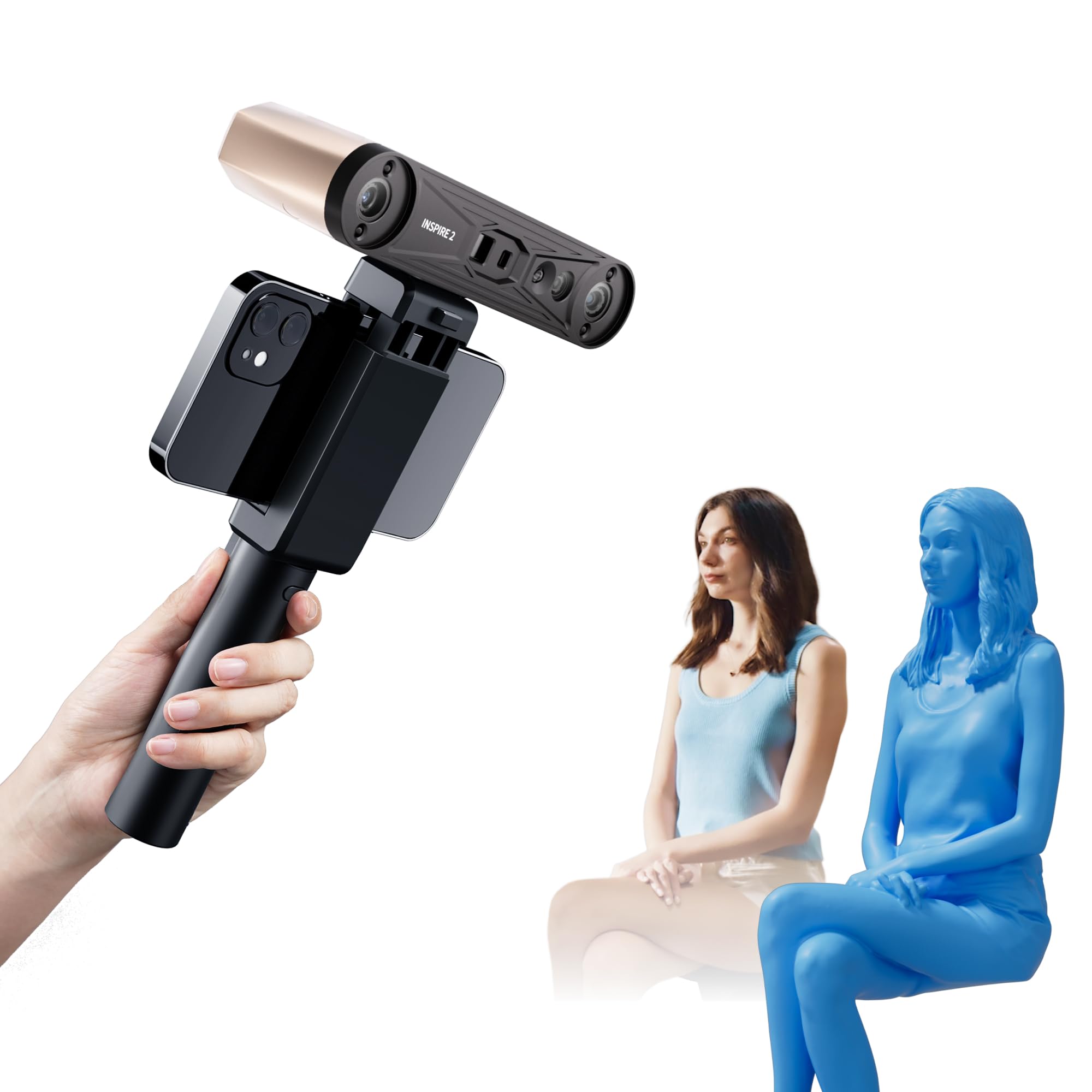
This is the complete kit that makes the INSPIRE 2 the most versatile scanner in its class. The premium package adds a turntable, tripod, carrying case, and calibration board, so you have every tool for small-object and medium-object scanning right out of the box. The core hardware is identical to the standard version, which means you get the full dual-mode capability: infrared structured light for general-purpose matte objects and 11 infrared laser lines that handle reflective and dark surfaces without needing scanning spray. That laser mode is a genuine differentiator—most scanners at this level require aftermarket spray for a car fender or a glossy vase, but the INSPIRE 2 captures those surfaces cleanly.
The optical zoom feature (1.5x and 2x magnification) lets you concentrate projected light for finer detail on mixed-geometry parts, and the high-precision calibration board improves point cloud accuracy by 75% compared to earlier Revopoint models. On the software side, Revo Metro provides a professional workflow with advanced scan settings and post-processing tools, though the Revo Design scan-to-CAD module is a paid add-on limited to Windows. Weight stays at a portable 190g, and the aerospace-grade aluminum front panel adds durability for repeated trips between the workshop and the scan table.
Wireless scanning over WiFi 6 works reliably for iOS, Android, Windows, and macOS, and the interactive streaming feature lets one person hold the scanner while another monitors the real-time point cloud on a separate device. The learning curve is moderate—expect to spend a few hours understanding calibration and the best distance for each mode—but the results justify the investment. If you need one scanner that can handle everything from small mechanical parts to medium-sized objects with mixed surface finishes, this is the most capable mid-range option available.
Why it’s great
- Dual structured light and laser modes eliminate need for spray on most reflective surfaces
- 0.03mm precision with adjustable optical zoom for fine details
- Complete premium kit includes turntable, tripod, and calibration board
Good to know
- Revo Design scan-to-CAD software is paid and Windows-only
- Sticky calibration dots can lose adhesion over time; carry spares
- Requires a powerful PC with dedicated GPU for smooth performance
2. Revopoint INSPIRE 2 3D Scanner, Standard Package

The standard version of the INSPIRE 2 strips out the accessory bundle but keeps the same dual-sensor architecture, making it the most affordable entry point to combined structured light and laser scanning. You still get the 11 infrared laser lines that handle reflective and dark surfaces without spray, the same 0.05mm accuracy and 0.03mm precision, and the same high-precision calibration board that boosts point cloud accuracy by 75% over the older INSPIRE generation. The package includes a mini turntable, markers, outdoor filters, and a USB Type-C cable, which is enough for basic small-object scanning straight out of the box.
The biggest trade-off is the missing full-size tripod and premium carrying case, but if you already own a standard camera tripod (most ¼-20 mounts work), the standard package saves a meaningful amount for the same core hardware. The 190g weight and built-in WiFi 6 make it easy to scan wirelessly with a phone or tablet, and Revo Metro software runs on all major platforms with free lifetime updates. The optical zoom and dual-mode flexibility remain intact, so you’re not losing any scanning capability—just the physical extras.
Real-world users report that the laser mode produces usable scans on black and metal objects that earlier structured-light-only scanners could not handle. The calibration process can be fiddly, and some users recommend watching third-party tutorials rather than relying solely on the included documentation. For anyone on a tighter budget who refuses to compromise on surface versatility, this is the smart buy. Pair it with a third-party turntable and you get 90% of the premium experience for a noticeably lower outlay.
Why it’s great
- Identical dual-mode scanning hardware as the premium version
- Laser mode handles reflective and dark surfaces without spray
- Lightweight 190g design with WiFi 6 for wireless mobile scanning
Good to know
- No tripod included; requires separate purchase for hands-free use
- Calibration board dots can lose adhesion; replacements may be needed
- Requires a capable PC or recent smartphone for smooth operation
3. Revopoint POP3 Plus 3D Scanner

The POP3 Plus is Revopoint’s refined medium-object scanner, offering a 20% improvement in accuracy and precision over the earlier POP 3. The key upgrade is the new photolithographic calibration board that keeps the system within 20 microns of true dimensions, combined with an optical zoom projector (1.5x and 2x magnification) that delivers 30% more point cloud detail on mixed-geometry surfaces. For objects ranging from 20mm up to 2 meters, this scanner produces dense, full-color models with an HD RGB camera and Flash LED lighting system optimized for texture capture.
Scanning speed reaches 18 fps with a 9-axis IMU that stabilizes the frame during hand movement, reducing the number of dropped frames common with budget trackers. The software ecosystem is mature: Revo Scan supports marker tracking, global marker mode for larger objects, and exports in PLY, OBJ, STL, ASC, 3MF, GLTF, and FBX formats. The POP3 Plus connects via WiFi 6 or USB Type-C to Windows, macOS, iOS, and Android, and the three touch-sensitive buttons on the scanner body let you start, pause, and adjust exposure without touching your device.
The class 1 infrared light source is eye-safe for scanning people, making this a strong choice for character modeling and animation workflows. Real-world feedback highlights that reflective and black surfaces still require spray for best results, but the included gimbal and turntable in the full kit make the learning curve less punishing. Some users report that the app-based marker tracking can be finicky, requiring very slow and deliberate movement. If your primary target is medium-sized objects with rich color and texture, and you can invest time in practice, the POP3 Plus delivers impressive fidelity for its class.
Why it’s great
- 20-micron calibration board ensures highly accurate dimensional data
- Optical zoom adds 30% more point cloud detail on complex surfaces
- Eye-safe Class 1 infrared enables safe human/face scanning
Good to know
- Reflective and black surfaces still require scanning spray
- Marker tracking on the app demands slow, steady movement
- Premium kit needed for full turntable and gimbal experience
4. Shining 3D Einstar Handheld 3D Scanner

The Einstar from Shining 3D has become a benchmark entry-level scanner for users who need reliable outdoor performance and human/body scanning. Its hardware array includes three infrared VCSEL projectors, two stereo depth cameras, and one RGB camera—a configuration that produces clean point clouds even in ambient light up to outdoor shaded conditions. The inclusion of a dedicated “Hair Mode” is rare at this price point; it adjusts the projector intensity to capture fine hair detail that most structured light scanners simply skip or turn into noisy artifacts.
The EXstar software uses intelligent automatic alignment and a built-in data quality indicator that tells you in real-time whether your scan is capturing enough geometry. The detail enhancement technology optimizes point cloud density without manual intervention, which lowers the learning barrier for new users. Scanning speed hits 14 FPS, and there is no visible projector flash during operation—the infrared light is comfortable for the person being scanned and safe for the eyes. Output formats include OBJ, STL, PLY, ASC, 3MF, and P3, giving broad compatibility with slicers and CAD tools.
User reports consistently praise the Einstar’s ability to track dark surfaces that cause other scanners to lose alignment. One user scanned a black SUV interior without tracking dots or spray and reported ±0.5mm accuracy. The main drawbacks are the 3-pound weight, which feels heavier in extended handheld sessions, and the lack of a tripod mount on the scanner body itself—you will need to hold it or jury-rig a support. The software also demands a capable PC with at least 32GB of RAM for large models. For artists, archivists, and automotive enthusiasts who work outside the lab, this is the most field-ready mid-range unit.
Why it’s great
- Three VCSEL projectors provide stable tracking even in outdoor light
- Dedicated Hair Mode captures human head detail other scanners miss
- No visible flash during scanning—comfortable and eye-safe for people
Good to know
- Weighs 3 pounds; can be fatiguing during long handheld scans
- No built-in tripod mount on the scanner body
- Heavy PC requirements (32GB RAM recommended for large models)
5. Creality CR-Scan Otter 3D Scanner

The Creality Otter is engineered for users who need a single scanner that can jump from a coin to a car. Its defining hardware feature is a dual-lens system: one short-focal lens for small objects (10-500mm) and one long-focal lens for larger volumes up to 2000mm. This is not a software trick but a physical lens switch that changes the working distance from 110mm to 1200mm. The four stereo depth cameras and eight infrared LEDs provide dense point capture at 20fps, and the one-shot 3D imaging technology stabilizes tracking during fast hand movement, reducing the tracking loss that plagues slower budget units.
The Otter scans black and metal objects without spray, according to Creality’s claims, and real-world tests confirm that it handles dark car parts and painted surfaces better than pure structured light scanners. The full-color RGB camera uses a dedicated color-mapping algorithm that faithfully reproduces texture even in low-light conditions, which is useful for scanning interiors. The three touch-sensitive buttons on the scanner body let you start/pause scans and adjust exposure on the fly. Wireless scanning is supported through an optional Otter Scan Bridge accessory (required for Android and iOS), while wired USB connection works on Windows and macOS.
Marker tracking is the most reliable mode—feature tracking can still lose alignment on plain surfaces, and attaching dozens of markers for large objects consumes significant setup time. The software (Creality Scan) has improved significantly via updates, but some users report occasional lock-ups on less powerful computers. The Otter is also on the heavier side at 3.6 pounds, which makes extended one-handed scanning tiring. For anyone whose workload spans very small to very large objects and who values a single-hardware solution over multiple specialized scanners, this is the strongest candidate in the premium mid-range.
Why it’s great
- Dual physical lenses cover 10mm to 2000mm object range
- Scans black and metal surfaces without spray in most conditions
- One-shot 3D imaging reduces tracking loss during hand movement
Good to know
- Marker tracking is much more reliable than feature tracking
- Android/iOS wireless requires separate Otter Scan Bridge accessory
- 3.6 pounds can cause fatigue during longer handheld sessions
6. Creality CR-Scan Ferret Pro (B0FJLRXMHT)

This version of the Ferret Pro hits the sweet spot between affordability and capability for the 3D printing enthusiast. The core specs are solid: 0.1mm accuracy, 0.16mm resolution, and 30fps scanning speed—the highest frame rate in its price tier. The WiFi 6 bridge enables stable wireless scanning to iOS and Android devices, which removes the need for a tethered PC for basic scans. The anti-shake tracking system uses one-shot 3D imaging to compensate for hand movement, making it noticeably more forgiving for first-time users compared to earlier Creality models.
Outdoor performance is rated for ambient light up to 30,000 lux, and the full-color 24-bit scanning reproduces textures faithfully for objects ranging from 50mm to 2000mm. The export options cover OBJ, STL, and PLY, which covers every major 3D printing and CAD workflow. The hardware weighs just 105 grams—easily the lightest scanner on this list—and the all-in-one kit includes the WiFi bridge, tripod, power bank, phone holder, and carrying case, so you can start scanning immediately without additional purchases.
Some user feedback warns that the software has a steep learning curve and that the scanner struggles with reflective, transparent, or very dark surfaces. The 0.1mm accuracy is adequate for functional prototyping but falls short for jewelry or precision engineering. The Ferret Pro is best understood as a high-value entry point: it gets you into color 3D scanning with wireless freedom at a low upfront cost, and its lightweight build encourages regular use. If your primary goal is hobbyist 3D printing and you are willing to invest time in learning the software, this is the most logical starting scanner.
Why it’s great
- Ultra-light 105g design reduces hand fatigue during long sessions
- 30fps scan speed with anti-shake tracking eases the beginner learning curve
- All-in-one kit includes everything needed for first scan
Good to know
- Struggles with reflective, transparent, and very dark surfaces
- 0.1mm accuracy may not suffice for precision engineering or jewelry
- Software requires practice and can be frustrating for some new users
7. Creality Ferret Pro (B0CSF9B1WG)

An earlier SKU of the Ferret Pro that shares the same 105g form factor and 0.1mm accuracy but is often found at a more accessible price point. The core experience is identical: WiFi 6 wireless scanning for iOS, Android, Windows, and macOS, anti-shake tracking, and full-color 24-bit capture for objects up to 2000mm. The hardware kit includes the same WiFi bridge, tripod, power bank, phone holder, and carrying case. For users who want the Ferret Pro experience without the newer model’s premium packaging, this listing represents a pure value play.
The real-world feedback mirrors the newer version: the scanner is excellent for beginners who follow the setup guide carefully, but the software can be buggy on certain hardware configurations. Some users found that the scanner only exports STL reliably, and that calibration can require multiple attempts. The fixed-height tripod in the kit is a minor frustration—you cannot adjust it for different table heights. For black or red objects, the scan completion rates drop noticeably.
Where this model shines is as the most affordable entry into full-color scanning with a major brand’s ecosystem. If you are not sure whether 3D scanning will become a regular part of your workflow, this minimizes the financial risk while still delivering usable results for functional prints and basic reverse engineering. Pair it with a separate turntable and a computer that meets the 8GB RAM minimum (16GB recommended) to get the most out of it.
Why it’s great
- Lowest barrier to entry for full-color wireless 3D scanning
- Lightweight and portable with complete kit included
- Anti-shake tracking helps beginners achieve usable first scans
Good to know
- Struggles with red, black, and reflective objects
- Fixed-height tripod in the kit lacks adjustability
- Software can be buggy; requires Windows PC for best results
8. 3DMakerpro 3D Scanner Seal Lite
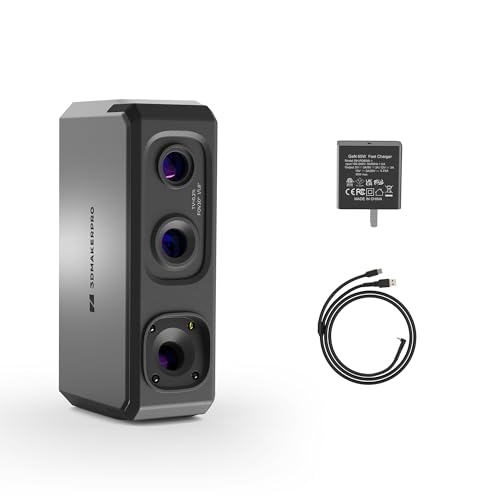
The Seal Lite is a small-format specialist that prioritizes accuracy over speed and size range. Its blue LED light source (400-500nm wavelength) projects finer structured light than infrared-based alternatives, enabling a class-leading 0.02mm accuracy for objects between 10mm and 300mm. For users who need to scan small mechanical parts, jewelry, coins, or dental molds, this precision is a genuine advantage—you can capture tiny dents and edge textures that 0.1mm scanners would smooth over entirely.
The trade-off is a slow 10fps scanning speed and a mono texture-only output (no 4K color mapping). The scanner requires a powerful PC tethered via USB and demands 65W wall power to operate—it will not run on USB bus power alone. The recommended working distance is 180-280mm, and the learning curve is steeper than most. JMStudio software provides visual tracking, error correction, and auto-alignment with lifetime free updates, and exports in OBJ, STL, PLY, and ASC formats. The Seal Lite ships with a 65W charger, data cable, and a one-year warranty.
User reviews consistently describe the Seal Lite as a capable scanner once you master the technique, but the documentation is sparse and many users find themselves relying on trial and error. It loses tracking easily on dark or shiny objects, and scanning spray is almost mandatory for anything with a glossy finish. The Seal Lite is not a general-purpose scanner—it is a precision tool for specific small-object applications. If your work demands high-dimensional accuracy on sub-300mm parts and you have the patience for a slow, deliberate workflow, this is the most accurate scanner in its price range.
Why it’s great
- Industry-leading 0.02mm accuracy for small-object detail work
- Blue LED structured light captures fine surface textures and edges
- Free JMStudio software with lifetime updates and alignment tools
Good to know
- Slow 10fps scan speed limits workflow efficiency
- Requires 65W wall power; cannot run on USB alone
- Poor documentation and steep learning curve for new users
9. Shining 3D Einstar Vega Wireless 3D Scanner

The Einstar Vega eliminates the single biggest frustration of handheld scanning: the need to stay tethered to a computer. This is a fully standalone scanner with a built-in 8-core 2.4GHz CPU, 32GB of RAM, and a 512GB SSD, plus a 6.4-inch 2K AMOLED display that shows your point cloud in real-time. You walk to the object, turn on the scanner, and capture data directly to internal storage without any cables or phone connections. When you are done, transfer files via USB, WiFi to the Shining 3D Cloud (5GB free storage), or screen-cast to a second display for client viewing.
The Vega offers two scanning technologies in one housing. Fast Mode uses VCSEL projectors for medium to large objects (270-1500mm working distance) at up to 20fps; HD Mode uses MEMS projectors for small objects (100-350mm) at up to 15fps, delivering higher detail density. The infrared light source handles outdoor scanning in direct sunlight and is eye-safe for human subjects. The scanning rewind feature lets you correct alignment errors mid-scan without starting over, and the hybrid alignment combines marker and feature tracking for improved stability on large objects.
The Vega’s all-in-one design comes at a premium and a weight penalty—6.45 pounds makes it the heaviest handheld scanner here, though the integrated handle and balanced design reduce fatigue. Some users report that the StarView software can be finicky for file transfer on new PCs. The 32GB RAM and 512GB SSD mean you can store dozens of full-resolution scans and process them later without impacting the scanner’s performance. For professionals who need to scan on-site at client locations, workshops, or outdoor settings without bringing a laptop, the Vega is the most capable answer.
Why it’s great
- Standalone scanning with no computer or phone needed
- Two scanning modes (VCSEL and MEMS) cover small to large objects
- 6.4-inch AMOLED display provides real-time point cloud visualization
Good to know
- Heavy at 6.45 pounds; requires strong arm or support rig
- File transfer via USB can be unreliable on some PC configurations
- High upfront investment; mainly justified for mobile professionals
10. Matterport Pro2 Camera Travel Case Bundle

The Matterport Pro2 is a purpose-built device for creating professional digital twins of indoor spaces. Unlike the handheld scanners on this list designed for individual objects, the Pro2 is a 360-degree scanner that captures 1.5 million depth points per scan in under 30 seconds, producing 134-megapixel spherical images. The bundle includes a 20-inch hard travel case, a tripod, and a quick-release clamp—everything a real estate photographer, insurance adjuster, or construction manager needs to produce accurate 3D walkthroughs on site.
The scanning process is streamlined: set the Pro2 on the tripod at each capture position, press the button through the Matterport Capture app, and pivot to the next location. The camera automatically registers each scan to the previous one, building a navigable 3D space with +/-50mm accuracy. The 8-hour battery life covers a full day of scanning. The Pro2 is not designed for object scanning or professional-grade industrial inspection—its strength is producing immersive, presentation-ready virtual tours for commercial real estate, property marketing, and facility documentation.
The critical consideration is the subscription requirement. The Pro2 requires a Matterport professional or business subscription to unlock full export and processing features, and the bundled software does not function without an active plan. Some users are caught off guard by the recurring cost. The hardware is rugged and reliable, with many users reporting years of daily service. If your business model revolves around Matterport-powered tours, the Pro2 is the industry standard. If you need to scan objects at sub-millimeter accuracy, look elsewhere on this list.
Why it’s great
- 134MP 360-degree scans produce photo-realistic digital twins
- Under 30 seconds per scan with automatic registration
- Travel bundle includes rugged case, tripod, and clamp
Good to know
- Requires ongoing Matterport subscription for full functionality
- Not suitable for small object or high-precision industrial scanning
- No color texture mapping for individual items; designed for spaces
11. Matterport Pro3 3D Lidar Scanner Performance Kit

The Matterport Pro3 represents the professional ceiling of this guide. Its LiDAR sensor captures 100,000 points per second with a range of up to 100 meters, delivering +/-20mm accuracy at 10 meters. The extended range mode enables scanning of large outdoor landmarks, construction sites, and warehouse spaces that indoor-focused cameras cannot handle. Each sweep completes in under 20 seconds, and the removable battery system allows continuous hot-swapping for all-day field work.
The Performance Kit is built for heavy daily use: it ships with two batteries, a charging kit, quick-release tripod mount, tripod, wheeled dolly, two door stops, a small hard case, and a backpack. The wheeled dolly makes it practical to roll the scanner through large spaces without lifting the setup repeatedly. The Pro3 uses the same Matterport ecosystem as the Pro2, requiring a professional or business subscription for full functionality, and the 20.3 MP effective still resolution is lower than the Pro2’s 134MP for spherical imagery because the Pro3 is optimized for LiDAR depth data, not high-resolution photography.
The real-world feedback is mixed at this price tier. While the raw LiDAR performance is unmatched among portable scanners, some users report that the subscription model and per-download fees create unexpected ongoing costs that can exceed the hardware price within a year. The wheel dolly has been reported to fail under heavy use. The Pro3 is not a general-purpose 3D scanner—it is a specialized tool for architectural and construction professionals who need to document large volumes with certified accuracy. For object-level scanning, it is overkill and the wrong tool.
Why it’s great
- 100m LiDAR range captures large outdoor and indoor spaces
- 100,000 points per second with +/-20mm accuracy at 10m
- Hot-swappable batteries enable continuous all-day operation
Good to know
- Subscription required for full functionality and data export
- 20.3 MP image resolution is lower than the Pro2 for spherical photos
- High total cost of ownership when factoring subscriptions and downloads
FAQ
Can I scan a black or shiny object without spray?
What is the difference between mono and full-color scanning?
How do I know if my computer can handle a 3D scanner?
Can I use a 3D scanner outdoors?
What file format should I export for 3D printing?
Final Thoughts: The Verdict
For most users, the 3 dimensional scanner winner is the Revopoint INSPIRE 2 Premium because its dual structured-light and laser modes handle the widest variety of surfaces without spray, while the 0.03mm precision and adjustable optical zoom deliver professional-grade detail for both small parts and medium objects. If you want the best balance of cost and performance, grab the Revopoint INSPIRE 2 Standard with the same core hardware. And for standalone wireless scanning in the field without a computer, nothing beats the Shining 3D Einstar Vega.