
Our readers keep the lights on and my morning glass full of iced black tea. As an Amazon Associate, I earn from qualifying purchases.
Specs are compiled from manufacturer listings and verified buyer reviews and can change over time — please confirm the key details on the product page before buying.
You have three circuits to control from one wall plate — a single 3 gang smart switch can do it all. With the right unit, you turn your overhead lights, ceiling fan, and accent lights on and off from one spot, your phone, or just your voice. The catch: most demand a neutral wire (the white wire bundled in the back of your electrical box) to power their Wi-Fi, and performance varies a lot between brands. This guide shows you which three-in-one switch is worth the install based on published specs and what real buyers report.
I’m Min — the writer behind Gadgets Feed. I compare the manufacturers’ published specs and the patterns across verified customer reviews so you get each pick’s real strengths and trade-offs, not marketing claims.
You have one wall box and three circuits to control. The right 3 gang smart switch delivers reliable app access, voice control, and an easy setup in a single faceplate without a hub.
Our Picks at a Glance

How To Choose The Best 3 Gang Smart Switch
Before you pick a switch, you have to know what your walls can handle. Most modern smart switches need a neutral wire — that is the white wire bundled in the back of your electrical box. Without it, many of the options here simply will not power their Wi-Fi radio. The next big choice is current rating: the Amps tell you how much power each circuit can handle. A 0.5 Amp switch is fine for a few LED bulbs, while a 15 Amp switch can run a ceiling fan or a large bank of lights. Finally, check your home assistant. All the switches here run on 2.4 GHz Wi-Fi, but some support newer protocols like Matter that promise faster local response without cloud delays.
Neutral Wire Is Required — Check Your Box First
Every product on this list requires a neutral wire to function. This wire provides constant power to the switch’s Wi-Fi brain even when the lights are off. If your home was built before the mid-1980s, you might not have neutrals in your switch boxes. You can check with a voltage tester or ask an electrician. If you do not have a neutral, you will need a different type of smart switch that works without one (often called a “no neutral” switch).
Current Rating — How Much Can Each Switch Handle?
The Amp rating of a smart switch determines the maximum electrical load it can control safely. A switch with a 0.5 Amp rating is really only suitable for low-power LED bulbs. A 15 Amp rating is the standard for most household lighting circuits and can handle everything from a chandelier to a bathroom exhaust fan. If you plan to control a fan, always check that the switch is rated for the fan’s draw — a 15 Amp switch gives you plenty of headroom.
Smart Home Protocol — Wi-Fi, Matter, and Your Voice Assistant
All five switches use your existing 2.4 GHz Wi-Fi network, which means you do not need a separate hub. They work with the Smart Life or Tuya app. Three of them support Matter, a newer connectivity standard that lets your switch talk directly to Apple Home, Google Home, and Alexa on the local network without cloud delays. If you use Apple HomeKit, a Matter-compatible switch is a major advantage.
Quick Comparison
| Model | Best For | Current Rating | Smart Protocol | Key Feature | Amazon |
|---|---|---|---|---|---|
| KKCOOL 3 Gang Smart Switch★ Best Overall | Budget Champion | 0.5 Amps | Wi-Fi | SmartThings compatibility | Amazon |
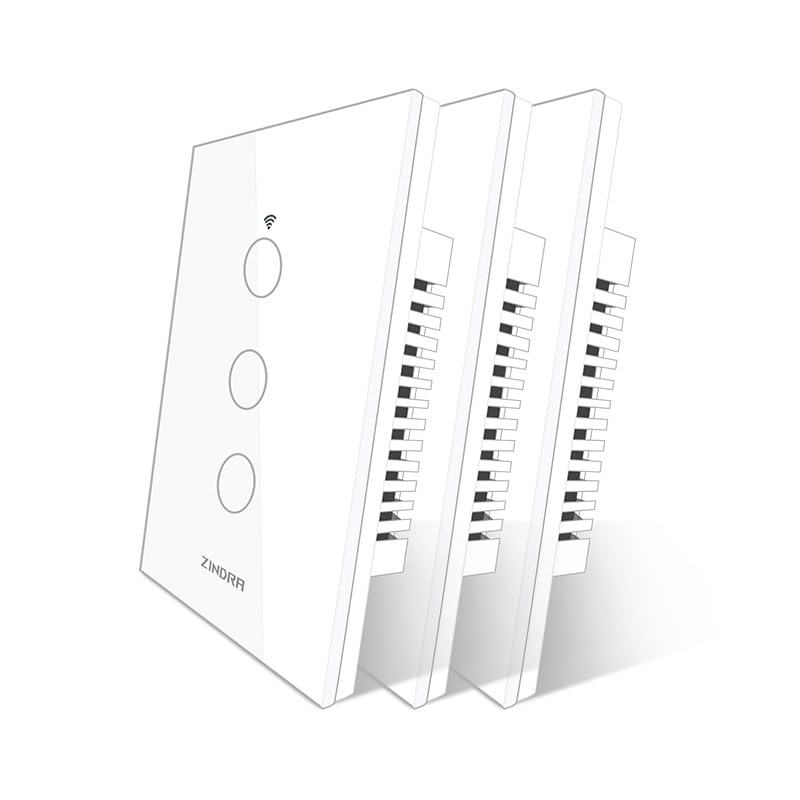
| ZINDRA 3 Gang Touch SwitchAlso Great | Best Overall | 5 Amps | Matter, Wi-Fi | Tempered glass touch panel | Amazon |
| Lesim 3 Gang Touch Switch | Premium Pick | 15 Amps | Wi-Fi | 40ms touch response | Amazon |
| MoesGo 3 Gang Push Button Switch | Best Value | 15 Amps | Wi-Fi, Bluetooth | Multi-control and scheduling | Amazon |
| Milfra 3 Gang Smart Switch | Most Versatile | 15 Amps | Wi-Fi | Group sharing up to 10 users | Amazon |
In‑Depth Reviews
1. KKCOOL Smart Switch 3 Gang
Our pick — over 4★ from 400+ verified ratings; the strongest balance of quality and price.
This switch works from the start with the Aeotec SmartThings hub — no custom setup needed — but only for low-power LEDs.
The KKCOOL is the most affordable three-gang smart switch on this list, but it carries a very important limitation: its current rating is 0.5 Amps, a 30x gap compared to the 15 Amps of the Milfra or Lesim switches. That means it is only safe to use with low-power LED bulbs. Plug in a ceiling fan or a heavy chandelier, and you risk tripping the switch or damaging it. However, for a set of six dimmable LEDs in a hallway or bedroom, the 0.5 Amp rating is adequate.
Where this switch shines is compatibility. It is one of the few smart switches that the Aeotec SmartThings hub recognizes automatically through the Smart Life app — no custom device handlers or complex workarounds needed. If you run a SmartThings-based home, this is a direct hit. The touchscreen panel has a responsive feel with an audible click, and the three keys on the plate can be labeled individually in the app. The trade-off is that some owners found the neutral wire extensions too thin and replaced them with thicker wire for a secure connection.
The functional choice for SmartThings users: it auto-detects and works with the hub from the start, which similar-priced switches cannot do. The 0.5 Amp limit is a hard constraint — keep it to LED lighting and your setup will be smooth.
Ideal for: a SmartThings smart home with low-wattage LED circuits, where budget is a priority and a hub is already in place.
Not for: ceiling fans, high-wattage fixtures, or anyone who wants a 15 Amp circuit for future flexibility.
2. ZINDRA Smart Touch Wall Light Switch with Matter
Your lights respond instantly to Apple Home, Google, and Alexa because this switch talks locally, not through the cloud.
The ZINDRA is the only switch here with Matter built in. Matter (a newer smart-home standard) lets the switch talk directly to your smart home platforms on your local network instead of routing every command through a cloud server. That means snappier responses and fewer dropped commands — your lights turn on when you ask, whether your internet is up or not. The front is a tempered-glass panel that resists scratches and fingerprints, and the touch response is crisp without requiring a hard press. Buyers consistently mention it stays connected and responds without glitching, giving it a strong reliability signal.
It is a 5 Amp switch — fine for standard lighting but not suitable for a high-power ceiling fan or a large motor load. That is a clear trade-off: you gain Matter’s multi-platform integration and a premium look, but you lose the ability to handle a heavy electrical draw. The Lesim below offers 15 Amps for fans, but it lacks any Matter support. Installation is single-pole only, and it needs a neutral wire just like every switch here. The dimensions (4.7 x 2.83 x 3.77 inches) mean it is slightly larger than some competing models, so check your wall box depth before buying.
Matter Advantage
- Direct local control with Apple Home, Google, and Alexa — no guesswork
- Scratch-resistant tempered glass face that looks modern
- Reliable performance with flame-retardant housing
Know Before You Buy
- 5 Amp rating limits it to lighting only — not for heavy loads
- Requires careful installation; small terminal screws can loosen if overtightened
Reach for this if: you use Apple Home, Google Home, or Alexa and want one switch that plays nice with all three without a hub.
Look elsewhere if: you need to control a ceiling fan or a high-wattage appliance — the 5 Amp ceiling is real.
3. Lesim Smart WiFi Light Switch 3 Gang

This switch delivers 15 Amps per channel, so it can handle your ceiling fan — something the ZINDRA at 5 Amps simply cannot do.
Unlike the ZINDRA, this Lesim unit can handle a heavy load — 15 Amps per channel — so it is safe to use with ceiling fans, bathroom vent fans, or a whole bank of outdoor floodlights. The touch-sensitive glass panel is rated for a 40ms response, meaning the light follows your finger instantly. A blue LED backlight shows the on/off state clearly in a dark room without being bright enough to disturb sleep.
The recurring frustration reported by owners is the quality of the included pigtail wires, which some describe as too short and too thin. Many buyers replaced them with 14-gauge solid wire during installation. The switch itself, once wired properly, performs reliably with schedules and voice commands through Alexa and Google Assistant. It also works with SmartThings and IFTTT (If This Then That), making it the most integration-friendly pick for power users who want to connect lights to motion sensors or door sensors.
Power to spare: the 15 Amp rating trumps the 5 Amp ZINDRA switch by a wide margin — this one handles any standard residential circuit without hesitation. The catch: the included wires are a weak link, and a bit of extra 14-gauge wire is a smart purchase alongside this switch.
Best for: someone controlling a fan and lights from the same three-gang plate and willing to swap the pigtail wires for a clean install.
skip it if: you want Matter or Apple Home compatibility straight from the start — this switch skips those protocols.
4. MoesGo WiFi Wall Push Button Smart Light Switch

A push-button switch that supports multi-location control — a useful trick most 3 gang switches cannot do.
MoesGo’s approach is different. While most 3 gang smart switches are strictly single-pole (one switch controls one light from one location), this model supports multi-control. You can pair additional MoesGo switches in other locations to control the same light from multiple points, a workaround for homes without traditional three-way wiring. It also supports Bluetooth for setup and a 2.4 GHz Wi-Fi connection for ongoing control.
The physical design uses push buttons rather than a flat touch panel. The buttons themselves are conventional in feel, and the build quality is solid enough that quality is the most-praised aspect among owners. The 15 Amp rating matches the Lesim above, so it is safe for fans. The thin profile makes it easier to fit into crowded wall boxes. The app supports timers, countdowns, and grouping. A minor design oddity: only the bottom half of the switch body is the pressable button — the top is decorative. Owners who replaced multiple switches in their home found the consistency helped avoid confusion.
Smart scheduling: timers and countdowns (1 to 30 minutes and 1 hour) are handled through the Smart Life app, letting you set your lights to turn off automatically after you leave the room. The 15 Amp capacity matches the premium-tier picks at a lower entry cost.
Grab this for: a whole-home smart switch rollout where multi-control capability saves you from buying extra gear.
Look elsewhere if: you want a smooth touch-screen feel — this is a physical push button, not a glass panel.
5. Milfra 3 Gang Smart Light Switch

You can share app control with up to 10 family members — each person uses their own phone without sharing a single login.
Milfra matches the high-current capacity of the premium switches (15 Amps) but adds a feature that matters in multi-person households: device sharing for up to 10 people. You can give everyone in the family app control from their own phone without logging into a single account. The switch also supports grouping — tap one scene in the Smart Life app to turn your living room lights, floor lamp, and TV backlight on at the same time.
Installation is straightforward in newer homes (post-1990s) with a neutral wire present. The physical depth of the switch is shallower than some competitors, which owners found helpful in cramped boxes. The voice integration with Alexa and Google works as expected, and the app lets you set timer or countdown schedules to automate your lighting. That said, reliability is the most-discussed trade-off — some units experience periodic Wi-Fi disconnects, and a small number of owners mention the switch failing after several months. The manufacturer’s replacement service gets positive marks, but it is note the pattern.
Family-Friendly Features
- Share control with up to 10 family members from their own phones
- Scene grouping for one-tap control across devices
- Shallower depth for easier installation in tight boxes
Consider This
- Reliability reports are mixed — occasional Wi-Fi drops and a few early failures
- Some units required slight trimming of the faceplate opening for a perfect fit
Pick this if: you are equipping a whole home with smart switches and want everyone on the same app without complicated sharing settings.
Consider carefully if: you need rock-solid reliability with zero downtime — the mixed durability reports make the premium-priced Lesim a safer choice for critical circuits.
Understanding the Specs
Neutral Wire
Most smart switches need a neutral wire (the white wire in your electrical box) to stay powered on even when the lights are off. Without it, the switch’s Wi-Fi radio cannot function. All five switches here require a neutral. If your home was built before the mid-1980s, have an electrician check your box — older homes often skip neutrals in switch boxes.
Current Rating (Amps)
The Amp rating tells you the maximum electrical load each switch can handle. A 0.5 Amp switch (like the KKCOOL) is meant only for low-power LED bulbs. A 15 Amp switch (like the Lesim, MoesGo, or Milfra) is the standard for residential circuits and can safely control a ceiling fan, bathroom vent, or a large array of lights. Always match the Amp rating to your fixture’s draw — under-rating a switch can cause overheating.
Matter Protocol
Matter is a new smart-home standard that lets devices talk directly to each other on your local network without going through the cloud. The ZINDRA switch is the only one on this list with Matter support, meaning it works natively with Apple Home, Google Home, and Alexa without extra setup. Traditional Wi-Fi switches (like the other four here) route commands through the cloud, which adds a small delay and depends on your internet connection staying up.
Single-Pole vs Multi-Control
A single-pole switch controls one light from one location — the most common setup in US homes. Multi-control (sometimes called “3-way” or “multi-location”) lets you control one light from multiple switches. Most smart switches here are single-pole only. The MoesGo is the exception: it supports multi-control by pairing with additional MoesGo units, which is a useful workaround for hallways or staircases.
FAQ
Does a 3 gang smart switch need a neutral wire?
Can a 3 gang smart switch control a ceiling fan?
Will a 3 gang smart switch work with Apple HomeKit?
Can I use a 3 gang smart switch without a hub?
How hard is it to install a 3 gang smart switch?
What is the difference between a 3 gang and a 3 way smart switch?
Can I use a 3 gang smart switch with a dimmer function?
What happens to a smart switch if my Wi-Fi goes down?
Will a 3 gang smart switch work with a 5 GHz Wi-Fi network?
Can I group multiple smart switches to turn on all at once?
Final Thoughts: The Verdict
Across the board, the 3 gang smart switch winner is the ZINDRA Touch Switch because it brings Matter support and a scratch-resistant glass panel at a mid-range price, giving you Apple Home, Google, and Alexa compatibility without a separate hub. If you need a 15 Amp circuit to handle a ceiling fan, grab the Lesim Touch Switch — just plan to swap the included pigtail wires. And for a multi-control setup on a budget, the MoesGo Push Button Switch delivers solid value with the most flexible wiring options. Among the roughly 1,700 collective owner ratings across these picks, the ZINDRA holds the strongest reliability signal at a crowd-pleasing 4.2 stars.
How We Picked
We do not accept paid placement. Every pick is matched to a real buyer and a real use-case; we do not hands-on test units.
Sources & Methodology
Specifications: manufacturer listings and product documentation. Review insights: verified customer reviews, as of July 2026. Pricing: not shown on this page (it changes often); check the current price via the retailer link.
As an Amazon Associate, Gadgets Feed earns from qualifying purchases. This does not affect which products we feature.