
The promise of a single machine that prints, not just one color or material, but a seamless blend of multiple filaments has long been the holy grail for makers moving beyond single-spool monochrome parts. The reality, however, often involves complex purge towers, clunky filament swaps, and calibration headaches that turn a creative spark into a frustrating troubleshooting session. A true 3 in 1 3D printer eliminates that friction, merging multi-color capability, high-speed motion systems, and intelligent automation into a cohesive workflow where the machine handles the complexity so you can focus on the design.
I’m Min — the co-founder and writer behind Gadgets Feed. My deep dive into this category involved cross-referencing hundreds of verified buyer experiences and technical spec sheets to isolate which printers actually deliver on the multi-material promise without the typical trade-offs in speed, reliability, or print quality.
After filtering through the noise of marketing claims and early-adopter grievances, these are the models that stand out as the genuine contenders for the title of best 3 in 1 3d printer, ranked for their ability to integrate multi-color systems, rapid motion control, and user-friendly automation into a single reliable package.
How To Choose The Best 3 In 1 3D Printer
Selecting a printer that genuinely excels at multi-color and multi-material printing requires looking beyond the headline number of supported colors. The integration of the material system, the speed of the motion platform, and the sophistication of the auto-calibration routines determine whether your experience is one of creative flow or constant maintenance.
The Material Hub: CFS, AMS, ACE Pro, and QIDI BOX
The filament management system is the core differentiator. A good system actively dries filaments, detects runouts and tangles, and switches colors with minimal purge waste. Look for systems that offer active drying (like the ACE Pro or QIDI BOX) to prevent brittle materials like PETG from absorbing moisture mid-print, and check user reports on purge waste percentages — some units waste 50% less filament than others through smarter purge algorithms.
Motion System and Enclosure
A CoreXY frame is now standard for high-speed multi-color printing, but the quality of the linear rails and belts determines vibration artifacts (VFA) on your surfaces. The real dividing line is the enclosure: a fully enclosed, actively heated chamber (capable of 60–65°C) is non-negotiable if you plan to print engineering-grade materials like ABS, ASA, or polycarbonate in multiple colors, as these materials warp violently without a stable ambient temperature.
Auto-Calibration and First-Layer Reliability
Multi-material prints are exponentially more sensitive to first-layer issues because a failure in one color can cascade across the entire print. Prioritize printers with strain-gauge or load-cell based auto-leveling that compensates for bed tilt (not just Z-offset), and systems that perform full calibration cycles — including input shaping and flow rate compensation — before every print to adapt to different materials’ thermal behaviors.
Quick Comparison
On smaller screens, swipe sideways to see the full table.
| Model | Category | Best For | Key Spec | Amazon |
|---|---|---|---|---|
| Elegoo Centauri Carbon 2 Combo | Premium Mid-Range | Reliable Multi-Color Out of Box | CANVAS 4-color, 500mm/s, 350°C nozzle | Amazon |
| Creality SPARKX I7 Combo | Mid-Range | AI-Powered Ease of Use | CFS Lite, 500mm/s, 50% less waste | Amazon |
| Bambu Lab P1S | Premium | Enclosed High-Speed Workhorse | CoreXY, 500mm/s, 16-color via AMS | Amazon |
| Bambu Lab A1 Combo + LED Lamp | Mid-Range | Beginner-Friendly Multi-Color | 10,000 mm/s² accel, AMS lite, ≤48 dB | Amazon |
| Anycubic Kobra S1 Combo | Mid-Range | Fast 600mm/s with Filament Drying | ACE Pro dryer, 600mm/s, 8-color capable | Amazon |
| FLASHFORGE Adventurer 5M Pro | Entry Level | Budget Speedy Starter | 600mm/s, 280°C nozzle, 220mm³ | Amazon |
| ELEGOO Saturn 4 Ultra 16K | Premium Resin | Ultra-High Detail Resin Multi-Color | 16K LCD, 150mm/h, 30°C tank heating | Amazon |
| QIDI Q2 Combo | Premium | Open-Source Engineering Multi-Material | 65°C chamber, 600mm/s, 16-color box | Amazon |
| Original Prusa MK4S | Premium | Industrial Reliability & Open Source | Input Shaping, 250mm/s, 1kg Prusament | Amazon |
| Creality K2 Plus Combo | High-End | Large Format Multi-Color | 350mm³, 600mm/s, 16-color, 65°C chamber | Amazon |
| QIDI Max4 Combo | High-End | Industrial-Grade Giant Multi-Material | 390mm³, 800mm/s, 65°C chamber, 16-color | Amazon |
In‑Depth Reviews
1. Elegoo Centauri Carbon 2 Combo

The Centauri Carbon 2 Combo is the rare multi-color printer that genuinely works out of the box for both novices and experienced makers. Its CANVAS system delivers seamless 4-color switching with smart filament detection and auto-refill, all housed in a robust enclosed CoreXY frame that reaches 500mm/s with 20,000 mm/s² acceleration. The 350°C high-temp nozzle expands material options to engineering-grade filaments, while the 31 onboard sensors and fully automated calibration handle first-layer perfection every time.
User reports consistently praise its reliability — one reviewer printed non-stop for weeks with only a single user-caused failure. The quiet operation and LAN-only privacy mode are thoughtful additions for workshop environments. The 256mm³ build volume is adequate for most projects, though some early units experienced firmware growing pains that were eventually resolved through updates.
Where it truly stands out is in value: it undercuts many competitors on price while delivering the same core multi-color ecosystem and print quality as much more expensive alternatives. The closed ecosystem approach to slicing software may frustrate open-source purists, but for the vast majority of users seeking a hassle-free multi-color experience, this is the benchmark.
Why it’s great
- CANVAS 4-color system works flawlessly out of box
- Quiet, fast, and reliable with 31 onboard sensors
- Excellent value for an enclosed multi-color CoreXY
Good to know
- Closed ecosystem with proprietary slicer lacks open-source flexibility
- Smaller 256mm³ build volume limits large single-piece prints
- TPU printing requires extra equipment steps
2. Creality SPARKX I7 Combo
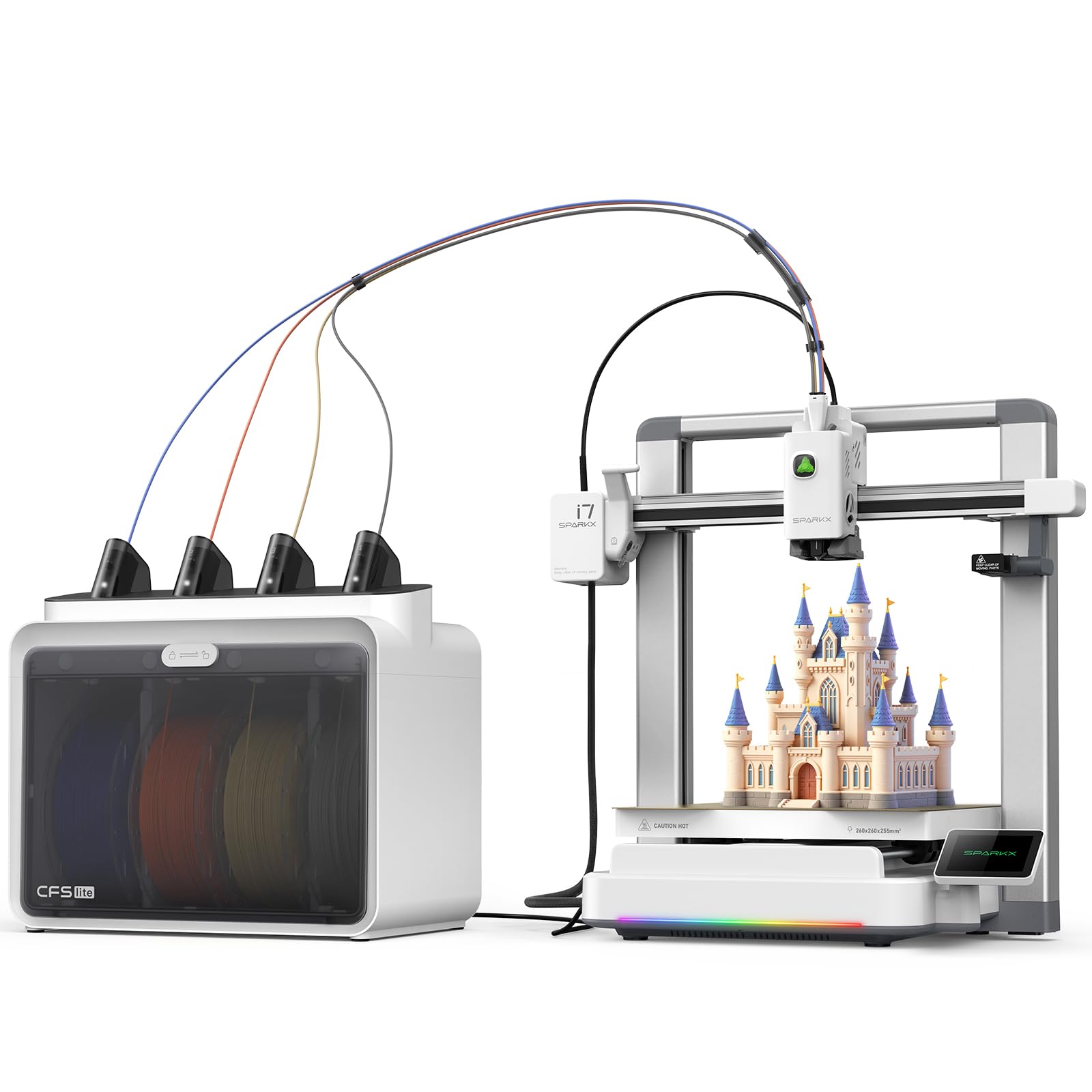
The SPARKX I7 Combo redefines multi-color efficiency with its CFS Lite system, which cuts purge waste by 50% compared to conventional setups. This is a massive practical advantage — less wasted filament means lower cost per print and fewer interruptions to clear purge towers. The combination of 500mm/s high-speed printing with AI-powered detection (spaghetti failures, air printing, build plate checks) creates a genuinely autonomous printing experience.
Setup is among the fastest in the category, with the printer arriving 95% pre-assembled and ready to print within minutes. The 260mm³ build volume supports large models, while the RGB lighting adds a stylish desk presence. The integrated AI camera provides real-time monitoring and automatic intervention when prints go wrong.
Some users reported early issues with the Creality Print app not detecting the printer, and the latest firmware updates caused minor stability hiccups. While the majority of reviews are overwhelmingly positive about print speed and quality, the software ecosystem is still maturing and may present roadblocks for less technically inclined users.
Why it’s great
- Industry-leading 50% reduction in multi-color purge waste
- AI detection system catches failures in real time
- Nearly zero assembly required — print within 5 minutes
Good to know
- Creality Print app compatibility issues reported with some devices
- Latest firmware caused minor stability issues for some users
- CFS spool holder can cause feed jams with certain spool types
3. Bambu Lab P1S

The P1S is the enclosed workhorse that has become the baseline reference for multi-color reliability. Its 500mm/s CoreXY motion system with 20,000 mm/s² acceleration is backed by automatic bed leveling before every print, and the fully enclosed body allows it to handle advanced filaments like ABS and ASA without warping — a critical advantage over open-frame multi-color printers.
Users upgrading from older printers consistently report that the P1S “just works” out of the box, with zero tweaking required for excellent first layers. The 260mm³ build volume is generous for a printer in its segment, and the Bambu Studio slicer streamlines the workflow from design to print. The AMS (Automatic Material System) supports up to 16 colors when multiple units are daisy-chained.
While the print quality and speed are excellent, the printer has known limitations with flexible materials like TPU, which can cause jams in the enclosed setup. The initial setup takes about 15-30 minutes, and some users noted that the door should be closed for ABS but open for PLA to manage chamber temperatures — a nuance that beginners may need to learn.
Why it’s great
- Enclosed design enables reliable ABS/ASA multi-color printing
- Auto-leveling before every print ensures consistent first layers
- Bambu Studio slicer offers streamlined multi-color workflow
Good to know
- Struggles with TPU and other flexible filaments
- AMS system for multi-color is an additional purchase
- Chamber temperature management requires user awareness per material
4. Bambu Lab A1 Combo + LED Lamp Kit

The A1 Combo is the most beginner-friendly entry into multi-color 3D printing, pairing the excellent AMS lite with a printer that performs full-auto calibration — Z-offset, bed leveling, and flow rate compensation — without any manual intervention. Its 10,000 mm/s² acceleration delivers fast prints while the active motor noise canceling keeps operation at ≤48 dB, making it suitable for home offices and shared spaces.
The included LED Lamp Kit adds a creative dimension, allowing users to print functional illuminated models right out of the box. The 1-Clip quick swap nozzle makes maintenance trivial, and the Bambu Handy app provides remote monitoring and access to thousands of community designs. Users report printing non-stop for days with zero failures, and the AMS lite handles multiple PLA brands reliably.
The open-frame design means it cannot print engineering-grade materials like ABS that require an enclosed, heated chamber. It also comes with only minimal starter filament, and the lack of a physical operation manual in the box was a common complaint. For PLA-based multi-color projects, however, it offers the most frictionless experience in the category.
Why it’s great
- Full-auto calibration makes multi-color effortless for beginners
- Extremely quiet operation at ≤48 dB
- LED Lamp Kit enables functional lighting prints
Good to know
- Open frame limits materials to PLA and PETG
- Comes with very little starter filament
- Lacks a printed operation manual
5. Anycubic Kobra S1 Combo

The Kobra S1 Combo delivers exceptional value by integrating the ACE Pro filament dryer directly into its multi-color system — a feature typically reserved for much higher-priced printers. The dual PTC heating module with 360° hot air circulation keeps filaments at optimal humidity, which is critical for materials like PETG that become brittle with absorbed moisture. This reduces stringing and jams, especially during long multi-color prints.
With a blistering 600mm/s print speed and 20,000 mm/s² acceleration, it rivals the fastest printers in the category. The Kobra OS includes flow compensation for smoother surfaces and reduced waste during color transitions. Users who received functional replacement units after initial defects reported exceptional performance and support, praising the ACE Pro as a “game changer” for reliable PETG printing.
Quality control issues plagued early units — some arrived scuffed or with missing parts, and the Anycubic app was criticized as web-based and unreliable. The build volume at 250mm³ is slightly smaller than some competitors, and the 8-inch product dimension listed is suspect (the actual footprint is larger). For those who get a good unit, the value proposition is unmatched.
Why it’s great
- ACE Pro active filament dryer prevents moisture-related failures
- Fast 600mm/s speed with flow compensation
- Expandable to 8 colors with two ACE Pro units
Good to know
- Quality control issues with early units reported
- Anycubic app is web-based and less reliable than competitors
- Smaller 250mm³ build volume than some mid-range options
6. FLASHFORGE Adventurer 5M Pro

The Adventurer 5M Pro is a budget-friendly entry point into high-speed FDM printing, reaching 600mm/s with 20,000 mm/s² acceleration. While it does not include a dedicated multi-color system out of the box, its CoreXY all-metal structure and 280°C full-metal direct extruder provide a stable platform for future upgrades. The dual-sided PEI platform enables tool-less model removal, and the 35-second nozzle heat-up time to 200°C minimizes downtime between prints.
User reports highlight excellent customer support from FlashForge — reviewers who received damaged units were provided full refunds or replacements that performed flawlessly. The HEPA and carbon filtration system is a standout feature for reducing fumes, though the door seals are not completely airtight. The Flash Maker app enables remote monitoring and parameter adjustments.
This is not a true 3-in-1 multi-color printer out of the box, but its high-speed CoreXY platform and robust construction make it a strong candidate for those who want to add a multi-material system later. The 220mm³ build volume is on the smaller side, and some users experienced software installation issues with newer macOS versions.
Why it’s great
- Excellent value for a high-speed CoreXY FDM printer
- HEPA and carbon filtration for safer indoor use
- 35-second nozzle heat-up saves time between prints
Good to know
- No integrated multi-color system — requires separate upgrade
- Smaller 220mm³ build volume limits large prints
- Software compatibility issues with newer macOS versions reported
7. ELEGOO Saturn 4 Ultra 16K

The Saturn 4 Ultra 16K is the undisputed champion for ultra-high-detail resin multi-material printing, featuring a 16K monochrome LCD that delivers unmatched smoothness and lifelike textures. Its smart tank heating system maintains the resin at a perfect 30°C, ensuring optimal fluidity and layer adhesion — dramatically reducing defects like bubbles and layer separation that plague cold resin prints.
The tilt release technology enables speeds up to 150 mm/h while preserving detail, and the AI camera with built-in chamber light provides real-time monitoring with automatic alerts for empty build plates and warped models. Users transitioning from older Saturn models report that the network file transfer and auto time-lapse are transformative for their workflow.
Resin printing inherently involves more post-processing than FDM, and the 10-inch build plate (8.33 × 4.66 × 8.66 inches) is large but not industrial-scale. Some users noted that first-layer adhesion may require fine sanding the build plate and adjusting base exposure times. The AI detection results can vary depending on resin type and lighting conditions.
Why it’s great
- 16K resolution delivers exceptional detail for figures and miniatures
- Smart tank heating at 30°C improves print success rates
- AI camera with time-lapse and anomaly detection
Good to know
- Resin printing requires ventilation and post-processing cleanup
- First-layer adhesion may need manual tuning for some resins
- AI detection varies based on resin and lighting conditions
8. QIDI Q2 Combo

The Q2 Combo is the best choice for users who want open-source flexibility without sacrificing multi-color capability. Its 65°C actively heated chamber enables reliable printing of challenging materials like PA, PC, and carbon-fiber-reinforced composites, while the QIDI BOX provides 16-color multi-material printing with active filament drying. The nozzle itself acts as the leveling sensor, delivering first-layer accuracy that is unaffected by bed surface variations.
Experienced users praise the repairability and customization of the open Klipper firmware, while beginners appreciate the plug-and-play auto-leveling and the triple HEPA filtration system. The 270mm³ build volume is generous, and the 1.5GT synchronous belt reduces vibration artifacts for ultra-smooth surfaces. Users report excellent first layers and perfect surface finishes with minimal tweaking.
The setup process is more involved than plug-and-play competitors — the QIDI BOX connection can be finicky and requires firmware updates and careful PTFE tube routing. Some early units had quality control issues with heat inserts failing, though customer support was responsive in sending replacement parts. The 55-pound weight makes it a semi-permanent fixture.
Why it’s great
- 65°C heated chamber enables engineering-grade multi-material prints
- Open-source Klipper firmware for full customization
- Nozzle-as-sensor leveling delivers unmatched first-layer accuracy
Good to know
- Setup process is more involved than plug-and-play alternatives
- QIDI BOX connection can be finicky initially
- Heavy at 55 pounds — not portable
9. Original Prusa MK4S

The Prusa MK4S is the gold standard for reliability and open-source longevity in the FDM space. Its input shaping technology reduces ringing and vibrations for clean results at higher speeds, and the fully assembled unit arrives pre-calibrated and ready to print. The 9.84 × 8.3 × 8.6 inch build volume is modest, but the print quality and consistency are unmatched in its class.
For multi-color printing, the MK4S can be paired with the Prusa MMU3 (Multi-Material Unit), which handles up to 5 materials. The open-source ecosystem ensures long-term firmware updates and hardware upgrade paths, and the Prusa Connect platform provides reliable remote monitoring. Users consistently report that the MK4S produces excellent prints immediately, with no tweaking required.
The primary trade-off is speed — at around 250mm/s max, it is significantly slower than the 500-800mm/s CoreXY competitors. The price is also premium, and the MMU3 add-on for multi-color pushes the investment higher. For users who prioritize reliability, repairability, and community support above raw speed, this remains the benchmark.
Why it’s great
- Unmatched reliability and print quality out of the box
- Open-source ecosystem with long-term upgrade path
- Excellent community support and spare parts availability
Good to know
- Slower than CoreXY competitors at 250mm/s max speed
- MMU3 multi-material unit is a separate purchase
- 9.84-inch build volume is smaller than many alternatives
10. Creality K2 Plus Combo

The K2 Plus Combo is Creality’s answer to large-format multi-color printing, offering a massive 350mm³ build volume that can handle full-size helmets, large mechanical parts, and multiple objects in a single print. The step-servo motor system delivers 30,000 mm/s² acceleration and 600mm/s speeds while remaining quiet, and the actively heated chamber supports high-temperature materials like PPA-CF.
The CFS (Creality Filament System) enables up to 16 colors when four units are connected, and the dual AI cameras monitor from both the chamber and the build area for spaghetti failures and foreign objects. Users upgrading from older Ender models report that the K2 Plus produces perfect prints with zero calibration or tweaking, and the sturdy Matrix frame with four linear rods virtually eliminates layer shift.
The unit is extremely heavy and requires two people to unbox. Some early adopters experienced severe quality control issues, including Y-axis communication failures and extruder motors spinning the wrong direction, requiring replacement parts. The CFS setup instructions are vague, and the printer is loud during color changes. For the price, the build volume is unmatched, but the reliability is not yet on par with more mature alternatives.
Why it’s great
- Massive 350mm³ build volume for large multi-color projects
- Step-servo motors deliver quiet, fast, and precise motion
- Dual AI cameras provide comprehensive print monitoring
Good to know
- Some units experienced severe quality control defects
- Very heavy — requires two people to set up
- Loud during color changes and high-speed printing
11. QIDI Max4 Combo

The Max4 Combo is the largest and most capable multi-color printer on this list, with a 390mm³ build volume that is 55% larger than the previous generation. Its closed-loop motors on the X/Y axes enable a blistering 800mm/s print speed with 30,000 mm/s² acceleration, while the 65°C actively heated chamber and hardened steel nozzle handle industrial-grade materials like PPS-CF and carbon-fiber-reinforced nylon.
The QIDI BOX integration provides up to 16-color multi-material printing with intelligent filament management, and the self-developed Polar Cooler system (sold separately) creates ideal conditions for high-temperature materials. Users who upgraded from the Q2 report that the Max4 maintains the same exceptional print quality while scaling up to much larger builds without splitting models.
At 120 pounds, this is a permanent installation, not a desktop printer. The pre-print time is longer than smaller units due to the chamber heating requirements, and the initial power consumption is significant. The user interface is functional but not as polished as competitors, and some users reported a warped bed out of the box — though QIDI provided replacement parts and guided repairs, supporting the right-to-repair philosophy.
Why it’s great
- Massive 390mm³ build volume for industrial-scale multi-color prints
- 800mm/s speed with closed-loop motors for precision
- Actively heated 65°C chamber enables advanced engineering materials
Good to know
- Extremely heavy at 120 pounds — not portable
- Long pre-print time due to chamber heating
- Some units may require bed replacement out of box
FAQ
Do I need a dedicated multi-color system or can I use a manual filament swap?
How much extra filament does multi-color printing consume?
Can I print flexible materials like TPU with a multi-color system?
Final Thoughts: The Verdict
For most users, the best 3 in 1 3d printer winner is the Elegoo Centauri Carbon 2 Combo because it combines a reliable enclosed CoreXY platform with a CANVAS 4-color system that works flawlessly out of the box, all at a price that undercuts most competitors. If you want the absolute largest build volume for industrial-scale multi-color prints, grab the QIDI Max4 Combo. And for beginners seeking the most frictionless entry into multi-color printing with the best software ecosystem, nothing beats the Bambu Lab A1 Combo.