
Our readers keep the lights on and my morning glass full of iced black tea. As an Amazon Associate, I earn from qualifying purchases.
Specs are compiled from manufacturer listings and verified buyer reviews and can change over time — please confirm the key details on the product page before buying.
Working from home often means juggling a separate camera, microphone, and speakers that clutter your desk and tangle your cables. A 3-in-1 webcam replaces all three with one device that handles your video, captures your voice, and plays your colleagues’ audio through a single USB cord. Speaker wattage ranges from 3W to 5W, so check the output before relying on it for group calls. We compared nine top models to match your room size, group count, and call style.
I’m Min — the founder and writer behind Gadgets Feed. This guide is built by comparing the manufacturers’ published specifications and the patterns across verified customer reviews, so you get each pick’s real strengths and trade-offs instead of marketing spin.
The right pick balances video clarity, mic reach, and speaker power for your budget. That’s why we analyzed the specs and owner feedback to find the 3-in-1 webcam with microphone and speaker that balances all three functions perfectly.
Our Picks at a Glance


How To Choose The Best 3-in-1 Webcam With Microphone And Speaker
Every all-in-one trades off speaker volume, mic range, or field of view, so prioritize what matters most. Match speaker wattage to room size and mic pickup distance to how far you sit. A solo desk user needs a narrow 76° view, while a team around a table needs a 90° or wider lens.
Match the Speaker Power to Your Room
Speaker wattage directly controls how loud and clear the audio is for everyone in the room. A 5W speaker pushes sound that fills a small conference room, while a 3W unit is better suited for a personal desk setup. If you’re planning to have three or more people listening in a larger space, you want the higher wattage to avoid straining to hear.
Check the Field of View for Group Calls
Field of view (FOV) is the angle the camera lens captures. A narrower 76° view is great for a single person, keeping your background tidy and your face centered. A wider 90° lens pulls in more of the room, which is essential if you need to show a whiteboard or have multiple colleagues in the frame. Count who sits in frame—one person suits 76°, groups need 90° or wider.
Weigh Mic Range Against Noise Cancellation
Microphone pickup distance tells you how far away you can sit and still be heard clearly. A 6-foot pickup range works well for a single person at a desk, but a 10-foot range means you can lean back or move around during a presentation. Choose a model with AI noise reduction to suppress keyboard clicks and room hum.
Quick Comparison
| Model | Best For | Video Resolution | Field of View | Speaker Power | Amazon |
|---|---|---|---|---|---|
| AIRHUG 3 in 1 1080P★ Best Overall | Mini PC owners wanting one-port simplicity | 1080p / 30fps | 76° | 5W | Amazon |
| pulais 3-in-1 2K WebcamBest Value | Budget buyers wanting 2K detail | 2K / 30fps | 90° | — | Amazon |
| CofunKool Desktop CameraPrivacy Pick | Users wanting a tactile mute button | 1080p | 90° | 3W | Amazon |
| ROTOPATA 3-in-1 1080P | Large rooms needing long mic pickup | 1080p / 30fps | 90° | 3W | Amazon |
| RayBit 3 in 1 2K HD | Mac users wanting an easy USB-C hookup | 2K | 94° | — | Amazon |
| EMEET C980 PRO 4K | Those wanting a sharp 4K picture | 4K / 30fps | 60°-98° | — | Amazon |
| NUROUM C10 | Portable hybrid meeting setups | 1080p / 30fps | 90° | — | Amazon |
| TONGVEO 3-in-1 4K | Auto-tracking with remote control | 4K / 30fps | 88°-118° | 3W | Amazon |
| NUROUM C20 HD | Small teams wanting wide 100° coverage | 1080p | 100° | — | Amazon |
In‑Depth Reviews
1. AIRHUG 3 in 1 1080P Webcam
Our pick — over 4★ from 90+ verified ratings; the strongest balance of quality and price.
The mini PC companion that turns one USB port into a full meeting kit.
Sitting at just 5.9 oz, this is the camera you throw in a bag and forget about until you need it. The big draw here is the sound: its 5W speaker pumps out audio at up to 90dB, which is the loudest on this list and a full 67% more powerful than the 3W units per verified buyer reviews. That extra volume means a room of three to five people can hear clearly, and it’s why mini PC owners call it the perfect one-port solution for replacing missing laptop speakers and mics.
You get crisp 1080p video at 30fps from a 2.07MP sensor, but the 76° field of view is the narrowest here, so sit close and centered. Buyers report setup is painless—no extra drivers needed on Windows 7 through 11 or Mac OS. The built-in microphone captures voices up to 6 feet away with noise reduction, enough for a solo desk. The catch: this crowd favorite, with a 4.4-star average across nearly a hundred owners, has a recurring wish that the speaker could go louder at max volume, so treat it as a strong room-filler, not a party speaker.
A magnetic privacy cover slides over the lens when you step away, and the universal clip fits even curved monitors. There’s no need for extra software; it’s genuinely plug-and-play.
Why It Earns the Top Spot
- Loudest speaker here at 5W with up to 90dB output for big rooms
- Featherlight 5.9 oz build that slips into any bag
- Tool-free setup with a magnetic privacy cover included
Reality Check
- Narrower 76° view means you must sit centered
- A few owners wish the speaker volume went even higher
Grab it for: a mini PC or desktop where you want one clean USB cable to solve camera, mic, and sound.
Think twice if: you need to show a wide room or whiteboard in the frame — the 76° angle is tight.
2. pulais 3-in-1 2K Webcam
A budget-friendly 2K lens that out-resolves most rivals for less.
If crisp detail matters more than brand reputation, this pulais model steps up with a 2K lens (2560 pixels) that beats the 1080p standard most competitors use. The extra pixels show up as sharper text and clearer facial details during screen shares and presentations. Its wider 90° field of view is a solid upgrade over the AIRHUG’s 76°, making it easier to include a second person or a bit more of your desk in the shot.
The camera quality is the clear highlight here — it’s a 2K autofocus lens at 30fps that buyers consistently rate as good for the money. The built-in dual speakers are present but described as adequate rather than impressive, so pair it with good headphones if you’re an audio purist. The sliding privacy shutter is a simple, effective touch that protects the lens when you’re off-camera.
That said, reliability is the honest concern with this one — one reviewer noted the unit started randomly cutting out mid-meeting right around the three-month mark before swapping to a Logitech. The 6-foot USB cable is handy for placement, and it works as a true plug-and-play device with Windows and Mac OS, plus Android and smart TVs.
Detail for the dollar: The 2K sensor gives you a sharper image than 1080p rivals at a budget-friendly price, but durability is the lingering question mark.
Choose it for: a budget build where pixel density and a 90° view outweigh brand loyalty.
Be aware: a small number of owners hit random disconnects after a few months of heavy use.
3. CofunKool Camera and Speaker
A desktop camera that makes muting feel as satisfying as pressing a real button.
Instead of fumbling with software settings when you need silence, this CofunKool unit puts a tactile mute button right on top. It’s an industrial-grade button tested for 100K presses, and it triggers a blue operational light or a red privacy light so everyone knows your status at a glance. A magnetic lens cover slides shut to physically block the camera when the meeting ends — no software tricks needed.
This one pairs a 90° wide-angle 1080p camera with a quad-mic array featuring AI noise reduction that tackles 95% of background noise. The 3W stereo speaker delivers room-filling audio, though it trails the AIRHUG’s 5W output noticeably. Buyers praise the true-to-life color and crispness, and the friction-grip base holds firm on monitors, laptops, and tripods.
It’s not a perfect device, though. A recurring note is the clamp can feel a little flimsy, and some owners wished for a washer to store the magnetic lens cap on the side so it doesn’t get lost. The setup is genuinely plug-and-play with Windows, Mac, Android, and Linux systems.
Comms control room: For users who value the physical mute button and clear status lights during sensitive conversations, this is the most reassuring pick.
Ideal for: home offices where a physical mute switch and privacy shutter let you control your presence without fumbling in software.
skip it if: you need maximum speaker volume, since the 3W output can’t compete with 5W rivals.
4. ROTOPATA 3-in-1 1080P

A conference cam with an 8-meter mic reach that catches voices across the room.
This ROTOPATA unit solves the problem of people sitting too far from the camera to be heard. Its four omnidirectional microphones pick up sound from all directions at a distance of up to 8 meters — significantly farther than the 6-foot reach on the AIRHUG. That makes it a genuine option for huddle rooms where you don’t all crowd into a single laptop.
The 90° wide-angle lens with autofocus captures small to medium groups cleanly at 1080p and 30fps. A mute button and magnetic cover handle privacy, and the speaker pumps out 3W of clear, adjustable sound. Buyers were surprised the speaker produces deep bass and works well as a replacement for main PC audio during Zoom calls.
One owner found the magnetic lens cover lacks a strong magnet and can be lost easily, and the speaker is described as basic rather than stellar. Setup is driver-free with a universal clip for laptops and monitors. One caution in the manual: avoid using this with a USB hub because of insufficient current, so plug it directly into your PC.
Long-Range Audio
- 8-meter omnidirectional mic pickup for whole-room capture
- 90° autofocus lens suited to small groups
- Surprisingly deep bass from the 3W speaker
Worth Knowing
- Magnetic lens cover can slip off easily
- Speaker is basic — fine for calls, not a soundbar
- Needs a direct USB port, not a hub
Best suited for: larger rooms where people sit spread out and need the extended 8-meter mic range.
Not for: audiophiles expecting rich music playback from the modest speaker.
5. RayBit 3 in 1 2K HD USB C

A USB-C native webcam that plugs straight into modern MacBooks without adapters.
If your laptop only has USB-C ports, this RayBit saves you from hunting for a dongle. It connects via a native USB-C cable and includes a USB-C to USB-A adapter, so it works whether you’re on a new MacBook or an older desktop. The 2K autofocus lens with 94° wide-angle coverage is ideal for showing off a full home office or including teammates beside you.
The standout feature is the light correction, which actively fixes color casts so you look natural even in dim or overly bright rooms. A built-in pulley-style privacy cover slides shut when you’re done, and the high-sensitivity mics reach up to 15 feet with background noise filtering. It’s genuinely plug-and-play with Windows, Mac OS, Linux, and Chrome OS.
Long-term durability is the honest concern here — a few buyers reported the speaker gave out after about two years of daily use, producing scratchy audio until a restart. Others found the wide 94° angle almost too wide, capturing the whole office when they wanted just their face. The speaker quality itself gets praise for being far better than a MacBook Air’s built-in audio.
Clean desk, sharp image: The light correction and 2K clarity make this a favorite for Mac users, though its wide angle suits groups better than solo close-ups.
Reach for it if: you’re on a USB-C laptop and want a single-cable upgrade with strong light correction.
Look elsewhere if: your desk is cluttered — the 94° view will broadcast every corner of it.
6. EMEET C980 PRO 4K

A 4K lens with an adjustable 60°-98° view that adapts to solo or group calls.
This EMEET is the sharpest camera on the list, jumping to true 4K UHD resolution for video calls that reveal every detail. It’s not just resolution — the 6P lens boosts sharpness and reduces distortion, making you look polished in client presentations. A key flexibility is the adjustable field of view, letting you switch from a tight 60° for solo calls to a wide 98° to fit a group around a table.
The audio setup matches the premium video: a 4-microphone array picks up clear sound up to 10 feet away, and 2 AI-enhanced speakers deliver rich audio with low distortion. It connects via USB 2.0 Type-A with a 6-foot cable, and the 90° forward-tilting stand helps aim the lens correctly. The magnetic cover fully shields the image when you’re off the clock.
Buyers consistently praise the easy setup and consistent quality, though the honest caveat is durability — a handful of owners reported the unit stopped working after 3-4 months or a year of use. It must also connect directly to your computer’s USB port, not through a hub or docking station, to get stable 5V/500mA power. Compatibility is good with Windows, macOS, and Android TV 7.0+, though not with Linux or game consoles.
Studio-Grade Sharpness
- True 4K resolution with a distortion-reducing 6P lens
- Adjustable 60°-98° FOV covers solo and group needs
- 4-mic array with 10-foot pickup and 2 AI speakers
Premium Trade-Offs
- Durability concerns reported by a few long-term owners
- Requires a direct motherboard USB port over hubs
- No Linux or game console support
Pick this for: executive-level calls where 4K video clarity makes a strong professional impression.
Weigh this: the longevity reports are mixed, so consider a warranty for daily heavy use.
7. NUROUM C10 Conference Webcam

A portable all-in-one that travels with you and sets up hybrid meetings in seconds.
The C10 is built for the person who works from a huddle room one day and a home office the next. At 384g, it’s light enough to toss in a bag, and it packs a 90° glass lens for 1080p video at 30fps. The folded USB-C cable hides in the base with a Type-C to USB-A adapter, so you never need to carry extra cords or a power adapter.
Its 4 omnidirectional MEMS microphones deliver a 10-foot voice pickup range with automatic gain control that keeps volume steady as you move around. A single tune speaker provides distortion-free sound, and full duplex technology means everyone can talk and listen at the same time without cutting each other off. The light ring around the top clearly shows your status, with four touch buttons controlling the camera, mute, and volume.
Buyers love it for hybrid meetings where five people gather around a table and everyone sees and hears clearly without passing a laptop. It even doubles as a music speaker via USB in a pinch. The honest fit-note: it’s best for small teams of two or three people, as larger rooms may find the speaker volume and mic range wanting. It works with Windows, MacOS, and Linux systems.
Go-anywhere conferencing: Touch controls, a hidden cable, and a full duplex mic array make this the easiest pick for hybrid collaboration on the move.
Best for: small hybrid teams and road warriors who value a clean, cable-managed setup.
Pass on it if: your meetings routinely seat more than three people in a large conference room.
8. TONGVEO 3-in-1 4K Webcam
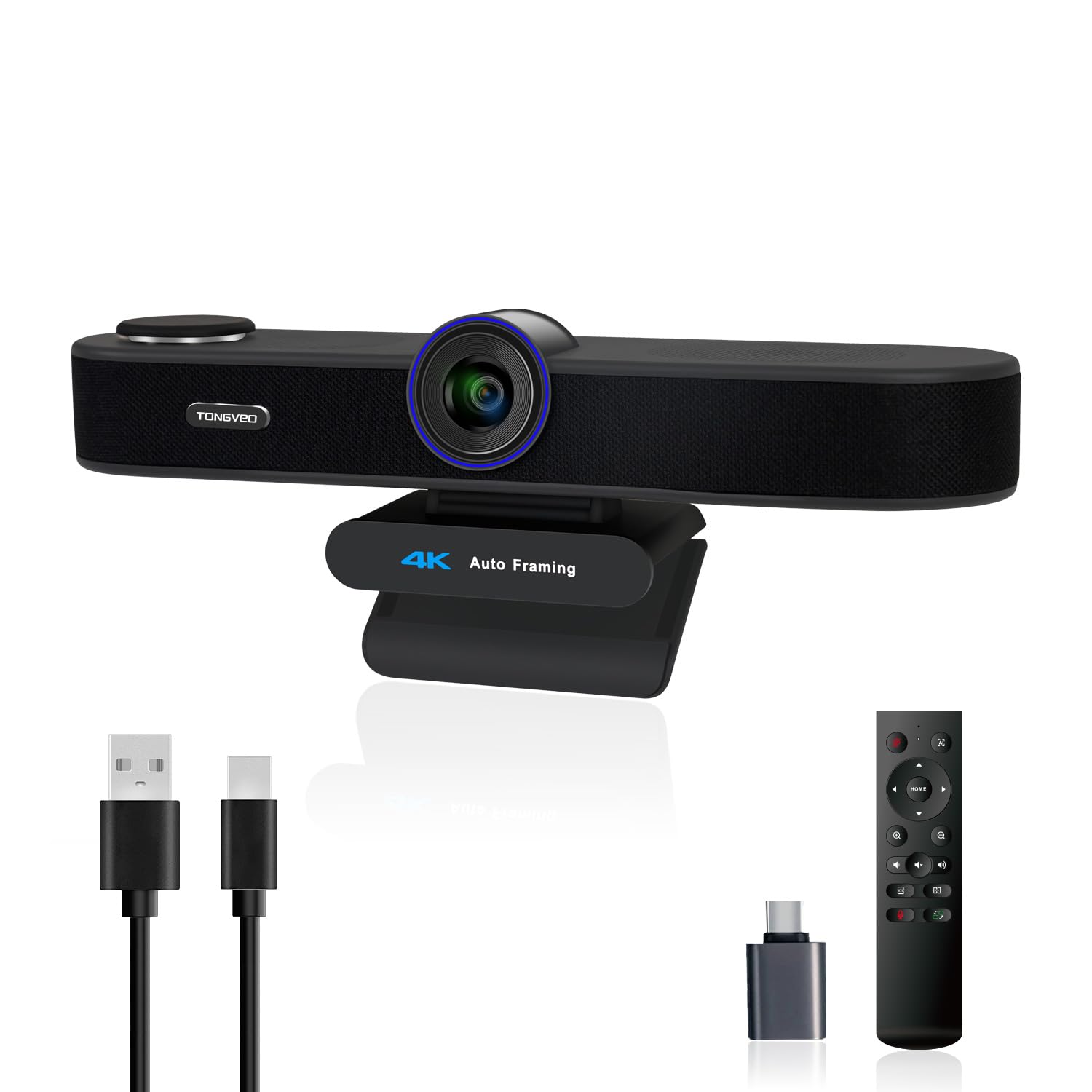
A 4K camera that follows your voice and frames the speaker automatically.
This is the most feature-packed unit on the list, using an 8.29MP sensor to deliver sharp 4K video at 30fps. What makes it different is the AI auto framing: the camera detects the people in view and centers everyone in the frame automatically. It even has voice tracking that locates and follows the active speaker within 3 seconds, so you can move naturally during a presentation without worrying about drifting out of shot.
You get real framing control from the included remote, with a 5x digital zoom and three adjustable field-of-view modes—wide 118°, medium 100°, and narrow 88°—so you can frame a solo call or a full group. The 3W speaker and dual omnidirectional microphones pick up voices up to 16.4 feet away, and a privacy cover protects the lens when idle. This model gives you more flexibility than the fixed 76° view on the first pick, especially for larger rooms.
Quality comes in waves here — owners mention the camera exceeds expectations, but the audio gets genuinely mixed reviews, with some reporting poor mic and speaker performance on Zoom and needing a headset instead. Setup is driver-free with USB 2.0/3.0 support, and it’s widely compatible with Windows 7-11 and Mac OS, plus popular platforms like Zoom, Teams, and WebEx.
Smart Framing Tech
- AI auto framing and voice tracking keep you centered
- 5x digital zoom and 3 FOV modes via remote
- 4K sensor with excellent camera quality
Where It Stumbles
- Audio quality is the weak link — several owners needed headsets
- One buyer found the wide view distorted like a bowling lane
Suited to: presenters who move around and need the camera to actively track and frame them.
Not for: buyers who treat built-in audio as a priority — budget for a separate mic or headset.
9. NUROUM C20 HD Conference Webcam
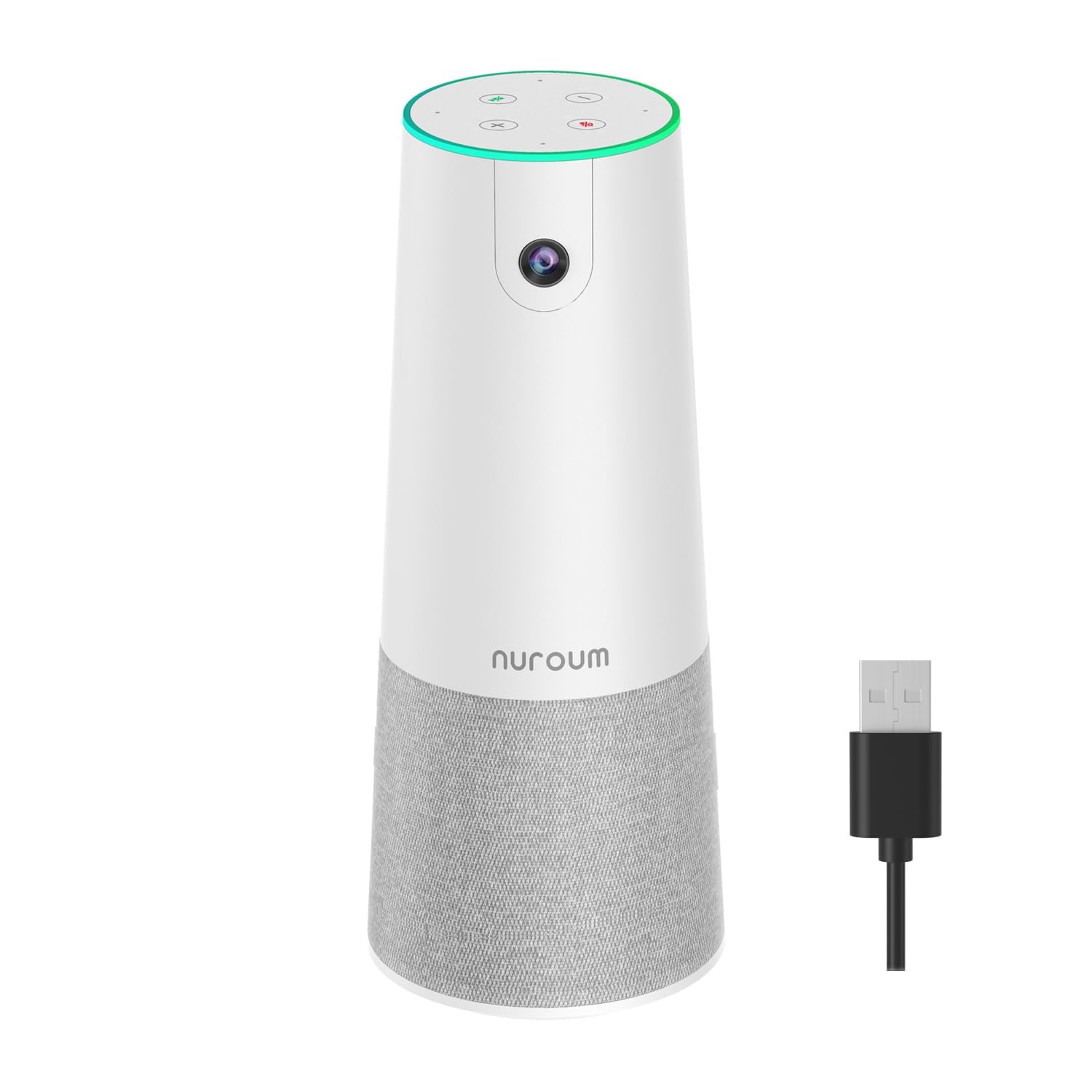
A wide 100° lens that lets a small team sit naturally without huddling together.
This C20 is the answer to the classic meeting problem: people leaning forward to fit into a narrow camera frame. Its ultra-wide 100° field of view lets a small team sit back comfortably and still be fully visible. The 2MP CMOS sensor delivers full HD 1080p video with crisp image quality, even in office lighting.
Audio comes from a 4-element MEMS microphone array with AI-empowered noise and echo cancellation, capturing natural voice within a 13-foot radius. The enhanced loudspeaker uses full duplex tech so everyone can be heard simultaneously without interruption. A matte porcelain-white finish resists fingerprints, keeping it looking clean on a conference table, and a ring light clearly shows your camera status.
Setup is a true plug-and-play affair via a USB-A cable with no driver or power adapter required. The touch controls for mute and volume are easy to master. Buyers describe the image as superb and clear, though low-light performance can struggle and the fixed wide view means no zooming for close-ups. It supports Windows, MacOS, Linux, and ChromeOS with common platforms like Zoom and Skype.
Table-friendly framing: The wide 100° angle and strong 13-foot mic pickup make this an easy choice for comfortable small-team collaboration.
Reach for this if: you host small team meetings where everyone should be visible without squeezing together.
Consider the catch: the fixed wide view and autofocus lag mean it’s not built for solo close-up streaming.
Understanding the Specs
Speaker Wattage
Speaker wattage tells you how much audio power the built-in speaker can produce. A higher wattage, like 5W, means louder sound that can fill a small conference room, while a 3W speaker is best for a single person at a desk. If you’ll have several people listening in a larger space, you want the higher wattage so everyone hears clearly without straining. This spec directly affects whether you can ditch your external speakers entirely.
Field of View
The field of view (FOV) is the angle the camera lens can capture, measured in degrees. A narrower angle like 76° focuses tightly on just you, which keeps your background tidy and your face prominent. A wider angle like 90° to 100° pulls in more of the room, making it essential for group calls where multiple people need to be in frame. Matching the FOV to your typical call setup prevents the common problem of feeling too zoomed in or showing your entire cluttered office.
FAQ
Does a 3-in-1 webcam work as a replacement for my laptop speakers and microphone?
Will a 3-in-1 webcam work with my Mac or Windows computer?
Why is a wider field of view important for conference calls?
Can I use a 3-in-1 webcam on a tripod?
How does noise cancellation work in these webcams?
What does the privacy cover do and is it included?
Do these webcams require special drivers or software to install?
Which is better: a 1080p webcam or a 4K webcam for meetings?
Final Thoughts: The Verdict
If you want one dependable pick, the 3-in-1 webcam with microphone and speaker winner is the AIRHUG 3 in 1 because it pairs the loudest 5W speaker on this list with driver-free setup and a featherlight design. If you want razor-sharp 2K detail on a budget, grab the pulais 3-in-1. And for moving presenters who need auto-tracking and 5x zoom at 4K, the TONGVEO is the one to reach for.
How We Picked
We do not accept paid placement. Every pick is matched to a real buyer and a real use-case; we do not hands-on test units.
Sources & Methodology
Specifications: manufacturer listings and product documentation. Review insights: verified customer reviews, as of September 2026. Pricing: not shown on this page (it changes often); check the current price via the retailer link.
As an Amazon Associate, Gadgets Feed earns from qualifying purchases. This does not affect which products we feature.